Problems? See this thread at archive.org.
Considering the small % it saves them and the amount of money which get burnt into RMAs from those who feel like it's too hot; considering the marketing hit from reviews that report high temps every time (1060 ones are the ones I've read best reviews about and thats cuz they changed that sh*t)... I don't think money is the reason, tbh.
Prolly just lack of real thermal engineers or improper thermal pasting (cuz by a theorical point of view direct contact MIGHT be better, but the thermal paste must be perfect).
-
But it doesn't matter if you make the reviewers agree that they don't post temperature problems right?
This is what Razer tried making us do in the first place, and why we had to eventually get an independent supplier for unlock's RBP and this RB14.mason2smart, jaug1337, ThePerfectStorm and 2 others like this. -
Do you have a source on that? I mean, verifiable proof? Because it's something I would definitely draw attention to. Pm me if you do.mason2smart and Vistar Shook like this.
-
Every penny count.
It's an calculated risk. Not all owners complain about high temp.
And Many of the owners don't even understand temp reading and why it's better with lowest possible temp. They only complain to Razer support if their machines BSOD or thermal shutdown. Some don't even see their hardware throttling as hell!!Vasudev and Vistar Shook like this. -
You know, ever since they contacted me about my Core review a year ago, I got this weird feeling like they were trying to sway what I wrote. They sent me some press releases and marketing literature that I should have put in my article but I never did. Obviously I can't prove it but I always wondered deep down if that contributed to why I never got sent a review unit on following products, after continuous promises they would send one out. I just assumed I was at the bottom of the list. But then Linus stating in his RBP video that he may lose his insider status(or whatever he called it) for criticizing the keyboard, it really made me wonder again.
And then when I really look at things, the only people who get the early reviews in are not critical at all - always having glowing reviews. I know they are capable of being critical because they are so with other models. It's as if they just aren't using the machine and basing their judgement off of the marketing literature alone. You can't tell me there's nothing wrong with the RBP...
I can certainly see where there could be writer bias if they do indeed send out review units to the folks that back them the most. There's a lot to gain from having early Razer articles. I can say from experience that Razer articles get at least 2x the traffic than any of my others. And that Core article was my highest by far, mainly because I got it out before any review units were sent out. If the bias is real, the temptation to write nice things certainly exists, especially for those who make a living writing product reviews.mason2smart, jaug1337, Darkhan and 5 others like this. -
and this is why laptopmag can suck my ****mason2smart, jaug1337, Derek712 and 3 others like this.
-
-
Got enough data on unshimmed GPU. Today will install shim on GPU and see result.
mason2smart, Vistar Shook, ThePerfectStorm and 2 others like this. -
Shim installed, so far not having any effect.
Will let it burn in to see temperature later.jaug1337, Papusan, Vistar Shook and 4 others like this. -
-
RTV silicone, is removable unlike epoxyVasudev, Papusan, Vistar Shook and 1 other person like this. -
That's odd.
-
The theory from @D2 Ultima is that heatpipe don't carry heat fast enough from the small die of pascal gpu.
Pascal gpu watts per unit area squared is much higher than Maxwell or Kepler.
So maybe with a vapor chamber solution, like in my KM1, will liquid metal make a big difference for temps.
With pascal GPU usually I only see a 2-4c drop of load temp from normal paste (kryo, gc extreme), this is much less than what Maxwell experiences...
Edit: oh yeah, I also have a really kinked heatpipe on the razer, will need a replacement machine to judge the temperature fairly!jaug1337 and Vistar Shook like this. -
I managed to undevolt the GPU to 0,8v@1733mhz. Stays there all the time never drops. Exept in heatbenches like OCCT/Furmark, but then due to powerlimit.
It's a lot quieter now.
All you need is Msi Afterburner 4.3 and in it press CTRL+F. You will get a frequency curve you can customize for every turbo voltage step. Holding SHIFT moves the whole curve up and down.
Not a real substitute for good cooling, but could be a solution for those who dont want to void their warranty.....yet
And in combination with better cooling this could provide very high non throttling clocks.
Vistar Shook likes this. -
You can do this, but for the sake of fairness I only tweak the CPU undervolt. Everything is left stock.Vistar Shook likes this. -
Yeah you´re right, it is probably best that way.
Just wanted to let people know it is possible.
Vistar Shook likes this. -
I personally lock my cards to 0.825v on the KM1 1080SLi, the voltage curve really helps when chasing lower heat output!Vistar Shook likes this.
-
Wow I did not know that even the bigger chips can run at that low a voltage.
Yep, it definitely had a huge impact on the Blades noise and heat output.Vistar Shook likes this. -
Coukd you please post a pic of your Hz/mV curve? Thanks!Vistar Shook likes this.
-
It is basically a flat line from 0.800v all the way to the last voltage @ 1733mhzVistar Shook likes this.
-
Voltages are on the "x" axis, the orizontal one; you can onky move the frequency value, given the tension.
What you are saying is to set the very first value (the one for 0,8mV) to 1733?Vistar Shook likes this. -
Nice...worked for me...didn´t know it was possible to lock the voltage at 0.8v. thanks.Papusan likes this.
-
Exactly. Just make sure that every other voltage/frequency slider is below the one you want to have. When you hit apply they get aligned in a straight line.
I too did not until recently.
You´re welcome
Vistar Shook likes this. -
Don't know if it's a bit late to chime in, but what I use to insulate/protect other components from liquid metal is that cheapie white thermal paste. I insulate the capacitors with 2-3 layers of nail polish on both GPU and CPU and then apply a layer of white thermal paste all around the package.
I've found that this white paste traps the liquid metal droplets and prevents accidental spilling.mason2smart likes this. -
if you get droplets, then something is really wrong with your application/heatsink pressure
also, nail polish is not removableThePerfectStorm, Papusan and Vistar Shook like this. -
Actually it depends on the brand. Some nail polish brands are removable by isopropyl alcohol.
As for the droplets, I put that thermal paste as a safety measure. I swapped motherboards recently ( this is a Lenovo Y50, 4710,860M -> 4720,960M) and on the previous one I had used the same method. No droplets went loose , even after I accidentally dropped tha laptop twice.Vistar Shook likes this. -
@Mobius 1 , did your replacement unit arrive?
-
yeah
I still have some other laptops at the moment so my hands are kinda full, review is 99% done except the thermal partVistar Shook likes this. -
Any chance I can get someone of you guys to pull your GTX 1060 vBIOS from a 2017 machine? Want to see if I can cure my BSOD problem with a newer vBIOS.
Found out from another RB14 2017 owner that he has 86.06.41.00.0A in his, which is newer than the one I got in the late 2016. Should be able to flash the new one with nvflash as the digital signature should be intact, or so I hope.
NVflash that works for the Pascal GPUs can be found at: https://www.techpowerup.com/download/nvidia-nvflash/
Remember to disable the nVIDIA driver in the Device Manager, otherwise it will not work to download.
nvflash64 --save original.romVistar Shook likes this. -
http://forum.notebookreview.com/thr...-said-msi-edition.805241/page-8#post-10550923
Bios attached, is from a MSI card id:1C60 you can check it with
Coolane's tool here http://forum.notebookreview.com/threads/mobile-pascal-tdp-tweaker-update-and-feedback-thread.806161/
or if you know with other editing tool.Attached Files:
Last edited: Jun 24, 2017Rideass and Vistar Shook like this. -
-
Really appreciate finding the tool, was hoping for it to arrive out soon.
Would still want to try out the RB14 2017 vBIOS though, if someone could pull it for me.
Believe it should flash without a problem. -
The pascal is Vbios is still locked, hopefully someone will hack it soon. I don´t have the kabylake vbios, so I can´t help with that.
My vbios is 86.06.35.00.08, probably the same as yours. -
As far as I understand you cannot modify the vBIOS checksum and flash it with nvflash, but it works with a clip-on programmer so there are ways.
That said, the 2017 RB14 vBIOS should flash without any problems as its unmodified. Or so I hope. This is why I am asking, and yes Vistar, I have the same vBIOS version as you.
Do you run the latest nVIDIA driver Does your Blade BSOD when running nVIDIA inspector for a while (the dGPU needs to be inactive and start polling)? I can trigger this every time.
Unless, I use the outdated nVIDIA drivers supplied by Razer. -
Yes BSOD in inspetor if the gpu is not active.
Sent from my SM-G930F using Tapatalk -
Yeah, figured I was not alone in this. Hopefully I can get hold of the vBIOS of the 2017 model and update if that helps.
-
@Rideass
Here you go: https://ufile.io/361j8
NVIDIA Firmware Update Utility (Version 5.370.0)
Simplified Version For OEM Only
Adapter: GeForce GTX 1060 (10DE,1C20,1A58,6755) H:--:NRM S:00,B:01,D:00,F:00
Identifying EEPROM...
EEPROM ID (EF,6014) : WBond W25Q80EW 1.65-1.95V 8192Kx1S, page
Reading adapter firmware image...
IFR Data Size : 0 bytes
Image Size : 167936 bytes
Version : 86.06.41.00.0A
~CRC32 : 38188C41
Image Hash : 8AE6B0E198B62743C57B8E8242BAECB3
Subsystem ID : 1A58-6755
Hierarchy ID : Normal Board
Chip SKU : 750-0
Project : 2914-0030
CDP : N/A
Build Date : 11/23/16
Modification Date : 11/28/16
Build GUID : 00000000000000000000000000000000
UEFI Support : No
UEFI Version : N/A
UEFI Variant Id : N/A ( Unknown )
UEFI Signer(s) : Unsigned
InfoROM Version : N/A
InfoROM Backup Exist : NO
License Placeholder : Absent
GPU Mode : N/A
Saving of image completed.Last edited: Jun 26, 2017Rideass and Vistar Shook like this. -
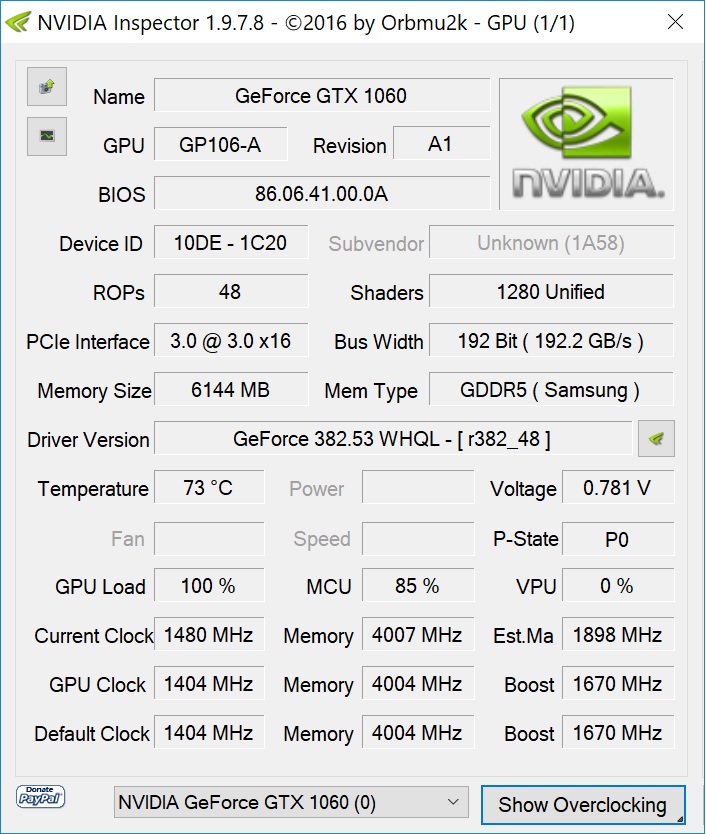
Success! No more BSODs! Just flash with nvflash64 -6 shared_above.rom
@Nuke33, you are a champ!
RB 14, 2016 with the 2017 newer vBIOS, only difference I can see is that the subvendor string changed slightly.
Done multiple reboots, and making sure the dGPU idles without any applications. It does not toggle on/off as it used to. Problem solved.
Edit: Do not mind the GPU load is at 100% above, running Furmark in the background.
Edit 2: Seems even the DPC latency has gone within much more decent levels. First time I have ever seen it go below 1000us. Might turn out to be the life saver I was looking for having lost frames and random micro stutter. System responsiveness is up. The small lockups are gone as well from say right click to Display Settings at desktop. Only minor freezeup is at shutdown if the dGPU is inactive which is a huge improvement.
Edit 3: Ok, so its better but I still get BSODs if overclocked with nVIDIA inspector and not having having any active apps on the dGPU.Attached Files:
Last edited: Jun 26, 2017Nuke33 and Vistar Shook like this. -
-
@Mobius 1 , I am wondering if your unlocked Bios on the Kabylake RB if there is the option to disable ASPM? There is this option in the Skylake version but it is not available in the Kaby standard bios, just wondering if it is available in the unlocked bios though. It does allow for a slightly better dgpu performance.
Nuke33 likes this. -
Pretty sure you can modify the 2017 BIOS as for previous versions, and that ASPM disabling might be an option available if unlocking all hidden settings.
Nuke33 and Vistar Shook like this. -
@Rideass
You are very welcome.
Sorry to hear you could not resolve all your issues.
Just for the record: On the RB2017 i am also having some hiccups when clicking on the battery icon in the taskbar for example.Vistar Shook likes this. -
I repasted the skylake RB with kryonaut....I didn´t follow Mobius 1 advice on using IC diamond for the GPU though.....not yet anyways. With a stress test of FS loop and OCCT, 30min warm up and 30min test, I do get a drop in temps for the CPU of 8 degrees on the highest temp core, the other cores 2C....the GPU about the same, 2 degrees lower. At least the core difference temps are better now, probably because the heatsink is more even now. Because of the heatsink design I didn´t expect much difference, did it mostly out of curiosity, so the results are within my expectations.
I ended up using K5-Pro to substitute the thermal pads, since the artic pads that I have will be used on another laptop.... @Mobius 1, if I decide to do another repaste in the future, what is the best way to remove the K5-Pro? Thanks for all the tips.Last edited: Jul 5, 2017Nuke33 likes this. -
You remove it using a card, scrape off gently. Then after a thin layer remains, remove like thermal paste on CPU/GPU.
I really recommend IC diamond (loads of it) for the Razer Blade GPU side heatsink, I cannot stress this enough. -
I think I will repaste next month, but try LM on the CPU and IC Diamond on the GPU or do you think it is best LM on both? Or just stick to Kryonaut on CPU and IC Diamond on the GPU if the conductonaut didn´t make that much difference to be worth the extra hassle?Papusan likes this.
-
I guess Kryonaut does need a little cure time, since i reran the same stress test at the same ambient temperature 2 days later....and it is better, nothing dramatic, but I guess the best I can expect from this particular system.
Original Paste UV -140mV (OCCT + FS loop - 30 min warm up, reset hwinfo, then 30min test)
![[IMG]](images/storyImages/6a9hIzG.png)
Repaste with Kryonaut
![[IMG]](images/storyImages/tsQSmUH.png) Nuke33 likes this.
Nuke33 likes this. -
What are the temps in RL usage? Playing some heavy game or just running a few Firetsrike tests in a row?
-
I just ordered some Kryonaut and IC diamond for the GPU, plan on re pasting my kaby lake razer blade sunday! I'm not feeling totally confident with LM on a brand new machine just yet lol. I'm also curious on your RL usage, browsing temps/gaming temps! @Makyura
Vistar Shook likes this. -
Can´t really tell any difference on normal use, except for idle temps which are in the mid high 20s instead of the in the 30s before...which is not really important since skylake RB runs cooler than Kabylake on idle anyways, since the KB version is passively cooled till it hits 65C or so.
I don´t have any results from before and after in Gaming to compare.
I did do a heaven loop with no stress test on CPU but with no undervolting before, 10 min warm up, 30min test.
So I redid the test after the repaste....and only a slight 3C difference on the GPU.
We will see the results that Mobius gets with LM repaste, which will define what is the best possible result on the RB, I don´t expect any dramatic improvement though on such a system.
Heaven loop (10min warm+30min test with no UV - Original Paste)
![[IMG]](images/storyImages/CjP5LMb.png)
Same Heaven Loop after Repaste with no UV.
![[IMG]](images/storyImages/Mcd2JLO.png)
Same test with 140mV offset makes the CPU temps go down, but I don´t have the same test with the original paste to compare.
![[IMG]](images/storyImages/rq2ak3d.png)
-
If you can....see what size thermal pads and where are on there...because on my next repaste I might try fujipoly pads instead of K5 Pro....but I don´t remember the sizes....doubt it will make any difference though except cost...hehe.
-
I will try to remember to do this. What and why are people replacing thermal pads? Is this something i need for re-pasting, or are these for when people do the LM process? Thanks!Vistar Shook likes this.
-
You can just reuse the thermal pads, but it is recommended new ones...especially if some fall apart when you remove the heatsink.DMoore03 likes this.
Razer Blade 14 (7700HQ/1060) beatdown log
Discussion in 'Razer' started by Mobius 1, Apr 26, 2017.