Problems? See this thread at archive.org.
Making some progress on flashing the 3080 vbios. Found an Acer Helios 300 vbios that has the same 100w TGP and it worked. Acer recently issued a vbios update utility that ups the TGP to 115w. Tried it after flashing the Acer vbios, of course it didn't work.
Flashed back to stock Razer vbios and am looking for the updated 115w Acer vbios. I'm optimistic it'll work because the GPU ID would probably be the same as the one I successfully flashed.
-
would be nice if someone would at least share the new 105 vbios from the blade 15
-
Tried running nvflash, even attempts to back up my current rom result in an empty file, all IDs and value are 0'd out. This **** is bricked.
It won't even take the stock vbios flash either due to mismatch.
Talked to Support and it's RMA time! Guess I'll see what happens in a few weeks, lol.
Buying a machine in 2021 was a bad idea. -
@Wackistan , that's too bad. Re-buy from Amazon or MS.
The updated system bios 1.06 is much more stable for OC. Here are my Timespy results with a +225/+600 GPU OC.
(10,401 overall, 10,760 graphics).
http://www.3dmark.com/spy/21513692 -
To me seems it reduces cpu performance which’s suck but bump the gpu performance which’s nice, 50 50. I think it’s first time I could hits 9,8K graphics score on internal screen. On external seems no big difference on graphics.
https://www.3dmark.com/compare/spy/21529209/spy/21521959jlp0209 likes this. -
Is it true that USB-C charging is capped at 50W on these laptops?
Sent from my iPhone using Tapatalk -
Nice! How was your OC ?
-
I don’t have right things to measure but as I mentioned on previous post, cpu capped max 15 watt gpu 35 watt, it’s measured before bios update not sure now. But it was charging quite fast while gaming no discharging.
3DMark core +210 memory 400, gaming core +175 memory 400, it maybe depends on silicon though for me I can’t go more than 400 memory. -
HWiNFO64 will report input wattage. You may need to enable the sensor manually within the software to see the readout.
Sent from my iPhone using Tapatalk -
You right you meant charging rate on battery areas right, I’m discharging it rn will check it with 65 watt ac adapter. Good point since I almost wanted to get 130 watt Gan charger from Razer, better get lower one if it’s limited to 50 watt.
-
CodeHusky from YouTube bought a Blade 14 and confirmed that he was able to get 100W from his USB-C charger (he and I are on the Jarrod's Tech Discord). He is planning on returning the laptop for other issues, though. His came with a wonky AC adapter out of the box and Razer are giving him the runaround for a replacement. Advanced RMA service with a credit card hold and the new part shipped within 72 hours of submitting the request should be the bare minimum of service you receive, especially for a premium product like the Blade, but he's been going at Razer for two weeks now trying to get this matter resolved. All the more reason to get an extended warranty from your retailer if you're going to consider buying one of these.
-
What are they doing, some nonsense like sending the entire laptop in for "inspection" and charging the $100 fee?
-
-
Damn it’s took a session good nap to reduce the battery percentage

Nope, maybe some Poeple thinking from gameplay it’s indeed seems 50 watt (cpu 15 gpu 35 watt), but game doesn’t taxes cpu max, so I run game and r20, it’s capped at 70 watt, each 35 watt cpu and gpu.
Gaming
Gaming cinebench
Can you tell me btw how accurate measurement using HWinfo64 I didn’t find the setting?
You want extended guarantee btw if buying 2K gaming laptop regardless these awesome brand.
Hi buddy are you joking, it’s Razer CS we’re talking about. It depends what cigarettes they smoke, if
a good moods
brand it’ll be free

-
"...if they even process it correctly..." sums up their terrible CS. So he's returning the entire laptop and saying to heck with it all? I get it. That's so sad just for a stupid charger.
I really can't stand Razer as a company but this Blade 14 checks all of my boxes at the moment, nothing comes close. I admittedly don't like supporting a trash company but at the end of the day, 15.6" - 16" is too large for my use- for the most part...I'm slowly coming around and have had a couple products sitting in shopping carts...
Razer finally reached out after 4 days of silence (after I pestered them again yesterday) about processing my return of my defective Blade 3060, they sent a prepaid shipping label so I really can't complain after it all. Just took WAY too long for a simple return issue that could've been resolved in 10 minutes on first contact.
In the off chance I return this one, I'd probably order an Eluktronics MAX 15 or wait 4 months for a Lenovo Legion 7.saturnotaku likes this. -
Sorry I'm having a hard time understanding. When gaming and running a Cinebench test, total power is capped at only 70 watts?
-
Yes, I didn’t manage yet to set HWinfo64 sensor to track accurate wattage. But as it shows cpu and gpu pulls 35 watt, I’m not good at math but it’s together 70 watt…but wait it’s from Razer book 65 watt ac adapter
I already commented before regarding this video i believe, nice he shared about macro refresh rate but regarding black becomes silver and gaming on PD I’m disagree, unless you careless and drops it often it won’t change the color and if you’re okay with 30fps gaming you’re good gaming with PD, it’s only a bit different with gaming on battery the difference only you can forever experience 30fps without discharging, on battery the cpu capped to 7 watt as I’m aware and gpu same 35 watt as PD power.Last edited: Jul 15, 2021 -
Does the battery discharge while running those applications? That will tell for sure.
As much as I love my Legion 5 Pro, the device's bulk and subpar trackpad are starting to get on my nerves. The Blade 14 would be great, though 16 GB is pushing the limit for my daily work. Plus, I don't like the idea of leaving USB-C power headroom on the table. I would love to see Lenovo take the L5 Pro and shrink it down to a 14-inch form factor. I wouldn't even mind a 16:9 aspect ratio display, a single M.2 slot, and soldered WiFi if they could include fully upgradable RAM even if it means the laptop is the same thickness. Just keep the weight at 5 lb (2.26 kg) or less and use a slimline AC adapter. -
Oh OK that makes sense then! I was worried it's capped at 70 watts when using the regular AC adapter.
-
On gaming not, I tested before (bios 1.01), now as well (for like 15 minutes), but on that 70 watt gaming with cinebench I’m not sure yet , since it’s over 65 watt this ac adapter maybe, but please don’t let me continue gaming on this power 30 FPS is suck
Sorry I just wake up, you meant its proprietary 230 watt ac adapter, or other like gan PD 100 watt for example. I’m sometimes for media consumption using my book 13 ac adapter that is always plugged on the wall and it’s as mentioned 50 watt on gaming and on stress test (cinebench) plus gaming 70 watt from Razer book 65 watt power brick, either way you don’t want to play game on that power adapter’s power.Last edited: Jul 15, 2021jlp0209 likes this. -
Deleted
-
Razer's RMA email instructed to send the laptop to CA here in the U.S. The included Fed Ex label is an international label and instructs me to send to Taiwan? This is so insane. I just want to send a laptop back for return, why is it so difficult. Awaiting another response from Razer that will probably tell me to re-install Windows again or something, lol.
-
I'd threaten to get your credit card company involved at this point.
-
So my MSFT-store machine arrived yesterday. Set it up last night. Let all my OneDrive hydrate and updated everything.
Today, ran side-by-side FireStrike tests. My original Amazon order consistently gets about ~500 more points, and CPU and GPU each max out 2-3 degrees Celsius lower on every run compared to the newer machine. Both exact same specs, set up the exact same way.
Feel like silicon lottery was much more fortunate on the machine that I'm getting ready to return. A bit disappointed. But it's foolish to not keep the MSFT order, which I got for $50 LESS and with FOUR years of accidental warranty. -
Yes as I said above it’s too many CS involved in one case making sometimes missing in translation LoL. Since it’s already accepted I think you don’t have too worry so much claiming this and that with credit card, your money should be back, yes it’s suck but sometimes with Amazon you need to wait until they notice your return package on shipping point and after that wait up to 14 days.
-
Did you update the system bios? Appears to boost results on the 3070 and 3080 versions compared to the launch bios.Joikansai likes this.
-
Did you update the bios as well? Newer bios bump the graphics score and lower cpu one, but since I need more gpu power I prefer have better gpu. Yes silicon lottery plays always a role regardless brands, factory thermal paste job as well, those depends your luck, you can keep sending for better one but I’d keep if there’s no other issues like the hardware. Mine is no BLB, some YouTuber units has it, not bad temperature even on 100 percent 80 watt tdp it hits 100 degrees but on most my intensive usage, gaming it rarely use more than 50% and rarely hits 80ish degrees (huge different with my previous Blade 15) so I keep mine.
-
Appreciate the quick replies and suggestions. Unfortunately, yes, both on 1.06 BIOS.
Just did another run on each after a restart:
1st Machine from Amazon: 20,929; 22,665 GPU and 24,023 Physics. Max CPU temp = 93.8c; Max GPU temp = 83c.
2nd Machine from MSFT: 20,788; 22,493 GPU and 23,992 Physics. Max CPU temp = 94c; Max GPU temp = 86c.
So ultimately, even though the new "keeper" machine is consistently slower, definitely close enough it's within the "margin of error." What is that, maybe a frame or two? I'm more concerned about the GPU temp than anything. Games are definitely hitting 85-88c while gaming, whereas the first machine hovers around 82-84c in the same games, same spots, same power profile (EA) and same settings. Feel like there's a little less wiggle room.
But good points - the machine is otherwise fantastic. Feels snappy. No weird OS issues. Hardware is solid. Lighting is uniform. Screen looks great. Fans nor PSU make any funny sounds. Ultimately, I'll keep it - and I have four years to let temps become a problem and then I can do a warranty exchange. But you know how it goes, if I could pick, I'd rather have the temps of the machine being returned, even if it won't make a huge difference.Joikansai likes this. -
Yes it’s really wise to get 4 years guarantee, here we get 2 years manufactur guarantee for extra two years I think it costs almost 1/4 blade itself like €500, so I think I’m good with two from the thermal etc, but definitely would ask if they have another plan like 3 years or so that won’t cost my left kidney LoL.
Nice I’ll try FS didn’t try it yet after bios update but on timespy it bumps pretty well gpu performance, let’s see on port Royal as well since it’s more to GPU. -
I signed up for the 3 year MS warranty through Performance Guard. I read some bad reports about it so not sure it is worth keeping. I can get an extra year of warranty through my credit card for free, but it doesn't include accidental damage.
Considering I'd need to send my laptop away for repair regardless, would you cancel the MS plan and just use the credit card warranty? The MS plan is transferrable if I decide to sell the laptop after a couple of years, so that's an advantage. -
Not sure about ms plan, I don’t even know till recently that they sell blade laptops, here only chomebooks I think. How much was it 3 years guarantee 250 bucks? Keep in mind my last blade 15 bloated just right on its 36 months, if I’ve had such guarantee, 250 bucks is nothing (considering you’ve to pay more without it). Though I heard it’s not bad at all, when I’m not wrong if it defective you can get refund and buy some other that you like, means if it’s after like two years it’s literally free upgrade to newer system in the future isn’t it?jlp0209 likes this.
-
MS used to be great because you could walk into the store and just get a replacement. Now that all the stores are gone you can't do that. If mine gets battery bloat I'd just buy a new battery rather than deal with sending the laptop in, I think.
Yes the plan was like $240, with accidental, so pretty good price. I believe yes, they just refund you if they can't repair it. I'll probably keep the plan. As soon as the higher TGP vbios come out for the larger 3080 Blades I'm going to flash, so 3 years warranty is probably a good idea.MagillaGorilla and Joikansai like this. -
Yeah I heard that one, idk if it’s now so complicated. And yes according to the verge blade pro tigerlake even using 130 watt 3080, hopefully it’s true and 3070 variant as well.
-
I think it may be easier to flash the 3070 since all versions are 8gb. Hopefully for the 3080 at least the 105w vbios will work.
Still silence from Razer re: my ridiculous ongoing RMA. I contacted them on twitter with my case details, etc., hopefully I can ship this thing back today. -
That’s suck let me ask around again. You got shipping label already only to China but other CS said you should ship it to CA when I’m correctly understanding?jlp0209 likes this.
-
They tweeted back to me stating CS never got an email response from me. So I emailed them again and sent to two support email addresses as well. We’ll see what happens.
Yeah, RMA instructions say to send laptop to California here in the U.S. The shipping label they sent to me is to send the laptop to Taiwan.Joikansai likes this. -
**Edit 9/16/2021 - I don't recommend trying this vbios I've linked to. It is more power than the laptop can handle and will drain battery while gaming on AC power.
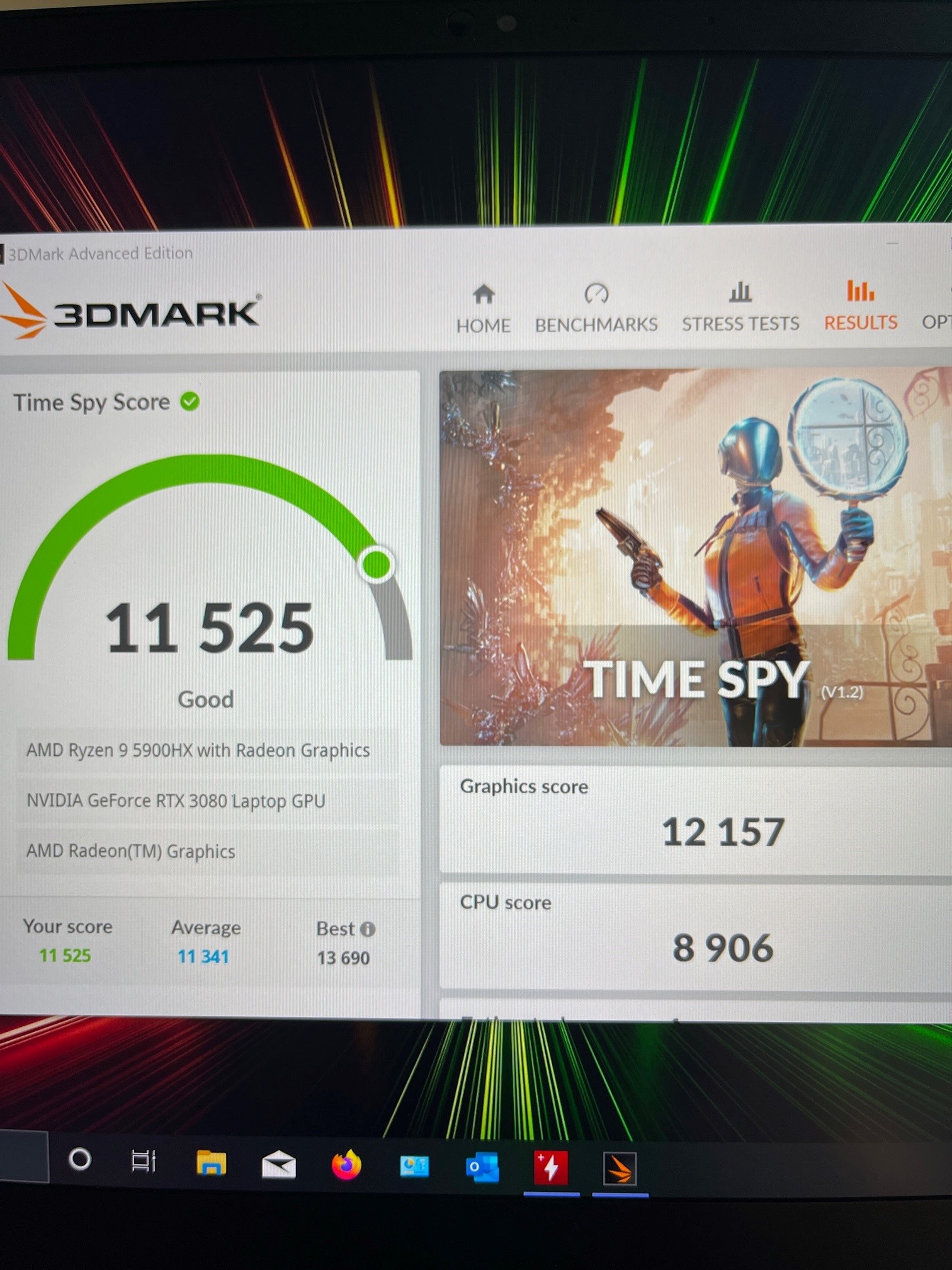
Tested out the Acer Predator Helios 300 vbios for the 3080. Interestingly despite it being a 100w vbios my Timespy scores shot way up. Power readings in GPU-Z and Afterburner aren't displaying properly, but I thought this vbios is 100w so I am not too worried?
Scored 11,564 overall and 12,293 graphics, which is phenominal. http://www.3dmark.com/spy/21571013
I am so curious why this score is so much higher than the Blade's 100w 3080 vbios?
Vbios here:
https://www.techpowerup.com/vgabios/233967/233967Last edited: Sep 16, 2021Joikansai, Darkhan and MagillaGorilla like this. -
Nice! Getting better scores than some x17s.
What were your temps like?
Getting a killawatt for the wall to display total wattage would be pretty helpful for comparison too. -
Played F1 2021 for about 40 minutes. GPU temp max was 82 degrees. The core clock stayed around 1930mhz.
It’s clocked quite a bit higher than the stock Blade vbios for some reason. For example in Timespy the core clock hovered around 1800mhz to 1870 ish. On the stock Blade vbios it was about 1565mhz to 1580 or so. Very strange. I get that the Blade is only 14”, common sense says that may be my answer. Still…
I have a kill a watt sitting in a desk, totally forgot about that. I’ll have to try it. I’ve looked at some reviews on the Helios and my results with that vbios seem similar, it is a 100w vbios from what I can tell.Last edited: Jul 17, 2021 -
Wow thats awesome news! I really hope we soon get a similar vbios for the 3070 version.jlp0209 likes this.
-
Why indeed? I think it’s 100w with dynamic boost just like the Blade 14. So you’d think they would be similar in performance. Can’t say I’d complain as those are great numbers. The real question is do all the ports still work the way their supposed too? Something I see a lot with bios flashing is the lose of some ports working.
-
Thanks to @jlp0209 finally found vbios that doesn’t id miss match. Same Acer though it is nitro one on 3070, same 100 watt but better boost frequency on gpu. Almost reach performance mux on external monitor.
This bios is very efficient only 28 watt to pull for 1900mhz, wonder if it use full 100 watt
https://www.3dmark.com/spy/21584913
Not yet cheating setting Last edited: Jul 17, 2021MagillaGorilla and jlp0209 like this.
 -
Damn that Helios Vbios is awesome. Max temp 82c. +rep for the info!
Attached Files:
-
-
Very interested in your conclusion about the 3070 VBIOS. Do you recommend flashing it? Link would be nice then
-
Hdmi works fine, usb c as DP not so no g sync, only for Pheriperals and external ssd etc, I’m literally just 10 minutes ago using it will update if there’s anything wrong. Yes that gpu tdp is also drunk.Darkhan likes this.
-
Tested with external monitor just now. The left USB-C doesn't detect the monitor. The right USB-C port works just fine and G-sync works too!
Nice! Glad we are making progress with vbios. That's a nice performance boost there!
Glad it worked for you. I flashed it about a week ago but saw that it was 100w so just re-flashed back to stock without even testing it. For some reason I wanted to try it again yesterday and actually test it, happy with the boost.
HDMI works fine and the right USB-C port connects to my monitor using DP to USB-C adapter. G-sync works as well, the monitor was detected immediately and I got the G-sync pop up from the NV control panel. -
So we know yet Acer is our friend on this, do you think Razer somehow limiting the boost clock? I think I didn’t see as well it hits anything above 1700mhz before on this maxq 3070. About external screen it’s nice but I’m seam since it’s apparently cheating like using eGPU. Got 105 FPS on SoTR internal 1080p not as high as external display though which was 112fps but a welcome non cheat performance upgrade. GPU Temperatur same not as high as 3080 it’s never shown 80, I think between 60 and 70ish. But unfortunately DP both can’t output videos. However tried not cheating on performance and like the screen as well, so f external monitor

See if other titles give also performance boost.
Edit: on Valhalla it even better
than cheating only synapse boost cpu and gpu high
Ah forgot to link the vbios was so hyped
https://www.techpowerup.com/vgabios/234733/234733
But don’t blame me if there’s anything brick your lappy ( it’s only formality most of us maybe know it won’t)Attached Files:
Last edited: Jul 17, 2021 -
Razer Blade 14 5900HX
Discussion in 'Razer' started by Joikansai, Jun 14, 2021.