 Problems? See this thread at archive.org.
Figured I'd chime in here. Got my new Razer Blade 15 a couple weeks ago (GTX 1070 / 512 SSD). Returned my Alienware 17 R5 for it. Although the R5 had a 1440p, 120hz gsync screen, a full desktop grade OC 1070, and the same CPU, I appreciate the look and feel of the Razer more.
Anyway I'd say the Razer is near perfect. I received mine with no backlight bleed or any other issues. My only true gripe was the temps, more specifically the 8750h temps under load, but this clearly comes with the territory.
Long story short, the performance is excellent, even WITH the high CPU temps and the occasional throttle. I have noticed in CPU intensive games, such as open world / a lot of other player games, ex. WoW / PuBG, a few cores would hit 100C, but only for a very short period of time. This would occur after at least 15-30min of playing, then I'd lose a small amount of FPS, fans would kick in high, and drop the temps back down. Typical average after an hour of playing was around 80c.
Fortunately, the GPU temp for the 1070 never exceeds 80c. The absolute highest I've gotten it after hours of WoW or any other game was 79c - and that's max temp, not average.
Anyway, seeing that the 8750h would regularly hit 100c I decided to try undervolting. Tried both Throttle Stop and XTU, but at the end of the day I prefer the ease of XTU. Throttle Stop seems far more advanced with extra profiles, and a bukkake of acronyms that the average user wouldn't understand. So I'm sticking with XTU.
Beginners note: Don't except to simply adjust your core offset voltage and be done with it. I found out AFTER the fact that your cache offset should be roughly the same. At first I had zero results because I didn't know the latter fact. Now I set both my offset voltage and cache offset at -.130mv. This seems to be a reasonable / conservative spot.
Prior to undervolting, I ran firestrike and achieving a score of 14,300 with gaming mode enabled, fans on auto. Not bad, and a seemingly average - above average score for a stock Blade. The only issue was after the test, HWmonitor / GPU-z reporting CPU temps of 100c, and it would throttle at the very end.
So I did the -.130mv undervolt and ran the test again, and again. My score went from around 14,300 to 14,400+ with graphics scores, physics scores, and more all increasing. A huge increase? Not really. I was already happy with the performance however. My biggest goal was to reduce the temps. So after the undervolt, not only did the scores increase, but my max CPU temp hit 96c with the other cores lower. So no more throttling.
Sorry for the long post. Just sharing my exp and thoughts. Here's a pic of the current score:
![[IMG]](images/storyImages/JZgVKdg.jpg)
I also put together a little vid of why I swapped to the new Blade 15, and how the Alienware R5 stacks up, if anyone is interested:
-
I hope it works out for you. I really do. Keep us posted!
-
I haven’t used my Blade 15 for about a month as I’ve not travelled (so using desktop). However this week I travelled and brought it with me.
After gaming (Divinity 2) CPU would hit high 90s and even 100C. This was even while undervolted by -0.135v, max manual fans (5000) and max multiplier at 33x. Gpu maxes out in low 80s.
It didn’t run this hot previously and I haven’t touched the original piping / paste etc.
This is really unacceptable - I think I’ll have to take it back to The Microsoft store.Darkhan likes this. -
At 33x max and -135UV you could probably go much higher on UV than that at 33 but those temps are crazy high.
Maybe it was the area you were gaming at, since not at home perhaps had something to do with it?Joikansai likes this. -
Agree with @Darkhan, ambient temperature may effect the hottest parts on laptop, especially cpu on Blade 15. Even on 22 room temperatures i can make it throttle and reach 100 celcius by using gaming mode on AC Odyssey (simple undervolting-130mv xtu and all cores on 4,1 turbo boost). But if i set on balanced mode, temperatures would hugely down to high 80ish some Core sometimes may hit low 90 but avarage temperatures on long session are under 85 and no cpu showed thermal throttling. Btw that’s the most cpu demanding games I have, second Far Cry and AC Origins max 95 on gaming mode and mid 80 with balanced mode, and it’s still with default cpu thermal paste, I saw some other users repasting with kryonaut and get better thermal, but not huge that made me want to repasting mine.
Though if yours was on balanced mode and still hit 100, i would also return it.Darkhan likes this. -
Did you undervolt the cache too? The voltage AND cache offset both have to be undervolted, preferably the same amount, to show true results.
I also find it interesting how peoples GPU temps are getting that high. Maybe this was an early model thing? My CPU was hitting 100c tops on some long gaming sessions, totally stock, but the GPU never broke 79c. On average it hits low 70s - and I never undervolted the GPU / repasted or anything. -
Did a little better with my undervolt today. A few posts up I wrote that I had success with -.130 to cache and core offsets. Played WoW like that for 1-2 hours, highest CPU temp logged was only 95c. Average was 75-80c over that time. Played the new Tomb Raider however and it peaked 100c again quick - son of a *****. So went down to -.140. This seems to be a sweet spot. As I posted above at -.130 the max Firestrike temp (bear in mind this is a longer run with the demo, so the CPU is already hot) was 96c. At -.140 it never broke 92c. Scores were practically the exact same, just above 14,400.
One question though - If I have my ideal XTU settings set, and the profile saved, do I have to open the app each time I shut off / turn on my laptop? I did a trial run today and did NOT open XTU. Hw Monitor showed the correct -.140 voltages, so I figured hm, it must have saved it. Ran Firestrike, and bam, temps dropped. Perhaps I'm answering my own question here but I thought since it was software it had to be opened. Yes / no? -
If you use TS don’t set anything on xtu, it may ruin your setting. Use XTU just to see the cpu graph, it’s nice. @Petrov is one of early adopters I think from US and I from EU, saw quite a lot tweaks I believe he did also a lot. On cpu demanding game like SoTR use the balanced mode to get better temperatures. It’ll be better for your laptop imo. 3DMARK undervolting value may vary with real gaming stable value btw. And great FS score with good silicone lottery is over 15K on 1070 model.
-
Yes mine was in balanced mode and was still hitting high 90s and even 100 on occasion. Both core and cache undervolted. It’s very odd as it wasn’t running this hot previously. Ambient temp was higher than home, but not by that much - I would guess around 25C vs 22C at home.
Not sure if I should call Razer or just take it to Microsoft. Or wait until they do a refresh with mobile 20XX chips and get Microsoft to give me one of those as a replacement...! -
Ouch yes, for balanced mode it’s too high hitting 100 imo, it’ll be better if you go to microsoft if you want replacement, humidity may also effect laptops temperatures though, but still I were uncomfortable on that temperature. I would look first Turing laptops temperature btw, we don’t know still if rt core worth on mobile, since even...your 2080ti
 ? may also struggle on 1080p with rtx on, without dlss isn’t clear yet and qc plus stocks Issues on high end Turing cards, it’ll be better go with Pascal laptops. Damn I’m also holding playing SoTR further on my core setting and waiting every day Ray Tracing benchmark tools...what a mess launching this time by nvidia.
-
Guys been a while, had lots of FUN (yeah right) messing up me bootup.
Anyways I am doing a new series on Data Backups, Recovery, Dual boots and virtual machines.
Startup the most important BACKUP
-
Hello, first time posting here
Any owner of the Blade 15 1060 60Hz (the Advanced Model, $1899 one) could tell me their display panel?
My display is BOE NV156FHM-N61 (the same one used in the Base Model) which seems to be inferior compared to the LG panel
Is the LG panel only available in 144Hz version?
Can anyone please help me confirm if this is normal? ThanksLast edited: Oct 28, 2018 -
Razer use different display manufacturers, like AUO optronic , LG, Sharp, and recently BOE (firstly I saw it on Blade 14 4K 2017). My 15 advanced is LG but I think i saw other users 144Hz with AUO. The important thing to me that it’s free of BLB with great color accuracy, which isn’t perfect on mine due minimum backlight Bleeding compared to my old Blade 14 which was 0, it’s hardly to notice on daily usage though and the color is great, so I’m okay with that.
-
Thanks!
do you know the exact model of your LG panel?
Based on the review of the Base model on notebookcheck, the BOE panel used is inferior in most aspects compared to the LG panel on the Advanced model.
The comparison is with the 144Hz one though, so maybe the 60Hz is expected to have inferior display quality?
Even then, I’d expect all Advanced models would have display quality that’s on par with each other besides the refresh rate.
If I’m paying for the Base model, I wouldn’t complain at all.
But since I get the Advanced one, I’m kinda disappointed :/ -
It’s LGD05C0. Hmm, ips 144Hz maybe a bit weak compared to 60Hz ips color depth, idk exactly. They seemly always put something different in term display manufacturers, to me color accuracy is great out of box, in fact I never celebrate it and could match my 4K external monitor on color and brightness that most laptops out there couldn’t, only MacBook beside Blade screen from my test on my local electronics store could match it and doesn’t show night and days difference on duplicate mode, other gaming laptops and FHD monitors display are too dark in my taste, plus i got the 144Hz compared some that has only 60Hz. Previous Blade 14 was also FHD lg with also great screen color depth btw. On your advanced model you get longer battery life, lighter unit and maybe cooler system due advance new vapor chamber design, I think it’s worth the price gap. I saw base model inner design and cooling system, hmm I don’t really like it honestly, advanced model looks more promising.
-
Hi guys,
So as many of you have put liquid metal thermal interface between your cpu/gpu and vapor champoer, so did I.
The thermals were great, blade 15 was more quiet and so on.. well. now it has been 2 weeks since I did this and I noticed that 2 of my cores were 10c warmer then others. Under full load it was for cores 1,2,4 and 6 72c and for cores 3,5 85c..
8750h is a hexa-core chip like one below, so it would be weird that the vapor champer is warped at cores 3,5 location. To my knowledge cores go 1 to 3 on top and 4 to 6 on bottom. Someone correct me on this if I'm wrong.
![[IMG]](images/storyImages/650px-coffee_lake_die_%28hexa_core%29_%28annotated%29.png)
This had me thinking that there was air in the mix. So I opened the laptop today and to my suprise liquid metal was dryed up... hmm...
Here is some pictures.
https://drive.google.com/drive/folders/1drC1VHnG28ez_WqSUYCd5jnahxbGLCif?usp=sharing
Even tho is was all dryed up, only the core 3 and 5 were higher in temps. Gpu was fine also.
Also from pictures you can see how uneven the pressure was on the gpu side. This had me thinking that while cpu has temp sensors for all cores, the gpu doesnt.. it has one for the chip. Can part of the gpu realy run hot as hell while good contact part of the runs cooler and that cooler part has to temp sensor? do not realy know where the temp senson is located on the GPU chip.
To make my self clear, all the temps were great except core 3 and 5 witch were not that bad but were 10c warmer. Seems that dryed of lm works just fine aslong the contact stays the same and vapor champer has no movement.
In the end I cleaned what I could of the old lm and reapplyed it again. This stuff is damn hard to clean! after the process temps were even and great again.
I use Thermal grizzlys conductonaut.
So have you guys checked your lm condition after applying it?
Tell me your expriences.
Sincerely,
-VillehaseoJoikansai likes this. -
I just noticed your signature, is your Blade 15 display the 144Hz one?
Yea, I did a bit of research before deciding on the Advanced model instead of the Base model (I got mine less than a week ago btw)
The issues regarding the Base model sure sounds worrying.
I'm not trying to be extra picky or anything, I probably won't return or exchange my Blade 15 anyway
(unless my situation is not normal in which case I'll most likely return/exchange it)
But one of the reason I choose Blade instead of other lightweight gaming grade laptop is because of the display
Also, I don't remember seeing any notes or anything regarding the display quality difference besides the refresh rate when I decided on the 60Hz version
I guess I'm just feeling a bit cheated
*Update*
In case anyone else is wondering, it seems that the 60Hz Advanced model did indeed use the same or similar panel as the Base model.
If anyone have similar (or contradictory) info to share, please feel free to do so
Last edited: Oct 29, 2018Joikansai likes this. -
I don’t repasting it yet, since mostly I use core for my gaming and temperature max on 70 only AC Odyssey can bump it to 80ish, I tried playing on dGPU balanced mode last night on 1080p which I actually don’t prefer on this game but I was not at home where I can use the core setting, yes 2 cores spike to mid 90ish which is I expected on this game but around 2 hours gaming session it was mid 80ish average with 4800rpm fans. It’s with basic undervolting per xtu -130mV. Poeple seems doing also kryonaut repasting and reported nice improvement compared to their temperature before. If I have to repasting this maybe I would try first kryonaut, conductonaut seems hard to remove. But from last experience having Blade 14 with default paste, my current cpu temperature was similar on average low 80ish that could keep it well in mint condition after 15 months gaming usage, so as long it’s around same and doesn’t show thermal throttling on balanced mode I’m fine with default pasting. On gaming mode it’s other story, since it’s Overclocking mode that bump cpu temperature. For good of my Blade I look at OSD afterburner if I’ve cpu temperatures like low 80ish i change it to gaming mode as long as it stays on 80ish to gain more FPS especially on shooting or esports titles like OW or destiny 2.
-
Core placement...
[0] [2] [4]
[1] [3] [5]
Darkhan and villehaseo like this. -
Thanks man.
-
No point doing a backup if you don't know how to recovery/restore it so here's how!
Joikansai likes this. -
So after undervolting -.140mv I dropped my average and peak temps a decent amount. WoW, on fully maxed settings and 150% resolution scale only peaks 95c now and averages 75-80c after and hour plus.
Other games are similiar to these temps too. As I posted above, Firestrike will peak low 90s during the whole test.
My issue still comes with new games like Shadow of the Tomb Raider. Within a few minutes of playing, I typically spike to 100c real fast, then right back down. The spikes are far and few between but do log as 100c peak. The average after an hour of play is usually low 80c.
Note - ALL these results are with Gaming mode ON. From my understanding, balanced mode will decrease the temps because the GPU is doing less work. Therefore the board is generating less heat overall.
So, I'm considering repasting today with a high quality thermal paste. The GPU never goes aboce 79c max / peak after hours of playing. Do these temps seem normal enough to just leave it, or should I just go ahead w the repaste? -
Not quite accurate. As you may know Synapse applies a very basic overclock to the GPU of +100MHz core clock and +300MHz memory clock in Gaming mode. The GPU may only run a teeny-tiny bit warmer as a result of that, but in Gaming mode they allow the CPU its whole 45W of thermal dissipation, which ramps fans quicker and higher because the CPU generates significantly more heat (the limit in Balanced mode is 35W). Basically Gaming mode is more beneficial to CPU performance than to GPU performance, because the CPU, if not thermally constrained, will hold higher clock speeds.
If you are comfortable with repasting and are proficient enough to do a good job at it, I'd say the temperatures shouldn't be the factor holding you back. With GPU Boost Nvidia GPUs reduce their maximum core clock speed with rising temperatures slowly until they hit a hard drop in clocks at 84°C. Basically with this behavior every degree counts to have as high clock speeds as possible, as you will most likely be limited by the GPU in most games anyway. -
I didn't know that about the CPU in gaming mode. That makes a lot more sense. Since I've done everything I've only used gaming mode. That's interesting that it increase CPU wattage in addition to GPU clock speeds. That will definitely heat the CPU faster. Maybe I should try going back to balanced mode and see where I'm at with temps. Either way, the time will come when I'll be in gaming mode often, so I'd like low temps with max performance.
-
Just tried SoTR over hours playing with dGPU 1070 (default paste unit, xtu -130mV), I usually play at 4K high with core and 2080 egpu setting for better viewing experience and cooler cpu. Blade 1070 is quite good with 1440p high 50~FPS, balanced mode and 4800rpm manual fan, cpu temperature mostly between high 70 and low 80ish, some loading screen spike it to high 80 or low 90 though (OSD afterburner). The game is quite cpu demanding so I won’t use gaming mode (OC), i use gaming mode only for FPS or esports titles for better FPS or benchmark for better result, on open world games and other my tasks mostly on balanced mode with auto fans profile.
-
Gentlemen, I have some exciting news.
Since I always keep my laptop in / game in gaming mode, I wanted to reduce temps for longevity. With gaming mode on, I would average 80-85c after an hour of playing a demanding game, such as Shadow of the Tomb Raider, but also peak 100c a few times during. I never truly lost performance, but during that quick peak I'd drop maybe 10 fps and it'd go back up.
So with fans set to auto, with a max of 4700 rpm, I would run Firestrike and score 14,400 - 14,500 and max at first - 100c. It would throttle at at first make my score go down to 13xxx.
So I undervolted -.140mv to cache and core offsets. Ran firestrike again, and temps maxed 93-94c. Average lowered and peak lowered a bit, but still, even with undervolt, I'd peak 100c during very demanding games.
Today I said screw it, and bought some Noctua NT H1. I opened up the blade (make sure you have the right tool kit - the torx screw is VERY small, a T5), and repasted the stock paste with the Noctua. The stock paste job really didn't look that bad, but I could see it was just plopped on and smushed with the heatsink - no even application.
I put the Noctua in a an X formation on both the CPU and GPU and spread evenly with my finger. Fortunately, everything came apart and went back together very easily. I did NOT disconnect my battery. I completely forget. I do not recommend doing this lol.
Upon initial reboot, I noticed my idle temps are already lower, hitting the 30s (c). I fired up Firestrike, and after the same demo and exact same conditions, I score 14,450 and the temp never broke 87c max, on gaming mode. This is a 7c reduction in temps from temps alone. To me, that's huge.
I would definitely consider this if you're trying to keep your Blade running at the best possible temps. Don't cheap out on the paste either - they say most of it's the same but I'm a firm believer in you get what you pay for. At least youtube search "best thermal pastes." Noctua came in the top 5 with nearly a 10c reduction in CPU temp over generic thermal paste.LuxoDave likes this. -
Interesting. You got your Blade only recently (with the non-painted vapor champer)? I bought mine right after launch and the thermals are quite a bit worse, but I didn't care enough to repaste yet. Seems they either changed to a better paste or upped the mounting pressure.Last edited: Oct 30, 2018
-
I think, they actually did change a bit, because mine already had a thermal pad on the M.2 drive, which wasn't the case for the early models. And I wasn't able to improve thermals that much with normal thermal paste (Arctic MX-4), only about 2°C, but combined with undervolting (-0.125) still acceptable 4-5°C less on average.
-
My first one was with allot worse thermals than my second one. First one was with black vapor chamber and no pad on ssd, but after blown Mosfet on mainboard I returned it. Amazon sent me second one, which is with 10 degree better thermals, pad on ssd and all copper vapor chamber.
-
Yes mine had an all copper heatsink. I didn't see anything painted, and bought this laptop maybe 2-3 weeks ago on Amazon through Razer. Could have changed both things - I made sure to tighten each screw directly over the heatstink when repasting too, to add as much pressure as possible.
I noticed a bad on the SSD too. What was your first blade hitting on temps? -
95+, second one is around 85 with heavy compile tasks and some emulation.
-
Couldn’t afford to go buy a new Mercury Silver Razer Blade so I decided to get a skin for it! The logo can still glow through which looks pretty cool imo
![[IMG]](images/storyImages/58f61c36d636858e9738a8852058152e.jpg)
![[IMG]](images/storyImages/69ede7a69eaf805e3a82436e194caf4e.jpg)
-
Just thought I'd say, I don't think there's a better backpack for the Razer than these TUMI Nellis packs, check this out ;]
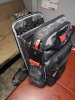
-
That’s a dope backpack but holy cow that price tag! I just picked up my second “Tavik”, first one is still in perfect condition after 2 years! https://www.nordstromrack.com/shop/product/2499345/tavik-daley-triplefin-backpack
Sent from my iPhone using Tapatalk -
Oooo I like the black and purple. Yeah tumi is expen$ive but they last forever. I don't pay full price, got this bag on ebay auction $229. I've bought and sold several. Definitely recommend them! Otherwise I suggest OGIO for cheaper budgets, they're a great company too.
-
Can anyone give performance benchmarks for the 4K UHD version specifically? I'm thinking that's the kind I want to get...
Last edited: Nov 2, 2018 -
Is there a good link which describes the diference between the 144hz and 60 hz panel in terms of quality of the screen?
(May look at this machine as a work replacement laptop, so no need for 144hz). -
Honestly depends on what kind of work your doing, if it’s not anything related to photography or color correction then the 60hz panel is more than sufficient in terms of quality imo
Sent from my iPhone using Tapatalk -
There’s already review on 60Hz Panel in notebookcheck on Blade 15 base model, I think they reviewed also 1060 model though not quite sure which panel that was.
-
I still can't shake my desire to buy a Blade again, haha. Has anyone successfully set a custom resolution / refresh rate in the nVidia control panel? I'm asking those who own specifically the 144Hz display and 1070 version. Because of Optimus you can't use adaptive v-sync or any other options in the NV control panel. I'd like to create a custom resolution of say 1080p and 120Hz or 100Hz, or something like that, and use regular v-sync for games like F1 2018. Even being able to use 75Hz / half refresh rate with v-sync would be fine with me. I am tempted to just buy one next week when I'll be close to the MS store.
-
Why would you desire to use a custom resolution and refresh rate?
What's wrong with 60 and 144 Hz, which you can set in Razer's Synapse app? -
There are options like RTSS (Riva Tuner Static Server) came with the MSI Afterburner.
You can add the .exe to your RTSS Library and set the FPS for each program individually.
Turn off the in game v-sync, enable it in the NVIDIA Panel instead.
It is probably a better way to deal with the FPS stuff.
Take a look at this video:
-
Because the game I play the most (F1 2018) won’t run at 144 fps all the time and 60 fps is a waste on this laptop. I’d like to set and lock a refresh rate say at 100hz and use v-sync so there’s no micro stuttering or tearing.
Thanks but not what I want to do. Setting an FPS cap doesn’t eliminate micro stuttering or tearing. I want to lock the refresh rate at a custom level and use v-sync.
I think there’s a way to do it using that toasty-x and CRU method. I will have to look at that stuff again. -
For nearly 7 months on the GS65 which has a 144Hz refresh rate, I haven't witnessed any micro stuttering using RTSS + NVIDIA V-sync though capping them to various FPS, maybe you are trying to do a more serious stuttering elimination, but I doubt it'll look any difference comparing to using the RTSS + V-sync setup.
-
Yeah, I’m used to my g-sync monitor and am very sensitive to micro stutter. Capping FPS isn’t the ideal solution for me, but I will try it again if I buy.
-
I don’t play F1 but I got 0 stutter on Forza Horizon 4 on non g sync 4K cheap monitor. It’s different with Blade 14 2017, i meant hugely The best 1070 maxq laptop imao
, with my tweak I can get 1070 laptops performance with yours I believe even 1080maxq lol
-
Really, repasting has done quite a bit for my early RB15 I have to say, more than I expected. Together with the BIOS unlock, undervolting the CPU and removing Synapse from the autostart it made the machine legitimately better for my use. I repasted with some pre-warmed Kryonaut. The paste just spreads significantly better when warmed up beforehand to something like 35°C.
Testing under full synthetic load (Time Spy GT2 and Prime95 26.6 12k FFTs, 30 minutes each, not at the same time of course), while the GPU saw an average reduction of 8°C (64°C), the CPU went from 100°C and thermal throttling to an average of 74°C (~21°C ambient uncontrolled). Mounting pressure and the paste job on the CPU from the factory seemed fine. Apparently the paste was just overwhelmingly garbage.
This reduced fan speeds audibly, which was really a somewhat annoying point about my RB15 for me, as I definetly heard a loud whistle when the fans went super-saiyan mode before while the CPU was under load. The whistle is reduced significantly now, which makes the machine much more enjoyable for me. Can recommend.
Just gotta figure out a way to program keyboard backlight without Synapse...
-
Hey now! I just got the Mercury White RB15 1070 MQ model. I am loving this machine so far. It looks super clean and fits my needs perfectly.
Can anyone with a more recent RB15 Advanced model confirm if the stock thermal pads for the SSD are attached to the bottom case of the laptop or the SSD itself? I am going to upgrade to a larger drive soon. I just want to know if I need to buy new thermal pads for the new SSD when I do the upgrade. Don’t want to open it up before I have all the required parts. Thanks! -
I repasted mine with Kryonaut, and my gpu is still on 80 degree( stock was the same), CPU is on 75-80 on Prime95 (5 digree diff), I think I have bad contact of the cooler and GPU, My previous blade have 75 degree of the GPU without repaste with stock "blubble gum". May be I have not put enough thermal paste
Razer Blade 15.6" (GTX 1060/1070, 2018 edition) Owner's Lounge
Discussion in 'Razer' started by X33nbat, May 20, 2018.


