Problems? See this thread at archive.org.
MoBo means motherboard, RTX cards means Artifacts and dead card. That’s on normal size gpu, can’t imagine it’s shrinking to mobile size and still having RTX name (Ray Tracing core took a lot space on the die), well actually I’m more interested than not believing, on how they shrink it down. And mobile gpu is soldered to motherboard. I’m not seeing a lot issues usb pulled out on a Blade, only stealth recently, maybe I missed it though. I’ve IPad Pro 11, and the usb c port is very tight, not like usb c on my stealth V2 or other devices, sometimes when I pulled it off I’m afraid pulling out it with the part inside it, well I’ve 3 years guarantee hope it’ll be finely covered by it.
But thanks it’ll be on my attention once I get one.
-
Great.
-
My base model has no issues with dead pixels on the screen. (knock on wood)
I have no issue with the screen closure. Of course if I hold the RB15 in an inverted position the screen comes slightly ajar but does not open. This is generally an irrelevant position I will ever have my RB15 in.
I also replaced the SSD, HDD and memory and have no issues with case closure. It is as tight as when I received the unit. I would like to find replacement screws though to replace a couple that have some screw slot wear. That's not a Razer issue but with the material of the screws. No big deal here.
I have no issue with the keyboard. Keys are fine and I don't care for number pads because this always offsets the keyboard.
Yes, USB ports are a little stiff. I've had laptops with loose fitting USB and those resulted with a slight bump of the USB media device becoming disconnected causing other issues. I'll take a slightly firm USB port any day. I have not had any issue with damage to the USB port or USB media device.
No issues with power plug or audio jack. Both plug in and disconnect like any machine I have owned in the past.
My thermals have been excellent, nothing more than 43 degrees. Then again, I am not a gamer.
My overall impression is the RB15 base model has performed every bit as I had hoped. My intent was more like a mobile desktop, a light weight laptop with a dedicated GPU that had storage capability that was fast and could run my business software including the offline robot programming software without shuttering or excessive CPU load. The RB15 has been terrific. The fact of the matter is that I probably didn't have to upgrade memory from 16gb to 32gb because I have never exceeded 10gb utilization thus far. Unfortunately I side on maxing out options rather than being frugal on them. If I have over capacity based on usage then so be it. I would rather side on that than the other side of the coin.Arondel likes this. -
My blade is on its way to Razer for warranty, the fan noise was driving me nuts. Light loads, low rpm noise that sounds choppy. Thoroughly cleaned the fans out alerady, removed and all. Heres a Google Drive link to listen, its hard to pick up with my phone so turn the volume up max.
Hope this doesnt take forever. I miss it already. T_T -
"Betty" is the Razer internal project name for the 14/15" Blade. I've heard that projects are named after the CEO's girlfriends. The name Betty appears on the battery label because the battery manufacturer is referring to the Razer project name since the battery housing is custom for Razer. I don't know who is actually supplying the battery.
Foxconn does not make the notebooks, but they do make the phone. The first two years of the 17" model (now called the Pro) were made by Gigabyte in Taiwan, but then was switched to BYD (Build Your Dreams) in Shenzhen along with the Blade 14/15" and the Stealth. You can tell by looking at the serial number which will start with "BY", or "GB" for the early 17" models. The Razer Edge tablet was made by Quanta in Taiwan.
A couple years ago, the design team was shifted from San Francisco to Taiwan, but most of the engineering as well as the quality and reliability testing has always been done by the manufacturer, BYD.Joikansai and Donald@Paladin44 like this. -
-
That’s great to know! Is it the ceo’s Girlfriends, how playboy is he, he has wife and kids He mentioned btw long time ago in his Facebook that they named after the ex of the person that came up with the idea of each project, Fiona, Valerie, Christine etc.
Yes Betty seemly one of those project for the Blade battery, and quanta made Razer Edge, it states on initial in front of serial number “QG”. But did you mean Foxconn not making “Blade” laptops? Or overall? Because they made laptops for HP, and by the phone did you mean they make Razer phone? -
Someone else referred to a thread that stated Razer notebooks are made by Foxconn. This is not correct, but Foxconn does make Razer's phones.
I would hope that the CEO has run out of girlfriends to name things after.... but who knows? -
I was curious because you mentioned also Gigabyte made Razer Laptops, which is literally competitor from Aorus laptops and Aero 14 back then. About Foxconn, It’s not only mentioned here it’s also mentioned by other person in Razer Insider before, couldn’t find that thread though since it was quite long ago, but I found the article about CEO FB comment that mentioned it’s not CEO girlfriends
 , in
here.
, in
here.
-
Well I am out of this exclusive club.....reluctantly.
I loved the 15 (original/advanced) but the battery would not play ball, asked razer for some kind of patch, but they said they didn’t have one. After the ongoing errors of synapse 3 and the battery issue, I kind of gave up and elected to return for a refund to my supplier. In razer’s defence they said we can look into the rig but as far as battery issues go “it was working within its specifications (I.e 3 and a bit hours) (PS this was a statement that came before the iPad BENDGATE response) and that had me miffed, enough to stop dealing with razer.
Sent from my iPad using Tapatalk -
Did you try also check HWinfo64 battery and closing opened apps on windows task bar on bottom right areas? I had also around 4 hours battery, by searching apps that bump battery discharge rate over 10 Watt, in my case it was Razer gpu switcher Beta, letting it open even not running made discharges rate -15Watt or even 20, that made battery life worse, closing it let discharge rate down under 10 watt, with screen brightness 25%, Backlight logo off, keyboard light 10%, battery saver mode, -130 UV, and 60Hz screen refresh rate that brings to 6 hours plus battery life sometimes even shows 9 hours on paperwork and WiFi on for media consumption like browsing or watching YouTube. It’s same before and after windows 1809 update, usually windows update ruins Blade battery life.
-
Yeah man, I did all of this and more, I had the downclck on both core/cache and igpu. With whisper mode, and 60hz, screen brightness at 10% with key brightness at 5% and a fresh install, with only the drivers and synapse running and my default discharge consumption was sitting @ -17 to -22
Sent from my iPad using Tapatalk -
Ah that’s really high watt usage, in order to get 6hours plus you should manage getting around -10watt discharge. Idk about other users but I don’t use nvidia experience, it’s useless to me, since wishper mode is super laggy and other features I can do manually, beside it actually lower the performance a bit. I never use throttlestop anymore since troubleshooting with egpu setting (use afterburner OC all the time on this Setting, sometimes but not often it’ll crash) is really pain to fix. I use xtu instead for easier changing the value when crashing and personally like better seeing cpu graphs than Value. Did you try to not use nvidia experience? Did you mean windows fresh install? Measuring battery right after windows installation won’t get accurate value imo, since it’s most probably something on background doing optimization or update. Recently right after 1809 update i saw also over 20 watt discharge which translates around 3 hours battery life, but several hours later it back to normal around 10 watt.
-
Yeah it was 3 days post fresh install of a 1803 then I tried the 1809 with no change in th results. The only thing different in this entire venture was me running the 970evo 1tb over the 961/981 Samsung 256 it came with
Sent from my iPad using Tapatalk -
Does anyone know of unofficial ways to manually adjust the fan speed? I have a Blade 15 since a couple of days and I like it, but I work with music and sound and it's problematic to me that the fans are always on with an external monitor plugged in. At the temperatures I am seeing (CPU and GPU both in the 40's) I would think that it'd be safe to adjust the RPM of the fans so that they're essentially inaudible, which is crucial for my day to day work.
I tried MSI Afterburner but the fan controls there are disabled. Synapse 3 only allows a minimum of 4000 RPM which is way too loud. I've done some Googling for other options but so far no result.
So, is there any way at all to properly adjust the fan speeds/curves on this machine? -
Not that I know of. The only thing I found is the platform thermal configuration settings in the BIOS (it's a hidden menu in the advanced category). You can set trip points for temperature and the corresponding fan speed in percent. There are only two points to set, so it's not accurate at all, but it's better than nothing if you want the thing to stay quiet at near idle. The standard trip point for the CPU fan to come on is 55°C and 75% fan speed, but I'm certain it's not really giving it 75% at that point.
-
Thank you, I had a look (twice) in the BIOS Advanced tab (and the others too) but I can't seem find this setting. I have version 1.06. You say it is hidden, what is the trick of un-hiding it or am I simply not looking properly??
-
It's a superficial BIOS mod using tools provided by AMI, the company the BIOS comes from. There are quite a few guides to unhide BIOS menus and settings. I've written up a "guide" here a while back.
-
Hmm no clue, I’m also using exactly same ssd as yours, it’ not the culprit imo, that discharge rate should be found where from. I remember quite before there’s youtuber reviews Blade 15 and complained the battery life to Razer the replacement seems great but when I’m not wrong he changed the specs not quite remember though.
-
Hi @No0B, can you unlock (get access to) bios undervolting menu?
-
You didn't happen to disable your nvidia card in control panel or some place did you?
I did this once to test some things and with it disabled, Optimus wasn't able to manage it, so it was constantly running regardless of load. Killed the battery crazy fast. Enabled it again and discharge rate went from 20s to under 10W.
I was having the same crappy battery life as you originally, but after some tweaks im getting 7ish+ hours average now. That consists of mostly programming and web browsing. Longer if I'm just watching movies or something light.Joikansai likes this. -
Nope, at least not via the methods provided by AMIBCP. It can only set the show-state for sub-level menus (for example the menus in the Advanced-tab), but not the tabs themselves. In some other BIOS the overclocking menu resides in the advanced tab, so it's possible to show it there, but on the Blade 15 BIOS it's turned into a tab. Unfortunately there is no switch in the setup's binaries for the overclocking tab (becomes apparent when you extract the setup options from the BIOS dump and turn the forms contained within into readable text via Universal IFR Extractor). Razer probably disabled the feature at build time which moved the menu entry from the advanced tab to a new tab. But again, the overclocking tab and some other tabs lack a switch to hide/unhide them. All default tabs do on the other hand.
Changing the overclocking options via AMIBCP and flashing doesn't do anything, so the feature is non-functional. There might be a way to enable it and show the tab in the BIOS, but I guess that would require some real BIOS hex editing skills. I'm proficient enough to find the right offset and change some values, but not enough to figure stuff like this out.Joikansai likes this. -
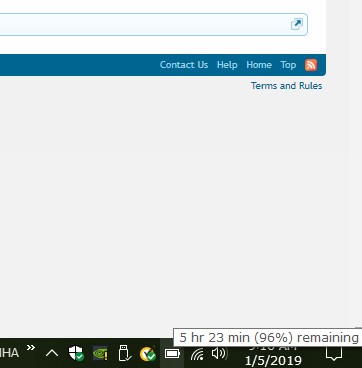
I just checked my battery charge and it is displaying 5:23 remaining with 96%. I am guessing that the time will ramp down and I will get around 3-3.5 hours on the battery. I closed any unneeded applications. I am still working on this as well without getting too complex. I do have a base model with a smaller battery and always have my charger with me. I have never found a business machine that has been outstanding with battery life .... ever so this isn't a huge deal for me. It is a bit inconvenient though.
Attached Files:
-
-
Thank you, I will take a look into this. I have nil experience when it comes to messing with BIOS so mildly apprehensive that I could mess something up badly, but your instructions look comprehensive.
-
You’re base model right? Yes pumping HDD will take more battery life and it’s smaller capacity right.RobotDoctor likes this.
-
No, the dgpu has always been active, but I did downclock the igpu
Sent from my iPad using Tapatalk -
I asked them about the 1.06 whether it could fix this, and their quote was ‘it was to fix an ongoing issue of the 15 not charging when off”. I’ll be honest, I thoroughly liked this laptop the powerful internals in such an unassuming package but the battery life really killed it for me. I was willing to put up with the light bleed and thermals but battery life was non negotiable. Stealth is not an option. Let’s hope they have some revision of this thing in CES 2019.
Sent from my iPad using Tapatalk -
Alright guys so I have a weird issue on my razer blade base 15 model. I keep getting random bluescreens and can't figure out what's causing it. Bluescreen view labels it as my hal.dll which leads me to think it's driver related. I have asked Razer for drivers however they say they don't have them yet because they're not ready. However before I do a complete clean install I was wondering if anyone with the BASE model would mind creating a driver backup for me? This tool is super useful and may save me from reinstalling everything lol
https://sourceforge.net/projects/drvback/
If not I'm going to buy a pro key and do a clean reinstall, most of my games are on my secondary hard drive so shouldn't be too crazy -
Why don't you just use the built in reset feature in windows 10 and it will retain drivers?
-
That's definitely true. I can live with 5-6 hours in light use, 2.5-3 hours of moderate/heavy use.
-
I did a clean install initially and swapped out the drive, so I lost all the original drivers :/
-
Did you try simple windows troubleshooting? If yes try download intel drivers update utility, and let it to scan drivers that’s needed to update, and update all.Michael A. Saldana likes this.
-
SOOOO as many of you will now see and hear, the Blade 15 is being updated to RTX cards, 2060, 2070mq and 2080mq. I'm already barely satisfied with the temps on the 8750h, after undervolt and repaste, but realistically wont the 2080mq drive up the temps even more? Unless things have been seriously tweaked, I'm willing to bet the cpu will throttle hard in game.
-
Depends. The 1070 Max-Q in the Blade 15 has a TDP rating of 90W (there's an 80W version, but Razer opted for the higher clocked one). Comparing the 2080 Max-Q and the 2070 Max-Q, both are rated at 80W TDP (according to Videocardz: https://vgy.me/3t2bIQ.png) with lower boost clocks than the current 1070 Max-Q, but more stream processors of course. The 2070 Max-Q operates at 1185 MHz boost, while the 2080 Max-Q has a boost clock of 1095 MHz. Of course GPU Boost will correct those clock speeds upwards if power and thermal capacities allow, but if Razer really forces them into their 80W power budget, then that's the clocks you'll see and the temperatures will be a little bit lower even. That doesn't account for CPU temperatures though.
EDIT: Oh right, of course expect a price increase because the GPUs will be more expensive (but that's no secret to anyone), especially if Razer opts to include an RTX 2080 Max-Q option. -
Though still new, I'm reading into the differences here.
I read somewhere the 2080 blade will cost $2,999 up.
Not really interested in ray tracing, and my system is spectacular, no need to upgrade now. What is exciting though, is HP will be using 240hz screens in laptops first, with Razer following behind some time, as well as 4k OLED displays. That'll be a treat to look at. -
hmm them new razers look spicy!! im going to wait for that 240hz OLED model yes pleeeeeeease!
-
Here you can see complete price list:
Ray Tracing is nice to have especially for non competitive play, like single player or open world. It’s like real movie. Here’s 2070 on core setting running 1440p dxr medium BFV single player.
I spent time mostly not shooting poeple just driving around
-
it cant throttle harder than it already does. And I dont think temps will be much of an issue. even with a 2080 max Q it will maybe see a difference of 5c ballpark. The fans will be louder because it will cool more aggresivly but im not worried too much about the temps. and the current razer blade already doesnt use all the power available to it thanks to the severe CPU power limit throttling. The new blades will have the same issue.
-
Hope they learnt from RTX launch. Here’s my experience from several RTX cards purchase, from 4 Rtx card 2 fine and 1 temperature and fans noise issues 1 DOA. If because the last one is great from Temperature and fans noise and also from Evga, i would return it already. Yes I’m interested and curious too on mobile gpu and can’t wait for reviews.djcgeez2189 likes this.
-
I have done that, also ran a memtest to verify it wasn't the RAM having issues. At this point I'm debating whether I should maybe return the laptop and get the new rtx 2060 blade coming out... Not sure what to do
-
I would get newest hardware if i were you, it comes with tons (only my expression) improvement over previous model. Yes it’ll be heavier than your current base Blade and more expensive. But with that I think you’ll use that longer than current one.
-
How do you think thermals would be? That's my biggest concern if I went that route
-
Yes that’s also my main concern, gpu temperature is always fine on Blade actually only cpu that is sometimes hard to control without proper tweaks. And with this new features like tensor core, dlss, we don’t know yet how it’ll impact (stess) the cpu. In worst scenario you’ll find the potential issues within RMA period and return it for maybe on that time more cheaper your current Blade. Usually first gpu Model like this will be fast out of stock so you’ve to be fast getting one.
-
Deff return it and get the 2060 model. the 2060 will be faster then a 1080 maq Q will be totally worth it
-
-
So I heard that MSI will be the first to market with these new laptops. I may end up switching over depending on how late razer comes out with theirs.
Yeah so I think my plan is to go to bestbuy today try and return it, if they don't charge a restocking fee then I'll return it and wait. If they try to charge me to return I think I will just swap out my base for another base so I can have all the stock drivers and everything -
It’s not known yet how every manufacturer will handle the thermal, even it’s with lower tdp and clock, it is possible that some manufacturer do more limitation like on Blade 15 power limitation for thermal reason. If it’s better than 1080maxq (raw performance not including Ray Tracing and dlss), it’ll produce huge heat, that’s one reason why zephyrus not using 1080maxq anymore if I’m not wrong, there’s too many heat problem with that in thin cassis and instead using 1070 and 1070maxq.
And be careful, I’m not pessimistic but from past experience, new gen gpu Blade will be down clocked quite a lot (late 2016 1060 refresh), and need time till users find how to unlock it.
My prediction 2060 Blade would be around current 1070 maxq Blade performance or maybe slightly lower, 2070 maxq would be desktop 2060 performance and 2080 maxq would be 2070 desktop performance...again it’s only my opinion, and I’m not good on predicting things
-
Did anyone of you guys lower your multiplier via throttlestop and if yes to what?
-
No, I didn’t touch it at all...and actually doesn’t need throttlestop at all, too hot? To your preferred core clock (on your convertible cpu temperature). I prefer xtu because using egpu setting is better than TS once there’s crash due my OC value (not yet but on previous setting yes), it’s easier to handle troubleshooting to me.Voxis9292 likes this.
-
I use the FIVR tab and limit it to 3.4ghz all cores when gaming. Auto fans, low 80s.Michael A. Saldana and Voxis9292 like this.
Razer Blade 15.6" (GTX 1060/1070, 2018 edition) Owner's Lounge
Discussion in 'Razer' started by X33nbat, May 20, 2018.