Problems? See this thread at archive.org.
The Cpu will start throttling at 100C whatever you put BD PROCHOT on or OFF.
-
-
Cheers Papusan, good to know.
So is BD PROCHOT completely unnecessary then? I am using this device primarily for video work so my temps will be high very often. I want to make sure I don't put the CPU under more strain than I need to. -
For the Cpu, yees no problem. The OEM manufacturers use BD PROCHOT to throttle other components if they run too hot vs. the cooling capacity. Some manufacturers put it all too low. Seen BD PROCHOT max at 90C or even lower. Probably to stop high costly RMA numbers due bad cooling. Or due use of cheap/low quality components.
-
So do I gain anything from deselecting it in Throttlestop? Or does it make no difference if its on or off?
-
I prefer not to have BD PROCHOT checked in ThrottleStop whatever max temp limits the OEM add into firmware.
Edit. Read also TS author @unclewebb ’s posts http://forum.notebookreview.com/threads/the-throttlestop-guide.531329/page-959#post-10848474
In short OEM’s way to rob the performance.Last edited: Mar 27, 2019Ashtrix likes this. -
Afternoon all. I'm trying hard to manage my thermals right now and I need a bit of advice.
*I've also asked the same question on the Throttlestop page, however I'd love to get feedback from fellow blade owners*
I use my Blade predominantly for video production work, 2D and 3D editing and rendering which tends to thrash both CPU and GPU under load. Despite needing to use it for work I'm keen not to melt it within 12 months, therefore I'm trying to find a configuration that gives me a good productivity to life ratio.
The Throttlestop settings I've finally settled on are as follows:
CPU core and cache offset to -140mv
iGPU offset to -60mv
Speedshift set to an EPP of 128
BD PROCHOT switched off
*all other settings are currently left at default*
I have been using RealBench for my stress testing as it is incredibly close to the real world stress I will be regularly putting my machine under, but I'm unsure as to whether the results are something I need to be concerned by.
On a 15 minute stress test the CPU clocks never go above about 2.7GHz and spend most of their time around 2.2GHz mark, occasionally dropping to about 1.8GHz with only 80% utilisation.
The CPU temps reach 91 degrees and the GPU temps reach 84 degrees
a 60 minute test saw the CPU temps reach 97 degrees and the GPU reach 89 degrees
a 15 minute stress test with Speedshift set to an EPP of 96, allowed the clocks to sit around the 3GHz mark, however the CPU temps peaked at around 100 degrees, averaging around 90 degrees.
So I guess I'm asking firstly is there anything more I can be doing to control either the clocks or temps and secondly is it safe to allow the CPU to be occasionally reaching 100 degrees under this kind of load?
Any feedback would be greatly appreciated -
At first I thought that the CPU is throttling a bit too much, but it seems that encoding video while tracing rays on the GPU is a little taxing.
 I ran the 15 minute test twice with the 8GB memory setting with cool down in between. I managed a stable undervolt of -152mV and -70mV on the iGPU (though that's irrelevant here). The EPP value was set to 64, deepest C-state was set to C2. PROCHOT is turned on, but didn't trigger according to ThrottleStop. I have applied a negative IMON offset in the BIOS (v1.07 and EC v1.03) to trick monitoring into thinking that the CPU cores use less power than they are in order to stabilize the clock speed under load. I'm running the balanced Windows power profile with core parking disabled and I don't have Synapse installed, so the EC firmware defaults to Balanced mode. The 1070 MaxQ is overclocked with a 240MHz core offset and a 620MHz memory offset.
I'm in a room controlled for 19°C. Managed CPU temperatures of 85-87°C sustained with a peak of one tick at 96°C. Otherwise each monitoring poll has shown under 90°C. It sustained 2.6-2.7GHz throughout the entire process. Didn't measure the GPU clock speeds, but it sustained 76-77°C with a 78°C peak of one tick.
Seeing that you could get higher clocks with worse thermals it might be that something fishy is going on with my settings. Still, your thermal situation could be improved, especially on the GPU side. Try repasting again. If you used Thermal Grizzly Kryonaut as thermal compound, try warming it a good bit right before use so it will spread better, and be generous with it. If you have a good, perfectly fitting screwdriver, increase the mounting pressure for excess thermal compound to squish out so you have good contact everywhere.
While it is safe for the CPU to run in such a thermal scenario, everything has its rated lifespan. Assuming that you have an otherwise flawless system and nothing will go bad, you can significantly increase its lifespan by not running it as close to maximum spec as possible. Don't ask by how much, but with CPUs you can generally expect something in the ballpark of a 20-50% longer lifespan when run 10°C lower than TjMax, again, assuming that it's a good chip.
CraftyClown likes this. -
.
Thanks mate, good to hear you had similar results. I was concerned my system was unduly struggling. Is there a reason you only tested for 8gig of RAM on RealBench?
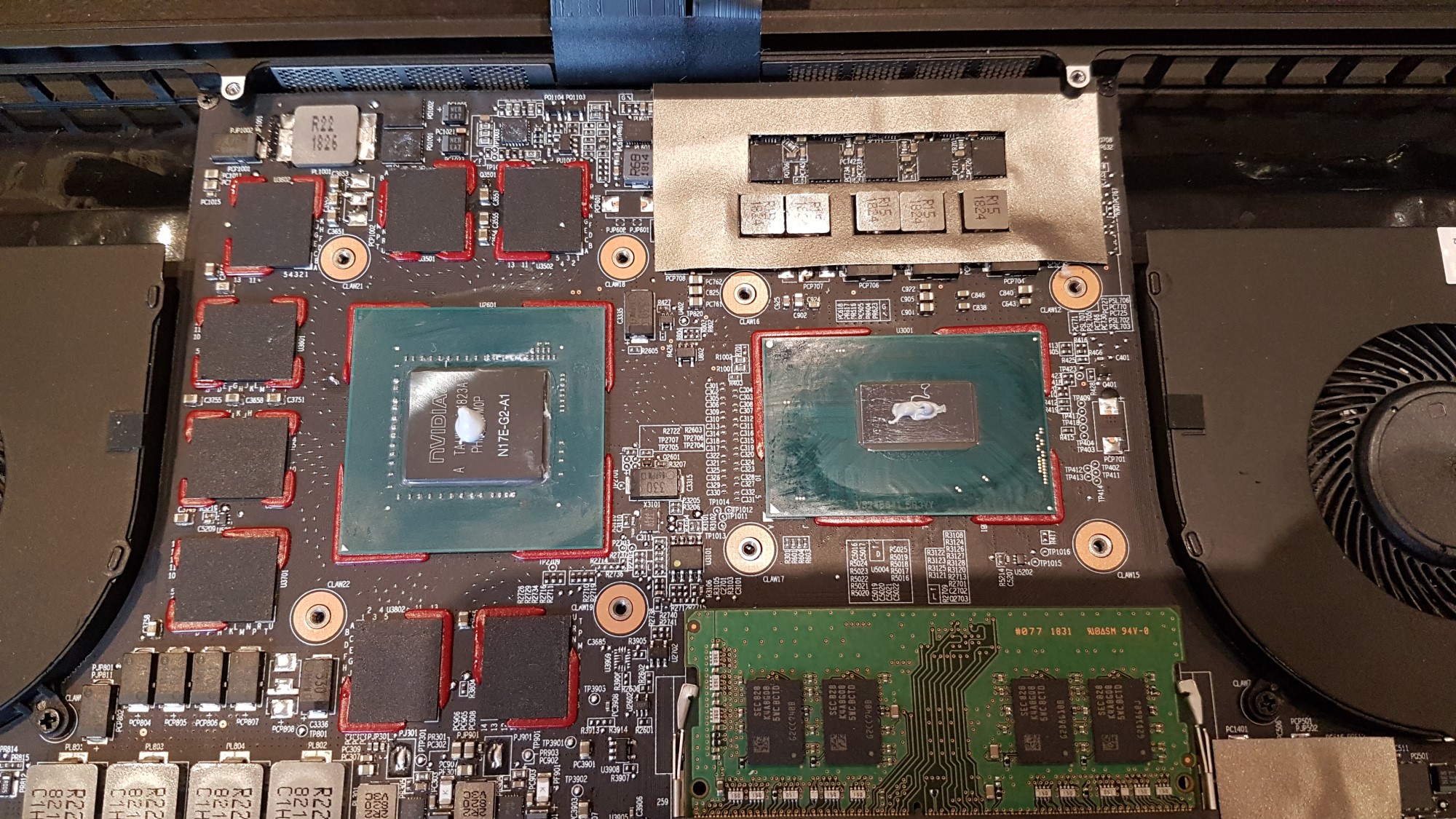
I'm happy to try another repaste if you think my temps are still a little too high. I've attached an image of my last repaste below. Do you think I should be using more or less?
CheersAttached Files:
-
-
It crashed when I chose 16 and clicked start. It was very late and I couldn't be bothered to investigate at that point.
I'd say the GPU could take two of these blobs, the CPU could take a slightly thicker line. Just to avoid hotspots, so you get full coverage. But everyone does it differently. I personally usually spread manually, so I have a thermal compound syringe with an applicator that makes it a bit easier.CraftyClown likes this. -
Evening all,
I've got myself into a slightly obsessive re-paste loop... Six times in three days!
I would really appreciate it if some Blade owners could do me a favour and use ROG RealBench to do the stress test for 15 minutes with 16 gigs of ram and let me know what your temps are.
Here's the link to the installer http://dlcdnmkt.asus.com/rog/RealBe...984.223895029.1553978579-915787453.1553701650
This test is greatly suited to my use case as as it combines simultaneous video encoding and 3D rendering and completely maxes the system out. I run a video production company and this is actually a real life use case for me.
My problem is hardly anyone with the Blade seems to have documented it if they do use this stress test and it makes it very hard to decide whether my very high temps are normal for this machine.
I am using Throttlestop with -140mv core/cache and -60mv iGPU and iGPU unslice
my Speedshift EPP is 128
I have my 1070 overclocked +170/500
I have power mode set to best performance and Synapse set to gaming mode with auto fans
My undervolt and overclock numbers are as far as I can push them without instability. I realise this is probably lower than many are able to get, but I think this is probably due to my 4K screen which I imagine takes more out of the CPU and GPU.
When I do the stress test my max CPU is 93 degrees and max GPU is 86 degrees
I would be so grateful if some other blade users could do the test and let me know the results, so I can decide whether to jump of the repaste merry-go-round once and for all
-
I did it today on my 10 month still default factory paste first batch black vapor chamber Blade. On default balanced mode with auto fans it wasn’t stressed the blade, since it’s limited not over 3ghz, so after 7 minutes I switched to gaming mode, plus running heaven together so it peaked to 91 but mostly on high 80ish. It’s on auto fans I believe with my preferred manual Fans, 4800rpm it’ll be around 5 degrees cooler.
Attached Files:
CraftyClown likes this. -
-
Today I reinstalled BIOS v1.05 (because of a separate issue), and tried again. The result is consistent, so my previous data is reliable. After setting the compatibility mode for the app to Windows 7 I was able to click start with the 16GB memory option selected, but it says that there's not enough memory to run the test. I suppose it really occupies the amount of RAM you select, so with the 16GB installed in my machine the 16GB option is not the best idea.
Not the best idea because having it use the pagefile because it fills up the RAM doesn't make much sense to completely hammer the components.
These temperatures seem acceptable. I'm confident that my thermal compound application is good, I'm getting lower GPU temperatures, but that depends on so many factors that it's unrealistic to control for it.CraftyClown likes this. -
Hey mate, I'm a bit confused by your results as that is ridiculously low for RealBench and you are running Heaven as well?? The photo also shows RealBench saying you have three graphics cards!? Do you have an eGPU connected? If so that would definitely mess with the results as there would potentially be less heat produced with the eGPU taking all the strain.
If it's not too much trouble would you consider doing the full 15 minute test again in gaming mode and auto fans, but without the eGPU connected. That way I compare the result in a more apples to apples way
-
It looks a bit like you may be having an issue with your ram mate. The stress test is designed to be set to the amount of ram your system has, so it's quite odd that you are having crashes and needing to find workarounds to get it working. It may be worth doing some tests on your ram just to make sure it's all good.
EDIT:
I just did a bit of google-fu and providing this was the message you got
"Not enough available memory. Install more RAM, increase size of pagefile, or select a smaller RAM preset."
Sounds like your page file doesn't have enough to manage the task. I presume you have page file set to auto? In which case it could be a lack of space on the drive the page file is assigned to, or a lot of background tasks using it up.
Either way, I'm sure your ram is perfectly fine, so ignore my first comment
Last edited: Mar 31, 2019 -
Exactly. I set the minimum pagefile size to be 256MB, but scale up to where it needs to be if it needs to. The benchmark just doesn't recognize that. Thanks for searching around though, sorry for wasting your time.
But I mean if either of the two things running during the test needs to access the pagefile I can see the CPU not being fed data quickly enough and the CPU usage to fluctuate a bit. When I ran the test the usage was pegged at 100%.CraftyClown likes this. -
Ah I forgot to plug off Razer Core, okay I’ll do stress test. But I just played Sekiro on dgpu 1070maxq with it plugged, cpu is same high with without compared to with rtx2080 on Core that was never show 80ish, it’s similar with 3Dmark, it’ll show it even egpu isn’t active. But I’ll run it of course
Attached Files:
CraftyClown likes this. -
-
Yes it peaked 100 on a test and right after finished apparently (didn’t stay in front of it to check) but mostly on high 80ish maybe auto fans isn’t good enough for keeping it cool, but it was loud enough. I’ll try again later with my fans profile 4800rpm, now continues Sekiro die (not) twice
. Curious if connection with core effects cpu temperature even working on dgpu though, good to know if it’s true will look at this as well later.
Attached Files:
CraftyClown likes this. -
-
Ah yes, that's exactly the kind of thing I'm seeing. Yours is maybe a bit hotter than what I'm getting, but clarification at least that my temps are to be expected. It really is a great stress test to see how good your system really is.
-
@Joikansai I noticed you take a lot of photos of your screen. Did you know you can press (Fn + Windows key + F12) and it will send a screen grab to a screen grabs folder, inside your pictures folder?
I just thought it might save you some time
-
It’s fine note as well that temperature is after I run long session games, Sekiro for 3 hours, usually I stress Furmark and prime95 to check the temperature with balanced mode since most my games are cpu bound to check if it still under tolerable temperatures, I do it usually in 6 months range and clean the Fans every year, repasting I do only before out of warranty, 2 years. This’s how I keep my Blade last long, I had Blade 14 that hold 2 years gaming usage and sold in mint condition, it was also factory default paste, since I stress at first weeks owning it and if I see possibility high temperature that I can’t handle I’d just send it back. On that Blade 14 I Limited only max cpu processor state to 99% to avoid Turbo Boost and keep it under 80ish degree area, but on new Synapse 3 Blade 15 they already do that by limiting tdp through EC firmware, even though it’s still boosting to max 3,9ghz, so I let Turbo Boost as it’s and synapse do its job.
Yes. But i use NBR forum mostly on mobile and better to me so than use Blade screenshot
-
Hey all, has anyone found a good cooling pad solution yet? I want something I can use comfortably on my lap when I work from home.
I have a Notepal I300 which is the perfect size and sits comfortably on my lap. It also brings the idle temps down a couple of degrees to about 39 degrees, however under load the thermals are actually higher as the cold air being blown upwards works against the hot air coming out of the exhaust
Is there anything out there that works well with the blade? -
Blade bottom fans are intake, maybe you should rising the bottom areas in order not to prevent hot air coming out. I never use cooling pad for Blade only by rising bottom area on gaming and playing between balanced and gaming mode, use gaming mode only if it doesn’t spike to high or mid 90. The FPS differences like for example SoTR or AC Oddysey that make cpu really hot is only 4 or 5 on ultra setting, still smooth, SoTR on 60~ and AC Odyssey 45~ but with 80ish cpu temperature on manual 4800rpm.
-
Not all of the bottom ones are. It's just the rear ones below the screen that act as exhaust. If I can find a solution that doesn't blow air towards them then problem solved.
I don't game very much on my Blade, I use it for video production, so it gets very hot and I need a cooling pad as I want to be able to work on my lap from home sometimes. -
Yes it’s the rear one is exhaust but at bottom lid grill both are intake, if it’s not it won’t dust after 10 months usage (posted photo on previous page somewhere). It blows also air through the keyboard i think it is designed so since rear one isn’t enough for output on max load. I don’t use it for editing or gaming on my lap only media consumption, paperwork that doesn’t need the dgpu, but if you’re using dgpu yes cooling pad that doesn’t disturb intake on below areas is needed.
-
iDATUS here again, just created another TECH GUIDE upload.
Its taken 3 weeks of about 5-6 hours a day to produce and it uses all the informational uploads I have posted on the NVIDIA GPU's.
TWO SCENARIOS
1) Overclock and Underclock the GPU Core Frequency to see the effect on FPS.
2) 4k Ultra max graphic settings, how to cool things down so it doesn't throttle.
Enjoy the video and please look around my channel as there are plenty other uploads just on the Razer Blade 15.
-
Not quite accurate. The fans are radial fans. They are constructed in a way that allows them to pull air from the top and the bottom if they can, and exhaust it to all sides. This stands in contrast to axial fans that pull air linearly through themselves.
The fans in the Blade 15 pull air through the holes in the bottom of the chassis, as well as through the keyboard and exhaust the air through the two little blocks of copper fins and out the back of the chassis, partly towards the screen and partly to the bottom. That's why the feet are so wide, they block some of the exhausted air from getting recirculated back into the fans.
CraftyClown likes this. -
That’s true about radial fans but because the high amount of air that been taken on high rpm it outputs not only to the rear exhaust area but also through keyboard (other brands has side vent so in such there’s a lot exhaust area but not on Blade). I noticed this from Blade 14 already and with Blade 15 it’s more. I use universal keyboard cover or keyboard cover that comes with it and on max load like on gaming session it’s throwing air from keyboard.
-
Yes I thought this was the case, the long foot acts as a barrier for the exhaust. I'm thinking of adding something to my cooler the length of the blade, but slightly higher than the foot, which the back of the blade can sit on and slightly elevate it at the same time as maintaining an exhaust barrier.
-
Patch for the issue similar to CVE-2018-4251: https://dl.razer.com/drivers/Blade/win/RazerUpdater_v1.1.1.0-ME mode-v2.exe
CraftyClown likes this. -
Where did you get this? It’s for all Blade laptops or only this 2018 model?
-
What is this mate?
-
It’s about this vulnerability things that users posted on Reddit.CraftyClown likes this.
-
Cheers, good to know
-
Duplicate post
-
Hi there. Can owner of Razer Blade 15 rtx 2070 and UHD display tell how long does the battery live?
Thank you -
Speaking about fixes. Here is the link to the firmware update to get the 60Hz on the BOE panel, installed and confirmed working. http://rzr.to/Tafjq Credit goes to the dude who posted in my Reddit thread here
-
Aghhhhh! has anyone managed to turn off adaptive brightness?
I have no options for it under Windows display settings, or under advanced power options, yet it is definitely happening whilst I'm on battery.
Please tell me Razer haven't locked it into the settings? -
Did you look through the Intel driver interface? It has dynamic color shifting to conserve battery in the energy settings.CraftyClown likes this.
-
Yeah, may have fixed it. I rolled back to the intel graphics drivers from the Razer website whilst trying to fix an issue with ICC profiles and it looks like that version doesn't have the full Intel driver interface for some reason. I just reinstalled the latest intel drivers and the interface is back and lo and behold the low power options had been switched back on.
I'm really not impressed by Razer's implementation of drivers -
For the most part Razer just repacks and renames already existing drivers. At least for the Intel Graphics driver they have more than likely changed nothing. The Realtek audio driver also is just what Realtek has on their FTP with some tweaks for Razer that Realtek also supplies.
I wouldn't be surprised if Intel's installer screwed something on your previous install. I also had that happen on machines of friends with Nvidia drivers, where the control panel would simply not be registered or have shortcuts created for until a complete Windows reinstall.
I personally would rather use more recent drivers than "Razer certified" ones. Packaging a custom build of the most recent Realtek audio driver (and they update pretty frequently behind the scenes) fixed a few problems for me because Razer simply supplies an old driver.CraftyClown likes this. -
It's frustrating that Razer call all their installed drivers 'Blade' It makes it extremely difficult to work out what's what and what needs updating.
I've had a few issues with my blade recently and determining whether they are hardware or driver related is proving difficult and frustrating. This adaptive brightness issue seems to be fixed now, but I am still having problems with using custom ICC profiles (They get unloaded and reloaded every time hardware refreshes, drives get connected, disconnected etc) and an ongoing issue with with my touchpad which has sudden acceleration at the end of two finger scroll movements. -
I have that as well. I'd say that one's probably on Microsoft. Potentially it can help to disable all the three and more finger gestures. I can imagine it misregistering inputs because the driver is looking for all kinds of gestures.
Huh. Isn't happening to me. I, of course, see the intrinsic performance degradation of using Windows color management, but I didn't notice any other drawbacks or bugs. Neither on the Blade, nor on the numerous machines I had in the last years. I occasionally do color critical work and WCS was okay.CraftyClown likes this. -
Good call, I'll try disabling some of the gestures and see if that helps. It's odd because sometimes it works perfectly and then other times it jumps all over the place at the slightest of movements.
Regarding the ICC profile, are you saying you also have a custom one installed and it's not got any issues?
If so are you using Windows to load it, or something like DisplayCAL? I've found issues with both, but it's more pronounced when using DisplayCAL. -
Yup.
Via Windows. Before color critical work I usually recalibrate and just replace the old profile in the Windows color management menus. Worked well enough. It just takes a second (literally) to apply it on startup. But I see the colors change every time I land on the desktop.
EDIT: By the way, I mean I of course don't do critical work on the Blade, since the 144Hz screen only has sRGB support.CraftyClown likes this. -
But you are still successfully loading a custom profile on your Blade without occasional flicker/loss of calibration?
I'm curious about how and why you're loading your profile from Windows startup. Does it not stick otherwise? -
Did you notice any difference in idle temps and how often the fans spin up when on a light workload?
-
Yes. Just as on my desktop the colors change once on startup and that's it. Of course when I start an application that likes to take over Windows color management, like Photoshop, the colors change if I have another profile than the one selected in Windows (but that doesn't stick after I close it). That's a little annoying to change every time I recalibrate since Photoshop falls back not to the Windows profile but to a standard sRGB/AdobeRGB profile, but that's nothing Adobe will fix probably.
I just didn't try anything else because I'm a lazy ass. I'm simply living with the slight drop in FPS in games because I can't be bothered to enable/disable the color management every time. It just works without any intervention on my end after I apply it in the color management settings. -
There are new Bios and EC Firmware updates on Razers driver page for 2019 RTX blades. Anyone know what these address?
-
edit: nvm clicking download shows the details.
So the updates both claim to provided stability improvements and fix audible motherboard issue. I can also see that the EC update fixed the 'freezing trackpad at startup' issue i was also facing. Ill have to play a game later and see if the noisy mobo is gone too.Last edited: Apr 17, 2019 -
Did you successfully update the BIOS? The updater stop at 99% forever, never reboot to finish update. I waited more than an hour, but I had to perform forced restart.
I only have issue with BIOS update.
The EC and IME update worked well.
Razer Blade 15.6" (GTX 1060/1070, 2018 edition) Owner's Lounge
Discussion in 'Razer' started by X33nbat, May 20, 2018.