Problems? See this thread at archive.org.
I bought my Sabrent EC-NVME enclosure for 20 bucks used on ebay last month. It works alright.
My system is the RB15 2018 Base Model. And yeah it does seem to cap out at 10GBs. Faster than USB 3.0 for sure but disappointingly short of the best speeds available via TB3.
-
Hi, I'm new here so hope this is the right place to post!
I have a Razer Blade 15 2018 (GTX1070) and I just noticed the flex cable in the centre of the hinge is starting to crack/split, I've uploaded an image here: https://imgur.com/a/whB8C8z
I've only had it since December but it is a new-refurbished unit with 90 days warranty so is technically out of that period however I did have to send it back to Razer as several of the keys weren't lighting up in January which ate up around a month of this period!
I understand that this is a very common issue and begins to affect the camera/mic, although it doesn't seem to be causing any problems at the moment this is really disappointing after just a few months of maybe being opened once or twice a day. I really expect such a high-end laptop to last some time if cared for properly.
I just want to ask how others have found/resolved this issue as I guess this is a ticking time bomb before it starts to cause problems for me.
Thanks. -
I have a 2018 blade with 1070 since launch and its been pretty rock solid aside from some windows update issues. I am noticing it is running a bit hotter these days. Last night the GPU reached 86c. I know a repaste is recommended but id rather not do this myself since it is under warranty still. I got the 4 year microsoft warranty when I purchased it. If I bring this to the Microsoft store will they do a repaste for me?
-
Hi, thanks for the info. It's a great machine and generally speaking has worked like a dream (apart from the keys that weren't lighting up, which Razer sorted). But yeah, It's a shame this flex cable can't seem to survive three months of what I think is pretty light use (opened probably once a day on average, maybe 10 hours gaming a month) :/
Is the cable is ok condition on your machine kessomatt? And other peoples? Thanks again. -
Yes. The cable is just fine on mine. No problems with my webcam or anything else.
-
Did you ever clean the fans? Mine, early batch black vapor chamber already cleaned 3 times in this nearly 2 years. GPU mostly always on 70ish never reach mid 80ish, I think I see rarely also in 80ish and CPU with Undervolting it stays mostly on mid 80ish some games spike it to 90ish though especially on pre rendering scenes like loading on open world titles.
No I don’t have it and please don’t happen after 2 years guarantee runs out next month LoL. -
No issues with IO errors when writing large files?
Which NVME drive did you put in the enclosure? -
Haven't run into any IO errors at all no.
I've used a lot of drives in it
Namely I used parted magic's Gparted to clone the ssd i had been using(A 1tb oem samsung drive similar to a 960 evo) to a 2TB HP ex950, since then I've put a few OEM Samung drives into it, a few toshiba drives. Mostly for testing purpose or data recovery
Maybe the enclosures you tested were bad? In the past, When I got IO errors on large files it was because the enclosure itself was bad. -
Have tried oem 1TB Toshiba XG3 drive in Sabrent EC-NVME and UGreen NVME enclosures. Both same problems. Maybe my usb-c port has a hardware issue. Will just have to live with it if that is the case.
Works ok on Alienware 13 R3, MBP 15 and my Android phones.Last edited: May 4, 2020 -
Yeah that sucks dude. Seems most likely that yeah it is the TB3 controller itself in your system.
-
I hope it's okay to crosspost from another thread. Has anyone been able to adjust their fan controls with the BIOS?
My fans turn on at around ~50C, which is really annoying since my temperatures fluctuate below and above the threshold to cause the fans to turn on and off constantly. To make things worse, my fans make a loud buzzing noise when starting, which is probably the only reason why I'm looking to raise the threshold. I'm also on the latest BIOS version and using Throttlestop to undervolt
I've pretty much followed seen on this video (but maybe it only works for the 2017 models. I have the Razer Blade 15 Advanced)
And this is the only other resource I found (which talk about the same BIOS changes)
https://www.reddit.com/r/razer/comments/asmkfa/razer_blade_15_2018_fan_control/
However, flashing the BIOS hasn't change anything on my laptop.Last edited: May 15, 2020 -
I've definitely missed this if it was mentioned before; but does anybody know how to solve the power limit throttling in the RB15 2018 Base model?
My 8750h ramps up to like 70w of power for a few seconds, then drops down to 45w.
To be clear, with the paste job it has and TS, it does not reach thermal throttling. This is a power limit throttle. It goes from maintaining 3.9Ghz on all cores without issue to dropping to something like 2.6Ghz on all cores.
edit: Upon some further observations it seems the power limiting only hits when the cpu spends an amount of time at 90c, so maybe it is "thermal throttling".
Too bad.Last edited: May 31, 2020 -
Did you try repasting it maybe it dried out since it’s already 2 years old? Some titles would easily spike the temperature higher especially on this laptop category and if you’re removing power limitation repasting job is a must. I can keep it not surpassing mid 80ish on GTA online, did like last month after 2 years owning flag, before on same game it can easily reach 90ish. Though mine is advanced with vapor chamber maybe the things would be different but I remember base model cooling system is actually not bad at all according Notebookcheck.
Attached Files:
Darkhan likes this. -
-
Oh yeah, the cooling in it is pretty great.
I kinda just gave up because well, it's not really something I notice in daily use, or when even gaming most of the time. It gets warm, but doesn't really throttle. The only time I was seriously noticing either thermal throttling or power limit throttling, was in applications like Cinebench R20 ... which lol .. that's just a benchmark, who cares.
I don't think i wanna repaste it. its not bad enough yet.Joikansai likes this. -
Does anyone here have the 90 watt bios for the RTX 2070 Super Max-Q from the Razer Blade Advanced 15? I'm trying to flash my GS66 Stealth from 80 watts to 90 watts.
-
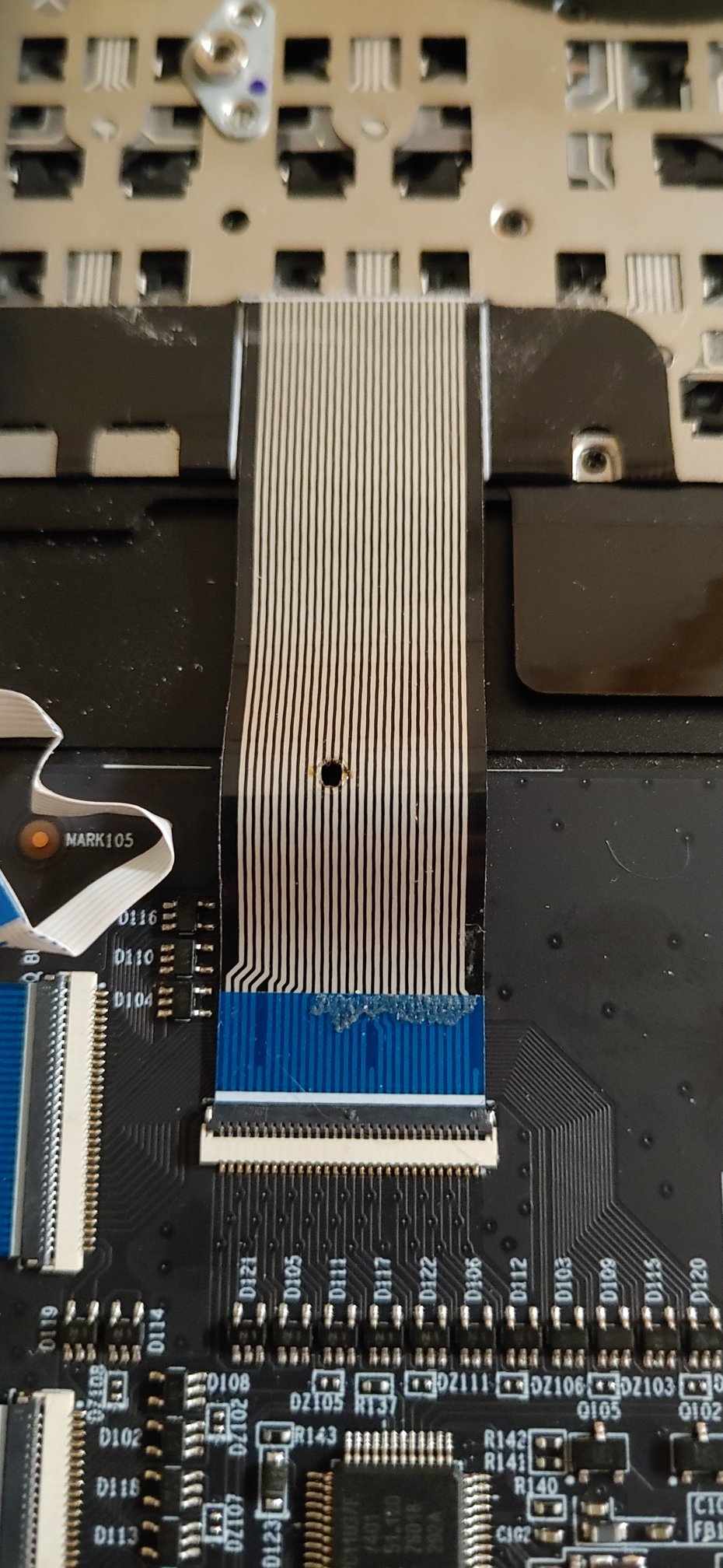
So I was playing Escape From Tarkov and all of a sudden the row F2 diagonal to Z stopped working. After removing the battery and jiggling the keyboard cables it was only the Z and F2 key that remained inoperable.
After lots of troubleshooting and theorizing I found that the voltage wasn't increasing on on the block of diodes when pressing either key unlike all the other keys in the area of the keyboard. I suspected something went wrong with the keyboard membrane or the ribbon cable.
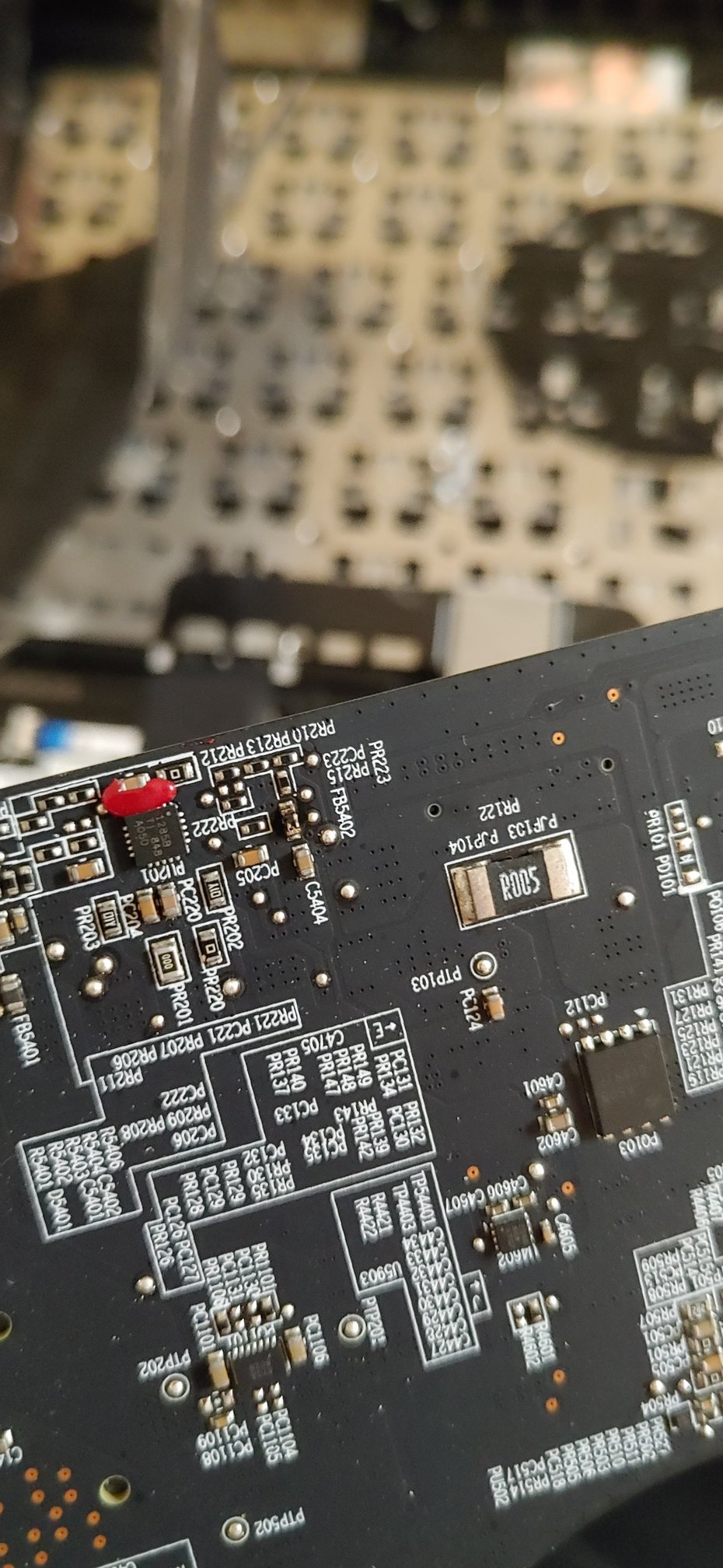
After taking out the motherboard I saw that FB5402 (Ferrite Bead) melted through one of the three keyboard ribbon cables destroying 2 pins of the connector. These are the Z and F2 keys The Ferrite Bead dissipates EMI noise as heat. I am guessing the ribbon cable was not suppose to sit right against the motherboard. Either it was folded wrong so it stood up or someone forgot to apply kaptop/thermal tape.
Looks like I will have to replace the entire palm rest with keyboard or just buy a new laptop if I want a fully functioning keyboard again.Attached Files:
Last edited: Aug 10, 2020 -
-
This sort of ribbon damage is quite repairable with some moderate soldering skills - lines are wide, damaged part of ribbon is in an accessible place. I think you can either give it to be repaired or replaced for reasonable money or DIY. The question is rather why FB5402 became that hot.
I didn't pull out my motherboard, but for Razer it's pretty easy to forget to do/put smth inside/outside of the laptop. So there may be a lack of a tape or wrong placement indeed.Last edited: Aug 10, 2020 -
it's not a copper cable. It's a trace ink/printed plastic one that is part of the membrane keyboard itself. It would be very very hard to repair and the pitch is at most 1mm. I have been brainstorming on how to possibly fix it but it will be very hard just trying to make a good connection with the printed trace material under the burnt plastic.
Would be something like this:
- Somehow prep the 2 traces on both sides of the hole
- Tape or glue a piece of plastic on the underside
- Draw the first trace on and wait for it to dry
- Paint on a layer of something to insulate it
- Draw the second trace on
- Paint on a layer of something to insulate it
Might want to check yours. I have covered mine with kapton tape for protection. I am not sure if FB5402 went out of spec or not. I am not sure what the ribbon cable is spec'd to temperature wise. FB5402 seems to be intact and measures out as it should. Checking out random SMD ferrite beads on mouser I see operating temps up to 155c -
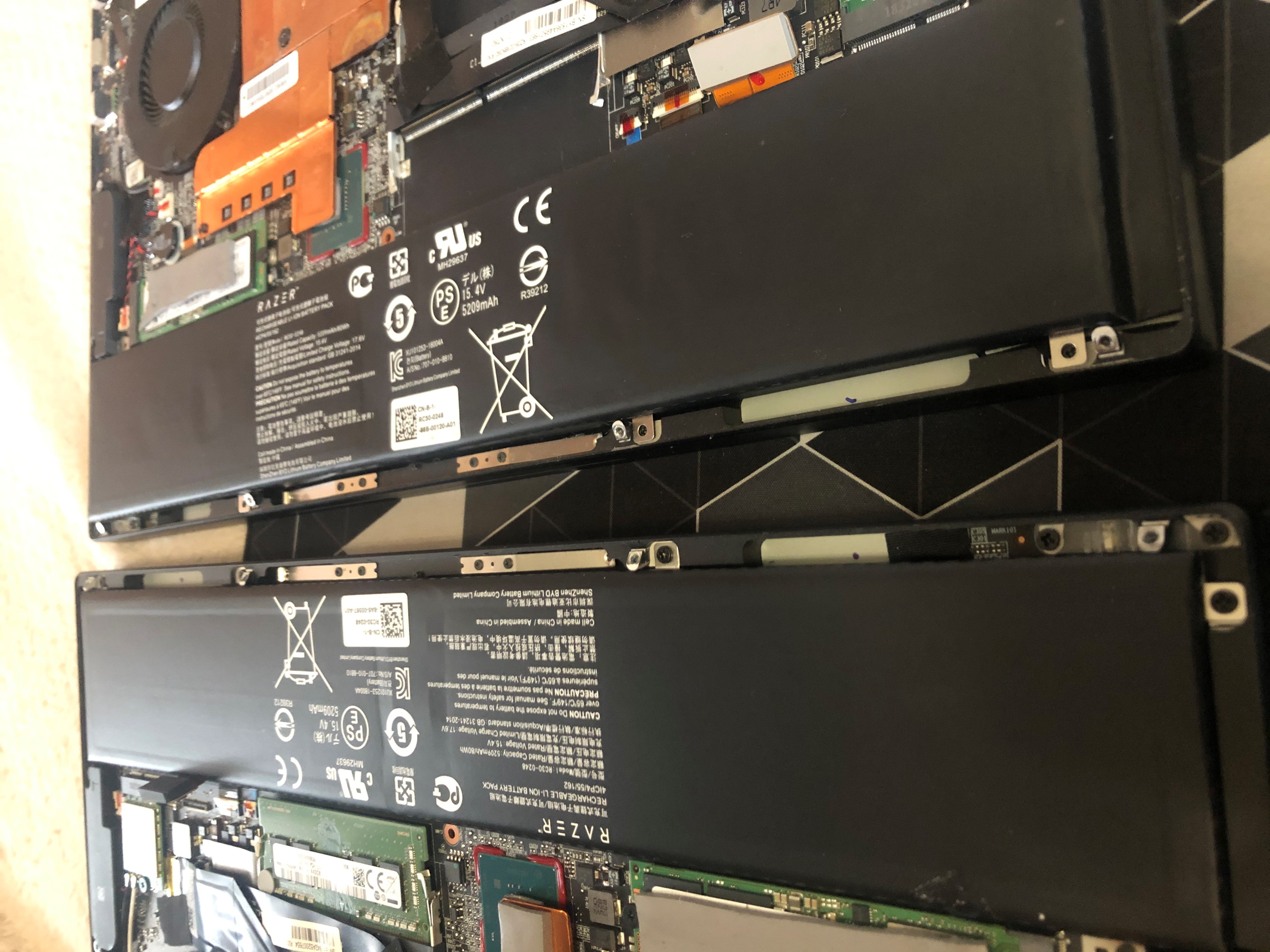
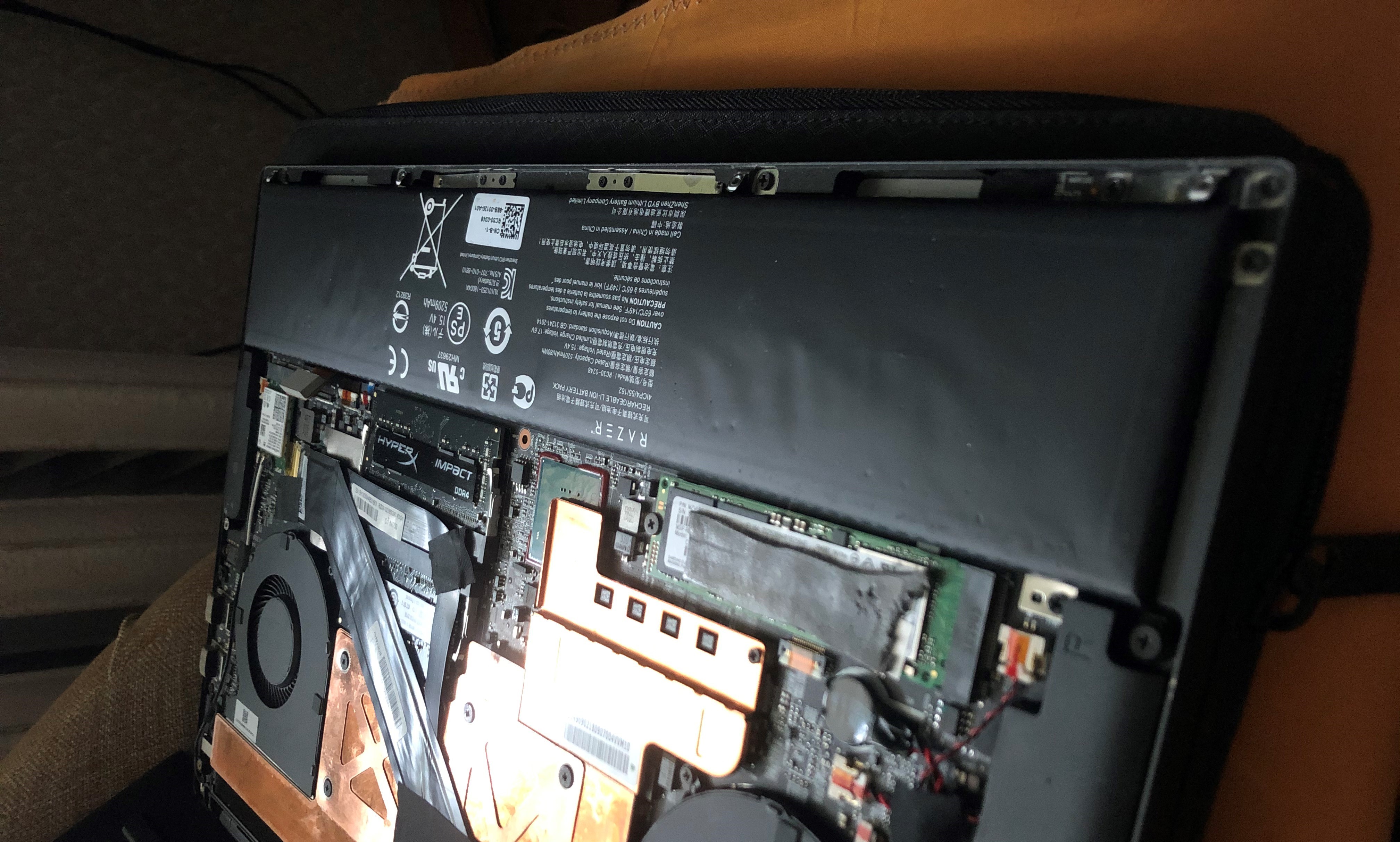
My original battery for my 2018 Razer Blade base model started to bloat. I have 3 years of extended warranty with BestBuy Geek Squad (oh joy of joys) but purchased a compliant battery myself. I would rather pay for a battery than let GeekSquad touch my computer, take it for a week to two weeks just to replace a battery. Touch pad "mouse keys" now feel normal and are functional without effort. When inspecting the original battery compared to the replacement there is a bit of bloating occurring, nothing major but that would soon change. No damage to my computer whatsoever.
Muezick likes this. -
Going on month 18 on my 2018 blade and the battery, which sits at like 90+% full all the time, only has like 3% wear and i can still squeeze out like 5-6 hours out of it messing with the settings.
zero battery bloat.
I feel like the battery bloat was more of an isolated problem than folks were assuming. At least, in 2018 onwards.
Edit: I have the base modelLast edited: Sep 20, 2020 -
Just noticed that my 2018 advanced touchpad is really difficult to click now and can see bloat pushing down the bottom of the case at the front. Between the battery bloat and it burning through it's own ribbon cable I am highly unimpressed.
Muezick likes this. -
Yes it’s known Blade issue if the trackpad hardly to click. Maybe thermal cooks the battery, thanks to aluminum unibody and literally only one heat output vent. They should change the body already like other two extra side heat output.
Same here only +10 months older, early batch black vapor chamber. Since I’ve stealth for one go literally it’s sitting on my desk plugged on the wall 24/365, can get also 6+ hours by dimming things. Was waiting it bulged or whatsoever to upgrade to 2020 one, but maybe hold a little bit till ampere mobile and tiger lake cpu out. -
Oh I'm definitely waiting for the 3000 series blades before buying one.
I am also holding out hope on AMD models. It's slim but it's there lmao -
I have had my 2018 Blade base model since mid-November 2018 so going on 21 months now. The bloat issue just started about 2-3 weeks ago. The only reason I noticed and suspected it is because of those experiencing battery bloat saying they had track pad mouse button click difficulties at the beginning of their situations. This seemed to be a common scenario. I certainly hope this is an isolated issue but at least there is something to be aware of.
-
I took the battery out and it's only one side of the battery that feels like it's full of gas. I can gently push down on and see it puff out at the other end of the left side. Right side is flat and hard like it should be. Don't think I will be buying another one of these. Battery still works great but it's turning into a balloon...
-
The computer has been terrific up to this point. I hope that Razer sources batteries from a different vendor who makes reliable batteries. I would definitely purchase another Razer computer only if it offers a battery replacement option.
-
Seems like the failing battery was causing me some severe overheating. Very weird. I removed the battery after last gaming session and it had ballooned massively. The screws were hard to take out and it had bulged out like 0.5cm!!!!! It deflated quite a bit after it was removed and cooled down.
-
It’s made by BYD (build your dream lmao), not sure if it’s from blade 14 2015 age, since that blade is unbelievable solid, was sold it back in 2017 and the seller listed it as working machine recently for like €600. I think the issues was starting from 2016 stealth, from my experience when pairing with the core it was steady hitting a good 100 degrees CPUs on some titles, and I think some guys thinking it’s a gaming laptop and play overwatch or CS go on 720p and hyping on chroma keyboard (from what I saw from my old stealth buyer), that’s literally cooking the battery on top (if) having bad battery quality. I use Blade laptops alway by limiting turbo boost, no fancy ultra setting and a must Undervolting to keep it on 80ish areas beside hardware tweak like repasting annually and dusting, maybe also lucky factor not having such hardware issues in past 5 years owning blade laptops.
-
Weird **** just keeps happening. I get ping spikes to any wireless AP of over 100 frequently causing kicks from games. Only happened since battery turned into a balloon and cooked the laptop causing a couple thermal shutdowns. Seems to be the Intel AC 9250 has gone flaky. Once it gets into that state I have to uninstall/reinstall driver and it works for a few more hours. Same Ubiquiti hardware for ever. Swapped out to a spare AP as well and same problem. Same problem hot spotting from my phone too. Ordered a replacement card. Hopefully that and the new battery fixes most of it...
-
I have two of the original RB 2018's. Both had battery bloat in the past two months and I have replaced the batteries. One of them has a burned out webcam. These have seen fairly heavy use for the past two and a half years but have been run both undervolted and without turbo the entire time. Nearly always hooked into AC power as well. I kind of accept the battery bloat, but the webcam is fairly annoying. Also after the battery replacement the palm rests seem more warm than they had been in the past. Getting close to being the market for a new notebook and I'm at a loss for what to purchase at this point.
DrewN likes this. -
I have RBA 2018 with 1060MQ (nowadays it mostly in use by my family ) and my personal RBA 2018 with 1070MQ.
First one already have faulty battery, webcam & mic. That's already hilarious =/ The second one have only broken mic so far.Last edited: Nov 6, 2020 -
RB15 baked out it's kryonaut in a few months with heavy gaming. Going to try liquid metal next. Vapor chamber already had liquid metal used on it from previous owner and it absorbed into the heatsink.
-
I just reading 2018 posts. And I kinda shocked how they getting such low temp in firestrike.
I repasted, repadded my blade undervolt cpu to -190V, limited cpu to 3GHZ but unfortunately i got these results after 30 min Apex legends. Also the main concern is PCH, SSD hitting 80c, sometimes 90c.
https://imgur.com/h7BpNNO
https://imgur.com/NKY977S
-
just add more liquid metal ez
-
Exactly. Shouldn't absorb much more. Though going to try a barrier too. Got some super 33 tape already.
-
So I had a go at repairing the burn damage on my keyboard flex cable! I managed to repair both keys affected by the burn hole! It took a few hours of really careful work but got it working with no crosstalk between any keys!
Supplies:
Circuit Scribe silver ink pen
Really pointy sharp pair of tweezers
Fiberglass sanding pen philmore PrepPen
Super 33 electrical tape for masking
1) Mask off single trace with a piece of tape on both sides.
2) On side of break with connector begin sanding with PrepPen closer to the burn hole.
3) Continue sanding for 3-5 minutes.
4) Check visually.
5) Test continuity between sanded area and connector pins.
6) Repeat until you have continuity or you can lightly scrap with someone very very pointy like a needle/sharp tweezers.
7) Once you have continuity use the pen to create a trace in that area. As it dries the resistance will go down.
8) Gently check continuity between new trace and pin on connector and adjacent pins. Fix any bridges to other pins by wiping away ink.
9) Repeat process on other side of the break and then draw a trace between the two points reforming the circuit.
10) Cover area of motherboard that sits on connector with Super 33+/88+ electrical tape or kapton tape.
Masking:
Fully repaired:
ole!!! and RobotDoctor like this. -
Was watching some youtube and screen went green followed by a hard freeze. Looks like Nvidia GPU died. Can't install/uninstall drivers. Hitting memory faults and Video TDR Failures. Definitely won't be buying one of these again!
-
yes because you can tell by the fact that razer is still in business and selling laptops, that literally all their GPUs fail
What about Nvidia? They made the chip that failed. maybe you should boycot them!RobotDoctor likes this. -
Wise decision. I refer to buying mine as a valuable life lesson

You can go and try to source a motherboard on ebay (but they are still expensive even today) or resolder/replace the gpu (if that's the actual fault) - that would be cheaper than buying another one.
Bulged batteries, failing camaera+mic, fragile plastic hinge covers, sound through mini jack socket, poor cooling, locked bios settings, backlight bleeding.
Everyone may add to this list (like the guy with the burned keyboard ribbon cable).
No, you are right - they are doing great. While people that I won't name proceed sing them laudatory odes, Razer would get a constant flow of customers.
I'd suggest to make a glossary to see what fraction of users here with Razer laptops have/had hardware issues and how many users would buy it again.
ps: forgot to mention total absence of the new replacement parts and immense price for a used ones.Last edited: Mar 19, 2021 -
They can if they make sure that the machines is able to survive within the minimum obligatory Warranty period. And extended warranty paid by the customers can take care of RMA costs outside the already mentioned warranty period (The way Dell and others do it).
Add in awful features in firmware to prolong the already a short lifespan due low quality components/ cooling can also reduce the companies RMA costs when the extended warranty period start to run. Many ways to stay in business
Last edited: Mar 19, 2021 -
You are assuming it's the Nvidia chip itself and not any of the supporting circuitry, VRMs, memory, solder/bga, cooling design. Even if it's the chip itself it doesn't mean it was a defect it could be harmed due to engineering of the board itself or a fault somewhere on the board.
Personally I'm not sure what it is. I had a cursory look and couldn't spot anything. Likely BGA related would be my guess and not the silicon itself. Though we've seen chiplet problems with both Nvidia and AMD before.
I'm not sure about their GPU failure rate but I would say that some of the other issues are quite common. Has not left me impressed durability wise or service/repair cost wise.ole!!! likes this. -
I would not buy it again, oh wait I have never bought razor to begin with because we predicted some of these will happen from miles away years before it happened. companies will go for profit so it only made sense to eventually give less and less while charging more. poor quality is bound to happen and unless some major fk up with massive rebound from consumer market, they simply won't care.
your statement is the perfect example why they don't care and continue to do these shady practices.
and as for being in business so they must be fine, yep flawed logic had to break it to you! take intel for example, they are still in business after doing harmful things to the consumer market and being anti-competitive. in fact, that benefited them way moreyears back.Papusan likes this. -
I have had to replace my original battery. I sourced a replacement and purchased two. I am not pleased with battery bloat but have taken steps to take care of future potential bloat issue.
Otherwise I have not experiences any issues other people are claiming. First question is how many people who complain of issues have changed performance specs, whether that is going into the system bios or any other means? I have not changed any performance specs. I have changed the primary and secondary hard drives (I have a base model) and maxed out memory (from 16Gb to 32Gb). Other than the upgrades and battery replacement I have not done anything to my system. My 2018 Razer Blade base model seems to be running fine with little issue. -
I’ve tons their laptops, from Tablet to Razer Book later one still baby so can’t see the issue but advanced 2018 one still rocking solid. One if I’ve mentioned maybe their software department, with buggy synapse but I can live with it.
Once they stop business I’d find the issue finding solid laptop that meet my requirement, most laptops build like a joke and weight like a tank, in this form factor with similar build maybe Asus g15, but again they’re also a joke not putting a webcam in such time a lot of poeple need even though they actually have place to do that. Yes I know we can use phone to do that, same reason as MacBook users with their dongles. So since maybe someone like me exist out there they still can sell things and make profit over one Billion last year, and it’s a growth from previous year just like scalpers that continues growing since there’re still poeple who need it. -
just because you have not experience issue doesn't mean others will not. the problem isn't you and your experience, it is the way laptops are build nowadays with the goal of making profit and giving consumer less while charging more for less quality on everything they give.
further more with slim form factor, you have got the problem of cooling it is just heat physics that you can't overcome with sheer size of copper. but worry not because with newer CPU on newer nodes, they will be able to hide more of these problems away and unaware consumers will be happy to buy more. -
Of course it’s, just show that there’s not everyone has experience as you thought and I know some dudes who on the same position, buying their products almost every year. And in term of business they are successful, and Alienware, MSI, Asus are moving to this thin light direction as well, though since they’re big Daddy on this field they keep offering tower replacement laptops.
Just move on in case you experienced bad things for your bucks. I did it as well from another brand to Razer and not regretted at all. -
Storytime praising Razer's (at least the German) customer support, scolding their German service center a little.
So I've had one of the first European launch devices of the Blade 15 since June 2018 (Advanced, i7 8750H, GTX 1070), and after one and a half years of little, and then around 9 months of constant use, the battery bloated on me. Probably because I left it plugged in all the time during the period of heavy use.
Looked for alternatives, nothing good and/or genuine to be found. Closest was importing a genuine battery from the UK, which would be expensive. Razer's support said they don't sell parts (of course they don't), so I was left with nothing but sending the machine to their service center and hoping for the best. My Blade was wrapped in dBrand skins, so at least the main surfaces were safe from scratches by a less than careful technician.
They arranged for express shipping to and back from the service center, and I had the machine back in a little more than a week. The new battery wasn't perfect, Windows showed a wear level higher than zero, but it was pretty low (3.x% if I remember correctly). Conditioning it over a few days didn't help by the way. It costed around €130, which was roughly in line with what genuine batteries costed without import fees and tax.
When I got the machine back, I immediately noticed an unusual flex on the bottom cover, albeit a slight one, and the dBrand skin was gone. I thought okay, maybe they took it off to verify the serial number, and were too lazy to look it up in the BIOS. And the flex was probably due to the battery being bulged, so it would likely bend itself back, or I could help it out a little later.
Being wiser now, I figured I'll remove the battery for now, since the machine will be stationary for a while. I was taken aback a little when I noticed that the bottom cover flexing wasn't from it being bent previously by the battery or something, but it was a bottom cover for a Blade 15 with a GTX 1060 Max-Q. The covers between the models differ ever so slightly in thickness, and that was what I noticed. And of course, the serial number was different from my machine. At least the rest of the device was the one I bought in 2018.
So I hit them up and asked (more nicely) how the hell an able human could not differentiate between the rough surface of the dBrand skin and the smooth stock bottom cover. Even if the technician were blind (which I hope they're not), they must have felt the rough surfaces on the rest of the laptop, and hopefully expected the bottom cover to have the same. I sent them the serial number of the device that I got the bottom cover from, and asked whether they could maybe set the two of us up, so we could exchange our bottom covers, either on our own, or through Razer. They obviously would have the other customer in the database, since that GTX 1060 Blade must have been sent to the same service center for service. And, well, they didn't want to do exactly that, but offered a new device.
So I'm now a happy (?) and confused owner of a brand new late 2019 Razer Blade 15 with the i7 9750H and the RTX 2070 Max-Q. Task failed successfully I guess?
I haven't had time to properly test the new device, but I can tell that the fans have a different noise profile, even though they're the same ones. They have less of the annoying whine that I grew accustomed to. Still there, but less. And the thermal situation is significantly better from the factory than my old Blade. That needed a repaste pretty much immediately. Also I find it slightly unnerving that Razer didn't find it necessary to provide all the needed drivers via their device support page. I personally don't like getting drivers via Windows Update. I imagine that situation getting worse as the device ages.
I'm glad that in this whole process no one said anything about all those mysterious BIOS settings I unlocked... Probably didn't even look at it. -
The Base version missed the ribbon problems (camera/mic issue) - your laptop has a normal wire through the hinge. The problem with hinge covers was brought to me by the repair "geniuses" (yes, they broke it while making battery replacement during the warranty period).
I didn't get what modifications are you talking about. By what means you can modify it in the laptop? As for bios - there are only a few options available but none of them can bulge your battery or break the traces on the flat cable in half.
Did anyone buy an aftermarket battery for these laptops (part number rb30-0248)? If so, could you share a link and some comments? I've seen some reviews that some batteries are a bit thicker than the original one or have a bit shorter/longer connection ribbon.Last edited: Apr 12, 2021 -
I'm looking for a spare heatsink and I can't seem to find any for the 2018 advance model (1070 maxq)
Does anyone know if the 2019 heatsinks are identical/compatible to the previous 2018 gen?
Razer Blade 15.6" (GTX 1060/1070, 2018 edition) Owner's Lounge
Discussion in 'Razer' started by X33nbat, May 20, 2018.