 Problems? See this thread at archive.org.
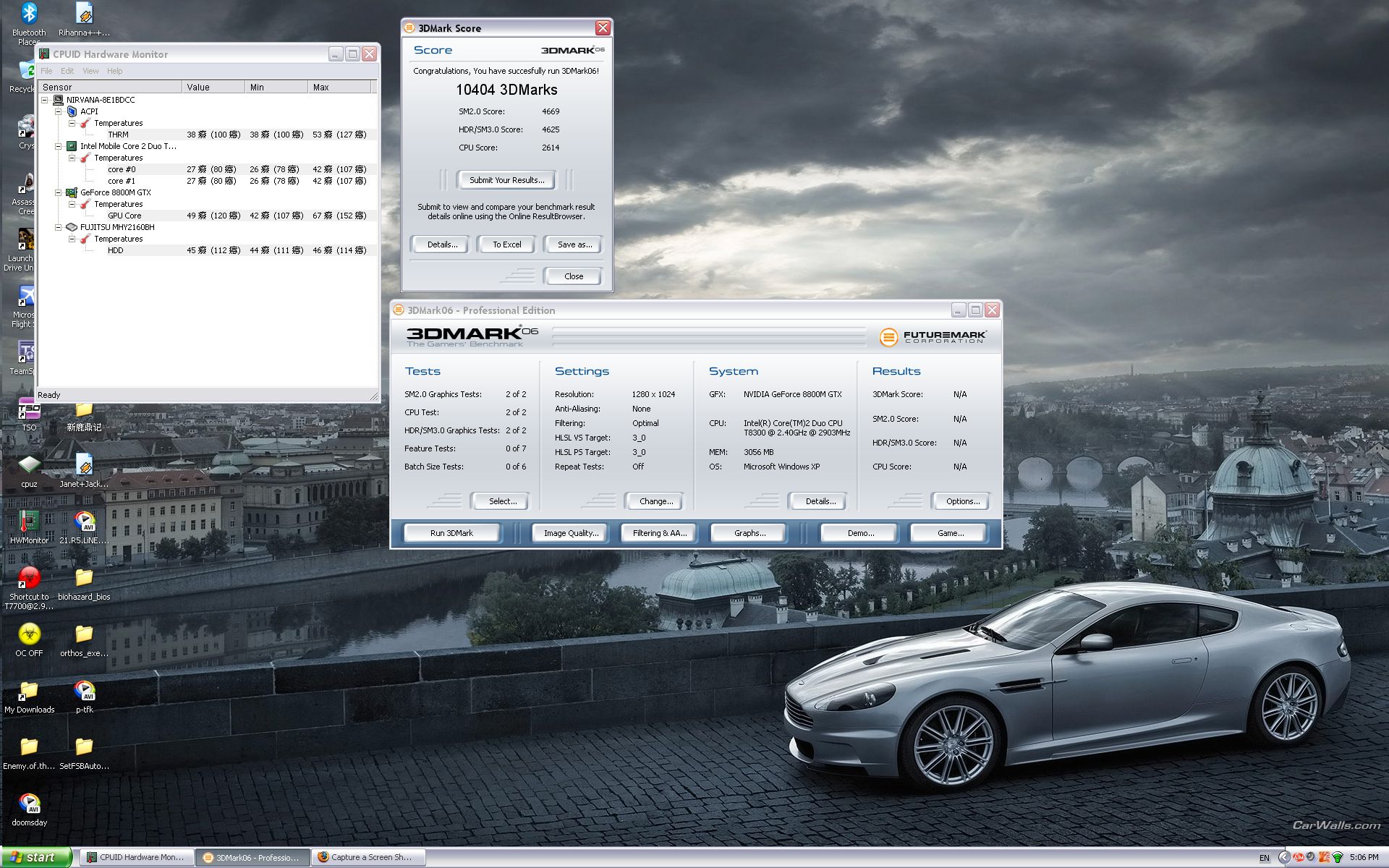
I used setFSB and raised my FSB to 245MHz, which achieved a CPU speed of about 3GHz.
I didn't overclock the graphics card at all, it seems that the CPU is the bottleneck in my Clevo
![[IMG]](images/storyImages/9945dw.png)
I was quite impressed, I didn't think a single 8800m at stock speeds could achieve 10k.
-
i still dont think that that cpu is weak
isnt it the highest c2d mobile cpu (not extreme) -
you will get a extra 2-300 for every step up you go in cpu... not a whole lot..
-
Did the other scores change?
-
Yeah, I normally get about 9100 overall at stock speeds.
The SM2.0 test usually gets about 4000, SM3.0 3900, and CPU 2300. -
I didn't say it was, just that in this case it was the bottleneck.
Yeah, apart from the T9500, although that only runs 100MHz faster.
One day I might get myself an x9000. -
^^^ x9000 not worth it.. didnt gain much more than the t9300/t9500 would have given me..and they oc to 3.2 any more and imo you stand a chance of melting stuff down..it gets HOT even with 3.2...i cant imagine it at 3.5 or higher... its cool to say you have it.. but imo not much else..
-
my x9000 doesnt run that hot at 3.5, but then I have the 5793, so it has a bigger heatsink than yours
-
Aren`t the heatsinks the same on the RU anyways?
Yours might be bigger since it`s KNE branded
-
The revised RU- U version with 'extreme edition' on the bottom has another vent and better cooling than the older models. My CPU didn't seem to go above 40c when overclocked.
-
Try Orthos for 10 mins and then we can talk.
-
I don't see much point in needlessly stressing the CPU, I don't run it overclocked normally, only just to see how it would perform when overclocked.
Constant 100% CPU usage is an unrealistic scenario anyhow. -
exactly.. and imo a system is not stable if it just runs oc'ed every day. a ture oc'ed system needs to be tested and stressed to make sure it doesnt error.. try occt, prime (small), orthos, etc.. then you will see the heat..
-
You don`t run it 100%, or course not.
But at certain moments, the CPU WILL RUN at 100% and then you`ll want to make sure it`s stable.
If it passes the ORTHOS test, then it`s definitely safe for any load percentage.
ORTHOS stresses the CPU to test every possible scenario,that`s why it`s a test and not real life. -
I did run SuperPi to 2m while watching the temps, it rose steadily from an idle of about 31c and topped out at about 39c.
Nothing to worry about, considering I've heard of people taking their mobile C2D's to 70c+ -
That's amazing! Your score beats my 9262 with a 3GHz E6850 by 800 points, and it beats the new ones with E8400 CPUs by nearly as much! What is equally impressive is that you did it with Vista and not XP. Always the skeptic, I have to ask if you used the default resolution of 1280x1024?
-
imo superpi is not the best test.. let occt run for an hour or two..and im not worried about the c2d itself im worried about the notebook, no way at 70c that sink in there will ever keep up .. it will either shut down or meltdown..
-
here is my 3dmark06 score with 2.9Ghz. default FSB. will test with OC GPU tomorrow
Attached Files:
-
-
Yeah, I used all default settings. I did post a link to the result on the Futuremark site, but it didn't seem to work.
-
Nice score
An T8300 faster than an X9000 stock, even with only half of the cache
It´s 3.0Ghz stable? -
No I can't pass the stress test at 3.0Ghz, although it showed no error with 3dmark06
-
Thanks. I'm calling Sager right away to complain about my low scores!
-
LOL at pukka stuff
-
Damn,that`s like twice my score
-
I ran it again and got a screenshot with the settings visible so you don't think I was cheating.
![[IMG]](images/storyImages/scoread2.th.png)
-
That`s a very nice score indeed...Wow.
I swear , these threads make me want a new CPU and GPU so bad
-
VERY nice score.
-
3Dmark scores are very cpu affected.
Try running any game benchmark @ CPU OC and then lower CPU to default but OC the GPU...
u will see that overclocking the GPU shows better performance in game!
Nice to get high 3dmarks but useless..
regards -
with CPU overclock, I got 10404
with GPU overclock, I got 9874
with both overclock, I got computer frozen -
still 3dmark
most games dont profit from higer cpu speeds, try e.g. crysis or cod4 -
funny thing is that overclocking both cpu and gpu freezes the notebook.
experienced the same thing; i thought it happens just to me : ) -
As I said to nirvana0001:
That problem is the one that is been for a wile on my head... I´ve thinked over and over, on what can be the cause of this...
As you can see, this is a old matter, some topics were made about it in the past( Freezing when OC CPU+GPU on M570ru), with no conclusion about what was the cause of all this.
It´s happening on my 8700M GT too... but I don´t know why... without OC on my card I can run at 2.9Ghz without any problems. But if I try to run it even at 2500Mhz with my card overclocked, it just hangs... WTF?
So far the best one is power related problems... maybe the internal power that is regulated from the board MOSFETs, are used to feed both the CPU and MXM slot. But then, why my 8700M GT wich consumes much less power than an 8800M GTX have this problem? Maybe my 8700M GT on an overclocked state can consume as much power as an OCed 8800M GTX?
Another one, wich is the one I´m thinking, is briedging problems over the MXM-IV(III) interface on an overclocked state, both in the card and PCI-E.
I searched a lot about this, readed lot´s of articles and such, and I came to a conclusion that the chipset PM965 doesn´t have PCI lock or also called PCI-E asynchronous ratio.
On an normal desktop PCI-E x16 slot, the PCI-E freqs can be rised to about 125Mhz (+25% above normal) without any problems. It´s a know matter that ATI cards can handle higher PCI-E freqs better than nVidia ones.
So if I rise my T7700 from 2400 to 2500, the PCI-E freq will rise to 104,5Mhz(1/2 the FSB rise), thats only 4,5Mhz rise, so it should not be a problem. And here enters the briedging problems over the MXM-IV(III) interface teory. But another problem comes with the pack... we can´t do anything about it... it´s interface fisicaly related, an design flaw... only Clevo can do something about it.
So the best way is use the OC on the start, then if you need to game, and want to OC your card, just run the AutoTool OC OFF( http://audigyapps.com.sapo.pt/SetFSBAutoTool_OCoff.rar), wich will return your CPU to stock values. If you need to OC again then run the OC tool with your desired overclock.
I thinked that the new RU-U board was fixed this by somehow... but I guess I´m wrong again...
-
Wrong, using setFSB to change my FSB the PCI bus clocks are locked.
![[IMG]](images/storyImages/1587ec9.png)
-
So did you manage to complete the Crysis benchmark (3 times) with your FSB at 245 and the GPU overclocked?
Try than and then you will see that the PCI lock does not really work. -
How did you get a 2.4 5793 to 11400 micloi ? Is that overclocked and which driver did you use if you don't mind me asking
-
Fixed my Sig! That score was with the X9000 at 3.2 and Windows XP (do not remember which driver I am afraid)
-
No, they are not... they will rise with the FSB, even if SetFSB doesn´t show that...
The SetFSB can´t control the PCI/PCI-E frequency of locked Clock Generators, even if you can move and apply the respective slider.
-
I don't overclock the GPU, just the CPU.
I ran 3dmark06 3 times and did several runs of superPi, all without issues. The CPU temp didn't go much above 40c.
Don't try to contradict me, you have the older revision anyhow so you wouldn't know. Hate to break it to you but at least on the newer motherboard revision the PCI bus is indeed locked. -
When you overclock only the CPU it works. If you try to overclock both it won't due to the PCI frequency.
>>Don't try to contradict me, you have the older revision anyhow so you wouldn't know
Excuse me? And for your info I have the latest revision, the laptop is only one and a half months old.
And if you are so sure about this then try to run Crysis with both the CPU and GPU overclocked. -
The PCI bus is locked on the newer M570's
Sorry, I thought I was replying to Audigy.
This is irrelevant since I don't want/need to overclock the GPU. The only reason that doesn't work is because the laptop simply can't supply enough current to power an overclocked CPU and GPU at the same time. -
I did a lot of testing and that's the only reason I do not agree with this.
One example and then I will let this be as it does not really affect me as I now have an XPS 1730:
1. T8300 at 2.4 and 8800 at 600 900: WORKS
2. T8300 at 2.5 and 8800 at 600 900: FREEZE
3. T8300 at 2.8 and 8800 at 500 800: WORKS
4. T9000 at 2.9 and 8800 at 600 900: FREEZE
5. T9000 at 3.35 and 8800 at 500 800: WORKS
Cases 3 and 5 use MUCH more current than cases 2 and 4 but work fine.
Only difference is the PCI FSB.
If you do not believe me then feel free to try it yourself.
This is the last post from me on this subject as I can run the X9000 at 3.4 and the 8800 at 610 910 great on the Dell.
Feel free to discuss this with the other members. -
You guys should get a 150W PSU then, it would clear off any doubt.
-
That may not work, if the power distribution circuitry in the notebook can't cope with it.
-
the pci values can be changed in the bios (using an editor only) as well.. not sure if this will help but from my understanding the normal is 32 well according to the bios the 570 is set at 21...
-
I ran Orthos for almost 2 hours on 2.8Ghz... didn't get over i think 54, but I had fan maxed for most of it... when I reverted to stock fans the highest I saw was 67. Nice and stable [email protected] and 4GB 667 Ram@750Mhz... surprised ram could handle that kinda speed. Runs very nice, I owe many thanks to Audigy for making it so simple! (also got RM clock utility disabling IDA, and system boot speed isn't even slightly effected)
-
mine never passed 54C at 2.9Ghz with fn+3
-
How do you overclock the RAM? I didn't think you could run it faster than 667MHz.
I have 800MHz RAM but it runs at 667MHz. -
overclocking the fsb automatically overclocks the ram as it runs of the same clock - check cpuz, it'll tell you what freq your ram is actually running at
-
there is a general misunderstanding, ddr2-667 doesn't run at 667Mhz, nor will ddr2-800 run at 800Mhz. the frequency of ddr2-667 is 333mhz
-
must be false reading of ram
3Dmark @ 3GHz
Discussion in 'Sager and Clevo' started by ms500, May 14, 2008.




![[IMG]](http://i27.tinypic.com/5ezneu.jpg)


