 Problems? See this thread at archive.org.
11" gaming rigs that need laptop coolers....damn what in HEAVEN have we come to?thanks for the review HT,much appreciated as always
Sent from my GT-I9001 using Tapatalk 2
-
So far no way to disable HT. BIOS is VERY sparse. Hoping users like Prema can help in this regard.
Nope, unfortunately. Will give give Throttlestop a whirl and have a chat with unclewebb.
Not even sure how to undervolt yet. And I just plan on putting as much copper surface area as I can on the CPU since that seems to be the problem child. If I feel adventurous, I may get a mPCIe adapater to SATA, so I can use an mPCIe SSD and that will free ups space so I can add a fan in the HDD slot to blow air over the CPU. But that mod won't come until I've exhausted other possibilities. -
Ok just be careful and take your time to learn that . The quantity is not the problem. It would be useful but only in order to change the enthalpy but the thermal conduction is the most important topic here... Ill make the mod and take some pictures, if you want to add heatsinks notice the following:
1- Get the lesser thick heatsinks.
2- Try to use copper instead of aluminum or other alloys
3- Make FULL area contact. The heatsink shouldn't be "flying"
4- Place the heatsinks over an area with sufficient air flux.
5- Try to place the heatsinks close enough but not touching each other
6- try not to touch them with your bare hands or clean them after you place them with alcohol.
7- Try not to block the air flux with the heatsinks, since this would only make things worse.
This thermal system seems to be bottlenecked, the sizes and distances must be affecting the performance for thermal dissipation. -
Hmm, in Germany the 35W CPU only costs 43€ more then the "normal" I7, and also the normal CPU is the old Sandy Bridge, the 35W (I7 3612QM) is a new Ivy Bridge CPU! ( mySN.de | XMG XIRIOS XESIA | buy Schenker Notebooks - XMG A102 ADVANCED Gaming Notebook 29.5cm (11.6") )
Thanks for the review, could you run Prime95 and Furmark at the same time and check the temperatures (except it is getting too hot).
Maybe the 35W CPUs are really the better idea.. -
Hmm this heat isn't good... We need a way to under-volt, badly, maybe I should cancel my order for the time being..
-
nah, you dont need to cancel!
Buy a Notebookcooler, that will solve the problems!
My Studio 1555 stays 10*C cooler if i plug in my Zalman NC 1500!
If this notebook runs at 1.9Ghz it is still fast! -
Seems like a good illustration of how Mythlogic adds value here, even though they do seem to cost more. Their build process eliminates a lot of these concerns.
-
I'm interested in seeing those benchmarks repeated on battery power so we can check that the system isn't throttling back the power draw on battery for those rare users like myself who have 2 hour train commutes and want to game/do work on the battery.
-
i have a bunch of copper and even more laptop heat sinks...what to do....
-
The real solution is always Moar Holez and Moar Coppah.
(Different machine, of course. And damn. That timestamp made me realize how long I've hung onto this MSI.) -
For the individuals looking for a BF3 benchmark of these systems check here:
-
those are a lot of holes and copper -
Hehehe not always. Problems with more coppahh:
1-For example, put a heasink over a gpu capacitor, one that doesn't need to be under a cool-down thermal system but has to be stable* then put a heatpipe o a heatisink connected to a heavy thermal system and put them closely (touch both heatsinks). You will end up blowing up the capacitor. The heavy thermal system will try to find a thermal balance with the now included capacitor system. Be very carefull with these mods.
2- Copper is also a high electricity conductor, if you misplace it you will short something.
3- If you close the air flux, you will only make things worse.
But yeah it helps alot. -
buying a notebook cooler for a 11' seem counterintuitive ~~
-
I'm hoping to find a small one that just fits the machine and works well in my lap as I'm going to be using this rather often without a flat surface to place it upon.
When it gets here I'm going to go by Fry's and Microcenter with it and see what fits the best. -
_meh: Yes, it is true that this lappy will run this BF3 okey but on that video we cant know etc: how many players and explosions there with good 30-40fps were was over there until the map was one of the biggest Caspian
But more important thing for me is how warm was the keyboard under left hand which was under playing BF3 about 30-60min non-stop because same things on LG P330 was toooo hot after 30min and im not lying :/ External BT keyboard have to bought... and that was sad like to buy cooler for this 11.6" laptop, waat???
-
I don't mind having a notebook cooler, when using the laptop stationary for excessive gaming.
I'm more interested in if its possible to turn it down that way, that its possible to use it on the go without the feeling you're working on a molotow cocktail
I'm not sure, but the p330 doesn't exactly look like what i would classify as "gaming laptop". Looks quite thin to me, and i'm pretty sure that this sacrifices some heat dissipation capabilities and therefore OCing the thing wouldn't be really recommended. Am I wrong? -
I think I've settled on this machine, but I'm waiting for HT's full review before I decide. Thank you HT for doing all this, you are a great asset to the community! +Rep.
-
It is the same class as the M11x, M14X and this W110ER. On January there were like no other same powerfull gaming laptop to this class...yes ALW but this was thinner and powerfuller than M11x and thinner only like M14X--> about same performance.
Now there are not as performace laptop on this class than this W110ER. And... you are wrong Btw, always you people want to OC a little a bit this W110ER what is close to the other.... gtx 56/70m...
-
I generally just put them over the heatpipes, so I increase total surface area. I also stick them with some really nice Sekisui tape which hasn't shown any signs of coming loose yet.
And it's arguable about the air flow, since you're increasing total cooling surface area, but that's why I always do Moar Holez. -
Yeah you fixed it with the holez XD, but without those it would be a mezz. You are increasing the surface area but also blocking the air to go to more directions.
Yep I saw the images, quite nice mod... mmm Sekisui nice nice... Better than that 3M sticky thing.
-
If someone do those extra cooling holes the original bottom plate and sell it to me, Ill buy it of course!
-
Get a dremel and a base, those are cheap. You can mod it yourself just make the holes were the heatpipe or the heatsinks are.
-
Or both of those? That*s easy, I mean only thrill holes under those? Have to try if it helps
-
It will throttle on battery, to 1200MHz. But that's still more than adequate for gaming. I'll be checking all that out, as well as I'm sure many others will.
-
HTWingNut, thanks for all the benchmarking and information.
Do you happen to know if the Geforce GT 650M has DDR3 or GDDR5 (maybe GPU-Z can tell us?)
Very tempted - I have an old 2009 Acer 1810TZ 11.6" that is similar in size, but old Intel core 2 duo CULV. I also have a 2011 Toshiba R835-P56x 13.3" dual core Sandy Bridge Core i5 2410m, and from work, a 2011 Lenovo Thinkpad T420 14" dual core Sandy Bridge.
I was considering waiting for the upcoming Thinkpad W530, or a MSI GT60 or Sager NP9130, as all are 1920x1080, 15.6", and feature four ram sockets for 32GB of DDR3 ram. But the 11.6" form factor is attractive -
It is 100% certain GDDR3 memory. Clevo 15" models with the GT650M do have the GDDR5 equipped.
-
Could you? I know it doesn't always, depending on the system, have to throttle down on battery. I'm not just going to be gaming but occasionally getting work done during crunches and other deadlines and most rendering and cad programs don't play well at that speed.
-
Hell, I just used a cheap Sears' drill, some grid paper, some scotch tape, and I think a 1/16'' bit.
-
Thanks for the confirmation regarding the geforce gt 650m with GDDR3 memory
-
Some information on BF3...
I just played some rounds, same map, same server Operation Firestorm with some different configurations.
High Performance, Medium Details, Plugged in AC, GT 650m:
Avg FPS 65
Max CPU Temp 89C
Max GPU Temp 80C
Balanced Performance, Medium Details, Plugged in AC, GT 650m:
Avg FPS 63
Max CPU Temp 86C
Max GPU Temp 80C
"No Boost" (1.9GHz fixed), Medium Details, Plugged in AC, GT 650m:
Avg FPS 42
Max CPU Temp 79C
Max GPU Temp 73C
High Performance, Low Detail, Battery, HD 4000
Avg FPS 26
Max CPU Temp 72C
Estimated battery life 1.75 hrs
Balanced, Low Detail, Battery, HD 4000
Avg FPS 13
Max CPU Temp 69C
Estimated battery life 2.00 hrs
Balanced, Low Detail, Battery, GT 650m
Avg FPS 31
Max CPU Temp 72C
Max GPU Temp 66C
Estimated battery life 1.5 hrs
Based on this, I can tell you that the HD 4000 is a far cry from the AMD 6620G performance. I can play 1280x720 at low detail on battery with my DV6z and average 32FPS, and rarely dips below 26FPS. The HD 4000 would frequently dip to mid teens. Based on that, I'm a bit disappointed with battery performance in general. 3.5 hours of surfing, and substandard gaming performance.
I still have to do some tuning with CPU speed and lowering GPU performance and I might be able to get near two hours with the dedicated GPU running at about 30 fps which isn't bad. -
CPU temp is a bit high considering it's a new notebook (dust free) and you've repasted.
But what can you expect from an 11" notebook with a quad core inside.
Still impressive. -
The 650M performance looks relatively nice, although anything is better then my old 9600GT... Would the performance on this go down if you had an i5, for the 650M? Thanks for all the benchmarks!
-
Are you going to run any benches of BF3 on high and ultra with the GT650M? It would be nice to know how it handles that.
-
Based on it running at almost 70 FPS on Medium, I would think it would handle High relatively easily. Maybe it will even run ultra overclocked.
Only time will tell.
-
There was a video posted a couple pages back that showed running on the high preset. It never dipped below 30fps.
-
I already saw that, just want to see HT's results on high and ultra.
-
Hey HT, did your laptop come pre-installed with the drivers? The reason I ask is because I will have to install the OS from an SD card, and wondered if the card reader driver was installed already.
-
If you don't have an OS, how can the drivers be already installed?
-
Hello,
Just a little question regarding temperatures, does not the compound (IC diamond i guess) gets better with time? Does it need several thermal cycles to achieve maximum particle to particle thermal conduction and for the heatsink to CPU interface to reach maximum conductivity? -
I don't think ICD needs any curing time. So it's pretty much as good as it's going to get.
HT, have you done 3dmark 11? I wonder how GPU compares to the gddr5 version. -
No, it's through BIOS. If card reader is USB 2.0 then it should work just fine. The system has USB hardware support through the BIOS.
IC Diamond can improve slightly, but maybe 1-2C, and it doesn't really need a curing time. -
how about heat on the bottom cover when playing with temperatures like 80-90C is it annoying or tolerate?
-
Let the man finish his review, then you can ask away.
His reviews are info packed covering everything and all will be answered in time. -
Thanks, I don't mind if people ask questions. I'll help what I can.
The laptop is actually quite cool at the bottom. The only hot location is the exhaust on the left.
By the way, here's the laptop running Prime95 with and without Cooler Master Notepal U2 In both cases for about 10 minutes run time, it never throttled.
Ambient temperature about 75F or 24C.
WITHOUT COOLER:
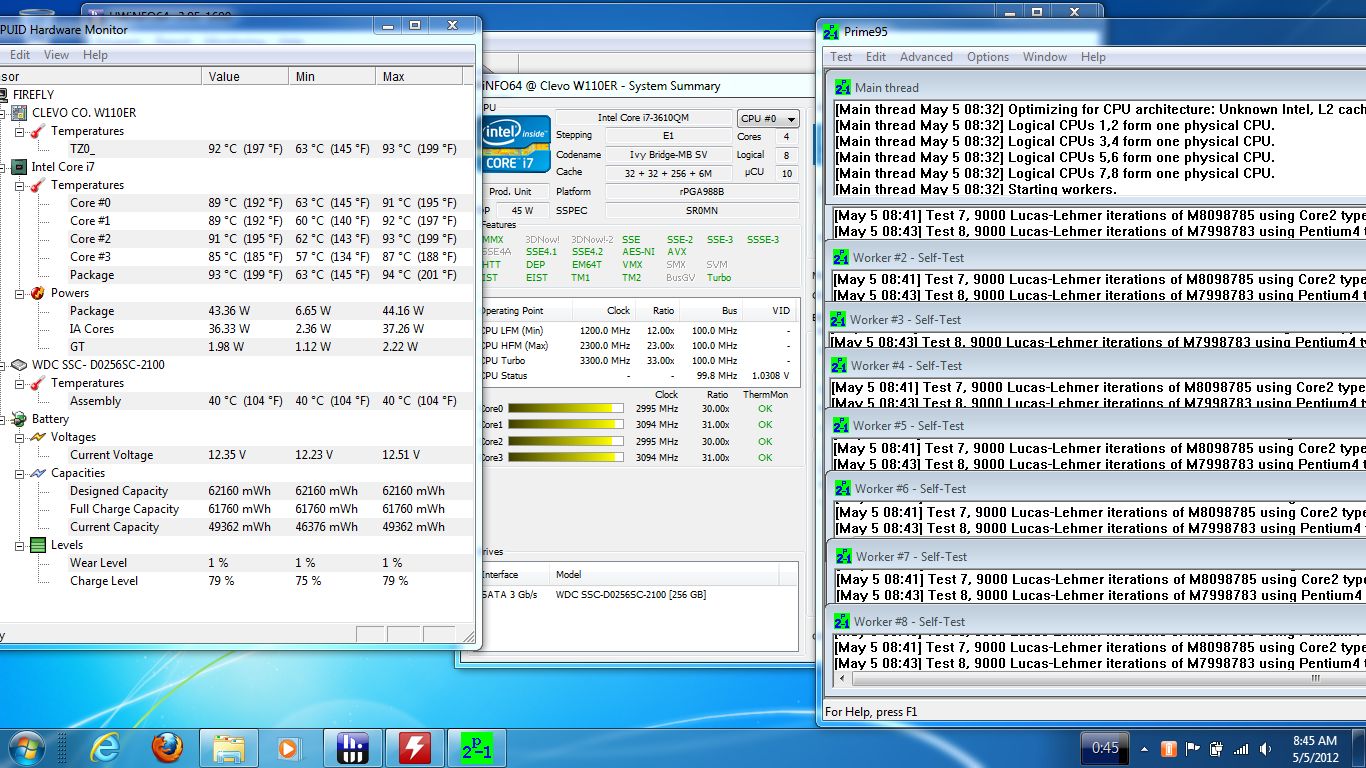
WITH COOLER:
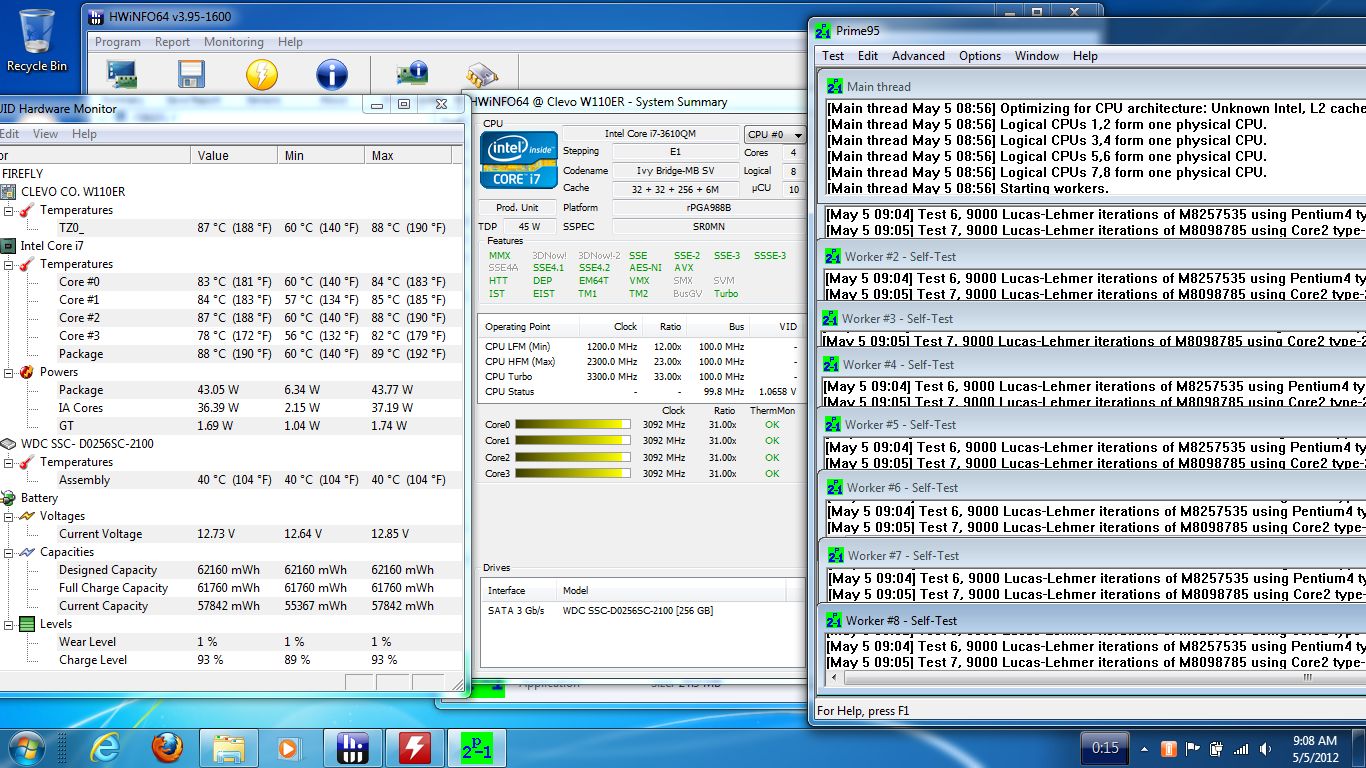
-
Regarding the temps and coolers that are the right size I found these two:
Newegg.com - Cooler Master Notepal U1 Black (with 80mm fan) Model R9-NBC-8PAK-GP
Newegg.com - Antec Silent Passive Cooling Model Notebook Cooler Basic
The second one is a lot cheaper at Fry's. I'm just looking for something I can use to make the system lap friendly (for the intake) so I'm leaning toward the passive one or just having a custom size piece of aluminum cut and gluing a mouse pad to the bottom or something. We'll see... -
How high was the room temperature?
If the room was 30*C hot, then the temps are ok, if it was 20*C warm, the temperatures would be bad!
Could you run furmark + prime at the same time? (too see the worst case scenario there is!)
But thanks! -
I wonder what the throttle temp is for i7 IVB? Probobly 105C.
Edit: Confirmed 105C.
http://ark.intel.com/products/64899/Intel-Core-i7-3610QM-Processor-(6M-Cache-up-to-3_30-GHz) -
You may plan on doing this already, but it'd be cool to see more info about why the battery life is surprisingly low--it almost sounds to me like the discrete GPU is getting used when it should not be. My work laptop is a dell latitude with a 35w Sandy Bridge and Intel HD3000, and the battery is a similar size, but I easily get 5 hours of use with wi-fi on.
I'd suggest using a tool like BatteryBar to see how much power is being used and Core Temp to see how many watts the CPU is using. If CPU wattage seems normal (below 10 watts for Internet browsing, I reckon), then the next step is to check whether the nvidia card is active when not playing games. This can be seen by clicking "Desktop/Display GPU Activity Icon in Notification Area" in the nvidia control panel, and left-click on it to see if any application is using it. -
So if you're using a cooler with it then why not get a larger laptop?
HTWingNut's Sager NP6110 / Clevo W110ER First Look & Review
Discussion in 'Sager/Clevo Reviews & Owners' Lounges' started by HTWingNut, May 3, 2012.


