 Problems? See this thread at archive.org.
I'm sure Amazon will get more if you wait a couple days.
Sent from my Tricorder using Tapatalk
-
Sure, but it won't say for the old one

Should have made myself more clear sorry, was asking if the "brick that came with it", was the 90w or 120w in his case.
If he got the 120W, I can believe this one is much lighter..
That would be even better if he (initially) got the 90w. -
Thanks! With the original "vanilla" installation, it did help on the lowest setting, but still not perfect. But I updated to the latest patch and everything went choppy again. I'm getting about 12-15 fps no matter what setting. Except for Ultra of course which isn't supposed to be playable. I also have the latest Nvidia 650M driver, the beta one. Maybe I should go back to the latest stable GPU driver instead? Which GPU driver and game version were you using when you tested the game? I'm starting to think something else is the problem here, not the stutter thing but something that completely eradicates my computer's performance, most likely the GPU driver... right? I'm going to give that a try anyway.
Edit: Ok, I reinstalled the game so it's unpatched and went to the device manager and rolled back the drivers of the GPU and well, it was a little jittery, but when I also copied those files (the stutter fix) over to the bin folder it runs perfectly on "High". So far I've only tried running around a little in the very beginning of the game but it averages at about 28 fps and ranges from 23-34, so I'm content! Weird thing is that the settings recommend me to play on "Low" when clicking on "Choose best settings" or whatever it says, but that's probably nothing to worry about. -
.
The brick that came with my NP6110 is a 120W model.. LiteOn model# PA-1131-07 ..and now looking on Google, it is apparently 135W, not 120W. Go figure.
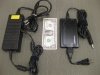
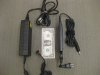
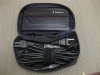
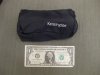
The 120W Kensington model# 38004 ( Amazon) came with a handy little zip-up carry case which fits the unit and all the cords in it comfortably. When everything is in the little case, it is close to the same size as just the LiteOn brick by itself (if you removed all the cords). I have a little USPS scale, so here's the weights (cords included)..clearly quite a big difference:
Kensington model 38004 : 11.7 oz / 332 grams
LiteOn model PA-1131-07 : 31.0 oz / 880 grams
and for relative comparison..
Sager NP6110 : 62.4 oz / 1770 grams
Yes the cord from the Kensington unit to the wall outlet is short - I have no idea why, but hasn't posed a problem for me. The cord from the unit to the laptop is plenty long though. See pictures following.
As far as the Kensington 120W getting hot while in use, I ran FurMark for 20 minutes, followed immediately by Prime95 for a further 20 minutes (blend mode). The Kensington was indeed very warm, but certainly not so hot that I couldn't comfortably hold it in my hand for the duration. I then shutdown and switched to the supplied LiteOn brick and ran the same tests again. The brick was also fairly warm by the end of the tests, but certainly not as warm as the Kensington was. Not exactly precise data, but still, there ya go.
For the record, after 20mins of FurMark burn-in test at 1366x768, my GT650M had leveled out at max 79°C and average FPS of.. err.. 17 - although GPU was throttled to 815MHz. After 20 mins of Prime95 blend test, the i7-3910QM CPU max temp hit on any core was 81°C, although most of the time core temps were in the mid-70's, which I am pretty pleased with. Everything was at stock settings, ambient temp 77°F (actually probably quite a bit warmer than that, as it was in our small office room, which also had 2 high-end PC's running at the same time). Laptop was sitting on a Zalman NC1500-mini notebook cooler.
Last but not least, here's a couple of photos of the two models for comparison:
![[IMG]](images/storyImages/80337d1342801213-htwingnuts-sager-np6110-clevo-w110er-first-look-review-01.jpg)
![[IMG]](images/storyImages/80338d1342801213-htwingnuts-sager-np6110-clevo-w110er-first-look-review-02.jpg)
![[IMG]](images/storyImages/80339d1342801213-htwingnuts-sager-np6110-clevo-w110er-first-look-review-03.jpg)
![[IMG]](images/storyImages/80340d1342801213-htwingnuts-sager-np6110-clevo-w110er-first-look-review-04.jpg)
-
+1
Wow that is .. quite interesting, thanks for sharing! -
Great writeup, thanks +1! Wow, very small. Wish they made a 180W version for my NP9150 too.
-
I replaced it myself. Cost $150 from Mythlogic. Not sure if they have them any more or not.
-
That's odd, mine does not throttle until it reaches around 85° (which is only when I have a contact problem, or if I run Prime95 with turbo on at the same time)
-
Just take output Voltage x Amps an you'll know.
-
2 questions, one about the power brick, one about cooling:
1. how much was this and where did you find it? or did i miss that post?
2. has anyone found any good smaller stands for this laptop? I have the coolermaster u1, it only came with one fan, and it barely moves air, i don't like it that much, it's only good as a rack to elevate the laptop. or does anyone know where i can buy a better fan that maybe moves air a little more efficiently?? -
mine throttles at 92-93*C, but I only reached these temps with the modded beta vbios (throttling "down" to 915MHz); then the fan keeps it between a constant 89-93*C
-
(1) I got it from Amazon.com [ link] although they are out of stock now. Despite the Amazon link saying Kensington model # K33336US, I was sent a different model - model # 38004 [ link], although specs are same. Note that the model they sent me is now also out of stock.. lol. Probably thanks to NP6110 owners
Kensington have a 90W model still available on Amazon [ link].
(2) That Coolermaster U1 looks about the most lightweight model with a fan I've seen - plus you can reposition the fan to where it is needed. I use a Zalman NC1500 mini [ link] which does fine by me, but not as lightweight as that CM U1 model. You could replace the fan on the CM U1 with a USB powered 120mm fan like the Thermaltake AF0007 [ link] if there's enough room for it.. this one has 66.5CFM which is plenty for a laptop cooler. They also make an 80mm USB fan [ link] which is about 47CFM... I believe the Coolermaster 80mm fan in the U1 is only about 15CFM [ link], but of course a more powerful fan is going to make a lot more noise...
Hope that helps.
Hmm.. wonder why mine was throttling at lower temps? I have not touched the BIOS in any way (yet), nor have I used the throttle utility discussed way back somewhere in this thread. I only just received the NP6110 very recently - could it be Sager have a different BIOS now from when you got yours? *shrug* -
Check this out: NVIDIA GeForce GT 650M video card benchmark result - Intel Core i7-3610QM Processor,CLEVO CO. W110ER score: P3269 3DMarks
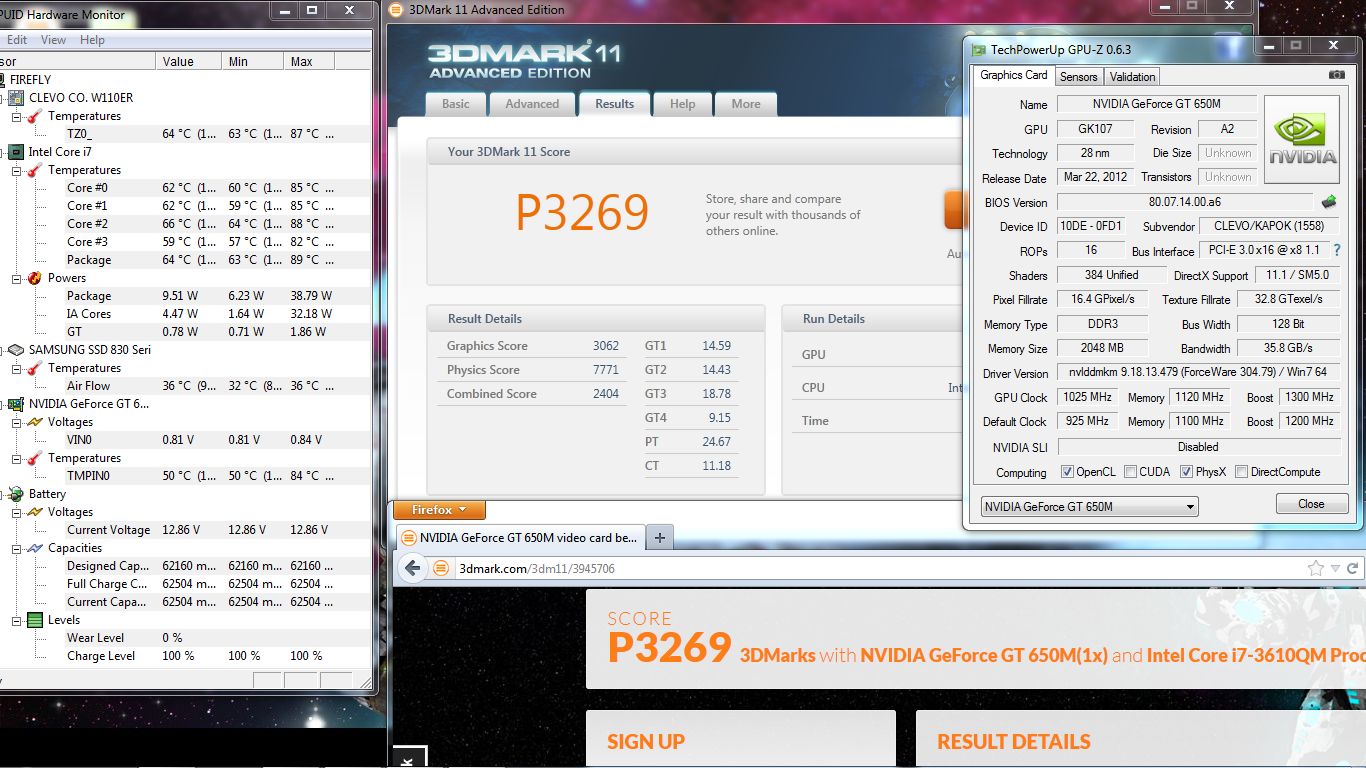
Thanks to Prema for the modded BIOS
-
To be honest, I envy your temps even more than your score.
-
That's actually without my fan mod. Not sure what's going on there, but it runs cool
-------------------
EDIT:
OH !#$#^%!#@$!@
I think I just killed my machine.
Did something really stupid. I had it unplugged but didn't remove my battery. Reached in with pliers to route a wire and think I touched the mobo. Now it won't power on AT ALL!!! -
NOOOOO!
No F@ckin' way, man! Really? After ALL THAT? After that epic review, all the mods and the tweaks and the endless hours?
I'll tell you, it was your review and benchmarks that finally pushed me to buy this system!
I'm so sorry for your loss. Mine is scheduled to arrive on Thursday, and it would be a nightmare come to life, if something happened to it. -
I can't say it's the first time something like this has happened. The risk you take I guess by modding. The funny thing is after all that, it was jut pulling a wire to route it that was the end of it (I think).
-
I pray for you.. oh god
try powering the laptop on w/o the battery -
I've tried pretty much everything, battery only, ac only, no SSD, no RAM, no CPU even. Just zero power coming in. I would have thought maybe the PSU but there's no indicator light if it works, however it should start on battery though.
-
Huh, I think I understand, did furmark indicated core: 950 (throttling: 815) ?
If so, it was not throttling, but if it needed to it would have throttled down to 815
-
thanks for the info on the fan, that was almost exactly what I was looking for haha I don't like the fan that came default on the U1, it's so weak.... all its doing is disturbing the air, it's not really even moving, or at least I'm not feeling it move when I put my hand over it. I'll probably jump for one of those fans you posted, I hope it fits onto my rack, that's what's so great about the u1, it's just a rack with holes, so it's got good airflow and it can be customized, which is good. thanks for the link!
-
I've got the U2 and added one of those Thermaltake fans on it (the 120mm one) and it works great. Excellent airflow for a 5v and not real loud. Does the job.
-
Ahhh ok yes, that is exactly what it was saying, thanks
-
Got a quick question. For the pass through USB ports that comes with the Cooling pads that ensures we still 'get' our USB port back, is it still okay to plug in an external HDD or charge a phone since it's already pulling power for spinning the fan? -
depends; try it, it might work; in my case (zalman pad) it did
-
hi HTWingNut can u tell me how to properly disconnect this two connectors
 marked with red
-
Any updated drivers? I'm using 304.79 and I've been experiencing a lot of crashing in BF3 upon minimizing the game.
-
Pull it gently. That's all I did.
-
She's alive... ALIVE! Muahahaha!
<param name="movie" value="http://www.youtube.com/v/QuoKNZjr8_U?version=3&hl=en_US"></param><param name="allowFullScreen" value="true"></param><param name="allowscriptaccess" value="always"></param><embed src="http://www.youtube.com/v/QuoKNZjr8_U?version=3&hl=en_US" type="application/x-shockwave-flash" width='853' height="480" allowscriptaccess="always" allowfullscreen="true"></embed>Last edited by a moderator: May 6, 2015 -
Hope that means that you got your laptop working again. Great news if true! If so, what did you do to get it working again?
-
NP6110 with matte screen ordered from Xotic on July 5th. Shipped today (7/25) and due to arrive Friday (7/27)!
-
god is great!
-
Phew?
So? -
Meh. With the old one, I could reach nearly 1300MHz on the core, now this one will barely exceed 1100.
Haven't pushed the vRAM yet. That's the problem with soldered GPU's. Replace the mobo, you lose your GPU.
-
Sorry to hear you had to replace the mainboard... As for performance, it only makes your task more exciting!
-
Just try not to break anything this time!
-
The only bad motherboard is a dead motherboard. Glad you've at least got it up and running again
-
You used the overvolt beta on the old one for 1300, did you use that also when testing the new board?
Maybe it simply does better with the newly released unlocked 1.2 without OV? -
I was using the BIOS you PM'd me on the broken mobo. On the replaced mobo I used the latest one you have on your site. Not sure if they're the same. Will try the one you PM'd me again and see if it works as well.
-
Ok, with the 1.2 I can run 1150MHz and 1150MHz vRAM. I was using the 1.15v one before, but that only renders me about 1240MHz on this GPU. That's ok. 1150/1150 so far is perfectly stable and a decent boost. Thanks again Prema!
BTW you have the stock BIOS PW protected. Are you planning on removing that? -
Ha ha ha, actually I forgot to put the one on the 2.1.
PW is biosmods.wordpress.com on all files -
Can any one tell me if the Core i7-2670QM CPU would be compatible with the W110ER?
-
@dooms33ker
in one word, yes
all sandy and ivy bridge processors are, minus perhaps the extreme (xm) versions, though only for heat - and possibly power consumption - reasons -
I know an Ivy bridge XM (55W) CPU was installed in one of these, but I would advise against it as the 3610QM can easily push 95C without additional cooling. i7-2670QM should work fine, just monitor temps.
-
Thanks for the response. The heat profile is a little worrying, since my last notebook, a 13" Acer 3820TG idled at 28c with an i5 480m and the fan set to maximum.
I'm anxiously looking forward to be able to undervolt the GPU. I undervolted my Radeon 6550m from 1.2v to 1V and it did wonders for the heat and battery life. Hopefully the same will be possible with the 650m with the next PERMA BIOS release.
Is there a way to force the fan to full speed? -
Well, considering the 650m is off or "sleeping" when not in use (supposedly) undervolting won't do much. And no, there is no way to force fans to full speed.
-
I'm thinking more along the lines of having the low power 3D clocks at 550/700 @.85v or so. Lock the CPU @ 1.2ghz and with those clocks at a low voltage, you may get closer to 2 hours of gameplay on battery.
-
The CPU will automatically be locked at 1200MHz on battery. And you can limit your FPS to greatly reduce power consumption. Unfortunately right now only way to change voltage is by a vBIOS flash. However being able to minimize your voltage to run at stock speeds would be a nice option.
-
It will work, but it will be too hot. I tried that CPU's little brother, the 2630qm, and even with turbo disabled, it ran at 94-95 when playing BF3.
Until I get my copper RAM heatsinks to modify my cooling, I have my 3610qm locked to a max of 2.8 ghz with ThrottleStop, and temps peak at 90 with the same load.
Sent from my Tricorder using Tapatalk -
I've done some vBIOS flashing before, could you explain how it works on the W110ER?
HTWingNut's Sager NP6110 / Clevo W110ER First Look & Review
Discussion in 'Sager/Clevo Reviews & Owners' Lounges' started by HTWingNut, May 3, 2012.


