 Problems? See this thread at archive.org.
It's pretty much what I expected I guess. It's a loud wooshing noise, pretty much same as my larger NP9150. It's the result of putting 15" components in a 13" chassis. People complain about temperatures but then complain about noise. Personally I don't think it's that bad. Then again I always use headphones when playing games. Drop your CPU down to 3.0, 3.1, or 3.2GHz and drop voltage 100mV, and limit FPS to 58 (seems to be best without tearing) with nVidiaInspector and it runs at 75-78C and also keeps fan speed down as well. I run my CPU at 3GHz now (3 and 4 core) and everything runs pretty cool and quiet. I still leave my 1 and 2 core at 3.7 and 3.6GHz respectively because one or two cores loaded up don't affect temperature so much, and good for desktop stuff.
-
Hi this is my first post so please forgive me if I break any rules or maybe this should have been posted somewhere else.
And GREAT POST HTWN!!!!!!
I am thinking of getting Clevo W230ST from Mythlogic (chaos 1313) I have the following questions:
I am using this laptop for travelling so lite excel, PowerPoint, email and wed surfing. Also want to play BF3 and Star Craft II at ultra.
My concerns: heat and Battery Life
My questions are:
CPU - 4800, 4700 or 4702 (if budget is not an issue) I read from the this post and some other post saying that
1. 4800 and 4900 might be thermally limited and won't be able to use the CPU at full potential. Does that mean even without any overclocking and tweaks? Or does this mean these CPUs can't be overclocked safely and keeping temps relatively cool due to the small chassis?
2. I also read from somewhere that, yes the 4702 uses less power and cooler but if compared with a 4800, due to slower speed of the 4702, it will take more time for the 4702 to process the same information vs the 4800 thus not much power will be saved? Similar logic applies to heat, due to increased time for the 4702 to process the same data, because it takes 4702 longer thus the temp will actually be higher because the CPU will run at larger load for longer. And heat is really higher when the CPU is at high loads.
Power supply 120W vs 180W
1. I also own a P150EM and I have two 180W power supplies. Can I use the 180 Power supply on my w230ST safely? I get some say yes and some say no. I even have someone from sales say that it will void the warranty if I use the 180W because it is not good for the MB?
Configuration
So with my uses and concerns does the following configuration make sense? Anything I should change?
CPU: Intel Core i7-4800MQ 2.7GHz, 6M L3 Cache, 22nm, DDR3L-1600MHz, Quad-Core Mobile Processor
- Q: Thinking of 4702 vs 4800
I think I am okay with tweaks and OC but rather just run things at stock if I have to choose.
System Memory: 16GB (2 x 8GB) , PC3-12800, 1600MHz SODIMM
- Q: Would 8mb 1866 be a better choice?
mSATA Solid State Drive: Samsung PM841 (840 Pro) 512GB mSATA Solid State Drive
Hard Drive: 1TB 7200 32MB Cache SATA Notebook Hard Drive
- Q: Thinking of 1TB 7200 32mb or 1TB 5400 8mb or 1T 5400 64mb Hybird
Video Adapter: NVIDIA 765M
Thermal Compound: Free IC Diamond Thermal Compound
Network Card: Onboard Gigabit (10/100/1000 Mbits/sec) LAN subsystem
Wireless Card: Intel Centrino Advanced-AC 7260 2*2 802.11 ac/a/b/g/n + BT 4.0 350/867MB Total Bandwidth
Bluetooth: Integrated Bluetooth 4.0
Thank you in advance for your help. -
This really means the system reaches TDP quickly. You can still maintain higher clocks than the 4702 for strictly CPU intensive tasks, although still recommend undervolting to achieve best maintained clock speed.
Yes and no. See my answer above. If you tune your CPU you can achieve 3.2-3.3GHz no issue with intense GPU use. You can achieve 3.5-3.6GHz strictly using the GPU with a slight undervolt and a little extra cooling can't hurt. In any case I recommend propping up the back of the laptop.
You technically can, the barrel connectors fit. The only difference is the P150EM is 19V and W230ST is 19.5V. It should still work fine. Just don't, ahem, admit you used it if anything goes wrong. To be honest I see 19V and 19.5V adapters used interchangeably all the time.
4702 if you don't want to fuss with tweaking. I run mine at 3GHz right now, and I believe the 4702MQ runs 3.0GHz with 4 cores as well. Just the 4702MQ should run a little bit cooler at load. As noted above only if you run CPU intensive tasks you can gain about 15% performance improvement.
16GB DDR3 1600 is perfect. You can very little from 1866MHz RAM except for the integrated GPU.
Please consider at least one mSATA SSD, 128GB minimum and also use a regular 5400RPM HDD for storage. The difference in performance is staggering, and for +$100 for the mSATA drive is more than worth the price, even if you have to buy it yourself and install it. -
Lower voltage is better than over voltage if it works, but as wingnut implied don't mention it.
You also need to be aware of the ground/hot "configuration". If it's reversed kids your new baby bye bye.
I would add more but this swiping input is not at all conducive to it ATM.
Sent from my Nexus 4 using Tapatalk 2 -
Wing, are you using throttlestop to control OC'ing? I don't really know which is the best / most efficient one.
And dookie, I'm using a zalman Cooler (ZM-NC-1000). -
@matt : I believe HT is only using Intel XTU.
-
Throttlestop doesn't work with Haswell as far as I know.
-
I've been using nVidia Inspector to manage OC'ing. How high can I OC for stable performance?
-
As high as you can before it becomes unstable :-/
That's different from one chip to another, so just test it yourself ! -
I was just reading over this and wanted to comment, I don't own a W230ST but my 120watt brick on my desk uses 20volts and my travel one is 19, used with the same laptop and came with the same model of laptop. I would hope .5 volt increases wouldn't ruin it haha
-
Hello everyone,
First of all i want to say that this thread is really GREAT !
I plan to buy myself a w230st from company Schenker (in Germany - i am from Austria) as soon it gets offered there and i got one question:
Can this laptop run without putting the battery in ? (i know that this is possible for some notebooks of other brands - so i wonder)
I don't care about battery at all since i always want full speed when i work/play.
thanks in advance
Bandieiner -
Finally got my hands on one today.
First impressions:
- What, no screwless back panel?
- Keyboard actually feels 'too big' (I'm sure I'll learn to cope somehow). The smaller travel on laptop keys was complemented by the smaller size of the 110er's, at least to my hand.
- Screen is GORGEOUS. Why is it that I can't buy a 1080p 3d desktop panel under 23 inches?
- Heat pipes twice as thick as 110er. Cooling fan actually quieter at max speed.
- Feels HUUUUUGE. Combination of an optical illusion with the screen shrinking everything, and my muscle memory being so tightly coupled to the W110er.
Oh Clevo, you spoiled me with your 11 incher. Of course next year, you'll bring out a 1080p version of *that* with backlit keyboard and my wallet will go through all the stages of mourning all over again... -
Hi everyone,
First of all - this is a GREAT Thread !! very informative
i got one question - is it possible to run this laptop (w230st) without putting the battery in ?
i do not care about battery since i always plug in the laptop for full speed.
thanks in advance for an answer
Bandieiner -
Why would you remove the battery anyhow? And yes it can run without battery.
-
Yep - good question - i was never into PC cooling system upgrading before. (but in the non notebooktimes i was used to put my PC systems together)
This thread and the high temps of this laptop inspired me somehow to look more detailed into cooling of systems. Now i searched already the internet through and got a lot of input like here with the lowering of the voltage/underclocking and also i saw some guys putting pure passive cooling into pc tower systems (so not notebooks).
Yes and then i had the dream of a pure silent notebook with passive cooling (meaning for me multiple headpipes with a big radiator where currently the battery sits...) - i know.... crazy dream .. maybe also impossible - but you know i like silent system because of better concentration for myself when i work (and also it would be nice to play without noise - i also do not like headphones very much...)
hope i could answer the question - maybe you've got also input regarding passive cooling on a thing like that ? -
Why not just build a mini-itx system then? Buy a good LCD, then replace components in mini-ITX as times change... Just get parts that work well passively cooled, i.e. look at what some of those crazy HTPC guys do...
[EDIT]
...or you could even do a closed system liquid cooled... I wonder whatever became of the liquid cooled sealed notebooks that I read articles about some years ago? (They were R&D, not sure if they even made any test systems, and they seemed to have disappeared not long after the articles appeared, so I forgot about them until now... )
[/EDIT] -
Windows 7 311.45 (stock)
nVidiaInspector GPU +135 / vRAM +550
CPU @ 3.5GHz 4 core -100mV
CPU Max @ 83C / GPU Max @ 61C
3DMark11 P4891 / GPU 4630
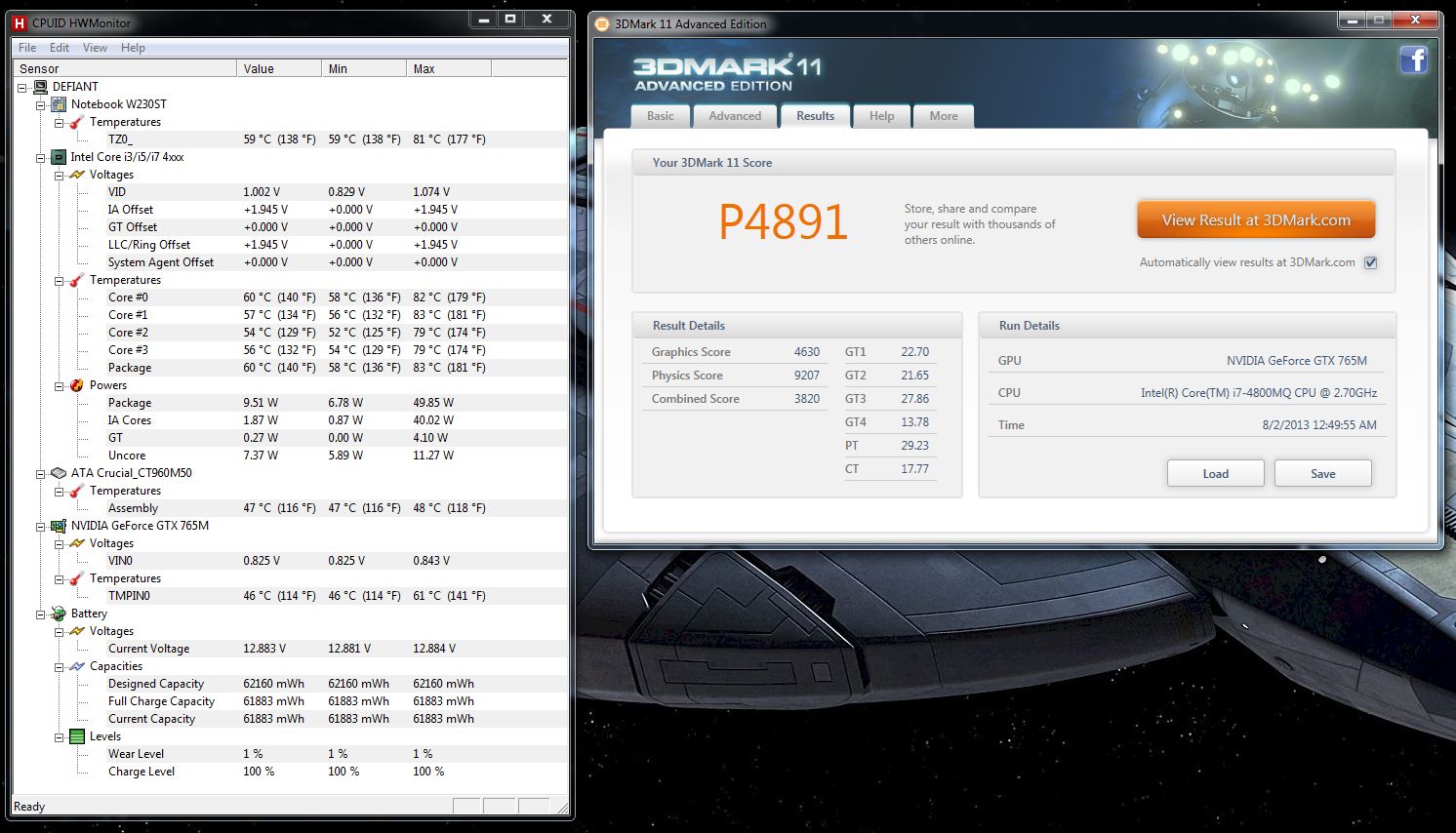
With a good set of drivers updates and possibly overvolt of the GPU we should be able to see 5000 easily. This replacement machine the core works great at +135MHz, but vRAM struggles past +560MHz or so compared with the other that would barely run +100 core, but +650 vRAM. Each machine is different, but most users should easily be able to run at +500 vRAM which is most important if you plan on gaming at 1080p. -
-130mv here, still flipping between 3.4 and 3.5ghz. (4800MQ like you, wingnut)
Damn you, TDP throttle.
Considering the 4700 is capable of the exact same feat with xtu, the only way intel can justify the existence of this chip is to add another 5-10 watts to the TDP, minimum.
Just a pinch of buyer's remorse here with that upgrade. -
That looks awesome!
I am wondering whether the battery life better on windows 7 or windows 8.
Maybe uninstalling SoundBlaster will improve battery life? I remember using Razer Surround and it reduced my battery life significantly. -
With -70mV on the 4800 CPU (and the back propped up by two nespresso capsules - no notepad cooler), my scores in 3dmark11 are:
- GPU +100 core, +400 mem: P4777 (CPU 85C/GPU 63C)
- GPU +100 core, +450 mem: P4795 (CPU 88C/GPU 66C)
- GPU +135 core, +450 mem: P4939 (CPU 91C/GPU 68C)
Interesting it seems upping the GPU core gives you better bang for buck than the memory bump. Can't wait for Amal to get a 765 bios mod...?
Petrov. -
That's great that you can run -130mV. I can't go lower than -100mV. Are you sure CPU on 4700 will run 3.5GHz steady? Also I have a beta BIOS from Prema that I'm testing. It has an option to bump TDP up or down.
GPU core will improve 720p, vRAM will improve 1080p. Run 3DMark11 X score with the various configs and you will likely see the opposite results (ie faster vRAM will improve score) because of the bandwidth bottleneck. At 720p it's not being starved. -
Yes - that would be an idea and i will look into that. But i guess it will not be as transportable as an W230ST
-
There's no need to remove the battery anyhow. Just leave it in, it's a free battery backup if nothing else.
-
Won't that heat up and wear the battery down ? I always remove the battery when at home, and just plug it in when I need to flash the BIOS
-
Nice OC and nice scores there.
Stock drivers?
This time I don't think I will be creating any BIOS MOD.
We have Prema for that this time.
-
True, esp. if you buy a decently sized nice monitor, but a mini-itx case itself should be VERY portable, but in toting, I'd expect having to make do using a TV(HDMI) or something...
If you're serious about, I'd STRONGLY suggest looking into HTPC oriented forums. They're ALL about SILENT, however most don't care too much about computational power or gaming, so...
One of the bigger review sites, I think tomshardware(maybe anandtech), had a review recently(sometime in the last several months) about a pretty fully featured mini-ITX board. Apparently it was more "featured" than those sorts of boards usually are, but I've never really looked at mini-ITX myself, so... -
Thanks for your input - i currently flip through the different proposed forums.
-
Quick question for the techs out there. I received my top in the states but I'm currently in Afghanistan. I had a friend of mine review the top for me ie. stress test, install drivers and software, repaste CPU, since I wasn't going to be able to do it myself with poor Internet connection, tools, or proper workstation for that matter. Not a tech and have never been one and I wanna pay the guy for his services. How much would you say a good amount is to pay for the service? It was a favor but still, plus he hooked me up with some really nice software lol.
-
I have a cooler master Elite 120. It's as big as four slice toaster but can accommodate a regular desktop PSU, CPU, GPU on a mini-itx board. I have an Asus m-ITX that is phenomenal. You just have to carefully pick out your CPU cooler since there's only a few that will fit.
$100 and a case of beer.
-
Really appreciate your pointers and insight. Placing order now, will post again when I have finalized the config
Thanks WingNut -
19V and 19.5V adapters are within the mandatory electrical tolerances of each other. The only issue would be in fringe cases perhaps.
-
I went with a 4700, and thus far I've been unable to verifiably up the the 1-2 core values at all via XTU. After I set the single-core to ~35x and run a single-threaded bench like old SuperPi - all I get is 3.2Ghz. And this is at very low (50's-60's temps). There's no throttling. It's just like there's never a circumstance in which the CPU "feels like" it's a single core (and therefor able to clock up to 34-36x).
How were you able to do this and what did you use to demonstrate to yourself that the CPU was actually throttling up to 35-36x?
-
Hey guys, just got my lappy today
Everything's going smooth so far with the driver installations, except when I install MEI Driver, it gives me an error and says it is unable to install it or something like that. I'm on W7 btw, with stock everything except the Intel AC 7260 card. Do I need MEI?
Edit: Whoops, didn't mean to post it in this thread, but I think I remember HTW saying something similar about the MEI installation error? -
Ah, found it. Did you ever figure out the MEI and SB thing? I'm afraid to try the SB one. Not sure, but should I be installing something else, like a Realtek audio driver or something beforehand?
Oh btw, the Intel 7260 driver just finished installing. Works like normal---detected my router, took my password, connected.
-
yo dookie, I had an issue installing MEI until I did all of the windows updates, got dotnet framework 4.0 and made sure all other drivers were installed normally.
-
Cool, thanks buddy!
-
Hmm, didnt install the MEI nor the WLAN, Combo BT, 3G or Intel WiDi. Everything seems fine so far. Still updating Windows so benchmarks and whatnot will have to wait
Man, this fan really does run all day. Reminds me of my old HP Pavilion from 2007. A BIOS update made the fan turn on only when needed, and would kick up to full blast when playing Brood War. FYI, I have my Cooler Master X-Slim on right now, and the system fan is still going. It's not going full blast or loud, but it's steadily whooshing quietly. Must be because I'm running windows updates or something, cuz HWinfo keeps showing the CPU clocks jump up and down between 798mhz on all 4 and 2.9ghz on all 4.
EDIT: While I'm typing this, and Windows is running updates, with my laptop cooler on, the CPU's max temp has been 74C, minimum 51C, current is bouncing around 59-67C. I'm using HWMonitor, haven't done a repaste yet, and the I'm in SoCal (SGV area, so outside temperature is about 82F right now).
EDIT2: Man, I'm bored haha. Just checked my screen, it's a Chi Mei CMN1343, N133HSE-EA1, that IPS we all want I did the dead pixel test from
http://deadpixeltest.net/ too. Nada! Woohoo!
-
Hi, i recently received my w230st and am looking for a keyboard protector for it, would this one work? certain asus laptops seem to have the same keyboard layout, what are your thoughts, http://gentechpcforums.com/system-images/Asus/S46CA/Asus_S46CA-18.jpg, available here TPU Keyboard Cover Skin Protector for Asus S46C S46E F401 X401 X401A X401U X401E | eBay
-
An issue I have come across (had this on a past laptop as well), and wondering what you guys think it could be:
I restart the computer, and it does not detect the nVidia GPU. Further, the translucent highlight box on the desktop goes from being the Windows 7 blue one to the classic, hollow grey one. Aero peak is also turned off. I have to switch in manually in my performance settings and restart the computer to get the nVidia GPU working again. -
I have a couple of questions for all of you before I finalize my order.
First, on xoticPC, it gives me the option to use IC Diamond Thermal Compound instead of the stock thermal compound. I have been reading a lot about how at full performance, a system with a 4800mq processor may run a little hot. Through some research, I happened upon an individual on another site who recommended getting IC Diamond to help make the system run a little bit cooler. What are all of your takes on that. Is it worth $35.
My next batch of questions will be regarding the harddrive (HDD) configuration. So far I have selected for no drives in the two mSata slots and opted out for the included 750gb 7200rpm drive for a 256gb SSD. I looked at some of the other pages and posts which recommended at least one SSD in an mSata and a 5400 rpm for storage. So is a SSD better suited for the regular slot on a laptop or an mSata, or are all three HDD slots mSata to begin with. Is having one SSD in one of the two mSata slots bad, aka should those slots only come in pairs for raid use only. Should I only get a ~250gb SSD and opt out for the regular HDD so as to reduce noice, heat, and vibrations from such a drive. I have heard that SSDs are best used as a drive for the operating system and not for regular storage. As such is it wise to even get only one SSD for everything or should i definitely supplement it with either a regular spinning disk HDD or an external hard drive of various storage sizes.
And lastly, xoticPC is giving me a lot of options for SSDs to buy. Here they are with associated prices, 240GB Crucial M5 Series $160, 256GB Samsung 840 Pro Series $195, 240GB Intel 520 Series $220. In the mSata raid slots i have the options of 256GB Crucial M4 mSATA SSD $230, and 240GB Intel 525 Series mSATA for $315. What are your opinions on each of these companies and/or drives. Is one more reliable than the other.
I really appreciate anyone and eveyone's help in answering my slew of questions. -
^All I can say is the IC Diamond is definitely worth it.
As far as the HDD/SSD, your choice entirely. -
So Wing, my cpu is hitting 95 Celsius during BF3 gameplay. I wanna undervolt but I don't wanna lose performance. I'm liking 60fps with the mixture of high/medium settings.
What do you suggest? -
Undervolting doesn't mean you lose performance, it just reduces power usage and temperatures. Because the cpu reduces its speed when it gets too hot you might even gain performance.
What you're doing here is absolutely fine, it's safe, and what you're doing is taking advantage of the fact that Intel just choose the highest voltage that means when they use the CPU heavily it produces as much heat as their TDP for that chip or less. It doesn't spend time finding out the minimum the chip needs to get its job done reliably. -
In the case of the 4800mq, undervolting is actually necessary just to hit the stock speeds under load.
47 watt TDP is just silly.
Even more hilarious is hitting 3.9GHz stable, only to throttle down to 3.2 if you actually give it any work to do. -
IC Diamond is definitely a worthy investment, but I still recommend doing it yourself if you're comfortable turning a few screws and have fussed with laptops before. Even if you get IC Diamond from the factory, there's no guarantee it will be applied well or correctly either. But if you're not comfortable changing the paste yourself, then best get it from the factory.
There are two mSATA slots, they are the mini cards without a case, and a single SATA slot for the traditional 2.5" SSD or HDD. I would definitely recommend SSD for system drive, for storage use HDD or SSD whatever your choice. Or just use a single SSD for everything. Whatever you want.
Right. Undervolting helps performance because it won't reach TDP until a higher clock, that's how my CPU results were BETTER with an undervolted machine than stock machine, it could maintain 3.5GHz instead of 3.0-3.2GHz. Also, with BF3 especially use nVidiaInspector to limit your FPS to 60. I also run my CPU at 3.0GHz now and with frame limiting BF3 CPU stays below 75C, and still stays pegged at 60. For the occasional time I need to do some encoding, I'll just bump it up to 3.5GHz and save myself some time.
Best I've been able to do is hit 3.6GHz stable, but we may have a way to bump TDP with modded BIOS. I'll be testing it out. I'd only recommend it for running CPU only apps though, otherwise you'll be doing yourself a disservice.
-
Thanks so much for your responses and your help
-
Understood. Will have to run some handbrake tests with overclocking vs OpenCL, see what works better. My 3.9 was only idling on single core, couldn't check for all core or loaded stability for obvious reasons. (Dropped to 3.1/3.2 when presented with any work.)
I'm hoping you're right about TDP unlockable in BIOS, but I doubt it. I suspect it's all on die, which would explain why the unlocked TDP in the 4930 and lower TDP in the 4702. Maybe we'll get lucky and it's up to bios to enforce, but with the VRM and clocks all handled on-die now, that would seem ambitious. -
I just tried the TDP up, and it didn't help. I realize Intel XTU stress test isn't that hard on the system because I can easily maintain 3.5GHz, but something like Prime95 or wPrime it does drop to 3.2 or 3.1.
-
I undervolted 70... haven't touched the cache though.
Temps seem to be down around 11 degrees
HTWingNut's Sager NP7330 / Clevo W230ST REVIEW
Discussion in 'Sager/Clevo Reviews & Owners' Lounges' started by HTWingNut, Jul 21, 2013.


