Problems? See this thread at archive.org.
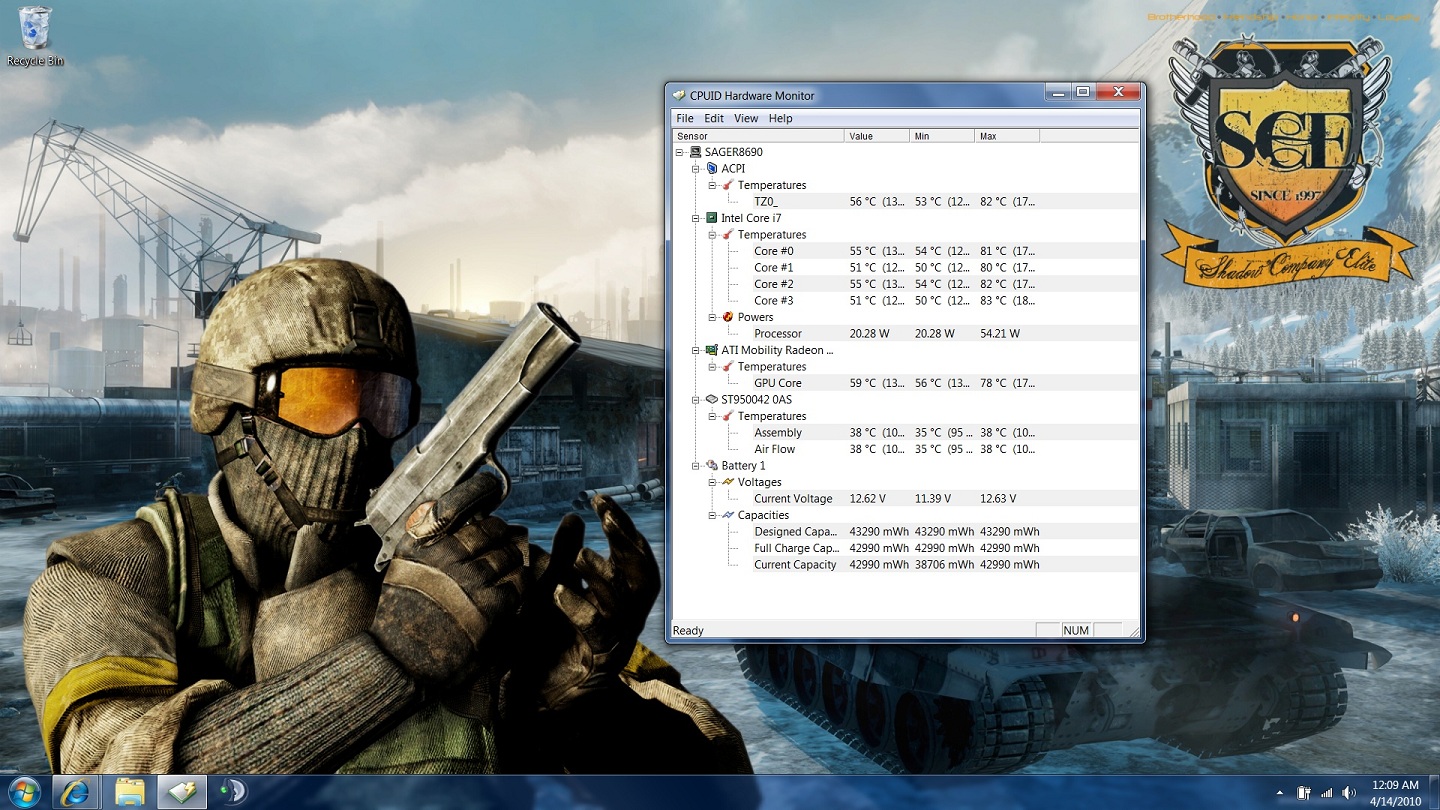
do these temps look right....keep in mind i am in miami and the ambient temp is really high..around 75c
![[IMG]](images/storyImages/Temps1212.png)
-
Errr...are you sure your ambient temp is really 75C?

-
haha i meant farenheit sorry
anyways attatchment should work now...should work now, btw these temps were after 30 minutes of gaming.Attached Files:
-
-
Temps are fine bro!
-
cool thanx for the confirmation...i came from an asus g50vt where the 9800m (gts clocked) would peak 96c lol....so yeah
btw my voltage on the pic is 12.6 because i was using a power inverter in my car...plugged in the wall is 12.9 -
There is no substitute.
![[IMG]](images/storyImages/boottime.jpg)
-
Now I want an SSD as well. Linux should boot in 5 seconds or so.
Too bad large ones are so ridiculously expensive. -
I'm buying an SSD once 100GB gets below $100.
-
Here here; that's how much I payed for a 100gb 7200rpm hdd for my AW three years ago. That was the largest fast drive you could get at the time.
In other news, Sager got my computer on Monday; I got an email saying they have it, but haven't heard anything more since then. Here's to hoping that they figure it out soon, most of my big papers are in by next Wednesday, so I am going to want to unwind... -
is there a disassembly guide, video or explanation on opening our notebook ..
Ide also like to remove the sticker but kinda confused..is it just covering the other round vent ?
thanx in advance -
I was just about to ask whether you had removed the sticker because it can and probably will drop your CPU temps by 5-10C. When you remove the backplate, you will see the sticker covering the vent that is above the CPU, you can't miss it.
-
cool...will be doing it tonight...is it just the screws and thats it?
anything else i should watch out for?..never opened up a laptop before but i know my way around tools a little -
You just need a small(ish) screwdriver. Grab an empty altoids tin to drop the screws in; they're all the same size. Make sure the screwdriver you use doesn't have a magnetized head. Try not to produce any static electricity when you're opening it up, and ground yourself if you can.
And make sure it's turned off and the battery is removed before you even think about touching screws.
On another note, I just came back from Best Buy with this USB audio interface from Creative. I'll let you all know how it works at some point. Pretty excited. -
Download the Service Manual from here:
http://www.mediafire.com/?2dvei3u2jt1
Detailed instructions and pictures of disassembly -- all parts and systems. Great resource. -
cool thanx...gonna do it now...
btw I have a steelseries "7.1" usb sound card paired with steelseries headset and the sound is great at least in games.
http://shop.steelseries.com/index.php/audio/steelseries-siberia-usb-soundcard.html
http://shop.steelseries.com/index.php/audio/steelseries-siberia-neckband-headset.html -
done lol...easy as 123.... has anyone added the little foam ring to that vent? i noticed the other one had it i guess to keep dust from floating other places
EDIT: my cpu temps dropped by almost 20 degrees? lol..i maxed out core one at 62 playing cod4...now the screenshot above was playing bc2 so im gonna run that game and compare but my gPU temps went up a bit,...
did anyone notice theyr gpu temps go up after removing the sticker? maybe that vent was blocked for a reason maybe to force the air out throught there to cool the gpu? -
I duno, i just took that crap off and my gpu temps went 7-10 temps down. It REALLY helped.
-
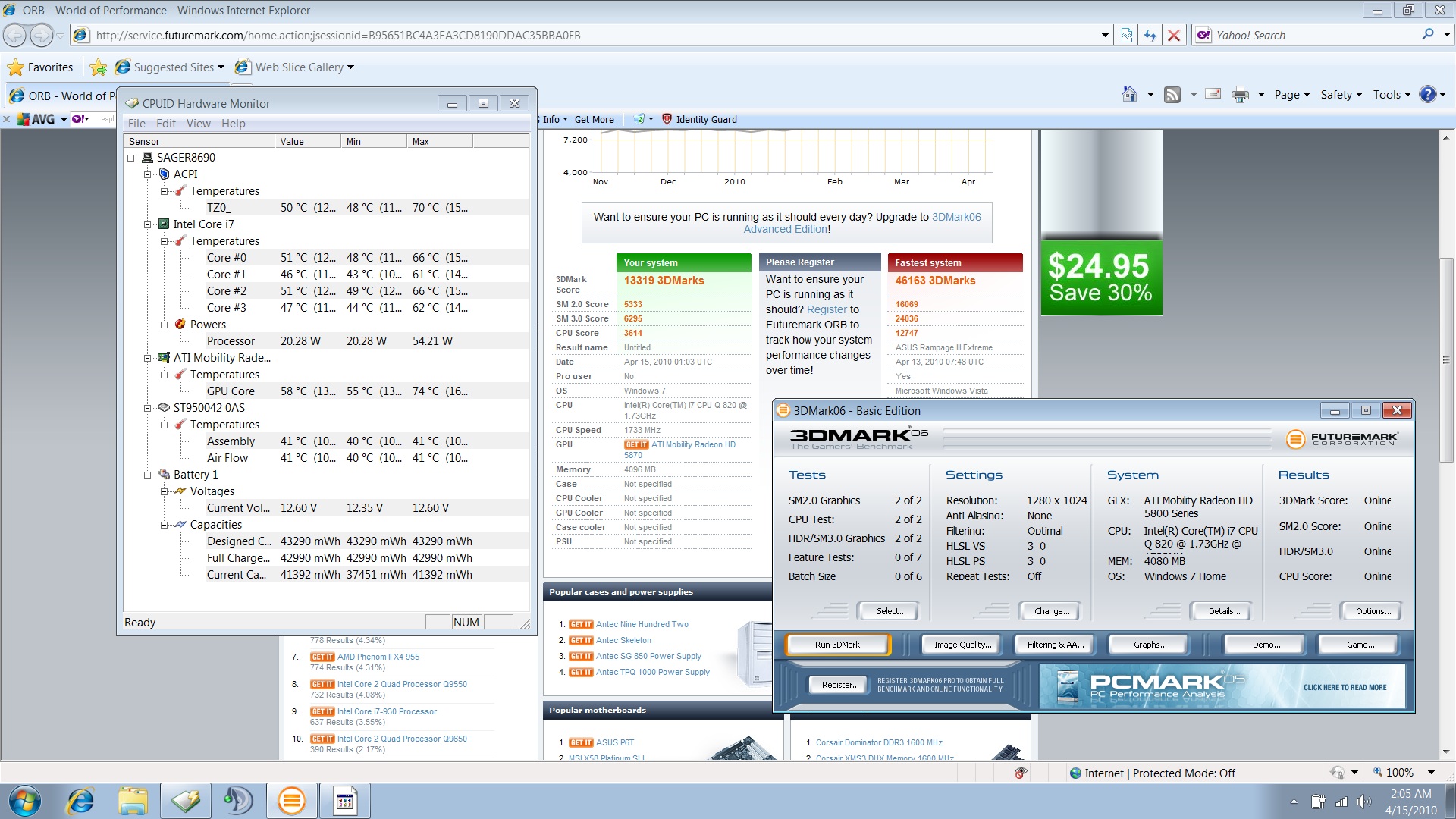
my first 3dmark 06 score and temps....let me know if everything loks normal...
yeah i got the free version of 3dmark so im stuck with that ty res 1280x1024Attached Files:
-
-
sry can any one enlighten me with gtx280m over hd5870 ?
-
I thought the ATI 5870 is the fastest GPU that's out right now?
-
yeah i know it is the fastest but comparing to how much faster than the gtx280m and if it is worth the upgrade :*
-
-
Ordered a G860 from Kobalt computers last night
These are the specs:
Screen - :: 15.6" 1920x1080 Full HD+ X-Glass
Processor - :: Intel® Core i7 720QM Quad Core 1.60GHz - 2.80GHz 6MB Cache
Video Card - :: ATI Mobility RadeonTM HD 5870 1GB GDDR5
Memory 1 - :: 4GB DDR3 1333Mhz CAS9 2x 2GB DIMMs
Hard Drive - :: 320GB 7,200rpm SATA-II with 16MB Cache
Still waiting for the confirmation e-mail with the ETA though, I hope everything got through all right. (paid with mastercard gold)
May it arrive shortly ^^ -
Hi logion
If you had a confirmation email from our payment service provider then the order will have gone through fine, full pdf order confirmations are usually sent out seperately the day after an order is placed so it will be with you this afternoon or tomorrow morning
-
Wow didn't expect an answer so fast, certainly not from a Kobalt employee
I did receive an email from paypoint.net stating that the payment got through, so I'm glad to conclude that everything is in order.
Thanks for the blazing fast reply, Neil! -
cool, congrats on the purchase you will be amazed by this little beast
-
I think you might find its a downgrade , i.e. it may be cheaper to have the ATI card fitted instead of the GTX , info I have seen suggests ATI is faster on the benchmarks but probably not hugely noticeable in games etc,
I went for the GTX and am well pleased with it -
Well, I still am looking for reasons to go with the 5870 than the 285M. Still weary of that overheating problems for the MR 5870.
-
Yeah I dont understand either, supposedly ATI card is better... Ok? WEll why is it more to get nvidia? My guess is poor marketing on nvidia's part for not releasing their dx11 card in time. I not saying this is the reason. Just seems like poor marketing imo. I am die hard nvidia, however seeing ATI was a step ahead and cheaper I went with ATI. I do like the physics built into the card howevever, ATI card may not handle physics, but the processor will pick up the slack there
-
There is an overheating problem on the 5870?
and there are plenty of benchmarks proving the 5870 is better. -
Do you also have the problem of the heatsink not being flushed properly to the GPU die?
-
Well... don't have to ask everyone whether they have the heatsink problem, it's like... getting really paranoid over nothing. Most Sager users are enthusiasts, and they will either post on this forum, or at least read this forum, if there is really a widespread problem with the heatsink, you will see tons of people complaining about the problem. However, up till now, there are very few complaints about the heatsink that is non-user created problems.
-
Ah ok. Well, if some representatives from different resellers here in NBR can confirm this "issue", that would give us an accurate conclusion.
So what are the disadvantages of choosing the 5870 over the 285M? Is Physx that of a big deal with games? -
You don't get CUDA and PhysX, it's not really a big deal IMO. PhysX is just hardware accelerated graphics, you can still play PhysX games with ATI, and most games using PhysX don't really use PhysX chip exclusive physics features like tearable cloth etc so you are not losing any features. 5870 is definitely a better all round choice.
For the heatsink issue, if you are really that paranoid, just get your reseller to do a furmark test on the temp before sending to you. My reseller helped me ran some temp benchmarks after changing thermal compound to ICD 7 before sending to me. -
No overheating problem here. Just did a paste job, I max 76-78C in games after hours of play. If I removed the can as it is called here on the forum I'm sure I would drop 4C in games. As of now keeping the can is fine with me. No problems whatsoever
-
how do i get my esata to work, i really don't know much about it except its has a faster transfer speed and the external hard drive i order had it
-
Looking forward to seeing how arma2 will perform on the notebook, I hope it will smoothly on 1920x1080.
-
nevermind after fooling around with it, i managed to figure it out
-
Already requested rjtech to do that but unfortunately they can't because i just bought a barebones from them. They don't even test barebone units before the they are sent to the buyers.
-
How about Furmark temps?
-
share how to?
Thanks -
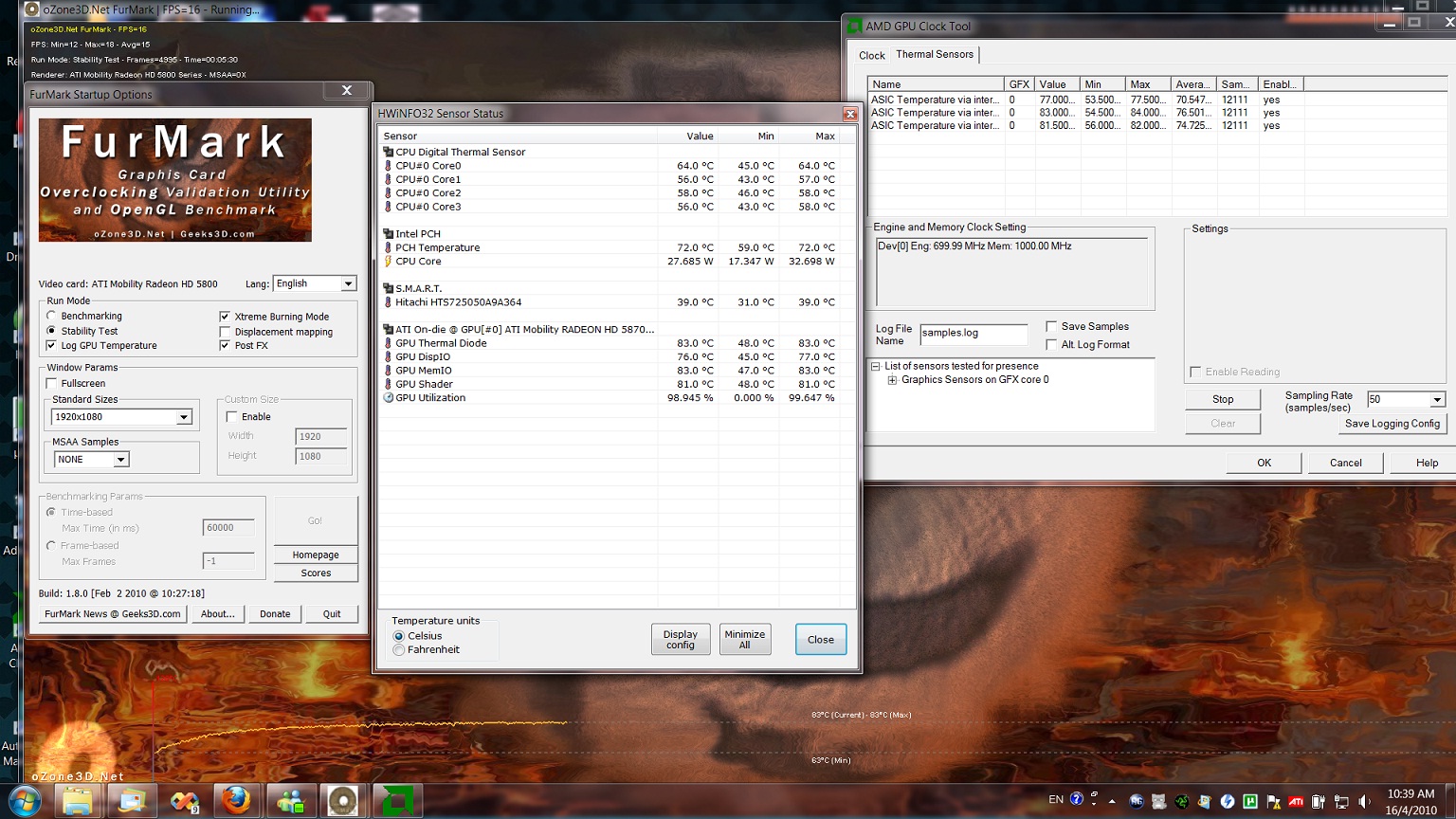
My furmark temp while OC 800/1100, and stock 700/1000 respectively, current ambient temp here is 36C.
For OC furmark, core temp reached 85C max, while for stock it's 77C max.
For gaming, I've played Napoleon total war and warhammer 2 chaos rising for 4 hrs, and max core temp was 71C. Temp lower than worshipingnow probably because of the ICD 7 thermal paste.
There's really no question to Clevo's cooling, it has the best cooling system unmatched in the notebook industry.Attached Files:
-
-
Has anyone else used a notebook cooler with this thing?
I already purchased a Zalman NC 2000 (I know, I know, but the NC1000 doesn't exactly fit either...) for this laptop to make even cooler than it already is. I figure if I can cool it about 5-10 more degrees Celsius it will be even quieter and this notebook really will run like a dream (though I expect noise while gaming... good thing I have great Bose speakers to turn up anyway).
SO, with that in mind, do you guys think the Zalman cooler would work with the vents being positioned underneath the fan? I figured those guys engineered the pad with the vents towards the bottom for some reason. Maybe the air gets forced up towards the top/screen part of the underbelly regardless.
If no one knows I'll post results and such when it comes in. But I just figured I'd ask just so I know to return if it's absolutely non-compatible or something.
Also this is my first post in this NP8690 lounge area so excuse me if all of this has been fully answered somewhere else or if I sound like an idiot posting all of this my first time here. Oh, and I did read all the intricately made posts by the guy who reviewed the different notebook coolers, but I don't think he really mentioned anything about Sager.
PS: What DID you guys find out about that sticker thing blocking the vents or whatever? -
I don't think anyone has posted much regarding notebook coolers with the 8690. I think it'd be great if you posted your results.
People generally remove the sticker thingy. -
Just noticed that actually. Opened it up to make sure it wasn't dust causing the somewhat obnoxious noise from the fans and saw that the vent was covered by some black thing and realized it was the sticker you guys were discussing. Amazingly enough that's where all the noise is coming from too...
If I were to remove it I could put it back on later, right?
Btw, should the fan noise be smooth like a ceiling fan or one of those desktop fans? It's not defective-sounding but one of my fans just sounds a little "rough." Hard to explain. The faster it goes, the smoother it sounds if that helps. And it's on the left side from my point of view looking at the laptop screen normally. -
I've heared from a W860CU owner(my brother actually) that removing the sticker causes the airflow to be more directed towards to the CPU but less towards other components(such as RAM).
So removing the sticker will cause the CPU to run cooler but will also cause other parts to run warmer.
(I haven't heared anything about reduced fan noise due to the removal of the sticker though.)
Can anyone confirm this?
For my own order status, I'm still waiting for my confirmation(36hours since I ordered).
I'm amazed by my anxiety over a notebook, lol.
I feel like a 6year old on the evening before santa claus xD -
There are some discussions regarding this, but the result is that it's a non-standing argument, it's best to remove the sticker. I've never heard of ram needing air flow to cool it.
-
Do theae temps beat the hell out of the gtx285m temps?
-
Hi there! I'm new here, and to be honest I had never even heard of this brand! XD
My question is: is there much of a difference between the NP8690 with a i5 or a i7 processor? -
Afaik you can't order a NP8690 with a i5?
I've gotten a (preliminary) ETA of 29april on my machine ordered on the 14th
**OFFICIAL W860CU/NP8690 Owners Lounge**
Discussion in 'Sager/Clevo Reviews & Owners' Lounges' started by ChinNoobonic, Oct 8, 2009.



![[IMG]](http://img17.imageshack.us/i/boottime.jpg/)