Problems? See this thread at archive.org.
^^^
Any rez other than the native won't be as sharp (slightly out of focus).
-
That is fine if you don't mind the blurry / fuzzy lack of definition which is the result of doing so. Personally I can't stand it but some others don't mind.
-
hey i wonder when you guys startup the OS, how many physical memory used, i got mine at 1.06GB... do you guys think it's normal? my desktop starts at only 700MB of RAM...
-
Thats normal on windows 7...
-
really? that's weird cos in my desktop i also use win7 ultimate, so many software but only start at 700MB... guess its the drivers that hogging the RAM...
-
How much RAM have you got in your desktop?
-
^ 4GB DDR2... i know by normal usage i wont be bothered by this, but sometimes i have to work with 2-3 programs on (Photoshop, Illustrator and flash) at the same time... so having extra 0.5GB will be nice...
sorry if i sounds like a noob, but actually i'm a noob in laptop things, i've been always desktop users before this laptop arrive 4 days ago. -
Some of it might be pre fetched as opposed to physically in use.
-
Just received my 8690 today! Very nice laptop! I am going to spend a couple days with the laptop before writing up my review...
-
I don't use Furmark. Kinda pointless since no program will ever push that far.
But after around 4 hours of gaming, my GPU rises to a maximum of around 85C (normal clocks), and my CPU at 80C. The average is a few degrees lower than that. I do have the laptop raised with a book in the middle, keeping the vents clear.
Try downclocking your GPU. Might help since the fans won't need to run at full speed. I don't really notice the sound of the fans, so I don't know though. -
Not really because of bad coding, it's simply because all RTS games are much more CPU intensive than GPU intensive, so will most likely bottleneck on the CPU. That's why CPU is only not so important if you only play FPS games or something.
-
Looking forward to your review
-
for my 8690, when playing just cause 2 with aircon off, i get 60 for cpu, 90-95 for gpu. with aircon turned on at 18-20 degree, my cpu temp will go as low 50-55 while gpu at 80 max. the gpu is still using original factory paste and not oced.
i really love my room air con
-
How does one safely(!) downclock a GPU?
I can't seem to find such an option in the CCC(i have an ati 5870M).
I would imagine that downclocking the CPU would cause it to produce less heat and thus it needs less cooling => less fan nouse.
Is the CPU allready getting downclocked automatically or should I do this manually? (i'm running windows 7 professional) -
That link provides a superb tutorial on how to downclock. That method is what I used. I have my 5870 downclocked on start up, and I just put it back to stock whenever I'm going to play a game.
-
Guys,
Will the battery life of the laptop increase if i use a i5 processor? -
Maybe. But probably not by much.
Edit: i5 540m TDP is 35 watts, i7 720qm is 45 watts. That doesn't affect battery life linearly though, as far as I know. Anyway you don't really buy this laptop hoping to get any battery life.
-
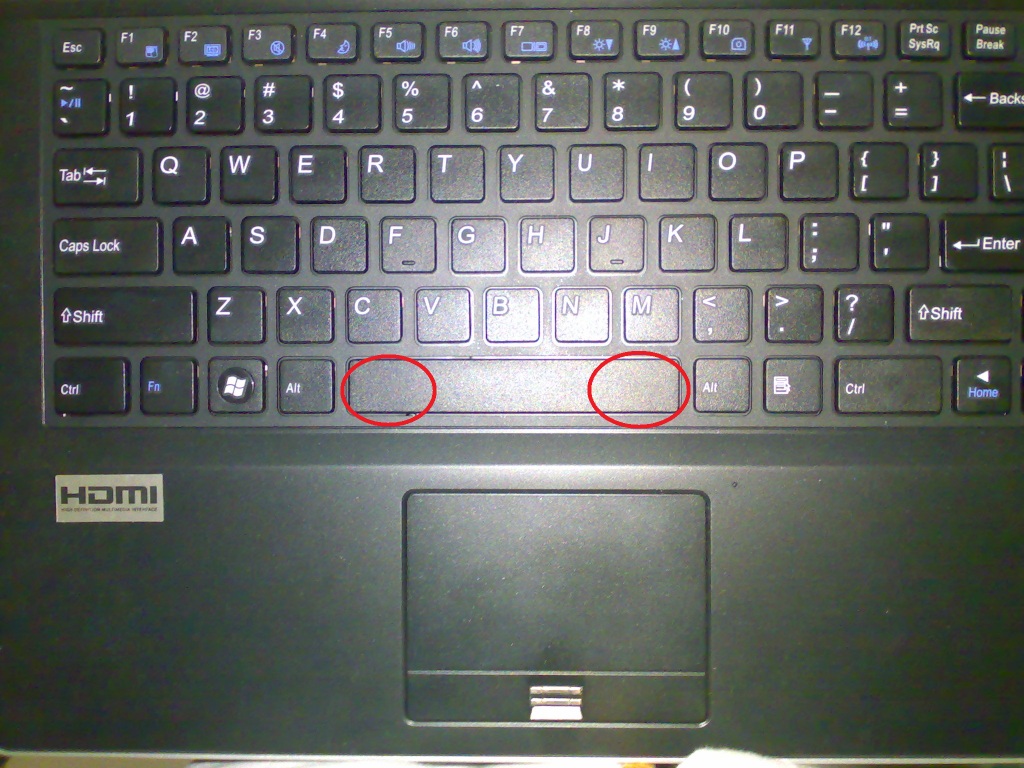
When you guys press the spacebar of your W860CU in the encircled areas of my picture attachment, is it registering all the time? And is the left encircled area not soft with your keyboards?
Attached Files:
-
-
Are you familiar with the term Obsessive-Compulsive Personality Disorder? I hope you will eventually be able to relax and enjoy that very nice, very capable new laptop.
-
@kevin: my kerboards registers all spacebar strokes even those @ the sides
-
that's the very problem of my first keyboard. as i have already said, you must ask your reseller for a replacement!
BTW, our italian clevo reseller is Santech. -
Yes. Only place that it doesn't always register are the bottom and top corners of the spacebar key. But realistically, I'll never hit those places in real life typing/gaming.
-
My NP8690 shipped today.
-
Yes I'm aware of that and this is something major. I always lose a space in my sentences.
Yeah but RJTech want's me to ship the keyboard back to them which is very expensive considering I'm from the Philippines. You were very lucky your reseller sent you a new one for free.
I agree with you totally. I too won't be hitting the corners but I do hit most of time the area 1-2 cm from the left and right edges and it won't register.
@All
Was there ever a time that when your typing a word, one letter is missing. This seems to be happening randomly with my keyboard as well. I'm pretty much experienced in typing and randomly it happens with this keyboard. -
This may not be the place to bring this concern up...but it's starting to worry me...
One of the main reasons I got this laptop was to be able to play Starcraft2, on the go, at the office, LAN parties for WoW, etc. But I made a disturbing discovery tonight.
Apparently the SCII beta does not like the mobility 5870 or the new 10.4 catalyst drivers....either that, or there's something severely wrong with my system.
After playing a little bit of the beta this afternoon, I noticed my framerate during matches hovered around 32-36fps, with Ultra details and native 1920x1080 res. This is certainly a playable framerate for an RTS...but it got me thinking. My fiance has been playing the beta on her laptop, which is the XPS m1730 (aka the BEAST). Her CPU and Graphics, according to most users, is significantly lower than my current config...she's running with a t9300 dual core cpu, and dual nvidia geforce 9800gt's. I did some tests tonight on her machine, and during matches, she's getting an avg of 55-60fps with ultra settings and an even higher native res at 1920x1200. What's wrong with this picture??
On both systems, I made sure that nothing was running in the background...I have updated drivers for both...and I even forced the 4xAA and 4xAF thru the nvidia control panel on her machine...and it STILL outperformed my 8690!!
Maybe this is a little pre-mature judgement on my part, considering SCII is still in the beta stages, but it's less than 2 months from release. I hope this may be just a compatibility issue, and that a future driver release will help...or maybe some more card optimization on bliz's part.
Has anyone else had any experience with SCII on their 8690's? -
SCII on max settings at 30-40FPS is normal, I'm not sure, but I think either that m1730 has SC2 ran at a lower settings (somewhere you might've missed), ran when there's very little action (like when game is at building phase or something), or there's something wrong with the framerate reading on that machine. Because even an i7 desktop with 5870 desktop is only getting around 60 FPS. Dual 9800M getting 60FPS on average is not quite possible.
-
Very infrequently, but yeah, it happens from time to time. However, I don't know if it has to do with user error (the regular typos and the fact that I'm still trying to get used to the chiclet-style keyboard), or it is an actual issue with the keyboard.
Has anyone else been noticing keystroke lag? As in, I'd type a word but sometimes it takes the word about a split second longer to appear. Normally, you'd see each letter appear as you type it, but I've been noticing that sometimes nothing appears and then a split second later the whole word appears at once. I haven't restarted my computer in a while and I have a few programs just running in the background. Could that be why (a memory leak perhaps?) or something else?
EDIT: Hmmm...I also just remembered that I have the GPU UC to 300/300, so maybe that could be why. I guess I"ll change it back to stock and test it a bit. -
I checked and re-checked all the settings, on both systems. Everything is the same. And on another note, I ran this tonight on my desktop system, to make some more performance comparisons. My desktop setup isn't much of an upgrade over the sager...core2duo, E8400 3.0ghz, with a geforce gtx260. My desktop graphics card is overclocked by evga, its the core216 version. With everything at ultra settings, rez at 1680x1050, nvidia controlled 4xAA and 4xAF, I get around 70fps in building stages and 50-55 during action sequences.
After building a custom match on my sager, I noticed my framerate was averaging 32-36 during building and even dropped below 30 during intense action.
This baffles me. For the amount of money I spent on this laptop I would, at the very least, expect it to perform on the same level as the two-year old dell.
I will try to run some basic benchmark tests while running it tonight and upload those results, if necessary, but HWmonitor is always running and reported normal temps during all my sessions. -
It might be a software issue, yes. Try to look at your cpu usage when you're typing. Or it could also be because of the hdd.
-
Don't you think it's very normal then, a desktop 260GTX is very powerful, more powerful than 5870MR which is based on 5770 desktop a midrange desktop card, moreover, it's overclocked, and you are running it at a lower resolution, getting around 20FPS more is very normal. I think you have overestimated the power on a desktop, 5870MR is the most powerful single notebook GPU, but it doesn't mean that it's anywhere near the desktop version.
And your desktop with an OCed 260GTX desktop at lower resolution running at around the same FPS as that dell with dual 9800M notebook GPU should tell you there's something wrong with the FPS test on that notebook. -
Thanks for the insight Fzh, and I certainly understand your point. I wouldn't be nearly as worried about this if it weren't for the results produced by playing on the m1730.
To be completely honest, I don't even really need the FPS indicator running to tell a difference between the way my system runs and the dell. It's that noticeable!
And maybe I might be underestimating the raw graphics power of my desktop, in comparison to both laptops...but I've been running every game and benchmark I own, that I've been running on my desktop, and the 8690 has outperformed the desktop in every area, with the exception being SCII!
I also come from a family with a LONG line of major over-reactors...which may be the case here, considering the game isn't even out yet. It's still, however, a little disconcerting.
I did notice that if I set the Post Processing down to the Medium setting on the sager (while leaving everything else at Ultra), the performance/fps falls between the dell and my desktop, around 45-60, action-building phases, respectively.
I'm trying to do some more research and I would like to see some others with similar specs on their 8690, running SCII, and that may provide the peace-of-mind I'm looking for... -
I have SCII as well, same 5870MR, and I can tell you that it's average of 40FPS as well, with heavy action (like mass carrier + mothership) dropping to 20+, and lighter action (like base building) at around 60FPS.
It might also be likely that SCII has had included some directX 11 effects for dx11 compatible cards that might lower the performance, because running SCII on my notebook with 5870MR does look better than SCII on my desktop with 4850. (it could just be because my notebook screen is better though). -
Well that still leaves me with some concern...as my FPS doesn't even max out above 45 with all the settings at Ultra, even during light action or building. As soon as the map loads when I create a custom game...it starts out at around 45...then as soon as I click the units to start building, it drops to 32-35 immediately, and never goes back up.
It's as if something is causing the gpu or cpu to throttle down maybe? I have no clue, I'm really at a loss. -
Well, I didn't turn on AA/AF at all, and 60 FPS is also only for a short burst when the game starts, for the rest of the game it's around 30-40FPS as well, so I would say it's alright.
-
Also, I notice that my GPU temps seem to be a little higher while running SCII...compared to my other games and benchmarks.
It maxes out at 83c with an avg of 79-80 while playing scII, during a 2 hr session earlier today. Does that seem normal?
CPU temps are just fine, nothing over 61c reported during play sessions. -
Oh, and I never enabled AA or AF on the 8690...I don't even think it's possible with the current ATI drivers, according to some of the reports on the SCII forums.
-
Ok, just to assure you that there's nothing wrong:
Benchmark Results: Ultra Quality : StarCraft II Beta: Game Performance Analyzed
Also, the reason your 9800M SLI is running higher FPS is probably because it only has up to dx10 and not 10.1, SCII seems to have some 10.1 postprocessing effects, and since your 9800M don't have 10.1, it won't show them and hence higher performance. Reason why there's high FPS improvement if you turn down post processing as well.
83C is normal, my temp is around 73C but it's with ICD 7, and your ambient temp is probably higher as well. -
With everything on Ultra, I get around 30 FPS for battle sequences. No AA, but I think I have AF forced in control panel though. I like AF, though it does nothing for SC2 because of the game's viewing angle.
I might put some settings down to high. The difference between high and ultra isn't that stark. -
Well now I can rest a little easier tonight. Thanks again Fzh. I did just stumble upon a forums post regarding the dx10 and 10.1 changes/additions as well, all good for now.
-
another thing to add in, when playing just cause 2, during a mission where i needed to bombard the whole factory of gas tank and the fire are everywhere, i could feel my fps dropped alot to at least 10-15 fps, other then that my 8690 is awesome ^^
same specs as fzh, while the hdd is 320gb 7200 rpm seagate, must find free time to upgrade to 7200.4 500 gb, waiting there in the corner to be used
-
With all settings maxed out?
I think some people have unrealistic expectations sometimes. Consider that you're playing newly released games, maxed out, on a laptop. Even getting to play games on mostly high-medium is amazing, for a laptop. I get some slowdown too, but then I think "I'm playing this game with maxed out settings on a 15 inch laptop" and my mind is blown all over again. -
What are people getting for CPU temps, both idle and at load?
I ask because I have been getting low 50's (occasionally high 40's) at idle, but my load temps have been as high as the mid-80's. This only happens when playing a game to is not optimized for multi-core. -
Those are good temps--about average--depending on your ambient temperatures.
-
I get those temps as well.
-
well for my case everything max out for the just cause 2, except for the extra like aa etc i put max x2 or x4.
my temperature varies. when i on my air con at 18-20, i get like max at 75 for the gpu while the processor stable at 55. without aircon, the temp could go as high as 85 for the gpu, worst was 92.
processor i think max out at 65-70, the gpu still using stock thermal paste. -
My CPU idles at 48, when gaming it's 50-60, only on prime95 CPU stress test does it get to 78C max. My GPU core temp is 72C max and memIO temp is 78C max after 12min of furmark. Did ICD 7 application though.
-
Alright so this may sound like a foolish question but; I removed all the screws to the backplate but I cannot seem to get it off. I got as far as unclipping the 2 bottom clips but just could not get the top (long side) flap off (the side that has a groove for your finger). Any ideas?
-
What's your ambient temp?
-
Are you sure you've removed all the screws? There is one in the middle that's in a deep hole. I remember forgetting to remove that one when I was opening up mine.
**OFFICIAL W860CU/NP8690 Owners Lounge**
Discussion in 'Sager/Clevo Reviews & Owners' Lounges' started by ChinNoobonic, Oct 8, 2009.