Problems? See this thread at archive.org.
The 7260 comes with bluetooth though...
-
-
Hey guys im looking at a sager p151sm at xotic pc. Im going to get it stock with the heatsink upgrade overclock, better screen, and better thermal past. Is xotic pc a good website to buy from? And is it safe to let them overclock my system? It will have. I7 4700qm and gtx770m.
-
I bought my P157SM from them. Although, I didn't opt for the heatsink upgrade nor the overclock.
I recently placed the order and payed by check, so my laptop has not been sent to Sager for building yet (it would have if it wasn't independence week). -
Do you think it is safe to opt for the heat sink upgrade thermal past and overclock?
-
Not sure. I heard from other people that the heat sink upgrade isn't worth it. The overclocking, you could do yourself I guess. I think if you do let XoticPC overclock, any damage caused by the XoticPC overclock will be covered by them.
Call/Chat with them on Monday, July 8th to make sure. -
Thanks. Problem is that I haven't been able to dig up a retailer yet that actually has any(mini) .ac cards to sell me.
Anyways IF I go the 68u it's kinda sounding like I'll want to wait for even more .ac cards as from what I've read so far the 1.9G requires newer broadcomm chips, so pairing the 68u with an older card would get me 66u bw.
[EDIT]
nm. specifically searching amazon for 7260 actually DOES turn up cards to buy... really super cheap too, which is troubling given that PCIe versions are generally at least twice as much.
[/EDIT] -
Ebay is your friend.
Intel 7260 Hmwanwb 7260 WiFi BT Half Mini Card | eBay -
Quick question for all the owners out there, for those of you running 780m's at the stock clocks how loud does the machine get? I'm very interested in buying one of these beast but the only complaint I've seen is the noise level. Is it at least a tolerable pitch? My current HP POS fan isn't that loud its just extremely high pitch. And Xotic PC's cooling upgrades aren't worth it?
Thanks,
Soon to be P157SM owner. -
Oops. Must got confused by too many specification tabs.
Sorry for the pointless post. Edited. -
i did the heat sink upgrade my self and the only thing it did is increase the time for temps to reach max but when they do they are higher than normal .... so DON'T DO IT
-
Forgot about ebay, but that comes with its own sets of problems although I don't see many sellers with assininely high shipping rates much any longer... i.e. you know those pretty decently priced $100 or so items, then check shipping and it'd be like $200-300+ for domestic US cont. 48.
Anyways anyone had problems with the 157's trackpad? Every once in a while mine goes wonkily semi-unresponsive, similar to when you accidentally have two fingers on the pad or an external device(mouse, whatever) moving while trying to use the trackpad? -
So no go on heatsink upgrade but do you think it is safe to let xtoicpc overclock my laptop? Will it run to hot with a i7 4700mq and 770m? Will it shorten the lifespan?
-
That seller I linked to is reputable and has the cheapest price. Ebay's buyer protection is pretty good too.
Any overclocking will shorten life span.
Again, you can do it yourself, but if your CPU/GPU/Motherboard burns out (kinda unlikely), and you feel really uneasy lying to Sager (saying the GPU just stopped working suddenly when you really broke it yourself), then you probably should have XoticPC overclock it. I'm actually not sure what Sager thinks about overclocking, so they MIGHT accept your RMA if you do tell them the truth.
Again, contact XoticPC/Sager on Monday.
I'm fine with all of that, so I'm overclocking it myself. Can't live life without a little danger.
I'm actually running my Desktop cpu (Intel i5 760 quad core) at 3.8GHz right now. This CPU is from the days of " If you reach 4.0GHz, you're a 'GOD' ". You can see I failed.
I overclock my GPU when needed. -
well I'm trying to keep it a good gaming laptop for at least like 4 years. Will a overclock make it not last that long. I want to be playing games 4 years from now.
-
Well, the shortened lifespan is not really noticeable. A CPU/GPU can last a really looooooooooooooooooooooooong time. 4 years of overclock is most likely fine. Don't go increasing voltages too much (I don't think you can do that on laptops), or else it'll create excess heat/power draw.
-
I hate blowing up this thread you guys must think I'm annoying with all these questions. But I was going to ask about XoticPC's monitor calibration. Do they do a good job doing it? Has anyone done it? Or is it just a wast of money?
-
I payed for it. I also upgraded the screen to 95% NTSC gamut. I don't think the calibration would be worth it if you didn't upgrade the screen. I think they use the Spyder calibration software. It comes with the hardware to do the test. Very expensive to do by yourself (hardware & software costs over $200 (for Elite version)). If you have a ton of monitors, I guess that's worth it.
http://spyder.datacolor.com/display-calibration/
I haven't got my laptop yet, so try asking other people about it
-
To the people who own a np8250-S I also have the same problem with no indicator lights, they just went out yesterday but other than that it's working fine. I may call them Monday to see if there is something I can do but not worth RMA. Also now that I think of it when I first fired it up about a week and a half ago, smoke/mist was coming out of the keyboard and smelled weird like maybe it was some thermal compound..? But it only dud it for a minute and since then other than the led thing mentioned above it runs like a champ.
-
Wow! You buy recently or something? As when I purchased 95% gamut screen was the ONLY option. As to "calibration" dunno, don't care/doesn't apply.
@CoolPrizes
Yes, they're probably reliable and all but Im now at the point where Im happy to wait for the 68u router(1900) and associated cards. Even not waiting for 1900, 867 from that Intel @ 2x2:2 ain't cutting it, I'll happily wait for some of those 3x3:3 broadcom cards, as I want to do a one time upgrade not card of the month upgrade... (sorry, but thats what Intels offering ATM, plus implication by broadcomm that only more rercent SoCs can do 1900...) -
The NP8250 has the option of a regular screen or a 95% gamut one.
With the NP8250-S, the 95% gamut screen is the only option available.
I ordered the NP8250-S. I was just stating that to those who buy the regular NP8250 and were deciding on calibration or not. -
Is mythlogic a good website? It is the only place that has a p150sm but they look kinda sketchy
-
Nope................
-
Is mythlogic a good website they are the only place that sells the p150sm but they look kinda sketchy..
-
Look in here: Sager Reseller and Clevo Reseller Forum, Sager Laptops
There's a few reviews on them. -
Just wondering, how our website looks "kinda sketchy" =)
Note: Thats an honest question, we are always looking to improve. -
Myth -
While I don't agree that your website looks "sketchy" I think for those who aren't aware of the small size of your opperation the basic nature of your website might be slightly off-putting. I don't find it as such, I acutally like the basic no-frills nature of your website, but for people who are used to AW/Dell's website or similar fare, the basic nature might seem slightly 'fly-by-night'esq ... Again, please don't take this as a critique - again, I actually like the simple easy to use/read nature of your guy's site. That being said - Powernotebooks/Xotic etc. both have 'flashier' sites.
Completely unrelated - I was wondering if anyone has played any Planetside 2 on a 4700m/780m rig as of yet? I've been drooling over this game for quite a while and am hoping I can get into it at high settings when my new lappy arrives in a week or so. Does anyone have any settings/fps numbers for Planetside 2 yet?
Thanks all! -
I think its a connection/connector issue. If i hold up the left corner and press VERY gently on the indicator light panel they come back on. Its probably a loose connection. I'm thinking of opening it up since there is a post showing how to disconnect the touch pad light that shows the indicator panel taken off. My machine is working fine also. I'd just like to know for sure when the 780m is working. "Other than the second fan comming on".
-
Its louder than my business laptop, without the 780m engaged (cpu fan on). I think that's because the vents are so open. Give me something to compare it too. Its quieter than my desktop and it has a mesh front and I'm running a 550 ti in there. The difference is that the noise is right there in your face instead of on the floor.....
-
I like their site, although I'm from the UK, I've browsed their site numerous times. Like you say, because it doesn't have flashy lights and aliens popping out, that might be considered sketchy, to some.
Regarding Planetside 2, I've played it numerous times and looks and plays wonderfully on max settings. Don't get any lower than 30fps in bigger battles and get 50-70fps running around or back at warpgate. Specs are in my sig. -
-
What offset me was that you guys have the word a** on your frount page... but it seems people like you guys so I might get my sager clevo p150sm off there. How long will your guys sale last on the free 8970m up grade?
-
Ah. I see. I had just assumed that there was only a single screen option since the -s didn't have any options.
Figured out what happened to the network/1103 when it shutoff that time. Using their "hotkeys app" thing -> power saver shuts off WiFi amongst other things.
Still haven't figured out what's up with the trackpad going semi-unresponsive sometimes though...
[EDIT]
trackpad just acted up again for a few seconds. Guess that it's time to update the driver and hope that fixes it o.w. apparently will have to go log diving.
@mythlogic
I thought that your site looked fine. Do you guys have an actual storefront as well? A^2 isn't that far away...
[/EDIT] -
No worries.
Though, I'm pretty sure Planetside is quite CPU intensive, but the 4700mq will be more than adequate.
Congratulations on your upcoming marriage. -
i am planning on getting an NP 8250 i just have some questions how does the 780m run things like Crysis, Skyrim, and Fallout New Vegas?
-
Yea we decided a long time ago that we wanted a more simple site that wasn't all flashy and in your face.. Just because we aren't huge fans of the FLASHY sites, just too busy.
We don't know how long the 8970m sale will be but it'll be for the time being
Yes we do, we have a storefront and its the same place we build all the laptops / desktops -
So how loud do these things get? That seems to be the only complaint I can find in these things
-
You're kidding me, right? The word "a s s" [Whoa, it's actually censored] made the website look sketchy?
Are you going to tell me you're offended at them for putting "What da puck" on the order page next? :thumbsup: -
Smooth like glass. Skyrim stock - no challenge. ENB + lots of mods - it starts dropping from the 60+fps you normally get. Crysis 2 ultra no prob. The only game in my inventory that made it chug was when I kicked The Witcher 2 into ubersampling mode. Then it dropped down to the high 20s (with everything else on ultra) If I turned ubersampling off it was smooth.
-
In my personal opinion:
idle - quiet
mid temps fans can be heard but easily ignored
full spin - not bad.
my environment - household with young kids running around crazy like. If you intend to play games in a quiet environment such as with someone sleeping next to you then ya it will be "loud".
I heard others state the sound bothered them so what you will find is a varied response based on personal taste. If you are looking for ultrabook quiet then no. But on the other hand it isn't that loud either. My wife notices it more since the fans are exhausting towards her when I am on the couch using it
EDIT: sorry for the multiple posts. should have used the multiquote thingy. -
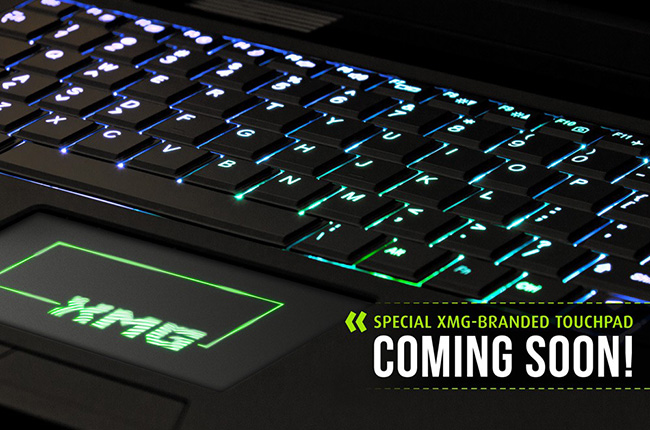
So Sager will never change the touchpad logo like XMG did?
![[IMG]](images/storyImages/P503-11.jpg)
Attached Files:
-
-
People call your website "sketchy" because it is, my friend.
Plain and non-flashy look != Easy design
Out of website pages organized in identical ways, some are blamed for being "sketchy" while others are praised for being "elegant". Why? Because on the elegant ones a separation line has at least 3 layers, and blends nicely to the subtle foreground texture which also has multiple layers to preserve contrast and is carefully tweaked to match the gradient/texture combination on the background. It looks simple. But it's not.
Aliens popping out of the screen is the easy way to get your website "designed". If you don't want to go the easy way, you'd better go the hard way.
I can see that your designer (if there is one) has put some work into the website, however it's inconsistent and tons of stuff are left there without any attention. Just a list of what I've noticed with in about 5 minutes:
This "Live Help" pop up, you have any idea how scary that thing is?
Important options don't pop out. Major categories of products are only listed in a slim line below the banner.
Huge black pictures over a white background with no border transitions or decorations whatsoever, and no enough dark color in the adjacent content area for balancing. Other pictures have similar issues, though to a less degree, with their clear-cut edges. Fading instead of sliding in the slide show also reveals small differences in text placement, creating the impression of inconsistency.
Spacing issues all over the place. Some gaps are ridiculously large while in other places logically distinct components are squeezed together.
The round red bar near the bottom appears to be a mistake left there unnoticed. It does not serve any apparent purpose.
Facebook iframe at the bottom has terrible contrast.
Long lists of customizations look cool to some, but new comers to the barebone land will freak out. "More Info" is not very helpful/friendly with a simple line of no information or a wall of tl;dr tiny text.
The pictures for laptop sleeves and cases are black again, clear cut, and don't even cover the full width. No offense, but this reminds me of some of the homework designs from kids in high school.
Comparing different models in the same category is no easy task. You have to read tiny text here and there instead of enjoying a organized list ordered in performance/price/generation with important spec differences shown.
Some typo-like issues. For example, if both LCD options are matte, why is the first bold and the second not?
I have no idea what's the ratio of experienced barebone users in your customer base. If most of them are barebone veterans how your website looks doesn't matter anyway. Otherwise poor designs make newcomers' journey even more scary.
Unrelated: I really like your idea of making a "black edition". While some other resellers do offer logo-less options they get buried in long customization lists, so many people are not aware of it. For your black edition, can you get rid of the stickers below the keyboard as well? -
Wow, someone is bored.
-
Stupid idea [but hey, I'm bored waiting on my 8250S to ship] - what would happen to the cooling on one of these machines if I had a custom bottom plate [such as the access panel to the GPU/CPU bay] fab'ed out of aluminium/steel/copper?
Just kicking around ideas, and thought it might be interesting to see what if any effect having a metal [better for conducting heat away from the components] bottom surface.
I have no idea what this would cost [probably a lot] but it would be interesting to take the access panel to the GPU/CPU bay in to a custom metal fab and have them fabricate a version in aluminum or copper or steel to see what happens ... -
Can't speak for Sager, but the $$ floated to us by Clevo for getting that done (Custom trackpad), was just NOT worth the investment (It was around 50K'ish) would rather them sink the money into a BIOS / EC where you can selectively disable things lol.
-
It would take longer for the Fans to kick on probably. I have yet to have my gpu temp to go over the 62-63 range, lid closed 21inch monitor connected.
-
So i just got my P150SM too but i'm really disappointed, i think that thing just can't handle that 780m actually
mine goes almost instant to 94°C and then backs it's clocks down to about 500mhz which actually sucks to be honest, i tried BF3 and Serious Sam 3 both causing the card to instant throttle, i actually reapplied thermal paste 3 times now, 2x PK-1 and 1x AS5 and i'm not in the mood to send it back. Damn i just wanted to get the real powerhouse for mobile gaming
-
Whoa, 50k....
So you guys had to pay Clevo extra for that custom BIOS?
Or did you just do that yourselves. I'm guessing the latter. -
We are a full AMI Aptio house (The people who make the BIOS code) so we've already paid them $$ for tools that help in that regard, we've also had to pay for some external help there as well lol. So yea paying our annual license fees to be able to make BIOS's with options or a custom trackpad, yea lets just say BIOS all day everyday lol
-
Mine does the same, few others I've spoke to does the same also. Not sure that I get any kind of throttling though.
Going to give it another test tonight to see. I know I get 94degrees during BF3 -
It would be interesting to see if those who are having heat issues are running 8250's or 8250S's - I'm just wondering if the repast [upgrade to IC] that came with the 8250S's is what is making the difference? The only other possibility I can think of [besides hardware issues] is bad/old drivers?
*** Official Clevo P157SM-P150SM / Sager NP8250 Owner's Lounge ***
Discussion in 'Sager/Clevo Reviews & Owners' Lounges' started by HTWingNut, Jun 1, 2013.