 Problems? See this thread at archive.org.
The 780M is DP1.2 compliant.
-
-
But it says DP 1.1 on Sager website. Is it the old info from 680M times?)
Sent from my Nexus 4 using Tapatalk 4 -
I guess you could try setting it to a lower resolution but it would look better at its native resolution even with lower FPS.
-
Well yeah, but it's not about gaming only, even 4k content in the future could look way better. Especially with Dell's new tempting 4k displays for under 1000$. It also says dvd-i, not dual link, which can't handle 1600p...
Sent from my Nexus 4 using Tapatalk 4 -
Agreed, just in general when you take any LCD screen out of its native resolution it wont look as good. 4K will help with that though since it has more pixels to make up for it. For an example if you have a 1080 screen now lower its resolution to something else and see the quality hit it takes.
I did double check Clevo's site and they list 1.2 support for all the GPU's offered. I'll shoot a heads up to Sager to look into their specs listed. -
Could you please ask about DVI if it's dual link as well? On Clevo website it says, eg:
NVIDIA® GeForce GTX 780M (N14E-GTX)
- 4GB GDDR5 Video RAM
- Support PCIe x16
- Microsoft DirectX® 11.1 compatible
- MXM3.0 Type B
- Support DisplayPort 1.2
- NVIDIA PhysX™
- GeForce CUDA™ technology
- Support NVIDIA® SLI® technology
and
I/O Ports
2 x USB 3.0 ports (1 x powered USB port)
2 x USB 2.0 ports
1 x eSATA/USB 3.0 port (powered USB, AC/DC)
1 x Mini IEEE 1394b port
1 x Display port ( Reversion depends on Video Controller)
1 x DVI-I output port ( Single link)
1 x HDMI™ output port (with HDCP)
1 x Headphone jack
1 x Microphone jack
1 x S/PDIF output jack
1 x Line-in jack
1 x RJ-45 LAN port
1 x DC-in jack -
could also tell them to add a small 2nd screen too? something like w700/701ds thanks
oh and 8 slots of sodimm, LOL -
Added latest stock BIOS for the 3D version to the blog...
-
As the specs say its DP 1.2 with the 780m and the dvi is single link.
I've always thought a quadro only motherboard with 4 sodimm slots instead if one of the mxm slots would make sense. There is enough vertical space to make them stand upright and quadro cant use SLI. However the pcb routing could be pretty nasty. -
Just curious. I bought the np9570wm from xoticpc. If I put in some more or different type of RAM will it void any warranty? Same with putting in new hard drives.
Sent from my SCH-I535 using Tapatalk -
Nope, RAM and HDD are user upgradeable options and it doesn't affect warranty, so you're good)
-
I was just joking with 8 memory slots lol dont think there would be enough space to fit all the rams, i'd choose storage slots over ram slots anyday. however dual screen, or a smaller side/vertical screen is something I've wanted for a while now. with x99 they are going to make a new computer with new mobo anyway may as well change the design a bit. does sli mobile graphics prevent dual screen or something? cause i recall you can multi screen with external monitors but those are hard to carry and can't be powered by battery.
this laptop is so thick there would be much room for a redesign. 17 inch is really turning me down, can't work all that well on adobe and photoshop its got so many window boxes screen needs to fit, hate dragging the scroll bar and switching bunch of programs nonstop. -
You're welcome to upgrade anything that is upgradable and it wont void the warranty. Just be careful as any damage caused while do so it not covered under warranty.
-
http://assets.vr-zone.net/14316/AD2500B-ITX.jpg
Now consider the height of the heatsinks on the 9570, you could easily fit 4 of them together stacked vertically as in that board, but it would require a totally different motherboard layout. -
how many pcie slots are in x79 and how many are going to be x99?
it'd suck to lose SLI over 8 sodimm slots or lose sata express/ M.2 if any, to memory slots. -
If the machine was not so niche I was suggesting a partner board not a replacement lol.
AFAIK x99 will be 40 pci express gen 3 lanes. No idea if clevo will implement 16x/16x or 8x/8x and at what gen (my guess is 8x/8x gen3 for routing reasons).
We will have to wait for ddr4 sodimms to see it though. -
Would anyone recommend a different RAM then the stock ones that comes with it?
Sent from my SCH-I535 using Tapatalk -
You can find 2133Mhz RAM 1.5v or 1.35v 4x4Gb on newegg. It should be the fastest RAM for IVY-E)
-
Cool thanks. But can I do 4x8Gb ?
Edit: nevermind they come only in 4 gb sticks. Right?
Sent from my SCH-I535 using Tapatalk -
Yes no one makes 2133mhz 8gb sticks.
-
Did anybody managed to undervolt this laptop ?
-
hi,
Just got my Sager NP9570, it looks great. It is heavy as I expected but it is smaller than my G73 (width and length) but thicker (really thick). Surprisingly the charger is HUGE ( I didn't expect this one) it is really big.
Asus G73 Vs. Sager Np 9570 (330 Watt - 19.5V 16.9A )
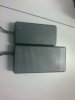
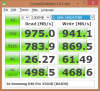
I got two Samsung 840 pro 256GB in RAID0 . Widows 8.1 64Bit installation got only 3 Mins and 40 Seconds in EFI mode.
I'm going to upload some result of Crystal Disk Mark later, Right now I'm checking the battery life on power saving mode.
and I got some news about converting this non-3D model to 3D. Based on my research on P570WM/P570WM3 Service Manual, there 2 kind of connectors on Motherboard for LCDs, one for none-3D (40 pins) and another for 3D models (30 pins) with additional connector ( 5 pins or 6, Not sure) for 3D Emitter.
3D emitter is Nvidia (942-10863-0000-000 A6) P170HM3 which can be find under Asus Part NO. 04G230081001 (IR EMITTER AEGIS-3D GLASSES).
it seems 120HZ LCDs use the 30 Pins Connector for 3D models, so it seems just by adding the 3D emitter board it will upgrade to 3D model. (Maybe Bios Upgrade is necessary to, should ask Prema) -
CrystalDiskMark :
By the way, I have an issue with Bluetooth ( Intel AC 7620 Dual Band), after 2, 3 times restarting the notebook, Bluetooth stops working and in device manager it changes to unknown USB device ( Or something like this ). have you ever faced this problem? is there any driver can fixed the issue? -
You can try to uninstall your current drivers and install newer ones (from Intel web site, instead of those from Clevo).
If that doesn't work, most probably you have a faulty bluetooth device and it needs replacing. -
we might see that soon, if its possible to make 2133 8gb stick theres still at least 2 years going before a possible ddr4 sodimm comes out.
EDIT: NVIDIA Maxwell GeForce 800M Mobility Lineup Launches in February 2014 - GeForce GTX 880M To Lead The Pack
8GB mobile graphics card? i'll take two thanks -
We need exact LG LP173WF2 (TP)(B1) model screen. 3D won't work with the other 120Hz LG LP173WF2 v2.
We need the emitter (internal connection has to be present on board, but I think they share same board this gen).
We have to cross-flash the 3D version BIOS, latest 1.03.03 3D BIOS is on my blog.
We need one of the GPUs that Clevo has paid 3D license fee for. They have done that "officialy" only for for 670Mx, 770M & 780M, sometimes they forget test-code in the BIOS which enables 3D on other cards...K5000M...caugh...P370EM3...cough...
Oh and of course we need the 3D VISION glassed (both v1 v2 work).
Regarding RAM. Samsungs "rare" 1.35v 8GB 1600Mhz sticks should do 2133Mhz. I have two pair of 4GB and they all do 2400Mhz on stock Timings... -
please let me know of the model number and how i'd oc from 1600 to 2133 lol.
-
Oh my, pcw.fr is in for trouble...the 880M is just a K5100M aka GTX780M 8GB with different clocks...and since 8GB won't easily clock as high as 4GB, well there you are...
Just use my BIOS Mod to OC RAM Speed and Timings (set, save and exit & full shutdown)...it also suppose to work in XTU but people seem to have less success...
EDIT: The IV-E compatible Mod is still in beta testing, IV-E owner CANNOT flash the current Mod!unityole likes this. -
well it make sense as it is still 28nm. they say its maxwell but it probably really isnt so I didn't get my hopes up too much. however for AMD R290M maybe something to look forward to for sure. again great work and p570wm isn't worth owning unless we flash your bios mod lol. this machine is now so much better than what it was before and definitely worth considering getting a barebone and just wait for the newer graphics card.
-
So I got my NP9570/P570WM last week.
So far my impressions are great laptop. It is heavier than my GSX74 but honestly it not that bad. I got the matted screen and like it a ton better than my glossy asus screen. The thing is blazing fast, it is that simple.
I wasn't surprised by the size, but I was surprised by how high the keyboard lays from the table. To me it is a very uncomfortable position being that high. However 95% of my useage will be attached to a monitor and keyboard so this is a non issue for me. -
Yeah when I move i'll be getting a lower desk lol, raising the back feet a little and tilting the machine should help.
unityole likes this. -
Thanks, I already use Intel website driver, its okay. It just happens very random, I will find a way to handle it
1) The LCD model shown as LGD02C5 in all software, I'm not sure if it is TPB1 version or not. However when I connect a normal dell LCDs (non-3D) to the notebook ( one via DVI and another by HDMI to VGA convertor) the Stereoscopic 3D category adds to my nVidia control panel, so I can think of two things, either the notebook LCD is not 3D or it needs proper Driver ( I believe the first one is the issue, because I couldn't find any drivers for this LCD).
I don't feel like dissembling my new notebook LCD to see the exact model (however I should do it eventually to install the internal 3D emitter)
2) I'm going to buy this Internal Emitter for ASUS and give it a try.
3) My notebook is IV-E so I think I should wait for the stable version of Prema Bios Mode
4) My notebook GPU is 770M and it works in 3D mode with external LCDs.
5) I will purchase a 3D Vision Glasses V2
6) Thanks for all your Help and Information ( I wish I had your knowledge )
-
LGD02C5 is the correct monitor. Internal screen is blocked for 3D unless we meet all the above requirements, it's a financial decision by NVIDIA, not a technological limitation...
I am not sure if the license is also bound to a specific NVIDIA Stereoscopic 3D USB Controller model.
The hardware ID of the one used by Clevo is: USB\VID_0955&PID_700 -
I'm getting the omega wireless gaming headset upgrade for my recon 3d USB sound card
Can't wait for my new desk and chair (DX racer) and monitor (still deciding and may not get it straight away).
-
As long as it is a software problem, it can be solve lets find what we can do about it. thanks for the help and waiting for the Prema bios Ivy-E
-
It's not a software problem but coded into the BIOS, we can't edit the driver side to enable 3D, yet.
I wrote something about it here. -
LOL you are more hyped up than majority of consumers
-
Oh i'm always hyped and i've been waiting for a proper desk again for over 2 years.
I think it's going to look like a proper gamer's setup
Does any one else's system manage to shut down the fans completely from time to time?unityole likes this. -
Thanks, I read it. So that's the reason in some 3D models, when you wanna customize some notebooks, it says 3D works only with nVidia 780 not nVidia 770, because they just paid for 780 series.
it doesn't seem easy to break in and make it work, but it is not impossible.
I'm a FPGA programmer, I never thought that the programming skill is needed for this level of modification, If I knew it when I was younger I would go for it
-
You need a good understanding of all levels of hardware/firmware for it, but it can be fun
-
in fact I design PCB too. But not very professional, just micro controller and sometime ARM. Where should I begin to work with BIOS, any forum, thread, datasheet, fact sheet, or whatever?
I'm really eager to break my system
-
Now, I'm more mad at nVidia, I just found out the notebook series does not support nvidia surround while my old g73jh notebook support ATI eyefinity.
what is the point of having 3 displays working with my notebook, when I cannot expand my games to all of them. -
Anyone recommend a good cooling pad for this?
thanks in advance. -
Other brands can, so the mobile cards can do it, it may just need a little vbios hack.
The triple DP adapter should work so you could at least to 3x1080p @ 60hz.
No cooling pad required. -
isnt that kinda pointless? having 1 laptop screen in the center so much smaller than the other two desktop monitors.. unless of course the other two are at the same size 17.3".
-
Nvidia Surround has no M series in the configuration (not 2d nor 3d).
the matter is , I didn't want to have additional device or pay for more things, I already spent a lot on the notebook. I will hack to the vbios and bring nvidia to its skinny knees or break my notebook
( based on my experience, normally second one happens
)
-
Well I finally got all the parts to put my P570WM together two days ago (Newegg using UPS and Fedex through USPS = NO GOOD SHIPPING ANYMORE!)
Here's some shots of putting the bare bones together, not like you all haven't seen the internals before.
![[IMG]](images/storyImages/bi6f.jpg)
![[IMG]](images/storyImages/p87w.jpg)
![[IMG]](images/storyImages/7sxr.jpg)
![[IMG]](images/storyImages/fydy.jpg)
Now don't get excited, the RAM above does not work in the P570WM, which delayed the final build until this afternoon when I got my hands on some crappy 1600 ram that won't OC at all, lol. Yesterday I had to use a stick of old 1066 just to get it up and running and load the OS.
I believe my 780m's are throttling as the frames in 3dm11 should be quite a bit higher for the clocks I'm running. At some point I'll have to put some cold air on them and see 'em come alive. Too bad it will be in the 70's this weekend on the east coast. And it was just 6 degrees F just a few days ago...
Here's what I have so far. Not sure how to lock the CPU clocks yet. They're just speed stepping around right now. That CPU-Z shot is not right. Really turbo boosted to 4300mhz. XTU sucks...but Prema helped me out in that area. Thanks Prema! And thanks to my brother and team mate Johnksss for his expertise!
I like this system, so much locked up potential...gotta unleash it!
![[IMG]](images/storyImages/5zx0.jpg)
-
Why the ram won't work? The laptop won't start at all? I got same corsair ram and it boots fine at 2133mhz on my Ivy Bridge core i5 500$ ultrabook but no go on Haswell, 1866Mhz max. I was told to try thaiphoon burner to fix some SPD
Also, you can check if your GPU's are throttling in MSI Afterburner after the run. Try to decrease the memory to 1450Mhz and rerun a benchmark it might be the cause. 1034/3000 should get you to 19200 GPU score mark
Sent from my Nexus 4 using Tapatalk 4 -
if you read the overclocking ram thread someone mentioned intel disable stuff with haswell and for whatever they did, you won't be able to overclock ram that easily anymore with changing profile, and its probably only to get worse as more and more stuff will get locked down. windows 8 first along with bios and then ram, probably vbios soon too, never know.
*** Official Clevo P570WM | P570WM3 / Sager NP9570 Owners Lounge ***
Discussion in 'Sager/Clevo Reviews & Owners' Lounges' started by jclausius, Feb 5, 2013.


