Problems? See this thread at archive.org.
It will be "only" two big updates this yearBe prepared to spend more time tweaking this baby boy colored tile tablet OS
-
-
As long as the updates are deferrable for at least a month or two while M$ fixes the clearly broken crap (because when did they ever push a non-broken update for this OS that wasn't a hotfix?) I'll survive.
I just want control and apparently it's THAT hard to acquire.Papusan likes this. -
Close the door the first 1 or two months Be prepared to have a spare panel lying. You never know if you need it
D2 Ultima likes this.
-
Well guys, after parting with Phoenix yesterday I wanted to post a stress test core temp screenshot, but things got sidetracked a little. I come to discover that none of the monitors in my house have hdmi input. The first thing in the morning I drove down to Fry's and picked up an Asus PG348Q. Because of its size I ended up rearraging my desk, and here's the funny part. I assembled the monitor and plugged in the Displayport cable, I took out the KM1 to find a port to plug in the cable into and I couldn't find one. I looked all around, but nothing matches. Now I'm panicking, I just blew 4K on a laptop and 1.3K on a monitor and they can't talk to each other. After about a minute I googled KM1 and displayport and found out that it has two Mini Displayport. Big sigh of relief. I hopped into my car and drove to the nearest Bestbuy only to discover that they don't carry Displayport to Mini Displayport cables or even adapters. But now I got a monitor with a hdmi input.
I'll post that screenshot when I can, maybe not during the weekend. The weekend belongs to my wife. -
The weekend belongs to your wife? Wise man!
I haven't posted here for a month or so. I had ordered a P870 DM3 from HIDevolution which I hoped to get before Christmas. To cut a long story short, and through no fault of HID, the thing went AWOL. The legendary Donald@HIDevolution lived up to his stellar reputation throughout. Given that the KM1 was about to drop, I decided to change course which entailed a bit of a wait. But the thing finally dropped in my lap today, somewhat unexpectedly. The specs are in my sig. I'm hoping the good man Phoenix will have some time to help me out and tune her up sometime.
First impressions are very positive. I know there are some complaints about build quality, but when compared to my old Clevo of 2012, the increase in quality is impressive. In particular, I read many complaints about the keyboard but it is much better than I was expecting. The old clevo keyboards were far worse in terms of feel. Let's hope my keys don't fly off like shrapnel over the next few days ;-)
I am so friggin excited to play with this thing - now going through the joy of migrating all my stuff from my venerable Alienware 18. Woop Woop! Happy days.Last edited: Feb 25, 2017 -
Yeah @Phoenix is the man. He helped me get in touch with @Donald@HIDevolution and the rest is history. I have never had a windows tuned so brilliantly. @Prema and his superb work on the bios and some awesome knowledge of @Mr. Fox make this community rock.
-
Can only second how helpful people in this community are. At the very beginning of this process Phoenix responded to my original post concerning my P870DM3 and gave me some excellent advice. I am simply a village idiot profiting from the immense goodwill and talent of others. Good times!
I am very keen to learn though so I hope to improve my knowledge in this area. I used to be a tinkerer back in the day when I was in college. But that was many moons ago. Now I am an older dog, but still keen to learn new tricks. -
j00 are an EVOC Gaming Team member, you have all my support. PM sent
-
I second this. The keyboard isn't terrible but not the best. Yooo made the correct choice of laptop!! A better keyboard can't replace LGA i7. Never ever!! Congrats with your machine
Ashtrix, dm477 and midnight.mangler like this.
-
Papusan, there were some dark times on this lonely road, and often it was only the stern reminders in your signature that kept me from succumbing to the siren call of the svelte BGA form factor! ;-)
Seriously, I am very happy with my machine. It is by no means small, but the fact that you can cram so much power into such a relatively small footprint is mind boggling. I remember, back in the day, when laptops were serious compromises. They were huge, and hugely underpowered relative to their desktop counterparts. The GPU power delta this thing has vs my 2013 Alienware 18 with 780M SLI is staggering. And I never thought I would say this but I like the case design. I am a happy boy.
Next, to dig under the hood with Phoenix!Papusan, infex, Spartan@HIDevolution and 3 others like this. -
Can I ask a practical question? I can see why asus rog gh800 has two PSUs - you can disable water-cooling block, disable sli and use only one PSU. asus tells it gives you 70% of the total graphic power, which is still usable.
is it possible to do the same with P870 - I mean - to use only one 330W PSU in stable and safe mode for the whole system. If not then is it possible to by it with 780W adapter only. I see that Devolution allows to buy it as an additional adaptor but you cannot deselect original power adaptor. it always selected for you as a "feature" which actually looks useless.hmscott likes this. -
1) who is Devolution?
2) When I had my P870DM3 that @bloodhawk now owns, even if I disabled SLI, if I would run a benchmark like Fire Strike, due to the intense power draw, the power brick would turn off until I stopped the benchmark, then unplugged the power adapter from the wall then turned it back on, then it would work. So a single power adapter is only enough for web browsing but nothing like a game or benchmark which uses both the GPU and CPU at the same time
3) Yes get a single power adapter 780W from HIDevolution -
Hi Phoenix, do you still have Clevo P870DM3? I had bad experience with Alienware 17 R4 (but I love design), now thinking to buy this one or even P870KM1. It's really huge laptop and heavy (I'm scared of that 2 power bricks, it's all about 7kg), do you use it home only or outside too? I like that you can upgrade anything, but I will miss AW battery, keyboard and light effect in games, and of course design.
-
I sold mine to @bloodhawk
I use it outdoors in a cafe everyday but with 2 power bricks
If you want a great laptop that uses a single power brick and has a superb screen and keyboard, see: MSI GT73VR 7RF Titan Pro-425 Review By Phoenix
If you don't mind a 15 inch laptop, but also has the same awesome SteelSeries keyboard AND a desktop CPU, see: EVOC 16L-G-1080 15.6" Custom Built Gaming Laptop w/ nVIDIA GTX 1080 -
I tend to take a single brick and turn off SLI when I am out and about.
lctalley0109, Ashtrix and hmscott like this. -
It would be awesome if we would be able to exchange the two power bricks for a single 780W brick(with somewhat more $$)
But they don't do it(Hidevolution)hmscott likes this. -
Developing small run hardware is not cheap so it does not surprise me.
-
So what laptop do you have at the moment? Personally for you, why do you like to have such heavy laptop instead of something small like Razer Blade (especially to go to cafe everyday), you do some development or 3D/photo-video editing or just playing games on it?
-
my laptop is in my sig. All I do is browse the forums and help others. I need all this power, just coz
hmscott likes this.
-
Looks like I can't see your profile page. What can you say about temperatures and throttling under high loads?
-
Here are the specs:
MSI GT73VR 7RF Titan Pro-425 | Intel Kaby Lake i7-7820HK @ 4.2 GHz | Kingston 2400 MHz 64GB DDR4 RAM | GeForce GTX 1080 8GB GDDR5 | Dynaudio System / Nahimic 2 Sound Technology | Intel Dual Band Wireless-AC 8265 | Chi Mei N173HHE-G32 17.3" FHD 120 Hz/5ms [G-SYNC] | 2x Samsung 960 PRO 2TB [Super RAID 4] + 850 EVO 1TB + 850 EVO 4TB | SteelSeries Sensei Wireless Gaming Mouse| Windows 10 Pro
0 throttling and max temps during stress tests @ 85C while being overclocked to 4.2 GHz and that's with the auto fan profile not even on max blast
See the full review here:
MSI GT73VR 7RF Titan Pro-425 Review By Phoenix
then order one from HIDevolution as their build quality is amazing and they have your back should something go wrong with your laptop rather than having to rely on MSI's not so great support.
This laptop comes free with a 1 year global warranty that covers shipping both ways and 1 year accidental damage protection
email [email protected] to get a small discounthmscott likes this. -
WOW, those SSDs cost about 5000$ only, very expensive build (I wish I had 4Tb for my PS4). The CPU and GPU upgradable? How about battery life? Do you think keyboard better than AW's or the same?
-
CPU not upgradable, it's BGA / soldered. GPU is upgradable
Battery life is 3.5 hours when you switch to the integrated Intel HD Graphics. They keyboard is the best laptop keyboard out there. period. SteelSeries chiclet keys FTW
For more questions, please post them here so we don't go off topic in this thread: The Official MSI GT73VR Owners and Discussions Lounge
![[IMG]](images/storyImages/gaIeukV.gif)
![[IMG]](images/storyImages/xXFVpeM.gif) hmscott likes this.
hmscott likes this. -
Thanks, I'll think about it.
-
Yes, the signature is important(All should have similar as me)!! Hope it affect many more people-buyers to choose the correct!!
YOU have a good taste for proper hardware +rep
midnight.mangler, Spartan@HIDevolution, lctalley0109 and 2 others like this.
-
you can always opt for the 780w psu like i will be doingTBoneSan likes this.
-
Can tobii eye tracer 4c could be used upon km1?
-
I have two LG 25UM58-P 25-Inch 21:9 UltraWide IPS Monitors on the way. Would it be recommend to use two USB Type C to HDMI cables, or two Mini DisplayPort to HDMI cables to connect to the monitors? The monitor is only 60Hz. I would prefer to use a USB Type C to HDMI cable if possible.
-
You have an HDMI on the machine so one can be a native HDMI cable. I would then convert the displayports as that leaves the thunderbolt/USB3.0 ports free (where as using one as a display ouput would disable a mini DP port anyway and require configuring).
-
Thanks for your reply Meaker. I am already using my HDMI for another monitor. Would you recommend two Mini DisplayPort to HDMI cables then?
-
So long as the 1080 supports 3 clock signal based displays that's fine, it's one of those niche specs which I have forgotten off the top of my head.
(HDMI/DVI require a clock signal to drive the display output, displayport does not so it depends on how many clock generators the 1080 has). -
Meaker, thanks for the explanation. After some crude research, it appears the 1080 has 4 clock generators. So I guess I'm okay to run the two new monitors off of both display ports.
-
Then yes you should be sorted (the internal display is eDP so does not use one). Going beyond can be done but involves expensive active adaptors.
-
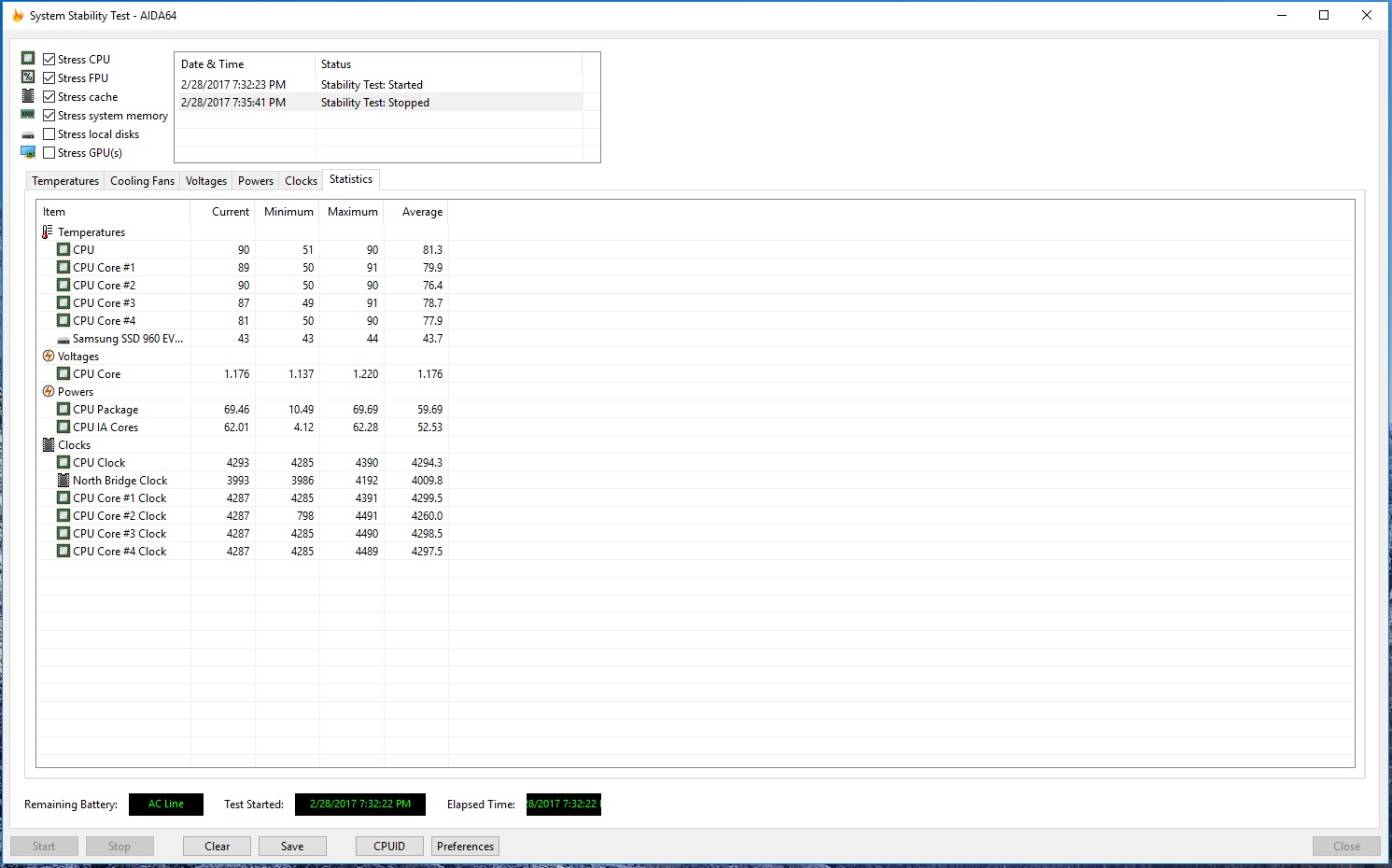
This is the stress test screenshot of my KM1. The laptop have been on continuously for 10 hours prior to the test (gaming).
Edit: For those that don't already know. The Prima Bios are not yet ready for the KM1.Attached Files:
Last edited: Mar 1, 2017 -
-
Btw how's the battery life?
-
Really? I thought the KM1 would already have the Prema Bios ready, given its similarity to the P870DM-2/3?
-
It will be by the end of next month
As said by @Donald@HIDevolutionslacker84 likes this. -
and temperatures?
-
So that means until the end of April? Since I just bought my KM1. Of course, I don't have it yet but the page did say that the Prema Bios would be installed.
-
This convo screenshot is of 20th feb
Nevermind the quality of the screenshot
And my previous quote(i forgot the details of the convo) :-|
My buying time would have been in July -
I can barely make out what that conversation even entails. What the heck happened to that image? Orrrrr, just disregard what you said in general?Spartan@HIDevolution likes this.
-
I asked: Any timeline on prema bios for the km1 example 1-2 months
Then he said that prema is on holiday until next week and the prema BIOS full support would be available by the time mine ships or in one-two weeks after that
As i would be buying it in July so july mid or end
And disregard my earlier post for the April's end -
Thank you for the kind comment mate. I really appreciate people who value the small things that I do.
Rep added +respect to j00![[IMG]](images/storyImages/ctvcICQ.gif) Ashtrix, Gursimran82956, hmscott and 5 others like this.
Ashtrix, Gursimran82956, hmscott and 5 others like this. -
How do I enter bios on this beast? Tried F2 and F1 but no luck...
-
If you need tech support or warranty service, please understand that I am not a technician, so it would be better to contact our Tech Support Team by phone at 011+1-562-485-6541 Extension 3, between 5PM and 2 AM GMT, Monday through Friday, by email at [email protected], or by Online Support Ticket at http://www.hidevolution.com/contacts/ (in the department dropdown menu select Zoltan S – Tech Support).
Please let me know if they don’t resolve your issue.Thana7 likes this. -
You're not that bad Donald, certainly compared to some when it comes to at least trying the basics
Papusan, bloodhawk and Donald@Paladin44 like this.
-
Too many models for me to remember the keystrokes for all of them. For that, either you or Zoltan are the wizards. Can you provide @ocr123 with the answer?
-
It should be F2 but the window can be pretty short to hit the key.
To guarantee it if you have windows installed then hold shift when selecting restart, then select troubleshoot and change UEFI settings. This will restart the machine and auto enter the BIOS.bennyg, hmscott, saturnotaku and 3 others like this.
*** Official Clevo P870KM1/P870KM1-G/Sager NP9876 Owner's Lounge! - Phoenix 3.0 ***
Discussion in 'Sager/Clevo Reviews & Owners' Lounges' started by Spartan@HIDevolution, Jan 5, 2017.