 Problems? See this thread at archive.org.
I just received this Amazon.com: Brenthaven 2099 ProStyle Sleeve I Ultrabook up to 13.3-inch, fits absolutely perfectly. Lid is guaranteed not to open in backpack! The only complaint is that surface on the outside is a bit rough.
-
I'm looking to get a second power supply. I went rummaging in the spares bin at work, and found one that has the 5.5mmx2.5mm plug I'm looking for, but it's [email protected] instead of 19.5V.
I'm thinking it should work, but I'm looking for second opinions before I plug it in. -
Using a 19v PSU on a daily basis.

-
Thanks Prema! I plugged it in and all the magic smoke stayed inside. Perfect.
-
I just got crysis 1 from steam. I'm getting pretty bad framerate. I'm guessing its running on integrated gpu. How can I get it to use the nvidia GPU and how do I know what its using? I'm looking though steam and it doesn't tell me. The nvidia game optimizer does not list my game also but it has all my other games there from steam. Any help appreciated
Sent from my SCH-I545 using Tapatalk 2 -
[redacted]
-
You might want to add a few options in this line to maximise battery life Mainly to trigger all the power options from the intel GPU (and PSR), and force pcie_aspm, it helps getting over the 4 hours mark on linux.
-
Edit, fixed with older Synaptic's driver
-
Just ordered my XMG P303 with 4800MQ, 8GB RAM and 250GB Samsung 840 Evo, but I stopped reading this thread like 150 pages ago, has anyone tried to play games with lower resolution, 720p for example?
-
tsk tsk.
I'm using a 230W 19.5V PSU, not much bigger than the 120W one they offered. Granted it's one that I had to mod myself, but no worries about power requirements.
Prema likes this. -
Just manually add Crysis .exe file in Nvidia Control Panel - > Manage 3d Settings and select to use High Performance Nvidia Processor.
I tried, massive frame rate improvement, it's hard for me to tell the difference in quality when every setting is maxed out. For example Bioshock Infinite went from 35 fps 1080p to 48 fps 900p to 58 fps 768p with Ultra Settings + DDOF. I didn't really see a lot of blur in non-native resolution, however maybe I didn't look hard enough. -
It's more noticeable on still scenes, or if you're looking for horizon (driving) / far ennemies / stuff like that
-
Hows windows 8.1 running on this now? is it all bug free now? thinking about upgrading to it.. but id want to keep all the start menu and what not, which i know you can do.. is it just a option when installing?
-
It's been bug free since the beginning.
There's no start menu in 8.1, just a start button which is a link to metro, but you can solve that with 3rd party apps: I use Start Menu X -
There is something pretty close to the Start Menu though. If you are in Metro there is an arrow down. If you click it a menu opens, which is pretty much the Start menu of previous Windows Version.
Plus right click on the start button on the desktop will give you loads of shortcuts to improtant places (Controlpanel, Software, Shutdown, etc.) -
Does it look like windows 8? I dont really like all the tile stuff.
-
I have problem with entering to BIOS, i turn on laptop and fast pressing f2 and nothing windows8 just starting. UEFI is disabled in bios, i can see start screen with devices but i cant enter the bios. Maybe anyone known a solution?.
-
it does, but you can avoid that using said utility
-
Turn off Fast Startup first!
-
This charms bar is killing me, anytime I swipe to center from the right edge of the trackpad I get the charms bar (search, share, start, ect) popping up. This causes me to stop what i am doing and re-selecting, or if I am playing a game, the game is minimized, and i am at the desktop(very frustrating in Papers, Please). I have gone into the synaptics properties, but there is no option to turn off the right edge activating charms, the corner and edge settings of the mouse and touchpad settings are all off. I have tried Winaero charms killer, set that to kill charms, start on startup, restarted computer several times, all to no avail. Does anyone have/ have had this problem or know how to fix it? It is a huge PITA.
Thanks! -
Well, since I'm playing AC4 at 720p with literally everything on low/off with my current Acer, it can only look better. But it's good to know that there is no overly noticable blurring
-
-
You go to Charms bar, settings, change PC settings, General. Then click advanced restart or something. This only works for one time. If you want to access BIOS later, you have to do this way again.
-
Hey guys,
I just flashed Prema's BIOS mod over the stock sager BIOS. Everything seemed to go fine, I followed a tutorial posted earlier in this thread. The BIOS opens fine, but when I start my computer a black screen comes up saying "Reboot and Select proper Boot device or Insert Boot Media in selected Boot device and press a key". Pressing a key just makes the message reappear.
When I boot into bios I have the proper boot device (a Plextor M5M) selected. No idea what to do, I can't do anything with my computer except get into the BIOS settings. Any help would be greatly appreciated. I changed it back to the default settings in Prema's BIOS so that is where I am at.
Thanks,
JFlem -
check the UEFI & win8 settings
-
Nevermind, I got the stock BIOS working. Thanks for the quick reply!
-
The ones I named, UEFI & windows 8, never used them but I assume it's related, if nothing happened to your ssd.
Not sure though.JFlem likes this. -
We have to set some BIOS settings again each time we flash any BIOS.
So like lastnikita said, if it was set to Win8.x mode, UEFI, RAID...etc then we have to set those same settings again, that's the normal procedure.
frewster likes this. -
I think I heard you can go into Synaptics and turn off side swipe function.
-
Has anyone found a small and high quality aftermarket power supply? The Sager/Clevo price seems ridiculous.
ECKS likes this. -
can this laptop run upcoming games at least medium settings at 1080p until the end of 2015 or 2016??
-
I've put the new prema v1.1 bios on and my temps have gone from idle ~50 to 60+
-
That's the prize of silence
HTWingNut, doughboy334, ha1o2surfer and 1 other person like this. -
Probably? I mean I can't predict the future *that* well but if you're running 2013 games at 1080p, High or Ultra, and it's fine, I have to imagine that you'll be OK with 2015/2016 games at *reasonable* settings. At that time, you might think about dropping to 900p or even 720p -- it looks quite good and can squeeze out a few extra FPS on a really demanding title.
-
Think of what 2010 config you'd need to play current games @med/fullhd, I think it would be a very high-end SLI config of that period...
-
Well, colour me wrong.
I had a chance to play some games this weekend, and other than one unigine benchmark, it's exactly as you say, the 765 is way faster, even at the higher resolution. I'm not sure what I did to convince myself otherwise, but I was definitely wrong.
This thing rocks.
And did I mention that the screen is amazing? -
Monthly check-in, lol. Still going strong. How about yours?
Ghengis and Art4ull Dodg4ar!!! like this. -
Still working great here. Running Prema 1.1 and I still get some bursts but it's better.
Strangest thing happened today, though... was running on quiet mode and idling and the fan maxed out all of a sudden and the system speaker started beeping. It shouldn't have been getting very hot at idle, so I have no clue what could have caused this.
ECKS likes this. -
Same here, I will also add that, for me at least, fan is more frequently on at low loads.
Also, it's now "pulsing" once every 5-10s, which it didn't do before...
Clevo BIOS teams : a step forward, 2 steps back. -
Guys I was reading through the comments someone left behind on an online retailer and the customer managed to change the keyboard backlit to green through a modification. I can't post the photo he uploaded as I am on phone now. But out of curiosity how did he do that? And no sadly I cannot ask him as it was a feedback comment on Chinese Taobao, which is a Chinese eBay thing.
-
We're http://img.taobaocdn.com/bao/uploaded/i1/443524833/T1mvbqFfxaXXaH.X6X.JPEG_400x400.jpg
Ok here's the image I tried to talk about -
I never understood how MS managed to release windows with this crap.
Its almost impossible to use a touch pad.
For a while I liked Windows 8 but now, slowly after over a year of using i being to hate it more and more.
The small things that are better about it are more easily forgotten then the simply absurd UI decisions that continue to cause problems every day. -
Just change the backlight LEDs. Some reseller also offer this.
-
I use add on called classicshell.net It gives you boot to desktop and the start button back. It also lets you turn off charms which has worked flawlessly for me.
-
Is there an easy way to shutoff the touchpad? My old notebook had a function key to disable the touchpad (Fn-F7). I hate when I brush the touchpad while typing, and I almost always use a bluetooth mouse.
-
Fn+F1, pretty explicit icon labelled on it.
-
Doh! I had always read the full fan shortcut as Fn+F1, not Fn+1, so I never even really looked at F1. Now that I look at it, it is rather obvious. <headshake>ECKS likes this.
-
Fellas! Just wanted to show you this. Anyone else think the screen on this laptop is flimsy?? No clue how this happened, but it's the laptop screen because if I use a 2nd screen its all good. What you reckon happened? and any idea of a fix?
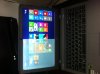

-
your LCD broke, I had the same problem.
the left part only was damaged too...
simple fix : buy a new lcd
-
Quick question guys, I'm planning to purchase this machine, it comes with a hybriid 500gb hdd - my question is can i use this hdd along with adding a samsung evo 250 gb ssd for example? Thanks in advance.
*** Official Clevo W230ST/Sager NP7330 Owner's Lounge ***
Discussion in 'Sager/Clevo Reviews & Owners' Lounges' started by HTWingNut, Apr 10, 2013.


