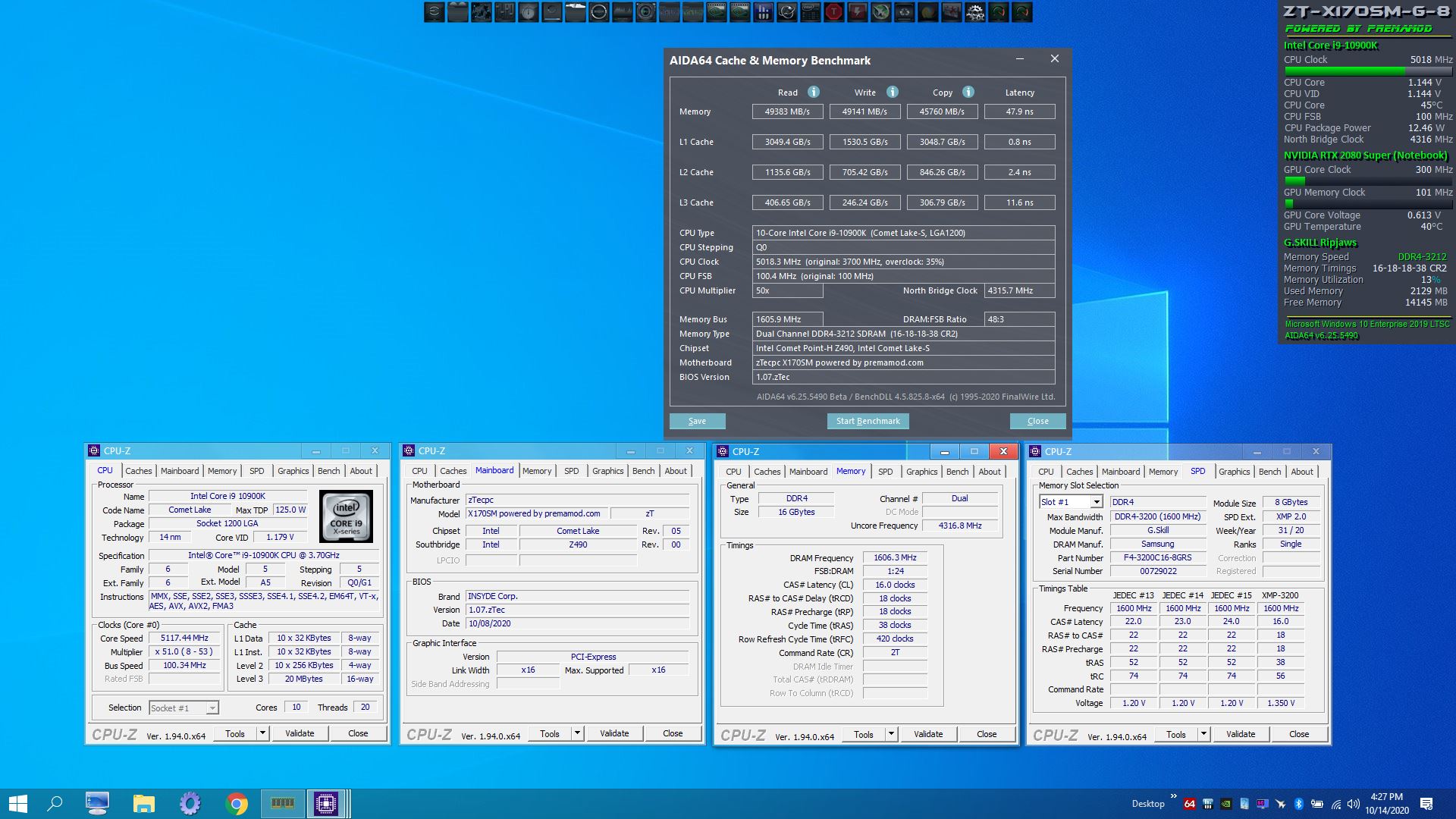
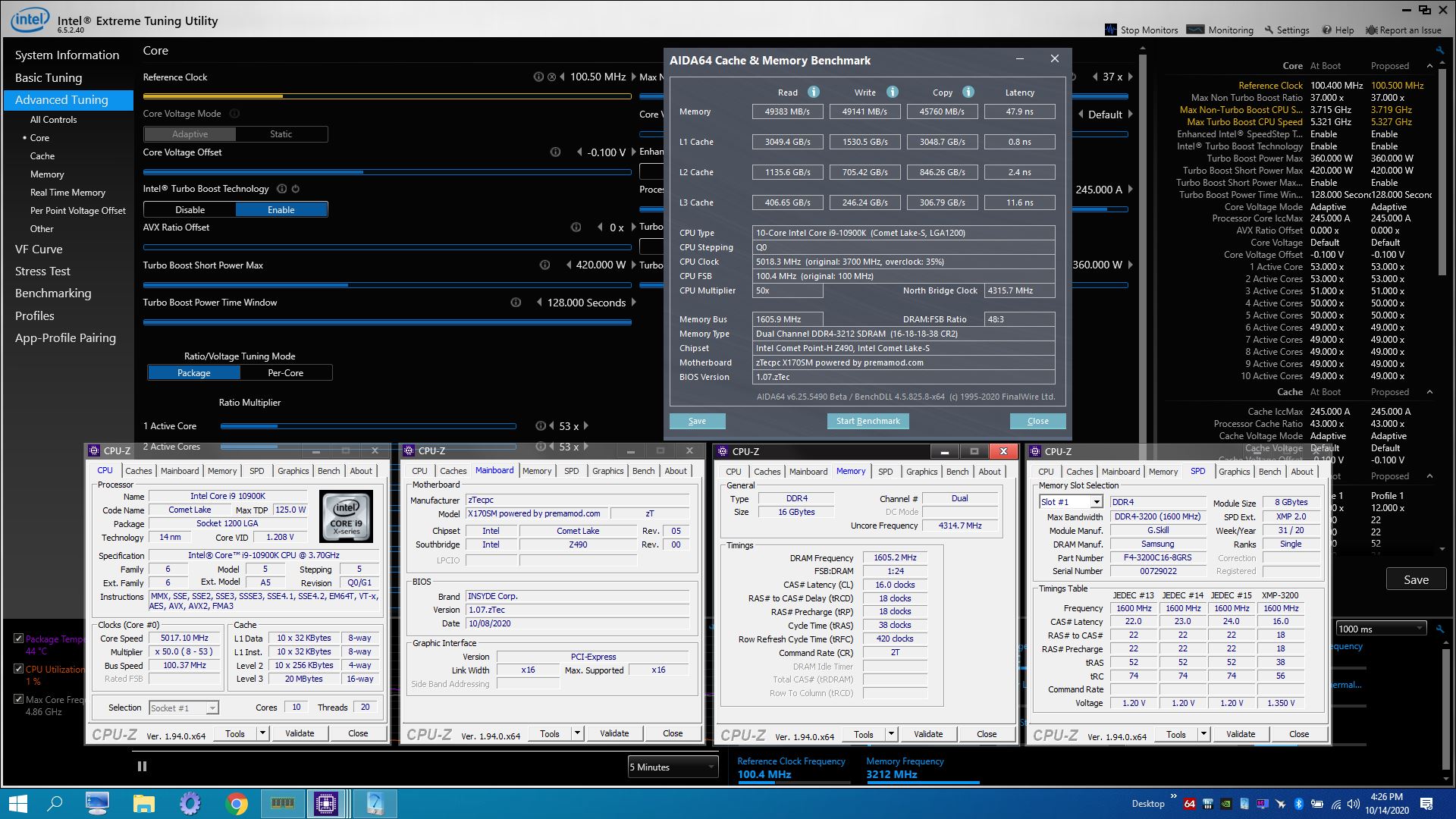
Problems? See this thread at archive.org.
Could be poor pad contact on the cpu, bad traces or slots. Worth getting it checked out.
-
-
Most likely a (compatibility) issue with the Kingster HyperX RAM and not related to the barebone. We also has some strange issue with Kingston HyperX in a TongFang GM5MPHY (no errors in Memtest). We replaced the memory with G.Skill Ripjaws and the issues were gone
wilpang likes this. -
The issue could be related to one faulty ram module but it is not a generic problem with the HyperX memory as I know some guys who are using it on their clevos and are happy with it.DreDre and Spartan@HIDevolution like this.
-
I contacted my reseller. Waiting to hear back and hopefully can sort out this issue soon.
Just out of curiosity: What are your CPU idle temps with a 10900K? Would be interesting to know in context of your room temp (automatic fan setting).Last edited: Oct 9, 2020 -
There will be variations in machine to machine due to silicon lottery and heatsink variations.
-
It could be the slot(s). You should try one of the partially known good sticks (since it ran for only 4hrs) in each of the freezing/potentially faulty slots to see if you can narrow it down to one slot.
Like @Meaker@Sager mentioned earlier, it could be a pad/seating issue with the CPU.
It could be an IMC/trace issue.
Either way, right now, it looks like it is the system not the memory but the only way to completely rule that out is to try another brand of memory.
I tend to have some 2-4gb baseline modules from DDR2, DDR3, DDR4 of DIMM and SODIMM types for this types of issues. They serve no other purpose but to rule out the system being the problem.
If you have a local store that sells DDR4 SODIMMS you could pick up a set real quick to test out those two slots. -
Good for forcing the memory to retrain too.
Mr. Fox and electrosoft like this. -
Can anyone with a 300 hz panel please tell me what is their bios version ? Is it bios 03 ?
Just asking because I wonder if bios 03 already have the 300 hz b173han05.1 panel already enabled so swapping the 144/240 hz panel to the 300 hz one would allow Gsync without any issues or not. -
Update: Since it was going to take a long time for the machine to get repaired and I have to travel next week, I've decided to return the machine while it is with HIDevolution. I'll buy it at a later time after a couple of months when I'm back. I've emailed Ted from HIDevolution and hopefully will get a positive response since the machine was returned well within 1 month of delivery as per their return policy (on the same day of delivery in this case).
Last edited: Oct 11, 2020 -
Small review from Fejerm on PCS
https://www.pcspecialist.co.uk/foru...sm-g-17-3-recoil-iv-review-in-progress.71892/ -
A few of your pictures in the post seem to be dead. Otherwise, it was an informative read!
-
Oh right, seems to show up on my laptop and phone not sure why you can't see some of the pics! Shame he had to RMA it...
-
This is weird. The pictures show up just fine on my work computer...wilpang likes this.
-
I have a single Crucial 32GB 3200 MHz chip (CT32G4SFD832A.16FB2 32GB DDR4 - 3200 SODIMM 1.2V CL22) and it shows up in the BIOS as 3200 MHz - https://i.imgur.com/EdAkf0C.jpg - and have had no issues with stability.
When I ordered my laptop I asked for it to not include RAM as I was going to buy HyperX for it. Below was their response so I had them include the RAM they tested/warrantied.
All of the images load fine for me. They're all hosted on imgur so unsure why you're having a problem with only some?Last edited: Oct 11, 2020Joe4zio likes this. -
I got a response from my reseller regarding Kingston HyperX 3200 CL20 32GB modules. They have tested it and also experienced instabilities if all 4 slots were occupied. They could, however run 2x32 GB Kingston memory.
I can also run 2x32 GB, but as reported earlier, I got about 1 graphics freezing + unresponsive mouse/keyboard per day.
I think I will go for Samsung or Crucial CL22 instead. Is there any performance difference between Crucial SO-DIMM Kit 64GB, DDR4-3200, CL22-22-22 (CT2K32G4SFD832A) and Samsung SO-DIMM 32GB, DDR4-3200, CL22-22-22 (M471A4G43AB1-CWE)?
I tend to go for the Samsung and order it from my reseller, so if it does not work I can send everything to them to sort it out. -
The review wilpang posted (below) had this to say about the RAM. Not sure about the Samsung but may explain why certain RAM make the machine unstable.
-
Interesting. I wonder where he got the information for his statement.
Btw, can anybody comment whether there is a quality and / or performance difference to expect between Samsung and Crucial 3200 CL22 32GB modules? -
If the Samsung is B-die it will be much better than anything else if you plan on tweaking the RAM to improve performance. Micron RAM chips (which is likely what Crucial uses) are generally very sucky at overclocking and tuning. If you're going to just slap them in and run them without tweaking then it probably doesn't matter one way or the other as long as it runs stable using everything based on default values. If they both use the same or similar timings (including tertiary values) there is probably no difference in the performance of one versus the other.
You're better off going with two sticks of RAM if you're planning to tweak for performance. If you're just going to install them and use them, then it doesn't matter.Papusan likes this. -
There are several Polish and Chinese users on the Fire Strike score list who are getting around 30.000 graphics points in Fire Strike.
Does anyone know how can they achieve this? They have almost 200 Mhz higher core clock then normal, how can they do this with the 200W limit?
It is also strange that their reported motherboard name is not "CLEVO X170SM-G" but "Notebook X170SM" instead...anyone know what is going on?S.K likes this. -
Sounds fishy to me. They must have found a way to change the motherboard name somehow on a desktop water cooled machine probably lol. I have seen this before.Mr. Fox likes this.
-
Does any of the resellers have any updated regarding the ghosting issue affecting the 240 Hz screen or everyone just keeps quite like in the past and the problem will fade away in the few people's memory who found it and asked for a repair ?
-
I still had ghosting issues even with my Area 51m R1 144Hz AUO panel, let alone 240 or 300Hz panels. I don't think this issue is going away anytime soon since nVidia doesn't seem to really care too much about it (from the looks of it).Mr. Fox likes this.
-
The devil is in the details...
https://www.3dmark.com/fs/23703619
https://www.3dmark.com/fs/23587725Last edited: Oct 12, 2020B0B, electrosoft, DaMafiaGamer and 3 others like this. -
-
-
Yes, AC cooling makes a massive difference. I haven't run my portable AC unit for a very long time. (Since I ditched laptops in favor of desktops.) I hope it is still operational. I might try it on this system while I still have access to it and see if it can handle 5.3-5.4GHz on cold air. Those links above (both mine and Prema's) are just using max fans, no AC.
Definitely a performance upgrade compared to last generation. The before and after numbers don't lie. Not huge compared to the P870, but the needle clearly moved in the right direction.
https://www.3dmark.com/compare/fs/23587725/fs/19358797
https://www.3dmark.com/compare/spy/13700492/spy/7118655#Last edited: Oct 12, 2020raz8020, jclausius, electrosoft and 3 others like this. -
Where would I find this? My machine freezes after every reboot, randomly but only when I boot into windows 10. It will usually let me log in and then a few minutes later it just freezes and fans go to full speed. I posted a question about it here:
http://forum.notebookreview.com/threads/x170sm-g-win-10-freezes-after-restart.834087/#post-11050150 -
Any of you guys ever returned a damaged or DOA clevo machine to HIDevolution before? How was your return experience and how long did it take?
-
The p775tm1-g with 144 hz auo b173han03.1 did not have any ghosting.
Seems like notebook manufacturers are doing the same thing they did years ago...they set up the timings for Gsync but only test it with synthetic benchmarks where most of the times ghosting issue caused by Gsync is not visible.
Nvidia does not care because properly fine tuning for the panel would be the manufacturer's job.
Seems buying a gamer laptop with no Gsync ghosting is still a Schrodinger's cat, you will not know what you get until you buy it.S.K likes this. -
Bottom row center icon named "Setup" in the BIOS and then look in submenu.
While you are in there reset defaults. The behavior you describe suggests the CPU may be under-volted too much.Papusan likes this. -
Those extra cores on the 10900k help the CPU score definitely.
Would like to see a 2080 super in a 870TM run since the GPU score is so close.
But yeah, @Prema magic got it where it needs to be and heading in the right direction.
Imagine no Prema BIOS on that thing?
And lastly really good to see @Donald@zTecpc and Ztec making inroads and stretching their wings....very nice!DaMafiaGamer, raz8020, Donald@Paladin44 and 2 others like this. -
Imagination is not required. Been there, done that... nope. Some things never change. That is one of them.DreDre, DaMafiaGamer, electrosoft and 2 others like this.
-
Ok I found it. I changed that setting... no improvement. It still locks up. Any other suggestions?Mr. Fox likes this.
-
-
Another review, more comprehensive, google translate required as it's in German
https://www.notebookcheck.com/Test-...X170SM-G-Laptop-Power-ohne-Ende.496933.0.htmlDreDre likes this. -
Easy answer, stop setting a 240hz monitor to 60hz. This monitor was never meant for that and never will be. Gsync at 20hz-240hz works like a charm with zero ghosting if you keep the nvidia setting on 240hz.
Look for my fix in the past if you search for me, but this is a non issue and wont be fixed as it is only triggered by certain old game engines using high refresh panels wrong and the fix is easy for those, just play windowed borderless Gsync (skyrim etc).
The 300hz panel will be the same, all IPS panels past 144hz are like this as I have found out lately. They are tuned to run higher then they were ever meant to on slow ass IPS tech and they will never tune them for 60hz, as it makes no sense to.jclausius and Spartan@HIDevolution like this. -
Using chilled water with no radiator is even more effective than chilled air.
Death is just one phase in the circle of life.
Did you reset defaults?Last edited: Oct 14, 2020jclausius likes this. -
What do you mean stop setting it at 60 hz and keep it at 240 hz?
I never touched the settings in the nvcp, it was left at 240 hz by default.
You say that the mentioned ghosting is not visible if Gsync is running in windowed mode ?
I have a 300 hz b173han05.1 panel incoming, we shall see if Gsync produces this problem with that too or not.Last edited: Oct 14, 2020 -
Does anyone have a service manual for the x170SM-g ?
-
Check sagers website for it. I believe they have it.
Also is anyone having problems where the 240hz display drops to 60hz and stays there? It’s annoying as I go into nvidia control panel and it says 240hz even though it’s clearly 60hz. I try setting 240hz again and the screen goes blank. Probably an incompatibility issue with 240hz screens and a Gtx 1070...
Plus I did do an inf mod to get it working so it’s understandable
-
They only have user manual.
-
- Alienkiller 3.0 - (•̀ᴗ•́)و be inspired ❤
Attached Files:
raz8020, jc_denton, Entropytwo and 5 others like this. -
-
Nice and all, but showing off Prema bios is the same as the 1 rich kid in class showing off his brand new Iphone that he well exactly knows that the others can't have
-
Patience, my friend.
-
PremaMod is always a deciding factor for me, but that by itself isn't enough. Firmware ranks equal to hardware in terms of importance. Good hardware with crap firmware is not better than good firmware with crap hardware. Either of those things is unacceptable and both have to be good in order for a product to not be viewed as a piece of garbage. I'm not speaking of specs when I say hardware. Specs require no effort, only money, and specs can fairly easily be fixed today or later on if the product isn't a soldered piece of rubbish. You can actually have a fantastic product without it having the best specs money can buy. Hardware means platform and engineering (or lack thereof). Firmware can't fix hardware engineering defects. In the situation of this product, there is a massive opportunity for improvement in both areas, and without both, the product is a failure. This is an unfortunate sign of the times we live in. People often lack the ability to discern the difference between good and bad and often get them confused. It makes matters even more difficult when lies and deception are thrown into the mix. That scenario applies in more areas of life than technology and it destroys everything. If we allow this to turn out like the Alienware Area 51m there won't be a single excellent option in the DTR space for anyone to own, even if money is no object. The world needs at least one example of awesomeness. Without it, we are all left with choosing from the sucky options that the lowest common denominators are willing to put up with.Last edited: Oct 15, 2020
-
Bad hardware with good control can still be fun, I volt modded a pair of 5670 GPUs in crossfire and ran 3dmark vantage tests with them
Looking at the result that was 10 years ago now, goodness. -
Is this locked to ztecpc or other dealers will get this as well? If not will ztecpc sell it as a standalone option to every x170 owner?Mr. Fox likes this.
-
All Prema partners will have access to the Custom Prema BIOS for the systems it supports, that they sell.
The Custom Prema BIOS is not available as a stand alone purchase. -
Hi Bro. We are still testing the waters and I am only sharing preliminary test results from an unfinished beta to see what's possible with the hardware. So it is not to brag or make anyone feel slighted for not having something special. We have to get it right before it becomes available so we don't brick or fry anyone's shiny new X170. That would suck, and yes... Prema has bricked his several times already. Knock wood, I haven't had it happen (yet) and I am hoping we will avoid that. I can fix it with an SPI programmer if I need to, but the BIOS chip is on the wrong side of the mobo (a trending bad habit that Clevo needs to break) and I'd rather not deal with such a pain in the butt as removing the mobo for something that only takes a minute or two to fix.
This firmware will be available to PremaMod Partner shops when it is finished. There is still work to be done, so the ETA is unknown. I know one thing we are hoping will happen is that Clevo will release a new BIOS base soon so that rework can be avoided. The current base BIOS is a bit long in the tooth and due for an update.
As the case always has been, it should be included as a standard option and those sold and shipped before it is ready will be remote-flashed by Partner shop staff. The @Prema firmware mods are never sold as a standalone item by Partner shops and these firmware mods are not made available for public download or distribution.
And, I refreshed the page to find Brother Donald's post. Last edited: Oct 15, 2020
 -
Why was this decision made? Wouldnt it be in best interest to after sell that to more unfortunate people? Its easy money and that way could also be remotely installed. Just curious, thank you!Mr. Fox likes this.
*** Official Clevo X170SM-G/Sager NP9670M Owner's Lounge ***
Discussion in 'Sager/Clevo Reviews & Owners' Lounges' started by Rahego, Jan 10, 2020.