 Problems? See this thread at archive.org.
I've had my Chronos Series 7 8870m for about a week now.
1. For its power capability you won't find much better for battery life. Its superb. I watched a couple of 45min tv episodes plus did some browsing and got well over 7 hours. For better power efficiency it switches from the AMD gpu to the intel HD one. Ive had around about 10 hours on light use with power saving.
2. I dont play masses of games and have only played a few on this which all seem to play smoothly with no problems. Far Cry/BF3 looks gorgeous at a decent frame rates. There are a lot of impressive benchmarks for this laptop that someone posted. I havent experienced any big problems with the drivers but I havent tried many titles. I have heard there are some issues with some games the gpu is very young and although sloppy from AMD I expect them to fully iron out the driver issue in the not to distant future. The 8870 technically is capable of beating the GTX 660 and probably with fully functioning drivers on par with the GTX 670.
3. Im not sure whether previous release cycles will be that relevant. I had this dilemma but realised that Id probably be waiting way past the summer for a Samsung with a Haswell. I was set on getting a Chronos/Ativ and although indeed the Haswell will be more efficient there are some conflicting arguments to actually how much more in the power/performance ratio plus there are known usb 3 issues. For me personally I couldn't see the benefit of waiting all that extra time for a little extra kick from a newly introduced chipset. The Samsung Chronos 7 is a dam good laptop and will exceed my power needs for a long time.
-
I am not intending to buy ssd drive, because I need space, is default windows really that cluttered that oyu need clean install?
Also what are overheating problems with 17.3 model? Does it shut down because of everheating? -
Check my answer to member Revanchist8525 here over in the 2013 Chronos Owner's Lounge.
-
Hi guys, I just got this laptop like a week ago. After searching a bit I found out that booting Linux under UEFI on certain Samsung laptops bricks them. The post about it on this forum only lists a specific number of laptops. I've been trying to find information about the 780z5e before I try installing any other OSes on it, but nothing definitive comes up. Anyone know if this laptop is affected as well?
I spent weeks trying to find the perfect laptop. This seemed like the one until I found out about the bug. :<
I searched this thread and others and came up dry on answers, but at the same time I can understand because after finding out about the bug I can't see people wanting to go out of their way to brick their laptops. -
Hi Necrotic,
Welcome to the forum. And congrats on that awesome new machine
Of course I cannot guarantee anything, but I don't remember seeing any UEFI-Linux bricking horror stories on the 2013 models. I think it was all on 2012 models delivered with Win8. These models were originally developed for Win7 (non-UEFI and MBR) then updated with new BIOS to support SecureBoot/UEFI and Win8. (They DID support UEFI even before Win8, but NOT SecureBoot -- and it was known to be buggy).
Also, it turned out the bricking problem wasn't JUST with Linux, but also occasionally with Windows clean installs -- causing us to rename this sticky thread which originally only mentioned Linux. Please read that sticky thread if you haven't already.
In light of that that, I think we would have seen more reports of problems if the 2013 models were affected by this issue.
If anybody know of UEFI related bricking of the 2013 models, PLEASE post it here and in that sticky thread. This thread here is very large and very busy, and it could have been posted without me noticing it. I apologize if that is the case
Edit: In any case do I recommend you proceed with caution: Many new owners have a great urge to quickly delete their Recovery Partitions. I mean, they're for sissies and amateurs, right?
Unless you intend to switch away from UEFI (requiring you to convert the disk to MBR and lose all partitions in the process) I recommend you leave those Recovery Partitions alone -- at least for a while. It's a nice fallback in case you have to call Samsung support or decide to sell the PC. At least make a bootable backup of them (using Recovery) before you wipe them. -
Thought I would throw this up for everybody as it is actually a Samsung page. Now we just need a US version to show up somewhere...
ATIV Book 8 NP870Z5E - SPECIFIKACIJE | SAMSUNG -
I'm also wondering about the battery Have you used BLE? if so, what battery life do you get just browsing the internet and playing youtube videos etc.?
-
The times quoted above where whilst not using BLE. I decided to turn BLE on within the last couple of days so not sure of the exact battery time using this. I gather you get roughly twenty percent less but it does significantly increase the life span of the battery.
-
Is this topic about 17 inch or 15 inch laptop? I cant differentiate between those 2 models. Why cant samsung name its products differently?
-
Hi,
I have one question:
I saw a review of the 15 inch 8870m Version and the reviewer overclocked the GPU to a superb Core 1030 / Memory 1200 MHz.
Do you Guys know which software to use for this ?
I already tried Afterburner, but it does only go up to 850 MHz.
This is the link, hopefully is allowed:
http://forum.techinferno.com/samsun...nos-amd-radeon-8770m-8870m-owners-thread.html
Thank you ! -
@Dannemand: You're totally right. Looks like they fixed it in the 2013 models. I was able to successfully install and boot Ubuntu without switching to legacy mode and without issue. Thanks for the insight!
-
Excellent, thanks a lot for that feedback. And well done getting it working. Hopefully Samsung finally put this issue behind them.
-
After being very happy with this laptop I have my first gripe. Getting the back off this thing is like trying to open a tin of boot polish wearing a pair of ski gloves. I managed it with a credit card although i could have done with something thinner. Also i noticed a lot of advice suggesting starting from the hinges. I was unable to do it this way but managed starting from the front halfway between the trackpad and the right corner. The clips are significantly smaller here and easier to pop off. I managed it without causing any significant scratches but I hope the plastic back part isn't expensive to replace as I can see a lot of people damaging them.
Anyway I have my ssd installed, plus a sore fingernail, and I can tell you I wont be opening it for a long while. -
so you installed ssd 250 gb? dude, that is not enough at all. I need at least 1.5 gb space, i guess I will be sticking with my HP envy till a good replacement comes on the market
-
Plenty for me on the go. I have a USB 3.0 4tb raid NAS at base. I dont like a cluttered laptop.
-
Crucial are producing a 960GB 7mm SSD although supplies are currently in constraint. Maybe you can figure out how to squeeze what you need onto that, perhaps supplemented with a USB 3.0 HDD. I had to downsize from 800GB to 256GB when I got my Series 9 a year ago and am waiting for the 480GB Crucial mSATA to reach the shelves.
John -
The thread is about both because they are both under the Samsung Series 7/ATIV Book names. And they do name their products differently. The 15" is 77z 5e and the 17" 77z 7e.
You can get a cheap flash drive for a few bucks to hold 1.5 gb of data. Most of today's hard drives already hold hundreds of GB.
Iff you eventually need more than a TB of data than the 17" can hold 2 drives if you replace the DVD drive with a caddy. -
but with the vid card, its kind of falling into the gaming laptop category.... which makes 250 gb just not enough, and you cant play games off a thumbdrive. if i end up going with the ATIV book, id prob keep the stock HDD until bigger SSDs came down in price
-
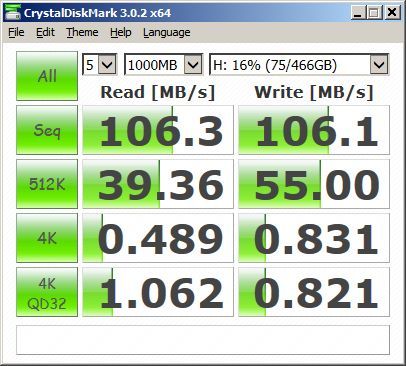
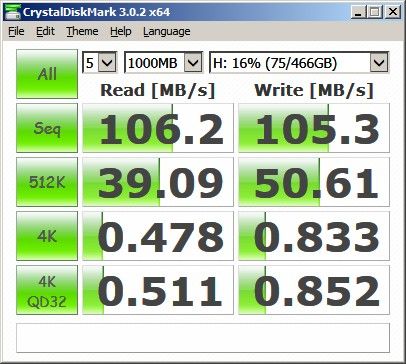
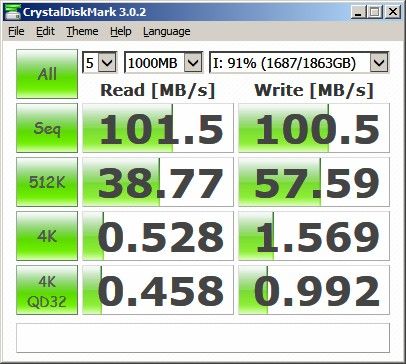
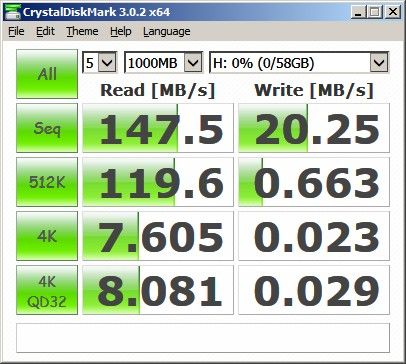
I've got a £25 ($40) 64GB USB 3.0 flash drive with read speeds above 100MB/s (but write performance is nowhere as good) while 2.5" HDD performance is not restricted by USB 3.0. Unless you don't like the small amount of additional baggage, put your 2.5" HDD into a USB 3.0 external enclosure (or buy the WD 2.5" 2TB USB 3.0) and you can have the performance boost provided by the internal SSD and plenty of storage space. Here are some performance comparisons using CrystalDiskMark:
1. Seagate 500GB Momentus Thin (5400 rpm 7mm) tested internally
2. Seagate 500GB Momentus Thin (5400 rpm 7mm) in USB 3.0 enclosure
3. WD 2TB 2.5" USB 3.0
4. 64GB USB 3.0 Flash drive
Food for thought? How much of the gaming HDD use is writing as opposed to reading?
John -
Is the 770z7e a good deal at $1100? I think I'd prefer the 770z5e, but if this is a good price, then I'd go for it. My concerns are basically the differences between the 17.3'' and the 15.6'' models. There seems to be an issue with CPU throttling with the 770z7e, which seems odd to me to be provincial to only this model. Also, the battery performance seems significantly better on the 770z5e. I don't know when the 770z5e it's coming out in the US, but, again, if this is a good price for the 770z7e, then I think I'll bite. Thanks!
-
Hey guys!
My video review of the chronos 7
Windows 8 Unboxing Samsung Chronos SERIES 7 - BEST NOTEBOOK EVER! - YouTube -
Right now I am using 1.5 internat drive in HP envy, and of course 1 TB external drive, so total I have already 2.5 TB and I am running out of space
I am not in favour of bringing with me a huge 4 TB drive, I am travelling all the time so that is a problem, otherwsie I would go for desktop
Yes what is with throttling with gaming in 17 inch model? -
The biggest difference is the screens... The 17" has a regular TN screen, the 15" glossy has an MVA screen which has much better color. Seriously, it's night and day. I'm surprised people don't discuss the screen more, since it's the one thing that sets it apart from every other "ultrabook". But the 15" glossy screen actually has more sparkle/grain than the 17" matte screen.
-
at 0:55 it says 256gb ssd on the box label....means it came preinstalled with ssd??
-
why you bought 15 inch dude, it is so small, why having a laptop if you have 15 inch screenm and 250 gb disk, omg
for me 17 inch is too small, i would prefer 18 inch monitor -
Two e-shops here show ATIV Book 8 (870Z5E) in stock:
apmshop.it @ 1448€ --> 5 available
eprice.it @ 1549,99 € --> 5 available (they even say that if I order now they will ship today )
It seems that Samsung likes Italy very much :thumbsup:
It's very subjective and depending on your usage: I've had a 17 inch for 5 years, and the last year I wanted to throw it out of the window...It would be fun to see you going around a campus, or train, with a 18-inch spaceship... I think that what the majority of people here likes so much about this laptop is its unique combination of power and portability: 18 inch is really too much to move it from a desk, and for desks there are plenty of laptops out there with more power for less money. 17 inch would still be portable thanks to its thinness and light weight, but less comfortable to use it in little spaces (i.e. in train)
-
ATIV Book 8 is also slowly starting to appear here in the Netherlands. It's on the official Samsung site for a suggested 1600 euros and some online stores give information and say it will cost around 1650 .. which is a lot!
On amazon.fr the 770z5e only costs 1250. As far as I know the only difference is a touch screen (but 200gr heavier!), 8 GB soldered and black, and obviously querty vs azerty. That's almost 400 euros difference!
So I am thinking about bitting the bullet, ordering the 770z5e from amazon.fr and hope that I can replace the full keyboard one day with a QWERTY one. Does anyone know what price I would be expecting to buy a full new silver top, and if this usually comes available for Samsung laptops?
Could someone who has the french version, pls post a screenshot of the Keyboard itself, to see where all the keys are. On the amazon.fr website it shows a QWERTY, but I guess that's a wrong image. -
If you want a QWERTY keyboard, you can get the NP770Z5E from John Lewis (UK) for £1099.95, but I think they ship to Europe too. Buy Samsung NP770Z5E-S01 Laptop, Intel Core i7, 2.4GHz, 8GB RAM, 1TB, 15.6", Metal online at John Lewis
-
I already checked. Sadly enough they don't ship outside of the UK for this product. Is there another UK retailer who has this laptop and might ship outside of the UK?
-
Amazon has the touchscreen version listed but it says "Usually dispatched within 1 to 3 months." Samsung Series 7 Chronos 780Z5E 15.6-inch Touchscreen Laptop (Silver) - (Intel Core i7 3635QM 2.4GHz Processor, 8GB RAM, 1TB HDD, LAN, WLAN, BT, Webcam, Radeon Graphics, Windows 8): Amazon.co.uk: Computers & Accessories
The only other retailer with the new Chronos in UK is PCWorlds, and they haven't had it in stock for a while now. -
I was in the Samsung store at Tottenham Court Rd London yesterday, and they said the chronos would be in stock in 'a few weeks time'.
-
I think they might not restock on the 770s anymore but go for the 880s directly which they sell for a lot more. At least this is what it looks like here.
-
Some real-life photo of the ATIV Book 8 can be found at:
Samsung ATIV Book NP870Z5E-X01HU (NP870Z5E-X01HU) | ATIV Book NP870Z5E | notebook | mysoft.hu
Not sure whether the "silver bezel" around the touchpad is just a reflection (hopefully) of the flash on the black surface, or
it is left unpainted. -
Yes, it came preinstalled I dont know any other country than sweden that has this setup
-
Because I wanted to dude. I already have two 24" monitors and one 2TB external HDD that I connect it to when im at my desk... -
That silver is the polished but unpainted bevelled edge around the touchpad. It's on the black Series 9s and is, in my opinion, a very effective detail that provides visual contrast and demarcates the edge of the pad.
John -
For People interested in retina display, Asus has presented a new version of Zenbook UX51VZ/U500VZ with IPS retina display 2880X1620, Amazon.de have already published their prices, 1999€ for 2X256GB and 1699€ for 2X128GB.
Asus Zenbook UX51VZ-DB115H 39,6 cm Notebook schwarz: Amazon.de: Computer & Zubehör -
These prices are outrageous, 250€/300€ only for black color, no thanks!
(In this moment in Italy 770Z5E costs 1200€.
I'm waiting for Haswell version, but if there will be 2 versions of ATIV BOOK 8, gray and black, and if it will be confirmed this gap price between gray and black model, I will stay with gray model. -
I just wanted to make sure, I since a lot of you are from Europe, that I'm talking about a 770z7e (17.3'') for the equivalent of 847.59 Euro, which is $1100 US, is this a good deal and would the 770z5e ever come close to this price in the recent future?
As for the screen, the 770z5e isn't even out in the US, so you would know more than I (if you're in Europe or have seen it), but this review says that the screen is using a TN screen of similar quality, only slightly better contrast, to the 770z7e's screen. -
I'm thinking about buying this computer. However, I'm in the US and would like to get the 8870M version. Does anyone know of any non-US retailers that would ship this to the United States? Maybe Canadian shops?
Thanks. -
why you want 18 inch monitor dude, it is so big
why have a laptop if you have 18 inch screenm, omg
for me 18 inch is too big, i would prefer a 15.6 inch laptop -
12 second boot time with ssd. Nice
-
We all have our preferences with portability being a more important factor for some people than for others.
John -
AMD just announced the next card in the 8xxx line, and its a doozy:
AMD unveils Radeon HD 8900M laptop graphics, ships them in MSI's GX70 (eyes-on)
now i really dont want to settle on an 8770 -
Don't expect any 8900m GPU to be able to fit in 1".
I made my post in the exact same format and logic as garfiola's to get across the point you have. I was merely playing Devil's Advocate by mimicking him. -
No way definitely go for the 8870 minimum
-
I watched this discussion unfold since garfiola posted his original comment to you -- which I agree was a bit odd, for the reasons mentioned by John. I thought your latest mimic response was not entirely inappropriate; and funny too, as others seemed to find as well
Now let's leave it at that.
I don't know if the advice I am about to pass is relevant in this specific case, but I know it applies to many members here: Be aware that attempts at humor or irony often fail to come across as intended in forum posts, and are easily misunderstood. Many participants here are not native English (I am one of them) and some posts can stir up heated discussion, when the poster was merely trying to make a funny remark or use cool language.
Nobody should have to hold back their contributions because of language barriers. Your English is fine! And let's all be mindful of that language challenge when we interpret each others' posts.
And now back to the scheduled program! -
I can't tell if you're being sarcastic or not, but for most people the decision to go with a notebook PC over a desktop PC is about portability. The 15.6" Chronos is a great form factor, and for many of us it's just about as big as we'd like to go. Moving to a 17" model means a much larger system, with more weight, and having to buy a larger bag to carry it in, which in turn means more weight. I can't imagine going to 15.6", and in the past I've typically stayed at 14.1"-15". This model barely fits in my bag as it is.
I have a big, heavy laptop for work (Thinkpad W520...still 15.6" but much thicket and heavier) and I can't stand carrying it with me too an from the office. -
Is there a pictoral guide on how to remove the bottom cover? I attempted to open it using the directions found in the owner's guide thread ti install an ssd but when I tried it it was a lot harder than expected.
-
17" for home, 15" for travel
Introducing The 2013 Series 7 Chronos with AMD HD8870M!
Discussion in 'Samsung' started by yknyong1, Jan 2, 2013.


![[-Mac-]](images/avatars/[-Mac-])


