 Problems? See this thread at archive.org.
If you are primarely looking for battery life, have you had a look at the MacBook Air?
I think it's pretty difficult for competitors to beat the Air when looking for battery life alone.
-
Agree: i used the latest MacBook pro of a friend of mine for one day recently: internet browsing (video watching as well) and slide reading(i am a student). It lasted more then 10 effective hours (effective time: i studied all morning and afternoon). Really awesome. To say the truth, after i've used windows 8.1, i wondered (why didn't i take my first mac?!)
Cheers -
You can't really compare it anyways as the Airs battery is 20% larger. But it comes at a price of size & weight.
-
The screen on the Air is also not nearly as good.
-
I am not saying the Air is the better machine overall, but it's a very similiar form factor and in regards of battery life Windows just can't beat OSX.
Have a look at the review of the latest 13" Air at notebookcheck where they compare the battery life of W7 and OSX Mountain Lion. -
Hey go45cvi,
do you consider upgrading? -
Dear everyone who answered my question, thanks a lot. MBA is obviously a breakthrough for what concerns battery life. I think it is unbeatable, and, let me say, the difference in weight between the air and my np900x3c are barely noticeable...also considering that with the air you have not to bring the charger...
That said, yes probably the new ativ book screen is better, and I am still sticking to windows...but probably your suggestion is the right one, unless the np900x3g will grant the mythic 8hrs or so...
Cheers, -
Yep, already did that since it's the first program I tried. Seems like I never posted it.
Not very helpful though..
CPU-Z Validator 4.0 -
thanks. maybe if you click on the Graphics tab on CPU-Z it'll show more detail? not sure though.
-
I got mine shipped yesterday.
The battery lasts 9+ hours with wifi on and 70% brightness.
The screen is matte, pretty nice.
The laptop is extremely thin, 2/3 of the height of the MacBook air 2013. (I compared it side by side)
This PLS screen is gorgerous. Will test with a spyder.
The color of it is awesome. It looks better than the ativ book 9 plus.
Key travel tends to be shallower than macbooks.go45cvi likes this. -
is there enough travel so you don't make many mistakes? are the keys kinda loose or firm? are they loud when typing?
have you had any wifi issues at all? do you have an N or AC router and does it automatically connect to a 5 GHz frequency?
how do you like the trackpad? -
Yes. Just think of it as a mac book air keyboard but pressed more easily. Not the best or worst. Just feels normal.
It's not loud.
No wifi issues. I've used wifi AC since 2013 April and had no issues with the air and this(from yesterday)
Connecting is a matter of your choice. It won't connect to any network if you don't put the wifi password in.... you know what I mean? -
Hi Sebae28,
Congratulations for the new baby...Battery life you claimed is great. What do you mean exactly that the battery lasts 9 and plus hrs? Did you use the laptop for nine hrs or so, or just left it hanging to a web site routine? If you used the laptop, what did you do? Typewriting documents and so on?
Thanks in advance, and it should be nice if the other owners could confirm your experience with that battery life...9 hrs is very good indeed!
Cheers -
I went into power options in control panel and chose the power saver mode.
Then did web browsing, excel and word processing.
I did NOT play any games or watched any video. This might have impacted the battery life differently.
Also no fan noise at all..
I noticed there are 2 fans in this thin laptop, so the heat/noise management is very good..
I -
I'm surprised you can manage 9 hours at 70% brightness. The backlight is one of the main power consumers under light usage conditions. What happens if you dim the display to the minimum usable? Also, is the 70% brightness on battery different from 70% brightness on mains. If so, it means that adaptive brightness is at work.
Which SSD did you get in your notebook (Device Manager should give the model number)?
John -
This is what i was thinking as well.
I thought it might have been 70% brightness when adaptive brightness is on which would mean its closer to like 20-30% of normal brightness. Even then if we could around 7.5+ hours for office applications and general usage @40%, it would be more than enough. My current x3f was hardly getting 5 hours.
Anyway, 9+ hours @70% brightness would be phenomenal.. Normally I find that 30-40% of full brightness is ideal for indoors and above 70% for outdoor use.
If the claims are true, I am happy that I waited. This,along with the 8GB ram and hopefully the replaceable mSATA ssd would make this, my dream laptop. I just hope it comes to Australia soon and isn't ridiculously overpriced... -
I'm pretty content with my old X3B, but Haswell+8GB+1080p is intriguing. If in a few months time there is another fire sale at the MS Store I'll probably have to pull the trigger. This is my favorite 13" on the market and I can't be sure that Samsung will update it with Broadwell...
I'm also looking for a 15" desktop replacement, but alas the XPS 15 is the only one that comes close, and it's got too many flaws. I afraid the laptop choices are going to get more and more limited in the coming years
-
This sounds great and that's exactly what I'm looking for. Could you please write the results when you measure the sRGB?
-
Ok. But you'll have to wait for a few days since I just ordered the spyder.
The battery... Umm. . Maybe it's because of the adoptive brightness. I just set it as 60-70% and had no issues seeing the screen though. I'll try without the auto adjustment in a couple of days from now. I got some midterms to study for..
When I said the color looks good, I meant the body color of this laptop is good.
Something to say:
Because it's a 13 inch matte screen with 1080, it looks like... A Kindle paperwhite but with colors. You can expect the same look.
Don't know how to describe the screen in a different way.
My 13 inch sleeve is too big for this laptop. I better get some smaller sleeve..
It doesn't flex unlike the Sony vaio pro.
You can expect "oh its a metal" kind of feel.
It's hard to lift the screen when it's closed. Maybe I'm too used to macs. Another part of the reason is this laptop is too light to stay on the ground when I apply a force upwards to open the lid.
Here is some screenshots:

-
Sorry for off topic, but what are the many flaws you've heard about regarding the XPS 15?
This Samsung sounds awesome, but I'm afraid it's going to take too long before it releases in Denmark. -
1. The hinges will loosen up with time. I can open my X3B with one hand, but it's now approaching two years old.
2. That's the Samsung PM851 SSD. I was wondering whether they would be putting the new EVO mSATA range in these notebooks. Either model is quite frugal with power which helps contribute to the long battery run time.
Three Swedish versions of the X3G (NP900X3G-K01SE, NP900X3G-K01SE, NP900X3G-K01SE) are in SW Update's database. I think the Swedish models also cover Denmark and Norway since those countries are not separately listed. It looks like -K03SE is arriving very soon but I wouldn't recommend that version because it has only 4GB RAM.
John -
Just ordered my K02 from samsung4campus for 949€.
I thought the offer might be of interest for fellow German students/research assistants and professors. -
Yes, after writing the post I found a site that has the k03se panned for the 26th of February. But it only has 4gb ram and 128 gb ssd, at quite a high price. I imagine the ram isn't user upgradeable?
-
Nope it's not.
Principally the high-pitched "coil-whine", lack of a docking interface, lack of gigabit, $$$. I just want a light-weight powerhouse I can set in a tidy dock and use as a desktop then quickly disconnect to go mobile. But I must be dreaming.Delta32 likes this. -
I just got the replacement (the first one i bought had a broken pixel and it was not "plane"...not what you expect when you buy a high end product).Tomorrow i will give u some feedback about battery life
-
Actually right now i am using a Lenovo X61s of some years ago (it wheights not much more then latest notebook, it's an awesome pc) with its docking station: it's super confortable to use it. When you need it, you can just disconnect it and go. Maybe you can find something that suits you need in their production (do they still have a X series?)
Cheers -
For docking you have to look at the models targeted at big businesses. Dell, HP and Lenovo come to mind but also have a look at the Fujitsu Lifebook range. I think they have docking connectors.
John -
I don't want to fight but i need to say this .You cant test battery life with adaptive brightness.Every room have different light ,sometimes removing notebook just 10cm can give you a hole different brightness.
look what i got with adaptive brightness on 900x3c
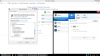
Please people when you give information on internet back them up like this:
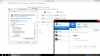
Sorry but life learn me to not believe everything i see.I been thousand time in situation when people try to convince me how they 4x4 or 150Hp car consumes only 5 liters of fuel.
What i really need to know is does extra 4GB of DDR3 consumes any power.I believe what we got with Haswell got away with memory.
It would be great Samsung puts Ativ Book Plus battery in this model that would be progress.
It just can get to my head that Samsung is finished with laptops.
They made such a good notebooks people dont need to update every year like with other brands and that is what i think main reason for ending notebook line.But what i dont get is that 7 million units is to small amount for them. -
I don't want to be rude, but you've asked your question and it's been answered a few times. You're not going to get an exact number because battery life can be affected by so many factors and it's unreasonable to ask someone to sit around for 8 hours to do a test that still won't directly correspond with your usage. You can expect a 10-20% bump from haswell, if that's not enough I recommend sticking with your X3C. If you're regularly away from an outlet for 8 hours at a time, perhaps consider a macair. Or just buy the X3G and if it's not up to snuff, return it.John Ratsey likes this.
-
No i didn't ask him to test battery life for me ,i am just saying we cant take those voltage for granted.Like you saw i can also low down voltage on my x3c.
You say we can expect 10-20% better results with Haswell in battery life.Yes that is truth but only if notebook is completely same.What we got here is 4gb more ram and that ram dont run on air it also need electricity.
Maybe i got one request and that is if somebody knows how much of that extra ram would draw electricity.Does he draw same amount that we save with Haswell.Even if he draws half amount that is not good because 1 hour is not something that would push me to buy new notebook.
Two hours definitely would.
-
RAM does use power but I think this should depend on how actively the RAM is being used (or maybe the hardware isn't clever enough to not refresh empty RAM).
I would suggest the following test: Unplug the mains power, put the display on minimum brightness (provided it is not impossibly dim) and start up HWiNFO and load the Sensors page. The battery drain should be down at the bottom (it is shown as Charge rate but is negative when running on battery). Wait 5 minutes and make a note of both the minimum and average values. Then reset and wait another 5 minutes and note the readings. Turn the backlight up two steps, reset the Sensors and repeat to see how much difference. As a reference, my NP900X4C at minimum brightness, with wireless devices turned off and sitting idle I've seen a minimum power drain of 5.16 W and an average of 5.58W. That's Ivy Bridge and has a bigger screen (which might use more power than the 13.3" screen but it has fewer pixels). I've seen some reviews of Haswell machines getting down into the 4W range.
John -
Ok, i installed SolidWorks (3 dimension assembly design): it runs as smooth as on working stations in university lab. Awesome, with my old PC opening a project took a life, now just few seconds
With this machine i can finally go around without the charger: i usually fill it up to 80% and pull the plug:It's more then enough to "live" the day (BUT i created a custom profile that set the max CPU speed at 50%: if you don't use programs like solidworks, you don't even feel the difference...). Like the first one i sent back,the bottom surface of this one is not perfectly "planar", but less then the previous: i think something went wrong in production. Can someone give me a feedback about it? Can't belive i took 2 PC in a row with the same problem.
Cheers -
new European owners..
- did your models come stock with W7 Pro with the option to upgrade to W8.1 Pro? do you have to download the 8.1 or is it already partitioned somewhere on the SSD?
- how's the boot time?
- how's the bloatware?
- how's the speakers?
- how's the brightness of the backlit keyboard.. is it uniform and even throughout? how many different levels can it be adjusted? and can you manually turn it on or off, or does it only light with an auto-sensor? -
I have the Italian version, window 8.1 installed already.
1) Around 5 seconds from turned off
2) Full of s**t you don't really need. I hate it
3) They surprised me: they sound very clear and loud
The keyboard has a proper (not too bright, like the mac) backlit: u can decide to turn it on manually or using the auto-sensor (recommended, it works very good). I really like it, right now i am texting in complete darkness. With 32% of battery the forecasting is 3h and 11minutesdroyder likes this. -
thanks. that all sounds pretty good.. quick boot, good sound, and functional backlight. hopefully the bloatware is pretty easily removed.
how do you like typing on the keyboard?.. is this your first Samsung laptop? if so, did it take some time getting use to? is the key travel enough for you to avoid mistakes? -
can you tell us what you were doing at the time? Also what was the screen brightness (approx.) and whether wifi was on or not.
much appreciated -
Perrype, thank you a lot for keeping us updated!
SolidWorks running fluently sounds great!
Will see if I can get my hands on a licence of Siemens NX as soon as I get my "Sammy".
How have you coped with the bloatware? Simply deinstalled all of it or have you setup up a clean system? -
Has the NP900X3G been officially launched in the US? I did not find it on Samsung's store Computers: PCs, Desktops & More - Browse by Reviews, Type & Price | Samsung PCs
-
I was browsing with chrome, brightness set to exactely 40%: it can seem not that much, but as there are no reflections on the screen is enough. Remember i set the ECO profile to limit the max CPU speed to 50%, as you don't feel the difference with "light" usage. And you stress less the battery, as it gets less hot
-
My policy is to install-uninstall as less as i can: i will get rid of the bloatware the first time i format the PC and reinstall the OS (i usually do it once a year)
-
Oh...
I almost ordered today a 730U3E and accidentally found (this) topic about NP900X3G...
Now I'm very interested in comparison of battery life to 730U3E...
On the one hand Ivy Bridge with 57 Wh Lithium-Ion 7.560 mAh battery and on the other hand Haswell with 44 Wh 5880 mAh battery... -
See the mobiletechreview review of the NP730U3E with the Intel graphics which suggests it could be stretched to about 7 hours although I would have thought it could be stretched for a little longer.
Recent comments in this thread about the battery time of the X3G suggest it can easily surpass 7 hours so, given that this is a thinner and lighter notebook, it may be more attractive (subject to price). Unless, of course, you are looking at a version of the U3E with switchable graphics and the extra graphics performance would be a consideration.
John -
Can someone please provide a photo from the internals next time you remove the bottom plate.
Thank you! -
Some additional photos.
Wifi works fine. Same as MacBook air.
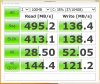
The SSD write speed tends to be slow. I don't know why.. -
Is that a 128GB SSD? If so, then the write speed is about half that of a 256GB SSD (which, in turn, is about half of a 512GB SSD). IIRC it's something to do with the way the writing is done in blocks.
How close were you to the router for the WiFi testing? If in the same room, can you go a couple of rooms away and try again.
John -
That is not true. If you look up actual numbers you find that bigger SSDs tend to be somewhat faster than SSDs with less capacity but nowhere near double the speed.
-
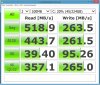
My 256GB SSD (900X3G-K01-DE) seems to be quite faster, but I used the tool for the 1st time, so I don't know if it's correct.
-
Hi,
Is it possible to get a Samsung NP940X3G with 8GB ram and 256GM SSD in the UK?
If it is not possible, how long do you think until Samsung are likely to release a model like this, and at what price do you expect?
I have seen there is a US model that meets this specification, but I'm struggling to find somewhere that will ship to the UK?
Hope someone can help
Thanks -
those are great wifi speeds. what model router do you have and what max speed do you pay for from your ISP?
-
Samsung don't list the performance for different capacities but have a look at this Crucial page. I agree I exaggerated but the increase in write speed up to 500GB is visible. Samsung only quote the best results within the family of sizes.
It is not possible, yet, but it is on the way. I think this is the version you are looking for. It went into the SW Update database about a month ago but production might have been delayed by the Chinese New Year holiday. sign up on that web page and they will keep you updated about the availability.
I would also be surprised if a US supplier can ship you a US version now. No US versions are listed yet in the SW Update database.
John
NP900X3G - Successor to the ATIV Book 9 (not Lite or Plus) with Haswell
Discussion in 'Samsung' started by abw1987, Dec 1, 2013.


