Problems? See this thread at archive.org.
How is samsung going to sell these laptops offering purple color lid version only?
Been checking few online retailers lately and their stock number seems to remain unchanged.
-
My X460 (big brother to the X360) just came in yesterday, the case color is much more of a brushed burgundy/ dark rose than a purple when viewed in person the photos don't do it justice.
-
Issac-1, would be nice to hear to your impressions. How do you find the build, quality and perfromance?
-
I have already posted some in the X460 message thread, however here are some additional comments (but first the glossy black really attracts finger prints).
Build quality seems solid, a little more screen flex than I expected, a few small issues (small scuff on black plastic, appears to be caused by the application of the intel sticker, Nvidia sticker slightly crooked, SD slot cover seems like a last minute addition, hard to remove and color does not match)
Several little things made the out of the box experience a little less refined than I expected compared to other major brands, windows Vista was set to UK defaults, pre-installed setup a bit more generic than other major brands, still have not found any info on the fingerprint reader configuration.
As to performance it is still a bit early to tell, I bought this computer to replace an almost 3 year old Dell E1505, the keyboard seems well arranged, it also may take some time to adjust to. Battery run time estimates seem low also, however too early to tell again. -
thanks Isaac-1. will check out your other thread.
i cant believe these foolish computer companies bother with the glossy black covers, they do nothing but attract fingerprints which maeks the laptop look terrible and cheap. -
I have an X360 - SU9300, 128GB SSD, 3GB RAM, Vista, red cover .. and I've been working with it for last couple of days. I'm not a laptop expert, and its early days, but I can give you my first impressions.
As a comparison point - I've been using a Dell latitude D820 over last couple of years for work - typical office apps, email, web browsing, & some light CAD. It has 2.1GHz centrino chip, 2GB RAM, 120GB 7200 hard drive, NVidia NVS120 GPU, 1900X1200 display, XP. Its a bit of a slab to carry - I wanted to replace it with something portable, 13" screen, good battery life, HDMI/VGA outs, and decent performance on typical office apps.
Build quality? somewhere between OK & Good. Overall, it feels solid in the hand, but is really let down a lot by the shiny black plastic finish on the cover which is continued inside - all around the keyboard, even on the trackpad buttons (which strikes me as a strange decision) .. if you use the trackpad then the inside finish is certainly going to get messy with fingerprints etc. They may have to re-think the finish in future revs .. its a glaring mistake. Interestingly - they ship the system with a cloth to clean the finish with ... I'm thankful I use a mouse rather than the trackpad!
Weight? - I measured 1.31kgs (including the std 6cell battry), but the scales could be a little off in calibration.
Keyboard? - not quite as good as equivalent Mac/Sony versions I've tested
(X360 keys are a little plastic-ey in comparison), but close enough to make it a decent effort. I find it a comfortable size for typing.
Battery life? I haven't done a test full charge-to-empty, but came close & seem to get ~6.5Hrs out of it on typical office apps using an optimised samsung system setting. There is a low power option that may extend this a bit more.
Screen? - I think its v.bright, I have to set it 60% to be able to work on documents etc. Some people have queried the contrast .. I don't have anything equivalent to really compare it to, but in-use, the contrast looks v.good to me on Docs/web etc. I've tested some DVDs using the external drive, picture quality seems OK .. not spectacular, but quite watchable.
SU9300/SSD/3GB RAM performance? - With Vista & bloat trimmed, about 60s to boot fully. Its much faster than the D820 for everything I've used it on so far - file Read&Write/Opening Apps etc. I'm not detecting much heat so far, just a slight warming at the LHS vent, even after sevral hours of use.
Intel integrated graphics? - a welcome relief from the NVS120 on the D820. I've run 2 HP 22" monitors (1650X1050) in portrait mode off the X360 (using HDMI & VGA side ports), it detected/rotated perfectly with no issues.
I haven't tested the integrated graphics with anything challenging, but for typical business use they work perfectly fine.
Overall 1st impressions? - It certainly meets my requirements for daily business use, portable, long battery life and good system performance. However, there is clearly some room for improvement on the design front(finish/keyboard). -
Nice mini review, thanks mirra.
-
Trusted Reviews have now posted a detailed look at the X360.
That review suggests that the SSD version has the red cover and the HDD version is the plain black.
John -
Yeah, that's right in the UK at least. Definitely reckon the red adds a certain flair the black lacks and the price difference between the two isn't huge either. I know which one I'd go for anyway.
-
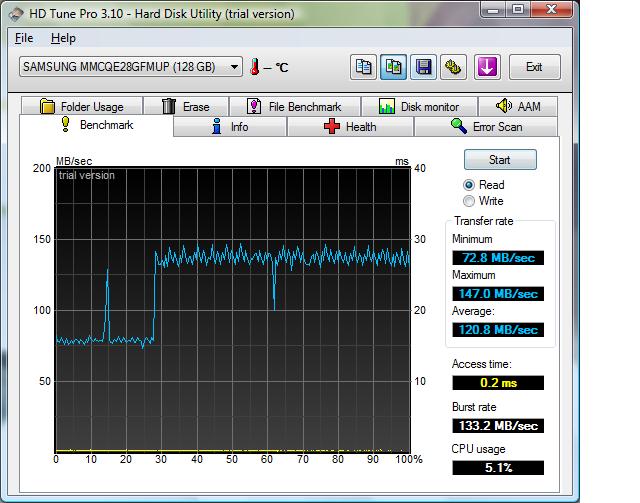
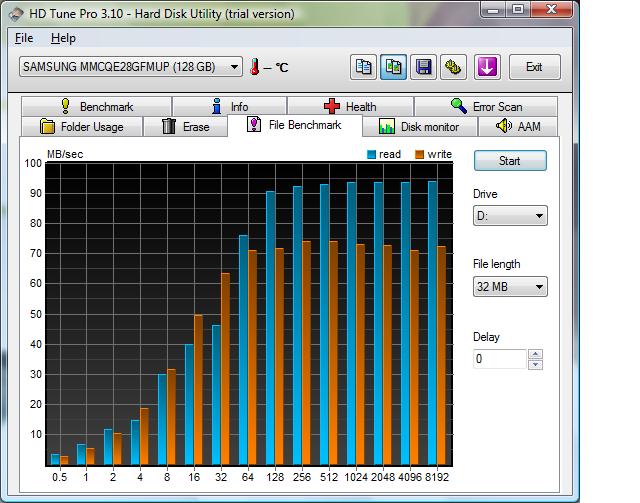
The 128GB SSD in X360 performs well. HD Tune posted on a dutch forum.
Attached Files:
-
-
Hi Mirra, have you tried to watch HD video on your x360? If not, could you try it and write results here?
Please!
It's the only question which is bothering me. -
I can't wait for Sony and Samsung to apply their new "lightifying" technology to smaller notebooks. If they can make a 13" laptop go under 3 lbs, they may be capable of making 10" and 11" ones go under 2 lbs.
-
HD video should be okay - 720p won't be a problem and 1080p should be okay unless the bit rate is unusually high or the codec very inefficient.
PS: John Ratsey: thanks for the welcome PM. Think my reply function is disabled until my post count increases, either that or I'm going completely blind and can't find the reply button. I'll go with the former for now.
-
It's OT, but you are correct about the PM facility being disabled for newbies. It's one of the innumerable anti-spam measures.
John -
Is is possible to upgrade the hard drive on this machine later on? I'm more interested in the normal hard drive version now since it is a lot cheaper in my country.
Is it a SATA or an IDE connection? -
See the attachments to this post. The storage is SATA and it appears to be 1.8" (since the specs say 8mm (thick)).
Look at the memory upgrade page and there appears to be what may be a storage module caddy under the right side of the keyboard. Otherwise it will necessary to remove the whole base of the computer.
Perhaps an X360 owner can look under the keyboard and confirm what is there?
John -
I'd just like to be sure. Do manufacturers ever solder the hard drive connectors to the motherboard (i.e. no connectors)? I've heard some GPUs are soldered and therefore cannot be upgraded. Is this ever the case with hard drives?
-
Notebook GPUs are a chip, with innumerable contacts. Hard drives have a simple interface and the drives themselves are designed to be connected using a socket or cable. Also, whereas manufacturers may use the same GPU for a production run, they may want to offer versions with different storage. The X360 is one such example, with SSD and HDD options.
I'm 100% sure that the HDD is swappable, provided you find an alternative with the correct connector. It can be done. The question is how easily.
John -
I got the x360 with the SSD today from Amazon. There was no CD/DVD drive included. Strange it came with a restore CD... so I'm thinking someone forgot to include it? Or do I have to purchase it separately (I hope not after spending $2300 on it).
-
I fear that you will have to spend another $100 on the external optical drive. Portable One's product info does not mention an optical drive but, surprisingly, they don't put one as a configuration option. I agree that, at that price, there should be one in the box, but maybe Samsung think that many purchasers will have access to another computer with optical drive and will then transfer material across.
John -
... It seems that the SSD version of the X360 does not come with the external Optical drive that is bundled with the mechanical HD one's.
By the way I would be VERY interested to know the model of the SSD disk inside the X360...
I'm from France and the X360 is not available here in a configuration with an SDD.
I would like to get an SSD for my X360 but it is almost impossible to find the model of the SSD that come with the x360-34p.
Thanks -
My X360 with 120GB HDD did NOT come with any optical drive at all. Also, the HD is very easy to get to. You just unscrew about 8 screws on the bottom marked KBD which makes it possible to pop the keyboard off. From there you can access the memory and the HD is held in using a bracket and rubber holder. once you get the keyboard off there are no more screws to remove to get the HD out.
I love the laptop and the only thing I'm really worried about is the 1 year warranty support and the possibility of the HD going bad and having to hunt for a 1.8" HD. -
The French model comes with an external DVD drive...
I did already remove the keyboard... my problem is WHAT is the reference of the SSD drive in the X360 ?
I need to hunt an SATA SSD 1.8 inch... and that's not easy to fnd...
I know samsung build some... I guess the X360 includes a samsung SSD drive... but the reference/model would help me a lot.
I'm not worried a lot about the HD getting wrong... but I'm used to 2.5 inch disk with chock detection.
On the other hand I had a 1.8 disk in a cowon MP3 player that is still working after almost 2 year of use... and i'm not expecting to shake my X360 as much as I shake my player
-
Could you tell me something about the fan? Is it loud? Quiet? Whisper quiet? Is it running all the time? Is the laptop hot or just normal?
-
The fan is not noisy at all... and compared to my Toshiba R500 that laptop is aa cold as an ice cube !
I think it's the same with all the laptop with ULV cpu like the X360 -
It is very quiet indeed. It usually hangs at a low level, sometimes goes a little higher and sometimes turns off completely.
-
Is it easy to change HDD in the x360? I couldn't find any information about this operation.
Here, in Poland, there are only models with the standard (non SSD) 120GB drive. I think I buy it and try to install the Intel X18-M SSD drive. -
As already told few post upper it is easy really to change the disk...
I've the same problem as you and that's why I'm asking any owner of a X360 with SSD what is the model / reference of the SSD drive ...
It seems cheapper to buy the whole X360 with SSD config than just buy a sata SSD.
The best solution might be to buy a SSD model from any contry that sells it (Germany, England, Belgium...) and try to find a local keyboard (as far as it is possible to find some spare keyboar) .
The keyboard seems easy to change. -
Hello, I've bought this computer and I'm not so happy :/
LCD backlight is horrible. Bottom of the screen is much brighter than the top of the screen. I set brightness to 50%. Top of the screen is ok but bottom of the screen is killing my eyes.
What do you think about it? Has your screen the same defect? -
No really the screen of mine is perfect & perfectly uniform ...
no difference between bottom & top.
I use it with full brightness because I kicked out dirty Vista to have a quick XP... and did not install the LCD control stuff yet.
There must be something wrong with your screen. -
I have installed XP too and replaced drive to Intel X18-M 80GB SSD. Now system is super fast
It is kinda weird that samsung sells this notebook with 4GB ram and installs Vista 32bit... . I tried install 32bit samsung tools (easy display) on 64bit XP and Vista but without success.
I like keyboard design, it is very good. Touchpad could be better though it is synaptics.
I will call samsung tomorrow and ask about my faulty screen. -
I just got one two days ago (the 34P with the 128 gig SSD) and I think it's great. I've had no screen problems, and after reading (and implementing) some info about "how to speed up Vista by turning off a bunch of stuff you don't need", it boots up fully from dead cold in around 75 seconds, which I think is pretty good. I do agree that the touch pad is a little weird, but I think that's partially because I'm not yet used to it, nor have I adjusted it yet. Now, if only it were 3/4 of a pound lighter!
-
Hi
What about HD movie? 720 /1080p ? I am wondering if the cpu is fast enough ? -
Should be no problem, particularly for 720p: The Intel X4500 GPU has a built-in H.264 decoder which takes that work off the CPU. See part 2 of my Dell E6400 review for more info.
John -
Had mine for about 1 week. The HDD model. Had HUGE problem installing XP since the lack of internal CD/DVD.
Positive
- Battery time is great
- Noise level=very good
- Screen is amazing
- Multitouch zooming is nice feature
- Function-key possibility to chose from 3 models of capacity vs battery/noise level.
- Light, weight is sooooo low!!!
Neg
- only 5400RPM HDD.
- No 7in1 adapter with the computer
- Position of left CTRL-key is to far out. Copy/Paste is not good. Did a redesign of the window key to CTRL key to fix this.
- Can not turn off bluetooth separately from WLAN.
- I can not get the Fingerprint device to work under XP.
- Just about little to "low" resolution. I would have prefered 1 step higher. A lot of scrolling needed.
- Lack of support from Samsung Sweden customer service. Not very skilled.
- Lack of support/info on forums.
- Little stiff feeling in touchpad, should have been softer/more flex, as on IBM T-series
- Little stiff touchpad buttons
Reg fingerprint and TPM:
Omnipass just says "plug in fingerprint device".
TPM says "can not find TPM module" when trying to install
Did not try it under Vista. Does it work for you other that run XP SP3?
I think i will also do and upgrade to SSD. Is there standard interface and connectors for SSD drives, or do i need a Samsung specific one? -
The performance difference is not big and 7200rpm brings more noise, heat and shortens the battery time.
Samsung recently moved the Crtl key to the corner because almost all reviewers (but not me) complained about the previous layout with Ctrl inside Fn.
Search this forum for the BTOnOff utility.
Samsung has only just started selling notebooks in Scandinavia so maybe it will take time for support staff to get up to speed. We will try to give any help here.
SSDs use the same form factors and connectors as HDDs. Which HDD do you have? (Device Manager will show the model number).
John -
Thanks for the answers John!
I called them again today about the TPM/fingerprint. And standard answer was of course "install vista" and then call back. For a computer for 1600, i expect some flexibility, specially when they can tell that i pretty much have turned the computer inside out trying to find a solution. They must have some experience worldwide that they can share.
I have the 120Gb HDD.
Does anyone have any feedback on the TPM+Fingerprint scanner running XP SP3? Would be good to know if this is a general problem, or if i might put the hours in and go for a reinstallation. -
I have had this machine in the U.S. for around two weeks now, and it's great. I have the SSD with Vista, and total boot-up time from a cold start is just 70 seconds. However, I used every trick in the book to speed up Vista-- in other words, I disabled all the "bells and whistles", and one of the things I disabled is the program (I forget the name of it) that enables the fingerprint reader, as that program significantly increases the start-up time, and then always runs in the background. Instead< I spend five seconds to type in a password.
-
TPM, but that is kind of what i would like. Because i can throw out PGP, and if computer gets lost/stolen, no one will have access to the HDD.
-
Does the HDD support encryption? If not, I would expect that I could read the HDD if I remove it from the computer and put it in an external enclosure.
John -
TPM is hardware encryption protection, so no you can not move the HDD to another computer without the proper keys to unlock (requires TPM-support).
I noticed the problem. In my Bios/Security (Bios upgraded to latest) i have no TPM Enable/Disable menu. -
Just got a hold of a WIN_X360_05LM.exe BIOS. But was not able to downgrade due to the fact that im now running WIN_X360_06LM.exe.
Anyone, can you tell me:
- What BIOS-version you are running
- Do you have an button under Security menu in BIOS where you can enable/disable TPM?
- Operating system (should no matter),
BR
Andreas -
Does the BIOS have a setting for VT (virtualization)?
-
Not anything that i can see, or associate to VT. -
has anyone really played 1080P playback on this?
-
Thanks. Usually it's pretty obvious. Usually it's found under Advanced options, but if you didn't see it, they cripple the laptop just like Sony does with theirs.
-
I have also established that TPM is only available on the A002 models.
Still leaves me with a none working fingerprint reader.... -
the "silent" mode seems to kills off all the fans, but wouldnt this be harmful for the laptop?
-
Silent mode may lock the CPU to minimum speed, which has no significant impact on performance for light usage. It may also raise the fan trigger temperature by a few degrees. You can check out what happens by using the monitoring page of RMClock to see both the CPU speed and temperature.
John -
Another problem.
XP SP3. Can not get the Audio over HDMI to work.
Picture no problem, but the audio will not work. (Realtek ALC6628 HDMI in the X360)
Any suggestions? Have tried to set is as primary in controlpanel/sound.
New lightweight Samsung X360 (13.3")
Discussion in 'Samsung' started by ernst42, Aug 29, 2008.