Problems? See this thread at archive.org.
Browsing German Samsung site for ultrabooks it just lists Series 5 & Series 7. I wouldn't mind it stays that way.
I understand that manufacturers are free to build whatever they want. But labeling that thing Ultrabook - which has the benefit to receive coveted subsidies - they have to obey Intel.
All rights reserved... *cough*
-
A touchscreen also necessitates a glossy glass-fronted panel, which will be a finger print magnet too

Samsung are calling the Series 9 a "premium ultrabook" on their site, but it initially didn't carry the ultrabook moniker. Hopefully they are smart and offer a non-touch option. -
One can have a matte finish touchscreen, but keeping it clean will be a nightmare.
John -
I really really hope there'll be a non-touch-successor a few years from now, by the time I am looking for a replacement of my S9 ;-)
-
Thanks so much for info. Any word on whether 15" will have 512 ssd option? and, most importantly, non-touch option?
Really want a series 9, with that light weight and the matte screen, but that resolution is a deal breaker. Would also really like more storage. If we have to wait until July, and if the new s9 15" will only come with touch, I might just go ahead and get a Zenbook Prime. -
512GB SSD is available (in limited numbers) and I'm sure it will be an option that your country Samsung marketing people could order from the factory if they think there's a market. Alternatively, the 480GB Crucial M500 should be on the shelves within a few weeks.
We have to wait and see about the touch. Based on the difference in thickness and weight on the new Series 7 it will be bad news for portability.
John -
Samsung answers on the NP900X3E-A03UK page indicate that the memory on the latest series 9 is upgradeable to 8 GB - indeed this is also mentioned in the Expert Reviews announcement (links below) is this now the case? I thought that previous 13" 9 series ultrabooks weren't upgradeable?!
Samsung NP900X3E Series 9 13.3-inch Full HD 512GB SSD LED Notebook - ASK & ANSWER
Samsung Series 9 Ultrabook updated with Full HD display (NP900X3E-A03) | Expert Reviews
...and it looks like this would do the job nicely:
http://www.amazon.co.uk/Samsung-memory-PC3-12800-1600MHz-laptops/dp/B00AAVSM18
Thanks,
James -
Unfortunately, I wouldn't have much faith in Samsung's technical support staff who have been known to give out incomplete information. The comment in Expert Reviews may have been based on that single reference to 8GB support, which doesn't actually say that there's an empty slot. I somewhat doubt that Samsung would re-engineer the mainboard to provide a SODIMM slot and then leave it empty when selling the computer with a 512GB SSD. If you get your hands on the X3E you can check the truth by running HWiNFO or CPU-z. If they report dual channel RAM without identifying individual SODIMM modules then you've got a DDP RAM package. The technical support may be correct in that the X3E would support 8GB if/ when an 8GB DDP module is available, but that would be an option at the factory in the same way as some other models have 4GB or 8GB on board.
John -
I suspected as much - hence my query. Although Mashable is now also reporting the same thing ( http://mashable.com/2013/03/26/samsung-series-9-full-hd/), so I suspect the press are getting this info from Samsung somewhere - maybe a reference to forthcoming 8 GB DDP support as you say. I guess I'll have to order one to find out!
Didn't the original 13" series 9 have 2 x SODIMM slots - or were they dropped when it changed to a unibody design?
Thanks,
James -
No, the 13.3" model has always had soldered RAM. The article is likely factually incorrect.
-
I think the X3A was upgradable to 8GB as it used sodimm, not sure if one slot or two. However, the wifi on that model was even worse. Pretty sure the haswell refresh will have an 8GB model, but that is probably several months away. I don't believe they will move away from DDP, in fact these may make it into the 15" as well.
-
I'm sure the X3A had two SODIMM slots. This caused a lot of confusion when the X3B (with soldered RAM) arrived. I think Samsung decided that two fans, for quieter cooling, was more important than 8GB. My X3B is noticeably quieter under load than the X4C which only has one fan (and two SODIMM slots).
John -
I totally forgot about the original Series 9 A models. LOL
-
John,
My NP900X3E-A03UK arrived today and here's what HWiNFO reports for memory - does this indicate DDP?
General information
Total Memory Size: 3718 MBytes
Current Performance Settings
Maximum Supported Memory Clock: 1300.0 MHz
Current Memory Clock: 798.1 MHz (8 : 1 ratio)
Current Timing (tCAS-tRCD-tRP-tRAS): 11.0-11-11-28
Memory Runs At: Single-Channel
Command Rate: 2T
Read to Read Delay (tRD_RD) Different Rank: 1T
Read to Read Delay (tRD_RD) Different DIMM: 3T
Write to Write Delay (tWR_WR) Different Rank: 3T
Write to Write Delay (tWR_WR) Different DIMM: 5T
Read to Write Delay (tRD_WR) Same Rank: 3T
Read to Write Delay (tRD_WR) Different Rank: 5T
Read to Write Delay (tRD_WR) Different DIMM: 5T
Write to Read Delay (tWR_RD) Same Rank (tWTR): 6T
Write to Read Delay (tWR_RD) Different Rank: 1T
Write to Read Delay (tWR_RD) Different DIMM: 1T
Read to Precharge Delay (tRTP): 6T
Write to Precharge Delay (tWTP/tWR): 12T
RAS# to RAS# Delay (tRRD): 5T
Refresh Cycle Time (tRFC): 208T
Four Activate Window (tFAW): 24T
Total Width: 64 bits
Data Width: 64 bits
Device Size: 4096 MBytes
Device Form Factor: SODIMM
Device Locator: ChannelA-DIMM0
Bank Locator: BANK 0
Device Type: DDR3 SDRAM
Device Type Detail: Synchronous
Memory Speed: 1600 MHz
Manufacturer: Elpida
Serial Number: 00000000
Part Number: EBJ40UG8BFU0-GN-F
Asset Tag: 9876543210 -
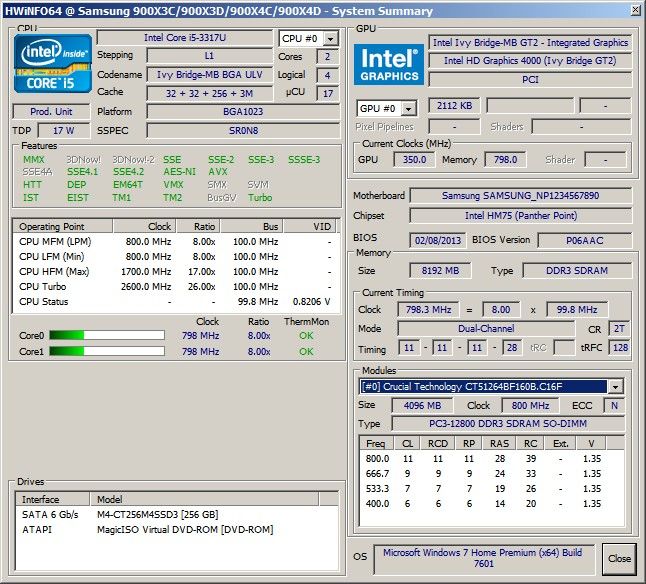
That is looking suspiciously like an SODIMM and it is single channel (if DDP then it will be dual channel), so the question is whether there is a second, empty slot. See what HWiNFO says on the summary page. The blue highlighted (below from my X4C) Modules selector should offer a second slot that is empty.
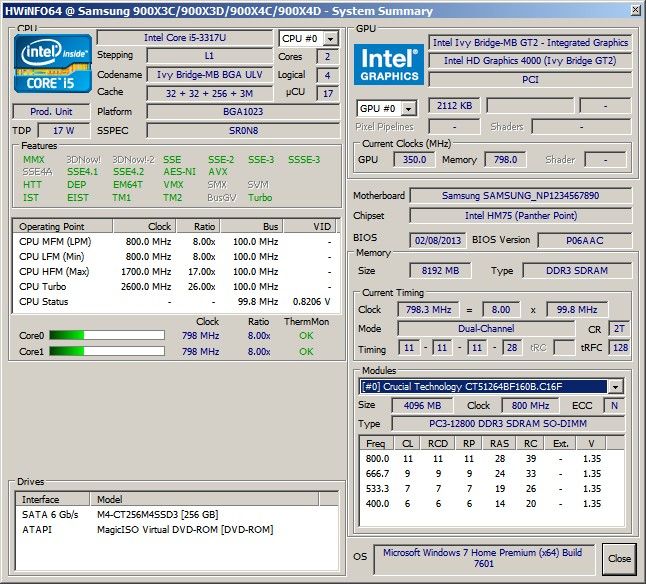
The only real way to be sure is to take the bottom off.
John -
Mmm - looks like it doesn't recognise it - that line on my summary is blank...see below:
-
Congrats being the first owner on the forum! In case you open it, take some pictures.
Time for a 900X3E thread!? -
Is that line still blank when you try to pull down the list? ie it can't list any modules.
For a second opinion you can run CPU-z. The Memory page should give the overall RAM details while the SPD page should have a pull-down list to select up to 4 slots.
Otherwise it's out with the screwdriver (Philips size 0) and a camera so we can see what is on the board.
On a different topic, please run CrystalDiskMark on that 512GB SSD.
John -
Yes, the pull-down menu is completely empty. If I run CPU-z the SPD page has 4 slots in its pull-down menu but no info for any of them. Here's the memory page which I'm not sure adds anything:
Just tried to take the back off and unfortunately I can only get 9 screws out - the 10th is in so tight I don't want to force it to risk ruining the head completely - especially if it's in vain! Might need to try some alternative drivers at work.
I'll run CDM now and post the results...
James -
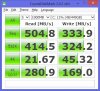
Here's the CrystalDiskMark for the 512GB SSD in the NP900X3E-A03UK - according to HWiNFO it's a SAMSUNG MZMTD512HAGL-000
-
This is puzzling. In one place reported as SODIMM and single channel, so not the dual channel DDP package, but no trace of anything in SODIMM slots.
Can you run the SiSoftware Memory Bandwidth benchmark and see how the memory performs. My table here has some results for single and dual channel configurations.
Shame about that screw but you do need a snugly fitting screwdriver to avoid the risk of damage.
Thanks. It compares favourably with the 256GB version see here.
John -
Here are the results of the memory benchmark: 9.7 GB/s
Sandra seems to identify the memory as "4GB LG EBJ40UG8BFU0-GN-F DDR3 SO-DIMM (1.6GHz 64-bit) PC3-12800"

Does this add any weight to it being DDP or not?! -
That's definitely single channel speed. Given that DDP means Dual Die Package and the X3B/C/D which have DDP are running dual channel memory with dual speed then I don't think this memory is a dual die package. Google doesn't have any hits for that part number (except this thread) and, until you get the back off for a closer inspection (which might reveal an empty SODIMM slot), I have to wonder whether Samsung have saved a couple of dollars by replacing the 4GB DDP package with a 4GB soldered single channel package.
A further piece of evidence for this investigation is whether both vents at the back blow out hot air when under load (ie there are two fans). If only one vent blows hot air then this might mean that one fan has been removed which would make space for the SODIMM slot. The fans should also be visible if you looks through the ventilation panels on the back.
Samsung have been known to be secretive at times but faiilure to put 8GB into this model, if there is room for it, must be considered to be a -up. (ie there isn't an empty slot in which case single channel RAM on a high spec machine is another -up).
John -
John,
OK - I'll definitely have a go at that final screw again tomorrow with some better tools.
However, in the meantime I booted into the BIOS and it lists 2 memory slots, 1 with 4096 installed and 1 empty - did the previous series 9s with soldered DDP list an empty slot in the BIOS?
If not, then it's likely the better of the 2 -ups above!!
Thanks,
James -
I meant to ask - assuming the case hasn't changed, once I've got the final screw out, are there any further screws under the rubber feet or further steps to release the back? It felt like there was more than just a single screw still securing it?
Thanks,
James -
Amazon.com (USA) shows the NP900X3E-A02US to be in stock. Let the release begin!
-
My X3B BIOS says:
Total Memory 4096 MB
Slot 1 Memory 2048 MB
Slot 2 Memory 2048 MB
At the platform level there are two memory channels. I don't know what would be reported if the second physical slot is absent.
If it is the same 10 screws around the edge of the base as before then that's all except the plastic clips along the seam at the back between the hinges. These challenged me to begin with but it is now straightforward. My method is: After removing the screws, place the computer upside down with the back edge nearest to me; put finger into the SD card slot to lift the base slightly and then lift the front edge (ie side away from the hinges) to rotate the base through about 15 degrees; then put spudger / credit card into one side of the joint between the hinges and gently lever apart.
John -
John,
Thanks for the pointers - the back came off easily once that 10th screw was removed. The bad news is that not only does it not look like there's an SODIMM slot (as far as I can see), as you say above it looks like Samsung may have fitted 4GB of single channel memory - unless of course that's also being reported incorrectly but then the bandwidth test also implies this. I think the memory is located under the metal cage between the fans - I've added pictures below.
Thanks,
James
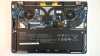
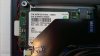
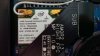

-
For shame Samsung, for shame.
-
Thanks, that all looks very similar to the inside of my X3B with the RAM under the metal cage.
So, very bad news although not completely unexpected: What is Samsung up to? Better CPU, SSD and display but only single channel RAM. It will reduce performance, with the integrated graphics taking the biggest hit. If they could fit some form of SODIMM in instead of the DDP RAM then why not put in some for of 8GB SODIMM?
If you plan to keep the machine in spite of zero potential to upgrade the RAM then you might want to follow up with Samsung support (i) why they put single channel RAM in the top model and (ii) more details of how to get the 8GB upgrade as per the info on their website.
John -
I didn't understand if this laptop will have a dedicated gpu or not. I mean, what should be the difference with respect to the series 7?
Inviato dal mio GT-I9100 con Tapatalk 2 -
The Series 9 does not now have a dedicated GPU and I doubt it will have in the foreseeable future. However, it is reported that the Intel graphics in the Haswell CPU (expected within a few months) will be faster than the Ivy Bridge integrated GPU (but needs to be if only to offset the extra work of a higher resolution display).
John -
Hi all,
Long time lurker posting for the first time! I'm looking to buy a new lightweight notebook and the updated series 9 is currently my favourite. I've just had an email exchange with Samsung benelux regarding this model and they confirmed it will come with the newer i5-3337 and i7-3537 processors instead of the earlier reported i5-3317 and i7-3517. They also confirmed that the higher resolution screen is still PLS and the memory unfortunately unexpandable.
James, I'm really interested to hear your thoughts on the screen as well as the laptop temperature and noise levels.
Cheers,
Raelta -
Raelta,
Yes, it's definitely the i7-3537 - see my HWiNFO summary screen here:
![[IMG]](images/storyImages/94519d1365527214-next-samsung-series-9-release-x3eraminfo.jpg)
My previous laptop for the last 3 years was the Vaio Z1 until yesterday, so I was already accustomed to a powerful & compact laptop (full voltage i7, 256 GB SSD, 6 GB RAM, FHD screen, hybrid GPU, etc.). I only found the series 9 because Sony went and discontinued the Z just as I was about to replace mine with the latest Z model!
Having used the X3E (i7, 512GB SSD, 4GB RAM, FHD PLS 13") for 24 hours here are my initial impressions - pros and cons:
+ Form factor is hugely impressive
+ 512 GB SSD in this form factor even more impressive - especially for the price
+ FHD PLS screen is stunning
+ Laptop temperature and noise levels are fine - in fact non-existent & quieter than my Z1
+ Touchpad very good and easily configurable
+ Keyboard very usable and already feels comfortable despite less key travel
+ Lenovo USB 3 dock running 2 x FHD 26" monitors, GB ethernet & 5 USB ports from X3E via a single USB 3 cable!
- Limited to 4GB RAM
- Even worse, Samsung cut a corner and didn't continue to use DDP memory on their top of the range series 9
My biggest surprise is that Samsung didn't take the opportunity to address the memory issue in such a high spec ultrabook. Unlike Sony's approach with the Z series which was to cram as much as possible into a very small laptop regardless of price, Samsung have cut corners here and there - despite the fact this ultrabook is half the price of a similarly spec'd Vaio Z. Anyone paying this money for an ultrabook with an i7 and 512 GB SSD would I'm sure pay extra to have 8GB RAM - even if it was single channel for now whilst they await the DDP package. This is compounded by the fact that if you're foregoing discrete/hybrid graphics for Intel's much improved HD 4000 integrated graphics to get the reduced form factor, the one thing that would mitigate this would be to ensure that the memory performance was not only sufficient but also optimal...
Having said that it has no trouble at all playing full HD videos on its own PLS screen or my FHD 26" monitors (via USB 3 DisplayLink). Indeed it's also fine running my favourite video editing software - so for now I'm happy with the trade-off in order to get such a compact yet powerful ultrabook. Would still love an 8 GB DDP version though...
Anything else you need to know, just shout - hope that helps.
James -
James, many thanks for the detailed response. I'm quite excited about this model. The situation with the single channel memory is indeed really weird. It's hard to imagine it being related to cost saving.
The only big negatives for me are the lack of a mini-DisplayPort connector and no 8GB RAM option. 2x USB3.0 ports would've also been nice, but I'm really nitpicking here. -
Interesting, any thoughts on how the pls display compares to the display on your vaio z? Maybe one or two pictures? I am also a z owner looking to jump ship.
-
The Vaio Z display was good, but this is even better. I've attached pictures below - not much difference when viewed straight on, but as soon as the vertical or horizontal viewing angle changes, the colours on the Z start to change whereas the PLS display remains constant. The grey screens are the pattern test from Creative tools for Creative mind which the series 9 PLS screen passes with flying colours - the grey remaining constant regardless of viewing angle.
Photo test:
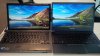
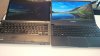

Grey pattern test ( http://www.mediachance.com/pbrush/monitor.html):
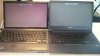
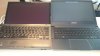
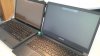
Both laptops were set to 100% brightness for the test and the Z was running in speed mode so its discrete graphics were in use.
James -
So I followed up with Samsung support on the RAM upgrade and got this answer...
Thank you for contacting Samsung Customer Support.
You are correct the RAM can be upgraded on this machine however I can not provide instructions on how to do this as it is a sealed unit.
To upgrade the RAM the sealed unit needs to be opened up which would void your warranty. For this reason I must suggest that you purchase the RAM and take it to a Samsung approved service centre to hav it fitted.
The closest service centre to your post code can be found using the following link <snip>
So I've asked them what RAM specification/part no. I should purchase in order to have this done by my local service centre! Not hopeful though...
James -
Interesting that someone else in Samsung is giving out the same information. Good idea to ask for a specific part number / specification: Eventually they may figure out that it's soldered (there's no room to have a SODIMM socket under that metal cage).
John -
thanks a lot James. the viewing angles on the Z are clearly inferior. But for the color reproduction, I'm not exactly sure which is better. In any case I don't have much of a choice and will buy the series 9
-
As expected...
Thank you for contacting Samsung Customer Support.
I am sorry but it would appear a mistake has been made on the Ask and Answer section of our website.
Since your first email I have looked into this further and it appears that this particular model has a max of 4GB RAM. There are two other devices in the series that are upgradeable (NP900X4C-A01UK & NP900X4D-A04UK) but your model is not one of them.
I have reported this error to Samsung management to have the incorrect information taken from the website and to investigate how it managed to be put on the website originally.
I apologise again for the inconvenience this has caused you.
Before anyone coming across this thread gets excited, the part numbers provided are the 15" series 9, not the 13".
James -
Thanks for the update.
My supplementary question to that Samsung person would why has the X3E got single channel memory (with consequently impaired performance) whereas the X3B / C / D have dual channel?
John -
Has the brightness of 900x3e been confirmed to 300nit? On the Samsung website it still says 400nit at some places. Brightness is an important factor for me but so is resolution so I have a hard time deciding between 900x3e and 900x3c.. if they don't actually prove to have the same brightness which would solve everything
By the way does the higher resolution of 900x3e have any impact on battery life? -
I have asked, but funnily enough no answer to that question yet...
James -
Have you left the display size at the default 100% or have you had to change it to 125% to keep from going blind?
-
Actually the default in Win8 was 125% but I've changed it back to 100% as that's what I've been used to with my FHD Vaio Z for the last 3 years and love it!
Having said that I think the X3E also has a marginally larger LCD than the Z so everything seems slightly larger anyway.
James -
I think my eyes have grown too old for FHD at 100% but I find HD+ at 100% to be perfect..the one thing that keeps me from jumping into the E model. I have tried the ASUS and ACERs with FHD and find it to be a strain after a while but of course neither of those has matte screens. I think the Z is a 13.1 and this is a 13.3 which would explain the slight difference in font size.
-
This is difficult to check unless someone has a suitable light meter. Notebookcheck will do detailed measurements if/when the review this model.
However, I find anything more than 6/8 brightness on my X4C to be painful on the eyes indoors - anything higher is too dazzling so I think 300 nit would be fine for normal use. The extra brightness is only useful if working in the sunshine (and the extra backlight power pushes up the power drain).
One way we may get an answer is through checking the display model. I wonder if it is the same as on the new 13.3" Series 7 (ie not Samsung). That notebook uses the CMN 1343.
John -
That doesn't look good at all!
What's that greenish tint? Have you calibrated the screen or tried to adjust settings?
Two amazon users are also reporting backlight bleeding: Google Translate Amazon DE
(see 'loop's comment with photo links) -
Maybe they are buying their displays the same place ASUS does..
Wow..after looking at those pics that looks exactly like an ASUS display right down to where the bleeding is at its worse.
Next Samsung Series 9 Release
Discussion in 'Samsung' started by eskimoerin, Jan 12, 2013.