Problems? See this thread at archive.org.
Bad luck in 2011, come 2012, it will go away!
-
-
I'm having a issue with changing contrast levels. The colour is generally washed out, but what I'm seeing changes dependent on light sources within the video.
For instance I'm watching a film thats quite dark but then the opening credits start showing at the bottom in big white letters. Each time a new set of words comes up the contrast changes so the whole video becomes even more washed out.
anyone else experiencing this? I've got auto brightness turned off and have the image set to sharp as its gives the best contrast.
Also how do i turn off the light on the wireless key (f12) mine is on all the time, that wireless is on. even when keyboard illumination is off.
Thanks for any help! -
In the Intel graphics control panel > Media > Image Enhancement, try changing the setting for Adaptive Contrast Enhancement. [This assumes that the Intel GPU is being used - I don't know if there is something similar for the ATI GPU.]
John -
it was unticked, i selected it but no difference.
-
today I´ve got update of bios via Easy Software (S01)
-
The ATI GPU uses the catalyst control centre, in other video settings there is the same enable dynamic contrast option. It is greyed out so i can't change it however it is set to off.
Any other ideas?
I'm using vlc and windows media player classic. -
Did Samsung bundle another video player (PowerDVD?)? If so, does it show the same problems or have any options.
I'm short of other suggestions.
John
PS: Regarding the light on the F12 key, I read somewhere that this is an indicator that the Wifi is on (presumably saves 10 cents on the manufacturing cost compared with providing a separate indicator light). Does it go off if you disable the WiFi? -
Is there a way to manually control fans? I am installing SC2, SWTOR and windows update all at the same time on a flat wooden surface and I'm looking at max temps of 88C but hanging a round 78C for the most part on the hottest core. I've owned a 2011 MBP before and these were similar temps so I guess in this form factor it's to be expected?
-
I have similar temps for sc2, so no worries there. Doesn't the Fn key with the fan picture control fan speeds? (Or maybe it just suppresses fan usage, can't remember...)
-
I have noticed that the Turbo Boost on this laptop is annoying. It stays at around x28 without load, plunge to x22 immediately with load and throttle at x8-14 with prolonged load. I am playing a game heavily dependent on the processor processing physics, and about every 20 seconds, the processor throttles with laggy graphics. Monitored with throttlestop.
Seems to be inadequate cooling (Processor temp peaks to 95+C and throttles to 80C, cycle repeats) as there is throttling involved. I'm living in a tropical country if you want to know. -
Yes its the wifi light so goes off when i switch the wifi off, it just looks a bit funny when the keyboard dims and the one key stays lit up. just to be clear i'm talking about the backlight on the whole of the key not just the small blue light embedded in the key. The light remains on even if the backlight is turned off.
-
Hey guys,
I am looking to snatch up one of these for a Christmas gift. The version I am looking at is the gimped BestBuy version, but for 829 it is a pretty good deal. How loud is the computer during light usage such as music and web browsing? The BestBuy version has a slower 5400 rpm HDD, ATI 6490m, no backlit keyboard and no expresscache. -
Its not loud at all, very quiet. Get it from Microsoft store the better version with 25% in store discount brings it to $950
Sent from my SGH-T989 using Tapatalk -
not loud at all when doing general use. When you load up a youtube video, then the fan becomes audible. It's funny though the fan will turn off almost immediately once the chrome tab of youtube is closed out. But yeah pretty quiet. Speaking from experience on the BB model you speak of that was on sale. It jumped $40 though since yesterday.
-
The BB model is fine for me. I know that in a few years my hundred bucks for the better version becomes a sunken investment, and by then I'll be in the market for something better with the extra money still in my pocket.
The ExpressCache comes into its own with bootup, and to compensate they come with "fast sleep", which loads stuff into RAM (and thus consumes battery while you sleep). -
just got this a week ago and am loving it so far, even though it the gimped BB version(JR just leaked a few of the upgraded version last night...)
one thing that i really want to get rid of is the annoying pop up when say i enable/disable caps/num lock or change the volume/brightness levels. does anyone know of a way to remove these? -
Updated OP
-
Has anybody sucessfully managed to implement smooth scrolling yet? (in chrome/any web browser) - I have installed the Chromium Wheel Smooth Scroller and although it is better than it was, it still isn't quite perfect
Has anyone else had any better luck? What settings are you using? -
Anyone know where to get skin protector for this laptop?
-
Just got this Sammy Lappy today
I'm pretty happy with it so far. The keyboard is especially nice - quiet and light with decent feedback.
Anyway, does anyone know how to disable the wifi and bluetooth for good? Every time I restart the computer they turn right back on and I have to manually Fn+F12 which takes me to Samsung's Express Settings to turn them off. -
Somewhere there should be an option to select the default settings for the wireless devices (on / off / use last settings). It might be in the BIOS.
John -
I'll get my 700Z5 (full version) in an hour or so, what do you need to do after a clean install?
What drivers?
Samsung software? (You need easy settings for the SSD to work?)
Icc profile?
What else?
Really looking forward to this laptop!
Edit: This is a really nice piece of work. Quality is top notch, screen could have been better but it's not nearly as bad as some people here say.
Did a clean install immidietly when I got it (with the samsung dvd), installed samsung drivers and AMD 12.1 preview from leshcat, used the screen icc profile from this forum and installed easy settings.
Everything works like a charm so far.
Anything else I should do to maximize performance?
How do I know that the express cache works? -
We need a solution for this contrast / lighting issue!
Exact same here when watching video.
Have you had any progress? -
Restart Windows a few times and make a note of how long it takes. The Windows boot time should be substantially reduced as the software learns what to keep in the cache. (More about ExpressCache here).
John -
Same problem here. Beginning to bug me now when trying to watch a movie at night or in a dark room with the screen.
I've also noticed it while gaming, especially when I'm playing a dark setting game such as LIMBO. The screen suddenly brightens when a cursor or some other type of white symbol appears on the screen.
I have adjusted the ico. settings from the thread specific to bettering the colors/display, but this one specific screen brightness auto-adjustment problem remains.
Butters- -
So, I'm thinking of buying one of these (NP700Z5A-S01UK) from UK. I really like the screen resolution and form factor combined with performance.
But, there seems to be quite a few niggles on here. I accept not many people sign up to forums to say how great things are, so there will be more people with issues, but there do seem to be quite a few.
Screen quality, trackpad issues, OpenGL issues, spacebar issues seem like quite a lot.
What is the truth, are the above much to worry about, or isolated issues.
I want the laptop for general use, to run linux on, to run virtual machines on, and also maybe for some light gaming, especially MS Flight Sim. Anyone got much experience of linux on this, especially ref the ATI card.
Finally, the only places in the UK with stock (apart from the currys cut-down model) are John Lewis and Amazon. JL is now out of stock, and I've been told it is now discontinued, barely 2 months after release. Why are so few people stocking this? Am I being suspicious that Samsung have pulled this due to multiple issues?
Thanks -
I'm not terribly savvy with computers, so I'm afraid I can't advise you much on the technical side of things.
But from my experience of using mine for a couple of days now, I haven't run into any major issues (yet?). The keyboard is great. I haven't used an Apple trackpad extensively before, so this 'button-less' trackpad took some time to get used to, but now I find the multi-gestures to be pretty handy when browsing the web and it responds quite well.
I've been having problems with the wifi and bluebooth always coming back on after startup and I have to use the Samsung Easy Settings to turn them off manually everytime...tho I haven't got around to go to the BIOS to see if there's a fix.
The screen has been pretty good on my end. There're different 'Display Colors' you can choose from in Easy Settings, and the 'No Effect' option it does look washed out and somewhat bluish. I have it set to 'Movie' and it looks great, I haven't noticed any contrast/lighting hiccups when playing movies and such. The fan does come on quite audibly whenever I'm on Youtube, maybe something to do with how it handles flash videos? But otherwise it's a very quiet machine. -
Where did you hear that it was discontinued?
-
I'm not the most technical of users, but I do demand that things work as they are intended and that features have a purpose rather than being gimmicks.
I've had my 700Z5A-S01UK for a bit more than a week now and I am happy with it.
The screen is fine for me - and the profile mentioned on this forum improved it a lot.
The trackpad is much improved by the latest driver - a simple download, and a step up from most Windows laptops.
I don't fully understand the OpenGL issue, and I don't think it affects me.
The space bar is fine on my example.
Overall, I'd say this is a very good laptop. It is not perfect, but then again, I doubt the perfect laptop exists...
As for Samsung withdrawing the model from the market, I find that difficult to believe... -
Thanks all for the responses, and a hny to all.
I don't know that Samsung are discontinuing it, but john Lewis are. They told me and also showed me their computer system. That just leaves Amazon. If you Google the model no, pcworld also used to stock it, but when you follow the link to their page it says no longer available.
I think the screen worries me, as it sounds like the default setting is bad, and it needs driver/software to fix. I think I would probably be stuck with default settings in Linux.can someone describe the screen issues and how to show them, and I will take another look at the i5 version Jl have in display and see if I think it will be an issue.
Bit annoying, as apart from the niggles this laptop looks perfect. -
This morning, Easy Software Manager presented me with a BIOS update...
![[IMG]](images/storyImages/Capture-19.jpg)
Anyone implemented this yet?
Should I do it? -
Actually, 10FD is the latest BIOS version.
-
Great. So, have you implemented 09FD and then 10FD?????
Any feedback? -
I suspect that the shortage is driven by the current supply problems although Samsung could usefuly address any hardware-related issues, particularly the WiFi. I would expect that more supplies / another version will become available within a few weeks. Wind the clock back a few years and Samsung notebooks were first released in Asia and then Europe while north America didn't get any (due to a now-expired agreement with Dell).
John -
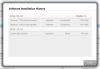
how do you check the BIOS version? I got an update about a week ago.
I thought it installed okay but just checked the update history and it shows failed in one of the columns,but doesn't give a header for the column.
If it is failed in anyway anybody know how I restart it?
Would it fail if my my BIOS settings are password protected?Attached Files:
-
-
I finally got my system yesterday. It does seem though that it gets heated up quite a bit. Specifically where the microsoft stickers have been stuck (center top of the backside). Is this normal ?
-
Also, my VLC video lags like crazy when i play slightly hd-ish files. Is this due to the intel / ati issue or is this completely unrelated ?
-
It should not heat up there. There is only a USB 2.0 port board and the internal battery, other than the DVD drive.
-
Is the size of battery in the i5 version different to the i7 version?
-
Look under the list here
Platform ID: FD
http://sbuservice.samsungmobile.com/BUWebServiceProc.asmx/BIOSItemList
Remove your password and try again. -
Same. The battery is fixed size for the chassis.
-
Thanks for that, the i7 is sold out so i may settle for the i5
-
Where is the i5 available?
-
I'm in the UK so that will be from the bt shop, dabs and john lewis
-
Anyone can make some photos of this laptop? And put it to the thread with screen If will be nice If You make compare to the other laptop which you have.
-
-
To update your BIOS version to 10FD, go to Samsung driver's site:
Samsung
Now click on the "Firmware" tab and download Update Software (Firmware) (ver.1.0.0.2). Run this application, it will give you information about the installed version of BIOS and the latest update available. -
Thanks for that, the price went up to £900. In John lewis you get it cheaper at £850 and three year warranty.
My dilemma is, should i get the i5 version from john lewis or wait for the i7 version to be back in stock and buy that? Reason i came up with is that the i7 will be more future proof and it's only £50 difference. Reason for i5 is better battery life, heat management and i save 50 quid. -
John Lewis have discontinued this, and wont be getting any more in. See my earlier posts.
-
I called them yesterday and they said they were just out of stock and do not know when more will arrive. I'm going into my local john lewis store to ask.
Samsung 2012 Series 7 Chronos (NP700Z3, NP700Z4 & NP700Z5 series) Owners Lounge
Discussion in 'Samsung' started by yknyong1, Dec 11, 2011.