Problems? See this thread at archive.org.
today Update Plus shows these updates:
BIOS update v. 07HL
AHCI controller update v. 10.0.0.10... (stupid app doesn't let you resize columns!)
any advice on these? are they safe/recommended?
cheers.
-
Just an FYI
I received a package from Samsung today which containted a Series 9 power supply and power adapter at no charge. I don't even own a Series 9 right now (and have a Series 9 power supply and power adapter in my closet) so I thought it might be a redesigned power supply. The part #s were the same.
I opened the box but it still looks exactly the same.
So I don't know why I received this. Maybe it's because when I sent one in for service it was returned without a power supply and I had to call them up to get it returned.
Anyone else receive one? -
No, but can I PM you my address... I sure could use another one.
-
I still think it's worth emailing [email protected]. I doubt they give the source for their drivers to Samsung. I think they just rely on the manufacturers to distribute the drivers so they don't have to do support. Let's make them actually support their product.
Also tweet @SynaCorp -
Ok I installed the new Touchpad drivers, I still need more time with them but I think the finally fixed the double click issue! (I hope I am not jinxing it)
Its still not 100% perfect to how I would like it but it is a HUGE improvement! -
So, inability to scroll in Firefox doesn't bother you?
-
I was extremely careful, but eventually I am in too - rubber cord casing has separated near AC. Will call customer support to request a new one. I think I will put electrical or self amalgamating tape on the 2nd AC adapter on both sides as soon as I get it to make it last longer. It's totally ridiculous!
As for the L shaped jack, they are available on new models (at least, in Korea) according to Kalahari's pics and flics, and it looks cool, but I am afraid we wouldn't be able to get it on the existing earlier models. Moreover, I assume if Samsung will use better materials in the AC production the problem would disappear by itself. -
That's ridiculous that the rubber cord casing separates. That's two problems with the power adapter -- the other one is obviously worse where the connection needs to be repaired in the S9 (and you have to send it in for service).
Just wanted to point out that the Korean pics did show a new power connection on the S9 (sort of larger rectangular cover) but there is no indication whether that's just an odd display model or whether the power connection has been redesigned. I am hoping it has been redesigned. -
Can anyone recommend any good car/airplane chargers?
-
I'm repeating myself. There aren't any that I know of for the S9.
You should look at power inverters (that have car and air connections) like the Targus Power Inverter Auto/Air 100W or the Duracell PowerSource Mobile 100 (which is larger but does have a battery too). -
Would this work for the series 9?
http://www.amazon.com/Duracell-DRINVP175-Pocket-Inverter-Products/dp/B004U1Y3VC -
Scrolling works fine for me in firefox...but I don't use scrolling much anyways, and even if it did, I still say clicking turning into double clicks is a lot worse!
-
That's quite a powerful brick. I would have thought a 65W - 70W rating would be plenty. Maybe something like this if there is a tip to fit Samsung.
Other brands to look at are iGo and Kensington.
Also. but I don't know if it is a trend, some airlines are now providing mains voltage power sockets.
John -
Can anyone tell me what is the model number of the display used in the 900X3A?
-
The stock charger is 40W. I also tested the laptop for power consumption and under average load its like 20W consumption.
-
Hi
just registered on the forum - I've been searching for information on the Series 9, and having read mainstream reviews was pretty much ready to go.
however two major issues seem to stand out having read through this thread (not all 271 pages, but a decent amount of it)
Is it fair to say that the wi-fi issues are a deal breaker? i don't want to buy a laptop and have to mess around getting high gain external receivers and what not just to get a decent reception.
The other issue for me is the lack of VGA; for an ultraportble I'd expect to travel to a meeting somewhere and plug into a projector even if it doesn't have a HDMI port. The lack of support for VGA is worrying
Right now it looks like the Macbook Air 13" for me, even though I'm not totally keen on moving into the Mac environment, being used to PC for so long
Any guidance on the Wireless issue would be gratefully received.. -
@macleod666
Yes, there is a WiFi issue. Is it a deal breaker? For me, it was and I'm waiting for it to be fixed or will buy alternative. It depends how and where you are going to use the S9. You don't need a high gain external receiver -- you just need a cheap, small WiFi USB adapter.
Regarding VGA. You need a Micro HDMI to VGA adapter aka "Series 9 VGA Dongle" part # AA-AH0NAMB/US (newer part # seems to be AA-AH1NAMB/US). $45 -
Thanks Kalahari. I'm not going to get something with a fairly serious known issue. Shame, it's a beautiful machine. If I wasnt in urgent need of a new machine I'd hang on for the next version
-
So I'm finally deciding to send in my 3-week old S9 to Samsung. The trackpad is not flush with the bezel and I believe it's also making it harder to click the pad in some spots. The bottom left corner of the trackpad is sunken in decently far.
Now I just finished my service request, and it appears that I have to pay for shipping there? That seems pretty crappy, but I guess it'll have to be done. What is everyone doing for shipping? Just take it to UPS and tell them to ship it ground service with a tracking number? Any reason to get insurance?
Any help is appreciated. -
I sent mine to Samsung (Benelux) 6 weeks ago for multiple problems (power jack broken, power adapter wire falling apart, bottom left corner of the trackpad problem like yours, i also reported weak wifi just in case...).
I didn't had to pay for the shipping cost, I received all the informations for the UPS shipment from Samsung by email.
BUT the company in charge of repairs for Samsung in my region (Comserve-NL) refused to replace the power adapter for free. I tried to prove them the design weakness with links to the multiple users reporting the same problem here, but they didn't want to listen... I have to pay 55 for a new adapter.
So now 6 weeks after sending the bezel, I still don't have my laptop back. It is reported as "Waiting for parts". I called Samsung yesterday and they asked me to wait one more week, then they may look for alternative solutions.
I am extremely pissed off about the situation. I only used the laptop a few weeks before I had to send it for repair, and I am now 6 weeks without my (expensive) work tool with no replacement hardware from Samsung of course.
The promises were nice with this laptop, it could have been a serious MacBook Air competitor, but Samsung really missed the target with poor hardware quality and terrible repair services.
Good luck all with you S9 -
@pedzukie
You did not say where you bought it from. If it was in the USA, it was not from Samsung.
I would suggest that you ship it UPS ground and get insurance. Not sure who you are returning it to but you will have to pay return shipping (unless it's a store like Costco where you can drop off returns). -
Hi,
I'm from Spain, I bought the Smsung series 9. And laptop it's perfect, it only has the wifi problem. Someone knows how to fix it? I read I could buy a new wifi card and change it, but I'm not sure about that, It is strange that samsung didn't give a solution.
Could anyone help me?.
Thanks. -
@Spaniard69
If it has the Broadcom wireless adapter, Samsung will probably replace that for free with the Intel Centrino 6230 adapter -- which will help a little. If you want to, you can install an Intel Centrino 6300 -- which will help a little more.
Samsung has not released a fix for weak WiFi, for current models, yet (and may not).
New models, which have the Intel Centrino 6300 (and have Bluetooth -- so I assume motherboard change) are available in just a few countries. Russia, Netherlands, So. Korea and maybe Australia seem to have some of these updated models. -
@Kalahari
But I'm not sure if I can buy for example in Netherlands, I talk to samsung and they didn't want to change anything, so I not sure what to do, may be I should return the laptop and wait.
What do you recommend?
Thansk a lot. -
You have to decide if you can live with the WiFi as is. If you can't, I would recommend returning it (as I have done) and waiting to see if Samsung releases an upgraded model or look at other manufacturer's alternatives (as I am doing). Right now, I like the Toshiba Z830 as an alternative -- it should be out in a month.
-
I purchased the laptop from Best Buy in the US. I'm sending it to the Texas Intelisol, Inc location. That really stinks that I have to pay shipping when I've literally had this laptop for 3 weeks and the problem was there when I got it. If only Best Buy had longer than 14 days on their return policy...
-
You have to pay shipping? You should not have to do that during the warranty period (as far as I know!). Your warranty is 1-year or 3-year depending on the model purchased.
When I sent mine in for service (it went to NJ; not Intelisol in TX), I was sent a UPS label to print. They paid return shipping too. -
Well, now I'm not so sure. They had me print out a shipping label, but all it has is the address and my return address along with a "Merchandise shipping label Ticket Number". It doesn't seem like a normal UPS shipping label and seems very basic. Is that all I need?
-
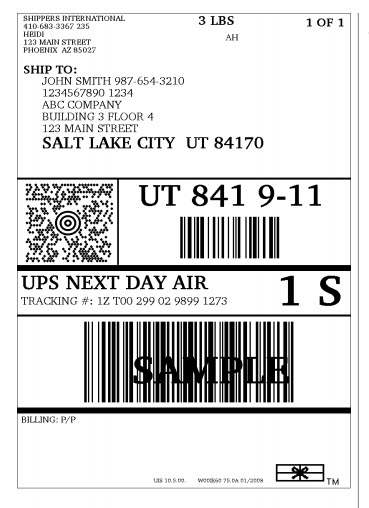
This is what a UPS shipping label looks like (that you would print out).
Attached Files:
-
-
Yeah I know, that's why I don't feel like this is it. All it has is the two addresses and the "ticket number" which I assume is just the RMA number for their own use.
Is there someone I should contact regarding this? Did everyone else get free shipping? -
Correct, I've had few of those new models in my hand from some of my collegues. We have opened up one of the newer models and found a third antenna wired through the screen. This is exaclty the solotion which has been proposed by Kalahari here over and over again and now this seems to be available in (some) production models. That is the good news.
The bad news is that Samsung is silent if this solution can be applied to existing models (technically) and if they are willing to work it into existing models through after service, or even by supplying parts.
I'm starting to become a little impatient, which is why I'm taking this story public. Samsung keeps referring to older solutions (replace card, switch wires), while the permanent solution is there.
I have been sitting next to a collegue a few times with my Dell and always found the wireless to be the same strenght as my Dell. None of them have complained about wireless problems so far.
Yesterday, I was again in need for my USB Wireless dongle when I coudn't connect to a network, but no problem with the Dongle. At my kitchen talbe I cannot maintain a stable Skype video call, while with the Dongle I can....
So people, if you have wireless problems, please go and ask the the 3rd antenna solution. You will find ignorance at first, especially with the first line helpdesks, they probably don't even know that this solution exist.
Together, we may be able to put some more pressure on Samsung to bring the solution forward. -
The only real way to avoid the wireless fault is to buy the models with the ultimate 6300 N card fitted as they have a third antenna which fits into the LCD ASSEMBLY. These are generally the high end Microsoft (have MS in the model )and Korean models. You could ask the repair centre to use this part instead it will fix it. Compared to the crummy antennas that attach to the keyboard it is a massive antenna(bigger than usual) . A difficult fix could be to retrofit an antenna yourself, its possible. also I used hot melt glue on the DC jack to add extra strength so it wont cave in. For such an expensive Laptop its amazing how flimsy the locators keeping the DC jack from moving are. I believe Samsung have fixed the poor AC adaptor now.
-
@SammyExpert
You are saying some of the things that I've found out (mainly by web searches). Are you really an "Sammy Expert" or possibly someone with inside knowledge?
Do you have more info on
1. the models that being sold with the Intel Centrino Ultimate 6300 and
2. what the fix is for the poor AC adaptor (as I haven't seen anything on that)?
You said "A difficult fix could be to retrofit an antenna yourself, its possible." I did not think that this was possible as I was told by Samsung tech (and the Samsung system documentation supported it) that the the LCD assembly cannot be opened. -
Somebody could tell me the differences between NP900X3A-B01 and NP900X3A-A01.
Thanks. -
The former is still sold and the latter is no longer for sale (in the USA anyway)?
Provantage has the B01 which'll show you some specs for that model PROVANTAGE: Samsung NP900X3A-B01US Samsung SERIES9 13.3 inch LED Pre Notebook
Samsung USA also the B01 Features and Specifications - Series 9 13.3" Laptop | Samsung Office
Google is your friend
-
I knew that I did google search too, but I want more detail. That's why I aks here.
Do you know if this model has different wifi card??
Do you know if it is already at the stores??.
Best regards -
@ Spaniard69
Yes, the NP900X3A-B01 appears to be available in stores. As far as I know, all NP900X3A manufactured since May 2011 have had the Intel Centrino 6230 installed (instead of the Broadcom). Is that what you were asking?
If you're asking if any models are for sale with the fixed WiFi (which uses the Intel Centrino 6300 and a third antenna), that depends on the country that you're buying it in. They're not available in USA yet. -
Hi all,
I finally took delivery of one of these. I plan on testing it a week or so and handing off to the president of our organization if all goes well.
So far I have not experienced any of the wireless problems mentioned in these threads. Wireless works just as expected. I've had no drops, and haven't noticed a weaker signal than any of the other laptops I work with. Granted, I haven't run any actual transfer or bandwidth tests to do comparisons, all I've done is use the machine the way any employee would... to connect to the internet, check email, and get on the web. For that, it has been flawless.
Other thoughts:
The laptop is every bit as beautiful as it seems. Great design and build quality.
The only gripes I have had with it is that I am struggling to get used to the touchpad. Took a day for me to stop accidentally dragging things around the screen like a noob.
The gestures also kind of suck - at least in comparison to Apple's, which is what I am used to.
But anyway, I almost didn't buy this because of all of the reports of wireless problems. Glad I took the chance. -
The WiFi of mine did not work with most of my networks. It worked fine with the university WiFi though. So maybe you just did not encounter any problems yet although it might still be there.
One thing which did not work for me at all was Connectify. It is a software to turn you Laptop into a WiFi hotspot.
Neither could I connect to another Laptop running a Connectify hotspot nor could I run a hotspot on my Samsung. -
Which model of wiFi adaptor do you have?
John -
http://www.amazon.com/Samsung-NP900...1?s=electronics&ie=UTF8&qid=1321027519&sr=1-1
I went into Best Buy yesterday to try out the touchpads/keyboards of the Series 7 and the Asus UX31, but I also ended up trying out the Series 9. I was shocked to see that the 13" Series 9 is now $1200 there and at Amazon, rather than the $1650 listed on Samsung (which made me just ignore it since its release).
The notebookcheck review on it seemed to greatly favor it (shockingly high 89% and praise of the screen). In fact, the only downsides I can find about it are price (expensive... not a ripoff, just costly because it's a good computer), low screen resolution, and the wireless problem I keep hearing about.
It sounds to me like the wireless issue is a hardware thing that can only be resolved via new laptop models. Would it be wise to wait until Samsung releases an updated version of this laptop with the fixed wireless? I ask because I'm worried that a new version with that would otherwise be the same, but cost more (not $1200 at Amazon anymore), have a worse screen, or something like that.
Are such fears of a new version with fixed wireless valid? Will/should the wireless fix be incorporated into all Series 9 models? How will I know if a Series 9 model has the fixed wireless or not?
If I were to get a Series 9 right now, would the warranty cover a fixed wifi (once that is available in the US)?
Thanks for any responses. -
@ Mykinius
At the risk of repeating myself,
1. A lot of people have been able to and will continue to live with the weak WiFi -- a lot depends on where you will use it. If you travel, you have to use a USB WiFi adapter. (I couldn't live with the weak WiFi.)
2. Samsung knows how to fix the WiFi problem (installing Intel 6300 adapter with 3rd antenna going up into LCD). Some countries (KR, RU, NL have those new models although Samsung has NOT fixed all the models that they even sell in those countries).
3. Unfortunately, regarding warranty claims, I don't think that they will be able apply a fix to current models as they claim that the LCD cannot be opened.
4. How will you know that you're buying a fixed one? It's not guaranteed but it will have to have an Intel 6300 WiFi adapter (instead of Intel 6230 or Broadcom). There will probably some other upgrades too like the Core i7 will be the 2637M instead of the 2617M.
5. Should you wait? That's what I'm doing. If they release a fixed WiFi version, I'll buy it BUT the Toshiba Z830 (not out yet) is looking VERY good too.
6. I would really like Samsung to fix the fragile power socket and plug for the Series 9 -- it would be great if they fixed that when they release versions with the Intel 6300 WiFi. -
Thanks so much! I now think I will wait as well; weak wifi could have a very negative impact on my productivity with the laptop at school. Hopefully they'll have a new/better iteration released before Christmas or so (that will be available for less than the $1650 listed for all the Series 9s at Samsung's site).
Somebody posted a neat, tiny USB wifi receiver on a previous page, and the only reason I don't think I would like using that all the time is that it would force me to always keep the hidden ports open. -
The B01 is a refresh of the A01 - the main difference being a bump up in the processor to i5-2467 and a cut down of the warranty to 1 year. This was mainly to make it compete with the 2011 MacBook Air (which also comes with i5 and 1 year warranty) and explains the drop in retail price from 1649 to 1299 USD.
-
As for Wifi, I've been using the B01 for 3 months over 3 continents and haven't run into any connectivity problems. B01 has a Intel Centrino N6230, if that makes a difference.
Performance wise, total satisfaction. Vivid lushous screen, smooth running of programs with i5 and SSD, and a sleek minimalist BLACK (I personally dislike the generic silver aluminum cover of most laptops) design. All this under 3 lbs, so no need for second thoughts when taking it out, is of course the most satisfying part.
The one disappointment is that the cover and palm rest are easily smudged with finger prints and palm sweat(problem with duralium?), so you need to often swipe them with the included cleaner fabric.
The hardest part was finding a decent sleeve, as many just-fit-for-macbook-air ones would be just slightly short in terms of length. While generic 13 inch widescreen sleeve would be too loose. After trying and returning 5, I settled on a BoxWave faux-leather (envelope style) sleeve for 2010 Macbook Air, which was a perfect fit ! -
I'm a little late to this party, but I'm on my 3rd series 9 and Samsung always paid for shipping. With UPS you can just take the box to a UPS store and they take the case # or whatever you get from Samsung and the serial # (make sure to get it off the laptop and not off the box, because the box is missing the check digit) and handle the shipping for you on Samsung's dime. If they aren't paying for it for you, tweet @SamsungSupport and they'll straighten it out.
-
I'm loving my Series 9..... and the wifi signal problem is not such a problem for me. Have not encountered an area wherein I could not get a signal.
My only gripe is the palmrest, it's annoyingly easy to smudge.... are there palm rest protectors out there already? like the ones available for macbooks. -
I have been experiencing WiFi issues frequently. Even in my house. And I have a formal request outstanding with Samsung to fix or repair my notebook from the 2 Antenna to th 3 Antenna version. My S9 is a personal notebook. In 2 weeks I will have this notebook also as my business notebook, so I will have a second one. I already know that this new one will have the 3 Antenna version (and I know from collegues that this one is performing well wrt to WiFi).
So it is going to be interesting to have both versions in my house, the 2 antenna version and the 3 Antenna version. Same environment, same WiFi Accesspoint strength. With our IT team we have beein doing some parallel testing using the inSSIDer toot. The conslusions were clear as almost everyone on this forum is also confirming.
Yet, Samsung is still in ignorance mode.
Has anyone else out there formally asked for fix/replacement based on the new 3 antenna version? It may help to get Samsung in motion. -
When I sent my Series 9 in for "WiFi repair", I included a letter with list of options that I wanted them to look at. One of them was to install Intel Centrino 6300.
I actually managed to speak to the technician (in NJ) who was working on it. I was really surprised that he'd read my letter.
He said that they could not put in a Intel 6300 adapter as that is not approved by Samsung USA yet. Also, he said that, with the current LCDs, they cannot put the third antenna anywhere that would help... -
Yes, there are. I remember seeing a number on eBay. Don't know if they're any good.
Samsung 9 Series laptop (ZX310 / 900X3A) unveiled
Discussion in 'Samsung' started by SoundsGood, Jan 5, 2011.