Problems? See this thread at archive.org.
Thanks John
I'm very sad for this. Another question in this case:
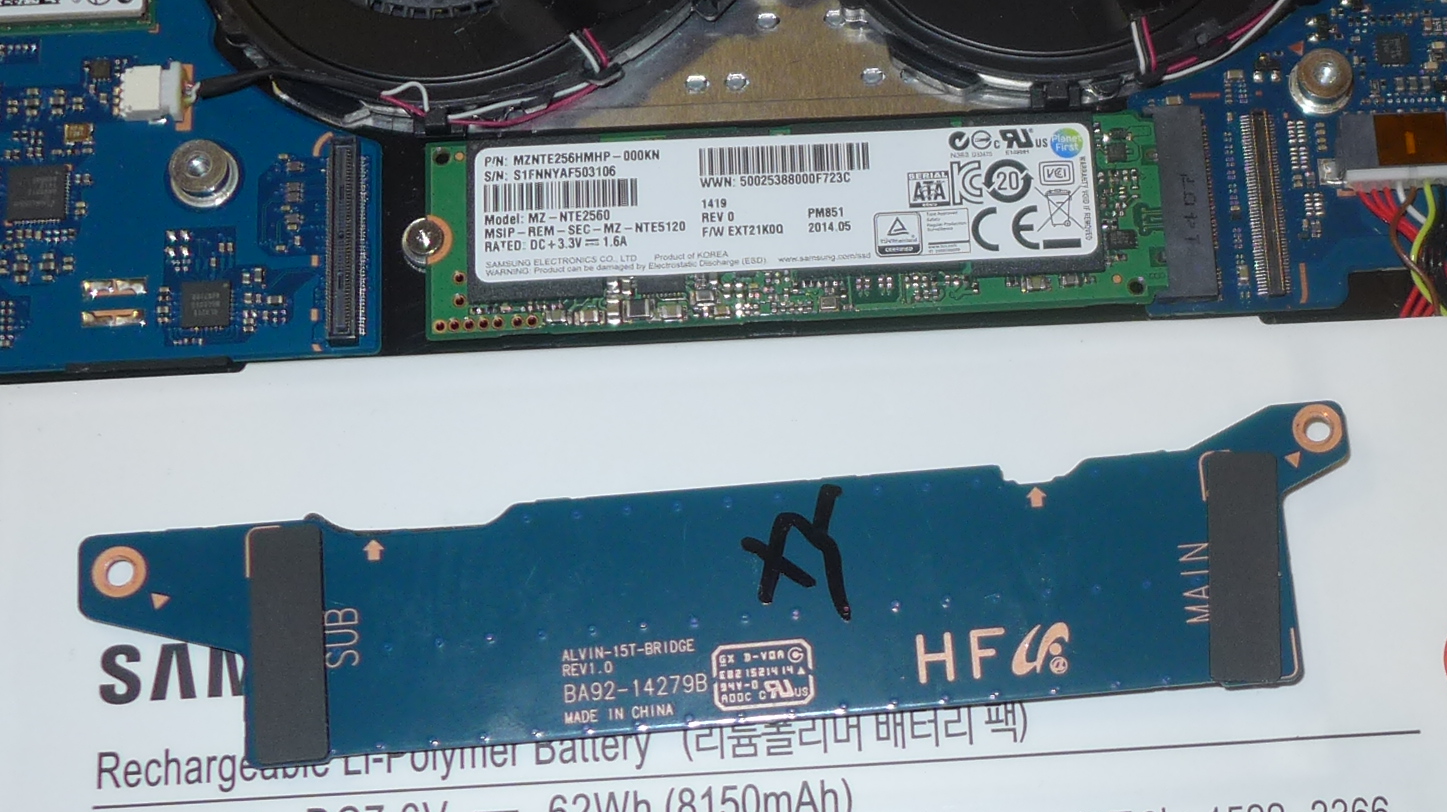
Main ssd is under a plate , how can I remove it ? there are no screws , is glued ?
-
-
The answer is somewhere in this thread. I don't have first hand knowledge of this notebook but I think it just lifts off.
John -
Is this, finally, a 1TB solution that might work in a 940X5J:
http://www.excaliberpc.com/639957/sandisk-1tb-sandisk-x400-m.2.html ?John Ratsey likes this. -
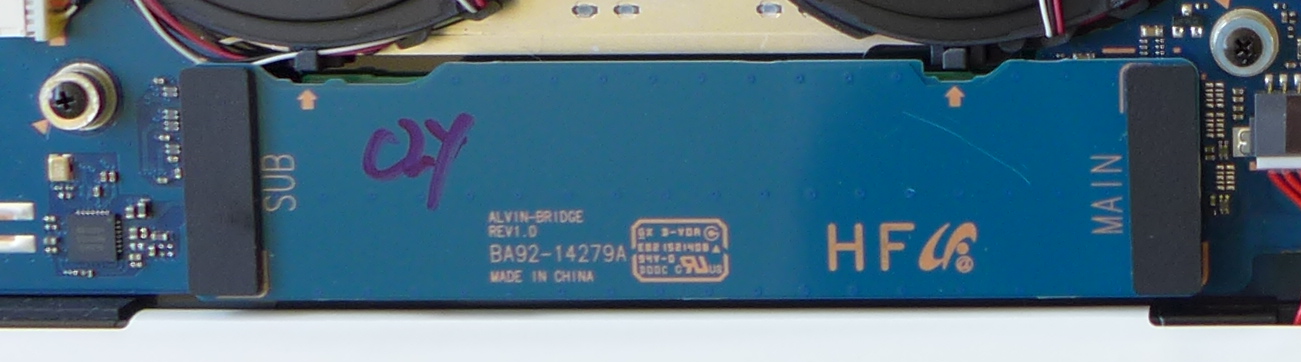
The plate is actually providing electrical continuity between left and right sides of the motherboard, and has 'push in' connectors on either end, plus a screw at each end. Simply remove the two screws, then 'pop' up the connector on one side and the plate will easily come off. A fingernail is all that is needed. See photo.
Attached Files:
John Ratsey likes this. -
-
I think that ticks the right boxes: M.2 2280; SATA interface. Good find.
I knew that this capacity of M.2 is in production because they are being shipped in some new notebooks, but they are scarce in the retail chain at the moment.
John -
Sorry - see photo attached to this post; it seems like the two models (930xj and 940xj) have slightly different plates (I have both). The plate in this one does not have the two screws. So in either case ... remove screws if present, then 'pop' the plate.
Attached Files:
-
-
In this article: http://www.computerworld.com/articl...disk-reveals-the-worlds-thinnest-1tb-ssd.html they say the X400 is single-sided, while the X300 was double-sided. Since the Samsung laptop can take a double-sided device, is there any benefit to seeking out the X300?
I'm having a hard time finding an X300, however.
here's another vendor of the X400: http://www.newegg.com/Product/Produ...cm_re=x400_m.2_ssd-_-0D9-0006-000G1-_-Product
I'm quite tempted to go for this; I successfully upgraded to 512 last year on my other Samsung laptop; maybe it's time to go for the 1 TB now on my other one. I'm worried about power/heat ... any thoughts on relative power/heat?
The X400 says 2.5 watts reads, 3.9 watts writes. -
Here's my post from last year where I upgraded the SSD.
http://forum.notebookreview.com/thr...unced-jan-6-2014.742013/page-112#post-9897972
I guess I'm about to embark on this again! -
I suspect the X300 has been side-lined now they can pack enough chips one one side. The single-sided arrangement also makes it easier for notebook manufacturers to add a thermal pad if they want to. The X300 would only be attractive if cheaper but with otherwise equivalent specs.
The power consumption of a 1TB SATA M.2 SSD should be no more than one of a smaller capacity - you are only writing the same amount of data at any time. I've been using a 1TB Samsung EVO mSATA SSD for the past two years without any heat problems. It's the M.2 PCIe SSDs that have the heating problems because they are trying to move data at double, or more, of the speed of the SATA drives. It's not a problem for short bursts of data but they need a good cooling arrangement to be able to maintain performance under sustained workloads.
John -
Since I have the 930 with the second slot, I COULD add this as a second drive. But that would obviously increase power draw. Any thoughts on what the impact of this would be, assuming not a whole lot of read/write (thus, I guess, what is the 'idle' draw?).
By the way - my 'use case' is that I have about 400 GB of photos. I've tried to keep 'only the important ones' on my smaller drive, with the rest on an external drive, but I always seem to be wanting to find a picture that is not on my internal drive, and find it a hassle to go get the external drive and plug it in. Also - silly but true - when I do plug in the external drive, I often forget that it's there and end up dropping it when I move the laptop with the drive dangling on the USB cord! Not so bad now that its an SSD external drive, but still, this often results in windows re-detecting the drive (momentary electrical disconnection).Last edited: Feb 27, 2016 -
The second SSD should draw very little power when not being accessed. This discussion is from a few years ago when the SSDs weren't so good at going to sleep. I whould hope that a new model of SSD would be very good at cutting back power when not being used. I had 1.5TB as 2 x mSATA in my Dell E7440 for a while and didn't notice a significant increase in power consumption
I would suggest that you make some observations of power drain, then drop the 1TB into the second slot, and do some more observations. It's possible that the new SSD might be slightly faster and better as the main system drive, in which case you clone the current SSD onto it and then use the smaller SSD for the archive.
John -
Aside from the NP940Z5L- X01US there is now also a NP940Z5L- X03US in the latest version of Samsung Update.
Any idea what that could be?
Could it be a 16 GB RAM version, or am I only dreaming? -
We will have to wait and see but I would expect a different SSD capacity or different version of Windows to be more likely.
Do we know if the RAM is soldered? If so, a RAM difference would require a different mainboard. If not, then the user can upgrade the RAM.
John -
According to this:
https://de.ifixit.com/Answers/View/287522/Samsung+laptop+NP940Z5L+RAM+upgrade
which refers to this:
http://support-us.samsung.com/cyber...&modelname=NP940Z5LE&modelcode=NP940Z5L-X01US
the memory is upgradeable!
Wow!
Edit: However, the manual says:
http://downloadcenter.samsung.com/content/UM/201602/20160210100935828/Win10_Manual_ENG.pdf
"Due to this computer’s design, memory cannot be replaced or upgraded."Last edited: Mar 2, 2016 -
The second link is generic and includes reference to the X360, which is somewhat ancient.
Accessing the memory, whether or not removable, will involve removing the bottom of the computer which Samsung considers will void the warranty. This might be the reason for the statement in the user manual so it leaves us none the wiser.
Once someone has bought the NP940Z5L then they can check the RAM using CPU-z. If there is no SPD data then it is very probable that the RAM is soldered.
John -
How would you suggest I measure power drain? I have a 'kill-a-watt' meter, so I could fully charge the battery and then observe actual power draw under different scenarios, perhaps - but would that be 'fine' enough? Is there a better way?
NOTE - my order last week through NewEgg (who was reselling it for 'NothingButSavings.com') was cancelled without explanation, and now they are selling it on behalf of 'OneDealOutlet.com', but at a much higher price. So today I re-placed my order, this time with Excalibur - the original link posted by another user here. Let's hope this time they deliver!
http://www.excaliberpc.com/639957/sandisk-1tb-sandisk-x400-m.2.html -
I would prefer to monitor the battery drain using BatteryInfoView or similar (you can make a log file using HWiNFO but this creates system activity and increases power consumption). This is the condition under which power consumption matters. Since you want to focus on the SSD power consumption put the display backlight to minimum and perhaps disable WiFi (which will directly save a little power and indirectly stop internet activity which may keep the system more active).
Measuring power consumption at the mains is an alternative but power-saving modes tend to be less agressive when running on mains power.
John -
OK, 1 TB SSD received from ExcaliburPC very quickly. Installation was a breeze (chose to add as second drive, as discussed). Formatted as GPT, not MBR. But before I did, I did some power measurements using BatteryInfoView - specifically, the 'Charge/Discharge Rate' item. Oh my, how difficult that process is! I killed as many processes as I could, and went into airplane mode, and got some readings. The readings varied wildly, but I focused on the lowest possible value. I chose not to dim my display, since I'm looking for relative values, not absolute values. While there were still big spikes, the numbers were along the lines of 8,755 mw, 7,785 mw, etc but the lowest over the course of about an hour was 5,776 mw. Then I installed the new SSD. Lowest value read was about 5,631 - marginally lower than without it (so obviously not very logical). Then I enabled / disabled wifi again, and this time, got readings along the lines of 5,119 - much lower. But today, no matter what I kill, I can't get a reading lower than 6,211 mw. So obviously this is not very scientific.
The lesson learned here for me is, to get good readings I would probably need to do a very careful killing of processes, document what is left, then do the same after adding the drive. I also noticed that when the screen goes dark (as it does in my case on battery, pretty quick), then the current drops significantly which makes reading the logs that much harder (was the low value due to screen blanking or other?).
Anyway - my initial take is that the new 1TB SSD did not add significantly to the battery drain and I'm very happy with it!Last edited: Mar 11, 2016John Ratsey likes this. -
You did well there - I know from experience that the power consumption bounces around a lot (I didn't want to frighten you too much when suggesting this method!) and you figured out to focus on the lowest value.
It's good to know that you concluded what I had expected on the idle power consumption (the peak, when both SSDs are busy - such as copying a file) will be higher, but the duration may be shorter.
John -
I've spent another couple of days looking at Battery Info View, and the results are quite surprising. As noted, the lowest values for me, with the computer pretty much idle, was about 5,000 mw. But even with nothing running, it spends a lot of time at 7,000, 8,000 etc (even in airplane mode). If I turn on network, and fire up a simple browser session (Firefox), the consumption is easily in the 12,000 range - and a site like Notebookreview, 14,000 (this site is actually one of the worst for consuming CPU!). Who would have thought that a 'simple' browser would consume so much. And if I have my usual contingent of excel, word, outlook, plus IE, Edge, and Firefox ..., its easily over 15,000 mw. I tend to have all these running at the same time.
I really wish there was a practical way to 'suspend' running apps. I need to keep these apps up all the time (eg, I track my time in excel so need to be able to just alt-tab over to it). But it could /should be fully disabled when it doesn't have focus. Similarly, I have dozens of open tabs in my browsers, but they don't need to do 'anything' when they don't have focus. Maybe I'll google around tonight
-
FlashBlock, AdBlock Plus and a custom hosts file will cut out a lot of unwanted web browser activity but I found out long ago that if I want to stretch out my battery then Firefox (where I have around 50 tabs open) has to be closed. Some web pages are automatically updating their content in the background. Firefox is by far the biggest power drain unless I have another program actively doing something (and I doubt if any other web browsers will be better). I also keep Bluetooth turned off unless I need it.
The MS Office programs shouldn't be using CPU if just sitting in the background unless they are also busy communicating with the www. Task Manager > Processes should provide a reasonable indication of what is using the CPU and my Word / Excel are sitting at 0% most of the time. There's an occasional spike of activity which might be auto backup at work. Firefox, on the other hand, is usually 10% to 15% CPU.
You can also make some power saving by limiting the maximum CPU speed when running on battery. Some manufacturers disable the CPU TurboBoost. Check if your X5J does this. If not, reducing the maximum CPU state for battery operation will limit the CPU speed. TurboBoost is inefficient because it requires a significant increase in CPU voltage to keep the CPU stable at the higher speeds so there is less work done per watt used compared to non-TurboBoost speeds.
JohnDannemand likes this. -
You are right about Firefox; mine is often at 20% or higher.
I already have max CPU set to 50% while on battery.
I just remembered about HIPM and DIPM, possibly learned from this thread. I had gone through the steps to enable this on my 930x5j, but it seems the upgrade to windows 10 reset it, so I had to re-do it. See this page for details http://www.sevenforums.com/tutorials/177819-ahci-link-power-management-enable-hipm-dipm.html
I ran SiSoft Sandra to check on the new 1TB SanDisk drive, looks like it has support for both HIPM and DIPM.
Not sure what turning on HIPM+DIPM actually buys me, but they are on now. -
I just received my SanDisk 1TB SSD from EXcaliberPC.com, and am almost ready to install it. First, though, I'm trying to create a factory image backup to a thumb drive, but I get the following error on four different ones when trying to boot from them:
"The program can't start because api-ms-win-core-heap-l2-1-0.dll is missing from your computer. Try reinstalling the program to fix this problem."
Google turns up nothing useful when searching for the error, and I can't find any mention of it in these forums... I suspect that it is a Windows 10 issue (I upgraded from 8.1), but can't know for sure... Maybe my Samsung Recovery software didn't fully survive the upgrade...?
I get the error about a dozen times while booting, and after dismissing them all, I get to a recovery screen that only allows me to select Windows restore points to recover from. I am obviously looking for the full partitioning with recovery option...
Also, I did read about the past issues with trying to use SanDisk and USB 3.0 devices for this recovery, so I ordered a USB 2.0 Kingston drive and got the exact same results.
Thanks for any help.
David -
Hi,
You have NP930X5J-S01US correct? I just searched for it in Samsung Update (W8.1) via "Find Model" and the driver version for the Touchpad Driver is 1.10.0.0.
Is SWUpdate the equivalent update client in W7?
I presume a W7 driver wouldn't work for W8.1, but my thinking was to find a slightly different model with an updated driver. Does anyone know the model numbers of slightly newer ATIV 9s? Say from 2015? Perhaps they use the same touchpad hardware, but Samsung bothered with the driver this time.
@John Ratsey By the way, for W7 "Touchpad Driver" is stated whereas for W8+ it is "Touchpad Firmware Update Driver", which might explain the different version numbering: perhaps the former is a driver whereas the latter is firmware. I am not an expert on the difference between the two and in fairness the latter also has the word driver, so I might be wrong.
I don't believe I just spent the whole afternoon on this :-( I don't even use the touchpad that much - just that delay before the cursor starts moving as others have mentioned is a bit annoying. OCD. I feel depressed now. -
You could well be right in diagnosing that Samsung Recovery Solution didn't complete survive the journey to Windows 10. Does Samsung Update offer any update as suggested here? I don't see an SRS when I use SW Update to browse the database.
I recall that the X5J doesn't use the Elan touchpad which was used on the previous Series 9 notebooks. Samsung may have provided a driver for Windows 7 but rely on the pointing device functionality built into Windows 8 and 10 because of the touchscreen support. I suspect the firmware update was to improve this. I see that the NP930X2K also has a touchpad driver for Windows but not for 8/10.
John -
Instead of using SRS in Windows (assuming that is what you tried) I suggest you load boot into Recovery by tapping F4 immediately after power on (easiest from a shutdown with Windows Fast Startup disabled). That will give you the "core SRS".
If SRS fails to load or run properly after being booted with F4, then it is indeed due to a conflict with Windows 10.
Member @Gulfmaster has a great thread about how to re-create SRS under Windows 10. You will find a link to it in the Samsung Forum Sticky list on top of the Samsung forum. But that is more of a new installation approach. If you choose to put SRS on the new SSD with Windows 10, that is the thread for you. -
I've just returned from a week in Cancun, so I'm just now getting back to this. Hope I've sobered up enough...
I had never had a reason to use recovery, but I thought I had confirmed that the Factory Image USB I made would at least boot without errors... I *don't* remember ever trying F4 recovery until your suggestion here. I only tested the USB because I wanted every option available in case anything goes wrong with the SSD swap.
F4 recovery did nothing but give me errors today, so I attempted to follow the advice of @Gulfmaster on my original SSD without wiping anything, but also didn't have success there. I had to download the USB Admin Tool ISO that he linked, but was unable to get past step 3. The backup creation process was at only 4% after running over three hours, and the estimated time to completion was approaching 80 hours when I stopped it... At this point, I have all the correct partitions on my original 256GB SDD, but I don't have a backup to restore (If I were to ever need to do so)...
Since I'm switching the SDD out anyway, I will try @Gulfmaster's tutorial from scratch on the new one. Going to take longer than I planned on to go that route, so it might be another week or two before I find time and report back with my results...
Thanks,
David -
I thought you were trying to create a factory image backup after installing Win10. That's why I recommended using F4 to boot into SRS and create the factory image backup from there (remember to check Create Boot Disk). If it takes hours, something isn't right, probably with the USB stick. Check this post for further guidance, including choice of USB stick.
Once you have the bootable factory image backup, you should be able to boot that directly (NOT by pressing F4) to image the new SSD.
But again, that will only give you SRS with Win8.x. If you want working SRS with Win10, you need @Gulfmaster's steps -- as you are already doing. -
I was looking to possibly upgrade the wifi card in my Ativ book 9. I took the back off the PC, and from what I can tell, my WiFi card is not removable; am I correct - is this soldered to the motherboard? -
Integrating the WiFi onto the mainboard helps to reduce size, save weight (and probably reduces manufacturing costs). RAM may be soldered for the same first two reasons.
Johnthefiverivers likes this. -
Just wanted to follow up on this, I implemented the custom hosts file in all its glory, and that seems to have made a BIG difference on CPU utilization, which should in turn extend battery life. I always have process monitor running on my laptop, and now, for the first time, even with dozens of tabs open, the CPU utilization is almost zero. So I have to conclude that all that cpu activity on all those (non-visible) browser tabs is ad junk! You'd think a massive hosts file would itself introduce problems, but so far, everything is good.John Ratsey likes this.
-
Has anyone figured out yet how to enable or where to find the Touchpad Settings in Windows 7?
They still do not show up on my NP930X5J
("Settings/Change PC Settings/PC Devices/Mouse and Touchpad" ?) -
Is a specific touchpad driver installed? If not, use Samsung SW Update to get the driver for the NP930X5J-K01US > Windows 7.
-
Yes, according to Samsung Update, the Touchpad Driver Version 1.16.00 (28.7 MB) is installed.
;-( -
Then I would expect to see a Touchpad icon in control Panel (make sure it is set to Small Icons in order to show everything). it is also quite common for the touchpad controls to be added as an extra tab to the Mouse control panel (also in Control Panel). That's what I see on my old NP900X3B which is still on Windows 7 (I had a bit of a battle with Windows 10 to keep it that way). If you can't find anything in either of those two places then I would uninstall the touchpad driver, reboot and reinstall. If there's still no obvious user interface then I would look for the location where the driver was installed and see if there is anything in the folder which opens a control panel.
John -
My np940x5j-k01US isn't booting :/ Anyone run into a similar problem?
I was using it, got the low battery warning, & I closed the lid to hibernate. Next time I got it out, plugged it in, opened the lid, & there was nothing on the screen.
Now, when you press the power button:
-blue power light comes on
-keyboard backlight seems to flash briefly around the escape button area
-sounds like the fans spin for a second or so
-but the screen is black
I saw something about laptops can go into 'limbo' when near empty battery sometimes. So I tried disconnecting the battery & holding the power button, then restarting both via power cable & via battery. No change. Also tried charging the battery. I've also left it on for a few hours, nothing happens.
It upgraded itself to windows 10, otherwise everything is stock on the laptop, original SSD.
*I tried to boot into BIOS by holding/pressing F2 as suggested by Samsung. It looks like it may need professional service :/ Anyone have experience with Samsung warranty, or shipping anything to Samsung? I swear I don't think I installed windows 10 myself, I don't remember checking any 'yes I want to install windows 10' box, I think it did it by itself during an update or restart.
Thanks for any info. Hope all your machines are working better.Last edited: Dec 3, 2016 -
Although Samsung notebooks have had more than their fair share of bricking issues they are normally for models older than the X5J.
Do you know if you ever updated the BIOS? It's possible that the updates (if any) may have addressed the problem you have encountered which may / may not have been caused by Windows 10 (there was a time about 6 months ago when Microsoft was very aggressively pushing Windows 10 and people had to opt out rather than opt in).
Anyway, the challenge is to try to resurrect your notebook. Read through the unbricking solutions and see if any work for you. Some of the methods include the situation when the BIOS isn't reading the function keys. But first make another attempt to get into the BIOS. Once you turn on the computer tap F2 about once per second (don't hold it down). Other keys to try are F4 (recovery), F12 (or maybe F10) which is for one time boot device options.
John -
Thank you, I am going to try getting into BIOS some more. I never went out of my way to update BIOS, but AFAIK I used the OEM Samsung provided software to install recommended updates along with windows updates. I contacted Samsung but they don't seem very eager to take responsibility. Bummer for a flagship device, & I own tons of Samsung stuff:/
-
Another thought: If the system had over-estimated the amount of power remaining (Windows is set to hibernated with at least 3% left in the battery) and the power ran out then the SSD could have got upset. Remove the SSD and see if you can get into the BIOS. A sick SSD might stop the BIOS from loading if it doesn't get a response from a device which it thinks is there. Also try removing the RAM modules (if removable) and replace each in turn as a RAM problem can stop the BIOS from loading.
John -
Does plugging in an external monitor reveal anything?
-
Following on from my post last march - http://forum.notebookreview.com/thr...nced-jan-6-2014.742013/page-127#post-10218009 (that's when I installed the "Sandisk 1TB X400 M.2 SATA SD8SN8U-1T00-1122" SSD). I now have another identical laptop in need of the same upgrade (I keep snapping them up on ebay as I think it's a great model!).
Looking at Amazon today, I see that same SanDisk model still available for $299, but I also see three other models, all seemingly compatible. There's the 'Transcend' model "1TB SATA III 6Gb/s MTS800 80 mm M.2 SSD (TS1TMTS800)", a " Samsung 850 EVO - 1TB - M.2 SATA III Internal SSD (MZ-N5E1T0BW) ", and a " Crucial MX300 1TB M.2 (2280) Internal Solid State Drive (CT1050MX300SSD4)". The specs for the last three sound like they are 10x better than the SanDisk - this page has a comparison table: https://www.amazon.com/Transcend-1TB-SATA-MTS800-TS1TMTS800/dp/B01BXNT9WM - 6Gbps vs 600 Mbps on the 'Data Transfer Rate' line, but then the 'Optical Storage Read Speed' (and 'write' speed) are all about the same. These tables are notoriously wrong on Amazon; even the 'Form Factor' line is clearly way off.
But anyway - is it worth looking at any of these other models compared to the SanDisk? Obviously the Crucial is a bit cheaper. There's no mention of power draw anywhere I can see. -
I've been using a 1TB X400 M.2 for the past 9 months and have no complaints. Sandisk's SSD Toolkit works OK and has done a couple of firmware updates without any problems. Most of the SSDs have very similar sequential read speeds at close to the theoretical limit of SATA 3. The 4k write performance may be a better indicator of real life performance but I doubt if you would notice any difference between the SSDs in everyday usage. I don't think anyone is measuring power drain these days. It used to be an issue as shown by the Toms Hardware charts but they don't appear to have been kept up-to-date. You can probably toss a coin between Sandisk and Crucial. Both are respected brands although not the pioneers.
John -
Any thoughts about the Transcend model? It's a lot more expensive. Just wondered why ...
-
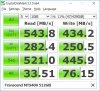
Normally I would expect Transcend to be the cheapest. It's not massively different to the others in terms of performance. I've got the M.2 2242 MTS400 (not a lot of choice of SSDs in the 2242 size) and CrystalDiskMark reported:
However, I'm not sure about support and firmware updates. Another consideration is that the Transcend has chips on both sides (as does the 850 EVO) while the X400 and the Crucial are single-sided. How much space is there between the SSD and the board in the X5J?
JohnLast edited: Jan 28, 2017 -
The X5J has space for a double-sided card. Well, I assume that simply because the primary SSD slot is definitely sized for double sided as it had a plasrtic 'spacer' I had to remove when replacing it. So I would imagine the 2nd slot would be the same.
But regardless - I have the SanDisk in my current X5J, so I may as well give the Crucial a go in this one for comparison! Plus, I can get it even cheaper than expected now on Amazon - $269.
As an aside ... I saw the posts about new Samsung models. Is there a current model that comes close to the 930 X5J in terms of screen size (15.6), weight (light), and so on? I was encouraged to see that some models on display were NOT touch-screen (which I think is a big waste of weight on a laptop) and were 'relatively' low-res (as in, 1920 x 1280, which I think is more than enough for clarity but still helps you see those as-yet-non-compliant apps that don't scale well (like photoshop!). I'd be interested to check out a new model but I'm so pleased with the overall package on the 930 X5J that it's a hard one to beat. Trackpad/touchpad is just about the only complaint I have, and I've even come to terms with it (but it's funny to see everyone else struggle to use my laptop!). -
Following your aside, the new Samsung NP900X5N has reverted to the original Series 9 15.0" display format so it's a bit smaller, and significantly lighter, than your X5J. I'm also pleased to see that Samsung has opted for non-touch FHD panel rather than continuing in the race for more pixels. The nearest equivalent (but probably heavier as well as being more powerful) to your X5J is probably the Dell XPS15. Member @huberth has the NP900X5N on order and will share his findings once the product becomes available.
John -
Is this still the best thread for these newer models or will there be a new thread?
Looking at this site: http://www.samsung.com/us/computing...indows-laptops/s/15_18_/_/n-10+11+hv22t+zq28g with the '15" and above' filter on, I see the NP900X5N-X01US showing as 'Notebook 9 15' but then it shows specifically 15.6" for display size. The NP9005XL-K02US however, also showing as 'Notebook 9 15', claims a 15" display.
The more detailed page for the NP900X5N - http://www.samsung.com/us/computing/windows-laptops/15-18/np900x5n-x01us-np900x5n-x01us/ continues to claim 15.6", and the 'specs' section at the bottom confirms 15.6" ... I wonder how big it really is! But - 2.7lbs - that's crazy light! -
Here is the current discussion about the new models. However, it may be appropriate to start specific threads for the two different sizes once they arrive. I follow with interest but not excitement as there's no hint that Samsung will be resuming notebook sales in Europe.
John -
Hi!
Is it possible to upgrade my Samsung NP930X5J from 8 GB RAM to 16 GB? If so, do I need to purchase a particular kind of RAM?
Best regards,
K -
This review mentions RAM slots but none are visible on the photo of the mainboard.
An easy way to detect if the RAM is removable is to run CPU-z and look at the SPD tab. If there are no timing values then the RAM is soldered - RAM modules have SPD data so that the BIOS in whatever computer the RAM is put in can read the timings and work out what speed the RAM can be run at. With soldered RAM the timings are coded into the BIOS.
John
Samsung NP930X5J / NP940X5J ATIV Book 9 (2014) 15.6" Haswell announced Jan 6, 2014
Discussion in 'Samsung' started by zordex, Jan 6, 2014.