Problems? See this thread at archive.org.
Hi there, same problem too in temp!!
When the system is on idle, temp is average between 50-55c but when i playin' game its reaching to 80c also 85c (playing cod4) and the interesting think is cooling pad does not make any difference. (i can post some pictures from speedfan)
What should i do!? I bought it 4 days ago!
Should i take it back to the store?
Please anyone help me!!
specs:
Intel Core i7 3615QM
8GB RAM
NVIDIA GeForce GT 640M 1GB
(Sorry for my bad english)
-
-
I would consider those temperatures to be reasonable. The CPU doesn't start to throttle until 95C so 85C is a compromise temperature that gives some headroom while avoiding screaming fans. Similarly, the idle temperature is a compromise to reduce fan activity when the computer is idle (I had computers which keep running their fan to reduce the temperature further when it is already reasonably cool - as the difference between the heatsink and ambient temperatures decreases then heat transfer becomes less efficient).
John -
You mean its normal?
Not better to CPU stay cool!? Cause i read somewhere how much CPU stays hot that much dying.. is it wrong information?
How 'bout your laptop temperatures!? Is it average between mine?
(Sorry for my bad English) -
Excessive heat does kill electronics. That's why Intel's CPUs will automatically shut down at 100C. However, repeated wide temperature variations can also cause problems. That's what happened to the Nvidia GPUs about 4 years back. Also, the CPU temperature is in the core. The surrounding components will be cooler.
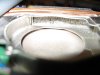
Apart from the problem with the Nvidia GPUs or damage arising from extreme overheating (usually a result of broken or clogged cooling systems), notebook computers usually become obsolete before they die from thermal problems. However, it is good practice to periodically check the operating temperatures in case there is an upwards trend (usually from dust blocking the cooling system). Here's one of my favourite photos, from another thread in this forum, that shows what tends to happen over a few years.
John -
Good information John, but i didn't get answer for my questions

((You mean its normal?
Not better to CPU stay cool!? Cause i read somewhere how much CPU stays hot that much dying.. is it wrong information?
How 'bout your laptop temperatures!? Is it average between mine?)) -
On my current computer (NP900X4C with the 17W CPU + integrated graphics) I struggle to get the CPU temperature over 80C but the fan becomes relatively noisy when the CPU is under load. I would prefer if Samsung changed the fan rules so I had slightly higher temperatures and less fan noise. On my previous computer (Lenovo T420s) I could get the CPU temperature up to 95C at which point it started to throttle itself to avoid the temperature going higher. I also had to use the TPfanControl utility to turn off the fan when the temperature dropped to 55C to avoid excessive fan noise when the computer was idle. You will note that my personal preference is for slightly higher temperatures (provided the outside of the computer does not get inconveniently hot) instead of more fan noise and lower temperatures.
John -
Did you ever find a fix to this problem? Every time I wake up the laptop, the brightness setting is frozen. I have to restart or shut down and turn back on to be able to control brightness settings. Fn keys do nothing. Easy Settings do nothing. Windows 7 Personalize menu does nothing. Only thing that makes the screen brightness adjustable again is restarting it. Thank you to anyone who can help!
p.s. my question is in reference to:
kangu
Default Re: Samsung Series 7 Laptops - 15.0" and 15.6" Models (NP700Z4 & NP700Z5)
Does anyone have a problem where when you wake your computer from sleep/hibernate, the brightness buttons don't work? All of the other Fn keys work but those. Is there a workaround this? The only way I can get it to work is if I restart my laptop, but it happens again once I put it to sleep =/ -
It's your Easy Settings not working properly. I suggest the following:
1) Use the Find Model feature in SW Update to lookup model NP880Z5E-X01UB, then save Settings 2.0.0.49 for Win8 using the Export feature. You select a folder to save it, and inside you will find a Win7 sub-folder with the latest version of Easy Settings.
2) Uninstall your current Easy Settings using the Windows Programs and Features control panel.
3) Reboot
4) Install the new Easy Settings which you downloaded.
5) Reboot
Now see if it works. It should.
Oh, I almost forgot: Welcome to our forum
-
Dannemand,
Thank you very much for this. Small problem: I don't have SW Update on my laptop. Do you know where I can download it? Also, my model number is NP700Z5B-S01UB if that matters? And it is Windows 7 Home. Thanks again for any more advice you may have. -
It's a standard program. Use the link on this page.
John -
So, after sifting through this whole thread (via search), I've concluded the idea of swapping the ODD with a SSD has been kicked around many times, but from what I've collected, no one has either 1. just decided to go for it 2. posted their results if they did. With mine (Z5B-S01UB), I'd like a little more speed for some programs (Solidworks and other engineering crap) and since I've disassembled it many times now, I'm considering making the ODD->HDD swap. I have all sorts of photos from inside the laptop and can easily take more/make a guide. I'll probably make my own caddy if I end up doing this, I want to check the connections on the port first, though. I saw a picture in my searching that showed a standard SATA interface, with just one small tweak. I'll open mine up this weekend, hopefully, and see what all needs to be done. Should I make a disassebly guide at this point?
My friend did this
![[IMG]](images/storyImages/IMG_2570.jpg)
by dropping my then 2 week old laptop on to concrete. Nothing more than cosmetics, but it did show that there's clearly plenty of space in there to add a SSD.
![[IMG]](images/storyImages/IMG_2593.jpg)
-
Thank you for sharing those pics, redsox.
Lots and lots of Series 7 owners have replaced their HDD with an SSD and/or moved the HDD to the Optical Bay -- and reported about it on the forum. There are even dedicated threads about it:
http://forum.notebookreview.com/samsung/626915-hard-drive-caddy-series-7-a.html
http://forum.notebookreview.com/sam...ies-7-chronos-np700z5a-disassembly-guide.html
This thread is not the most active, however. You will find even more discussion about SSD replacement in Owners Lounge threads for various Series 7 models:
http://forum.notebookreview.com/sam...eries-7-lovers-heres-np700z5c-ivy-bridge.html
http://forum.notebookreview.com/sam...00z7c-s01us-laptop-i7-3615qm-650m-review.html
http://forum.notebookreview.com/sam...0z3-np700z4-np700z5-series-owners-lounge.html
If you want to move your post to one of those threads, just let me know. Or you could just post links to it, so others who read those threads can find it.
Thanks again for sharing
-
Thanks for all those links! So, clearly it's been done. I will still probably make my own cradle for it as I would rather spend that ~$40-50 elsewhere. I have access to a machine shop through my university, so it shouldn't be too tough. Funny enough, my LCD disassembly guide is in the second link you provided. I may just post a step by step guide here if/when I do the swap as this was the thread a good bit of Google'ing found, not one of those others.
-
Oops, I didn't even realize that, since I haven't read that full disassembly guide thread, only seen yknyong1's extensive posts in the first few pages. Due credit!
That's cool, it's entirely your choice. I just don't see activity in this thread very often, so I wanted to offer moving your post. I look forward to seeing your guide. -
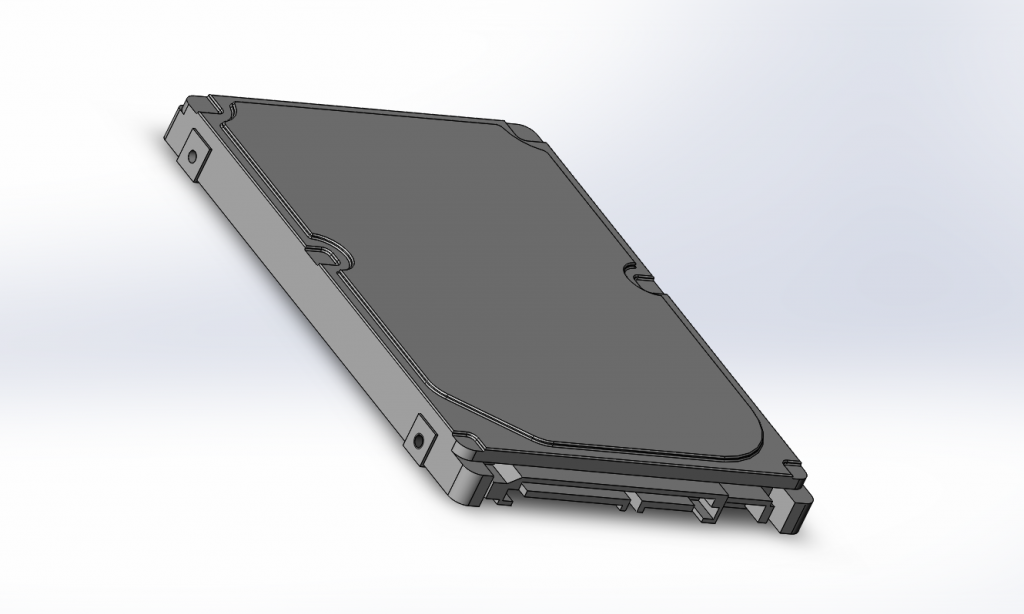
So, today I started by ripping open the laptop to get the drive out and see exactly what I'll have to work with. I easily got the drive out and decided that I would just use the screw on mounting brackets that are currently used to screw it down. Also, I modeled a 2.5" hdd so that I'd be able to create and assebly in Solidworks. I plan on modeling the ODD and then cutting it away and creating an assembly with the modeled hdd as a reference. I fonud I'll need a mini-sata male to sata female adapter and figured that, based on location, that a cabled version will be a better choice that a solid one. Here's a snapshot of the modeled hdd.
-
I'm trying to record some old cassette tapes to mp3 using a cable from the cassette players headphone jack connected to the laptops microphone jack. Since the Series 7 has a combined headphone/microphone jack, how do I get it to work properly? I've been trying for hours with no luck.
-
Don't bother with the combined microphone / headphone jack. Just do yourself a favor and get a usb audio recording device. This jack is a pain to use...
-
Although I have not tried it myself, I believe you need a splitter similar to this. This particular one only accepts a mono mic. I would hope there is a way to get stereo in through that jack.
Otherwise a USB recording device as suggested by ThePuckDaddy.
Samsung Series 7 Laptops - 15.0" and 15.6" Models (NP700Z4 & NP700Z5)
Discussion in 'Samsung' started by PeterDLai, Aug 30, 2011.