 Problems? See this thread at archive.org.
Thanks for all the advice! And you are correct, i can just continue again and again until i get it correct. I used to build PCs all the time, but I've been out of the game for so long I've never even heard of UEFI.. i had no clue there was an alternative to BIOS. I will spend the time waiting on my ssd to arrive, researching all this new stuff that I'm clueless on.
But in your opinion it was worth ditching win8 and going back to win7?
-
-
One more quick question and i promise I'll leave you alone for tonight lol...what are these Hotfixes you speak of?
I know what one is but in regard to the computer what hotfixes am i wanting to address? -
The question about Win8 is a good one -- since the S02UB came with Win8 I got to play with it for 2 weeks, and I REALLY liked it. I absolutely LOVED the task manager, which is much better than the Win7 version. The trackpad gestures were also very good. However, my 2nd impression is that it is the "new Vista" and Microsoft will fix a lot of silly things in Win8 in the next version (OMG, there are 2 browsers depending on whether you start it in the Modern UI or the desktop -- so dumb).
Personally, I made the decision to downgrade because it's a work machine for me, and in particular, I need Matlab and a few other CPU-intensive programs to work. My gut feeling is that I could run them in some kind of "compatibility mode", but in the end it seemed more straightforward to install trusty Win 7, get everything working exactly like I know it should, and wait until sometime next year to migrate to Win8.
Unfortunately along the way I botched my original recovery partitions (trying to adjust partition sizes and it failed!), and I can't wind everything back to factory condition. But I have an institutional site license for Win8, so I can do a clean install eventually.
The Hotfixes are (I assume) part of Windows huge Service Pack 1 -- I haven't looked closely, but presume they patch various major network vulnerabilities that are easily exploited. As Dannemand notes in his post, running wifi and then exposing the unpatched machine without a firewall/router in front of it would get it infected in minutes. The Hotfixes help eliminate some of those glaring holes in the original version of Win7. I guess I avoid the whole scenario by making sure I'm behind a decent router before connecting the machine to the internets.
-Matt -
gadgetrants, from what I've read, Windows 8 doesn't lose compatibility with most Windows 7 applications. The only issues I would expect you to find are with apps that are tightly integrated, such as antivirus products, or OS-specific tweaking utilities.
-
Yep, I have the same impression. I was pretty tempted to stay with Win8 (" fast startup" was especially appealing), but the lure of the familiar won out.

-Matt -
On a different note, after I got this update, my rendering issues on my browsers have gone away (previously affected browsers: Chrome and Firefox)
-
Ooops, I neglected to reply to your second comment. Here are my 2 cents:
(1) SW Update: the latest version of what used to be "Software Manager," it's a pretty clever and useful program that checks for both required and optional software, and notifies you when new versions are available. In principle it works great, but in practice I would give it a C- (sorry, it's final exam week!). First, it seems to "stagger" updates, e.g, it tells you "Hey, version 2.1 of program ABC is available," and 10 minutes after you update it, it says "Hey, version 2.2 of program ABC is available." This doesn't happen consistently, but often enough that it seems like either there are issues in the version databases it checks, or maybe it tries to "work you up" to the latest version rather than jump straight to it. Not sure about that. Also, I can tell you straight out: it will say "I swear that you have the latest version of ABC" and then you can search through another route (i.e., see "Find Model" below), and find a newer version of the same program. Finally, it also seems that the server system for delivering those updates goes down at odd times. So it takes patience.
Probably the feature of SW Update I like the most is a button on the main screen labeled, "Find Model." On the S02UB, I can type in NP700Z5C, and find DOZENS of versions of the machine. It seems to be a MUCH more effective way of getting system software, and most importantly, when it lists the available downloads, you can do a BATCH download, rather than the painful one-at-a-time process on the Samsung website (which is spotty at best). Another very cool feature of SW Update is a kind of backup function, which allows you to take all the drivers and programs that it manages, and write them to a disk -- effectively allowing you to create a folder with all the necessary system stuff, if you want to do a reinstall.
(2) Easy Settings. I think most of us have a love-hate relationship with Easy Settings (I think for Win8 it's just called "Settings," how quaint): it's the interface through which many of the basic settings can be viewed and changed, e.g., toggling automatic screen brightness, keyboard backlight, sound settings, power management, etc. Again, in principle it's a superb program. One insidious issue, however, is that instead of running as a service (which loads at boot time for example), it is started through the Task Scheduler, which is really the right tool for things like regular virus scans and disk defragmenting, but is a very clunky way to get Easy Settings started. In particular, users complain that it can take 1-2 minutes after logging in before basic things work, e.g., using the F-keys to change screen or keyboard brightness. HOWEVER (remember my comment about .NET Framework before), I've found that the latest version is much snappier. I don't have any complaints about it. Another complaint I've seen here (especially in relation to ExpressCache) is "I can't find a tab in Easy Setting for function XYZ (e.g., power settings)!" In other words, sometimes it looks like some of the settings have just gone missing. Again, I found by being careful and systematic during the installation, everything showed up and worked as expected!
I don't recall if I linked to it already, but a super resource to read before reinstalling Windows is Dannemand's thread on latencies and system responsiveness. In particular, pay careful attention to item (4) -- I strongly recommend his advice for only installing the wifi driver, but not the whole Intel PROset utility (you can download a driver-only version -- the latest version for Win7 is 15.3.1).
-Matt -
Wow.. all i can say is thanks!!! So much useful info for me.
It arrived today!!! Haven't played with it yet because I'm doing that 6-7 hour initial charge Samsung recommended.
And i must say, luckily, this eBay user i purchased from was A+, and it was truly brand new and factory sealed which makes me even more elated about paying only $800 for this beast.
Once the initial charge is finished, i will play around with win8 for the next week or so until i get that ssd ordered and received, and then make the win7 win8 decision. Either way i go, you have been very helpful!! Thanks again!
CAN'T WAIT TO BOOT THIS BAD BOY UP!!!!! -
You know you don't need to wait for it to charge. I think playing with Win8 for a while is a super plan -- you'll probably get a lot less frustrated with it knowing that you have 7 if needed.
-
Yeah, I just spoke with a friend that informed me that I could use it during the initial charge. That being said, I am posting this from my new Samsung!!
So far I am incredibly happy with the overall build quality. This is by far my new favorite tech toy, right behind my Asus tablet.
As for Win8, I feel like Microsoft kind of "over-did it" if that makes sense. I will continue to use it and make my decision within the next week or so.
My first question after using the computer is I did Windows Experience Index Score, and I expected it to be somewhat low due to the hard drive, but my graphics score was only a 6.7, and from what I had read on here about other individual's scores, it seems like this is a little low. Is there a graphics setting that I need to change or something to take full advantage of the graphics on this thing, and get my Index Score higher?
Also, how do I turn off the ambient light sensor that automatically adjusts the backlight of the keyboard? -
First, let me shake my finger at you and say "tisk, tisk" -- don't place any major meaning in your Experience score. Of course, if you search the forum you'll see it's been extensively debated, and both sides of the debate are pretty stubborn. So take it as you will. Second, remember you have two graphics cards. One is discrete and separate from the motherboard, and the other is a chip on the motherboard. That begs the question: which is used in the graphics test? I have to take "the 5th" on Win8 and say I'm really not sure. However, it seems that since the Win7 version of the Experience score does in fact utilize the discrete NVIDIA 640m, it will be much higher (I unfortunately don't remember mine). But it's a complex issue, e.g., does the assessment use the 640m for all of the tests, or just some of them? Some have also suspected that it turns the card "on" and "off' between tests, incurring a switching cost. Ah but I'm blabbing too much. Hopefully others will chime in but I'd say "Don't worry about it!"
One last thought: I naively assumed that the NVIDIA GPU switches on whenever there is a large graphics draw. That's not completely true. In fact, I think the Intel HD 4000 does the bulk of the graphical processing, and you'll only see the NVIDIA turn on in very special cases, e.g., graphics-intensive video games. As far as I can tell, it won't turn on if you run youtube in 1080p (on Chrome or Firefox), it won't turn on in Mediaplayer with HD video, etc.. A popular misconception (I think) is "Hey, I can just set that particular app in the NVIDIA settings to use the discrete graphics," but I'm pretty sure that's more a "suggestion" to the system than a demand. Again, when I've done that on specific apps and monitored GPU use, there was no evidence the NVIDIA card was utilized. So far, just video games (and oddly, the GPU-Z utility that displays GPU activity!).
-Matt -
Yes, these are related issues. Only parts of the windows experience test seem to trigger the gpu, so the # is off.
BUT, I had the opposite experience with teh Nvidia settings. Kind of.
So I'm playing Mechwarrior Online. It's beta, so not listed in teh Nvidia profiles list. As a result, teh computer ran it on teh HD4k instead. It was pretty obvious too. So, I went in and added the MWO .exes to the Nvidia list, told it to use the "high performance graphics processor" as the default for those apps, and it triggers no problem.
Same issue with a benchmarkl program (passmark I think????). Didn't trigger by default, but if I added the .exe to the Nvidia settings list, it worked fine.
So I think the Nvidia GPU triggers based on some Nvidia settings. A white list of apps that will trigger the gpu, and if you add apps to that list, they too will trigger it.
UNless Nvidia has added some blacklisted media apps or decoders, you should be able to add WMP etc to get them to trigger for BlueRay and high def playback. That said, the Intel GPU is more efficient for that stuff, so I'm not sure why you would. -
Just a bit of reverse engineering, but my intuition is what's critical for the 640m to get involved is 3D rendering, e.g., shading/lighting, particle dispersion, object tracking/physics, complex graphics, etc. In other words, the kinds of computation inherent in video games. Maybe I should revise my earlier point -- I wasn't saying the system ignores apps put on the "please use" list, but rather, it isn't obliged to use the 640m if the job "can be done" with the HD4000. Not sure why it didn't correctly trigger for your two games though -- do you figure they have to be on the whitelist to work automatically?
A random note: common sense would suggest a discrete GPU would also get picked up during something like heavy video encoding. While I haven't really studied that issue, it seems most don't, but I think there are a few encoders out that will detect the card and use it for graphics encoding (e.g., NVIDIA's Cuda) as needed.
-Matt -
Appreciate the replies on the graphics question. And as for the ambient light sensor for the backlit keyboard, I had just let the computer sit for 1 minute which automatically turns off the backlight. I did not know this because I had not run the SW Update yet and got the Settings app. BTW, I like that QuickStart app that somewhat mimics the old start menu from previous versions of Windows. The more I play with Win8 the more I am starting to get used to it, and actually like it. With all the touchpad gestures, it actually reminds me a lot of a Mac.
-
I think I stand corrected -- with a bit of experimenting, I finally got GPU-Z and the NVIDIA tray to show as active while playing a youtube video in Chrome. Took a bit of configuring and closing/restarting apps, but it's definitely triggering the 640m. Live and learn!
Jon, been a few hours...what's the latest word??!?!!? LOL
-Matt -
Hi guys, I'm interested into this laptop but I'm not yet decided whether to buy this or Asus n56.
I know they are different, but I'm looking for a powerful but still portable laptop that allows me to do CAD and rendering.
Np700z5c seems to be enough portable and still powerful but......
1) Is it suitable for cad and rendering considered that this kind of work heats a lot the computer and np700z5 doesn't have that huge dissipating system like n56?
2) Is this laptop reliable or does it suffer malfunctioning with time and heavy usage?
3) Is the embedded battery a concern? (does it wear down early can I find spare batteries?)
4) Asus n56 has kasko warranty... How is the warranty of np700z5c? -
Hey zooster, you've picked two really good machines -- I don't think you can go wrong with either. I can't speak to all of your questions but having owned both (I tried the N56VZ for two weeks) I can offer a few thoughts.
(1) Weight. I appreciate the lower weight on the Samsung. Amazon lists an N56VJ at 5lbs, but the Asus rep told me that it's actually closer to 6lbs.
(2) Battery. The Samsung will run 2 hours longer than the Asus. If you're OK with opening up the Samsung, the battery is easily removed. Check out the video below for an internal view of the Z7C. You have the option of using Samsung's 80% feature, which "extends" the life of the battery by only charging it to 80 instead of 100%.
(3) Graphics. You should have absolutely no problem with the Core i7 and 640m, as far as CAD. I'm not speaking from firsthand experience, but I have run both some graphics intensive video games as well as Matlab code, and the Samsung did great. At full CPU the fan will kick in, but that's not a surprise. Also, as the video above illustrates the Samsung actually has a pretty impressive dual-fan system (jump to 7:40).
(4) Price. At the moment I would recommend looking at Best Buy's NP700Z5C-S02UB, which runs $1000. The Asus is around the same price.
(5) Screen. The one feature where the Asus wins hands down is it's gorgeous FHD screen. The Samsung doesn't come close.
On a personal note, one reason I ultimately returned the Asus is that the palmrest area ran a bit warm. However, this is a very, very important feature for me (probably not others) and on that count, I have yet to find a machine that can beat the Samsung.
Hope that helps!
-MattLast edited by a moderator: May 12, 2015 -
Thank you Matt, but my concerns are mostly about the reliability of Samsung laptops... Asus is well known in the laptop panorama.
The embedded battery... Usually I take out the battery to avoid its wear when I'm not in mobility using the power adapter only. So how the embedded battery changes things here?
And finally the warranty, I think that the Asus kasko is unbeatable... Don't you think? -
Enable the Battery Life Extender option and the battery charge is limited to 80%. It seems to substantially reduce the wear.
John -
I consider myself a die-hard Asus fan. I think I've owned 5 or 6 machines, and never had any problems with one, ever. OK, actually I returned one due to a screen defect, but I only owned it a few days. On the hardware side, I love them. However, I've heard some pretty remarkable stories about Asus US customer service. The only firsthand experience I have is sending in the warranty card 2 weeks after purchase and -- I'm NOT joking -- getting an email from them 1 MONTH before the warranty period ended acknowledging receipt (and asking me to send a copy of my invoice as proof of purchase). I've read so many CS horror stories on Amazon (laptops and tablets -- OH yeah, I forgot to mention I own the OG Transformer and love it), that I believe them. I think Asus puts incredible warranties in writing, and then does everything they can to avoid honoring them. A few customers seem to win the lottery and get reasonable service, but that seems to be the exception. I'm sorry if your experience is nothing like that.
John hit the nail on the 80% battery rule. I also am probably the wrong guy to ask: I leave my machines running 24/7 plugged in, and typically get 2-3 years excellent battery life. The only exception so far has been an HP laptop, but all the others have been great. I'm a freak that way.
RE: reliability, the 7-series is relatively new, and the Z5C is less than a year old. So I think it's too early to tell. However, having been part of this particular sub-forum since July I think, the complaints have tended to focus on a few, very specific things (none which are related to reliability), e.g., screen color and contrast, and possible wifi issues (esp. the 17" Z7C). Occasionally, there has been some discussion of heat during gaming and possible CPU throttling, but I don't think those conversations have gone anywhere. My honest opinion is that it's an extremely well-built machine.
EDIT: may apologies for the smear campaign on Asus above. LOL I didn't mean it that way, but it kind of reads a bit harsh. FWIW I've read a few CS stories about Samsung customer service that are even worse.
-Matt -
Thank you all for the answers.
Another question, in the specs it's not clear whether the optical dive can read bluray or dvd only... -
Just DVD. I'm curious -- can you post a link to the product page you're referencing?
-Matt -
I'm curious what bluray drive would replace the current dvd drive in this unit if I choose to replace it
-
Hi thanks for all your help, I think I have it working perfectly now (Touch wood) I uninstalled all software, uninstalled the Wireless card and installed the recommended driver, (I could never see the WLANsetup) but it all seems to be fine now, hoorah!
NOTE: if anyone is having the same trouble, be careful when you remove the Bluetooth drivers and software, after doing this I couldn't get Bluetooth working so I installed a driver only but it completely ruined my windows 8 installation for some reason, had to system restore to an earlier date! that was the only problem I had. -
Serie 7 Chronos - SPECIFICHE | SAMSUNG
Anyhow, the lack of bluray pushes me toward the asus... drawbacks of this Samsung are a bit too many then, if compared to n56...
N56 has a better screen with a higher resolution, better graphic card, removable battery and especially bluray...
I think that smaller dimension therefore more portability and overall aestetics and build quality on the samsung side are not enough then...
So how would I change this Samsung laptop?
Well:
1) bluray drive
2) fullhd display
3) 650M gddr5
4) not necessary but a nice addition would be a display with touchscreen integrated (hopefully 10 multitouch point with gorilla glass2), many laptop are coming out with a touchscreen... with W8 is a nice pair. -
Hi guys!
I'm currently deciding between the Samsung 700Z5C and the Sony Vaio S15 as my new laptop. Wanted to hear some impressions from you guys... Samsung has bettet graphics, while Sony has bettet build quality. Both maynhave bad screens (Sony: Orangegate), but I don't care that much about that. Samsung should be much quieter than Sony, which is a big plus. Prices difference isn't too important for me, since this should be the right investment.
Any thoughts what to prefer? Actualls I'm heading towards the Samsung, mainly because of the noise. -
Speaking of "impressions", you might want to check out: http://forum.notebookreview.com/wha...30-impressions-sony-s15-samsung-np700z5c.html
EDIT: you're right that the Samsung is quieter -- the Sony HDD and fan are very quiet, but you can definitely hear both ticking/spinning away. I also would probably disagree about build quality -- I think the Samsung gives a much more solid impression. Have you had the chance to play with either?
-Matt -
I'm not a big fan of the Samsung Series 7 web pages. I don't seem to find some of the models I see in the stores or on the Internet, and the prices on the Samsung web site do not seem to jive with those charged elsewhere. Strange.
I just found out that the NP700Z5C-S04 may be the Microsoft version of this computer and that it may have a different GPU in it.
Does anyone know where one can find an accurate summary of ALL the NP700Z5C models and their features? I want to make sure I'm comparing the correct configurations. TIA. -
Sadly, since Samsung doesn't do a good job cataloging the models, I don't think there is really a definitive place to compare them. I learned most of what I know from Amazon, but even there third-party sellers have offered the S02US, S03US, and S01UB (and now S02UB) without always being totally "accurate" with their listings. For example, when the S01UB appeared on Amazon, some listings had it with the 640m, when it fact it has a 630m. I think most vendors, however, either accepted returns or offered some other incentive when the buyer realized something was amiss.
RE: the S04US, I didn't spot one with a quick search. Or rather, the only one I found was the NP700Z5A -- which is an earlier model from the 7-series and sports the AMD 6750 GPU. I seem to recall owners of the Z5A variant complaining about AMD's implementation of GPU-switching, so I'd personally steer away from that model.
I might also distill most of the Z5C variants into just two focal differences: 750GB 7200RPM HDD vs 1TB 5400RPM, and 6GB RAM vs. 8GB. I don't recall any other major differences between models (another minor difference I think I briefly saw was Win7 Professional vs. Home Premium). Other than the S01UB which has an NVIDIA 630m, I think pretty much all the others have the 640m, including Best Buy's newer S02UB (interestingly, microsoftstore.com briefly listed a 14" NP700Z3C with a 630m, but that's gone now).
Sorry that wasn't a very clear response. I don't know about others but the way I've battled the fog of confusion is with LOTS of internet research!
-Matt -
Hi guys,
I have a strange problem with my NP700Z5C S02: the bluetooth is acting really strange. I try pairing a bluetooth headset (Sony Ericsson MW600) with the laptop but no matter what I do, it doesn't work. When I try to add a device using the Win7 bluetooth controls the headset doesn't even show up. Just for fun I wanted to see if the laptop can detect my cell phone (Samsung Galaxy S2) and it doesn't show up either. Both the phone and headset pair without any problems, and I got the headset to pair with another Win7 desktop PC.
I have to admit that the first thing I did after I got the laptop was a complete reinstall. I installed my own copy of Win7 64bit Professional, then installed all the drivers and the Easy Display Manager from the Samsung web page. I have a Microsoft Bluetooth Notebook 5000 Mouse which I can use without any problems.
I updated the wireless and bluetooth drivers, as well as the BIOS - no luck so far.
Any suggestion would be greatly appreciated! -
Thanks, Matt. Of course the 630M and 640M is another issue (minor) and perhaps most important to me is the change in screen that some have spoken of between the S01 and S02
-
hmm.. just wondering how much i can sell the laptop for in these days in uk
really thinking about Y580... hmm... 700z5c-s01uk standard spec.
-
I'd love to take an unequivocal stance on the screen, but I've run into an issue I don't fully understand: I'm already on the record for noting (a) the S02UB (at least mine and a few others) comes with the newer SEC0007 panel, and (b) the newer panel is a major step up in quality from the previous SEC0006. But here is where things get a little hairy.
About a month ago, jrcuttz made an odd observation -- his S02UB iniitally reported the 0006, but after some type of update, the device ID changed to 0007. What's just as odd is that I witnessed it happen in reverse...I came home with the 0007 (Windows 8) but a few days after downgrading to Windows 7 I checked the device ID and it had DROPPED to 0006. Weird.
Since I'm trained as a psychologist (experimental, not clinical) I realize "all bets are off." Unless I can get the S01US and the S02UB side-by-side, and do a set of objective, systematic comparisons, there's no way to really know if the display I have is any better than the old one. I'm CERTAIN it is (fwiw I owned the S01US back in July for 2 weeks), but there is no way for me to prove it. Plus I know beauty is in the eye of the beholder, and I be beholding a $1000 laptop that is just past it's 30-day return window.
Like I said, I have no logical explanation for how a display device ID can change with software updates, revisions, installations, etc. I also can't explain why my panel looks better to me, considering it might be physically identical to the older model. Maybe some other owners have a way to unravel this puzzle.
-Matt -
@Matt: Aside from the curiously changing panel ID, I think it is very possible that the difference you noticed in color and contrast was completely REAL, but that it was due to different profiles being used: Either manually loaded Windows ICC profiles or Display Color profiles in Easy Settings.
OK yes, I am indeed trying to make you feel better
But the truth is different profiles (or lack thereof) can make a significant difference in how the screen looks. It is indisputable that Series 7 models suffer from low contrast panels (except the Z7C) but I think many poor reviews may have come from people who never got a profile loaded. -
Thanks! But alas I am my own worst enemy. One of the first things I tried back in July was to tinker with ICC color profiles, including this excellent option. I may have logged 2-3 hours at the local Best Buy comparing settings. Unfortunately I don't have a trained eye so I can't say for sure, but my subjective impression is that there's better saturation on the S02UB, better color contrast, and the blacks are a just a bit sharper/truer/darker. On the other hand, viewing angle is marginally better at best, if not. And the upper-right corner still seems to be under-illuminated. Argh, who knows...
But my honeymoon is over, and I've watched several movies on it and felt totally immersed and engrossed (probably the content, e.g., Girl with the Dragon Tattoo, helps!). So either way I have no complaints! This is a machine that maximizes the set of features I wanted, so I'd feel silly and ungrateful for nit-picking.
-Matt -
Interesting point about the issue of different profiles and the appearance of the Series 7 screen. I really wondered how an update could change a screen from the older SEC0006 to the SEC0007... I wonder if it is simply a difference in what the updated software sees.
-
@Matt: OK, so you were already on to that. Indeed, there may be a difference in panels on that model.
Personally, I just use the Standard Display Color setting in Easy Settings (as opposed to the No Effect setting or the more extreme Sharp setting). And then I leave the Windows ICC profile alone.
And I agree: I like my Z3A as well, despite the so-so panel. And I REALLY like the matte finish and strong brightness which allow me to read it clearly almost anywhere -- but which of course are main reasons why contrast and black levels suffer.
Girl with the Dragon Tatoo was great, particularly if you mean the original Swedish Trilogy. Of those, I liked the first one best. We still haven't watched the significantly extended versions available on Netflix; they're in our queue. -
Ah well sadly I just checked HWiNFO64 and yep, it calmly tells me the monitor ID is SEC0006. That suggests it's not simply a quirk of Device Manager, but in fact something a bit more systemic.
However, it also says the Date of Manufacture is "Week: 0, Year: 2002." So, heavy grain of salt with that (looking for a ray of hope here!). FWIW the serial number is 4294967295. Maybe that will prove useful down the road -- coincidentally, it's 2^32 - 1! Hmm, wait... that actually suggests both the Date and Serial Number are "dummies"!
I've got all three queued on Amazon: Swedish (subs), Swedish (dubbed), and the American (only book one so far?). I'm quite the purist when it comes to movies and food, so I'm focusing first on the dubbed set. Don't tell my wife but I have a very serious crush on Lisbeth.
-Matt -
If you're a purist, you have to get used to subtitles so you can watch (and hear) the movie with the original actors. I'm just saying... Promise I won't tell your wife; and as far as I am concerned, you can have her -- Lisbeth, I mean; your wife too, of course
-
Gee, what is WRONG with me (don't answer that)!?!?!? Of course I meant to say SUBBED, not DUBBED. Darn.
Hey, I'm in the middle of reading book 2 and watching movie 1. I guess she's a complicated woman?
OK, sorry for hijacking the normal programming!
Speaking of which: I've installed Steam and Origin, and begun a bit of gameplay. My hope is to do a full round of systematic testing in the next week and post the results in an update to my earlier "impressions" thread. I mean, I owe it to the guys who are wondering "what ever happened???". LOL Actually, I'm disappointed that other than the NBC write-up of the Z7C, there are almost no real reviews of "C" 7-series machines. (Now that I'm a full-time member of the club) I'd really like to post a message that offers a comprehensive look. EDIT: I also want to make a contribution that honors the efforts of you, and John and yknyong1, who've made the 7-series forum an exceptional place.
-Matt -
All is well with the world, then, and nothing wrong with you
Back on topic, over & out. -
Wow. Glad I found this thread (well, finally read it, I mean). Just picked up a new S02 (with the newer screen) at BB yesterday and very happy so far. The wireless is solid and fast (using the 5ghz N). The display is decent (it's not fantastic, but a huge step up from my old sony CS). Very quiet, too. I LOVE this trackpad.
My only concern is knowing which GPU the optimus is using. Games like left 4 dead play great, but something older like HL2 plays a little choppy, leading me to suspect it's using the intel hd 4000. Is there any way to force this? I may start a new thread for it. Anyway, that's all.
Also, that tear-down video was very helpful. -
Yeah, I really like the trackpad too -- I wonder why there are a few/several haters?
If you add HL2 in the NVIDIA Control Panel (Manage 3D Settings -> Program Settings tab), it should have no problem using the 640m. Another option is to load HL2 from the Start menu -> right click on it, and you should see a "Run with graphics processor" option.
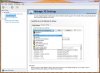
Or, oops, it just occurred to me: I assumed you're running Win7, but if it's the S02 you may still be stock Win8. If so, it might be nice to get confirmation from another owner.
-Matt -
Is anybody having a charging problem?
I'm having issue with erratic charging. it'd charge -> not charge cycles like that.
Also, my stock drive failed which is being replaced by samsung. -
I actually had that problem on mine, turns out the charger was failing. Then it just completely stopped charging altogether. I got it replaced under warranty, but good luck doing it without them asking you to send in the entire laptop + charger rather than just the charger.
I had to send a few rather scathing emails to gt it done. Make sure you use the Samsung Support Chat service to initiate the request so they'll send you a pre-paid shipping label.
And gadgetrants I agree, this trackpad is the best I've ever used on a Windows machine, so I don't understand where all the hate comes from, -
I'm here seeking help because this laptop is starting to me off.
It all starts when I boot the computer and it shows the Samsung logo for like two minutes. This has nothing to do with the Samsung Fast Boot Mode although this option gets disabled from time to time. This happens more during shutdown and hibernate but not with Sleep mode.
The problem with using sleep mode is that almost every time that I put it in sleep mode I have to restart the machine because the wireless adapter gets turned off and the only solution is restarting.
It also has moments when it gets stuck doing something and it takes like 30 seconds to be responsive again. We are talking about normal activities like browsing websites in chrome.
To conclude, it also has sound glitches when listening to music or video is playing.
For me, the fundamental question is: Should I upgrade to Windows 8? Will it get better? -
Hmm, I've caught mine a few times with the power light on the machine glowing red -- since I leave it plugged in, it seemed a bit strange. I checked charge level and it's around 98-99%, so I figured that it's "trickle charging" but...
It sounds like some of the issues you're describing (especially the issue with wifi) are discussed here:
http://forum.notebookreview.com/samsung/688064-how-reduce-latencies-samsung-laptops.html#post8840303
My advice is (and I HATE sounding like entry-level phone support, but) if you have the Win 7 install media and don't mind a clean install (and in particular, following item #4 in thread I linked above), I suspect you'll see some major improvement. I would definitely go that route first to rule out the question of hardware issues, and leave Win 8 for Plan B.
-Matt -
Is the ram upgradable? 4GB are soldered on the mainboard and other 4 on the sodimm... So is it possible at least to install 8GB to have 12 total?
-
Yes. Quite a few people have done that upgrade.
John -
So the ram isn't dual channel...
Samsung Series 7 Lovers - Here's The NP700Z5C Ivy Bridge!
Discussion in 'Samsung' started by yknyong1, Apr 23, 2012.


