Problems? See this thread at archive.org.
Where did you buy it?
If it's easy to exchange [Best Buy], try a new unit; could be a bad fan. If not maybe just return.
-
Yeah I can easily return, just wondered if it was normal. A few reviews have mentioned a constant whine or low fan noise. The whine is low volume, just constant.
-
I've read some reviews that stated that the fan was always on and other where it is not.
For me... it is always on and more noticeable at home than at work (at work there are much louder machines).
I like that the notebook will wake up from sleep or hibernate by opening the lid.
The battery life is very good but I'll put it through its paces this week. I'll do the same thing I did with the Sony SE but just based on playing with it this weekend, I already know it will last longer.
I do notice web browsing is slower than my MBA... not sure if it's the browser, the WiFi or the SSD. -
Series 9 guy, I made a special trip to Staples today and couldn't find a single portfolio that fit my z830. I even got 2 sales guys involved and both thought I was off my rocker, I think. Could you be so kind as to check the SKU number or brand/model of your sharp-looking portolio please? the 2 sales guys finalized theorized that you purchased it from a different Staples with some different stock. He said that it wasn't uncommon, because Staples apparently restocks according to purchasing history for that store/region. I've got the neoprene Toshiba bag, but I'm pretty sure the portfolio would work better sometimes.
Thanks for any help you can give.
-
Fiendish, so far, after 10 days heavy use, my fan has kicked up to what I would call an obnoxious level only *once*, during a windows Update. Otherwise, the sound has been a very low-frequency wind-noise... only *slightly* mechanical in nature. And it's so subtle, I don't think there's a soul who would want to return this one. So maybe there are different fan models in use by Toshiba???
-
Comparing with my old HP DM4, the fan on my HP is constantly on. Is it that kind of fan noise? Or is it an all together different one?
I'll get the z830 tomorrow, if my payment for my CC gets cleared. -
The best way I could describe it would be a low level whine, it's always there from the moment the machine is turned on. The pitch is not that low though, it's slightly grating in its tone. Its loudest point is right over the enter / backspace key. If I turn my the machine over and put my ear to the fan vent then the sound is mixed with the air coming out of the fan and slightly less noticeable.
-
Very odd as I have 3 regular size paper portfolios and they all fit. I will hit the Staples site to try and find the exact one...
-
So what do people think? Should I take it back?
Do you hear any constant noise on yours Series 9 Guy? -
NO but I do here the fan every now and then. It is not always but does occur at times when there is not great airflow beneath (ie when on your lap) or you stress the drive out though testing and there are incompressible writes involved.
The thing that concerns me is that this design becomes the first ever reverse airflow system. In other words, the air is sucked in through the bottom and not blown out. I seem to take extra caution where I place it simply because of that. I wouldnt want to see dust or whatnot sucked in.... -
I hear the ladies like a little bulge after it zips up.
Thank you, thank you... I'll be here all week!

-
Thanks for that. Doesn't sound like anyone has a similar issue so I'll take it back. It's the kind of thing that could become worse...
-
fiendish, where did you get it from in the UK and did you get a hands on beforehand as i cant find it on dsiplay anywhere and i wanted to see it side by side with my R700 to see if i want to go slimmer
-
John Lewis have it on Oxford Street, that's where I picked it up. They also have it on their website. It has a matte screen and 6GB ram, here's the link.
Buy Toshiba Satellite Z830-10U Ultrabook Laptop, Intel i5, 1,4/2.3GHz, 6GB, 128GB with 13.3 Inch Display online at JohnLewis.com
Just exchanged for a new one which I haven't opened yet, fingers crossed no whine! -
Great sport, Series 9 Guy. But I didn't want to put you to all that trouble. I was hoping there'd be some marking on your favorite -- like, "Daytimer Item #368." or whatever.
But thanks for checking... -
So I got my z835 from best buy, and it does have a sound that is pretty much on constantly. The best way I would describe it is a quiet buzzing noise... like what you would hear from an electric razor, but much much quieter. I couldn't tell you exactly, but as I sit here in the airport with the slightest background noise, I can't hear it at all. If I'm in a small, perfectly quiet room with the laptop right in front of me, then I can hear it- but again, its not loud at all. I would forget about it if I weren't paying close attention.
That being said, in a silent room, or possibly a classroom, I could imagine it would be noticeable. I will probably try to unplug the fan just to see how much the processor heats up... I'd imagine its not a lot, as the entire computer temperature is very cool and I don't even think the fan is doing much right now. -
Yes that's it, a light buzz. My replacement was silent for about the first 20 mins, then the buzz was back.
-
I dont know if this wil help at all as I am from Canada but here is the padfolio info for the Z830...see piks
Attached Files:
-
-
I'm only speculating here, but if the noise is bothersome, there may be a future BIOS update that could address this issue; the z830/35 is still relatively new.
However, if the noise is the dealbreaker, do not keep the z830 on the assumption there will be a fix in the future. -
Sigh, I ordered my z830 and already waiting a week
..they promised to ship it in 1-2 days but after I ordered they then told me its back-ordered and will be sent out 3 weeks after the order date..I was like WTH...so I went back to the site and they changed ship date from 1-2 days to 1-2 weeks. Though still doesn't explain why I gotta wait 3 weeks!!!
I even ordered the i5 model over the i7 cause I wanted it to arrive faster :/
If you want an awesome display and can live with some other faults, the Series 9 matte display is very very nice... -
IMHO.... the theory of an i7, cool laptop and no fan is unrealistic. Am I wrong?
-
I'm not sure how much of a bump from i3 to i5 to i7 results in higher temps, but the GPU has something to say there too right?
My non-scientific battery test (mainly web browsing, no multimedia) puts the z835 (i3) at just about 6 hours... this is with WiFi off (but tethered to a wireless phone for data... so it's also charging the phone battery). It's a tad better than the SE... and I should see how long it runs on WiFi. -
Its possible to have an i7 with no fan and a cool laptop, the question boils down to how much exactly a person is willing to pay for a cooling system lol
Like maybe one of these NASA grade cooling things:
http://news.cnet.com/8301-17938_105-20066890-1/nasa-to-demonstrate-super-cool-cooling-technology/ -
Anyone else's custom-built Z830 ship from China?
-
How do you check where it ships from?
-
Is it safe to say that the Z830/835 have fan issues?
-
If you check your order status and the laptop has shipped, you should be able to see a tracking number. Mine's fedex.
-
oh, I ordered over a week ago and they still didn't ship it...when did you order yours?
-
Leave it to the Canadians to think of exactly the right product. I'm searching and searching, but so far, that product number comes up as being a Canadian exclusive. I was hoping to find one locally before a big trip I have starting Wednesday to California. Wanted to look so cool with your really nice looking portfolio case. So far, all I have is this "murse-looking" man-purse from Toshiba, which is mostly going to remind people of a wetsuit.
-
Depends what you consider an "issue".
From the reviews I've read... the Z is supposed have the fan going most (if not all of the time).
Like other said, that might be addressed with a BIOS update. -
Sorry.....tried.
Fan....not on all the time and never bothers me. -
Yey, my laptop is finally shipping! whew I though I'd actually have to wait 3 weeks...its shipping from California, but before that the status was "Shipping to warehouse" so my guess is it was in china prior.
Though I have to wonder how Toshiba is making on their website when it seems to be down every other day...*sigh* -
Fan noise... You should try the latest Elitebook models with fans that run all the time day and night while the Celeron Vostro and HP 5330m are more or less silent.
I'm thinking of buying the Z830 (Also looking at the series 9) but hate... HATE fan noise. If it can stay off then I'm okay with the fan but if it's constantly on then the machine has failed (Core i3 especially but I can provide slack to the i7 and a little to the i5). -
Have you guys heard about the LG X-Note Z330?
-
Same design with Air like UX31. They both stole the design from Air ! And they both more expensive than Air, interesting...
-
X-Note Z330 is too expensive. Its more of a competitor to the Sony Z or Fujitsu SH771.
-
as above, the toshiba is a brucey bargain in comparison, the X-note is mooting at costing about same as top spec tosh z830 for its lowest spec model, and its to generic looking, the tosh is a much better looking machine imo
-
No one stole the design from anyone, some ultrabooks are influenced by Apple's design such as Apple's Air was influenced by Sony's design.
That said an i5 for 1055 + tax with a 3 year warranty is a pretty good deal. And what adds to the icing is I can upgrade it to in-home warranty for $99 (maybe a bit less) -
What ultrabook are you referring to here... the Asus or the Tosh?
-
Toshiba, Asus is 1 year warranty(sad since normal asus tends to be 2 year)...and n in home :/
-
Are you sure?
I thought that too but it turns out the ambient room noise masks it. If I turn it over and put my ear to it... I can hear the fan going. -
The fan on my system is not always running. My standards are also much lower I would guess because, if I am sitting using my Z830 as I normally would and I don't here it, it doesn't bother me.
I don't think I would have a reason to turn it over and put it to me ear eheheh.
IMHO, I think we have gotten carried away with the fan issue and each and every fan I know of makes noise... none are immune. I have seen the same thing with just about every laptop where we start to pick it apart and its almost like we have to find fault.
This is a great laptop. Heck it survived a fall from my desk to the floor and gouged my hardwood without a scratch to the system...not bead as far as I am concerned. -
I'm not concerned about fan noise either... but I am concerned about a fan spinning constantly a bit because that's something that may break later on.
The sound is not consistent which indicates different fan speeds but I don't think it turns off.
That's why I asked you if you're sure it's not running. I made the same assumption (again ambient noise masks it quite well) but I noticed it at home where it's quieter than work. I had to turn it over to listen to it just to confirm if it's running or not... which from what I can gather the last 4 days... it is always on (even when it's just sitting next to me while I'm using another computer). -
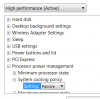
Have you tried this???
Attached Files:
-
-
I don't have that setting on mine.
Maybe I need a BIOS update, instead I have this setting (and the fan is still running):Attached Files:
-
-
First of all, I will say that my fan is always on, and the speed never changes. According to "Toshiba PC Health Monitor" it is always at about 40% speed.
I will echo BigNerd, and say that the sound is very quiet, and is only audible if there is absolutely no other ambient noise.
Series 9 Guy, I find your screen shot very interesting, because I noticed that there was a similar setting like that in my advanced power settings as well. Except mine is under the "Toshiba Power Saver Settings" section, it is called "Cooling Method" and it has "battery optimized, cooling optimized, maximum performance, and performance." Although, no matter what I select, the fan speed does not change. It always stays at 40%. There's also a setting you can change in the bios, and that also has no affect on fan speed.
I also tried the Fan diagnostic tool, which I was hoping would give me a nice graph or something, but all it did was ramp up the fan speed for 20+ minutes, and then gave me a text file that said my fan was operational. But at the least, this tells us there is a way to modulate the fan speed- Toshiba already does it with this fan diagnostic software tool.
I wonder why your advanced power setting is different than mine, S9G? Did you do a clean install after getting your laptop? Did you uninstall any toshiba bloatware? Maybe this could be the key different between yours and the z835 factory settings. Hmm.... -
I'm going to need someone's expert opinion before I go screwing around with my laptops innards.
I've already installed the 4GB RAM, which has pushed my Windows Experience Index for RAM from a 5.9 to a 7.2. Haven't noticed a huge change in performance, but then again, I'm not a power user so the performance was fine initially.
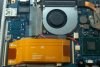
Next up, I'd like to replace the wireless card from the crippled one provided in the best buy model to a the Centrino 6230 provided in the i5 model. If you look at the picture attached, the wireless card is hidden underneath the large orange cable. I just want to confirm that this cable can be removed and reinserted... you can see a slightly darker-brown tab on either end of the cable that looks to be the thing you grab to pull it out, but I want to see if anyone else can confirm?
After that, I'd like to experiment with unplugging the fan. Anyone else think its the white plug with the blue-black-orange-red cable coming out? That seems to be the one that sticks right into the fan.
-
And that is what in home warranty is for
You won't see increase in performance when installing more ram, the time the ram helps you is when you go over the 2gb thats built in, instead of using swap memory of your slower SSD you continue to have performance with higher memory usage.
And yes, thats a standard cpu heatsink fan connector. -
Guess who's typing on a z830 right now
The one from best buy that is.
A few pointers, i love the keyboard. I need to get some time to get used to it, but it feels very natural to me, as if, I''ve been using it for almost a month.
There is a buzzing noise that I hear. What the hell is that? It doesn't sound like a fan at 40%. It sounds like my refrigerator humming. i can only hear it when my ear is right next to the laptop or when it's dead silent. It's annoying.
it's daylight right now, so I don't know how effective this backlight keyboard is. Hopefully I'll be able to shut it off completely so I can squeeze as much battery life out of this thing.
Did I mention I love the keyboard? The touchpad is also good. I prefer it over all my other laptops. The "ALT" button is huge.
The screen flexes alot. I compared it with the asus, and the lid on the asus is alot sturdier than the z830.
Here is the "Uninstall or Change a Program" under the Control Panel.
Adobe Air
Adobe Flash Player 10 ActivX
Adobe Flash Player 10 Plugin
Adobe Reader X MUI
Best Buy PC APP
Google Chrome
Google Toolbar
A whole bunch of intel R things
Java 6 Update 25 <-- Really?
A whole bunch of Microsoft visual C++ things
Norton Internet Security
PlayReady Runtime amd64
PlayReady Runtime x86
Realtek HD Audio Driver
Renesas usb 3.0
Ricoh Media Driver
Synaptics
24 Toshiba bloatwares YES! 24 of them! I haven't looked at all of them, but most seem useless
Windows Live Essentials 2011
Windows Live Mesh Active X control -
Yeah the buzz is the fan. And the bloatware is astonishing, Toshiba and Sony always had the most, and this takes the biscuit.
About four of the bloody programs give you ridiculous 'messages' from Toshiba. You'd think they could do some consolidation here.
Also out of the box,the screen leans towards blue/pink on the two I've had. Can be calibrated out though. If anyone's having a problem with loosing calibration on sleep/standby, you need to disable the three instances of Intel Common User Interface from Startup.
More details here
http://answers.microsoft.com/en-us/windows/forum/windows_7-desktop/color-profile-switches-when-computer-restarts-or/6ef7aee8-2d63-49f7-ac5c-002d16924228
New Portege Z830
Discussion in 'Toshiba' started by Hoopsontoast, Sep 12, 2011.