Problems? See this thread at archive.org.
the fans do run constantly in all the portege Z and R series laptops
the only one i have heard of that doesnt run constantly from all the threads i've ever read on the R700/R705, R830/R835, Z830/Z835 (which is alot!) is Series 9 Guys. absolutely every other one i've ever heard of runs the fan all the time. it is part of toshibas airflow cooling technology, if you note the laptops design, the fan and intake are at the front bottom usually and then the heatsink fins and exhaust are towards the rear, at least thats the case on the R700/R830 series and as such the air blows over more than just the CPUheatsink assembly, its blowing over the chipset and god knows what else before exiting the machine
-
Secure erasing on SSD is a pain, if your data is extremely sensitive information then I would suggest hard drive encryption. This way you can safely delete stuff in windows like always.
-
It's not the fan that bothers me... it's that it never turns off :/ That fan (being the only moving part) will eventually wear out and sure it might not be 'tomorrow' but for the price we've paid for these things... (I'm going to be typing in a quiet room so the noise would have been noticed)
Just picked up a HP 2560p for 540 pounds so I'll be using that instead
The Z830 is a very, very nice machine and it should sell very well! -
Hi everybody!
Very useful this post. So, do you recomended this netbook? I have a Dell XPS 1330 and it's too heavy and his battery life is ridiculous. I want to buy some thin netbook, low weight and powerful. I don't need to play hard games but I need to use Matlab, programing, watching series in Full HD, office, web and typicall things. I use the computer a lot in the university (I study Computer Science). In other forum from Spain says to me that I need more RAM than 4GB and the low voltatge i5 is not enough to me. So I am in doubt.
In Fnac Spain is: Toshiba Portegé Z830-10F Portátil 13,3", PC Portátil. Comprar Toshiba Portegé Z830-10F Portátil 13,3" en Fnac i5, 4GB for 999€.
The first impression is very nice, this 1.12kg is awesome. -
This is exactly the upgrade i made. I had the XPS1330 with the 9 cell battery and the Z830 is easily half the weight if not more. Like I said in my previous email the only thing i don't like about it is the French keys in Canada are not backlit so I don't know if this will happen with a laptop purchased in spain. Otherwise the system is faster, quieter and a lot lighter. I am happy with my puchase - just wish I could get a US keyboard on it.
-
umm..netbook? this is more then a netbook...the Intel HD3000 has as much GPU power as a Nvidia 9500gt. In terms of CPU power the one you linked has a s much processing power as a Intel Core 2 Duo (Desktop) E6850. And there are faster i5's and even an i7 version with even more power.
Its no top end laptop but it can handle what you want like a piece of cake. You cna also upgrade to 6gb ram. I myself right now am using a Dell XPS 1340 and moving to this notebook. Had a series 9 prior and it was 100x better then this dell but had to return it due to trackpad issues. So now goign wit hthe toshiba.
Can't you order one in the US and have it imported or something? shouln't be too hard... -
I wonder if it's the clean install that keeps S9Guy's fan from coming on with that Power Option he showed previously.
Does anyone who ordered from ToshDirect (ie the z830 series) have the same Power Option that S9Guy has (factory default)? -
I proabably could but then there would be shipping, customs and taxes on it. Plus warranty support will probably be an issue. Not really worth it. It isn't really a huge deal but I am just going to bug Toshiba a bit to see if they will do anything.
-
I am going to correct myself here because, up until this concern, I never felt the need to put the laptop to my ear during normal use. My fan is on always so far as I can tell but I have to put it to my ear to hear it.
-
Funny.
-
if you order from toshiba directly they ship it from china anyways so I don't think it'll be a big deal one way or the other...and warranty is global...but I guess yeah find out from Toshiba...
I would suggest using a stethoscope just to be sure lol -
I found a way to "fix" the fan problem! By listening to music
I forgot who mentioned the problem with the space bar not always responding when pressed; mine works perfectly fine. After owning this baby for almost 2 days, here are some of the things that irks/pisses me off:
Screen hinge
It feels VERY cheap. Maybe it's because the lid is very light, but whenever I adjust the position of the screen, it wobbles crazy after letting go of it. Also, it seems too "loose" when compared to my other laptops.Shift button
Perfect size. Perfect location. Perfect travel. I hate how it doesn't always register. This happens rarely, but still.Power Source
I hate how it's located at the back. Oh well, in order for it to be this thin and sexy, you have to make some sacrifices.Glossy Screen
I'm an outdoor nerd. Period.Port Location
Same reason as the power source. Atleast they have a USB 3.0. I love this thing! Transfered 20gb of files in like... 2 minutes.Screen Flex
Remember that youtube video that shows how bad the screen flexes? It's exactly like that. But I do like it how the screen doesn't crack or crease. DON'T TRY TO BEND YOUR SCREENS!Keyboard
It looks hard to clean. Is there a manual that shows how to safely clean the keyboard? I love cookies, and I think I've already accumulated enough crumb under the keys to make another cookie.
Thank you. -
Thanks for the answers kaikara and uniten. I like that phrase "Its no top end laptop but it can handle what you want like a piece of cake" so I supose toshiba won't have any problem with Matlab.
My Dell XPS 1330 is to heavy and Matlab runs bad if I work, for example, with mesh=to plot in 3d (I don't know if the problem is RAM or CPU) command, besides I think the Intel 3000HD is better than my 8600M GS. I think I gonna buy this laptop! -
If your comparing it to an 8600M GS the GPU is around the same processing power, but you have advantages of newer technologies in the GPU.
If I remember correctly, matlab is based off cpu unless you specifically enable GPU acceleration.
as far as cpu I have a P8700 inside mine and the i5 is superior by around 10-20% in terms of processing power. +i5 has new technologies.
Why not run a performance benchmark while running matlab to see what exactly is being bottlenecked? -
Ahhh... that's what I was saying.
I realize you don't always hear it... but it IS always on. -
Try an app called SpeedFan, assuming it works fine with the chipset it should give you reports of how much the fan is working.
And it also can be used to control your fan based on temperature. -
That begs the question: if the fan is always on, what is the power draw? How much could battery life be improved if it could be turned off? Or is it negligible in the overall scheme of things...
-
Toshiba included a crapware for that, the Toshiba eco Utility.
It says my current power consumption is: 11w... now 10w... now 15w since I just turned on youtube. -
Installed SpeedFan and played with it. I couldn't tell any difference. But the truth is, I don't notice the fan noise a bit. Then again, I usually don't notice most other noises that are constants. Grandfather clock chimes bug me. Rattles and squeaks bug me. But white noise is what my wife uses to put us to sleep.
-
Sorry but, how i do that?
PD: I still worried about 4GB ram, my old Dell (4 years) has 4GB ram too. I thought when I bought the Dell that my next future laptop would have more RAM.
PD2: I supose I'll be able to view Full HD with the Intel 3000HD and i5. In my Dell I watched Game of Thrones in 720p and it freezed when I tried to step forward the video. -
are you saying it didn't work with the chipset? or you couldn't figure out how to use it?
You can use the built in Windows Performance Monitor.
I bought a ramstick on newegg for 12$ and upgrade my pc to 6gb which is the limit.
hmmm..when I owned a series 9 and i played 720p and 1080p content fine, keep in mind the GPU has a separate chipset for decoding video. Though depending the filesize of the file it may be you have a slow hard drive that doesn't seek fast enough. -
Well, when I run the 'mesh' command ( http://www.mathworks.es/help/techdoc/ref/mesh.html) for figures with a lot of information and for example, if I try to rotate the figure, my Dell will start to freeze and It's impossible to rotate the figures fluently.
-
No, what I meant was the power draw of the always-on fan, not the system in its entirety. -
I just got my z830 today with a core i5 and yes, the fan is 100% always on. You can hear it spinning cnstantly, albeit a faint noise but still quite annoying.
-
Hopefully nothing is broken, but my laptop stops charging at 80%.
Also, is there a trick so we can make more than 1 recovery media? Like how with HP laptops you just delete 2 files, then you can make another set. -
the tosh will take 6Gb RAM max, it has a single upgradeable slot with 4Gb max capacity along with 2Gb soldered to the mainboard
PinoyBoy - keyboard is easy to keep clean, simply buy a soft paintbrush and use that to ease crumbs etc out from under the keys, then a can of anti-static cleaning spray and a lint free cloth to polish it back up again (with the PC off obviously, otherwise you'll write some weird emails as you clean the keys!lol) been using this technique on my R700 for a year and the whole laptops still immaculate (apart from a bit of shiny wear showing on the keys) -
Can you post a link to the ramstick you purchased?
-
Another question, If i needed in the future a 256GB SDD, it would be posible to change 120SSD for 256SSD?
Thanks guys
PD: today I've seen for the first time this laptot in the "El Corte Ingles" webpage: http://www.elcorteingles.es/tienda/...ction=jump&navCount=0&brandId=&selectedSkuId= and they say: "Memory expansion up to 10 GB". I supose that should be a terrible mistake. -
The one I bought is already out of stock, cheapest one they have now is 19$
Newegg.com - G.SKILL 4GB 204-Pin DDR3 SO-DIMM DDR3 1333 (PC3 10666) Laptop Memory Model F3-10666CL9S-4GBSQ
Its probably is a mistake, but I have heard rumors of an 8gb version... -
Hi guys! Sitting here with a cup of coffee in the north of Sweden, and I am reading this thread with the greatest of interest, having had my eyes on this beauty of a machine for quite a long time. Having now been released, the only reason I have not ordered one already is some question marks about the fan.
A definite picture on how things stand has not crystallized, as some report of it being only audible when putting your ear against it, while others describe a low, but definitely significant and possibly distractive noise. Pesonally, being very sensitive, or an absolute neurotic as my friends deem, in this regard, I am staying on the fence a bit longer.
The person earlier, experiencing with manually disconnecting the fan, reported that heat wise it still stayed very cool, so that gives hope that a eventual BIOS update could help in this regard.
I hope some kind soul experience with SpeedFan or the like abit more and report back with any updates, would indeed be very much appreciated!
*My current system is a Sony Vaio SZ2XP, which I was ready to sell* (*throw out of the window) because of the ridiculously rampant fan noise (in idle), turned out to be a absolute gem and trustworthy friend after I stumbled upon a Ubuntu system deamon being able to overrun the BIOS setting and calm the fans down. This is what SpeeFan does also if I have understood it correctly, given that it is compatible and that you get it to work. -
Yep... Create a full recovery media set using a 16Gb usb thumb drive... restore the machine using that backup and then you can create ANOTHER 16Gb set.
Well... Thats' what I would do fresh from the box -
Toshibas must not be popular on NBR... no Owner's Forum.
How has battery life been with you other owners?
Mine's not doing so well... 4 to 5 hours, no WiFi but tethered to a phone for Internet. The screen isn't even on (running on external monitor). Must be because it's also charging the phone. -
I just got my laptop
First impressions out of box:
The presentation isn't the same as with the series 9 (not that I care)
It feels really light, lighter then the series 9
The screen is no series 9 (to be expected lol)
The power adapter is not built into the plug like on the series 9..but bright side is the plug design seems better cause for me my series 9 plug on the pc end ripped to shreds on 1st month lol
Is it suppose to run a factory reset on 1st boot?
UPDATE 1: Ok, here is some other things I noticed and to answer some asked questions
1) I got my laptop from toshiba and the power setting isn't there for the fan, so you probably need a clean install, will pdate when I do it.
2) The screens seems to be worse then even my Dell XPS 1340, but bright side is it is Matte!
3) I have pretty good hearing so I can hear the fan noise it is there, but personally it doesn't bug me.
4) Personally I prefer the cooling design used in the series 9 and my xps laptop where the heat is channeled up, you can feel the heat exhaust when its on the lap when it runs the windows benchmark (which is very intensive, outside that it runs fairly cool)
5) The fingerprint sensor is kind of in a silly sspot and it always tickles me when moving from left click to right click, lol
6) Touchpad buttons feel a little stiff but we will see if that improves with use, and to series 9 guy below, yeah first thing I notice is the touchpad is not as smooth.
More to come soon.. -
Bit of an update....
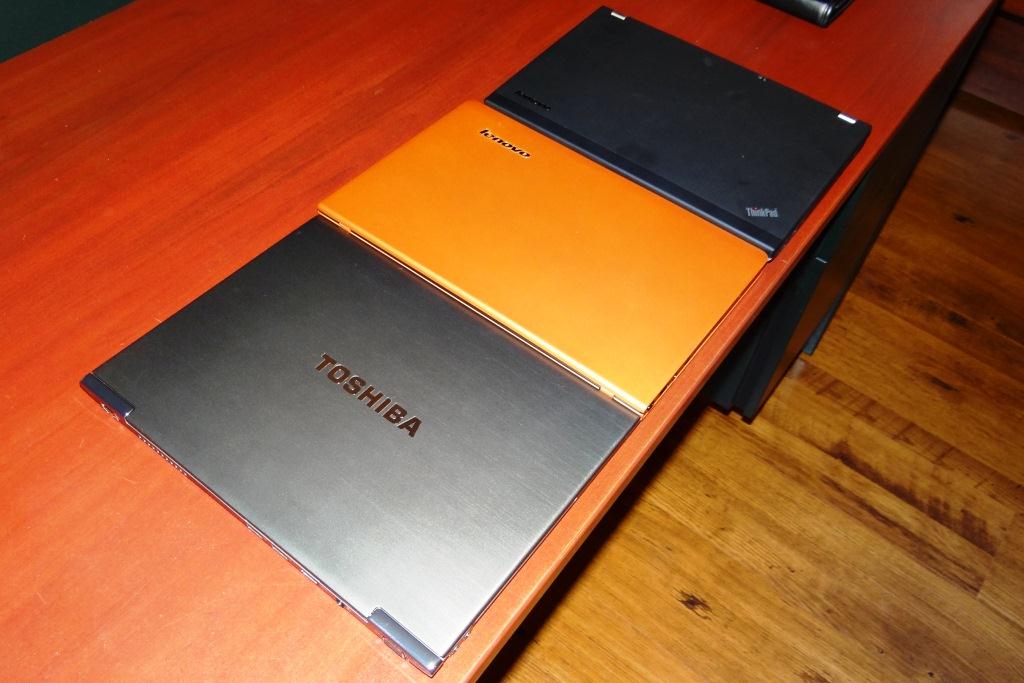
I have a brand new orange (Clementine) Lenovo U265 side to side by the Z830 and noticed something... The trackpad is not as smooth of a feel as the Lenovo.
The Lenovo is definitely heavier, not SATA 3 and there are a ton of things that dont touch the 830 (battery life being one) but I have to admit I was surprised at how solid the Lenovo is built...even compared to the Z830.
In fact, if anyone has had one in their hands, their exterior finish is very...almost like a nice rubber grip but its definitely metal.
Something some will notice of the Toshiba is that it annodizes and dulls out because it is an untreated metal and, as well, it will scratch fairly easily...although it does survive desk drops VERY well.
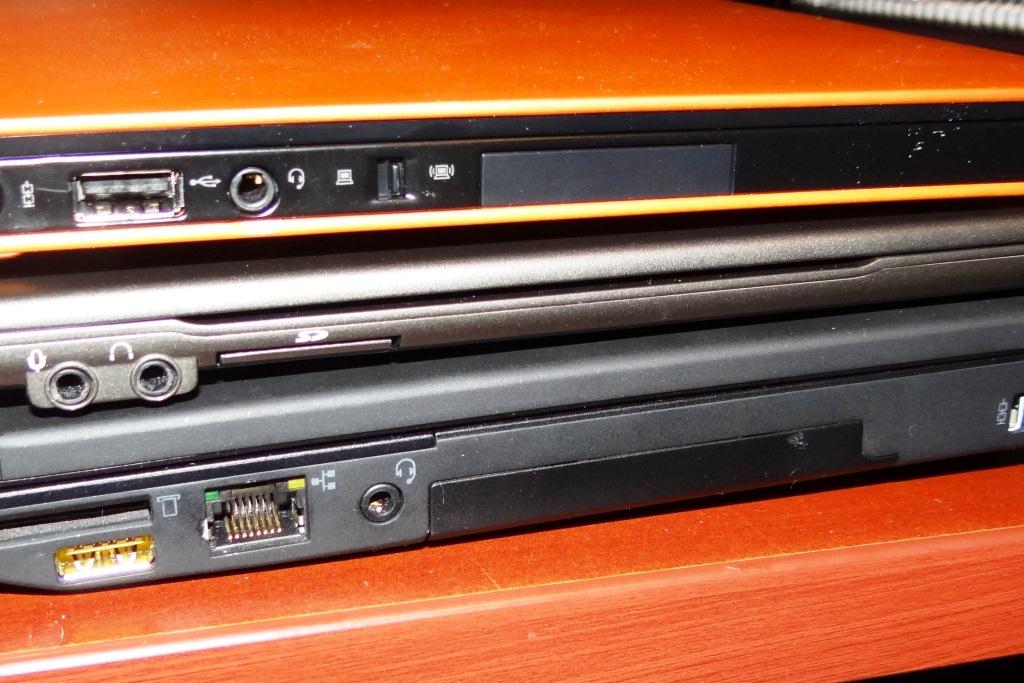
Here is a shot of the three I have in house and which is EASILY the thinnest! The big guy is the X220 which, I guess is a real testament to how small things are getting.Attached Files:
-
-
Purchased a Runcore Msata Sata 3 ssd(Latest firmware 3.3.2) sandforce sf-2281, and dropped her into the Z830 last night,nice snappy drive however Intel RST states sata transfer rate 3gb/s,the benchmarks are atypical of Sandforce Sata 2 speeds
Intel RST lists the Adata ssd in my ASUS UX31 as transfer rate 6gb/s,so...begs the question,Series 9 guy how did you get Sata 3 transfer rates,your writeup on SSD Review stated that when you 1st installed the runcore you too were getting Sata 2 speeds,then when benchmarking suddenly got 6gb/s performance,care to elaborate? -
U265?
I thought the Lenovo ultrabook designation was U300. -
The U260 is a lovely machine but too bad it is 12.5". I prefer the U300 but can't afford it without payment plans
-
Canadian... U265 = U300
And the answer for the SATA 2/3 is I don't know. It just started... I am going to have to put it back in again to see.... I have been screwing with the different mSATAs as a habit both the X220 and this z830. Gimme some time. -
By the way,for anyone who would like to remove the bottom panel ,you need a T7 secure Torx bit for the center screw,most of the cheap kits out there, smallest is T8 which won't fit.
-
I got the green security torx set from amazon for $9. It worked perfectly.
-
It's the tone of the fan, the buzz/whine, that I find most annoying, not the volume, which is pretty low. It just sounds like its very cheap, like the stock 40mm chipset fans you used to get on old desktop mobos. Fans can run constantly and be pretty much silent, like those from Noctua, though obviously the smaller they are the harder this is to pull off.
So I suppose potentially, aside from hoping for a BIOS update, another avenue is replacing the fan, though I'm guessing it's a proprietary type given the form factor. -
Anyone else's z830 not read external cd/dvd drive? My usb ports work because I tested them with a few thumb drives. And I know my external works because I hooked it up to another laptop.... Any suggestions?
-
I hooked mine up to the usb 3.0 and it worked. Let me ask you this, does the usb cable have double connector? each usb drive requires different amount of power, and each usb port can have different power output so you may need to plug in both usb ports in.
-
@uniten: the drive blinks green and starts spinning the cd but nothing pops up on my laptop... it's as if the drive doesn't exist.
-
Did you do a clean install?
What's weird is my Z835 is reporting a CD drive on D: and I don't have one... I don't have any drive on my USB ports. -
my i5 from toshiba direct arrived today. 30 minutes in, and here are my issues so far.
1) I think my screen is defective. There is a thin dashed horizontal line at the bottom of the screen that is flashing. It is there whether I'm in the boot screen, or in windows. Hardware problem, I'm assuming. Any thoughts? I guess I have to call for a replacement. Very dissapointed.
2) Spacebarnotverysensative Missingalotofmyclicks. Annoying. HopefullyIwillgetusedtoit, butIamsignificantlyconcerned.
3) Regarding the fan. When TV is on, I don't notice it a bit. But in my office it is clearly noticeable. You put it to your ear, and it is a typical fan noise, the sound of whooshing air. But just sitting with it on the desk, it sounds like a distant buzz. I guess I would compare it to the sound of a buzzing lightbulb, if that makes sense. Subtle. Not sure i would have noticed or cared, except everyone on here has pointed it out. Thanks a lot guys. Now I won't be able to ignore it.
Mainly, I'm really upset about the screen issue. Hoping someone on here has an idea, short of returning it. -
oops, duplicate post, trying to delete it.
-
Definitely sounds like a problem with your screen. I'd return it and get a new one (if you can live with the space bar and fan). I just regularly press the space bar a little closer to the middle, so it doesn't really affect me...
-
Nope. That's what I'm trying to do... to perform a clean install but can't because my laptop won't pick up the external...
I guess I can always use a usb drive to do it... but still, there's something fishy going on with my system... -
ckthepilot (my old friend):
When you turn the laptop on initially, keep hitting F12 (or is it F8?) ... It will then get you to the available options.
DO NOT put it into a USB 3 slot. It has to be a reg USB slot.
New Portege Z830
Discussion in 'Toshiba' started by Hoopsontoast, Sep 12, 2011.