Problems? See this thread at archive.org.
If your talking about the z830 and not the z835 turning off or covering the fan is going to cause it to overheat.
As for the z835 as makryger says his was fine when he turned off the fan so maybe something can be done on that model.
-
Thanks for the quick replies. You guys rock! So the noise comes outta keyboard, it is same with Acer S3 on the left side. Z830 is gorgeous, If I buy Z830, I'll be really annoyed if Z840 is out on CES as Toshiba is saying world's lightest and slimmest ultra book. How much roughly does it cost to upgrade the 128 ssd to 256? I'm on vacation and here only one configuration is available, model is z830-m110 which is without matte screen and no sim card slot.
-
Is there a huge difference between z835/z830 in terms of heat? I think if covering z830 will toast the laptop then it shouldn't be much different for Z835
-
If you can wait then I would. There are going to be lots of ultrabooks coming out in the next few months. They will have the new ivy bridge which will be an upgrade to the sandy bridge chip that is in the current ones. It will only cause the systems to get cheaper and you will have way more options.
That being said you can always wait for something better and never buy anything. In my case i bough the z830 because I cracked the screen in my old laptop. I probably would have waited if I could though.
You can't configure the z830 with anything other then the 128GB mSATA on Toshiba's site. I am not really up on my hard drives but from what I can see 256GB mSATA are not widely avaliable. If they are they would probably cost a small fortune. -
I believe Asus uses a 256 mSATA in their UX31.
-
Yep they do have one. But is not avaliable for consumers to purchase and only avaliable to manufacturers right now. From this article Samsung is going to be releasing a 256GB for consumer purchasing after CES sometime.
SSD Types and Form Factors - An SSD Primer - The SSD Review -
The z835 has an i3, and z830 has i5 and i7..the i3 processor is weaker and is newer..so it might be less prone to heat then a slightly older and more powerful processor...its hard to say as these are individual tests, Where I live there is also a lot of humidity and other environmental factors that might effect things.
-
At CES and speaking with Sandisk today who are displaying the new Zenbook with their U100 256GB mSATA inside today. They maintain that they have no intend to make this available for consumer sales. This sounds like it may be same same with Samsung and there new 256GB mSATA SSD.
-
Lots of good stuff being announced. Did you see the Acer Aspire S5 yet?
Should be an interesting year for laptops... -
I just wanted to add my own 2c on the z830.
Purchased yesterday, it was sitting alongside the asus zenbook, acer and the hp folio and I much preferred the toshiba immediately, especially the feel of the keyboard and the ethernet port.
As soon as I got home and sat in a quiet room the fan noise was very disappointing. I have gone to the trouble of signing upto this forum just to share my opinion in hope anybody else concerned with noise will get yet another warning.
I have the i5 model and would really like to keep it but this hum is like a cd spinning in a cd drive really fast, so sadly I think I will have to return it, unless somebody can come up with a way to maybe add a resistor onto the fan connector and stop it running at 40% fan speed. Sure it would risk over-heating but if the fan was only this loud under load i could deal with that.
I have used many laptops over the years (many acer, dell, hp and lenovo's) and never had a fan this annoying, I will admit my experience with toshiba has been very limited, from what I am reading they seem to have annoying fans on a lot of their products and this is simply not good enough for a laptop costing > $1000
-
I think a lot of the fans are producing different noises. In my case I had an i5 unit that had a really quiet fan on it. It was replaced with and i3 (it had a defective keyboard) and the i3 is louder. I compared them side by side and the i3 one was more noticeable even though the fans are exactly the same. But it is not as loud as you are describing. I can only hear mine when there is no background noise or i put my ear closer to the unit. the i3 makes more of a buzzy noise then the first one i had.
I would go back and check the demo unit to see what sound it is making. you could have just got a defective or loud fan. -
thessdreview.com offer Samsung 256gb mSATA review in January...
Toshiba Portege Z830 SSD review
![[IMG]](images/storyImages/Toshiba-SSD-300x200.jpg)
-
Anyone see Toshiba's newly announced dynadock? I could see myself getting one. Right now, I have to plug in power, an hdmi cable, a logitech dongle and a hard drive to officially "dock" my laptop. Then, if my computer is closed shut, I have to reopen it to turn it back on. This would be a nice change, where if my laptop was stationary for a while, I could just keep it closed with only one usb 3.0 cable and power cable (if necessary) connecting everything. Then, to turn it on, press on the dynadock. Plus, I wouldn't risk the constant plugging and unplugging of an hdmi port that could compromise it in the long run... I just don't think it is meant for that many repetitions.
Toshiba's dynadock U3.0 universal docking station and 15.6-inch Mobile LED Monitor make multi-taskers' lives less messy -- Engadget -
I love docking stations. I haven't had a good one since my old Dell Latitude laptop.
With this Toshiba, any idea how many plugs have to connect from the docking station to the laptop? Also, how exactly does the monitor get plugged in? (from the docking station to the laptop?). I'm interested in this docking station if its notjust a glorified USB hub. -
They have only released one press release for this so far, so this is more of an educated guess based on what they say, but it sounds like it requires just one usb 3.0 port. There is a graphics card in the dock that can do DVI/VGA and HDMI at the same time. The monitor would be plugged into the dock. If you're looking for more than a glorified usb hub, well, it does have multiple usb 3.0 ports, two audio jacks, an ethernet jack, power-on switch, hdmi (with 5.1 audio) and dvi.
One thing I'm not sure of, and I don't even think this is possible with USB-based docking stations, but it would be awesome if the dock charged my laptop. Otherwise, you'll still need to plug in the power brick separately.
Also, it would be nice if the dock came with its own power supply... sometimes they don't include that and expect you to use your laptops power brick... -
What I would like to see (and would purchase) is a ONE PLUG solution -- simply attach one single plug and everything is taken care of: power, large external monitor, all USB, etc, etc. Then simply UNplug one single cord and walk away with the laptop.
If we have to manually plug in (and unplug) 2 or 3 separate connections, it kinda defeats the purpose of the docking station. Might as well buy a $10 USB hub. Know what I mean? -
The new USB 3 specs will allow laptops to charge over USB..though n\I don't remember when exactly the spec will be finalized.
-
Yeah, I know what you're talking about. Unfortunately, I have not seen any universal docking stations that also do power. Proprietary ones, maybe. And perhaps in the future, when usb 3.0 can charge the laptop (as uniten suggests) then it will be easier, but not quiet yet.
As someone who would need power, graphics, and a couple usb connectors, yes, I could remove some of the hassle with a cheap usb hub and get down to only 3 connectors... but I also like the idea of having an external power button. As well, having a docking station that is always connected to my monitor means the monitor can go into sleep mode when I unplug from the hub, instead of staying on, drawing power, and constantly searching for a connection. So I'll take a good hard look at this docking station when more details are available. -
the usb hubs do everything over usb, use them at work and they run monitor and the lot through single usb connection. only downer is u have to plug the power into the laptop seperatly!
-
Most of what I've seen can't handle my monitor's resolution (1920x1200). Can yours?? If so, what are you using?
-
to be fair i think max res i run is 1366x768 so your probably right, i reckon the scope for usb 3 will be better however and this one by the sounds of it has its own graphics processor in it for full HD output
-
If I were to venture a guess, I'd say that USB 3.0 may be capable, but USB 2.0 possibly not. Although I have no idea how having the graphics card in the dock makes a difference in bandwidth requirements...
-
Apparently they've gone live on toshibadirect... (sorry for hijacking the thread)
dynadock® | Toshiba -
The theoretical speed of USB 3.0 is around 5gigabit..uncompressed 1080p is around 2-3gigabit for 60hz...considering it will most likely be compressed it'll most likely be 100x less.
USB2 is around 480mbits so with compression 1900x1200 should be possible over USB2 no problem.
Considering the speed, USB 3.0 should be close to PCI Express 2 8x...
Oh and out of all the new ultrabooks Ive seen so far, this new Samsung Series 9 looks the best...though I have to wonder why they keep going with the dumb single trackpad...and if they do no markings to separate right and left click :/ -
I much prefer having separate trackpad buttons. I think they're all trying to copy the MBA a bit too much.
-
Thanks for the tip on the Dynadock thing. Ordered 2, one for the office and one for home. Kinda' expensive for an overgrown USB hub, but I love my z830 and if it saves wear and tear on the HDMI connector, I'm a fan.
-
Please let us know how you like it. I've gotta wait tll I get a 3.0 capable laptop, but I like this. I work from home and plug in and unplug my laptop several times per day (from desk to kitchen table to whatever) so I'm a fan of docking stations.
-
ai z830guy, keep us updated of how you get along with the docks, if power thru USB, how well displays on full HD TV, etc etc
shame the things are black to match the R series, should do a silvery magnesiumy one to match the Z series imo
-
Hi to all,
Toshiba (direct) made a discount for Z830 for a short time (899 to 769 USD + tax of course). Its a good deal who wants to purchase one.
Portege Z835-ST8305 Ultrabook -
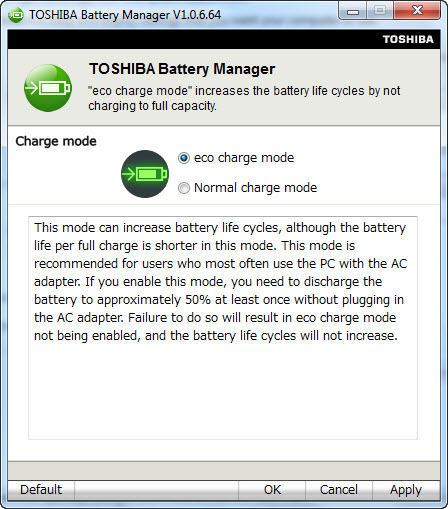
Can't find the setting for max charge to only 80% in Z830, already open Control Panel\All Control Panel Items\Power Options\Edit Plan Settings for eco then click advanced setting power setting.
In my previous thinkpad, there's thinkpad advanced setting what percentage level to start and stop charge even the ac adaptor still plug in condition.
I find this TOSHIBA Battery Manager.Attached Files:
-
-
Yesterday, my office friend feel sorry to bought MBA 11" (already use for 2 months) after she look and try my z830.
She compare the weight, price and and no headache for microsoft office (she have problem with MS Office for mac).
When I ask her why you buy MBA but you have no experienced with mac OS, she answer me that she buy MBA because she love MBA design
-
Depending on what shakes out at CES... I might return my z835.
I like everything about it (and don't mind the fan) but the 1388x768 is killing me... esp when my MBA has 14400x900. If someone puts out an ultrabook running Full HD soon, that will be the kicker. -
I suppose everyone has their preferences... I personally think this resolution is perfect for this size screen- if the resolution gets any higher, then that just means all the text and icons get smaller, and it gets to be a bit too small for me. It also makes it easier to overshoot something using a mouse or trackpad. This laptop is perfect for me now, although it's impossible to keep up with the technology, and who knows what the landscape will look like come 2013. (assuming the Mayans were incorrect). So, at the price we paid, I won't feel quite as bad about buying a new laptop a little bit sooner in the next couple years...
-
I've wondered about this. I've never used it myself, but since I'm used to 1600x900 (laptop) and 1920x1200 (monitor) I'm guessing I might not love 1388x768 -- I'm just not sure if I'd be able to handle 1600x900 on a 13" machine (I really don't think so).
This is why I was happy to see that Samsung is coming out with a 15" Series 9 laptop. Smaller than other 15"ers and only 3.5 lbs with 1600x900 resolution. Sounds good to me!
-
Got a look at the new Series 9 last night....hands on as well.... AMAZING!!!!! It stands 1/2" complete unlike the Z830 which is 1/2" before the rubber feet. It also got rid of the fingerprint prob and res is higher...
-
It's not so much the 1366 (which is very close to 1440), it's the 768 vertical. Most websites are scaled for 1280 width or less so that's fine but when you can see only 1 or 2 items on the screen (or even less than 1) and have to scroll more... it gets a bit irritating.
-
Hi, all
Did somebody try to insert 8gb ram in a single slot? Did it work for z830? -
I understand. In fact, the last week or so I've actually been purposely making my browser smaller (shorter) to get a feel for 768... and I don't love it.
Time to change your name back, perhaps? Two questions for ya about the Series 9:
1. I hate the fingerprint problem that I've seen on the current 9. How much better is the new one?
2. Did you happen to see the 15" Series 9? Thing is, 1600x900 on 13" scares the cr@p outta me -- and 768 is too short (see above) -- so I'm thinking that I might be better off with something like the 15" Series 9. Please let me know your thoughts if you had a chance to play with it.
Thanks!
-
i'd hate to have a higher res overall on a 13", as everyone else mentioned, it's be too much, however a few more vertical pixels wouldn't go amiss for a different aspect ratio, that'd be nice
apart from that and the fan theres nothing i dont like about my tosh
-
I always thought 1280x800 was just fine (thank you) on a 12 or 13" screen.
-
Got Cash? If so Perhaps the Sony Vaio Z (2011) is for you -- it offers 1920x1080.
-
I don't like the Z keyboard (prefer dedicated nav keys)... for that price... EVERYTHING has to be close to perfect.
I used to have a 14" Dell running 1920x 1200 so that's where my vertical pixel desire has its origins.
And it's just not webpages... Excel spreadsheets, programming code... etc etc benefits from more lines on the screen.
And it doesn't have to be 13"... from what we're seeing from CES, looks like "ultra"books are coming out in 14" and 15" form factors. -
Things like this are very sad, there is nothing wrong with having a nice design but end of the day you buy a laptop for functionality, not because it looks pretty...
Its not a big deal...personally I miss the series 9 shiny screen more then a higher resolution. (not that it'll hurt)
Not sure...haven't seen anyone try it..it might work it might not hard to say...The z835 since its newer i3 cpu should be capable of 16gb ram by specs.
You can set it to rescale everything so that it will be same size, just crisper image. -
No more fingerprints as they have a surface that completely eliminates that now. The 15" version is excellent as well. I never expected this at all from Samsung and they have sincerely made that laptop stunning to look at and hold at least. Having said that, this Z830 is an amazing system and has been working continuously since last Friday. It hasnt missed a beat!
-
True, BUT... That won't work for me since I often bounce back and forth between laptop screen and large external monitor. Therefore, if I rescale it, things that look good on the laptop look too big on the large monitor. Or vice versa. Know what I mean? If anyone knows of a workaround, PLEASE share it with me. Thanks!
-
Awesome. I'm looking forward to seeing them. My one "bummer" is that they don't have dedicated Home and End keys (I really like having them).
Thanks for the update! -
Well at best the DPI scaling works on a per-user bases, not sure if windows 8 will allow it per monitor bases in the future or not.
The best I can offer is:
1) Create a seperate user to use for external monitor and user fast user switching to switch between a user with increased DPI and one without.
2) Keep it at a compromise between the 2 I guess :/.. -
I'm not aware of fast user switching (I'm the only one that uses my computer so I only need a single-user setup) but I'll do a bit of research on it. Thanks!
-
Sure thing. I'll report back once they arrive.
But I saw that in the packaging, an AC adaptor comes with them.
-
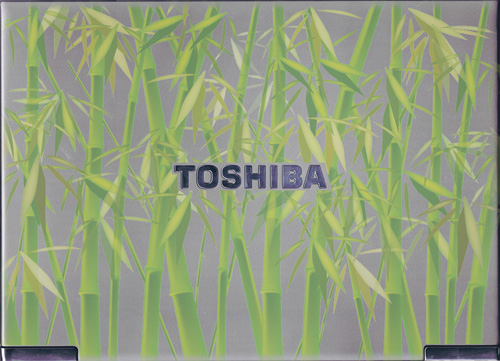
Finally got skin for my Z830, 2 days for order, measurement, cutting and installation process. Palm rest and touch pad got transparent cover too.
Attached Files:
-
New Portege Z830
Discussion in 'Toshiba' started by Hoopsontoast, Sep 12, 2011.