Problems? See this thread at archive.org.
Oops -- I used the utility nentioned above and I must have erased something really important. I would no longer read the Dynadock. I went back to the restore point and I *hope* it's fixed, but -- beware hasty changes. In trying to remove some of the added bloatware I succeeded in giving myself quite a scare.
-
Last time I used pc decrapifier, it deleted a whole bunch of registry entries. I had to do a factory install for windows to work properly. Lesson of the story: clean install is faster and easier IME. I have done a clean install on over 10 laptops/desktops. WAAYY easier than cleaning programs 1 by 1.
Anyone else have any info on their battery wear? -
Ouch! Sorry it had a negative experience Z830guy. Like I said, I never used it before, I hope I didn't screwup your laptop.
I'll go ahead and remove the link from my post to prevent others for accidentally using it. Thanks for the heads up; sounds like it could cause major problems. -
It works, based on what a few of my geekier/techier friends. Just be careful.
I prefer to use RevoUninstaller to manually remove bloatwares. Still, be careful when using any program that deletes registry entries. -
AlexUW, very kind of you. You could have just called me a dork for not being careful enough.
As it turned out, I hope I've found the solution to my problems. One of the Toshiba utilities I removed was facial recognition. What I discovered was that it hadn't totally removed it. For some reason, the utility had stalled about halfway through. I think it had stopped up several other routines from running. Anyway, I restarted the uninstall for Facial recognition and just tried to be more patient this time. It literally took about 30 minutes for it to uninstall. Then I uninstalled and reinstalled the Dynadock software and, at long last, everything seems to be working better. But everyone's conclusion is still just, I guess: We need to be very careful and take it one step at a time when cleaning off these utilities. Thanks again for your understanding and kind words. -
ai, best to clean install if your going about it that way, bloatware can be linked to other bloatware and any 3rd part uninstall programs are imo asking for trouble!
-
As my sig indicates, I also own a Sony VAIO SE and like the new HP Envy 15", it has problems reproducing reds (they look orangish).
I recall someone complaining about the Z835 screen having too much blue and I think that's a similar issue to what the SE has. I looked at it over the weekend and it also seems that the red is showing up as a bit orangish.
Does anyone concur? -
I wish my wallet can crap out money. Only pennies and nickels fall out when I open it. If I'm lucky, a quarter might come out. I forgot who upgraded his SSD in his z835, I wonder how this compares.
-
I do. Always unplug adapter when already full charge.
-
These are the SSDs being used in the new Dell XPS 13 Ultrabook.
Or if you don't want to go through that hassle, just use the manufacturer's battery optimization/extension software to stop the battery charging at 80% or 90%. -
Hey,
Whats the battery time you are getting. I am getting below 3 hours. Normal Usage on Wifi. Should I return it ?
Site shows 6 hours of battery.. -
So no one else sees orangey reds like I do?
-
not really noticed, i know that the screens on these arent superb or anything but its miles better than my R700 screen which looks really washed out in comnparison so i sort of just crack on
 lol!
lol!
under 3 hours is rubbish, are all your power save settings set correctly? i run mine on toshiba eco mode when on battery and i get 5 hours + normal browsing -
I am using Balanced. My Screen brightness is high.
-
high screen brightness will monster the battery. try it on full eco for a battery cycle and see what life it returns
-
Hello,
I'm looking to get a Z83 with i5 - can anyone please tell me what's the difference between the 835 and the 830?
10x!! -
The 835 series are sold in retail stores. The 830s are sold on toshiba direct. I think the main things that are available on toshiba that you won't find in stores are a toshiba extended warranty in some cases, and a matte screen. But you'll have to look at the individual specs for each z83x model to confirm those differences, as it's not the case for all of them.
-
theres security differences as well, basically the 830 is the business oriented model, so you get 7 pro, TPM, fingerprint reader, stuff like that.
-
My apologies if I missed this, but has anyone done comparative battery life tests/benchmarks between i3, i5, and i7 versions of the Z830/Z835?
-
Yes, our informal user testing has been as follows:
i3: Long
i5: Surprisingly long
i7: Astonishingly long.
No seriously, I have the i7 and I've stopped carrying around the extra Duracell add-on battery I used to carry on overseas trips (with Thinkpads). It's just that I never ever needed it!
-
I get about 4.5 to 5 hours of regular microsoft word use, or atleast that's what the battery pop up thingy says.
- all radio (wifi-bluetooth-3/4g) off
- Level 3 brightness setting using FN + F6/F7
- Toshiba Z835 P330 (i3 best buy model)
- balanced power setting
How good is the i7 model and if possible, please provide a list that might affect the battery life. -
Toshiba Satellite Z830 | Videos | CNET UK
Check out the SCARY flex @ 0:40?!
What's with the cheap build?? Not sure I'd buy this now
-
its not cheap, its a necessity of the lightest ultrabook you can get
its also a design feature utilised to enable the lid to withstand impact damage and drops etc. the panel flexes unlike others which may crack or break.
edit: i get about 5 hours from my i5 general browsing and document editing, thats with eco mode on and wifi set to performance -
That video is a bad representation of the laptop and, if he would have done any background before the review, he would be able to relate that Toshiba intentionally chose with this flexibility for impact protection. Think about it....will ANY other laptop withstand that flex without permanent damage? Not a hard answer IMHO.
The system doesn't feel flimsy at all and, in fact, it is a solid machine all around and still the most compact to date.
I am in Germany at CeBIT and have seen all of the laptops this week and I can still say that this is definitely in the top two for ultras; the new Sammy being very nice as well.
Funny as it is, I have a 11.6 Zenbook sitting on the shelf to my right n the hotel room which I just choose not to use....
EDIT: I also would still find it hard for any other ultra to beat the battery life of this system. -
I find that result surprising, since I've always assumed that the faster the processor, the more power it consumes in the same amount of time... or is my assumption wrong?
-
I think z830guy is suggesting the battery life for the i5/i7, though shorter than that for a i3, is still very long [from his experience?].
Just how I read it. -
Anyone else notice that this thing seems to charge very quickly? I got from 10% to 90% in less than an hour. Much faster than my old laptop!
-
Absolutely and even on voltage converter out of country fast charge always under an hour from dead.
-
Hello, I just bought a Z835-P330. It comes next week. I hope that I am happy with it, I wanted to wait for the Ivy Bridge Macbook Air or Pro but needed a notebook right away. The fan noise issue has me worried.
-
The fan noise was remedied a few weeks ago with the latest BIOS. Users have reported positive feedback.
BIOS 1.60
Model Content Page
Good luck and let us know what you think of your new ultrabook -
Anyone found an Auto Air charger for this ultrabook, I love it
-
The newest bios has much better temperature-responding fan control. As a result, for me, the fan is off 85% of the time now. Only gets going when I'm doing some heavy imaging editing.
-
For me, until I updated the bios, I had never once heard the fan at full speed as I do now. I also had not even once experienced the heat that I experience when the fan is running from the bottom end as I get it now; this while playing videos for the most part.
I wish there was a way I could return to the old bios... -
This is just a guess, but maybe, when the fan is always on- you never hear it, because it just started to blend into the background. But now that you actually hear the computer ramp up from literally no sound to even the quiet buzz from time to time, you can hear the difference.
-
Not at all... Prior the fan never once went full bore but now it seems that every time a video is played this occurs. I never once felt heat in the system prior as well.
In order to ever know the fan was on before, one had to literally have their ear to it. -
yours seems to always of been a bit of a freak of a machine Apparition however, with the SATA 3 working and the very quiet fan from the off.
most if not all other users have reported a massive benefit in noise from the BIOS flash, myself included. its basically removed the one major gripe i had with the whole system, and the unit never gets warm. as mentioned in my repaste thread, i have used some IC7 compound at thats brought my idle temps down 4-5 degrees aswell which has been a massive help
edited for clarity and typo's!lol! -
Gotta admit that what you say has some validity given respect to both the SATA 3 results ant the fan silence. Can't fake them, however, as the specs are clearly shown on the Anvil lower right and would like to know if there is a way to revert the bios???
-
oh i'm not doubting the results, the hardware is SATA3 capable, so seems yours was for some reason loving the Runcore, does it still return SATA3 upon re-insertion? as i know you checked the new samsung drive on the SSDReview site and it failed to return SATA3?
i'm fairly sure that its not possible to revert BIOS, but if you can grab the previous version off the samsung support site could attempt a re-flash? although i personally wouldnt like to guinea pig that idea as i kninda need my machine and cant afford to brick it!lol! -
How do I update the bios on a clean installed z830?
-
toshiba website, download the windows installer package and run it, it runs the flash from within windows then reboots the system, very very easy to do, just follow the onscreen instructions
-
Got it today. Right away I noticed the fan issue. I installed the updated BIOS. I did notice that the fan does not run continuously now but when it does, it is very loud and disturbing. Is this something Toshiba can fix if I send it to them or am I going to have to return the item?
-
Probably going to have to return; it's a hardware/design issue. Sending it in will only result in the repair depot replacing the old fan with a new fan of the EXACT same model.
However, it shouldn't be overly loud; more like a constant "humming" noise. -
as above, its unfortunately a design fault, if you can deal with it then all good, if not then send the laptop back as it wont get any better
i personally was close to getting rid of mine but the BIOS flash has no made it a keeper as the fan is literally never on for 90% of the useage i have of the laptop and if it is on its because i'm watching a film or playing a game, as such the fan noise is drowned out by the speakers/headphones -
Another BIOS update for the z830/z835 porteges
Be aware it states once you upgrade to the new BIOS, downgrading to a previous BIOS will not be possible.
Here is a generic z835 support page: Model Content Page
Good luck -
What does "Improved the battery charge function" mean?
I wish they had more detailed explanations. -
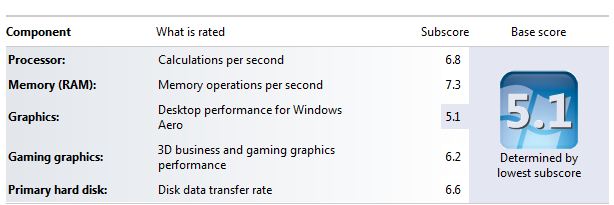
Had a tweak with the woeful tosh SSD today and managed to get it from 5.9 on the WEI to a much more respectable 6.6 and it feels snappier as well, the lag I felt with windows/programs opening compared to my Vertex 2 seems to be gone
used the following tool in default settings:
Guide SSD Tweak UtilityAttached Files:
-
-
OOhhh, that seems like a nice 'upgrade'. Did you uncheck everything, or is there anything you would recommend keeping?
-
I'm back on the build quality subject..
I've seen some user reports online of panels cracking and not working - after "normal" usage (I mean no drops or beating)...
What do you guys think?
I'm really lost, I wish there was a perfect machine
-
mines been perfect for the 4 months i've had it, still looks out the factory fresh and no evidence of weakness, it doesnt feel like using it is damaging it in any way seels solid and fine. the screen flexes but feels like it should be, not like its trying not to and likely to break if you get me
ai i unchecked the lot, think it was the super and pre fetches that sorted it as i had already manually done a lot of the tweaks, but very happy with that result tbh, makes the machine look a bit meatier on the old meaningless WEI
New Portege Z830
Discussion in 'Toshiba' started by Hoopsontoast, Sep 12, 2011.


![[IMG]](images/storyImages/PCBFront-Label2.jpg)
![[IMG]](images/storyImages/CDM-Random1.png)