Problems? See this thread at archive.org.
I fiddled with other drivers like 196.86 and 195.xx and dox's latest driver, but after those kept giving me real high temps I reverted to toshiba's default drivers, 188.29. I get the same temperature readings though. Under load, I get to 94 degrees Celsius, which concerns me. (with dox's drivers, I got to 99 C). Using GPU-Z I'm getting 62 C right now on low clocks but sometimes the clocks inexplicably go up and the temperature rises with it.
-
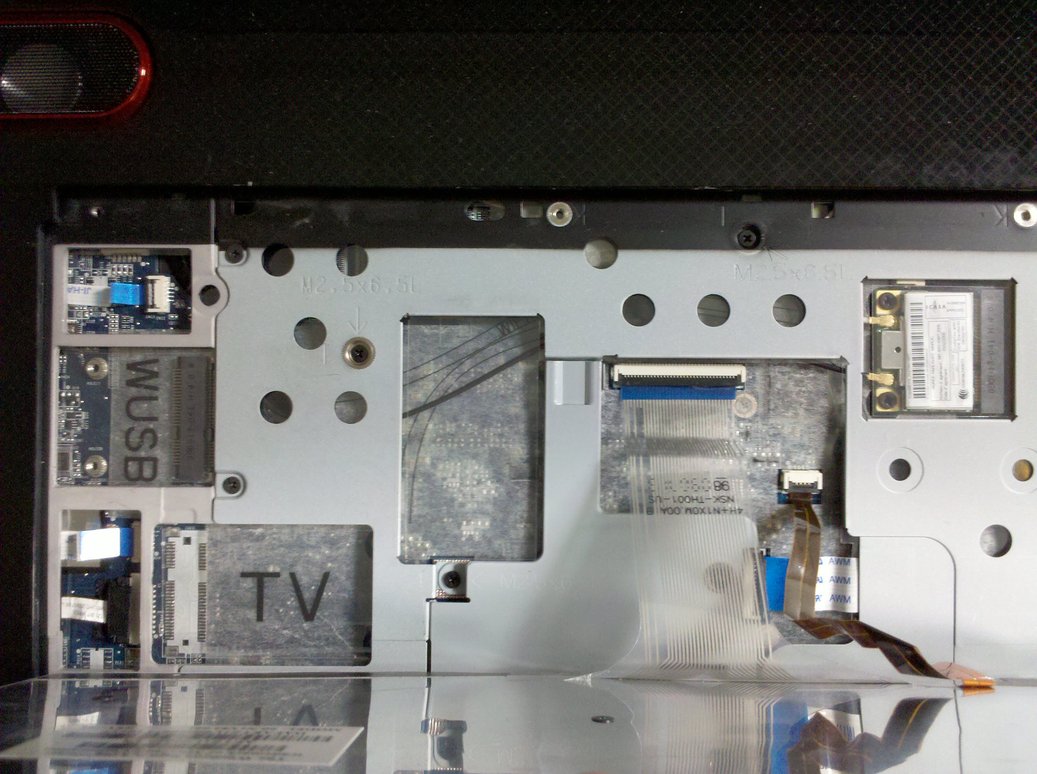
Took a pictures under keyboard on my X505-Q830.
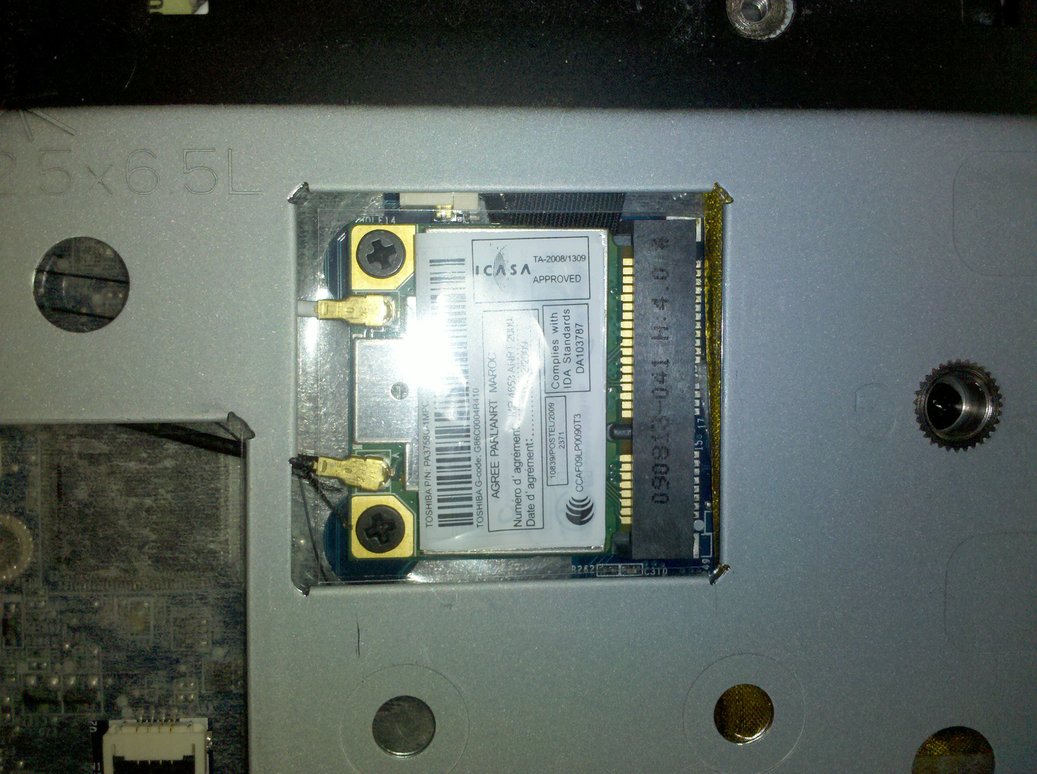
There are two half-length miniPCIe slots, one occupied by WiFi card, another one is free (originally intended for Wireless USB judging from marking - I dont see antenna cable though).
There is actually third (!) full-length slot, intended for TV Tuner (!), but unfortunately greedy Toshiba didn't even solder a connector for it
So miniPCIe SSD are not possible...
Replacement of WLAN card is defenitely possible, but not with a good one - only two antennas, as I've expected. Good Intels like 5300 require three antennas.
Should be still possible to put something like 5100 one in, not sure how much better than current Realtek it would be though.Attached Files:
-
-
Thanks for the info, Ingvarr. So the WLAN card can be replaced after removing the keyboard? How does the keyboard come off - is there a reference for disassembly anywhere?
I haven't had any issues with my wireles connectivity since I disabled the n capability (except being able to take advantage of the higher connection rates), but I haven't moved the computer too far from the router. I had issues, most annoyingly total loss of connection periodically, using n even when the laptop was very close to the router.
I think the X505 has a lot going for it for the money, but I am now considering the current Alienware M17x. If I go that direction it would be more expensive, but I think I'd like the RGB LED 16:10 ratio display. Using the DPI.text scaling in Windows 7 would be okay with the 1920x1200 resolution it has. I have a Dell Latitude for work with 15+" screen running at 1680x1050 and the text is a readable at 100% scaling, better at 125%.
Lee -
Holy crap. That's unreal. Are you sure nothing is blocking the intake vents on the bottom or anything???
I cleaned mine after running 24x7 since I owned it and got an easy 4 deg C drop. LOL.
My idle with powermizer is around 42C. Even overclocked running a stresstester, I don't think I went over 75. (Tho did max the power adapter out)
Ingvarr, nice pics. I could care less about the TV, but the WUSB would be grand! Finally upgraded my RAM to full 8Gb. Everest software, Sandra, etc show 4 mem slots, 2 filled. I'd have been happier if you'd have found the 2 mystery SODIMM slots. LOL Tho I think they are phantom from the chipset software. -
Peel off the plastic strip on top edge of keyboard - starting from right edge. You should make right edge to pop off first, little tricky, then slide the strip to the right and it will come off. Undo 4 screws under strip, slide keyboard to the left, lift the right edge, slide to the right, lift the left edge. Done.
I had high DPI display for 1.5 years and have completely fed up with it. Surely, Vista/W7 has very good scaling support, but it still far from perfect. My main gripe was that entirety of World Wide Web is done for 96 DPI - and looks too small on 150 DPI display if you look at 100% browser zoom. If you set browser to higher zoom, it kind of works, but slower and, most importantly, makes raster images blurry(even with bicubic interpolation) - so they look a lot worse than on non-high DPI display at 1:1 pixels.
Also a lot of other raster apps dont zoom well.
I didn't want gaming laptop that could not surf the net adequately, that's why I am not buying displays with DPI above 100 anymore.
If you considering m17x, look and listen to it first. Its freakin' thick, very heavy, and fans are completely ridiculously loud, even on idle (with a lot of funny wind noises when load getting bigger )
-
Thanks for the info and your opinion.
I have a current generation M17x now with the 1440x900 display which isn't very good in my opinion compared to the X505 1920x1080 display. I got it from Costco, so I have the 90 days to return it. Costco didn't have the M17x with 1920x1200 RGB LED display, and they haven't offered a build to order program for Alienware yet. They do offer build to order for HP Laptops.
I haven't pushed the M17x very hard. I like the keyboard, form factor and build quality. The weight is a little more than the X505-Q879 I have which is not an issue for me, and I haven't noticed a problem with fan noise under light loads. The touchpad buttons take very high effort to activate and the touchpad action is not as nice as the X505.
I might stick with the X505-Q879 and use the savings compared to the M17x to get some other goodies like a big LCD monitor for the desk. The laptop replaced a desktop that had reached the end of its life.
Lee -
Nice picture Ingvarr, quite difficult to get to those parts sometimes. + rep point.
-
Had a look in the shop at one of these today, and I have to say, they are really. I'm thinking of buying one, my only problem is that on inspection the screen wasn't great and the screen was flexing easily...
-
Just ordered one, X505-865 is what coming on Wednesday.
Will post up my little review then. Returned my G60 to best buy to get it. Didnt like the little 16' screen. -
well,after a few months with the x500 I can safely say that all that toshiba crapware is good for nothing.Ive slowly eradicated it from the system after freezes,locdowns and stalled shutdowns. Not so unpleasant and typical of a windows OS but am near nirvana with this great machine! What else is up folks? Kinda quiet round here. HAs everyone already upgraded?
-
It's probably quiet around here because using all the latest drivers with all the crap removed (or a clean install of the OS and install only the driver stuff you need), that this laptop is rather stable, quiet, efficient and just plain works well for most of us. Couple that with MS's surprisingly most stable OS and what's not to like?
Most folks come to forums to about things or find help for problems, and honestly, I have had the least amount of problems with this laptop and OS combo.
I stop here every day and glance around to see if anything new and cool has happened, but I don't have much to say as, like I said, it just works.
Oh, I did finally end up having to upgrade to the full 8Gb of ram, too many VMWare virtual machines and you will eat up the memory.
I also found some "suction cup" laptop feet that elevated the back of my machine by about 1 inch. Dusted out my fans and continue to run it 24x7 with 1 or 2 reboots a week just to "start clean". -
Help! I've just got a X505-Q870 and it's showing me an error about a problem in the cooling system, asking me to shut down immediately and take it to a service! However, I find that the temperatures are nothing out of the ordinary. What can I do?
-
go to pg 50 - scroll to post #497 - read post by bruin8uclap.
-
OK so, I've had my X505-Q870 now for several weeks and I love it so far... except the sound system. The problem with it is that I have the volume all the way up and can't hear it. I have wiped the hard drive and installed Win7 Ultimate. I didn't use the computer before doing this so I can't compare the sound to what it was before I did the wipe.
I don't know if I'm missing some software or if there is a problem with the hardware. I have tweaked every setting I can find that has anything to do with sound and it has not helped at all.
Can anyone shed some light on this? It seems to me I should be able to watch a movie on this computer and be able to hear it at the same time. I have even tried connecting external powered speakers and they are louder but still have to strain the hear. I admit I am a little hard of hearing but this is not all my ears. -
Bought ones myself - thanks for the lead. They great, elevate back for better airflow, higher screen position and more comfortable keyboard angle - and easy pop off for transportation
-
Hello
I Just buy a Qosmio X505 q880. I would like to ask if its possible to use the headphone output jack as rear audio channel. With SmartAudio tool that come pre instaled with the laptop, at "sound director" tab there is an option " multi stream ". If you select it and press the test button it seems to send the sound separate to the laptop speakers and the headphones. But how can i apply this and use it to make a 4 speaker surround system. I just need to use the headphone jack as rear LR rear speaker.
I wish somebody to have a solution for this!
Thank you very much. -
guys, I created my recovery disks already. now if I format all my partitions including the recovery partition and make a clean w7 64bit installation, can I go back to the factory settings including recovery partition and all the crapware or not? if I can, I will make a clean installation.
I also posted some more questions here, if you're all x500 users, maybe you can help.
-
Guyz, i apologize if someone asked this question before but i searched and nothing to find.So for people who own the models with res 720p (1680 X 945), is it good?I mean are you pleased with that screen? because i want to buy the Q880 but its just too much money!
thanks.. -
I am pleased with that screen. It's quite bright and resolution is just alright for gaming and general work - not too big, not too small.
-
hi guys does the Q860 have dual hhd bays?
and when is qosmio refersh coming with nvidia g4xxx series? -
Wow this thread was huge for a while and then damn it went dead, i kinda miss this machine now, now thinking why i should of never traded for it.
-
bump for a new user.
-
Are there any review for the Qosmio X505-Q890?
-
There's a review up now on Laptopmag.com
Toshiba Qosmio X505-Q890 - A Review of the Toshiba Qosmio X505-Q890 -
Well, now after half a year with X505 I am finally moving on. After 4 weeks of wait I've just received my new shiny mobile workstation - Lenovo Thinkpad W701, which will be a base platform for building ultimate laptop of my dreams (considering awesome Lenovo openess and also MXM 3.0 video
)
After half a year using of X505 as my all-around PC, I would not rate it as high as X200 I had before. X505 is definitely very decent machine (especially for the money), but with very pronounced skew to "pop" sector. Which means a lot of things I didn't like at all, in fact I swing exactly opposite direction, that's why enterprise-aimed W701 will be my next PC.
I still will cannibalise some stuff from X505 for my new W701 (as bluRay player for example) The only thing I will miss is Harman Speakers, but, well, there are several of portable USB speakers with great quality around, and you can improve that easely.
Toshiba core platform on the other hand (screen, chassis, etc) can not be improved much, especially considering Toshiba traditional lack of service information and using harder-to-tinker assembly techniques in later models. Hell, they even choose not to solder in second HDD connector, how much this saves them, several bucks?
My only hope they will improve some day, I had very good experience with Toshiba overall (niggles excluded). -
Ingvarr, you do digital editing right? Why not go for the W701ds? Personally tho, I'd still wait for the 6 and 8 physical core processors to make their way over to the laptop side.
-
No, I am a graphics programmer, and I want my personal laptops to be powerful all-rounders both for work and play.
I don't need second screen much, and it makes W701ds quite heavier and thicker. And I've got quite good deal on my W701, nearest W701ds would be almost 1.5 times more expensive. I mean, all this money spent is 100% worth it, but no need to go totally nuts here
From my experience I feel like even 4 cores (8 HT) are grossly underutilized most of the time. I am considering switching CPU with Arrandale i7-620M, which provides more dual-core performance while being extremely power-efficient. Or to i7-940XM, haven't decided yet. -
The 18'4 was great and a really amazing multi-media machine, been thinking about getting it again but also wanting to move on and i do have an m17x R1 decked out, i would always go for a 940 extreme if you could afford it, your going to have a Quadro FX 3800M right? I really hope toshiba improves their performance and better workmanship too but their tech support isn't that bad. The price for the X505 is really good though especially the guy selling on here. The 18'4 does come in handy in terms of screen real estate space.
-
I developed dislike for 16:9 screens. They far too squished for ordinary work - many useless horizontal space, scarcer vertical space.
And actually 17" 1920x1200 screen has a lot more screen real estate than 18" 1920x1080 screen - and it's vertical estate, where it matters most.
I have Quadro 2800M and it's enough for now. When it will become aged, I will replace it with MXM 3.0 card whatever fastest will be available (currently Radeon 5870M seem to be the best option). -
Yeah 16:9 do become annoying after a while i do agree, yes you can flash the firepro one to a 5870 which is currently the fastest single gpu Yeah i know it has more realestate 1200P than 1080P that's one thing i hate about the current gaming computers. I have a dell precision m6400 also. Lenovo rocks best workstation the extra screen is great though, glad to see their using a rgbled panel now but the CCFL ones still have higher contrast though.
-
It's awesome for viewing many columns of data tho! and of course, for those who watch 16:9 widescreen blueray movies which is, I suspect, what Toshiba was aiming for here.
-
That's direction a lot of manufacturers follow recently, it also makes easier for them to trick user into thinking that they getting "same or bigger inch diagonal", which, in fact, less screen area then same 16:10 diagonal => less pixels, less expensive. All under guise "'tis better for movies".
Dunno about other people, but my primary notebook use is not for movies (if you ask me, buying high end laptop mainly for watching movies is just plain stupid )
When I need to watch movies, 16:10 does just fine. It's not such a massive difference for movies anyway, since most of them done with huge cropping allowances in mind.
And, man, antiglare matte screen - feast for my eyes. No more looking at yourself like in freakin' mirror Somebody truthfully pointed "yes, glossy screens are cheaper to make and perform slightly better in the dark measurement rooms, but you don't tend to actually
work in dark room, do you?"
-
I custom fit a privacy filter on mine, so no glare. Besides, kinda have to have that for where I work/what I do. Never thought about the shiny issue. Still, tho, no issues at all with mine, serves the purpose. Am considering one of those Seagate Hybrid SSD/7200 RPM 500Gb drives. Maybe for both C and D and drop the Small SSD. Few seconds of boot time saved over my space requirements.... Really wish there was a 2TB/7200rpm laptop drive out.
-
Seagate Hybrid is no good, it caches only reads. You could as well use ReadyBoost for exactly same results (and more cache size/more intelligent caching too).
I don't really see any alternative to "proper" SSD.
I will be using Vertex 2 60 GB as "system/fast" drive and probably Scorpio Blue as "data/bulk" drive in the future (for now will keep my 320Gb Scorpio Black). -
That's the dilemma. SSD isn't big enough esp. based on cost. I'm afraid I'd eat up dual 500Gb's awfully quick too.
my 1tb external esata is about full now as well. That is where your usage and mine differ so much. I need lots of space and fast reads. But can't switch to desktop for many reasons. I have 2 large NAS drives on my network but for what I do, they're not fast enough. Great for archiving/holding stuff I'm not actively using. After bumping my ram to 8Gb, I'm not bumping into that barrier yet. Just space. -
Are you sure you need both fast random reads and linear reads?
SSD is good for small random read/write acceleration, like OS. These are easely limited by sane space requirements.
RAID0 is good for both space and very fast linear speeds (like video editing). -
Key word is sane space requirement. Toshiba doesn't support raid so I have to work within the constraints there.
Cost per/GB of SSD is a huge constraint as well. I love the speed but the cost of it is a bit much.
That is why I was considering the hybrid drives. 500Gb of space, 7200rpm plus a bit of SSD to help with the read caching. As far as linear reads, not likely. I work with many different virtual machines on a daily basis, Starting, stopping. Tho I keep my drives defragged with diskeeper, it would still be random reads. (Even tho the "drives" of the virtual machines are single files) -
You can do reasonably good software RAID using Windows built-in disk manager. Only restriction that you can not be system drive I beleive. Also slightly more CPU load, but that should not be issue with quadcore i7 at all.
As for supplementary SSD/ReadyBoost read cache, temp drive and swap you can use ExpressCard SSD (can't be used as system drive sadly). I've used 24GB FileMate SolidGo (with internal SATA interface) with my X505, and it gave me very significant speed boost. -
Nope, can't do the system drive, and it's a bad thing to span/raid, etc across external drives, even esata just because of the hot plug capability. I've considered the express card SSD's and may very well use that soon, esp if I switch the SSD primary drive out for a 500Gb drive. USB readyboost doesn't provide any real gain, I've tested and played around with that. Not on these machines anyway, good to hear the expcard ssd seems to.
I'm looking at the new Seagate Goflex drives with the swapable interface. They have esata, usb 2, usb 3, firewire, and network interfaces that interchange with all the goflex series. I'm not a huge fan of Seagate. (past issues) but I have a few and they still run fine. Anyway, that's another option I'm considering.
Gonna miss chatting with you when you disappear off to the Lenovo forums. You'll have to stop by and say hi every now and then.
-
I will keep checking up on Toshiba forums so often, after all, I had a lot of Toshiba experience up to now
edit: btw, have you considered something like this?
http://www.google.com/products/cata...75CJOUzQXl8MmVCQ&sa=title&ved=0CAcQ8wIwADgA#p -
LOL, that's a brick and a half!!!! Good find. I found a unit similar. Might have to decide and maybe re-arrange my space allotment here at home. Looking at the local store websites at the expresscard SSD. they don't have the smaller model you suggested but they do have the 48Gb one.
In fact, they have the Wintec 48Gb and a Transcend 32Gb. I'm familiar with Transcend and have used their products in the past with no issues. Not that familiar with wintec. Looking at 16 reviews, a few folks had issues, rest had 0 issues. Both would make pretty serious caching capabilities. (or I could put my primary vmware machine that gets used EVERY day on it.) lol hmmm. -
Don't buy a Transcend one, it uses internal ExpressCard USB for data transfer, hence about 30Gb/s speed cap.
Go for Wintec one, it's the same model I have, only bigger. This Wintec/Filemate SolidGo is the fastest ExpressCard SSD out there, with internal SATA controller.
Here is the review - http://www.modsynergy.com/review207.html
And I can confirm that speed figures are pretty accurate. -
Oh, I see. I didn't glance at the specs in depth.
Yeah, I see that the Wintec will do usb and the PCIe thru the expresscard, whereas the Transcend is usb 2.0.
Explains the price diff. I'll keep it in mind while I continue my research. Not completely out of space but within 3-5 months, I'll be desperate. Planning ahead now and doing my research on workable/portable solutions. Back later. "quittin' time at work"
-
Actually the vertbatim 32 gig express card ssd was pretty good i read and quite fast 300 read and write speeds and quite expensive of course lol. Yeah Ingvarr was awesome with the machine and the knowledge he knew. What are you going to do with your Qosmio now? Its a big fail that you can't run raid on this machine!
-
I've tried Verbatim 32Gb first, and it wasn't good at all. Surely it was good in benchmarks (and this only on clean new drive), but not in real usage. I especially couldn't stand the fact that it caused X505 audio to stutter! Also it had these sporadic "system pausing" issues on heavy usage after it was used for a while. So I've returned it.
Assuming W701 goes through initial loosening 2-week period without problems, X505, like all my previous laptops - to eBay it goes. -
I hope it goes all smooth with that thinkpad, they are amazing machines, sucks without a backlit keyboard. Do you prefer rgbled or CCFL dual lamp?? I agree with you about ssd its horrible and i can't imagine it slowed down so fast, this is the reason why i still prefer the actually drive, i really only knew about it because of the ssds in the sony vaio Z cannot take out the 1'8 drive which sucks. How much would you sell the machine? I have only bad luck on ebay.
-
Actually W701 has two ThinkLight white LEDs at the top bezel, so it could illuminate keyboard and partially the table in darkness perfectly
I definitely prefer RGBLED. Its like 2x times brighter, and colors just insanely rich - I had to tone them done about 10% because I feared that my brain will explode
Only one thing I didn't like about RGBLED is that I see white as having pinkish hue (same happens with OLED screens to me). I did read that this happen because some people like me have slightly different red-reacting cells in their eyes (they react to slightly different hue of red). But I've pretty easely solved this using manual Windows 7 calibration.
As for SSD I am getting me Vertex 2 soon for the system drive
I dont expect to sell X505-Q830 for much, but I don't sweat it. It sells for whatever it sells, better sell it now then have it lying around uselessly just devaluing I've sold my X200 last year for about 500GBP and that was quite a good price for almost 2-year-old machine.
-
Hey sorry for the late post just didn't think it was important to answer. Yeah i am happy that the w701 is offering a rgbled screen. I am getting my alienware m17x R2 with a rgbled screen and i can't wait to compare my precision and that one. I have had the samsung before and the reds were horrible! Do you have a Samsung panel? I love Samsung products! How much are you going to sell your Qosmio? I am getting my R2 replacement with a 128 ssd most likely the samsung one once more again.
-
I intend to sell X505 on auction, so it sells for whatever it sells.
I've answered a questions about W701 in appropriate thread, to keep this one from more offtopic - http://forum.notebookreview.com/lenovo-ibm/504045-thinkpad-w701-owners-lounge.html#post6522549 -
Oh Alright, just wondering. I have so many freaking laptops LOL. That X505 was a great entertainment machine! What were your specs and your price for selling it? Wanting to trade lolz!
Official X500 Owner's Lounge!
Discussion in 'Toshiba' started by Red_Dragon, Oct 26, 2009.