Problems? See this thread at archive.org.
That's what I believe as well but since toshiba is the most thick laptop it should have more than enough cooling. If dell can provide overclockability in the alienware then toshiba should do that in their qosmio. But I am still happy with it since I can overclock with throttlestop. Only problem is with the gpu drivers! Does anyone know if I change the gpu bios if I will be able to use nvidia driver's and if they will work?
-
Anyone with 9800m GTS SLI using latest drivers with no problems? I was using the 267.05 but had problems in nfs shift when SLI (not happening with toshiba's drivers) and call of duty modern warfare 2.anyone modified the drivers and tested them working? Thanks in advance!
-
anyone who knows how to install the latest nvidia sli profile on driver 186.42 ??
-
Probably I am wrong and it is a driver problem..I used force alternate framerate 2 and everything runs fine... Is there a program to test both gpus? Thx!
-
186.42 drivers from toshiba are stable but I can't use SLI in new games.. I cannot update the sli profile to newer than profile 4 since I need 256 or higher version.. Any suggestions?
-
Did you find that volume limit option tunay?
-
No one is answering my question
 ! I have a massive problem with drivers. When using toshiba drivers the laptop works with no hangs up bt I am limited to sli profile uptade 4. After that I cannot install the next sli profiles. When I change the inf to install the nvidia driver the laptop seems to work okay but when in sli and playing more than 10-15min I get blue and red colours then the game comes back until finally black screens. It never goes more than 70c in sli so it is not the gpu. I have used throttle stop so that cpu does not throttle, I have used the gpu throttle off in registry but I still have the same problem. Someone with dual 9800m GTS SLI using a modified 2xx series driver that works in sli? Please I am kind of desperate since I have large amounts of fps loss using the 186.42! I even e-mailed toshiba but guess what? No answer!
PS: When using the single gpu with any driver it works fine. Problem is only on SLI option. I thought I had a defective gpu but with 186.42 I have no hangs up with sli. 3dmark06 passes with any driver (which I thought was a good test for the gpus). Stability test with furmark passes with any driver again (I use the multi gpu one). I just can't understand what toshiba drivers have in them and they work in the sli... -
Mate, I would help but I've only got the low spec version sorry.
-
Ops, I've forgot that. Will check it out later today
-
The fix was the same thing as Riva tuner, but the difference was he was charging for it via paypal. Basically people got to pay for something that was offered elsewhere for free. SCAM!!!! The Toshiba US forum does have a solution offered that helps the single GPU people and it has been there for some time now, it is the riva tuner fix and it has worked for all single gpu users. The Sli people are suffering a different problem unfortunately. Maybe you can contact one of the groups that make custom drivers and see if they can tweak your driver to get the functions you need in a newer driver.
Oh, and that is the same guy that was selling the fix, posting here as a user of the fix. He screwed up and used the exact same username here that he had used at the Toshiba forum when he first posted that crap there. I just checked the deleted by moderator logs over at the Toshiba forum and found his old post in the logs.
If it was legitimate, why pretend to be a satisfied user???
I sent Tunay a copy of what was posted at the Toshiba forum with the username that was used. "akshatrathee"
I can send screen shots of the original post from there if needed. -
Where's dserie gone I had a few more questions for him on that LED screen of his.
-
Thanks for the copy, I've saw that.
People like this should be banned from internet forever
-
I'm booting up my Qosmio after several weeks just for you Stand by
EDIT;
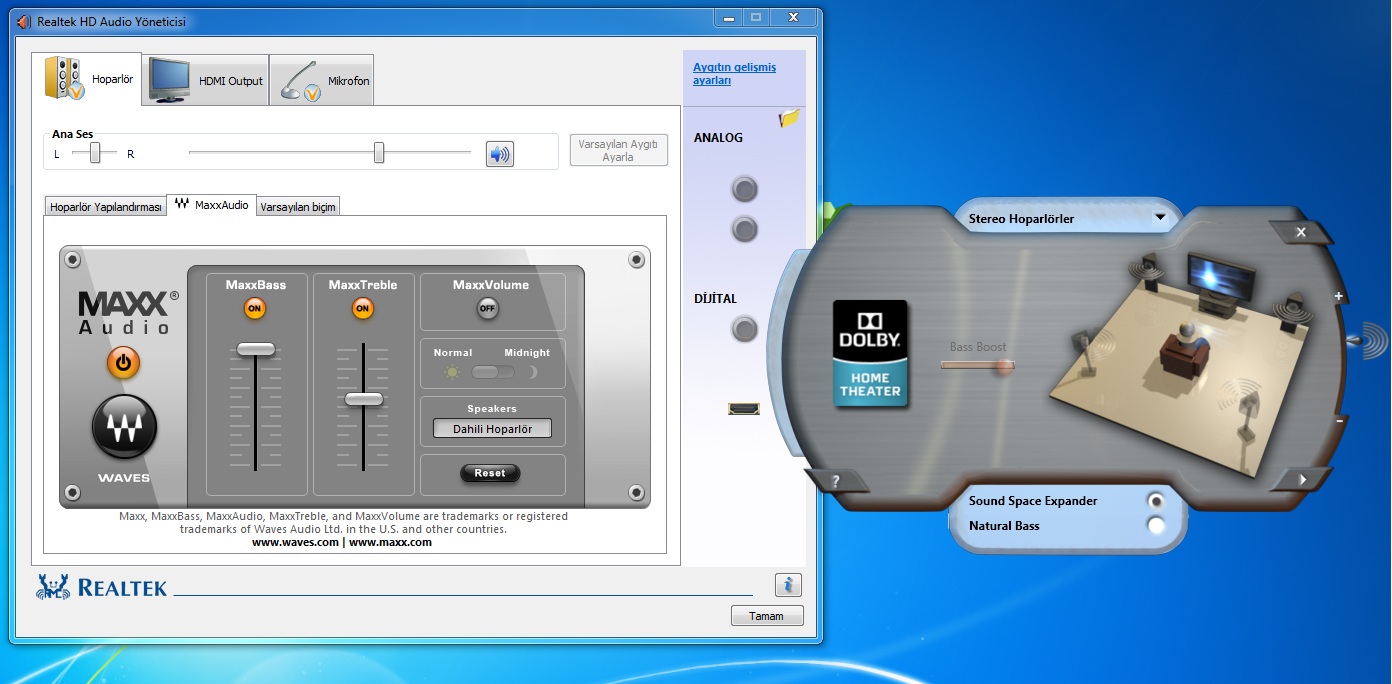
here you go
It should look like this, sound from my Qosmio is just amazing!
MaxxxVolume should be off, this is the part that makes most diffrance. You can set that other as you want to be clear. But I like it this way.
Let me know if there is anything.
This is the fix, 5$ thx! Better den Toshiba what can make....
Attached Files:
-
-
The moderator logs at the Toshiba forums have a dozen posts by him claiming that the fix will solve a dozen different problems for totally different systems and all of the messages were copy and paste messages containing the exact same content.
He was banned there too, and if he comes back we will just ban him again, I already left word for the other user Mods and the Admin to keep an eye out for his posts under any account name he might try to use.. -
Yep, posts are gone now...
BTW, read my post above, the ultimate sound fix!!
-
Good, I hate the idea that the guy was ripping people off that way. Now I will just wait and hope that he makes another appearance at the Toshiba forum so I can have the fun of removing his posts again.
I actually have fun doing that, and it has been very quiet recently, most everyone obeys the rules there, so I get bored with nothing to do. hehehe.
-
hahaha, I actually laught at this
-
Thanks a bunch Tunay, your effort is much appreciated (+rep!!)
Looks like I just needed the new version of realtek manager though, cos that looks similar to mine but doesn't have those options. -
This is actually the old version.
Go to Toshiba's driver download site, choose vista x64, download the sound driver, BUT this is important, you MUST install it in Vista SP2 mode.
Otherwhise, this won't work
Let me know how it turns out for you!
I can upload it for you if you want me to
I'm not using my Qosmio any more, but don't forget that Legends never dies
-
Ohhh ok I just downloaded the latest version from the realtek site, but haven't installed it yet. Been playing some guitar lol. I'll get the old version now. Thanks!
Edit: I installed the vista 64 version, run in vista sp2 compatibility, and I don't have that maxx sound option that you do in your screenshot. Also, whenever I boot now it says "Soundchanger.exe has stopped working". Sound still works though. I'd like to be able to get that maxx sound thing to see if it actually works, but I'm not actually that fussed lol. -
HEY! I do also play guitar Played for 9 years, this is my 10th
However, backtotopic, let me know how it turns out for you
-
That moron came back to the Toshiba forum. HAHAHA I guess he doesn't know that Moderators are notified about new posts, and since I put them on alert, all posts are being viewed critically to spot such abuse.
-
Nah it's not working. Tried again using driver cleaner first and uninstalling from device manager too but still no luck. I just get the same menu as before.
Its my 3rd/4th year now. Can't remember exactly. -
haha I wonder how long he is going to continue to do that
-
It is the v1.95 you need to install. Was that what you tried?
-
Yeah that's right. It shows that version in the top corner of the screen when I run the installer.
-
Wow, now that is strange!
I have done that before, I did install another version to test it out etc. I got it back by reinstalling my Windows, but it should be a way around...
You have cleaned your registry, restarded and then tried to install 1.95, is that right? -
Yeah. First time I just uninstalled, rebooted then installed 1.95. Then I unistalled, used driver cleaner, then rebooted and installed 1.95. Then I uninstalled, used device manager and selected delete software, used driver cleaner, and when it restarted I disabled wifi so it doesn't auto update, and its still the same. Now I installed the latest version from realtek to see if they've put the maxx audio in the new versions but its not there. I've given up and just had dinner hahah.
-
hahaha, I belive this is somekind Toshiba version of this driver. But however, don't tell me that clean install is the only way around?
-
I don't know. It didn't work the first time so I did a clean install to make sure and had the same issue. Do you ever get the message "Soundchanger.exe has stopped working"? I got that with the vista x64 version so I thought it would be best to go back to a newer one. And because I was putting a newer one, I decided to go for the newest one, which is in my view no different than the one on the Toshiba site, but the file size is about 25 meg larger.
-
No, I never got that. Or any type of crashes under Vista, I loved vista 64-bit, I got some under Win7 tou...
-
Doesn't cheesyzombie have an intel chipset single GPU motherboard Qosmio? I think that tunay has the Sli nvidia chipset on his, that difference may be why he is having an issue running that sound app.
-
Good point priest king. Thanks for the help from you guys. You lot should be employed by Toshiba.
-
I do have Intel chipset, 9800M GTX
spec in my sig is my other lappy I use atm.
-
Anyone who knows how to test my memory of the my dual gpus? Thanks in advance!!
-
Finally nvidia released a display driver that supports qosmio x300 sli!
The only problem I have now is that in some games like batman arkham asylum and modern warfare black ops I guess random freezes which when I press control alt delete brings up the task menu and when I select the game it continues with where it froze without any problems! Anyone know why is that happening? I believe its the fetching of additional vram from hdd (since my vram is always nearly maxed). Can I disable that? Thanks in advance! (this problem occured also with toshiba's drivers so... anyone knows any solution?)
Btw driver version is 267.24 which is still beta but it works well! As good as the 186.42 but with the sli support. I still have the same issues though... Can the freezing being caused by any of my programs or can this be hardware related ? -
Try setting up readyboost on a flash drive and see if that helps with the freeze ups. If it does help then get yourself a good SSD drive.
Amazon.com has a sweet deal on an OCZ Vertex 2 120gb drive for $204.00
http://www.amazon.com/OCZ-Technolog...ref=sr_1_2?s=pc&ie=UTF8&qid=1299169339&sr=1-2
The performance of most SSD drives blows away any regular hard drive ever made and that includes Velociraptors. Don't get a Kingston SSD drive, they suck badly.
You will get more of a performance boost from an SSD drive than you would if you increased your ram to 8 gb's, but that would not hurt either.
![[IMG]](images/storyImages/ATTO_Benchmark_ICH10.png)
![[IMG]](images/storyImages/Iometer_Random_IOPS_ICH10.png)
-
Well I am not sure if its the memory now though. I have searched other forums and the batman arkham asylum and cod black ops randomly freezes to others as well with different systems...
-
I can confirm that judgment, Black Ops freezes randomly here too! But since the last patch I have not seen much of it. Did you buy the game?
-
Yes I bought the game. But it freezes randomly. some times it takes 2hrs some times 10min.. ctrl+alt+del then cancel and the game continues smoothly. Any suggestions?
-
Not at the moment, I assume that you have the last patch?
It happends to me too sometimes... -
How can I check about the patch? btw is it normal for my cpu to hit 90% ? I have a core 2 duo x9100 dual core at 3,06ghz..
-
I have no idea about that, steam patches it autmaticly for me. Yes, BlackOps does use a lot of CPU. Nearly 100% on my T9600.
-
I reinstalled the direct x sdk and the freezing problem seems to be gone! I will test further and let u know! I had a reply from toshiba for the drivers requesting my serial number etc and to look into it but since nvidia released drivers supporting my laptop I dont know if I should reply.. Well freezes returned! Random again!
-
yep. It seems like to be the game. I think this has also been discussed before on NBR gaming section.
-
I run it on single gpu mode and it seems not to freeze. So any ideas?
-
It is random, happends to me too sometimes... I have no idea actually, even don't know if the problem is still there or not. I can play for hours without a single crash then another time can't play even 30 min without a issue...
-
Well for me when it happends I see the hdd indicator blinking. SO I am kind of certain that it is the turbocache causing my random freezes since 2 gpus need more ram eg 512mb each that lets less than 1gb for the game to run.. If I disable paging then the pc crashes to blue screen! My ram is tested with memtest and past 90 tests in the thorough mode! So its not ram..
-
I can confirm that the freezing problem its due to turbocache. So my ram goes to its limit hdd is a bottleneck and theres the random freeze while the computer still works. I have used my 8gb usb stick as ram with ready boost disabled the memory paging from hdd and voila the game run for 1 hour with no freezes! (Currently running nvidia's beta driver 267.24 which amazingly supports qosmio x300 sli gpus!)
-
That is strange.
What about to send it to Toshiba? What if there is any problem with your GPUs?
Official x300/x305 Owner's Lounge
Discussion in 'Toshiba' started by Bartlett, Oct 4, 2008.