 Problems? See this thread at archive.org.
Hi, my first post. but have been reading this forum for some time
The problem I have is: For some reason, my x300 runs slow, before formating, I checked performance with Passmark and super pi, and it was on par with similar cpus, but now, I get about half the performance...
Have reinstalled win 7 64bit, tried various combinations, no updates, just drivers, do updates then drivers, cant figure out whats going on
The cpu runs very cool even when 100% (about 66C)
IIs there some specific driver thats missing and causes this?
I used the toshiba drivers, as I had in the previous installation
-
Make sure that you have the newest chipset drivers installed, and the latest Nvidia driver from the Toshiba downloads. It's an older driver, but it will work.
-
Ok, got it working (I have the intel chipset)
I also got the FN keys working.
I installed first the TVAP, then the flash cards utility, but when I pressed a FN key, an error message came up that an application had crashed
Uninstalled and reinstalled many times, but no luck
What fixed it was:
I used toshiba software installer for win7 (downloads all drivers etc automatically)
After intalling some drivers automatically it seems that it got in a restart loop
But the packages were saved in C:\toshiba update\packages, and the flash cards utility was a newer version
So i uninstalled flash cards, restarted, uninstalled TVAP, restarted, installed the new TVAP that the installer downloaded, restarted, installed the new flash cards, restarted, and all OK!
Also my cpu was getting hot, so I remounted the heatsink after polishing it, and used arctic silver, and added some small washers under the spring, to put more pressure between the heatsink and cpu
The springs still feel very weak -
My Qosmio X305 was stolen about 3 weeks ago.
Now no laptop... -
There are lots of qosmio x300 cheap on ebay though I would not recommend buying one nowadays! Although I am currently using one, its too chunky for what you get nowadays!
-
Just bought used Asus G750JX for only USD1000.
Used for less than 3 months, and surely still under warranty.
Really an upgrade from X305.
What I miss is its red colour.
Have to choose between Asus G750JX and Qosmio X75-a7298.
Finally choose Asus because its cooling, and price which is usd230 less.
In return, I lost 256gb SSD, and its red colour.
Absolutely will buy X75 if not because of this Asus deal. -
Thats cool!
 I am still using the x300 and its starting to show its age. I was thinking to get an X75 for myself (it looks good saw it at a showroom) but after the bad experience with the current one (until they gave me a new unit but that took them 1year!) I am skeptical of going to toshiba again. Moreover this
MSI Dragoon Army got my attention! For its price I believe it gives amazing specs..
I am still using the x300 and its starting to show its age. I was thinking to get an X75 for myself (it looks good saw it at a showroom) but after the bad experience with the current one (until they gave me a new unit but that took them 1year!) I am skeptical of going to toshiba again. Moreover this
MSI Dragoon Army got my attention! For its price I believe it gives amazing specs..
-
Hello again guys! Long time no see! (busy with studies^^)
I just checked here for fun if there was something new posted about the gpu drivers from the x300.
And judgments post about him installing the newest driver and then change back to the 280.26 catched my attention.
Since i want to try it out aswell which dirver did you exactly install from the nvidia website before rolling back to 280.26, judgement.
Thanks in advance! -
Hi guys, I haven't posted in this thread for at least three years as I sold my X305 (9800m gtx, Intel P9600 etc) to one of my friends.
But he is having problems with the old girl and seeing as I'm a bit rusty with the qosmio I thought I'd ask you fellas who are probably a bit more up to speed.
Firstly its getting hot, like 90-100C on the gpu (the cpu gets pretty toasty as well) during gaming and we are not sure why, The fans have been replaced, new thermal pasted applied heat sinks cleaned, What else can we do? replace the heat-sink? (do they wear out or fail eventually?)
We have also replaced the graphics card (as the first one died) with a gpu from ebay which supposedly had been re-soldered with a leaded solder so that it handles heat better, but it seems to be on its way out as well with graphical glitching and crashing in games (I believe the overheating issues are the root of this problem tho) going to try baking it. Has any one else had any experience with these supposedly better replacement cards -
Well the last one working for the x300 SLI version is the 286.xx though v-sync does not work and thus was a pain for me. 280.26 is the final driver that works well on the SLI version and that is outdated! I am planning on changing this laptop in the future though I do not game that much anymore. I will probably move to a desktop custom build by me and get a thin laptop (I got a vaio for my brother and while it is thin bvattery life is around 6hrs has an i7 and a decent 740m so it can game (not everything on high, ultra) thus I am leaning towards something similar as my laptop. Back to topic I had tried various 3xx series drivers. None works for SLI since hybrid sli support was dropped by nvidia in the 3xx series. Well lets be honest its an old laptop old technology so we cannot ask for support can we? FYI last driver I tested is 320.49. If you want to use the latest drivers from nvidia you can. Problem is you will be gaming on the single 9800m GTS. The other gpu can only be used as physx. For me thats a big loss of FPS and thus did not make the move to those drivers.
-
Well I had overheating issues with my laptop at the beginning. My version is the SLI version so not sure if its similar but heatsinks do wear off. Mine caused the overheating towards my GPUS. What I did was change fans, heatsink and replace thermal paste with arctic silver (I think 5). Moreover if you haven't got 2 fans then adding the 2nd fan will make the difference. If the motherboard does not have a port for the 2nd fan you can connect both to the 1 available port by modifying it. There is a guide in this thread I don't remember who wrote it though. It been a long while so I am not following this threat regularly.
-
Thanks for the answer judgment. i'll share my experience asap with you guys ^^
-
It has got 2 fans and they are new so we'll try replacing the heat-sinks and hopefully we wont keep frying the gpu
Thanks -
Hello everyone and sorry for my english.
I have a qosmio x300-15u with the MCP79 chipset. After upgrading the CPU from Q9000 to Q9100, I changed the thermal pad with a Phobya 5w \ k 1.5 mm, and lost the old one. Mcp at idle is 63 degrees while gaming pc turns off. What can I put on thermal pad mcp? What is the right thickness and the size of the thermal pad? Thanks to all the answers
-
Just check all your other temps, something else maybe getting hot?
-
no only mcp it s hot...in gaming over 99 degrees
Cpu all 4 core 45 degrees and 9800m sli around at 53 degrees in idle
The problem it s mcp\ 9400m g after chenge the original thermal pad. -
Ok, sorry I misunderstood you as to what was getting hot and causing the shut down.
Chances are if the replacement thermal pad isn't as thick as the old one there will be poor or little contact between the mcp/9400m and the heatsink. You can put two layers (or more) of thermal pad to try and get the extra thickness.
I have had 4 layers of some thin thermal pad on my old m17xr2 so it definitely works.
Otherwise the replacement pad isn't up to spec which I think is unlikely -
The thermal par makes contact with the heatsink but with poor results. And if I tried with a copper mod Cooper? You know the measures of 'mcp and distance with the heatsink? I have a copper pad that measures 15x15x1mm ... according to you okay? Alternatively I found a thermal pad modeling called t-flex can go well? 100MMx15MMx1MM Laird Technologies T-flex
-
I would just try out another pad on just in case the contact pressure is not enough (having said that your judgement is probably better then mine as its been a while since I have had one of these machines apart)
Copper is risky as is has no give and I don't know the exact measurement between the mcp and heatsink. If you do try it use thermal paste on both sides of the copper to help the heat transfer and closely monitor all your temps.
The t-flex thermal pad has the same heat transfer rate as your current pad so there is no advantage of getting it over the phobya pads.
The only other helpful thing that I can think of is for you to contact Toshiba and see if they will sell you a genuine replacement pad.
Does anyone else have any ideas or input to help this guy out? -
Meanwhile, thanks to your help kenny. I wanted to replace the thermal pad Phobya because I noticed that the thickness of 1.5 mm fathers is too much even if well pressed and not dissipate heat well. I was thinking Tflex because it is a pad modeling, similar to the original lost, and should fit well between the mcp and the sink. If someone has a x300 with the nvidia chipset please can you tell me with which pad has replaced the original one?
-
Hi,
I am new to the forum :hi2: and have been trawling through it in the hope of finding a way that I can update my x300-13w with a more recent graphics driver. I can see that the various implementations of the x300/x305 laptops differ and not all drivers fit all devices.
I have tried various driver sets claimed for fix a variety of sins, but whenever I use any drive other than the Tosh one I do not detect the correct video device. I think I have the hybrid intel tri-SLi 9800m GTs and 9400m orgy.
Has there been any success in finding a modern driver set for this system?
Many thanks
-
Nice you got the king of the x300 range, which has the 9800m GTS Sli and 9400m orgy (haha that made me laugh)
This is a partial quote of what Judgment posted a while back hopefully it answers your question
-
Thanks, I knew there would be something useful in there, but heavy reading from #1
So basically I am screwed :/ I am on Bios 1.8 and have tried various drivers cited as worked with zero success. Oh well.
Thanks Toshiba. <.fail.> -
Try this: NVIDIA DRIVERS 280.26WHQL - 64 bit windows
OR
NVIDIA DRIVERS 280.26WHQL - 32 bit windows
Let us know if it works for u. For me its the final version of drivers working without bugs.
If anyone knows how to update the sli profiles I would be grateful.
NOTE: just tried it myself and yes it does not work, I don't know why since it is the same version I have saved on my hdd. If anyone knows a free place I can upload the 280.26 drivers that work pm me. -
I don't know how much this will help, but I do remember having a similar issue a long time ago.
After installing incompatible drivers, I was unable to roll back to the drivers I'd been successfully using previously.
I was able to recover the situation by uninstalling all graphics drivers (and removing the driver files so Windows couldn't automatically reinstall them when I rebooted), then reinstalling a bunch of the toshiba crap from their website. THEN I could reinstall the correct drivers with the three GPUs correctly detected.
My assumption was that something somewhere in the Toshiba bloatware was meant to be controlling the hybrid SLI side of things, but got overwritten/disabled when installing the incompatible drivers. I don't know enough about how the setup works, to know whether that assumption is at all plausible.
Unfortunately it was a long time ago, so I can't remember what particular package needed to be installed, but hopefully this might give you somewhere to start at least. -
Okay so I was testing random drivers and found this: LaptopVideo2Go: Drivers - 32bit and LaptopVideo2Go: Drivers - 64bit . These drivers rock! I have gained 5-10fps in every single game. Even need for speed most wanted is now playable at 30-40fps (everything on medium). Just change the inf with the one on the website after extracting the drivers! Although a bit older they work miracles!
-
Cheers Judgement, I'll try them out next week.
Do they handle switching between the dual 9800s and the 9400 ok? And any crashes since you installed them? -
No crashes since I installed them. Well they switch gpus correctly though its not automatic as it was before. In the right side down where the apps run there is the sli logo where u have to choose manually boost performance or power saving to choose between discrete and onboard gpus!
-
I'd forgotten what a mission it is to remove nvidia drivers on Windows 7!
The uninstaller leaves the driver files in Windows\system32 and Windows\syswow32, so Windows automatically reinstalls them after the reboot. This is an unstoppable process too (thanks very much Microsoft).
I had to manually remove each file after finding the list of driver files in Device Manager, reboot, and then quickly prevent windows from connecting to the update servers.
But I got there eventually!
So far it looks pretty good. I don't use this laptop for gaming too often, so I don't have solid benchmarks to offer by way of comparison with the 320.49 or the 280.26 drivers, but they seem to perform ok. More importantly, I haven't had a crash since installing them. The dreaded Chrome crash seems to have gone.
I prefer the manual switching of SLI modes, as I hate my laptop switching video cards every time I unplug power to relocate it to a different desk.
Good find Judgement! I used to use drivers from laptopvideo2go for an old Toshiba A9 I had for work, which wouldn't allow the install of official ATI drivers for its X1600. I was stuck with the horribly outdated drivers from the Toshiba website until I found laptopvideo2go. I'm a little annoyed at myself for not thinking of them when I encountered problems with this X305, so I'm glad you found them. -
Can anyone provide links towards the toshiba value added package (VAP) drivers and toshiba flash card drivers for windows 7 64bit? Thanks.
-
Hey bud,
Do you still need this?
I've retired my X305 now, so I don't check this forum too often. I needed a counterweight for a service lift at a local hotel, and discovered that the X305 makes a much better counterweight than a laptop.
That said, I DO still have all the drivers backed up so I can throw it up on my website for you if needed. Just flick me an email on [email protected]. -
Apologies, but the last 150 pages I could not understand how to overcklooking CPU ?
My laptop is Qosmio X300 15T PQX32E.CPU T9550/GPU 9800GTS, MB KSRAAA LA-4471P rev1.0, clock generator SLG8SP556V.
Wth setFSB does not work, because my chip it will have a similar SLG8SP513V.When changing the registers of the chip machine crashes.With the slide does not accept settings.
I tried with bios mod for Acer, but flash my written Could not find BCP DMI block in BIOS ROM.
I am with the latest version of bios 2.10.
I found the option to break the second leg of the generator and a 10k resistor to GND, but I prefer software to do it because it's safer.
Can you help me?
Sorry for bad English, I of Bulgaria, and generally have only technical level of English.
Greetings from Bulgaria, Plamen Milev
-
hello
I would like some help from you.
a friend wanted to buy a qosmio x300-13e with 9800M gtx burned .
I would have to give him a 9800M gts sli to replace.
I thought that only worked with nvidia sli chip pqx31 but then I saw a qosmio x300-15r with pqx32e and 9800M gts sli .
so if you buy it I can mount the 9800M SLI ?
here is the link of the x300
Qosmio X300-13E - Toshiba
Qosmio X300-15R - Toshiba
thanks always
-
No. It won't work.
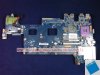
The SLI version of the X300/X305 uses a different motherboard (Pic related). An easy way to distinguish one and the other is that the SLI version has two holes and two fans to cool the GPU whereas the single slotter has one hole and is smaller. The problem with this motherboard is that it isn't easy to find, and getting a working one is next to impossible. I learnt the hard way I bought two of these exact boards off some people on ebay and they boot, but shut off as soon as they try to load windows. They do it in the BIOS as well rendering my X305 useless. It's a real shame really as I badly wanted to use my one after I built it.
-
Hello, and thank you for your response
even i thought it was impossible to install the 9800m sli in the qosmio. Certainly in the web site of the 15r will have written 9800m sli instead of 9800 gts single -
Hello, anyone knows where is the bios chip on the motherboard with nvidia chip that has the 9400M on board base.K000069270
I'm interested in the chip vga bios and bios of the board, if possible in photos and references.
Also the bios chip K000063960
Thank you -
 That scam THOSIBA with those of the two models as the PQX31E PQX32E.
Never buy you nothing more Thosiba.
regards -
im finally retiring my toshiba qosmio x305-q705 after 5 years of hard use it still hasn't died, iv been very impressed with this laptop and it is still better than some modern laptops you can get from Walmart. all i have done to it is change the thermal paste to arctic silver 5, upgrade the ram to 8gb, add an Intel ssd, and upgrade to windows 7 professional. this laptop still plays borderlands 2, dead island and a few other newer games. but i have decided to get an alienware 17 r1 so that i will be able to play the games i want to at max-ultra settings. i will miss the 4.1 harman kardon sound system that this thing has as i would always bring it to work and jam out to some music all day. maybe ill keep this one just for music?
-
I am still using my qosmio x300-14x (upgraded from x9100 to qx9300 and 8gb ram). Only reason I am considering its replacement is the thickness.. I would love buying a razer blade but it is not easily available in EU...
-
Is there someone who has and is willing to sell a HD 4650 from the Toshiba P300 Series, which I'm desperately in search of?
Thanks!
Official x300/x305 Owner's Lounge
Discussion in 'Toshiba' started by Bartlett, Oct 4, 2008.


