Problems? See this thread at archive.org.
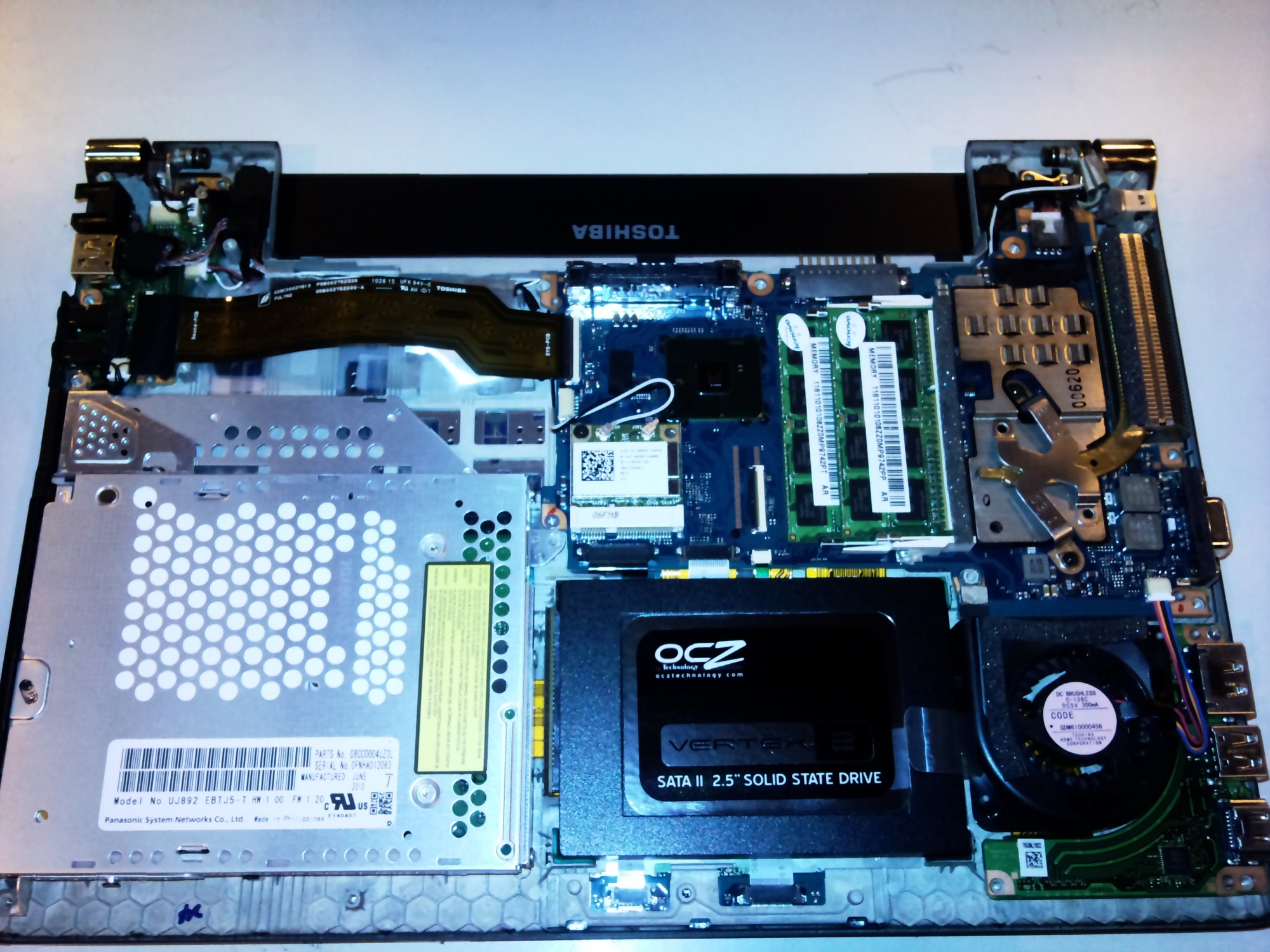
Ok I opened the base and took a picture, it's attached. There's only 1 mini pcie slot for the wlan so I'll use that one. I bought a mpcie 3g card, unlocked Sierra Wireless MC8700 UMTS/HSPA+ Data Card | eBay. Now can I use the embedded wlan antenna (wires) for wwan purposes? I think 900mhz is the frequency mostly used here in Finland.
-
Attached Files:
-
-
im experiencing short freeze-ups during hte videos where the video stops and sound goes zzzzzzzz. Anyone else?
-
you need to get hold of the standard SATA ribbon connector of a lower spec R700 with a mechanical hard drive, connect that in place of the current ribbon and slap a normal 2.5" SSD in there. i think the part number for the cable you want is P000531410
Ben -
Just a heads-up. It *is* possible to replace the Optical Drive with a second Hard Drive (HDD) in the Toshiba R705.
Instructions are the same as for the Toshiba R835 HERE. ( http://forum.notebookreview.com/tos...al-drive-bay-portege-r835-p56x-hdd-caddy.html)
NOTE #1: Please don't do this if you are not comfortable messing with laptops. That being said, if you have already swapped out the main drive of the machine (e.g. for an SSD), this is not that much more difficult. It just involves a bit of patience and common sense. Read those instructions carefully and it will go okay.
Note #2: Don't buy any of the first generation SandForce based SSDs for these laptops. They have known issues. Stick with Crucial or Intel for these particular laptops. And I don't know that the newer SandForce SSDs are any better. I just haven't tried those to tell you for sure that they don't work well with these laptops. So you are warned. The $20 you save is not worth the hassle. Just use a drive that others can verify works (e.g. the Crucial C300). -
See my previous message. You can leave the original SSD in its place and add the second SSD in the Optical Drive bay. That will give you the most storage. Of course, you might actually use the optical drive with some regularity (though I doubt it).
-
Just bought an R700-181, with the i3 370m - any ideas what other CPU's I could put in there?
I've looked at the other CPU's in the other R700's:
i3 350m
i3 370m
i3 380m
i5 520m
i5 450m
i5 560m
i5 480m
i7 620m
Any others? Would love a quad... -
don't think cpu is interchangeable, its soldered to the mainboard i believe. so to upgrade you'd have to buy a complete mainboard from a higher spec model.
mine runs the 560m that returns me a WEI of 6.9, more than adequate
as for the sandforce SSD issues report........not mine, had an OCZ vertex 2E in mine for a year or so now and never had an issue, runs fine, no glitches or BSODs and i have used sleep as normal
TrackSmart - i personally use my optical drive quite a lot, hence buying a slim laptop with ODD. and some others may too who have the OEM SSD equiped models, as such the fix i mentioned will enable a larger SSD to be placed in the standard HDD slot
-
Hi,
I have a few questions regarding the 630:
1. Did they ever iron out the battery leakage problem, ie. where the battery drains overnight by a huge amount in comparison to what it should?
2. How long do they take to charge, is it really 5 hours minimum????
3. Is the power input socket becoming loose a common problem?
4. Most importantly, can you replace the DVD drive with an OBHD, as it still seems unclear given the fact it was found to be 9.5mm in height and not the usual 12 or so that an OBHD seems to be. This is important to me because my current 12" c2d ultraportable has 2GB HDD space on it (2x Samsung M8's @ 1TB 9.5mm) and I require this capacity as a minimum to be in my primary machine, which the 630 would hopefully become.
Thanks in advance.
-
While this is bumped up, I'll just mention I saw that the r700 series has a newly released BIOS update.
Toshiba Support - Homepage
Here's the change log:
-
Hi!
I have a r630 since november 2010
1) It doesn't happen to me.
2) I don't know how much time need really. I know that is a slow process so I do it when I'm sleeping.
3) No (at least with my unit).
4) I think you can. There's a post in this forum about changing the DVD drive to a r830, who has the same structure. (I don't know if structure is the correct word, I don't speak english very well, sorry) -
I have the R705, which I believe is identical to the R630.
1) These computers have a "sleep and charge" feature activated by default. It lets you charge devices over USB when the laptop is 'off'. However, I find that the battery drains a bit faster with this feature enabled. Turn it off if you don't use it. Second, the default power management settings have the laptop *never* go into hibernation, so the computer will continue to lose power in sleep mode, rather than conserving power by hibernating. Turn "sleep-and-charge" off and enable hibernation (say after 2 hrs) and the battery will drain at the same rate as any normal laptop.
2) I've never timed it, but it takes a long time to go from empty to 100% battery charge. I'd guess about 4 hours (about 25% recharge per hour). That's just a rough guess...
3) I haven't had a problem with this, but I don't use the laptop daily. I mostly use it for travel and giving presentations. So not so much wear-and-tear.
4) I replaced the DVD with a hard disk. My setup: Solid State Drive (SSD) in the main hard disk location. Original 500GB hard disk in the optical drive slot. It's not easy to do the swap, but it can be done with some patience. Here's a link on this topic: Toshiba Support Forums: Portege R700 - Replace DVD unit with ...
And another link: http://forum.notebookreview.com/tos...al-drive-bay-portege-r835-p56x-hdd-caddy.html
My main concern with these laptops is 1) the low-quality screen (narrow viewing angles and poor contrast ratio) and 2) the constant 'whine' from the fan. It's not loud, but it is clearly audible in any quiet situation, which can be a bit annoying. Otherwise they are decent laptops and a good value for an ultraportable. Just my two cents. -
has somebody a gelaskin on this laptop?
-
i have a gelaskin on r700 and loving it. Is somewhat tricky on the edges coz they are curved but overall it works great.
-
thank you!
where did yo buy it? -
I'm trying this: 2nd HDD SSD Hard Drive Caddy For IBM ThinkPad x300 x301 DVD-ROM 7mm Optical Bay | eBay
2nd HDD SSD Hard Drive Caddy For IBM ThinkPad x300 x301 DVD-ROM 7mm Optical Bay
It fits perfectly but I can't get the bios / windows 7 to recognize it.
Plus, boot time just jumped by 30+ seconds.
Any help would be greatly appreciated!
-----------------------------------------------------------------------
What did you use to install a second hdd in your r705?
I had to go with a 7mm drive.
But, I can't get it to recognize in the bios. In windows 7 I get a driver error.
Any help would be appreciated.
Thanks! -
1) Did you follow these instructions? I got the Caddy they mentioned and it installed just fine. You have to remove the top cover of the caddy which allows more space for a normal sized HDD or SSD. And you can replace the plastic side piece (the DVD 'door' cover) with the one from your own DVD drive. It works fine, but there's some labor involved:
http://forum.notebookreview.com/tos...al-drive-bay-portege-r835-p56x-hdd-caddy.html
2) You should install the primary boot drive (i.e. the SSD) into the place where the original hard drive is located. The BIOS on the laptop thinks that the optical drive bay is still an optical drive (it lists it as an optical drive, even when and SSD or HDD is there and offers to let you eject it in Windows). It's better to put the primary boot drive in the place where the original hard disk sits. I can't guarantee that will fix your issues, but hopefully that will help.
3) It's also possible the SSD has issues. A surprisingly high proportion of SSDs are either dead on arrival or have firmware issues that cause problems with specific laptop hardware. I couldn't use any original SandForce based drives to work properly in my R705 (OCZ Vertex 2; Corsair Force; Microcenter SSD with SF 1200 controller). I went with a Crucial C300 and it has been rock solid. I recommend Intel or Crucial (non-SandForce) SSDs for these laptops. The SandForce drives have some compatibility issues with our hardware. -
Hi all ,
i searched the web for some info for changing my HDD to SSD , and i came to conclusion that , sand-force based SSD are NOT recommended for the R700 .
does some one have the crucial M4 ( or the micron C400 ) ?
second thing ,
did anybody switch his keyboard for the a one with a back-light ?
thanks a lot ! -
Hi, thanks for getting back to me.
I did follow the instructions and my ssd works fine in the primary slot.
But, my DVD is PATA (usb) so I had to get a different Caddy:
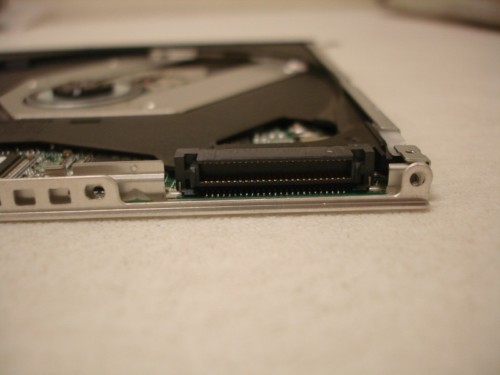
Take a look at the photos to see how it's different:
2nd HDD SSD Hard Drive Caddy For IBM ThinkPad x300 x301 DVD-ROM 7mm Optical Bay | eBay
I still can't get it to work.
Please help!Attached Files:
-
-
I have a r705-p25 without a port replicator.
Can someone help me locate the esata pins so that I can solder in a 2nd hd.
A photo would be wonderful.
Thanks.Attached Files:
-
-
Hi!
Does anyone installed W 8 in his laptop?
I did, but I'm having some issues with drivers. I can't turn off the optical drive...
For now, that's the only problem so far.
(sorry about my bad english) -
I have the 705-p35 and F2 is to get into Bios utility whereas F12 is to set the boot sequence for a single time.
On a different note, has there been a fix to the screen washout that alot of people have experienced with this laptop? -
-------------------------------------
Hi,
This is somewhat old but I wanted to know if you remember which caddy you used.
Thanks a lot,
Eyal -
Any one with LIF/ZIF connection SSD out there changed their HDD to normal SATA connection and now have a SSD at a corner without use!?
I have... because I can't find any 1.8" HDD LIF to SATA 2.5" adaptor instead of this one at china and can't find another one with the same functions!
1.8 24pin LIF macbook air SSD to SATA adapter with case - Sintech adapter card and test tool
It's a shame having a 128GB SSD without the hability to connect it to other PC!
Any idea guys!?
Thanks -
I don't know which Hard Disk Caddy he used, but I used the model recommended in the various guides posted on the internet:
Ebay Description: NEW SATA 2nd HDD Hard Drive Caddy 9.5mm Universal DV22 (300558840432)
Seller: ny-compu-tek
Current listing that looks similar: NEW SATA 2nd HDD Hard Drive Caddy 9.5mm Universal DV22 | eBay
Remember three things: 1) this will take some time, patience, and care if you don't want to break anything. 2) You will need to remove the top 'plate' on the caddy for it to fit and 3) you'll need to swap the plastic 'door cover' from your current DVD drive onto the new caddy.
I suggest you look up all of the threads on the Net that offer instructions on swapping in the HDD caddy. Do everything *carefully* and don't force anything as you remove and install parts.
Good luck. -
I have a Problem which occurs sometimes on startup. If I press the start button only the fan will start running quite loudly. I have to turn it off by pressing the start button, after that i can switch it on normally. What can be the cause of that?
-
Hi there guys.
I have the laptop in the sig and I was wondering if I could replace de 4GB RAM for 16GB RAM. Will the memory controller handle it correctly? Will it worth it?
Thanks. -
I can't believe how much I still like my R705 after close to 2.5 years. When compared to the latest Ultrabooks, it still is competitive. With an Ultrabook, you would lose the full-powered chip and full slate of ports while the R705 still delivers great performance with similar weight and battery life. The only thing I wish it had is a back-lit keyboard. Are there others who are still as content as I am?
-
It's funny, I've gotten two compliments on my "new" laptop in the past week. Mind you, this is my more than 2 year old Portege R705. I agree that it holds up pretty well to the ultra-book competition in terms of weight, performance, and battery life. If I didn't already have the R705, I might be tempted by the new ultrabooks for a two reasons:
1) 1080p IPS displays (this is only true on a couple of models)
2) Thinner form factor (not a huge deal, but its hard not to be impressed by the thinness)
So yeah, I've been pretty satisfied and have no reason to replace the R705 anytime soon. My main gripe with the R705 is that the screen is pretty poor (low resolution, low contrast, muted colors, narrow viewing angles). And my big gripe with ultrabooks is that they are not upgradeable - at all - since the RAM is soldered to the motherboard and the SSD is often a proprietary form factor than cannot be exchanged for higher capacity models down the line. For instance it is not possible to get an Asus Zenbook, which has a beautiful 1080p display, with more than 4GB of RAM. And you can never upgrade it. -
Had my laptop for 2.5 years now; still going strong. Even though the flimsy screen has caused me much consternation (hinge broke 2X) I have been pretty happy with the laptop otherwise.
Has anyone had any experience with buying aftermarket/ 3rd party replacement batteries with the portege? I want to buy a 9-cell to improve on my current 3.25hr battery life (with 25% wear). I suspect the OEM battery would give approximately 6.5 hrs battery life which would be awesome, but at $130 it is quite an expensive upgrade for a laptop that is 2.5 years old. I found the following replacements that may be adequate:
Buy.com - Toshiba PA3833U-1BRS 9 cell, 8400mAh Replacement Laptop Battery with FREE Headphone Splitter (no-name but 8400mah, 1yr warranty, and seller seems reputable)
Toshiba Portege R700 Laptop Battery (duracell named, 7800mah (900mah less than toshiba OEM)-- pretty expensive still though). -
Hey! Anyone? I am facing the same problem..
-
This doesn't exactly answer your question because you specifically ask about HDMI and about the R700, but you should be able to set any resolution that the graphics card and driver allow if you use a standard VGA cable. That's always been my fail-safe when HDMI or DVI fail to provide native resolution support. I've heard people say that the image quality suffers when using a VGA cable, but I have not been able to notice the difference on the displays I've used. Good luck.
-
I would like to add a small SSD drive to my R700-15Q to boost it's performance, and lengthen it's life a bit.
Unfortunately, my toshiba portege r700-15q (bought in the UK) does not have a CD/DVD/optical drive bay, and does not have an obvious cut-out/panel to remove to install one either, so I can't use the common optical drive caddy as a solution to install a second drive.
I am also still loving the machine, it still looks modern, the main downside for me, is the constant noise the fan generates, presumably due to slight overheating. I use it as my everyday machine, I maxed the Ram at 8GB from crucial, and when docked in my toshiba docking station it is driving 2 Dell u2412m (one via VGA and one via HDMI, one in portrait, the other in landscape).
My fall back position is one of the new seagate hybrid SSHD's (8GB SSD and 1000GB magnetic), but I would prefer to install a second 32 or 64GB SSD drive, and place the OS and frequently used applications on it, and leave the normal internal drive for storage.
Does anyone know if I can install a second drive inside a portege r700 that does not have an optical drive??
Thanks! -
If you have the non-optical drive version, it most likely is not probable nor possible to add a second harddrive [although, if a r700 owner has more information, please comment].
Another option is to replace the existing harddrive with a SSD [perhaps a 256GB SSD?]. Although the storage is most likely less than what you have now, you'll still have the benefits of having a SSD. [so there's a trade off].
The hybrids are nice, but still do not offer the true SSD experience.
Good luck and keep us posted with any updates -
I fixed it by doing a fresh windows 7 install and not updating the intel graphics drivers on windows update. Also works fine with ubuntu.
-
I've had a 240gb ssd in my r700 for a while, and it's absolutely worth it!
-
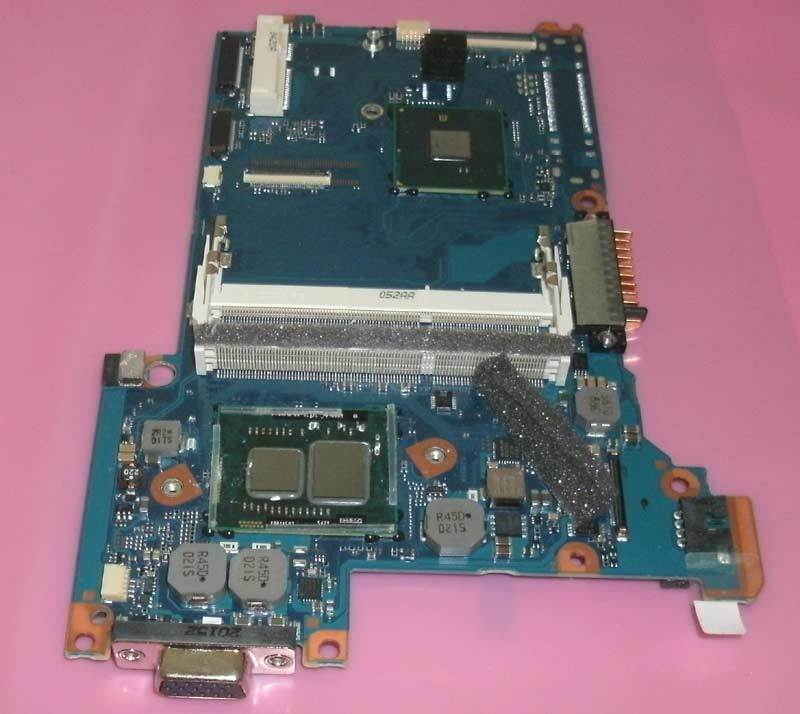
My R705 needs a motherboard replacement and I am thinking of retrofitting a motherboard from either a R835 (Sandy Bridge) or R935 (Ivy Bridge). Motherboards for R705, R835, and R935 look identical and are available on ebay for $50-$60. Apart from USB 3 ports and processors, I couldn't find any other differences between the three models. Has anyone done this before and is this even possible?
-
I own a Toshiba R630 and recently replaced the original disk with a Crucial SSD one, gaining a big boost of performance. I've been using the old Hitashi drive in an external case through the eSATA port without any problem.
Today I replaced the optical drive with a new caddy containing my old disk. Physically all went good (apart from the fact that I had to take off the back cover, more than 25 screws; I took the opportunity to clean the fan) but when I turned the computer on and accessed the BIOS the Hitashi disk is recognized as an optical drive!
You may see an image here: https://drive.google.com/file/d/0BxkqpkWLS8_nMFotaUlEbE4xTnc/view?usp=sharing
In Windows 7, Disk Management recognizes it as a disk, but can't initialize it.
Any help would be appreciated! -
Just out of not so sheer curiosity anyone replaced the palmrest ?
The one on mine near the "cooler" the "paint" has started to get all bubbly all due to heat.
Would i need to buy a new isolant or just adding 3m double tape do it on top of the isolant ?
Cheers
Francisco
Toshiba R700 / R705 /R630 Owners Thread
Discussion in 'Toshiba' started by meboy, Aug 26, 2010.