 Problems? See this thread at archive.org.
A question to all 9 cell battery owners: how long does it take to completely reload the battery?
I'm a bit concerned since Toshiba has no quick charge option for their batteries and I've red something about 12h while running...
-
YES! I'm having the same issues too on my R705, with YouTube videos turning super-pixelated and turning into green vertical streaks. It's not every video, just a handful, but it's enough to be frustrating. Has anybody else had this problem? I never experienced this on my older Core2Duo laptop, so I can't imagine why the i3 on my R705 can't handle basic YouTube clips in basic resolution, not even HD. Any thoughts or suggestions?

-
GPU is too hot, because of the bad graphic drivers or because of the hardware problems.
-
hi imk82,
no, i didn't find any solution.
just for the sake of precision: i couldn't log in either with the original BIOS (vers. 1.4), nor after updates to 1.5 and 1.6.
i thought maybe the update would "heal" this behaviour, but obviously it didn't.
i also set the supervisor passwd only.
cheers,
neolock -
I'm thinking about the Intel, actually. Was it difficult to install? Actually - are there any guides to taking apart this laptop?
-
You need to install (or reinstall) the flashcards driver, which is available on the Toshiba website, that should do the trick.
-
Sorry to spam this thread - I have a couple of pieces of advice:
1. Look at your power settings and ensure that they are optimized for high performance. If Eco or balanced mode is on, I have noticed that the graphics controller behaves very differently to when it is on full power, including playback of videos, youtube, etc.
2. Visit the Intel website ( http://downloadcenter.intel.com/Default.aspx?lang=eng) and download the latest driver for the graphics card. If you have Windows 7,a new driver was recently released on 31 Aug 2010, which you may not have.
Just a note on that; according to Intel, Toshiba use some kind of proprietary modification which Intel refuses to alter through their driver detection software, but installing the latest generic graphics driver direct from Intel works anyway (at least on my machine). -
Hello Neolock,
I have the solution, pretty simple but stupid from Toshiba. Just press the "INS" Button while booting. After that follow the steps on the screen (Type in Password and press "F2").
Best regards,
Imk82 -
Got the same problem. Can download, but can't get to run - set up aborts, says driver not authorised by manufacturer
-
Hi,
Can some one that has the R705 helps me out? I would like to buy this laptop from bestbuy US and bring it back to Canada. I can't find anything about international warranty on toshiba US website. However, there is a page on toshiba US webiste that required model # and serial # to check for Global Entitilement. I would appricate if some one that has a R705 model can check it out and let me know whether warranty is covered in Canada.
here is the url: Global Entitlement
thank you very much. -
@imk82
thank you, that did it. could you please tell me where that info comes from? and why INS? never seen anything like this...
cheers,
neolock -
Had this same problem, has a pretty simple solution. Right-click any youtube video and then click on settings. Then UNcheck the "Enable Hardware Acceleration." Solved the problem for me.
-
I just got my R630 today and I love it, such a nice laptop
-
Sorry if I missed this. Does anyone know if the R700 Port Replicator supports output two two connected monitors at the same time (one connected to the VGA port, one connected to the HDMI port).
Thanks! -
Yes. .
-
But you can't extend right? Won't both monitors display the same thing?
-
I used it to extend across two Acer S231HL displays, each at full 1920x1080 resolution, one using VGA and the other using HDMI. But once both screens were up, I couldn't get the laptop screen to work as a third. Still, two 23" monitors is pretty sweet, and no additional hardware is required.
But I think I missed millercentral's question. If the question is about using the docking station (aka "port replicator"), then I don't know. I did this plugging directly into the ports on the side of the laptop. But I would assume that, because the ports are being replicated, it wouldn't be any different. -
Well, that is very cool. That won't work on most laptops.
-
Hey everyone, I picked up R630 but as I was passing it to my mother the other day and whatever angle I lifted up at i can see that the spacebar is basically bowed , should it be like this ? All the other keys are perfectly fine
Aswell, heres a photo I took of the lid a while ago (Its in the photgraphy thread too
![[IMG]](images/storyImages/5059214765_411cfe99d6_b.jpg) Last edited by a moderator: May 5, 2015
Last edited by a moderator: May 5, 2015 -
what program or drivers I need to install to enable blue fn keys on the keyboard (for switching wifi, bluetooth on off and etc?)
-
It's called Flash Cards. It's part of the Toshiba Value Added Package, found on the support site.
-
After using this R705 for a few more weeks, I've become more and more annoyed by the display. Am I the only one who is annoyed by the poor vertical viewing angles and poor contrast? I guess I was spoiled by my old Sony SZ, but this is a major step backward. I don't think I can take it much longer.
-
I have a R630. Wlan (Broadcom (?)) only see my 2.4 GHZ WLAN (not 5 GHZ AP)
Is 5 GHZ not supported with my R630? Is the wlan module a standard mini pcie card? (and replaceable) -
I had the same laptop before and I know what you mean. The advantages just about outweigh it for me, but only just. It really is a poor screen for the price. -
I just saw a pcmag.com review of the Toshiba R705-35. I appears that the new battery has more capacity than the first generation issued with the R700 series. They got over 7 hours on the new battery but they reported over six hours with the previous battery (which is longer than most of us are reporting). It will be interesting to hear some "real world" experiences with the newer version.
For the record, I am getting 4.5 - 5 hours with my R705-25. I still think that is excellent but it may be worth purchasing the higher capacity battery from Toshiba and using the previous one as a backup. -
An interesting look at the guts of the R700/630/705 models:
Toshiba Portege R700 Disassembly | Blog - ScreenAid.com Toshiba Portege R700 Disassembly | Blog - ScreenAid.com
Also, has anyone used these machines for gaming? I am surprised by the rather high core temperatures when running Half Life 2, sometimes up to 84 celsius. I am aware this is still within the Intel tolerances for the i3 core, but it doesn't bode well for long term use... -
Hi,
I was considering buying R630 but having read here that it has the those loud click buttons (under the track pad), so I'm assuming it has the same 'click noise' from the new Tecra model's. I've used a newer Tecra and the click buttons drives me absolutley nuts. This would actually put me off buying one and I really like Toshibas.
If you were using one of these in a public place (like a cafe), a person sitting close by could clearly hear those loud annoying clicks.
Is there any way to get rid of this?
Thnks -
I don't know if there is any way to get rid of them, but you can just tap the trackpad instead of using the actual hard buttons.
-
Any idea if u could exchange the wlan card with this one:
Intel Ultimate N WiFi Link 5300, 450Mbps (MIMO) Dual Band, PCIe Half Mini Card (533AN_HMW) -
I purchased the R705 from Best Buy on Monday, and I am pleasantly surprised. My old laptop (Sony CS) was terrible.
This laptop is so light, it's pretty amazing. However, this comes with a price. All of this good stuff packed into a tiny case like this is going to produce a lot of heat. There's really no way around it. Turning on eco mode makes a big difference though. What I did, since i like a bright screen, was copy all of the eco mode settings into "power saver" and I usually just use that.
I was thinking about purchasing 4gb more of ram (the computer came with 4gb), but I've never done this on a laptop before. Does anybody have any recommendations as far as brand or any specifics? A link on amazon or a different site would be cool.
-Nick -
If you want to add 4gb of additional ram you're gonna have to remove the two 2gb modules that are there. This means that you have to buy 2 new 4gb modules. Right now they would run you about $75 each. I have noticed the prices have come down a lot lately. So if you can wait a bit longer you might be able to upgrade to 8gb for about $100.
Newegg.com - G.SKILL 4GB 204-Pin DDR3 SO-DIMM DDR3 1066 (PC3 8500) Laptop Memory Model F3-8500CL7S-4GBSQ -
Any potential buyers for the R630-135 based in the UK might be interested to hear that you can purchase the aforementioned laptop for £649.90 + £6.10 p&p from Pixmania
Pixmania
Don't forget to use quidco to earn cashback. £14 off any order value above £500 and 3% cashback. Final price once the cashback has been received is £622.92 + £6.10 p&p
Pixmania have a pretty bad reputation but I didn't experience any issues other than a slightly longer delivery time. I ordered on the Saturday and received it yesterday (Thursday). By the way, I received an email advising me that the laptop was out of stock two days after placing the order but the delivery was only delayed by one day therefore I would not be concerned by the Temporarily Out of Stock message unless you require the laptop urgently. -
I got great results from adjusting the gamma for "all colors" in the Intel graphics properties to 0.7. One quick adjustment and everything has looked fine ever since. Well, except for viewing angles, obviously.
-
I'm having a very tough time deciding between this and the Asus U35JC. Both laptops have similar specs aside from the graphics card with I honestly dont care too much for.
What I am looking for is durability/stability. Does anyone with experience of both care to share some input? Or anyone that's had a Portege for a while now, how is it holding up? -
I think about buying R630 (R705) and have couple of questions
1. have freeze up issue been fixed by Toshiba's fingerprint software update a week ago?
2. do you know any similarly well built compact laptop, without CD-ROM? I haven't used cdrom for years and, honestly, would prefer a slimmer machine or bigger battery instead. Adjustable keyboard backlight? New macbookair? Alienware M11x? Not that I want a video card in there... -
Spam! Please try harder next time.
-
I have a reproducible problem. UK model R700 15Q (i3 350M), custom install (Windows 7 64 Enterprise), Device Manager shows no outstanding issues except for "Teredo Tunneling Pseudo-Interface" (This device cannot start - Code 10).
I can send the unit to sleep or hibernate OK, wake it up OK, but after doing so, it cannot shutdown anymore, i.e. it stays on the Shutting Down screen, keyboard not responding, etc., and I need to manually power it off.
The same happens if, after waking it up from a sleep or hibernation, I try to send it back to sleep or hibernate: it blanks the screen but the unit doesn't power down, fan is still running, keyboard not responding, need to manually power it off.
I have tried disabling the fingerprint device, also installed the latest fingerprint utility mentioned in another thread as solution for freezing up, but I still cannot do 2 sleeps in a row, for instance.
Could someone please check if your r700 notebooks are showing these symptoms...?
I will post this same issue on the Toshiba forum.
Thank you! -
Hi, I am from Canada. I want to whether Canadian version of R700 has a bluetooth? How bad a bilingual keyboard is? Any difference between the English Keyboard and bilingual keyboard? thanks
-
I was trying to decide between buying the R700 and one of Asus' UL models. I've looked around, read a bunch of reviews and checked with friends that own these laptops and it seems to me like the major problem with the R700 is that it gets quite hot within a couple of minutes compared to the Asus' UL model, which seems to me keeps cooler. I'm still too confused!
-
Not at all. As I said in my post I have just purchased the R630-135. After cashback it works out £120 cheaper than PCWorld/Dixons/Currys. I'm just letting people based in the UK know what price they can obtain the R630-135 for.
-
Hi
I am wondering which revision toshiba uses in its r700's cpu. Is it C2 or K0? Some guy said the new K0 revision consumes less power and generates less heat. I think it's very helpful. Can anyone tell me. You can check this information on cpu-z. Please also state when you bought it. Thanks -
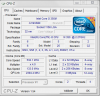 Does this help? This is for the R705-25. I am not sure what is used in the latest models.
 -
thanks, it seems toshiba haven't clear its old inventory. I suggest just wait to boxing day to see if the new modle is in the market
-
I see that the new Best Buy model (R705-35) includes the K0 revision. Looking at the specs though, it doesn't look like there is much difference between the original and the revision.
-
hi, thanks for the quick reply.
-
Hi, I just find toshiba release r730 in japan. anyone knows when the new one would come to north america? I believe the new model will fix the overheat/noise problem.
-
How about the keyboard? There were complaints from existing users about the stiff keyboard on the R700/R705.
This is the only piece of information in English that I can find on the Toshiba Dynabook R730:
http://www.batterycategory.com/blog...op-battery-pushing-six-new-autumn-and-winter/
Edit: From the specs on the Japanese Toshiba site, it looks like just a CPU (and maybe wimax) upgrade. The US equivalent might be the ones described here:
http://www.engadget.com/2010/10/13/toshibas-13-3-inch-portege-r700-gets-a-pair-of-wimax-models/
and the I presume the US consumer equivalent is the R705-P35. -
Assuming it has the same keyboard as the R700 (and even if it doesn't).
You just have to try the keyboard yourself. Some people were put off by the action of the R700 keyboard, most didn't really mind about that one way or the other.
But for the ones that really don't like it, no amount of telling them that it's ok is going to make them like it. So ultimately, it's not something that anyone can tell you anything all that useful about unless you just try it yourself. -
Does the r705 support multiple external displays? Can I contact two monitors through VGA and HDMI (and no longer use the laptop screen, just the two externals)?
I currently have a dell xps m1330 which allows me to do this. Thanks.
Toshiba R700 / R705 /R630 Owners Thread
Discussion in 'Toshiba' started by meboy, Aug 26, 2010.


![[IMG]](http://farm5.static.flickr.com/4150/5059214765_411cfe99d6_b.jpg)


