 Problems? See this thread at archive.org.
I have the svs1313C5E model... SSD is a samusng 840 pro 256 GB. And, as I said before, clean install windows 8 and installed all drivers from sony except the video drivers. I got those from the Intel and Nvidia sites.
-
Sure.

-
I'm using 2012 model, SVS1511C5E and it also doesn't seem to have orange-gate problem. Red is just red.
-
What is the latest Driver package we can use with a S13 Model with Windows 8? Preinstalled is 306.97 Nvidia Driver but i´m not sure if i can update it with a newer Driver from nvidia Website? is this an official hybrid Driver?
-
yes you can update it and hybrid still works...
-
Got my sony yesterday -.- The package had lots of damage on it, and when I opened it they computer had scratches and it was even bent open on the left side..... the best part was, I waited over a month for it......... I don't really like Sony now.
I was really looking forward to getting this one. Now I probably have to wait another month.

-
Nvm, please ignore this.
-
Send it back and get a different one or ask for a refund, I'd be really angry as well. Depending on which country you're from you may get some upgrade for free if you express your complains to the rep. I heard people do it but only in the US.
-
This is exactly how my S13 looks like out of the Box two weeks ago...

BTW, is it right to say that i can update both intel hd 4000 and nvidia 640m LE drivers with latest version from the websites without loosing the stamina/speed switch functionality? -
Same here my new SVS15112C5E has no orange gate.Very happy whit it
-
Where do you live?
I ordered my own S from Sony Online Store in the Netherlands. I received my S next day, meanwhile I received around 5 SMS infos regarding trackingnumber and what's going on with the shipment, etc.
I'm really pretty satisfied with the service, I can even send the laptop back in 30 days. -
I live in Norway, I talked to customer service, they connected me to some Swedish person that told me that he was from the business section and that he could connect me to the right place. I had been waiting for over 10 minutes so I just hung up, could bear waiting another 10 minutes. I just placed a return order on the sony page.
I think that the shipping was the worst part, they used TNT Shipping and in Norway if you google them, they have almost exclusively bad reviews since they're also used by Apple Store Norway. First they tried to deliver the computer whilst I was in school, although I asked them if they could deliver it after 14:30. Then they said that they would deliver it the next day, they never came and on top of that I missed an entire day of school because of that, they came the next that at 9:57 although the customer rep said it would be there around 14:ish.
Finally got it on Friday 2 weeks after it arrived at TNT norway..... -
I'm surprised. Have always thought that Norway as such rich country should have the best customer service in every area.
Sony Benelux gave me even a 10% voucher if I would like to buy anything else. -
Yes, it works here....
-
Hey everyone,
Just wondering how do we tighten the hinges for the screen?
My screen seems to be looser than when I first bought it. -
So is there something special To do or only install Intel HD driver and nvidia driver? No special Sony part necessary, like the driver in the z series?
Gesendet von meinem Nexus 7 mit Tapatalk 2 -
Hi all,
I'm having issues with high idle CPU temperature with my SVS1512 i5-3210m - average temp is 60c while 0% CPU load.
With these temps fan noise is annoying even in office environment. There's no difference between Balanced and Silence mode.
Could you guys share your idle temps? -
You need something by Sony (don't precisely know what) to get the speed/dtamina switch to work, but the hybrid graphics don't depend on it. When you choose 'speed', the Nvidia driver chooses automatically OR you can specify which application should use which gpu.
-
Mine are in the 50's with my 3230... In the best case low 40's, and have never seen lower.
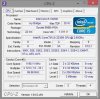
By the way, does anyone know what's going on with this CPU-z reading? Seems weird to me... Is it a bug in CPU-z?
-
So best way is update the current nvidia Driver with newer package, right?
-
Hi all,
i just bought the S 15 with win8; I have a fiber optics internet and with a macbook pro i'm downloading at about 80mbps, with Vaio i max at about 53mbps.... The N-6235 Intel Centrino Wi-Fi suppose to be able to achieve the same speeds... I have updated the latest drivers, and beyond the speed issue, i still experienced a couple of dropouts too. Do i miss any settings?
Also, i'm planning to upgrade to an ssd, any updates on the SATA 3 issue?
Thank you! -
@jahaan, thanks for sharing, much better than mine temps...
I'm going to repaste chips and oil the cooler, hoping it will help.
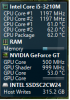
Another weird thing - I just found that Nvidia GPU is always on 500mhz (as Open Hardware Monitors shows).
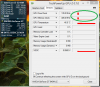
Once I start GPU-Z and switch on sensors tab, GPU goes into powersaving clocks 135mhz.
If I quit GPU-Z clocks go up again.
Running GPU in powersaving mode decreases GPU temp ~5c and CPU ~3c.
I believe it's also the reason of short battery life for some people who reported it in this thread.
I'm running on latest Nvidia and Intel vga drivers, latest bios.
Would rolling back to drivers from Sony help?
P.S. Attaching screenshots
Before I start GPU-Z:
After I start GPU-Z, notice that clocks go down and keep low
-
@krendel13 wich intel/nvidia drivers you are using? You are running windows 8, right? Everything is fine with STAMINA/SPEED switch?
-
SirRobin, right, Windows 8, driver versions - Nvidia 314.22, Intel 9.18.10.3071, STAMINA/SPEED switch seems to be working.
But you know what I found - Nvidia GPU activity tray indicator was always on until I I quit all the monitoring software (Open Hardware Monitor and GPU-Z) !!!
Apparently having gpu status requested by these tools keeps the driver thinking that gpu is in use.
Now I can't see temps and clocks, but laptop feels much cooler, fan is quieter (not as quiet as I'd like to have though).
Also battery life notably improved.
Damn I didn't expect this from my OpenHardwareMonitor, it's such a handy tool... -
How can I share my Internet connection through Ethernet over HDMI cable from my laptop to TV? The cable is 1.4a version, TV supports Ethernet over HDMI. What about the laptop?
-
About temps: My 3632QM idles below 50*C always, even below 40*C in house (quite colder than any apartment).
How can you tell if speed/stamina is used, other than checking the battery life several times? I don't see any light for either of them so I can tell what is used.
CPU-z reading seems OK, if you are referring to the 1198MHz speed - this is what Idle speed of the CPU is. -
You can see in the Nvidia control panel... When it's on 'stamina' you can't choose which gpu to use for which application, when it's on 'speed' you can...
-
Can you tell me exactly how you did the driver installations please? Setup or over device manager?
So what is the problem about the speed! Running tools like gpu-z will not let the gpu do powersaving?
Gesendet von meinem C6603 mit Tapatalk 2 -
I did normal setup in every case.
OpenHardwareMonitor does not let gpu to switch to powersaving - it always runs at 500mhz.
GPU-Z - when it's running, clocks initially at 500 then go down to 135. After running it over longer period - clock jump between 500 and 135 for no visible reason.
Nvidia GPU activity tray icon shows activity in both cases:
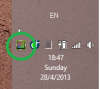
I'm not running anything else what could use gpu. When none of these tools are running, GPU activity is none:
-
Finally, the function of the Switch is still as before updating Drivers on your machine?
-
Stamina/Speed switch seems to function properly, as it changes active power plan.
It's working the same way as before installing the new drivers. -
How long does SVS15 run on battery? Mine around 2.5 h. Quite short time for 3rd gen i5 and Intel HD 4000.
-
Any ideas on how can I run Recovery from partition? ASSIST or F10/F11 don't seem to work. Every time I get 'No operating system found'. Tried to switch to Legacy, but the same effect.
-
Does anybody else's fan starts when switching from stamina to speed with absolutely no load?
-
@Dantei, I estimate mine battery life now as 3.3 hours of browsing on STAMINA with WWAN and WLAN on, 70% brightness.
I agree, it could be better! -
I get around 3 hours myself just browsing wireless... (win8, i5, hdd) The weird think is that nothing happens when i change from stamina to speed mode. I called Sony support and they told me that i have to restart for the change to take effect... Is that true???
Also is there a place to check whether the GPU is on or off?
Thank you in advance... -
I'm getting tired of trying to get working the Power Management settings. I want the lid to do nothing after being closed, but the laptop goes sleep. I changed the setting in VAIO Control Center and it still doesn't seem to work.
-
There is also the standard windows energy settings. Check there.
-
My SVS1511 Win7 has orangegate (bought in December). Sony refused to substitute my panel EVEN IF I sent them clear proof they did solve the problem with new models!
@Dantei
There are different models of batteries. I have the same yours, the one with the smallest capacity (4xx mAh). Sony sells also other batteries when you buy the Vaio from the website (5xx mAh). But if you want it now, it will cost to you too much (over $100) and it will give you just another 30min... This was told to me here in Turin in the Vaio Store.
After this awful battery and screen, I am gonna sell my Vaio. With a more 200$ I can have the same FullHD screen + SSD + more solid structure + 8-cell battery and no fu**ing orangegate
4 months of uselessness, i should have waited instead of hoping sony would fix my Vaio -
Don't complain. I had other FullHD+SSD laptop, which had much more issues than this SVS15. I find it a great piece of hardware. Even if the battery doesn't meet my expectations I'm gonna buy new one from Sony Outlet for good price.
-
To those who have had the S15 for more than 4-5 months, how is it? Any issues, is the fan loud? Would you still recommend it as a purchase today?
-
It's just I had a bad experience with it.
Plus, finding out you can have something like this at the same price
as they sell it elsewhere online at 1500eur, it's not just me being a perfectionist. -
personally I found it very quiet (except from gaming sessions)
moreover, HDD can be easily replaced and DVD bay also removed (as you can see in the first thread)
it is a very good machine, except battery life and orangegate (that seems it has been corrected) and maybe build quality.
For me now it is not the best choice, since I can have more with a pair of bucks more. But when I bought it in December was the best choice and compromise. -
Sony claims the battery life to be very good. How much were you getting?
-
SVS15C5E here (i7 3632, 12Gb ram, 640M ecc..), no problem after a couple of months of intese use, travel everyday with my notebook and use heavy software, the chassis (black) still like the first time i see and the fan is always ok for me, is loud only when is needed (for example in game, render, image raw editing and big CAD files in my case).
the overall quality is not comparable as a macbookpro, especially the chassis is really light (my 15' model weight 1.85Kg) but not rugged as the unibody, but i definitelly recommend this notebook!
PS: as always, sorry for my eng but i'm Italian :\ -
italian me too, don't worry
@jakal1 I got 3h with wifi off, mid screen brightness and watching slides. The curious thing: I got similar lenght at high usage (watching an HD film) about 2h and 35m
the battery is good for a year ago standard. But consider it is only a 6-cell battery for a 15" (since Vaio must keep small). If you see the 15" competitors they often have a 8-cell at least.
The merchant said it was the smallest 6cell battery on the market, but if you assemble it online it is possible to request a more capable one.
I tried to go on the website, but the only thing it asks is if you want the additional sheet battery or not.
I agree with the overall quality. I want to switch to an asus which is built in aluminium and has metal finish. Of course macbookpro is unbeatable on this. -
The S15 is magnesium + aluminium too as far as I know. -
I read a couple dozen pages back that the screen of the S13 was awful. Is this still true for both the 1366x768 and the 1600x900?
-
It is. But simply it bends. So does the keyboard. At touch it is not metal at all.
For me it is ok, it has a very good finish and I am not too concerned about build quality. I advise you to go into a shop and see what I am talking about.
There are also some videos on the web showing how much the linge and the screen are flexible
-
It is not awful, it is just a non glossy display, which most people aren't used to which means it doesn't look as eye catching. Things look a little dim and hazy. its also a TN panel instead of a higher quality IPS panel; which means the viewing angles aren't great vertically. Its only a bad display due to the price of the laptop; its a display typically used in cheaper laptops and not a 1k+ laptop.
There is however a relatively easy mod to change the display out for a great IPS display! Just finished it and love it. After doing this you have one of the most powerful ultraportable (although technically its not due to the full powered cpu), and the only high power ultraportable available with such a great display aside from macs.
Official 2012 Sony S Series Owners Thread
Discussion in 'VAIO / Sony Owners' Lounge Forum' started by Petrov, Jun 9, 2012.


