 Problems? See this thread at archive.org.
I own an SVS151190x running windows 8. I am about to conclude that my 640m LE has a memory defect. Sony wants 500 for a "major repair" since the laptop just ran out of warranty. Anyone have recovery media I can use to do a final check? They want to charge me 80 just for that and being a college student I don't have that kind of money...
Here are my most recent BSOD Logs if anyone wants to shed any light on this issue. Id appreciate any help I can get. Thanks
https://skydrive.live.com/redir?resid=6A8B7A5FBA7131E1!1062&authkey=!AL9vvAZj7fZsAIo
-
-
I am kind of bummed that Sony did not refine this model. Three people in my family have them, apart form a fan issue that sony fixed quickly under warranty all three work great.
I'd love a haswell version with 750m and better sata. Maybe drop the oprival to get weight down to 4 lb.
I'll have a hard time using anything else after using this screen for a year.aditya_m likes this. -
I dont have bluetooth after a clean win 8 pro install. Tried everything but no BT. Any suggestions ?
-
Mine is the same but i've had it for 10months, and the funny thing is ive turned off the touchpad since day 1 and use an external bluetooth mouse...
Doesnt bother me that its a bit slanted to the right. -
http://forum.notebookreview.com/com...013-sheet-battery-40-shipped.html#post9364682
Selling a sheet battery for the S13/S13A for $40 (USA) if anyone is interested. I ended up not using it at all. -
Anyone using the Latest Nvidia drivers on their s15? (320.49 I believe). I believe this driver has fried my Nvidia card. I'm just outside of my warranty as well... Anyone else having issues with this latest driver?
-
It happens very often that my mouse's scrolling speed resets from 5 lines to only 1 line, after the laptop wakes from sleep. I have to reset it manually to 5 line in Control Panel almost each time I open the laptop.
It's a SVS151190X machine with all official and default drivers up to date.
Could it be a driver glitch or something else? -
Need help with BT on my SVS151290x, its disappeared after I clean installed win8 pro. Nothing seems to make it work.
-
Hey everybody.
I am proud owner of Sony Vaio SVS151290X. But something happened in the summer. Has anything like that happened to anyone of you? This alloy of the laptop where my palm rests while typing its color started to go off, to crumble. I am attaching some photos for a better explanation. It looks kind-a uncool now, but as long as the laptop's performance is ok, I'm fine with that.
But why did that happened? It shouldn't!

-
The same thing has happened to mine silver SVS1511 also! It is very weird, and rather ugly. Pity, because it was a beauty till this happened.
-
I did notice that the fan was louder during idle with 320.49 compared with the stock driver from Sony.
-
Hello,
now I'm looking for a long time to find a notebook with a nice display. After being very disappointed of the Screens of Samsung Series 7 (not the newer ones), I've heard about the legendary display of Sony S15.
Since it is a notebook, which was first released over two years ago - so I'm not sure whether it is worth or not.
I have the possibility to buy the S15 with following specs:
Intel Core i5 3230M
Geforce 640M LE
320 GB HDD
12 GB DDR3
Blu-Ray
And the nice IPS Screen
The price would be a litte under 800 .
Do you think the notebook is still worth buying?
My other opporunity is to get the new Vaio Fit SVF15 with following specs:
Intel Core i7-3537U
500 GB HDD
Geforce 735M
12 GB DDR3
Blu-Ray
With a Full HD screen - but not IPS.
I could get this one in the Sony store also for about 800 .
But after taking a look on both systems, I really prefer the great screen of S15. What do you think? Would you still buy it for this price?
Thank you for answering! -
Does anyone have experiences with Windows 8.1 on S13/S15 yet? I have a clean intall on my laptop and it works for most part, but there are couple annoying quirks to iron out:
- I'm unable to install Vaio Control Center, it gives an error that newer version is already installed
- Stamina/SPeed-switch doesn't work
Control center wouldn't matter that much if it wasn't the only place to control fan speed. On High Perofrmance fan stays relatively quiet and therefore I get issues with throttling, especially with GPU overclocked. Haven't yet found an alternative way to boost fan speed...
edit: OK, I figured it out. There's no use trying to install Vaio Control Center as standalone. Instead, I downloaded Sony Shared Library and installed it. After that I downloaded and installed Sony Notebook Utilities. After couple pretty FAST reboots, Stamina/Speed-switch is working, Vaio Control Center installed and I was able to change fan settings etc. At least on short testing, i could use 750 mhz overclock without issues. -
There is no reason to go with the FIT with the specs you mentioned over S15.
-
Thank you for your appraissal!
So you think I should prefer the S15? And is the price for about 800 € okay? -
The FIT that you menionted is a previous generation (Ivy Bridge). If it were Haswell generation (i5/i7-4xxx series CPU), that would mean much better battery life. In that case, I would say go look at the screens in person!
Since it is last gen, the S15 is better - robust, compact, you can easily replace HDD for SSD, and Optical also, the screen is good (just make sure you see the screen, NOT all S15 have the IPS screen!!!!).
800EUR is, I think, about right. New gen laptops seems a lot more expensive.hochverrat likes this. -
Are you sure that not all S15 have an IPS-Screen? You're right with the S13, but in this Wikipedia-site, I can't see a S15 version without an IPS-Screen: Sony Vaio S series - Wikipedia, the free encyclopedia
Nevertheless I will go for the S15, although I can't take a look on the screen. Maybe you know this model-no: SVS1513C135B.G4.A ? -
Hi,
I currently reinstalled Windows 7 from original dvd. However I have problem about vga. I have installed INAWID-00257625-1042.exe which is AMD Radeon HD 6470M / 6630M and Intel® HD Graphics 3000 Update. However although it installed without any error, I see that my graphics where not smooth as before and stamina speed key also was not working. What is the driver that I should install to let it recognize my gfx card? Is there a special way to install gfx driver like(switch to speed or stamina before installing?) -
I'm certain IPS is not on all S15. I am not sure if in some country all were IPS, but I know it was an OPTION only in the US, and also I saw non-IPS versions in South Korea and elsewhere, in person. The non-IPS is as bad as the S13 screen or worse, since it's bigger so the perception is worse

Can't tell
https://outlet.sony.de/shop/VAIO-Notebook-PC/S-Serie-13-15/SVS1513C135B.G4.A
It does not specify IPS on any models on the Outlet site, even the ones for which I am certain the screen is an IPS screen.
If you're in EU, which I presume you are considering the model, give them a call and ask.hochverrat likes this. -
Which model do you have? I thought all S13/S15 have nVidia, not AMD?
-
My model is VPCSA33GX and I have solved that issue. After I have installed Vaio Utilities it worked. However I have another issues;
1) During the welcome screen screen fades sloooooowly. It wasn't happening before.
2) My Wifi is not stable. I even installed drivers from Intel but it is not stable. It goes on and off with exclamation mark. -
Hi there fellow sony fans... Im the recent and very proud owner of a special edition svs1511c5e
Under Windows 7 its a dream, however dual booting with windows 8 I ran into some issues...
My main gripe is with how sony lists / offers the available windows 8 drivers... its a mess!
Sony : SVS1511C5E updates | Download updates for SVS1511C5E
I downloaded every available driver and program from the page under the windows 8 option, and noticed there is duplicate drivers for wireless, graphics etc.
Can someone tell me why this is? I also note there is several uninstall application downloads which dont seem intuitive as to their function.
For example there is
Graphics Driver (Intel) - 9.17.10.2843
8UPG_Graphics Driver (Intel) 9.17 - 9.17.10.2828.0903
Whats the difference? Whats 8upg?
Furthermore, after installing all of the drivers, and software applications within windows 8... vaio control centre is missing a whole pile of options, mainly for the backlist keyboard controls and a few others.
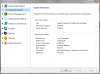
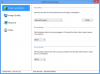
Everything runs ok under windows 8 other than the missing controls for the backlit keboard, oh and the function keys to adjust the brightness dont do anything under windows 8 either
Arrrrrgh! -
That's the much older "S" model, but rather it is SA/SB, not VAIO S of this thread. You're more likely to get help in the VAIO SA/SB thread.
-
-
Known issue. Go to the Windows 7 Drivers section on the eSupport website and under System Components download and install - Sony Shared Library, Sony Firmware Extension Parser Device Driver.
That should do the trick. -
I downloaded and extracted... pointed the missing device to the folder containing the inf files, which added the parser etc... rebooted.... but I dont see any change the vaio control centre still doesnt have the same amount of options as windows 7 (even tried re-installing control centre) - and the brightness controls on the keyboard still dont work... am I missing something obvious?
-
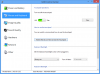
Job done! Thanks peeps for helping :thumbsup:
-
One more problem if I may... im running the RTM version of windows 8.1 at present, and have the watermark in the lower right hand corner... there are dozens of tips to resolve, most of which refer to making a change to secure boot within the bios, however these models dont have that option.... anyone seen this watermark in win 8.1? Anyone know of a solution to remove?

-
Solution worked for me
(Solved) HowTo: Remove the RTM/CP Watermark -
HI
Just what I'm looking for - someone who has loaded version 8.1
From what you have written it sounds as though the update works without major issues with existing drivers, is that correct?
Do all of the VIAO apps work?
Can you really customize your start screen, i.e. get the desktop to be the start screen?
Congratulations on being a maverick.
Cheers
Oops, just read your previous posts... Looks like there are some issues as regards my question above. -
Hi guys!
Did someone noticed that when Vaio S13P is connected to ac adapter and you are using it battery is not charged? Or maybe it is only my "problem"?
It looks like ac adapter doesn't have enough ampere to run my Vaio and charge in the same time...
Cheers!
-
To be honest, other than the issues I initially posted, no it went smoothly . Vaio control center now works as it should. Again install all of the drivers, then update the missing device in device manager with this
http://dl.weeaboo.com/Dark_SFEP_Fix.rar
Then run the Sony Shared Library, Sony Firmware Extension Parser Device Drivers from the win7 section. This will fix the brightness control and complete Vaio control centre options... and then to fix the watermark problem, follow the guide
(Solved) HowTo: Remove the RTM/CP Watermark -
First time poster here. I just bought a refurbished SVS151290X from the Sony Outlet site. I love the laptop! It was configured to be fully loaded, including the SSD option. I some questions regarding installing Windows 7. I can't seem to find definitive information in any one place, so I'm hoping anyone could shed some light on this topic. This is my first time with a UEFI machine, so I'm learning as I'm going along and am afraid of really messing things up.
- For simplicity, I am intending on installing Windows 7 in legacy mode. It appears that I'm supposed to delete all of the partitions that currently exist since they are GPT, including the Recovery and OEM partitions. Do I have this right? If so, then I'm guessing I don't need to use Diskpart to "convert" the disc to MBR.
- If I do delete all of the partitions and install Windows 7, does the Assist button still work to get into the BIOS? If not, is an F key used? I'm just afraid that there might not be an easy way to get into the BIOS if the original OS and/or partitions aren't there.
I did create the Windows 8 recovery media from VAIO Care, so I could go back if I had to, but I would like to avoid as many surprises as I can before starting this process.
I'm sorry if this was mentioned elsewhere, but I just wanted to make sure I had as much information as I can before I start and Sony's instructions aren't very detailed. Any help or tips would be greatly appreciated. Thanks in advance! -
That's encouraging.
Thank you -
Does anyone have a problem with abnormally high cpu usage when idling whenever there is a disc in the dvd/bluray drive?
I sent my SVS13 in to 2 different repair centers and after 1 motherboard replacement and 1 month of not having it, Sony says this is normal behavior and I should just remove the disc when I'm not using it.
-
Reminds me of the time ASUS told me that 104C was a normal operating temperature for the GPU in my old G51. Yeah, right...
-
I just noticed high pitch sound coming from right (power plug) side of the laptop when laptop is on and on power supply. If I plug it out noise disappears.
After investigation to see what's causing it I came to conclusion that its a Logitech USB dongle plugged in USB 2.0 port. If I take it out noise disappears.
Mind you there is no noise on battery even if USB dongle is attached or detached.
Changing USB power/recharge option in Vaio Control Center did not solve the problem.
Plugging in Logitech USB dongle in USB 3.0 does not cause any noise what so ever.
Anyone has a solution how to make this high pitched noise go away? I mean I want to use my mouse so
-
Hi there. I bought a new Vaio S Series a few weeks ago....had to send it back blah blah blah they have run out of black because it's discontinued and they only have red left. Does anyone have the red model and can take a picture or something? I'd love to know what it looks like. Most pictures online (and on the Sony site) make it look really pinky-red? The black was what I really wanted but...in the end it's the insides I want so I just went for the red.
Also (I'm sure someone else has asked this but I can't be bothered reading through all 684 pages) how well do games (Skyrim, Dishonored, Assassin's Creed etc.) run on this? One of the main reasons I got it is the dedicated graphics. The model I'm getting has an i5-3210M, nvidia 640m le and 4gb ram. Thanks guys
-
All of them should run very smooth on high/ultra settings and by smooth I mean 60 fps. Of course you will have to OC your card... but it's not a problem
First post here:
http://forum.notebookreview.com/sony/677079-sony-vaio-s-bios-mod-gt640m-le.html
I think that "red" really means red... I saw some pictures in google (not exactly s13) and you shouldn't be worried. -
Thanks I'm really looking forward to getting it!
matiss likes this.
-
It's here, I'm typing on it - and it really has the IPS Screen. Great machine
Thank you for your advice! -
Great value for money then! Enjoy!
-
Hi everyone,
I am new to this game so sorry if this message is not on the right thread.
I have just bought the SVF1521F4EB.AE1 Sony Vaio SVF1521F4EB.AE1 | Sony Vaio FIT 15E F1521F4E Intel Core i5-3337U 1.8GHz Windows 8 Pro 15.5" 1366 x 7 - Laptops Direct.
It is pretty good but I am looking to expand it's RAM from 4GB to 8GB can this be done? More importantly I was also wondering if it is possible to upgrade the processor to something like the Intel Core i5 3340S?...
Intel i5 3340S Quad Core 2.8GHz LGA1155 HD 2500 6MB 65W Processor - BX80637I53340S - CCL Computers.
I have seen that it is rather complicated to do and there seem to be a multitude of factors determining whether or not it can done. Any advice or assistance would be most welcome.
Cheers
Richard -
Sony Notebook SVF1521F4EB - BHS Direct This site says the max is 8gb.
-
Anyone swap the dvd-rom in the Sony Vaio S (2012) SVS13A18GXB with a newmodeus caddy or something more appropriate. I typically have to put my computer into sleep to get the SATA 6Gb/s (SATA 3) performance; would another identical drive in that bay force me into never getting the performance on either drive?
2nd HDD / SSD caddy for Sony VAIO S Series (VPC-S) [SONY-2BAY-S] - $44.55 : NewmodeUS, Hard Drive Caddys for Notebooks
http://forum.notebookreview.com/son...tical-drive-hard-drive-guide-sa-sb-sc-sd.html -
Replacing the ODD bay: Sony Vaio S15 Disassembly and ODD Replacement Tutorial - YouTube
It will not give you SATA3 speeds if you put an SSD there on either drives. -
Didn't work for me after I replaced Bluray with HDD.. But then I only tried it once haha. Luckily, the HDD is working like a charm -- unlike some reports you might have seen mine goes to sleep with ease, and there's no tax on CPU whatsoever while idling. Must be cause I have 2012 Win7 model (clean Win8 over it though)..
-
Speaking of memory, are there any news regarding the 12GB limit? I haven't seen 16GB SODIMM, so I assume there isn't one yet -- but it's only a matter of time before it appears. What about then?
Would definitely love to stick some RAM into mine, one of the very few things I am not entirely satisfied with on my SVS1511C5E. -
Hey guys, I just purchased an S13p at a great price due to being removed from the lineup and am now looking at my upgrade options..
I've read through the majority of this thread now but not particularly thoroughly.
Current configuration is:
i7-3520m
8GB memory
2GB 640m LE
DVDRW ODD
My first priority is to get swap out the HDD to an SSD but I was wondering If anyone has been able to swap from an HDD to the OEM RAID0 Setup.
I understand that one would need the flex cable as well as the the SSD brackets and dual SSDs - that Is if the mod is possible and not locked by bios.
Does this upgrade present any noticeable difference in real world usage? Am I better off getting a 512GB samsung PRO SSD and have it running at SATAII speeds for a similar cost to a 256GB RAID0 retrofit? -
Hi again,
Someone help me please. I NEED to download Photoshop from a CD my school will give me soon BUT i tried it before and my DVD drive is NOT reading ANY CD. (maybe because i put windows 8 a while ago) PLEASE HELP ME.
Thanks.
Official 2012 Sony S Series Owners Thread
Discussion in 'VAIO / Sony Owners' Lounge Forum' started by Petrov, Jun 9, 2012.


