Problems? See this thread at archive.org.
Just for comparison:
ran Bootracer again - I guess I was wrong... my boot time with all gadgets and startup programs is below one minute.
The result below is including logon time (7 seconds).
![[IMG]](images/storyImages/bootracerboottime55.jpg)
![[IMG]](images/storyImages/bootracerboottime552.jpg)
Also measured the time to start (for the first time after rebooting) a few programs:
Word - < 1 second
Excel - 1 second
Acrobat Reader (Pro) - 1 second
Photoshop CS5 - 5 seconds
Opera - <3 seconds
-
Hmm okay! It's a hard decision for me to choose between an older S13 and the new upcoming SB. There is now an possibility to customize your own SB, we didn't have it when the S series came. When i'm upgrading from my S12 (because of hinge problems, I have the opportunity to refund it) to the S13 I will have things that will improve, like the processor and the graphics card. But I don't know, the new SB also has great specs but I don't know if I like the design, I like the cylinder design very much, with the power button on the side.
-
Nice. Never heard of Bootracer before.
I find that Ubuntu shut down in 3 sec. I dont know why Windows 7 take so long to shut down! -
Does anyone know if the harddisk on the Sony SB is easily replacable with an SSD? Is it 1.8" or 2.5"? The current SSD configuration prices are really expensive, might as well buy one myself and put it in myself.
-
I don't think anyone has SB yet, besides that - this is not he right thread for that!
http://forum.notebookreview.com/sony/545391-sony-sa-sb-discussion-sonys-next-new-13-3-laptop.html
but IMO it is 99% sure it is a standard 2.5" SATA. -
I would imagine it would be, if it's a standard 2.5" one (which it is), here are some pictures of the SB, looking at the underside I can't see a "HDD" size panel, so I guess you'll have to wait for someone to buy one and strip it:
http://www.pcworld.idg.com.au/revie..._sb_series_vpcsb16fg/377819/images?image=2#cb -
Did anyone tried the GPS function which is described in this forum? How does it work? I found it by accident while I was searching for replacing the keyboard with a backlit keyboard.
-
Works fine
 Used it twice only but works like a charm
-
I don't understand what to do next. I have completed step 1, now the next steps are (see below). Do I need to instal this or is it also possible with the normal software? I have the NMEA etc. installed on my notebook.
2) We need to turn on the GPS receiver. Unfortunately, despite the image present in the help, it seems that Sony disabled the GPS switch in Smart Network. I've seen images of Smart Network coming from different Vaio models with the GPS switch, but I didn't manage to get a fully working SN. That's a bit sad because I can't see any reason for such limitation. However a workaround is still possible: in the USA, Sony sells the Vaio Z advertising the GPS feature and fortunately it uses the same Gobi 2000 WWAN module (and Wi-Fi module). However no SN is installed there, there is a similar, but more limited, utility called Smart-Wi. You can download it from the USA site and install it even without removing Smart Network. The downside is that with this utility you cannot have both WWAN and Wi-Fi turned on (only Wi-Fi, and GPS off, or only WWAN and GPS on). Well, you have to turn the WWAN module and the GPS on and then go to SN to turn the WLAN back on, it's a bit annoying. The other downside is that Smart-Wi seems "predominant", so the SN switch configuration is discarded or superseded by SW.
I'm still looking for a GPS capable Smart Network, maybe coming from a different Vaio, maybe you can contribute.
3) Now you can connect to the COM port and read the NMEA coded output, for example using Putty. It's still human readable but not really comfortable, so a specific application is preferable, such as Google Earth, VisualGPS and so on. While using the Vaio X software I installed "Location Search Update", that add some GPS controls in the Vaio Control Center and a useful IE bar that you can use to locate yourself using the GPS and, for example, Google Maps. Will upload later the exe I'm using right now (don't remember exactly where I downloaded it).
Note: if you're unable to see any NMEA output try a different COM port. For example, if you see COM 5 in the device manager and no output from that port try also port 6 and 7, a mismatching is possible.
The real issue is the lack of the GPS switch in Smart Network, but Smart-Wi is an acceptable compromise if you really care about the GPS device. Let me know if you find a GPS capable Smart Network fully working for our Vaio S. -
You are following the wrong instruction!!!
There is another one that comes with a small EXE which activates/deactivates the GPS once the right drivers are installed! Look for it - someone linked to it in this thread!! You DO NOT need to uninstall Vaio Smart Networking!
P.s. I thought you are without S right now waiting for replacement unit!? What happened !? -
Well, I searched for it, but can't find it :s.
About my notebook, they gave it back to me because they will make a decision without my notebook, because I said that I need it for work. So they will decide and then I will refund it, if that's the decision. And I will definitely go for the S13 because when I look to the design of the SB I really start to like it a little bit, but I don't want to take the guess that it will be a good laptop (known problems with Z-series etc. and problems with my older FZ series (first gen.) was also not 100% okay!), and if I have to wait for 3-4 weeks to look at it in real life instead of to pictures it's too late for me. Also IMO the SB is more like a square (keyboard part) and a square (screen part) connected with a hinge
, but I really start to like the specs
. So the only possible option then, if I wait 3-4 weeks, will be the SB and no S13 anymore, so I have to decide know.
-
I definitely agree about the design of SB. awful
I will look for that instruction for GPS later or tomorrow and will let you know if I find it. -
Ok that would be great!
-
im back again... after about half a year of using the system becoming laggier. being very slow in opening stuff. any similar prob? and btw anyone tried installing jolicloud 1.1 or ubuntu in it?
-
What is your system configuration and usage pattern?
-
Try to run running System Tune-Up or One Click Care once a week..
...and scan your system for infections (virus infections, malwares, etc...) too. -
Is there a Keyboard skin/cover (EU Type) for this laptop? iv been searching for one and cannot find a correct model (EU) and its driving me crazy!
-
Hey Everyone,
I did a search and didn't find much on the topic, so I decided to post...
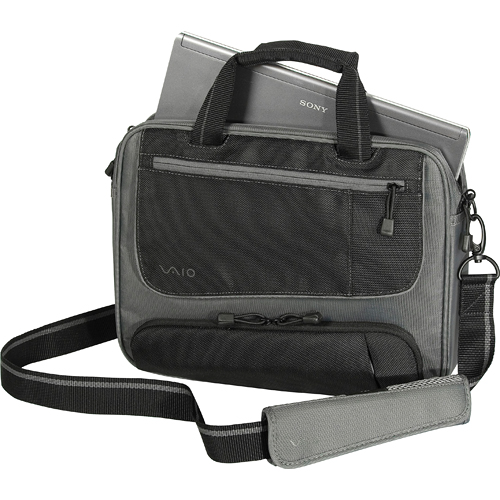
I just got my VPC-S111FM/S a couple weeks ago (I know its an older model, I guess Best Buy is trying to get rid of them, so I got it at a pretty good discount), and I have yet to take it out on the road with me, because I don't have a case or sleeve for it yet. I have looked around on the internet and found this...
Amazon.com: Sony VGP-AMC1 Neoprene Carrying Case for VAIO S Series Notebooks (Includes AC Adapter Case): Electronics
... the description, and name, says it fits the S series, but I read the reviews on Amazon and everyone was using the case for something other than the S series. So I'm still not sure if that's what I should get.
So this question goes out to all of you... what do you use to protect your Vaio S? Whether it be a sleeve, a case, a bag, a backpack... I'm open to all suggestions.
Thanks in advance.
BTW... This is my first time posting on this thread. And it looks like you've got a good thing going here. I've been reading it quite often since I got my Vaio, and I've learned a lot. It's a great one-stop resource for anything related to the S series. This thread is definitely going in the Bookmarks! -
Never seen one. Do people still use one? That's really old-school dude...
What do you need it for? It would look terrible. Like using your TV remote in a plastic bag (thumb-down).
Welcome to the forum/thread and congratulations on your new laptop
I personally use a CaseLogic Sleeve + Backpack. Very satisfied with both. -
what you mean by configuration? the model? mine is vpcs117gg
using it very often
have tried using tune up utilities but not much of use -
Please list your configuration:
CPU
RAM
HDD (capacity and speed 5400/7200/SSD)
.
And by usage I didn't mean how often you use the computer but how you use it)) How many programs you use simultaneously, what programs you run, how do you define the lagging, etc.
Without more detailed information it is impossible to find what is causing it. -
I use this Sony case: VGP-CCB4/B
It's actually a VAIO branded Targus case.
You can read my review of it on B&H, and as of the review, I actually realized what the magnetized flap is for, there's a spot for small stuff like pens and SD/USB memory cards. I wrote the review while I wasn't near the case...
I have an SR Series (VGN-SR590 CTO) which is pretty close to the S Series.
I'd also suggest adding this thread to your subscriptions so that you get email updates daily or weekly...Attached Files:
-
-
WOW. I just saw the new S.
Everything is on the right side!
Talk about front loaded or back loaded, night vs day, drought vs rain, etc etc
I dont think this is good design! -
!!! http://forum.notebookreview.com/sony/545391-sony-sa-sb-discussion-sonys-next-new-13-3-laptop.html !!!
Let's keep this thread about S11/S12/S13 only, shall we...! -
Hi,
Finally arrived my baby S13X9E and first thing what I wanted to do is create recovery discs, but when I run VAIO care and click on create recovery media it says: This feature is not supported when running Audit mode. Please exit audit mode and re-start VAIO care.
So how I may exit that audit mode? I have no idea..
ALSO: When trying to install SATA driver in order to downgrade XP after I get that blue screen error, doing everything what says on VAIO installation instructions:
1 - Enabling external device boot;
2 - Booting computer with XP disc and pressing F6 at the beginning of the windows setup to install a raid driver and inserting USB flash drive with only SATA drivers on it.
At the end cant choose any driver as it says that it like not recognize anything..
Would be very thankful for any help.. Thanks! -
There are tools out there that will let you slipstream your SATA driver into the XP install disk if you have the ISO, but.....
Is there a particular reason you need to downgrade it to XP?
I would really advise against it unless you have apps that use drivers that won't run on anything else and also wont run in xp mode. xp, in terms of it's kernel and it's potential for exploitation via rootkits and the like is a much much higher risk when compared to windows 7. -
I have managed to prepare XP disc with SATA already with nLite soft.. worked smoothly and the reason about downgrading to XP is just that I hate Win 7 so much... Even with these latest huge spec computers it runs a way much slower then XP and moreover I hate Win 7 interface.. For me XP for life.. Btw, I am using computer just for surfing the internet and other easy tasks, I mean not pro at all, so XP is till the death for me and I really feel it very very stable OS
-
On one hand I do understand your point - you are used to XP, you know where everything is, you need no eye-candies, so you decided to stick with it.
On the other hand, as a person who has been in your situation and who had lots of problems adopting herself to 7 at first, I can tell you that XP is past... you will run into many troubles such as lack of drivers support (or very old drivers), performance issues and so on. XP is not being developed anymore so new hardware is hardly combined with it and it will become harder and harder.
My friendly advise would be to just give 7 a try. As a matter of fact you can make it look just like XP with no visual effects if that's what appears "slower" to you... you can always go back to XP but I think you might change your mind. -
You're not alone, but you'll probably find the s and xp aren't particularly compatible - in my experience it runs hot and drops drivers. Give Classic Shell a go if you don't like the win 7 interface.
-
To be honest the BIGGEST problem about the 7 is that you cant move folders and this is not understandable how they disabled this option.. You can only move them on desktop but not on other places.. This is just horrible, I am using external HDD with lots of data and when u run it with 7 it just automatically arranges folder and it gets very very messy.. I hope you understand what I mean.. Also, I was trying to get used to 7 and there was no luck after week of use I was like exploding.. It really runs slow plus that disabled option as I mentioned.. And yes, I know about the driver and other possible problems, but..
Interface is pretty ok when u set the classic theme.. But as I mentioned, there is other problem that bothering me. About running hot I didnt experience that yet and the drivers I believe there will be some hassle.. Anyway, Miscrosoft announced that they will still provide XP downgrade for some more years and it should be totally bad with it as there is given XP drivers on S13X9E drivers download page and as for just minimal everyday needs I think I should be enough running them.. -
Ahh the "Auto arrange in windows explorer feature".
Theres a fix here that will give you back the "Auto Arrange" option in explorer folders:
How to Disable Full Row Select in Explorer in Windows 7? - The Winhelponline Blog
I'll try it for you on a virtual machine and see if it works....
edit - just tried it on win7 sp1 x86, it doesn't work. -
Yes, the Auto Arrange....
Anyway, I have just completed full install of XP including drivers and I can say it works pretty smooth! The only problem I am having is that keyboard backlight is always on once using the keys, not like it used to turn on only when its dark on Win 7.. Anyone faced the same problem? I would be very happy if someone could tell me how to fix it. Thanks! -
Typical problem even when Windows 7 is being clean installed. Maybe those who clean install might have a solution for you.
Does the light-sensor work at all? Auto brightness of the screen working? -
Nope, light-sensor and auto brightness of the screen doesnt work. But I have just solved the problem about the keyboard backlit being always on, there was utility called VAIO Control Center and it gives you option to turn on/off KB backlit so finally I am happy with my VAIO at the end
-
The Mediamarkt is really frustrating. They now need to send my notebook (because of cracking hinge) to Sony again, and then within two weeks I will hear something from them. But the S13 notebook will disappear because Sony has the new SB series introduced. Also when I want the S13 I have to pay an extra of 250 euros. So I don't know if I need and want to do this, because if I wait 2 weeks, the S13 will be sold out, so no S12/S13 for me anymore only the ugly SB series. So maybe if the problem will be more worse than now, it's maybe better to send it directly to Sony.
-
Is it Spain's Mediamarkt?
-
If you have to pay for S13 you will certainly have to pay for SB as well, so I'm not sure I would do that, taking the hideous design of SB into account.
Make sure your S12 gets fixed qualitatively and keep it... that's what I would do I think. -
I have just checked SB of how it looks and it's pretty close to MacBook, I love it and if there would be black colour available I would be blaming myself that I have just bought my S13 few days ago but white/silver is not practical colour and pink/blue is useless.. Gracy123, why dont you like SB?
-
I will let Sony (directly) fix my S12. I have to pay extra for both S13 (220 euros) and SB (120 euros). I don't like the design of the SB and on March 25th the iPad 2 will be released so I will not use my notebook not that much as I do use it now. So I will use my 120 or 220 euros for the iPad 2.
It's not the Spanish Mediamarkt, but the Dutch one.
-
I'll never know why anyone would buy anything as useless as an iPad but that's a different topic
-
Because I can use it for my study (school), they also recommend to buy one.. but well ontopic now..
-
Wow you must be studying Marketing or Advertising... that's the only thing selling those.... Money thrown down the toilet.
But enough offtopic.
Attached the updated Drivers database, now including the WWAN. Unfortunately I haven't been able to find any driver updates for it yet.
I politely ask all of you to send me PMs with corrections, newer driver versions, etc. so that I can keep the list up to date and upload it here regularly.Attached Files:
-
-
Hi Gracy,
Thanks again for the update. So I tried installing the updated driver for the GeForce 310M since I am still running 198.28. I got the install file from Nvidia's website, and it says it can't install since I need to get the driver direct from the manufacturer; but Sony doesn't offer an updated driver on its site.
Just wondering where/how you got yours?
Thanks
-
As stated in the comments box, all "not-original" (not coming from Sony) NVIDIA drivers need to be modified in order to be installable on our machines. Unfortunately I still haven't learned how to modify them myself, but there have been a few nice gentlemen here (special thanks to coolguy!!) that have modified a few versions already so that they can be 1. installable and 2. supporting auto-dimming and other S specific features.
Here is the modified nvszc.inf that you need to replace in the 266.58 installation you have downloaded already (you need to extract the exe first).Attached Files:
-
-
Hi Gracy,
Thanks for the welcome, and your suggestion. I also ended up buying a Case Logic sleeve. It's the ENS-13 neoprene sleeve.
I wasn't able to check back here for suggestions because I didn't have internet access at the time and I needed one right away, so I just picked this one up.
That said, it works pretty well for a quick purchase. I like like how the opening is along the side as well as the top, for easier access. But one thing that I don't like is that it is about half an inch deeper than the laptop (9.43" instead of 9"), so it has some sliding room in the case, which I'm not too comfortable with. I would rather it be snug on all sides of the laptop, so I stuck a microfiber towel in with the laptop to take up the extra space. But I'm still not sure if I want to keep it. It works well for now and I have a microfiber if I ever need one when I'm out.
Sorry for the long-winded reply, but thanks again.
One other forum-related question, if you don't mind. How do I put two quotes in one reply? I want to respond to two people in one post? -
Thanks for the suggestions Jaded. That looks like a nice case, I'll keep that in mind. I just bought a Case Logic neoprene sleeve, because I needed something right away. But I'm not sure if I'm going to keep it, it's a little bigger than what I was looking for. I was also looking for a bag or backpack to use with the sleeve, so this might just work.
How do you subscribe to a thread, is it somewhere in the user settings? -
Mine is a bit deeper too but I do like that, as this way it perfectly fits in my backpack isolating and not moving around
To multi-quote different postings click "Multi-quote" on the first one or few posts you would like to quote and only "Quote" on the last one. It will list all selected.
To subscribe to a thread click "Thread Tools" and "Subscribe to this thread" from the bar menu bar on top. -
With the case that I have, the laptop cannot move at all. It fits snug as there is no movement from side to side and there is a nylon strap with velcro to hold the laptop down and in place. The case is slightly taller than the laptop but the velcro strap still holds it in place. That and it has room for all of my accessories
-
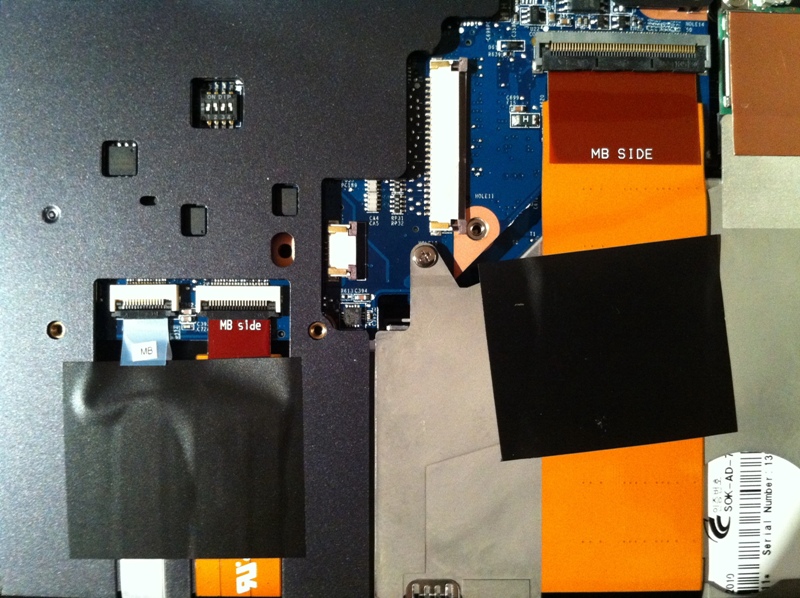
so right....my wee sony vpcs13-l9e has no backlit keyboardb....
but i had my kb out today for a nosey and saw a socket for it
anyone know if it will work?
also, what are the dipswitches for?
thanks
jjAttached Files:
-
-
The dip switches are related to the screen. I once tried out different combinations - so lead to black screen with vertical lines without image. The position of your switches is different than mine though - as far as you see you have all down whereas I have 2 up and 2 down.
Official Sony S11/S12/S13 (2010) Owners Thread
Discussion in 'VAIO / Sony Owners' Lounge Forum' started by dubbs, Jan 13, 2010.