Problems? See this thread at archive.org.
Are there notebooks with HDMI input? I have yet to see one. Also as far as I know all HD cable and satellite use coaxial cable not HDMI and there are some external HD tuners that support cable and satellite input.
Sadly this has been a recuring problem since the beginning of blu-ray, software/firmware sometimes need to be updated to play some of the latest discs or you have to wait until there is an update.
The newer Fox blu-rays have gotten a lot of complaints on other forums about playback issues.
-
You can try Arcsoft's TotalMediaTheater Extreme for Slumdog BD who knows it might be able to play that movie. The trial version plays BDs and is good for 15 days. Picture quality in my opinion is a bit inferior to WinDVD (bit grainy). I haven't tried burning MP3s on Blue ray I will try and report how it goes.
Edit:
OOPS forgot to add the trial version of TMT Extreme doesn't play Dolby sound so it'll be a silent movie. You can turn on the subtitles though
-J -
OK - I've installed a second drive. The BIOS sees the second drive and shows both drives on the first setup screen, but there is no option that I can find for enabling RAID. Both drives are identical 320GB drives. Anyone know how to get to the RAID configuration? I have an AW120JH.
-
When I bought it I just assumed it would do what I want it to do-didn't realize I would need an HDMI input and didn't know the difference between inputs and outputs for HDMI. My previous HDTV was a 46 inch Panasonic circa 2000-2001 or so and two of the Panasonic D-VHS tape decks (they were quickly taken off the market because they could produce endless perfect digital tapes by connecting firewire from one to the other. I heard what happened was the MPAA or a similar organization was going to make the recomendation to the studios etc. to stop purchasing professional Panasonic equipment and that got those tape decks off the market in a hurry.
Noticed something else I hate about some of the Fox/MGM Blu Rays (doesn't apply to Slumdog Millionaire)-they use a case that's not solid-little spokes and a bunch of spots where there's no plastic between the disc and the cover-when you hold them they feel like they're sort of collapsing in your hands and if you were to grab them too hard you could bend the cases really easily. Kind of annoying since I try to keep them in pristine condition-but not nearly as bad as the issue with them not playing in the first place.
Telephone number to complain about Fox BluRay/DVD quality: 888-223-2369 -
When I last tried Arcsoft's trial verison a couple of months ago the player would not load/start, on Vista.
-
Can someone help? I have an AW190c and all of a sudden I have no audio when playing any type of video files. I've checked everything that I know of & can't figure it out. Did I accidentally turn something off not knowing it?
-
yeah since then the trial version vanished for a while but its available again now. I installed it couple of days back only thing is you have to watch the movie without sound as the trial version doesn't play Dolby sound. In terms of picture quality WinDVD is better.
One nice feature is that you can take screen capture of the BDs
-J -
As soon as I installed a second drive, I was given the option to press Ctrl-I to enter the RAID manager.
-
Follow up to my original post.
The AW120j has been out of stock/deactivated several times already on Newegg and has always come back in stock.
I'm just wondering, is there any major visual difference for a standard user between having the Fluorescent screen and the LED screen? I'm just wondering if its worth the extra cash to get the LED over the fluorescent.
As for the RAID parts mentioned in http://forum.notebookreview.com/show...postcount=1551, are there any other parts? Somewhere previously mentioned in this thread there is a dual SATA cable and a double SSD bracket. Does anyone know the part numbers/price of these components? Also the drives in the AW are in fact 2.5" and not 1.8" right?
In addition to this, the prices for such relatively simple hardware is ridiculous, are there any other places that offer better prices? Also are the screws mentioned in above post special in anyway, or are they just normal small screws you could probably find at a hardware store?
Oh, I forgot to ask about the network card. I hear the WLAN Intel 5100AGN isn't particularly good and the 5300AGN is significantly better. Is it possible to replace the 5100AGN with the 5300AGN, and if so where can you buy the 5300AGN? Also I''m looking into an external battery for the laptop when I do get it. Is it possible someone could find out what the input voltage is? Like from a wall not from the battery? Most laptops are 16v and I imagine this is 19v but I want to make sure.
Thanks again, Thog. -
depends on what you are comparing with - Normal lamp display on AW is gorgeous enough and easily puts other laptop displays to shade. But if you compare it with another AW with LED display then the difference is obvious. LED display is in different league.
But for a non professional and mainly recreational use I find it hard to justify another ~1000 bucks just for a better display
Thats what the opinion seems to be but I have seen some improvement in terms of connection speed after downloading wireless connection utility from sony support website. I don't know if its possible to swap out the network card. The rated voltage on the brick is 19.5V -
Thanks for the reply. At what point to do you press Ctrl-I? While the bright "VAIO" is on the screen when the system is just starting, or while in Setup? I tried both, and neither seems to work. Do you have the updated BIOS?
Brian. -
Is the AW connected to an external display? I assume you rebooted? What devices are listed in control panel->sound? Was this after a program/system crash?
-
Hi everyone! Guess what I have been up to?
Messing around with forceware drivers. When I bought the laptop it came with the october 2008 drivers.
Yesterday I installed the 182.50 modded nvidia drivers and everything fine except for one thing! Messed up blu ray playback!!!
Had to roll back to the original driver. My questions are:
1-Has anyone tried forceware and gets everything ok? (ok meaning everything stable and playing games and watching movies)
2-If everything is fine and I can play all games and watch blu rays with my original factory drivers, should I even bother in updating drivers?
3-Can using improper drivers damage hardware? (a bit dumb myself in this matter)
These are my questions, if anyone can put in a little light I would be very thankful. -
I guess you installed the 'regular' ie. desktop drivers. I had installed the notebook drivers I guess its 179.xx. It was a forced installed and it messed up the BD playback (basically the OS crashed when BD player was started). After that I found an update on sony support for WinDVD BD player and since then my forced install driver have been working without a hitch. Mind you the driver is for notebooks and not desktops.
-J -
it indicates I'm listening to "Bluetooth hands free audio" which makes me believe it thinks I'm using headphones, which I've never used.....I know this must be really a simple setting but I can't figure it out!#$%%
I HAVE NO AUDIO...any have a suggestion on where i can look? -
RGB screen ............Regular AW..........................................................Everything Else
|-------------------|---------------------------------------------------------|
whether that difference is worth $400-$500 to you is your call. Either way, you're going to have a better monitor than any other laptop has. I can't recommend the RGB screen (what I have) unless you spend a lot of time working in graphics. Photoshop or heavy photo editing for print. -
Go to Device Manager, expand the sound node, right click on Bluetooth audio and select Disable.
See if that works may be do a restart as well. If the normal audio comes back on re-enable the bluetooth audio and see how it behaves.
-J -
That was it!! Works just fine, now.
Thanks!! -
I tried to use a Direct-TV box but Media Center won't let you connect to it w/o a ir booster. Even then it won't work as it can't set the channels even though it sees them. With the ir booster you can hook it to cable but I switched to sat...so I am still out of luck. Sony doesn't provide an ir booster but they are out there pretty cheap. I don't think any laptop has HDMI in just hi end video cards for desktop. I went for hours with Sony over this issue and they claim it is a software problem ...not theirs.
-
I actually prefer the gray as I had a shiny finished HP and hated all of the smears and fingerprints. I understand that the RGB is better but I absolutly love my LCD on the AW290J. It is so much much better than anything else except the RGB. I do games or heavy photo editing. BD is awesome. I guess that's why they do different versions. If I needed it for work or games I would have upgraded but my screen is really bright and totally saturated with color.
-
Have you tried other tuner software? Easy HDTV and GBPVR are the only two I could get working in Vista, not sure if they support Direct-TV thou.
-
i had it working fine with the ir blaster and a cable box but not with the Direct TV box. I stopped trying. I travel on business often and wanted to store video from sat to watch on the road. Maybe Win 7 will improve Media Center to work. I haven't tried other software. Do they allow for storage too?
-
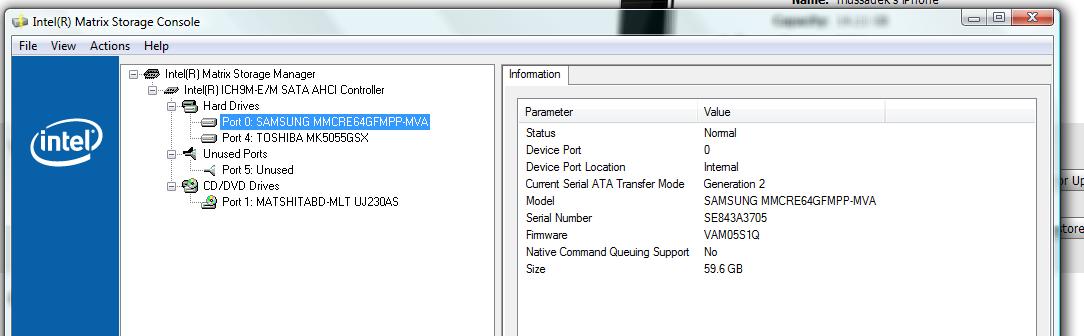
Brian, the Intel Matrix Storage Manager is the very first thing I see, before the VAIO logo. I never saw it until I put the second drive in.
Looks like my BIOS Version is R1051Y2
Here's a screen shot:
![[IMG]](images/storyImages/DSC00424(800).jpg)
-
By storage I assume you mean schedule recording to the harddrive? GBPVR can do that and it's free.
-
Hi all
Can i install vista or windows 7 32bit on my AW290 ?
if yes from where i can get the drivers ?
because all the driver in Sony support are for 64bit
thanksLast edited by a moderator: May 8, 2015 -
Thanks - I appreciate the effort in getting that screen shot. I don't see that screen at all - even after installing the second drive. I have "hand installed" vista 32 on my system, and I must have missed something from the normal factory install. I'll have to google "intel storage matrix" and see what I get. Thanks again.
Brian. -
Can you connect the AW to a Direct TV box with it? That would solve all my problems.
-
I do not have Direct TV so I cannot tell you. GBPVR has a forum, maybe you can find an answer there.
-
Yep, the latest totalmedia theatre trial version now works on my AW (with no sound).
Thanks. -
hi
please can u take a screen shot from ur Intel matrix storage console in vista , i want to see the ports of ICH9M that u have -
Hey all, does anyone know what the difference is between the first and second generation of the Sony VAIO aw? I was looking at purchasing an AW with a one in the model name, rather than a two. Any significant difference? I was looking and couldn't discern any. Maybe I'm just not paying close enough attention.
Thanks! -
Looks like 0 and 4...
![[IMG]](images/storyImages/DSC00442.jpg)
-
From what I remember (could be wrong on some of these) the 100 series had slightly different processor options, they all came with BlueRay R/W, and all premium models came with Photoshop Lightroom (currently the AW290JFQ does not). From what I can tell, the change from 100 to 200 was just an incremental step up which happens about every 6 months for computers. The 200 series has a few more options for CTO (more HDD options, more RAM options and Blueray options).
I expect the 300 series AW's to be out in June (200 series came out in early Jan). It will be interesting to see if they go to DDR3 RAM + 1GB video card and offer quad core processors similar to the HP HDX series. Some answers to earlier questions I posted in this thread suggested DDR3 and the 1 GB video cards can't really be used to full capacity with the class of processors in the AW (and other laptops) right now. I'm not sure if having quad core processors would change that. Anyone else want to speculate what the 300 series will have and guess when it will be released? -
The hard drive included in the current pre-configured model AW290JFG is 1TB (2 x 500) which is great. Unfortunately it has an extremely slow 4200 RPM. It comes with a fast processor. Why would Sony include such a slow hard drive with their premium/flagship model? Would such a slow drive negate the benefit of a fast processor? I have that model and just wondering if it would be of great benefit to replace the 4200 drives with 5200 drives. Any opinions are welcome.
-
The JFG is not a Premium model. It is offered in the CTO's and some of the pre-configs to get to the "magic number" of 1TB at a lower cost (though I'm guessing the 4200's were the only options when they started doing the 1 TB HDDs). That's probably another small change they could make for the 300 series, 1 TB at a faster speed (I'm not sure what's on the market for 500 GB HDDs).
-
That slower 4200 RPM 1 TB Hard Drive is why I opted for two 320 GB hard drives at 7200 RPM. The reality is you end up with 585 GB of hard drive out of the box after the installed programs use their needed capability. That's still quite a lot.
-
Sorry, I meant the AW260JFQ. That is the fully loaded pre-configured model. There are 500GB 5200 RPM drives out there. I find Sony's choice of 4200 RPM odd, because I don't really see drives with such a slow speed being sold. Is it that the Raid 0 configuration makes the faster drive speed less important, or is Sony just trying to keep the price lower?
-
the 4200 rpm they are very quiet I couldn't hear it when I had it in laptop
the 5400 rpm they are quite audiable I have it now
the 7200 rpm that must be a proper hurricane -
I would agree with your assessment of the 4200 RPM. I cannot hear it at all.
-
thanks for the info, i think i have deferent ICH than yours , here i have ICH9m-E/M SATA AHCI Controller
Attached Files:
-
-
I don´t really believe that a 7200rpm hard drive is really that noisy. It depends of the manufacturer. All my 7200 drives have been extremely quiet from samsung to western digital!
This is an extraordinary machine but I believe in one thing when it comes to multimedia and what I expect from it:
-Gaming
-Video & photo editing
-HD viewing/composing
-Rest of simple day to day tasks.
Sony take some advice for the next time round:
-Throw in a Crossfire or SLI configuration
-Put a good 5.1 speaker sound sytem
-More connectivity options (esata, more usb ports)
Maybe I´m just dreaming!
Anyhow I´m happy with this monster!
I don´t envy the Asus W90VP. It was my first option! -
What specific application slowness are you referring too? In my years of computer usage I have found that the CPU and GPU have a far greater impact on computer speed then the harddrive does, not to mention RAIDs are faster then non-RAID systems.
I edit and preview HD video on my AW and have yet to experience any "slowness", infact my older tower computer with faster drives is slower. -
The second generation will probably get better driver support over the first generation or at least longer supported.
-
Thanks. I'll check in there.
-
I have a CTO AW290J(non premium) with 2x320/7200 drives. Mine are very quiet...and fast. Can anyone tell me what the advantage of running them in RAID is? Is mine? Can mine? Should I? I don't play any games. It seems fast to me with 4GB and the P8700. I'm not a rookie...just a traveling salesman with a heavier bag now.
-
I have installed a second HDD in my AW120JH but still do not get any BIOS support for RAID. Does someone know if there is a "secret" key sequence to tell the BIOS to enable RAID support? The "Advanced" page in my BIOS setup screen is completely blank, and I suspect that there should be an "Enable intel matrix storage manager ROM" option there.
Brian. -
Hello everybody !
I'm very hesitating between
the AW21Z:
-Intel® Core™2 Duo processor T9550 (2.66 GHz and 1066 MHz FSB) and Intel® PRO/Wireless 802.11a/b/g/n
-564 GB (500 GB Serial ATA 4200 rpm hard disk drive (1 x 500 GB) + 64 GB SSD Flash drive ultra ATA/66 (1 x 64 GB))
and the AW11Z:
-Intel® Core™2 Duo processor T9400 (2.53 GHz and 1066 MHz FSB) and Intel® PRO/Wireless 802.11a/b/g/n
-640 GB (2x320GB Serial ATA 5400 rpm hard disk drive)
I'm going to use photoshop, hd video editing, play games, watch video
I would like to know if this SSD would make the laptop faster than the two 5400rpm hard drive.
With this SSD there's a 4200rpm :-/. Does it mean that all the programs should be installed on the SSD ? And I should use the HDD only as a storage HDD ? What would be your choice ?
I sent an email to Sony asking the exact model of the SSD. Does anybody know it? Is it a good one?
Sorry about my English...
Thank you in advance ! -
New to the forum. Just found it yesterday. Read the entire thread over the past two days for background.
I do video and photography, currently editing with the Adobe CS4 master collection. I need to edit on-site at client's locations from time to time. So, a powerful but portable computer is an absolute must. My current laptop is an HP/compaq NW9440 mobile workstation, but it's getting tired. Need to replace it soon as now the screen is starting to get really dim. I priced a new one with the goods and it came out at $4500+. Too much for me.
So now I'm looking at the AW series with a lot of interest. It has the power I need, and I can't tell you how excited I am by the prospect of a laptop screen with the full adobe color gamut (the rgb/led version).
I've been looking at the sony style site since I don't have a store anywhere near. My first and biggest concern was the warranty offerings. These mail-in service packages that Sony provides just aren't acceptable to me. I have a PS3, and know what it's like to have to send it in and wait. This just won't fly for my work computer and I was ready to move on to another brand.
But here's the good news, Sony offers on-site warranties through their business to business division, and through certain approved resellers! I'm might be the only one that didn't know this, but this is awesome!
So now I'm going to really dig in and try to find the right model for me. I have a couple of questions:
1. I found this model that seems about right - VGN AW290JGQ (Core 2 Duo T9550 / 2.66 GHz - Centrino 2 - RAM 4 GB - HDD 640 GB 7200 rpm - BD-Read and Write - GF 9600M GT - Vista Home Premium 64-bit - 18.4" Widescreen TFT 1920 x 1080 - etc.) It's pricing out at a reseller for $2435, but I'm just not sure if this model has the top screen? Does anyone know how to break down the part number?
2. When I price an AW290 CTO at sony style, it comes out about 300 higher, and I'm pretty sure it's with the RGB screen. It also has the Adobe light room software. Would that account for the 300 price difference?
3. For those of you who have the RGB screen and have tried to calibrate it, can you confirm you can see the full range from the darkest blacks to whitest whites? What do you see when you look at the chart on this page - drycreekphoto.com/Learn/Calibration/monitor_sensitivity.html ?
4. I remember someone saying they loaded CS4 but had some problems. Are there successful CS4 users on the AW series. Can anyone comment on the performance for HDV video editing?
Just realized this post is getting pretty long, but I think this might be the right computer for me and I'm eager to get things rolling. I'll save other questions/ thoughts for another post.
Thanks everyone! -
I'm trying to write to a DVD+RW and I receive the following message:
This DVD-ROM drive is read-only. You can copy files to this writable DVD, but you must insert it in a writable drive
Really, really irritating to say the least.
This is the Sony AW 290 PREMIUM with Blu Ray Read and Write!!!! -
The model you have mentioned is listed on sony B2B site. It does have Adobe RGB screen but I am not sure if it is available to normal consumers. Most likely these models and prices are for resellers or enterprise customers that will explain why your comparable AW 290 came out $300 more. Rule of thumb seems to be that all shiny black AWs come with adobe RGB screen
IIRC that problem was traced to CS4 as other non AW users also reported having issues with CS4
-J
Official Sony VAIO AW Series 18.4" Owners thread
Discussion in 'VAIO / Sony Owners' Lounge Forum' started by Phil, Sep 9, 2008.