Problems? See this thread at archive.org.
Intel Responds to Fragmentation with New X25-M Firmware
Anyone with an Intel X-25M SSD will want to read this article:
http://www.pcper.com/article.php?aid=691
I haven't tried it yet but I plan to at some point (full backup first to be safe).
-
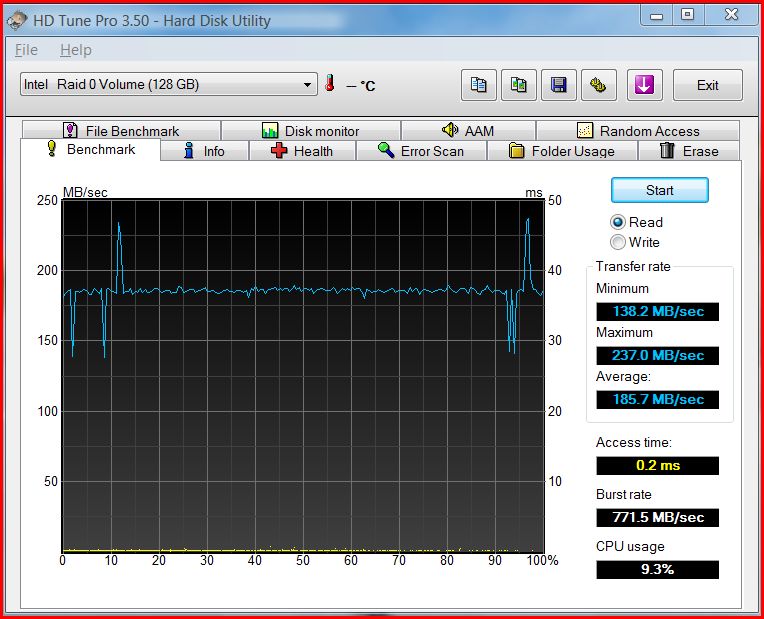
After seeing your post and fiddling the same these are my results:
Attached Files:
-
-
that's a bit high. I'd recommend that you undervolt. It's awesome.
-
Hi edgain, that's a good improvement as well on your SSD's.
I tried the same optimization on the 500GB HDD, but there was little or no improvement, but it really does make the SSD's much better.
I notice my boot time is speedier. -
Same for me on the ordinary HDD, not much improvement, but anyway at least we doubled the SSD´S!!!

Mine can probably go faster because I did the test on a fragmented background...I´ll try cleaning up a bit and trying again! If you tamper with anything else let us know, thanks for the feedback!
-
I'd never heard of that "advanced performance" thing before-new to Vista I guess. Does it make any real difference for mechanical drives? Technically it DOES have a backup power supply, given that it's a laptop, but...
-
Hi Wolfpup,
No, it does not appear to improve mechanical disk performance, but it certainly has a big effect on SSD's. It was a big surprise as it appears to almost double the read performance, but it does use a few % more CPU power.
It should be fairly safe on notebook pc's as they are always running with the battery present (I mostly use my laptop on mains power). -
Huh. Thanks! Well, I guess I could always turn it on, just for a while...
Must cache...something more to try to speed access. -
FYI, for those waiting to buy. Sony is offering 24mo 0% financing on all Vaio' s (including the AW). I'll bet once that is over, they will once again have the $300 bundle discount, so if you have the cash, you might want to wait for that.
However, 24 mo financing is worth about $88 on a $3,000 computer if you can get 1.5%APY in your savings account (i.e. save $2,912 today and you'll have $3,000 2 years from now) . The $300 bundle sounds better, but you actually end up spending all that money on a service plan and two accessories you might not really need.
Also, the education discount is still 7% on the AW290JFQ and 5% on AW290 CTO's. -
Hello. I had a question about a problem I'm having with the Vaio-AW 170Y. When leaving on the laptop for a couple of hours with the screen down, it is going into standby and blue screening. I haven't checked the blue screen report but I think it is a DRIVER_POWER_STATE_FAILURE 9f. My friend had the AW 290 and had the same issue. This forum has been so helpful for all my other problems. Thanks in advance.
-
just today was reading wery baaad problem with that intel ssd
i think ssd is not good in these days ..
that firmware will not save it .. i think ..
i'll wait some year or more with ssd's ... not ready yet ..
bring a thing into fluent running ... -
What do you want the notebook to do when you close the top and what are your advance power options settings?
-
hey guys, its time i update my laptop and i need any advice you got.
i want the highest spec AW series but without the blueray and spinning hard drives. the problem is that i cant customize the AW series on sonystyle.uk and the other option is the FW series with the 16.4 hd screen rather than the 18.4 hd screen of the AW.
i play some light games but basicaly i just want a very fast laptop for everyday use including things like photoshop. will a high spec FW still deliver for me? -
Thank you for the response. I think i found the problem. I am using a torrent program that disconnects my internet. Probably a router or port problem. The computer then goes idle for some time, therefore, tries to go into standby. When I close the screen I want it to do nothing and I changed the setting in my power options to do when I got the laptop. My advanced power settings were to go into standby if it had stayed idle for 25 minutes but I changed it. I still don't know why it blue screens but I have found the source of the problem. Thanks again.
-
would just like to say that I'm disgusted that Sony is not on top of this more. while I'd like to run Vaio Care, I'd rather not run it than have to uninstall major windows applications to do so. I'd much rather Sony release a statement more like, "we're working on IE8 compatability" rather than, "hey...uh...don't support that." it's stupid. IE8 has been in beta for a year, damn it. Not only that, but I actually had 2 different Sony tech support people tell me they do not support Vista Ultimate on the 290-J! what does that even mean? lol, as if you can't configure it for Ultimate on their main website? It's one thing to not be ready to officially support something; it's another to act like you can't even volunteer the slightest amount of assistance or provide some measure of hope/optimism.
*sigh*
how do all these companies have such poorly-trained support teams? I thought nobody was worse than Toshiba. Then I gave Sony and HP a call. -
It's called downsizing among other things, I am only surprized when I get good techinal support.
-
lol, I hear that. but Toshiba and HP have been bad since well before companies felt the need to downsize. Sony, I can't speak for, as this is my first Sony experience.
-
Hi! Does anybody changed the processor on their AW by the Intel's 3.06Ghz T9900? It seems hot, but i'm thinking it could be too (thermalwise)
hot? Experiences?
-
I can't speak for the past but right now a lot of these companies are losing money hand over first and Sony is no exception.
For now I am more concerned that Sony keep doing driver updates for the AW. -
BDRW drive owners: does your BD drive make an audible noise when the computer starts up?
I don't know when mine started making noise, but I'd compare it to a belch. doesn't affect its playback of discs or anything and only happens at startup or when I unload/load a disc...but I don't remember it making noise before. If others do, I'll just assume I didn't notice in the past.
I might make/post a recording of it so that people know what it sounds like. it's like 2 noises back-to-back.
My drive is a Matshi ta UJ230AS. -
Ajreynol don´t worry about the BD noise it´s normal. Mine does it three times, two on startup and another one while the windows green sliding logo is going. It has to be some kind of drive check! No problems with the drive! Works perfectly. If yours does too then don´t worry about it! Oh, straight out the box noise since I bought it, came like that from factory ok!
-
One more thing on the UJ230AS BD affair, does the drive recognize all the discs you insert? This question is to all members. FW users have been given an update to solve this particular problem. Just curious.
Mine will not write double layered memorex dvd´s that come with a nice purple surface! Memorex is a crappy brand anyway so I´ll blame it on the discs! No problem reading same purple surface on TDK´s. -
excellent. thanks for the confirmation, edgain.
-
FYI - Vaio Care only works with IE7. Confirmed.
If you've installed IE8 and want Vaio Care to continue working, you'll need to uninstall IE8. It will resume functioning. Until Sony fixes their app, this is the only solution. -
The internal camera, can this be used with MSN, I've tried using it with MSN without any success. Has anyone here used the internal camera with MSN, can you advise how to get the set up working.
-
Hi everyone,
I finally kind of sorted the My Documents folder thing googling a bit, Vista is a mess. Anyway, the other day i tried to see a blu ray for the first time in this laptop and.... seriously, is this how it's supposed to look? it looks horribly grainy and it doen't get much better from a distance. The blacks are almost blue and everything is so pixelated... i'm REALLY disappointed about this
I tried testing it with some other blu ray playing software like PowerDVDs but it looks the same, so it must be the screen or something. I might be spoiled because i normally watch blu rays on a Pioneer KRP500A (which is the most amazing TV ever), but this is just unacceptable to me. I mean, my dvds look much better than my blu rays? What is this? I really hope there's some way to fix this software wise, if not then i'm already regretting the purchase
By the way, the blu rays i've played were Planet Earth, 2001 Space Odissey and Blade Runner. I think the worst looking was Planet Earth, specially the night scenes which made me feel like crying, so ugly!
-
some movies are grainy. has to do with everything from source material to intended look, as chosen by the director and film editors.
Planet Earth - good portions of it filmed in DVD-quality. only looks great some of the time.
2001 & Blade Runner - ancient source material. Old movies will look...old. Higher in sharpness and resolution.
go rent/buy The Dark Knight or Pan's Labyrinth if you want to see your laptop display & blu-ray shine. -
Yeah, i might have to do that, but it's such a pity that some blu rays look like this when on my TV they look perfect, so it can't really be an intended look in my opinion. There must be something wrong with te quality of the screen or the blu ray software. I guess i'll have to try those movies you've recommended me. I've just seen a Appaloosa video in 720p and it looks much better than the BR i have :S
Thanks for the response by the way!
-
I can tell you all three look great on a plasma (assuming you are talking about the BBC version of PE), not too mention are rated highly for their quailty on HD sites.
Try Arcsoft TotalMedia trial and do a screen capture if you got another computer to look at the images. -
a 1080p screen will bring out more problems than a 720p screen will. especially considering how much closer you sit to your laptop screen than you do your TV screen.
-
Note on updating firmware for Intel X-25M SSD
I just updated my firmware on my Intel SSD's. I was unable to use Intel's updater on the Sony machine, which didn't surprise me too much, as Sony so often likes to do things (such as SATA controllers) their own unique way.
So I just took my SSD's out and plugged them into another system temporarily to update the firmware to the new 8820 version that is supposed to improve performance.
No problems, it's a very quick process:
- Download the ISO image file
- Burn a CD from the image
- Boot from the CD which updates the firmware
-
what was the update for?
-
After reading this, I checked to see if it worked for me - have not used MSN in ages. Booted MSN, did the setup - and works great. Not a problem at all.
-
That's great news for you, can you advise what you set-up, I've had msn installed for ages and only just started to us the camera and I can't see anything to set-up.
-
Hi I like Sony and I Hate Them as well !
Sony so often likes to do things their own unique way:
And I Love so much to DESTROY THEIR UNIQE WAYS and make it easy and smoothly done
but sometimes it not work :-/ -
Launch MSN. TOOLS --> AUDIO AND VIDEO SETUP
-
Sorted, thanks for pointing me in the right direction
-
Not a problem Glad you got it working.
-
Some testing had been done which showed that the SSD's performance degraded over time due to weaknesses in it's control algorithm. Still much faster than a mechanical disk, but not as fast as when new.
http://www.pcper.com/article.php?aid=669&type=expert&pid=1
Amazingly, and to their credit, Intel took the criticism to heart and quickly released a firmware update to deal with the issue.
http://www.pcper.com/article.php?aid=691
There are still improvements to be had, as I understand it, especially if and when Windows 7 supports SSD-specific enhancements.
Disclaimer: I'm not an expert on SSD's, I just do what the experts advise (if I feel like it). -
i see. looking forward to dropping prices of SSD in a couple years.
Until then, I'll be quite content with my Raid 0 solution. -
stupid question but whats the command to enter the bios. I only see the VAIO splash screen on boot up and nothing else?
-
It's usually F2 right when it's booting. You can usually just sort of tap it a few times as it's coming up.
On some systems it's delete instead (or in addition to), but usually F2, and I'm almost certain that's what I hit in a store to bring it up on the AW. -
The "Premium" model WITH the Adobe RGB calibration is the ONLY screen that is LED based. Also FWIW the Premium model is the ONLY one that also comes with the luscious leatherette padded palm rest area. I really like that feature for after hours of photo editing the hard surface gets to my wrist. It also will serve as a nice damper for vibration of the hard drive and also insulate from the heat. Worth that for sure.......
-
palm rest really isn't soft. in fact, it's not soft at all. more aesthetics than comfort. "luscious" is not a term that should describe it. at all.
-
I have to agree with AJ, the palm-rest isn't too comfortable. It's dead-flat, and there's no padding to speak of. Also, the sharp corners on the front edge and left side of the laptop really irritate my hands sometime.
Add that to the unfortunately quirky keyboard layout and mechanics.
Two of the Sony's features that are not the best. -
Late response, but I want to add that my AW had 3-4 dead pixels all in the same place and I got the screen replaced in about 3 days. I'm in Tokyo, though, so other countries may have different policies.
-
That really took me by surprise Jay, i've read several reviews on the AW series, and all of they pointed the keyboard "action" on the positive stuff.
Of course, you have the advantage of having the hardware beneath your own hands, so i'ts a good point. I'm still gathering the $$$$$$$.
-
funny thing: I've often felt like it should be or was supposed to be soft...and wondered if there were any aftermarket direct replacements for this component.
-
Have you found any?
-
haven't even looked. I actually figured the market wasn't big enough for it. but I'll look around and let you guys know if I find anything good.
Official Sony VAIO AW Series 18.4" Owners thread
Discussion in 'VAIO / Sony Owners' Lounge Forum' started by Phil, Sep 9, 2008.