Problems? See this thread at archive.org.
I've noticed when I try to open from the side or the corner, it tends to put added stress on the hinge. As long as you open it from the middle-front, I don't see that problem. That screen is so #&%@ big.
-
Thanks so much. I've got 32 bit running properly atm, but I'll give 64 bit another go this weekend.
Thanks again
Gordon -
Man Im still waiting for my Sony VGN-AW160J/Q that Ive ordered from Costco.. Is there anything that I should or shouldnt do when I first get it.
-
One quick question about the TV tuner for AW owner:
The HDTV tuner for AW series are internal or external? If it's internal, how to connect it to cable? I assume there's an interface on laptop body, am I right? If the tuner is external, what's the interface? USB?
Thanks for the input in advance. -
For those models that have them:
The NTSC tuner is internal and connects via a special breakout cable (included with the unit) next to the LAN/Modem jack on the back right side of the case (it's behind a cover and not visible in most pics).
The ATSC tuner is a USB device about the size of a thumb drive with a coax connector on the end. -
Ordered mine on 5/10 regular shipping, so I'm now waiting too.
 First thing I would do is create the recovery DVD's. I assume this is still an option on the Sony AW series for doing so?
As for the BIOS VT enable, does anyone have the direct link to the procedure and data files required for the US-based VGN-AW BIOS? -
it's in this subforum. look through the first 2 or 3 pages. title is specifically about enabling VT.
-
Thank you very much for the quick response. I just got a little bit confused.
So, for models with TV tuners: There're 2 tuners come in the package, one is internal built-in NTSC, another one is ATSC external? Or some models have internal NTSC while others have external ATSC, i.e., ONLY one tuner per model? -
Mine (AW290JHQ) came with both internal and external. I'm not sure about other AW models. You can call Sony and ask, but sometimes they know less about their products than we do.
-
happy to hear im not the only one that caved on the costco deal. i think you guys will pleased. mine took 3 full business days to arrive.
-
I got in on it too, ordered 5/7, shipped today, looking forward to checking it out. I neglected to opt for the express shipping (my error) and i'm on the opposite coast, so i'll be waiting quite a few days.
-
im in nyc which is exactly why i opted for the express. costco is so slow to process orders its crazy. on the upside the 90 days is a good way to gauge the product quality and to ensure that you are happy with your purchase. nothing worse than buyers remorse. anyone know why the t9400 was dropped??? im guessing sony just wanted to shorten the list of available options for config to lower fab costs. since the p8700 hits 2.53ghz and the average customer is a tard cake that wont know the difference, we gain via costco. thoughts...
-
For those who care, I changed my raid 0 to a pair of SD Scorpio Blue 500GB HDDs.
CDM is as follows:
![[IMG]](images/storyImages/crystaldm.jpg)
numbers are better than the 5K500.B's (see my sig), but I can't say I've noticed any significant real-world performance differences.
considering I got the WD's for $46/drive, I' a very satisfied customer. -
Well I haven't been able to get to the local Sony store to check out the display model screen regarding my perceived issue with the video quality. I played an identical clip on my old notebook and compared the two in real time. I was amazed by how dim and colorless my old notebook was compared to the AW, which is vivid to say the least. After seeing this, I don't think that there is a problem with my AW. I think it's just a matter of adjusting the color settings and lowering the brightness way down. Especially considering that Blu-Ray plays well.
I've been batting this one around myself, but I can't seem to be willing to go through all of the trouble for the same amount of storage. Sure the 4200rpm's are slow, but I think I'm just going to have to wait for 640gb's or 750gb's to come out. Surely it can't be too much longer. -
check out my 5k500.b link in my sig. lots of real-world performance analysis.
there is a real advantage to these 5400's over the 4200's. -
agreed which is why I went with the 7200's
now I have to sell my 1tb of 4200 rpm drives.
did you notice that the 4200 drives are 12mm in size and not the normal 9mm? -
Yeah, and as such won't fit in a lot of the small footprint external enclosures on the market (such as Vantec's various offerings). So much for my plan to use them as data caddies.
On the bright side, it does mean that the AW has room for the 12mm units, which could be handy for early adopters of any 1TB 2.5" drives that come out. -
So does this mean that the older 12.5mm 5k500 drives will fit in the AW? I read in previous threads that they would not fit.
Any speed differences between the 5k500 and 5k500.b drives? -
12.5mm will fit in the AW, sure. this thing has HUGE drive bays.
anyway, you can import a 12mm enclosure from the UK. $25 shipping for a $25 item, but there is an enclosure out there that will hold it. -
OK Im looking into upgrading the HD once my laptop arrives. I know that I'll need to make recovery disc for my laptop. But once thats complete, I want to replace the 5400RPM with a 7200RPM. My concerns is that the hard drive will make more noise than the orginal 5400RPM one, reduce my battery life, and vibration... I plan on shopping at either newegg or zipzoomfly any recommendations..
I prefer zipzoomfly since there prices are a little cheaper than newegg..
http://www.zipzoomfly.com/jsp/ProductList3.jsp
http://www.newegg.com/Product/ProductList.aspx?Submit=ENE&N=2010150380%201035507776&bop=And&ActiveSearchResult=True&Order=PRICE -
Seagate's Momentus 7200.3 320gb drives work well in my AW. Quiet, no noticeable vibration and only mildly warmer temps (still quite comfortable). I can't say for sure about the difference in battery life, but I'd guess you'll lose maybe 5-10 minutes at most. Spin down time, screen brightness and other power settings will effect your consumption far more than the difference between the 5400 and 7200 motors will, IMHO.
-
Yeah, no reason to use 5400RPM I don't think.
This is annoying, Newegg has Seagate's new 500GB drive in stock. I would have picked that up had it been available in February. Oh well, my 320GB drive is doing fine for me. -
Hi! Any news of the 300 series on the AW's?
DDR3, Win Seven?
-
Well I now have two 5k500's (12.5mm) in the system. I managed to screw up the Raid 0 configuration and had to do a complete recovery twice. Not sure if it was worth the trouble yet.
What do you guys use for back up software? I was using EMC Retrospect Express on my old system, but it doesn't support 64 bit. I'm looking for a backup solution that will duplicate two drives by replacing only the files the have changed from the master drive. -
I used ShadowProtect Desktop.
It comes highly recommended.
I've used it on several systems and it's easy as pie to create the image and restore. -
costco sold out...
-
I was going to say that as well I was having some problems with my shipping address for whatever unknown reason. I had 6 orders that got cancel. So I called customer service to see what the deal was and they had to place the order manually. Apparently my info havent been sent to whatever address verfication system they use, so my name doesnt show up as me living there. But the rep did tell me that there was 7 left. So I finally got everything taken care of and I should recieve mine Monday..
-
1.) Do anybody know any coupons for Zipzoomfly or Newegg?
2.) Whats the difference between SATA & SATA II and which one do the AW have? -
They just doubled the possible transfer rate over the bus. Most (all?) computers have had SATA 2 for a while now. Mechanical hard drives haven't exceeded SATA 1 yet, though the fastest flash based hard drives actually have. I think it also added support for Native Command Queuing which was lacking from the original specification, though at least at first that wasn't having any real benefit.
-
OK.. Can you please dumb it down for me.. Its like your speaking in a whole new language. But will it matter if I get SATA 1 or 2 for my AW laptop..
-
they canceled on me twice as well for no good reason. They didnt even notify me. i found out only because i called to see when it would ship...
-
It won't matter. SATA2 is compatible with SATA1 and the AW will run either just fine. In fact, the 500gb Fujitsus they use in the 1TB models are SATA1.
You won't notice any real performance difference between SATA1 or 2 either. As Wolfpup said, laptop HDDs (excluding some flash drive like the X25-E) don't use the full capabilities of SATA1, much less SATA2. This includes the drives that are labeled as SATA2 drives. They just support the newer spec and for the most part are no faster than their older SATA1 counterparts. -
I was just looking, and I'm not even sure my new Seagate drive even supports NCQ. Maybe it does, and they just don't bother listing it anymore, or maybe it doesn't, since it doesn't affect performance any.
At any rate, it's thankfully fast enough that I don't notice a real difference in drive speed between my new notebook and my desktop with a Seagate drive from maybe 4 years back, so I'm happy enough. (Though I'd love to get a quality 320MB+ Intel or Samsung flash based drive when they hit cheap enough! Just the idea of not having to defrag anymore, and the massive speedup in random reads and writes...) -
You ordered 6 systems? Or you placed the order 6 times for 1 system?
It must be a Costco thing. They delayed mine as they said the bank wouldn't release the funds, but before I even called them I looked at my bank account to find that the funds had already been reserved by Costco a day prior. I suspect that if I hadn't called, the order would have been cancelled. -
Ordered Sunday, came on Tuesday via UPS.
Overall, I'm impressed with the screen compared to my other notebooks. A few issues and resolutions:
- After hibernate, system would not respond even holding power button several times would not boot and appeared locked up solid. Removed battery temporarily and rebooted.
- Found and installed newer BIOS update from March
- No problems since
- Fingerprint reader went away
- Found issue and USB fix on sony site, installed, seems ok since
- Found issue and USB fix on sony site, installed, seems ok since
- Brightness not retaining last setting in Vista
- Changed 'power settings' display brightness on AC in power mgmt control panel which resolved the problem
- (my XP-based sony did not change brightness from boot to boot)
- Changed 'power settings' display brightness on AC in power mgmt control panel which resolved the problem
- Slightly green/blue, turned nvidia settings to 47% for both seems to help
- Off center viewing - LCD appears more red on left than right, not much can be done for this
- Bottom 1/4 part of display slightly darker than rest of screen
I'm not a big fan of raid 0, so a new WD 320gb 7200rpm drive is coming today. - After hibernate, system would not respond even holding power button several times would not boot and appeared locked up solid. Removed battery temporarily and rebooted.
-
No it was one system six times whether it was the pre-authorization, shipping and mailing address dont match or whatever, But my ordered cancelled at least 5 times..
-
Q ? : Why i cant update any firmware update from sony support ?
it always fail to update ?? -
I got mine yesterday, beautiful notebook. Has anyone else noticed the screen continuously changing colors? I installed the BIOS update to fix the flickering issue (which I didn't really notice), but the screen is still cycling colors. It's very subtle, but it's definitely there...most noticable on a white background (like this forum page).
-
I've noticed these things too. Overall i'm not as impressed by the screen as I had hoped. The color is nice, but the viewing angles aren't good. I think the issue with the screen appearing more red on the right, and the bottom appearing darker are angle issues. On mine if I move lower, or more to the right, both of those things disappear for the most part.
-
The issues that you guys are having is it with the Costco AW series..
-
So whats the difference between raid 0 and raid..... Your laptop came so quick because your in CA. I still havent recieved mine and Im in Houston.. BTW go ROCKETS!!!!!!!!!!!!! -
Hello happy AW owners!
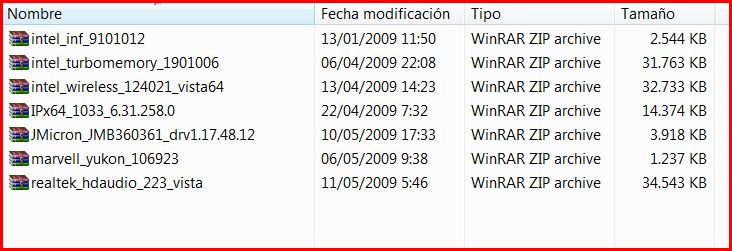
Just wanted to inform everyone that I downloaded Driver Genius Pro and managed to install new updated 2009 drivers for the following hardware as shown on the attached image!
At least it is something compared to the outdated Vaio page!
Hope it helps!
By the way it´s for the 64 bit systems!Attached Files:
-
-
driver geius is sit ...
will give you downl. offer even what you don't need for your machine ..
Install rather driver detective it will detect your machine,will set your model and will check properly what u have out of date and step by step you will google them all out .. -
Hey
Have not posted in weeks-new problem
First of all-old problem-the Viao AW290 Premium is not capable of receiving HDTV cable just over the air HDTV. Los Angeles reception is unreliable but most shows are easily found anyway.
Has anybody experienced a paint chipping problem? I certainly would assume so. With any luck it seems to be the one plastic piece sitting on the very top of the case (oblong about 12 inches long and half an inch wide) other parts of the case are not chipping-the chipping on that piece is severe and underneath it is simply black plastic close in color to the rest of the case. Who has had this issue and have you done anything about it? -
the only part i have chipping is the silver-colored plastic border going around the unit. near the mouse pad where my arms rest while typing on the keyboard. it looks very ugly and would like to get a replacement piece and spray lacquer on it to act as a shield.
and ota HDTV works. you need to let it search as you walk around the house with your antenna. I get 3 or 4 strong signals. can't speak for LA, though. -
I'm using an indoor antenna-it does not pick up all channels. Yours is AW290 premium? Must be since you mention LED in your specs. Silver plastic is not chipping at all, I have had this unit since February. What about you?
I assume the paint chipping is under warranty but quite a pain in the to be without it for a few weeks. -
I've had mine since March. It's fine, but the rubber wrist rest is coming unglued from the computer (causing a weird lumping effect), and the afore mentioned chipping on the silvery plastic strip.
-
Like I replied before, if you want to get channels broadcasted from a long distance you need something like a quad antenna and aim it in the right direction. It's a lot of trial and error with no guarantees however.
-
What's a quad antenna and how can it be adjusted to work indoors? There are no balconies in this apartment and the fifth floor windows face a building immediately adjacent they open to the south. There are no long distances involved this is about four to five miles from downtown Los Angeles. Also no roof access.
-
The antenna is big but can be used indoors, you need to mount it on something.
This is what one looks like:
http://overtheair.saveandreplay.com/images/channel_Master_4_bay_antenna.gif
You also really need to know where the signals are coming from, the www.tvfool.com site will tell you. If your window generally faces where broadcasts are coming from you stand a good chance of receiving them.
Official Sony VAIO AW Series 18.4" Owners thread
Discussion in 'VAIO / Sony Owners' Lounge Forum' started by Phil, Sep 9, 2008.