Problems? See this thread at archive.org.
slingshot........engaged
-
-
Hi can u please rightclick on taskbar then start task manager and click on performance and make print screen and post pic here ?
thnx ..
-
Hunh....
Okay a couple things Ive noticed and I'll probably have to go back in the threads to do some research. My color is ALL out of wak, greens are too bright and the reds look like hot pink. Im having a hard time to install an instant messager client where I can use the webcam. People say Skype but everybody dont use it. I was thinking something along the lines of AIM,Yahoo, and MSN.. While we are talking about Ricky Bobby maybe its me or the fact that my colors are out of wack but the movie didnt seem eye popping like I thought it would be on blu-ray.. -
how its possible u didnt get it ?
-
Is it just me? I've no idea what part you guys are talking about. By "plastic oblong piece", are you talking about the speaker bar with the touch controls? The chrome trim that goes around the perimeter of the LCD and notebook base? The screen bezel? The edge of the lid that your index finger touches when you open the notebook (thumb on the inside by the camera, index finger on the lid edge)? I see that the lid is not one solid piece, and I hope it's not that edge you're talking about, because that would mean eventually the whole lid will peel. The horror.
I second the request for pics.
-
-
Very good nice mmm utilizing all 8159 ..
if you can edit a bit that picture cut that green unnecessary crosshatch
and magnify that info below total mem ,system etc .
I will very appreciate that -
-
better for you
-
Thank you very much beautiful!
so how much they cost u 8GB ?
I might buy only 4GB and I will replace with one 2GB module
I will have 6GB -
If you think your colors are actually out of wak you should go to where you bought it and have them look at it.
If you bought it on some non-bricks&mortar online retailer you may have to contact Sony. -
I picked up a really nice set of corsair memory (pc6400) that was on a crazy sale at newegg for $329
overkill? Probably but certainly nice to have especially when I do blu ray encodes -
I have the premium screen/glossy piano black model. I just noticed that some of the black glossy material is flaking off on the lid near the opposite side from the camera. Any opinions on whether this would be covered under the standard Sony warranty. Very poor design and disappointing.
-
Disappointing indeed. I'm getting closer and closer to the idea of returning mine. I don't see any peeling on the unit I have, but i've only had it a few days. The AW is the only system out there that I find totally compelling at the moment, so i've no idea what I would even get in exchange as everything else seems to pale in comparison. HP and Toshiba are definitely out of the question, wouldn't give money to Apple to save my life (even though thier hardware is beautiful), Asus seems to have sub-par build quality and the designs are unappealing, Dell's quality control is appalingly bad, I have a Thinkpad now and I fall asleep when I look at it...so what's left?
No telling what Sony would say, it may depend on the specific representative. Regardless, even if they replaced your lid, the chances are high that it would just happen again seeing that so many people are experiencing the same thing.
Let us know what they say if you decide to call them. -
I actually gotit from COSTCO, I wonder if there is an program that I can us that can calibrate my screen.
-
Im kinda like you as well Ive only had it for about 3 days and I havent had any issues outside of the flicker, but other than that I cant see myself going back to Apple but there's not other PC that is close to this AW hardware wise
-
There are a couple of recommendations earlier in the thread where the LED screen's color accuracy was discussed extensively. I think Spyder Pro was one of the programs recommended, hopefully i'm getting the name right. Everyone who used it stated that after calibration the screen was perfect.
-
OK I'l check into it.. But let me ask you a question Im new to VISTA and I dont know if its normal or not. But the screen only flickers / blink when I open a program. Other than that its ok. I have a SonyStyle store close to me I wonder if they'll be able to help me out..
-
for me, I found it wasnt until I formatted my computer and used the latest nvidia drivers was the color and screen uniformity much better. Something you wouldnt think right out of the box with the RGB screen. YMMV however
-
I'll probably pick up a copy of Vista Ultimate and do a fresh install of the OS. Im more concern that since I found the drivers in one of the other threads, The only one I havent found is the Lightroom app. When I open Lightroom I didnt see an area to enter or view a serial number so I dunno how thats going to work out.
-
I don't think it makes sense to buy Vista Ultimate with Windows 7 on the horizon. Just install the Win 7 release candidate and use that until Win 7 officially releases.
-
I was thinking about that as well.. But I heard that windows 7 should be out in 2010.
-
I was wondering the same thing about Lightroom. I wanted to use my own Vista install disc, but I don't want to lose that program. Hopefully someone knows the answer to this one.
-
I've been looking at 18" models and the Sony was the obvious choice but as I can't be sure of being able to upgrade the RAM I looked again at the The HP HDX X18 and it seems to have better specs than the the base model AW (I'm comparing like with like pricing in the UK). Higher resolution, fingerprint reader, ESATA interface and dual 250GB HDDs. Just a thought.
-
You definetly bought these :
http://www.4allclients.co.uk/?action=4&id=2001999&utm_source=GB_UK
did you ? -
http://www.newegg.com/Product/Product.aspx?Item=N82E16820145599
not sure if they are one in the same -
I was actually quite impressed with the specs on the HDX18, and the price seems insanely low considering the options available, especially with the extra $400 off deal that HP.com in the US has going right now. I hate to say it, but I can't stand the way the HP's look with the glossy plastic on every surface, the stenciled graphics all over, the chrome touchpad (which is very difficult to use smoothly and looks awful unless it's cleaned after each use). I'm also trying to stay away from "frameless" screens. Every phone i've had with the plastic layer over the LCD has always accumulated dust under it that's impossible to remove. The HP's also feel flimsy, although to be fair I haven't handled the HDX18 specifically. Also the HP keyboards never feel that nice, and almost every HP at the local Best Buy is missing keys which makes me think they aren't constucted very well. After using the AW though, I think any keyboard is going to feel poor in comparison, this thing is incredible.
I know i'm excessively critical.
Might try to search out the HDX someplace local and at least see it in person before I rule it out for good. -
I agree in just about every respect. i like that with the hp i can get a quad core and a lot more bells and whitles for about the same money with the 25% cashback however there is something about hp design that irks me. They all have this junkie, plastic look and feel that i just cant stand. forget which design they overlay it with. the other big turn off is the gloss screen. im still having the wonky screen issues here with the 160 but i know hp's screens just dont compare. the entire build quality is suspect compared to the aw. i wish the aw had backlighting for the keyboard like the hp.
-
Seagate Momentus 7200 500Gb.
Has anyone installed this drive? I am considering replacing the 2 500Gb 4200RPM in my AW 290. Is it as quiet? Excessive heat? -
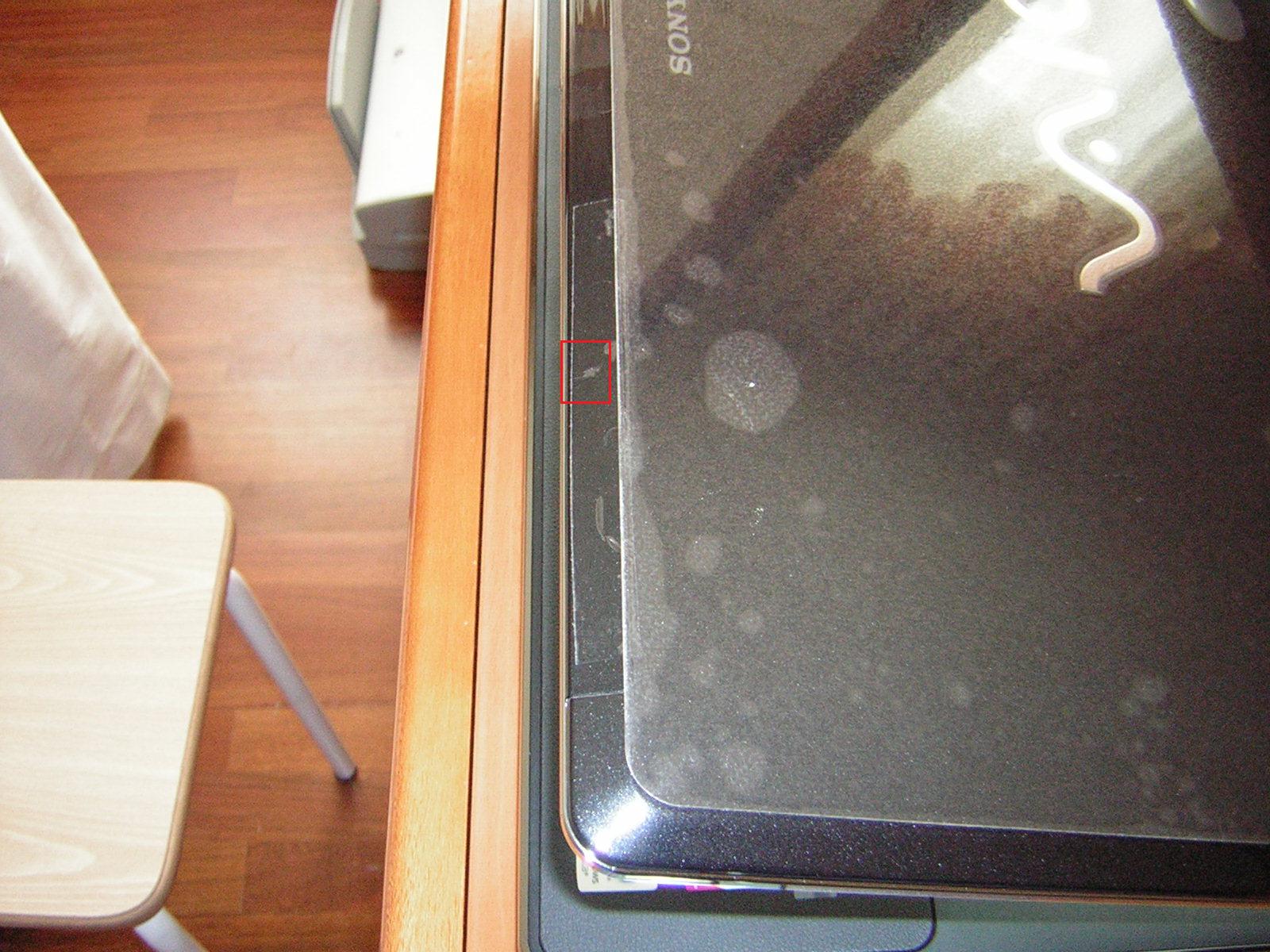
Hi guys! This is the part that I´m talking about, on the outer side of the laptop inside the red rectangle, that´s the scratch or peeling away thing. Tell me what you think guys. If it does not happen any further along this piece of plastic I will assume that it might of been a scratch made by me or something although I´m very very very very very careful with the unit!
Attached Files:
-
-
By the way you can see that I have put tape over to avoid contact here. Let see what happens. What would you guys do?
-
Ive only had mine for a little less then a week but I havent notice anything like that maybe you brushed it against something to cause that mark. But mines doesnt look like that..
-
That´s why I´m going to give it some time to see if it keeps on flaking or not. I want to be sure if it was "human error" or computer design error if you know what I mean. Some people have the lumps in the rubber wrist pad, what about that! I don´t think I would return it just because of that when the unit is running superb 100% and I have no other issue. I dont really know what else to say...
-
Thanks for posting the picture. It's hard to tell much, It does appear to be a scuff mark, but who knows. I guess all you can do is keep an eye on that area up there. If it really does peel on it's own, removing the tape will probably accelerate the process when the tape's adhesive pulls up on the finish. It might be worth taking by a Sony service center at least, if you have one close.
I had to laugh at the fact that you left your protective plastic on the main part of the lid, I left mine on too. -
i finally took it off the other day. if you want a permanent solution get an invisible-shield for it.
-
I left the protective plastic for two reasons:
1- Less to clean (and I can assure you that I have a maniac cleaning routine).
2_ Obvious, more protected!
Happy you left yours too, LOL!
Let´s see what happens with the rest of that piece!
I know what will happen when I go back to my store and discuss this issue: they will tell me not to worry too much and wait for more things to arise in the warranty period so that all the crap that happens can be fixed by Sony in one go! Resuming (plastic piece scraping, lumpy rubber pad, hardware issues, screen issues, the lot!
I´m not worried at all because the rest is ok and incredible! Hardware issues and faults would really pi** me off! I´d chuck it in Sony´s face! -
How could it be fixed without sending it in? Any type of spray or lacquer? Polishing and spraying? Not that I will touch anything in warranty period though! Thanks for your comments anyhow guys!
-
Problem with Wireless-N
Has anyone seen this: My Wireless-N has started acting up. It sometimes drops the connection. Switching it off and immediately back on again using the hardware switch on the front of the notebook very quickly gets it going again, but I think it's happening more frequently.
I checked driver levels, and un-installed and re-installed the device (Intel 5100 AGN). The system is Vista 64.
Any ideas? Thanks. -
I had poor performance at first with wireless N that I could not explain. I rebooted the router and the speed went back up to normal. Have you tried resetting the router yet?
-
I took a look at the invisible shield material. It seems like a good idea, but i'm wondering how well it would go over the Vaio logo since it's slightly in-set. I suppose it could be cut, but that would be a test of one's steady hand for sure.
I think trying to touch it up would look obvious. Even if you could remove the affected piece, it seems like it would be difficult to get a perfect match. Maybe if you're really adept at painting and the like though..
On another note, is there anyone on the board who would be willing to post a picture of thier lumpy palmrest pad? -
If it is less than 90 days just take it back to any costco for a refund and order a new one. Real easy with them...if they still have any left. I bought mine before Costco had them and brought back an FW from them to buy my AW. You don't even need a reason and Sony's contract with Costco makes Sony buy them back at full wholesale.
-
Help needed. I have the AW 290 Premium model with 2 500GB hard drives running at 4200rpm. I have purchased 2 replacement 500GB drlives running at 7200rpm. The problem is that I do not know how to duplicate the drives in the same configuration. I have imaged the drives using Acronis True Image onto an external drive. I installed the new drives but cannot figure our how to restore the data in the same raid 0 configuration. Has anyone replaced the drives in a raid 0 configuration and cloned the data from the original drives?
-
go into your BIOS, scroll over to the tab RAID config tab and select "show" (it's hidden by default), then restart.
when it reboots, you'll see an Intel Matrix (RAID-0) menu begin to load. press Ctrl + I to boot into the raid menu. Follow the menus to create a new Raid 0 array. Name it something other than what your old menu was named. leave everything else at its default.
once it's made, it'll tell you. from there you can reboot, re-hide the Intel Matrix (Raid) Menu in the Bios (resetting it to "hide"), then re-drop your image.
Good luck. And post your HDTune benchmarks! I assume you picked up a pair of 7200.4's? -
Thanks for outlining the steps. Does the procedure start after I remove the old drives and insert the new ones. And yes, I have the 500GB 7200.4's. I am hoping to gain some speed.
-
you do the steps I outlined after you insert the new drives.
-
I successfully installed the new WD 320GB 7200 drive (running single, not RAID). Here are the HDTUNE results:
Stock Toshiba 250gb 5400 drives in Raid 0
75 MB/sec avgNew WD black scorpio 320gb 7200 drive (single)
18.5 ms access
72 MB/sec burst
64 MB/sec avg
15.2 ms access
126 MB/sec burst
The new single WD is significantly quieter and I only hear a few clicks here and there. Palm rest is cool to slightly warm.
The only thing I've noticed on this new drive that seems odd is that during the 'quick scan', there are pauses about every 5 seconds for about 1 second. Other HDTUNE quick scans only pause a split second and resume. It does not pause in the same spots each time, so I suspect writes are happening by Vista which are taking longer to execute on this drive? Not sure, but all of my other drives (in other systems) scan without those 1 second pauses.
EDIT 07-06-2009: The cause for the pauses is related to HD TUNE 2.55 on my installation. When I tried the HDTUNE PRO trial, the quick scan had no pauses during the quick scan. The only thing I can think of is that the regular HDTUNE might have a thread running that querys the SMART parameters or something and delays the drive during that period. Anyway, glad to know that the drive is working normally during quick scan as my others. -
This is a '10 day of use' quick review of the Sony AW 160J/Q model (from CostCo) with 500gb (raid 0), 2.53GHz 6MB L2, 4 GB RAM, Vista 64, RGB LED black piano finish, Blu-ray read/write, Adobe LR 2.0 Notebook:
- Pro
- Display
- Screen color and resolution of 1920x1080 - beats out all of my other notebooks and LCD's for full color gamut
- Side to side viewing angles decent
- Screen can get bright if using in bright room
- RGB LED is instant on from screen saver with no delay to full brightness unlike CFL that fades to full brightness
- Screen color and resolution of 1920x1080 - beats out all of my other notebooks and LCD's for full color gamut
- Dedicated sound volume keys
- Dedicated number pad
- Trackpad is smooth but not 'sticky shiny' like many of the new HP's
- Fingerprint reader
- Multiple card readers; SD, CF and memory stick
- 2 internal drive bays
- Wireless switch is a hard switch not a soft touch like many of the HP's
- Webcam (a feature I'll probably not use)
- Asthetics; looks nice and seems much sleeker than the AR series it replaced
- Overall solid feel; keyboard flex minimal
- HDMI (also usable as DVI)
- VGA (good for projectors with only this interface)
- Modem port (have not tested)
- 1GB Ethernet
- Firewire 400
- Optical out (works well with Logitech Z5500s)
- Std speakers 2.1 sound is good for a notebook
- Blu-ray read and write (future HDR movie burning)
- Wireless a/b/g/n
- NVIDIA graphics 9600M GT (good for some decent gaming)
- Super easy access to swap out hard drives
- Fairly quiet (when stock drives replaced)
- Display
-
- Con
- Keyboard layout
- I prefer the thinkpad ins,del,home,end,pgup,pgdn arrangement and switching back and forth will be a little frustrating until I get used to it
- Eject key is a waste of keyboard space
- No trackpoint (speaking from a thinkpad user's perspective here)
- Trackpad mouse buttons click loudly
- Size of notebook; it's large, it's heavy and more appropriately named a 'luggable' (but the screen real estate of 1920x1080 makes up for it)
- The original 2x 250gb 5400 rpm drives are clunky noisy when accessing (a new WD 320gb 7200 solves this problem)
- Only 3 USB ports; 2 inconveniently placed front right - which interferes with external mouse
- Cover over Ethernet and modem ports a pain to move down and out of the way
- No eSATA (the 2 HD drive bays help make up for this)
- Lights on front; charging, disk access, wireless should be on top next to other indicators
- No positive latch to keep lid shut during transport
- Keyboard layout
- Questionable
- Long term durability of the rubber palmrest material and some have reported bubbles
- People have reported paint chipping off some trim pieces
Overall I'm pretty pleased with this model and starting today I'm on my way to configuring the O/S (clean install of Vista Ultimate done) and apps the way I need them. - Pro
-
^ you'll find that prolonged use of the rubber palmrest will result in the glue underneath it coming undone and creating a bubble look.
I've not gone so far as to snatch it off yet, but when I do, I'll let you guys know, as well as what glue I used to re-secure it. -
Is it me but the camera / video chat on this laptop doesnt seem that good.. Also I need some assistance on reinstall some software see the *** AW - x64 Vista & Win7 Drivers and Utilities ***
-
relative to other built-in cameras...I'd say it's better than most.
Official Sony VAIO AW Series 18.4" Owners thread
Discussion in 'VAIO / Sony Owners' Lounge Forum' started by Phil, Sep 9, 2008.


![[IMG]](images/storyImages/Capture-12.jpg)
![[IMG]](images/storyImages/Capture-13.jpg)