Problems? See this thread at archive.org.
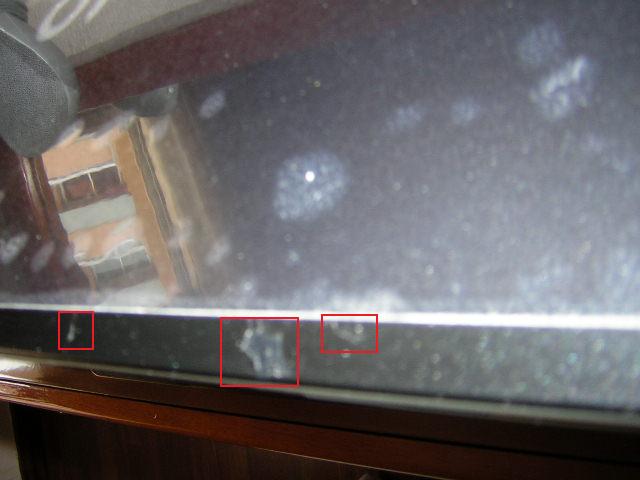
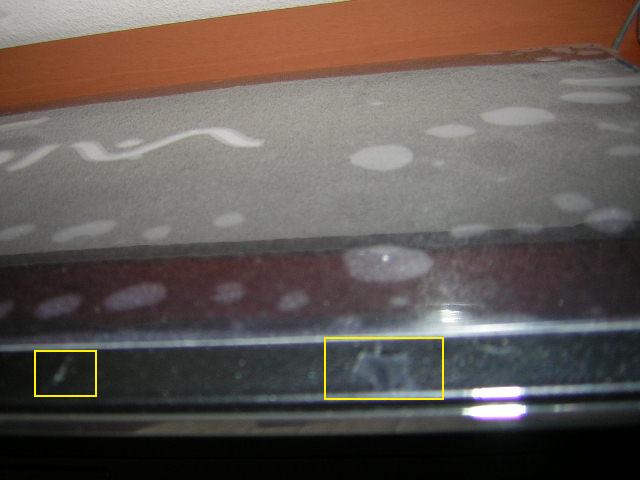
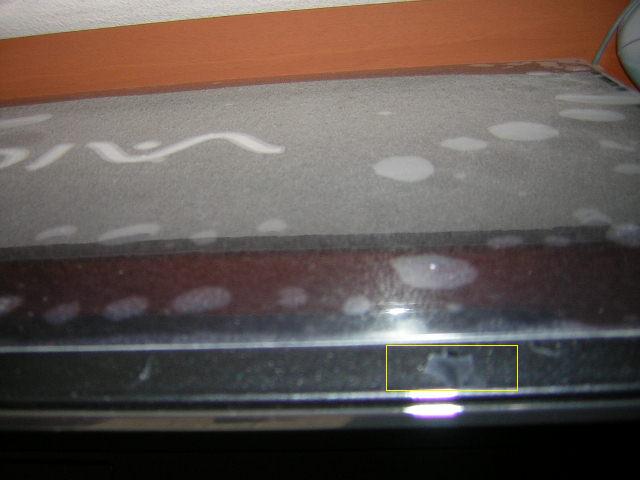
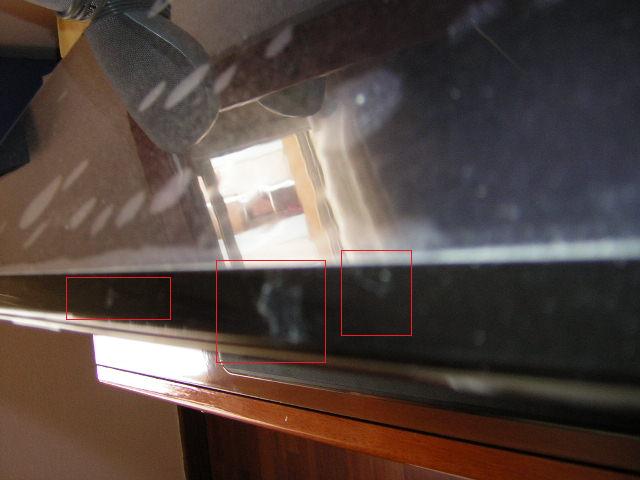
I bought mine in February without extended warranty. It's funny that you mention the area near the camera. The chipping is the shiny black part on the front and top opposite the camera area. Believe me, I have not abused the laptop and this should not occur. It is truly used as a desktop replacement and has never even left my house.
-
Hi folks, sorry for not posting in some time, been busy doing backups of data before sending my Sony in for service. I´ll take it in tomorrow thursday or friday. The chipping has gone worse and started in other areas. I think that Sony did not stick or glue very well the glossy black plastic on the lid. Affected area is only the rectangle piece other side of web cam. NO other area of laptop lid has this infection!!!!!!!!!! Here are photos. People about to buy this laptop: Get it, it´s awesome. Chipping is minor flaw! Honestly. Next posts will be coming from my old acer again!
I´m relieved because now I know this wasn´t my fault!Attached Files:
-
-
Mine is chipping in the same location. I just called Sony service. I explained the problem and he put me on hold for quite some time. He returned and advised that cosmetic issues are not included in the warranty, but they would authorize shipment back so that the technician can look at it. I suspect they have received other complaints. I hope others are not like I was initially. At first, I was going to live with the problem because it is only cosmetic and I did not want to give up my computer for a week or two. But everytime I open the lid and see the chipping, I feel like a dope for spending all this money for something that has such a flawed appearance. Everyone who sees it asks what happened.
edgain, please keep us posted on what happens and I will do the same.
Thanks -
That´s crap what Sony SAYS!
Only in terms of misuse does this apply! I don´t think anyone scrapes the paint on purpose!
Read the guarantee booklet carefully! -
Not to get into a big argument about this, but that's screen non-uniformity. Even highend LCD and plasma (like mine) displays have this. But its only noticeable on a very dark image and then usually when you are looking for it.
The non-LED LCD notebooks have non-uniformity plus a brighter lightbleed over it on the bottom. -
Isn't that what lightbleed is though? Non-uniform distribution of the backlight?

I noticed it quite a bit on the AW that I had, the screen was brighter at it's edges than it was in the center. Definitely much less noticable than any CCFL backlit screen i've seen though. -
Hi folks! Typing this post on my acer 1690. Hope you don´t mind!! LOL!! Took the AW in for service regarding the endless chipping gloss problem. When I get answers I´ll tell you all what´s happening!
For the lightbleeding posts, I think I once stated in a post that on my AW there is a bit but very uniform over the screen and in dark room it´s not annoying! Not very intense. When you watch high definition content you´ll forget about it! -
BTW I made the post not arguing the pro and cons of the non-LED LCD vs the LED LCD but rather replying to a poster's question does the non-LED LCD have lightbleed (which previously has been interpreted as meaning coming from the bottom in this thread) and I answered it. If someone likes their lightbleed that's fine by me, that's their choice.
If someone asked is the AW LED LCD is as good as or close to a highend LCD, plasma or OLED, I would have replied no.
You can believe what you want but I find it quite a stretch to say that a strong lightbleed from the bottom is the result of normal uniformity issues.
To me it is clearly an additional effect caused by something else. -
My AW 21 s/b has just died on me totaly!
BSOD and memory dump when i try to boot when i try to use sony recovery from partion or disk, when i try to reinstall vista when i try to use adanced boot options such as save mode and kernal debug.
Is this common do they fail often, should i get a different model, as i can return it for a new one or get my money back as is only 2 weeks old.
Any advice thanks Skoobys -
You may have gotten a defective unit. I would return it and get another if you liked the machine otherwise. My a290 sony has been working well for a number of years every day. Can you get into the BIOS? F2 ? You might also reseat your RAM to make sure nothing has wiggled out. Unlikely, but it may save you a trip.
-
Have you had any peeling of the case like others had..
-
Hi folks,
I was just looking at the specs of the "new" Vaio VGN-AW31XY/Q.
Apart from a higher clock frequency of the µP and more RAM I have not spottet any difference to the previous versions (AW21XY/Q and AW11XY/Q)
Did I miss anything?
sunzi -
I dont actually move my laptop as it a desktop replacement also no paint peeling but i have only had it a couple of week.
I managed to get then to replace the machine with a new one though they did wont to send it in for a repaire at first.
hope that it was juat a one off.
Skoobys -
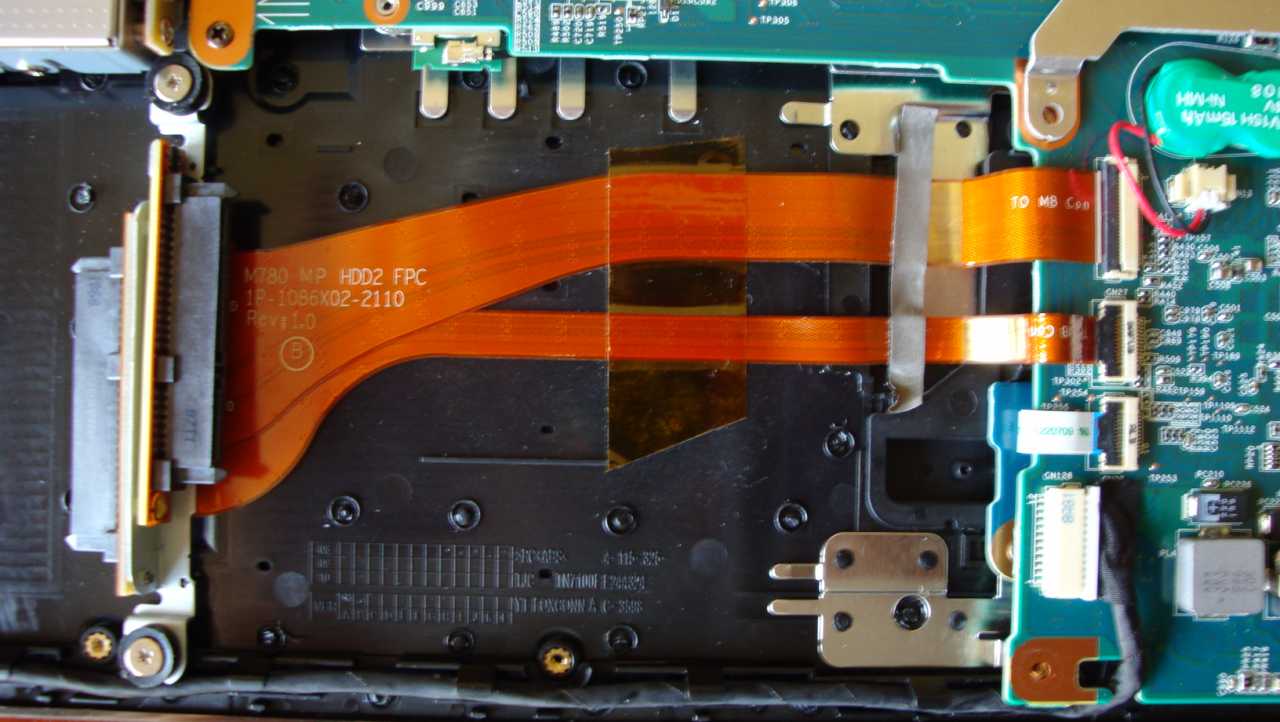
Please see the Picture...... i need this Sata-Cabel (HDD-2) and the Storage-Cage for the AW-21.....
please where can i buy it.....
Hi...
i need your Help....(sorry for my bad English)
I have a Vaio VGN-AW21 S/b....(German)
What is the Maximum-Ram (Everest say´s to me 8GB...is it real???)
I will updated the second HDD-bay...now i need the HDD-Cage...and i think the second Sata-Cabel !!!
Who can i buy this Part´s ...???
I hope....you can help me.....
THXAttached Files:
-
-
I know this is a dumb question, but is there a way to partition the hard drive w/o reinstall the OS.. I was able to do this in Leopard when I had my mac so I was wondering if I can do the same in PC
-
I use Acronis Disk Director. Unfortunately Acronis' own boot CD doesn't work with the AW, unable to see the HDDs.
Download Hiren's BootCD, Acronis and lots of other utils are included in this, and run it from there. -
Boomzilla
hi u can buy that sata flex cable from sone for unreasonable price + cady and screws about 200 cash -
This is my 1st post here (think of it as an intro;-).
Thanks, happy to discover there IS a way to hold onto Lightroom. However, after searching the Start Menu & assorted related folders, I just can't find the serial # for (fresh) reinstall later. Any more specific clue(s) for me?
After a ton of research/comparisons & waiting for new model releases from various notebook mfgrs, I month ago I was ridiculously happy to spot the VAIO AW160J/Q at COSTCO for about half the price anywhere else online. Even better than expected, it had a matte display--& of course, the RGB-LED screen I wanted most of all. Love the display, minimalist design, size/wt, audio's not half-bad for a notebook (mostly using V-Moda earbuds & Logitech Z5500 spkrs). I don't even mind the "shiny top" tho I'm not into shiny plastic things....& I can workaround the lack of ports including the inconvenient placement of USBs where mouse space is needed. There was 1 glaring error in the tech specs which listed maximum capacity for RAM as 8 GBs when, in reality, it is only 4. This is 100% confirmed. And, btw, the error was posted at esupport.sony.com owners manual, NOT at Costco (Costco linked to Sony for detailed specs). Was looking forward to increasing the 4 to 6 GB RAM. Won't happen if I keep this unit.
KEYBOARD'S DEFECTIVE (out of the box defective), very disappointing since I can't just exchange the AW---Costco ran out of stock on this item (this great deal) the day I received mine (bad timing, ouch). Have already attempted a # of adjustments (of key timings, repeats/delays) & other suggeted possible fixes. No improvement & problem worsens as I type longer (heat related perhaps?).. The very worst of the malfunction is the SPACEBAR. As others have posted somewhere in this forum, there is a dead zone on the right side of the spacebar. As I type this, I have to press the left side only & then must depress the spacebar several times to get it to do its job (create a space!). Not something I can just live with. The other issue is that according to the local (Costa Mesa, CA) Sony store, they will have to "send it in for a keyboard replacement" which will leave me computerless for 10 days, maybe more. No can do.
I'm still finding this AW160jq around the web for $2500-$3400---& those sellers do not offer Costco's generous 90-day return policy; Costco's always honored their policy in my experience. Stuck now trying to decide how to proceed. Sure wish I could've fixed this on my own.
My greatest concern is, what feels to me, flimsy materials used in the contruction of the case---especially the bottom 'half.' Flexible plastics (or silicon, according to one Sony tech). Hard to imagine this holding up longterm regardless of how gently I handle it. Even this magnificent display's bezel is made of the same cheesy silcon or plastic junk... feels mighty cheap, flimsy (ditto for the BluRay door/drawer).
What a mix of extremes this VAIO is. Never before have I been so ambivalent about a piece of electronics (& I have lots of consumer electronics including, but not limited to, Sony ES high-end audio/video). And never has it been this difficult to get basic product FACTS... seems each/every Sony rep/tech I've spoken with has conflicting info to offer. Reading much at this forum shows me I'm in good company (LOTS of good company;-)
PALMREST concern, too. Some forum members have described bubbling, etc. of the padded palmrest (a feature I really like---the palmrst, not the bubbling;-). After reading the forum however, I noticed my own has 2 indentations in it. The Sony store tech I spoke with today sarcastically emphasized that's due to the genuine leather (not rubber or polysomething?) caused by hand/palm pressure over time. Well, in less than 1 month, I have perfectly Square indentations whereas my palms, last checked, do not have this shape at all. Sony store tech assured me the palmrest WILL wear out with some time (quote). How much time? He didn't appreciate my asking.
The only possible viable alternative for me right now is the AW290 (w/ no letters after the #) from a place called "LCWAY" via Amazon... 2 variations of the AW290: $1999 for T9800/2.93, 1x320 GB @ 7200rpm HDD, 4 GB RAM with 8 GB MAX RAM CAPACITY. The other model has same specs except 2x320 GB @ 7200rpm drives & 8 GB RAM preinstalled. No mention, however, of the Most Important Component: What type of display? After enjoying this RGB LED display, I can't imagine not having it--plus the matte finish is vitally imporant to my lifestyle (RV'ing & outdoors a lot).
Anyone know anything at all about this LCWAY seller? Also I've never bought anything from Amazon before. I'd save $150-$200 on sales tax if no tax...yet that wouldn't matter if can't trust the seller. Thanks for listening---ANY FEEDBACK IS VERY WELCOME!
(fresh from San Clemente, CA) -
Welcome and a nice review!
This is the link for this model at sony support:
http://esupport.sony.com/US/perl/model-documents.pl?mdl=VGNAW160JQ
I too see the specs listing 4GB max, but I recall someone in this thread stating 8GB was being used or possible. Perhaps the model number was different and with proper searching disabled on this site, nearly impossible to locate.
When you say 100% confirmed, I assume you actually tried 2 4GB modules in this particular model?
I hope you can resolve the keyboard issue without having to 'repair' it. Perhaps something is stuck under the right side. -
I have the 170 and I currently have 8gb of memory installed. I also have the space bar issue but for me this is in no way a deal killer for an otherwise amazing laptop
-
I felt the exact same way about the one I had. I was on the fence about whether or not to keep it until I saw the palmrest start to bubble in a couple spots. I immediately packed it up and drove 50 miles to Costco to return it. Even $1500 is too much to spend for something that will deteriorate so quickly. None of the materials on the notebook felt all that sturdy, or high quality to me. It sure looked incredible though. Aesthetically it was the most well designed notebook i've ever seen.
After handling lots of notebooks, I think the construction/materials quality on all of them stink. It's not just Sony. It seems like modern electronics in general are purposely made to achieve nothing more than a disposable level of quality. People defend Sony's quality to the death, but I suspect they are either people who don't remember what real quality feels like, or they just want to feel good about the hundreds, if not thousands of dollars they laid out on disposable electronics.
The only really solid machines I could find were Macs, but then you're stuck with Mac OS, unless you want to pay extra for Windows, and the price is already too high to begin with. I'm back to my old Thinkpad for now.
BTW, there is no way the palm rest on the AW is genuine leather, unless it's from alien cows. -
-
Also everything else that comparable in quality and specs seems so cheesy. Like the HP HDX18. I couldnt stand the graphics on the keyboard area. Then I saw a Gateway but it had a burnt orange color to it. The Toshiba looked ugly with those big boom box speakers and the red color. So it seems like Im stuck with the AW or go back to a Mac
-
I own the Vaio AW model with one 500 GB hdd, which has become too slow. What do i need to install a SSD as 2nd Drive. I'm sure it has already come up in this thread, but i couldn't find it. thx
-
my spacebar is somehow broken, on the right side it doesnt recognizes I press it, and also it feels not right there. in the middle and left it works/feels normal. When I asked a Sony Competence Center store how much I had to pay for a fix, they told me they cant get replacement parts for keys and can only change the entire keyboard (for 90€ + work cost). ?
-
Does the Costco version have the same notebook build/materials as the offical Sony models? At half-price I suspect not.
-
Man, you should read some older posts carefully. It's a wide gamut display - that means you HAVE to use a proper calibration profile AND color aware applications. Sony have created a couple of profiles to choose from (I had 3 or 4 of them as far as I remember) and they are quite usable. The main problem is that Windows interface will not use those profiles - the system itself is not color aware. To get better results you need to get a colorimeter that supports wide gamut displays (Spyder3 is the only one I know right now) and create a proper profile for your display. Profile loader that installs with your calibration software will neutralize the interface colors as well, so everything will look better in terms of color and contrast even if a saturation of the interface elements will be very high.
But that's only the beginning - every application you want to use MUST be color aware, so it knows that it should use a monitor profile values instead of sRGB ones. So stop using IE and other crap, switch to Safari or Firefox3 with Color Management enabled and choose a good picture viewer (ACDSee Pro, Fast Picture Viewer, ExifPro).
If the software you use is not fully color aware, it sends wrong information to your monitor. It's like sending 255,0,0 values for pure sRGB red, instead of correcting it to let's say 230,20,40, which would be proper max sRGB red on this monitor. Unfortunately, a lot of logos and website elements are not tagged properly, so even color aware browsers will display them oversaturated or slightly shifted.
That happens with all wide gamut displays and you'll have to consider it if you want to use one. -
But that extra money right..
-
I have two question for you guess..
1) I believe that the new AW series are coming out with the release of Win 7?
2) Ive checked 3 stores here in Houston,Tx and none of them have their AW's any more they even sold there demo/floor model.
3) What laptop is comparable to the AW series
Im thinking that I can hold off until the new model comes out and get that one and then turn around and return my Costco laptop. For those of you Costco deal buddies do they nag or bother you if u try and return it at there store.. -
The version that was sold at Costco wasn't a Costco specific model. The 160 is still sold at places like Amazon as well. All AW's use the same parts (premium and non-premium respectively).
They didn't give me any problems at all, they just asked if it was defective, to which I answered no, because I wasn't about to get blamed for the bubbling palm-rest should I have mentioned it. The only small issue was that because I paid with a Visa online, and they only take American Express in-store, they had to give me cash back instead of refunding my card. They didn't act like it was a big deal though. -
Alright, after reading all those posts I've checked mine and it looks like I have some signs of chipping as well... I've had this notebook for over four months, but it has never left home so far and I guess that's why it still looks ok. I'm afraid it's gonna get worse with time or heavier use, but anyway, it looks like it's just a small plastic part, that should be easy to replace...
-
I find it odd then that those complaining about things falling apart seemed to have bought the AW at Costco.
-
Right click on Computer (on the desktop) and select manage.
Then select disk drive/Hard drive.
It will display the hard drive(with the hidden partition). right click on the hard drive and select 'Shrink Volume'. after shrinking select the new unused/clean part on the volume and select 'create new volume'
select size and drive letter based on your preferences. Its really simple.
-J -
Hi, I'm new to this forum.
I have two questions, the first one of which I believe has been touched before (but I couldn't find the place). I've got the AW 110J/H.
1. Does the laptop has place inside for a second hard drive? Is it easy to install? (I'm a little bit shy on disassemble it yet.)
2. What the hell is the SPMservice.exe? It has a memory footprint of almost 60MB (in Vista x64).
Thanks for any help!
Cheers! -
Solved the second one: Sony Power Manager Service. (But it's still a huge memory footprint!!!)
-
Hi everyone!!!
I just buy the AW-170Y, and i feel it slow... the movement of the windows, the time to open applications, etc
Someone tried to switch to XP?!?!!?
I think thats the solution to get more performance!
Thanksss,
wait your cooments
PD: sorry about my english
-
1.) give the system's superfetch system to get used to what you like to open. Takes a couple weeks.
2.) install TuneUp Utilities 2009 to optimize your speed further. -
Hi, laptodd5... Absolutely, this is not a special cheap version that Costco sold---but the very same VGN-AW160J/Q sold at SonyStyle online & many resellers on the web. THAT is why I went for it. Buying a new computer is a huge deal for me & I know it will have to last a long time (can't afford to buy another next yr). At just $1499, I figured I'd use the $$$ I saved to upgrade drives, RAM, add peripherals for extra ports.
FYI: About Costco notebooks (same for Sam's Club): You'll see a "cl" at the end of their model #. This bit of info is even available at Wikipedia (for real, 1st saw this under "HP").
COSTCO RETURNS & TECH SUPPORT: They are have been consistently lenient about returns of all kinds & computers being no exception. Doesn't matter if the thing is scratched, malfunctional, or you just plain didn't like it---they give a 100% refund. And you can keep the notebook for a full 90-days (note: NOT 3 MONTHS!) COSTCO CONCIERGE (included with all computers) provides terrific tech support (they're in FLORIDA, btw). You can call on them OR the mfgr tho I usually prefer them. They will work with you until you are satisfied with the resolution of any problem. I've returned 3 notebooks over the yrs so that's my experience with them.
Looks like this AW160J/Q might just be a return also tho I've been trying to avoid parting with it. BUT IF SONY IS COMING OUT WITH A NEW AW SERIES OR COMPARABLE SYSTEM, I'M GOING WITH THAT! (Maybe I'll just sit on the one till that comes out;-) -
I had the same seriously SLOW problem exactly as you describe when my 1-month old AW was "new" (I think that might be a joke;-D) Removing all that bloatware (trialware, promotional junk) & turning off the many unnecessary Windows Vista SERVICES that were automatically starting up each time Windows started (autoruns) made all the difference. Among the dozen or more apps I found useless &/or troublesome was Windows OneCare (which includes Windows Defender); removed every speck of it. I use other security apps instead including NO Windows Firewall. But your preferences may be different. Additionally, I prefer (from Microsoft by SysInternals) Autoruns & Process Explorer (replaces Task Mgr). Vista was not the problem since a while back I experienced the same slowness on several new XP machines. Just realized, Vista's been out about 2-1/2 years now; noticing it's NOT problematic as it was in the beginning.
This system has been lightening-quick ever since. Good luck to you!
PS: Your english was easy to understand, good job! -
Hello All
I am a huge fan of Sony and a apple hater and I got my first vaio AW (The big boy) a few months back very happy with the performance. I was looking for multi touch and stumbled into this All of us can have multi touch enabled on our AWs synaptics touchpad has the hardware to support this and its been disabled by the manufacturer i.e, our beloved Sony
Here is the link to the modded drivers i havent tried it out yet hope it works.
http://www.mydigitallife.info/2009/...synaptics-touchpad-in-windows-7vistaxpserver/ -
Im thinking about the same thing I need to pull my receipt so I can see how long I have left. Hopefully the new AW will come out before my laptop is pass the 90 days. I was also thinking about down grading to the FW
-
Sony gave authorization for me to send mine in for review and hopefully repair. I returned it Tuesday (they received it yesterday). I just checked on-line and they state that repairs have been completed and shipped back. I should receive it tomorrow or Monday. I presume they have replaced the peeling part. I will let you know. edgain, what happened with yours? -
I have spent alot of time searching thse forums but sorry if this has been asked before.
I have the AW11S/B which comes with a single 400GB HDD. I would like to insert a 64GB SSD in the spare bay for the os, etc. but after opening it up, cannot see any connections or brackes needed to mount the drive on.
Can anyone advise how you would go about inserting this drive and connecting, and where I could get the parts from?
Thanks in advance for any help. -
Has been answered several times in this thread already. I know it's along thread but if you start reading now you'll be finished by Monday
-
Not sure but you may find it in this link:
http://servicesales.sel.sony.com/ecom/accessories/web/productSearch.do -
Same thing with me docslm, were in the same position!
Mine has gone off to Sony for repair or replacement. Estimated time for return in about two weeks!
Let´s hope everything goes well for us or anyone with these probs! -
I just installed a 2nd disk. You'll need the following parts from http://servicesales.sel.sony.com/ecom/accessories/web/index.jsp
Part Number: X23201541 Quantity: 1 Description: M780 HDD BRACKET SUB-ASSY Subtotal: 43.03
Part Number: 173023011 Quantity: 1 Description: M780 SATA HDD2 FPC Subtotal: 82.12
Part Number: 467283601 Quantity: 5 Description: SCREW ,M2 SPECIAL HEAD, EG G Subtotal: 1.84
Part Number: A1222968A Quantity: 4 Description: F SPECIAL APPEARANCE M3X3 Subtotal: 4.99
For the M2 screws, 2 are for securing the SATA cable to the chasis and 3 are for securing the HDD bracket to the chasis. The M3x3 screws are for securing the new HDD to the bracket.
NOTE: The new SATA connector will actually host the primary drive so move your original HDD over to the empty bay. Connect the 2nd HDD to the original SATA connector. -
How did u overclock your AW
-
Are you thinking about asking for the same/near price as a new AW or more?
-
well right now you cant even customize a AW on the sony site.
if I recall, the configuration I currently have would be close to $4k and thats not taking into account the SSD drives
Official Sony VAIO AW Series 18.4" Owners thread
Discussion in 'VAIO / Sony Owners' Lounge Forum' started by Phil, Sep 9, 2008.