Problems? See this thread at archive.org.
For tbNB & all who, like myself, maintain doubt about the maximum amount of RAM your AW-160J/Q can accept. Some folks w/have already read the above post along w/a few others re the same concern from a while back -- (duh! I didn't take note of the date)...
Just found the above quote (serendipitously) & this, to me, seems like it could be a real possibility from a common sense standpoint, altho my pool of common sense on the subject is rather, um, shallow. I do know I'm not in a position to experiment w/this now & maybe not in the near future either---but I sure wish SOMEbody could or would---& then tell the world about it!
-
I have disabled all update services cause they annoy me. I do update manully sometimes, if I got SP2 in the update list I do not know how I missed it.
-
Hopefully Sony will just swap it out for you.
I don't recall but you can get there via right click properties on the drive letter and then choose the ReadyBoost tab.
I'm trying readyboost again today (2gb SD card this time). We'll see what happens. -
Uhhh... readyboost will slow your system more than speed it up. If you have more than a couple GB of ram, it's worthless.
-
So Western Digital just announced its 1TB Scorpio Blue 2.5" hdd, shipping to retailers now. It's a 12.5mm drive, which means it won't fit in most laptops (as they use 9.5mm bays), but lucky for AW owners that the AW has hdd bays big enough to accomodate 12.5mm drives.
As it's a Scorpio Blue, the drive is only 5400rpm. But as a secondary drive (to a 7200rpm drive or SSD in the first bay), it's pretty hard to argue with that kind of capacity.
So who's in for one?
-
Hi all,
I just wanted to say Hello to all other Vaio AW owners.
I own a AW 31 S/B (German model) since last thursday and after some confusion about the high contrat of the display in the beginning (see my other thread), I'm totally happy with mine.
CU
Tobi -
ah, so glad to know! just read about the release, I will probably get it, tho i'll wait one or two month, just didnt was sure if 12.5mm would fit the AW hdd bay. I have a 400 gb 4200 rpm slow-as-hell drive, I just waited for a big enough capacity jump to upgrade. a few months should be enough to evaluate if the terabyte drive shows instability or other issues.
btw I can confirm that readyboost is slowing the system. the system will periodically start writing from hdd to the readyboost cache, slowing everything down. my system works better without it, and I had highspeed SDHC card -
I have a question regarding the TV tuner for those who are using it on their aw.
I just got a aw170y and have a clean copy of vista ultimate on it. I'm having problem with the TV tuner driver, no matter how I install the driver the OS will not recognize it. There is a single device under Device Manager that is unknown, labeled as multimedia device. I am assuming that this is the tuner but the drivers available on sony website will not work.
is there some kind of software package that I have to install to get this tv tuner working? (maybe the multimedia software package from sony?)
thanks
-
Chikarin, it was Evoss-x who helped me last time but I cant find his post for the life of me
-
In for 1? I'm in for two, baby.
-
aha, i think i found the post you're talking about
http://forum.notebookreview.com/showthread.php?t=379870&page=6
i will give it a go when i get home! -
Hey guys, I`m currently debating on which AW model to get. What do you think is the difference between those two offers, they seem identical to me, except that one has a remote control.
1: http://cgi.ebay.com/Sony-VAIO-AW-18...b5563e40&_trksid=p3286.c0.m14#ht_11743wt_1165
2: http://cgi.ebay.com/Sony-VAIO-AW-18...1c0b8cc0fb&_trksid=p3286.c0.m14#ht_9734wt_907
EDIT: Please excuse my stupidity. I have just seen that they are different models and have different CPUs. -
Glad to hear it! You have a good machine. Enjoy it! May your hours with the AW be happy and productive not forgetting entertaining!
-
Famous phrase from the film Robocop and I quote:
"I´d buy that for a dollar!" -
OH GOD THATS TOO FUNNY I JUST FORWARDED IT TO YOU !!!!!!!!!!!
-
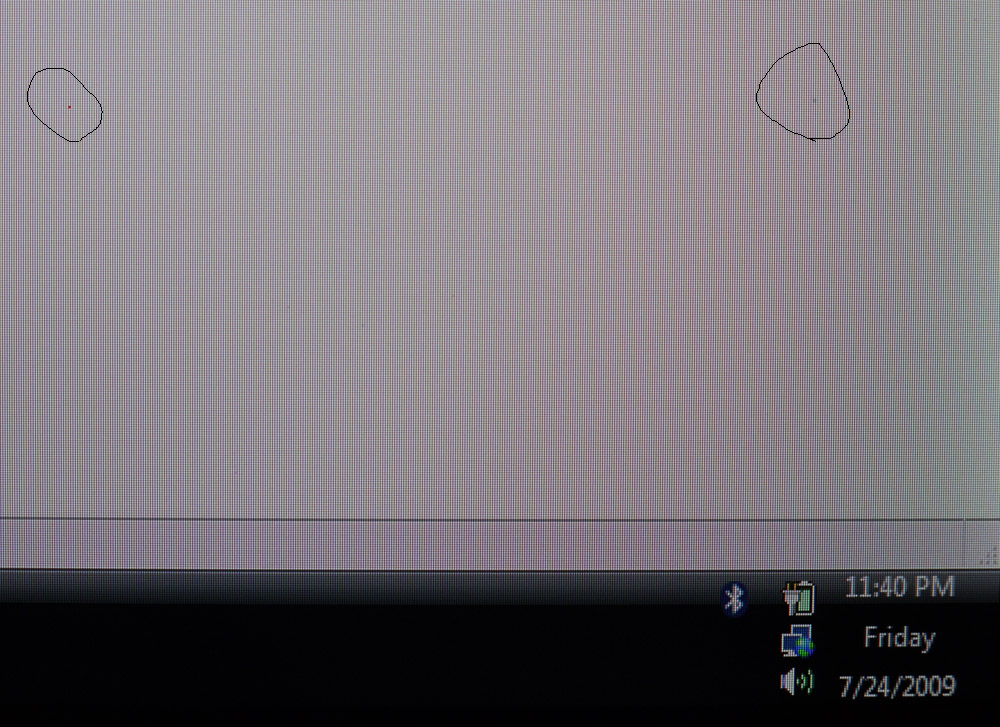
I have a question for the board here regarding dead pixels.
I just sold my AW170 which has ZERO dead pixels and I mean zero. I have tons of photographs posted etc that show no dead pixels. Now I recently shipped the unit to the new buyer who informs me that unit has one grey dead pixel and one red one. How could a dead pixel suddenly show up. We have both been racking our brains on this one.
any ideas
could a bad video drive cause a pixel to not light up properly -
bad coincidence ?
or he was messing with gamma max or collors to max putting too bright in vidia settings ? -
he lies! there is no way to see gray pixel.
red one means dead subpixel not entire pixel...
he could pressed the screen too hard...
if you had good pixels, there is (almost) no chance they are dead
look here: http://en.wikipedia.org/wiki/Defective_pixel -
if he press display it will be black ink-blot there
-
aww I don't lies
maybe you guys can make more sense of it with the picsAttached Files:
-
-
Hey guys, is there a chance of upgrading an AW290`s CPU to some quad core?
-
I looked very closely at the gorgeous pictures you posted & not a single limp pixel in the joint!
Interestingly enough, I consulted with 2 Sony techs in the past few days. Both tried to diagnose &/or find a remedy for my "gray spots" issue. I've posted about this before but to refresh: There are what appear to be a cluster of gray spots of varying sizes near the center area of my RGB-LED screen, only visible w/white & light backgrounds. If these were really pixels then wdn't they all be the same size? I'm not positive but it sure seems like there are more spots now than when I 1st received this laptop. When 1st noticed, it looked they spots would be easily wiped away w/LCD cleaner or cloth...but that affected nothing. Wonder if back at the factory, dust/dirt particles got trapped behind the screen's surface. I have no experience to compare to this to so I can only guess at it.
One tech had me go into the BIOS screen (via F2) where, unfortunately, my particular brand of gray spot still showed up, same as anywhere else. From that, he ruled out faulty driver(s) or other software. The other Sony tech said, tho he cdn't be 100% sure till he saw it in person (or in pixel), sounded to him like I have "a bad screen, needs replacing." Both techs suggested I do the usual battery removal / depress power button for 30 secs. Had already done that a few times in the past wks so no point in doing it again for them.
Had a stuck pixel a few yrs ago. Unlike the present gray-spots, it just appeared months after purchase (a 30-in monitor). So, one very bright, distracting, glowing red pixel near center of display which resolved when I powered off & massaged pixel in circular motion w/gentle pressure & powered back on while still pressing the spot (used a toothbruth tip wrapped in smooth towel, btw). I'm guessing w/your tech savvy, you already know these simple maneuvers---but thought I'd toss 'em out there anyway. Maybe it'll help someone else. Meanwhile, I'll stay tuned.
_________________________________
PS: Still kicking myself that I missed buying your 170Y! -yep, even w/mysterious pixel thing. I'm betting this soon becomes history. (But hey, if not, have Canadian buyer ship it to me!) -
unless you need a BD writer, I'd suggest you look at one of these.
http://www.newegg.com/Product/Produ...er=BESTMATCH&Description=sony+vaio+aw&x=0&y=0 -
ahh, so I guess the grey one may be dust under the screen. I also wiped the screen clean but that one didn't go away unlike most other specs.
about massaging the pixel thing, exactly how much pressure do you need to apply? I read about it at the bright pixel fixing utility site but didn't have the heart to actually do it. kinda afraid that I may make the matter worse lol.
thanks for the help btw! much appreciated -
woow te hell ...
why he wanted sell it ??
or if i would buy something expensive I will properly check the item even where nobody will look ..! -
Chikarin, wish I could say w/any degree of certainty what the gray specs really are---but fact remains, I just don't know. As stated, I was only guessing at dirt/dust specs behind topmost layer of display since that's what it looks like to my untrained eye---plus they won't wipe offtho my system was brand new, & are not colored or black. While black spots would make more sense, these spots/specs appear gray (almost see-thru) compared to the rich blacks in this display. Also, they're not only irregular in size but in Shape---looks very much like the 2nd (middle) of the 3 images in your post (w/the Wikipedia article). I might go back to re-read that 'coz I didn't quite absorb all of it the 1st time. What do you make of the "gray" spot in the 2nd image? I opened it in a new tab & magnified it even more--it does look like what I see here (which means it wdn't be dust/dirt).
Just checking.... have you yet booted into your BIOS screen (tap on F2 key after powering on) to rule out any s/ware involvement? If your gray spec(s) don't appear on that screen then that's a significant clue. I believe the Sony tech was right about that---but again, I'm not expert on this. Just trying my best to resolve a persistent annoyance as you are.
How much pressure to apply to your stuck pixel? Lemme see here...how to communicate this? Ok, think I got something! Sometimes used in accupressure, about as much pressure as you would apply to your eyeball (eyelid closed, of course;-) w/out causing discomfort or pain. Yea, I know... that amount of pressure is going to be different for each of us so I wish I could be more scientific but, sorry, that's the best I can come up with. Hoping other forum members can describe this better than me. If anything, I think too little pressure wd be ok since you can always repeat the process till it (hopefully) works. And, as the Wikeipedia video presenter points out, excessive pressure can result in breaking surrounding pixels even if it fixes the originally troubled one. How about trying one of the pixel-fixer apps? As I "talk", more ideas surface... Have you run VAIO self-diagnostics for color?
So far all I've attempted is to rule out what the problems aren't (deducing). Today I am backing up my data to an external drive in preparation of sending this unit off to Sony for repairs (screen & keyboard). These issues came w/my unit & are not new. I'll check back to see how this goes for you---& of course, if I learn anything from my repair then I'll post that. Look forward to reading how you resolve those pixel problems. Good luck! -
yea, I've never seen that before either. glad my display is still smooth.
-
Over the last weekend, when I called @ my AW's needed repairs, a local Sony in-store tech informed me of 2 things I didn't want to hear!
1) Xtryker's statement is true @ all AW mobos & 8 gigs or RAM. However, the tech added that the BIOS is locked & therefore won't take more than 4 regardless (on the AW160 whose max RAM capacity was wrongfully stated on Sony's own model-specific spec sheet, & on other models correctly listing 4-GB max).
2) Windows 7 w/ONLY work in AW300's that were released since June 26, 2009. Sony w/not be issuing device drivers for any models released prior to that date. He was not able to recite which model #'s were included, only the "upper AW300 models." Like I'm supposed to know which models were issued to that store on June 26;-)
After he insisted I forget @ increasing system memory, I commented that I plan to move on to Windows 7 maybe in Oct (final release) or a RC sooner since that would probably fare better on 4-GBs memory. He seemed noticeably annoyed/put-off @ that esp when I mentioned, tho I don't yet know any specifics, I've read that other AW owners are already running Win7. He added "Sure, you can install it but all your special function keys & devices like FPReader, WebCam, printers, etc. won't work---& that Sony will not be issuing drivers for any models released prior to June 26th." The guy was adamant that I'd have to buy a NEW model which will include a prepaid upgrade to Win7 from Vista x64. I've spotted a Win7 thread @ NBR somewhere but haven't gotten around to reading thru it yet.
So...heck... as I make plans, what should I make of this new information & is it any of it worth considering? -
Unfortunately newegg does not ship internationally. Besides even if there was an option to deliver it to Europe, I`d still have to pay more than 20% taxes at customs while when buying in eBay I could make arrangements with the seller in order to bypass some taxes.
EDIT: Hey, if anybody of you guys has an ebay account it would be great to assist me in getting this AW290JAH from newegg. You could get me the notebook from newegg and set up an ebay auction leaving say $ 100 or more commission for yourself and I would purchase it immediately. If there is somebody that would do me this big favor I would greatly appreciate it. Besides you will still make $ 100 for the effort.
EDIT 2:
I hope that there is some kind of mistake about this because I just purchased 2x 4GB DDR2-800 RAM for my future AW290... -
This does not surprise me and what really annoys me about sony notebooks in particular. My 4 year old a290 runs windows 7 but I'm unable to get the fn or buttons to work so there is no control of screen brightness or volume using the buttons. Lenovo on the other hand puts out drivers today that continue to work with older models. It seems like sony re-invents the wheel everytime a new model comes out with device specific drivers and then no longer provides a way to use those beyond the exact model. In fact many driver updates won't extract because of a model check.
Even installing vista 32 was a pain on my AW because I had to find an older model with that version and not all of the drivers for all the components are on the model support pages. In other words a full install from your own copy of vista32 was not possible had it not been for another user's scrounging around of FTP sites and driver downloads. This is really annoying and I would imagine that the win7 upgrade may be a similar PIA coming in october.
It really is time that the software engineers at sony start making a uniform BIOS software interface for the sony utilities that works across all models so that a single driver install provides this support for all the other drivers. -
thanks for taking the time to reply! hope sony takes good care of your laptop.
I think I have an idea of how much pressure now, just enough to have that color-changing effect on the LCD screen I guess, and massage it around. I tried the utility but that was no go. When I get home today I'll test it on the bios screen and also try the power flush as well.
But that grey thing is a mystery indeed. Bright pixels I saw before on my work PC's monitor or even on my old PSP but the grey thing is odd since it is pretty much overwritten by any strong color or dark color. I hope the sony techs can figure it out for you since I just want to know what it is! -
speak to someone else. he's clearly not knowledgeable on these matters. Next time you're in the store, send him here:
http://esupport.sony.com/US/perl/os7upgrade.pl
and quote him this:
"The drivers are expected to be available when Windows® 7 is officially released by Microsoft. Please check back then for further information."
I hate it when misinformed employees spread confusion. -
hello
i have sony vaio aw11z/b and i want to upgrade to window 7 from sony
how can i do it ? -
Hey guys, would you recommend a full carrying case or the neoprene sleeve for an AW290JAH?
-
Download the Release Candidate from MS (64-bit) which you can use legally until July 2010.
You'll find all the drivers and utils in my Win7 thread, see link in sig. -
Yes, and it is worth shooting an email to [email protected] to report this incident, citing the esupport page and the case number of your call.
The only way to train the tech in question is to train the tech in question. Sony keeps a record of your call and the tech who worked with you. Ask sonylistens to set the record straight so that the tech in question won't blithely go along spreading misinformation.
I'd like to think that these are good faith errors but a friend of mine always calls the Sony number for tech support in the Philippines because she, too, had a similar experience with Level II techs in San Diego. Maybe it has something to do with the native arrogance of "the American geek" and the more total customer care approach of the Philippines techs -- that's how she put it to me.
That said, there is the question of warranty and "unwarranted" OS upgrades: A friend told me that Sony informed her it will not guarantee that software operates with any different system you install and, in the event of a repair, will reconfigure the computer with its original OS before shipping it back to you. -
I have the AW21XY/Q with 2 samsung MMCRE64GFMPP-MVA 64gb SSD's (the stock ones)
I previously had a single OCZ vertex, which supported TRIM, Firmware update and the ability to reset all the flash chips.
When I want to reload the machine I naturally wish to completely wipe the disks not just the FAT's but the chips on the SSD is this possible on the samsungs? does it support TRIM or firmware updates? -
Just a thought: the AW290 has a TV tuner, right? So would it possible to connect an Xbox 360 via the tuner and use your notebook`s screen for the xbox 360?
-
Possibly but you won't get a HD res from composite which is what I guess the antenna input is. You'll need VGA, HDMI etc to get the 360 to output a HD res.
-
major input lag (it'll get to the display slow), lack of HD, etc. will make that unrealistic.
-
I'd probably go for the full bag versus the sleeve mostly because you can put other stuff in the full bag. If you get the sleeve it will look cool, but you'll just have get something else to carry the accessories.
I use a Matias 17" case for my AW and it works great. I had to do a little surgery and remove the metal hinge, but it's very durable and I can carry some accessories < 0.7 inches, although not the power brick. I have a picture in this thread.
I can tell you that carrying the AW is a pain the rear. I was going to sell mine because it's quite a thing to travel with especially though airport screening, but in the end I figured I'd just get hosed on the selling price, especially with the new 300's. To be honest the screen on the AW blows everything else away by a long shot and I after having it for a while now I don't think I could settle on another notebook. -
Kind of a strange question, but the power cord that goes with the brick can be inserted two different ways. Does it matter which way the cable is inserted into the brick? I'm guessing that it doesn't matter because it works fine either way.
I have a Canon HD camcorder and the cable that goes into the power brick has a square blocked side so that it can only be inserted one way. -
@substance90
I use http://www.amazon.co.uk/Targus-XL-Laptop-Backpack-Black/dp/B0007V75CS
It fits the laptop perfectly and is well padded, enough space for your laptop, power brick, a spare change of clothes, bluetooth usb keyboard and mouse.
By design with just the laptop and power brick its not huge either, add to that a waterproof cover that you can take out when it rains for me its the perfect bag -
Does anyone know of any problems using a Samsung 256gb SSD as replacement for the Fujitsu 500 Gb D\: drive on the AW21XY?
After replacing this with the Samsung, I started the notebook (I'm running Windows 7 64bit), in Windows I ran fdisk to init and quick format the Samsung.
Now, Windows see's the disk (with approx 238 gb free).
I then ran ATTO benchmark and everything seems perfect at this point. It's reporting Write speeds of upto 200 Mb/s and Reads of 220 Mb/s.
Now, I start copying files from the C drive to the Samsung. This seems to be working fine for the first 3 minutes.
Then I start copying a third folder of files and the copying 'freezes'.
Eventually after a few minutes, I'm able to look in 'My Computer' but the D drive is now not visible
After a cold boot the D drive becomes visible in Windows again, reading files on it is ok. When I run ATTO benchmark on it, it now reports VERY SLOW Write speeds of upto 40 Mb/s.
Note: After having this problem, I got a replacement Samsung drive from the supplier and the 2nd Samsung is doing exactly the same (ie. freezing sometimes while copying files).
I've replaced the Samsung with the original Fujitsu drive and repeated the copying files operation exactly and the Fujitsu has no problems so I'm assuming this rules out the notebook and Windows 7 as causing the problem.
Any ideas would be appreciated. -
Hi people, i was reading some posts about problems upgrading some AW's to 8GB RAM, with issues like MOBO's blocking for that, but i'm a little confused about the conclusion: the only way to put 8gb in this series is buy it from the start from sony with that config?????
-
I would just love it if someone who owns an RGB LED AW and an FW190 or an FZ with HiColor would compare the two screens. Yes, we know that the AW's RGB LED blows away the Eco and the FullHD screens but I really wonder about the HiColor's competition.
Why has the term "HiColor" (an AUO trademark as well as a Sony trademark?) disappeared completely in the U.S. market while the "100% color fidelity" ad is now re-appearing on the AW's and FW's European market CCFL FullHDs? Perhaps they are actually HiColors while the American FullHDs may be HiColors on the AW but surely are not HiColors on the FWs. HiColor is more than a dual-lamp technology.
What has me so puzzled is the lower luminescence of the AW's RGB LED. notebookjournal.de measured the AW at an average 250 cd/m2, I believe, compared to, I think it's 350 cd/m2 or more on the HiColors, depending on FW or FZ -- with some loss of contrast on the FW's HiColor, I admit but the AW's RGB LED only gets up to around 500:1 anyway. In short, the AW's comparative darkness is quite surprising.
Is the AW's RGB LED's contrast edge over the HiColor for everyday use (not professional color tweaking needs) simply due to the darkening of the screen? -
Yep, so much for the RAM-ifications;-) ...that's what they tell me. In fact, for the past 5 mos, of all questions I've asked both before & after purchase, that's the Only bit of info that has been given consistently by Sony (via phone tech support in the Philipines, & from 3 techs employed at 2 different (local) So. California SonyStyle stores). Bottom line: Regardless of how much RAM comes preinstalled in any AW, you can only use 8 GBs system memory in a model that clearly states it has a maximum capacity of 8 gigs RAM. Perod. Unfortunately (& I'm still miffed about this), I bought a model that clearly stated in its spec sheet @ Sony's own website that it could use up to 8 GBs when, in real-life, it only takes 4 max.
I can only assume this is the only model where this particular error happened. For emphasis, that last statement's just my guess---& for other ppl's sake, I sure hope so. BTW, it's the BIOS that's locked (again: so I'm told!). Good luck. -
Does anyone out there own the AW335J/H?
I'm a Sony nut and currently have an FZ340N, but I'm looking to upgrade so I can play a few more games. I'm not looking to max the settings on anything... I just want smooth gameplay. My current system is struggling to play CoD World at War with everything turned all the way down. I'd like to be able to play CoD Modern Warfare 2 and Diablo 3 when they come out, but I doubt the FZ and its 8400m GT are up to the task. I think the AW with th 9600m GT would be much better suited for the job. I have the AW335J/H, along with the new BDP-S560 Blu-Ray player (WOOT!), in my Newegg shopping cart, but I figured I'd try to get some feedback before I commit to spending the dough. And before someone says it, I know the AW has a Blu-Ray player, but the standalone is to pair up with my KDL-40XBR6.
...told you guys I'm a Sony nut. -
Would there be a possible way to upgrade the AW video card cause it`s really outdated already. Of course I`m not talking about a legal method of upgrading... Is the AW`s 9600GT built in the mobo?
-
no. you can't. and "outdated" is pretty relative. it's all a function of what you're looking to do.
we love our AW's. they'll do what you're looking for.
Official Sony VAIO AW Series 18.4" Owners thread
Discussion in 'VAIO / Sony Owners' Lounge Forum' started by Phil, Sep 9, 2008.