Problems? See this thread at archive.org.
I'm starting to notice that pesky space bar problem. It's not all the time but it is starting to make itself known while I write long emails.
Was it a huge drag getting it fixed? did those who get theirs fixed have a service warranty or would mine be covered just because I paid money for the dang thing and want it fixed?
-
i would like to know this as well. I'd love to have a ssd for my OS.
-
Got my AW few days back and I'm so happy with it

-
congrats. welcome to the family.
-
@ajreynol: I have VGN-AW290J/AH as well though the system shows 290J. Got the same spec as yours except I have only 320 GB HDD
-
cool.
beautiful screen, isn't it?
I'd highly recommend watching The Dark Knight via Blu-Ray on it as soon as possible. It looks...MAJESTIC. -
See an option to fix the space bar in my signature line.
"Fixing the non-responsive space bar"
Because of the width of the spacebar and the positioning of the outboard clips, even with the fix, I still miss a lot of spaces and have to consciously use my right thumb more towards the middle of the key
. It really is a design flaw in my opinion.
-
no problems here with the keyboard. I do see that it's less sensitive on the outside edges...but how do you have your hands positioned such that you hit the keys at their edge when you type anyway? when I have my hands in typing position, my thumbs are sitting beneath the "V" key and the "N" key. even if they were spaced as far out as the middle of the "C" and "M" keys, I'm still getting 100% responses.
-
Oh believe me- that things insanely powerful- but it isn't a fast GPU no matter how we cut it. Sorry!
-
Yep
Ok I'm gonna watch it soon. Now I'm in the middle of "Switch-to-Windows-7-and-get-rid-of-unnecessary-sony-crapware!" -
What benchmarks are you using to make this assertion? I'd like to see them, seriously. What would this computer need for you to consider it to be a fast gpu? What kinds of demands are you wanting to place on it?
-
Well, I'm used to a GTX260 right now, so that'd be where we'd start, but if you are looking for benchies, I hate referencing Notebookcheck, but they've got some...
min: 3930, avg: 5164, max: 6296 Points
http://www.notebookcheck.net/NVIDIA-GeForce-9600M-GT.9449.0.html
That's 3DMark06 for the 9600GT
min: 9537, avg: 9997, max: 10684 Points
http://www.notebookcheck.net/NVIDIA-GeForce-GTX-260M.14559.0.html
That's 3DMark06 for the GTX260
Also, I do virtual machines and a lot of gaming. Don't get me wrong- the AW is freakin' sexy- but that GPU is killing it. Even the younger brother FW has a better video card in it right now. I would just want a little more muscle. I realize we're probably looking at the AW for two different reasons, but for me, it just doesn't cut it right now.
Edit: Oh, yes, you wanted to know what I would want to make it acceptable... I suppose I would find the GTS160 or even the GT230 acceptable. The 230 has 16 more shaders, and the GTS160 a 256-bit bus. I think those would be great upgrades for this wonderful machine. -
After installing this update ( http://esupport.sony.com/US/perl/swu-download.pl?mdl=VGNAW290J&upd_id=2031&os_id=34) on Windows 7, I can't access to my DVD drive. Infact its not showing. Any help? How to undo the registry change?
-
System Restore, if you have it enabled.
-
I do not recall reading anyone saying the AW has the fastest or even gamer fast GPU. I think most people buying it know that.
Sony notebook biggest headache is the lack of GPU driver updates rather then which one is faster.
There are gaming notebooks out there but as I have said in the past, the AW is not one of them. -
This was the original question asked of me that prompted my response;
Do I wish they'd add a better GPU? Of course! Will they? Probably not. That doesn't mean that we can't speculate and ask about the future, though. -
idunno. I game just fine on my AW. just gotta know where to get the drivers from and how to overclock.
-
I was referring more out of the box then hacking (as far as sony is concerned) the GPU. Of course you can play games fine on AW, but is not designed or adveristed to be a gamer notebook say like the ones with two gpus in them.
-
Thanks a lot
-
Do any of you AW owners use your notebook in public? I mean like a Starbucks or library? Do you get self conscious about it?
Anyone know when those darn 1tb drives are going to be available? -
Yes I do and no I don't. See me many mornings at Starbuck's in or near Sunnyvale.
I did buy a smaller aftermarket power supply which travels better than the huge stock brick. -
Yes, I do and no I don't.
-
I cannot see why not, it's a chance to show them what real notebook looks like.
-
The AW looks AMAZING, and during my short ownership, I did in fact take it to Starbucks. I wanted to be seen with it.
-
On a side note, (related to my earlier posts) wasn't the Dv8 the same chassis or whatever as the AW? It seems the Dv8's refresh has been posted,
http://www.engadget.com/2009/09/30/hp-dv8-specs-page-goes-live-confirms-core-i7-processor/
Core i7 and a GT230M... If so, I'll most likely be jumping straight into line for a refreshed AW as soon as possible. If they aren't the same chassis, I'm sorry and don't mean to stir trouble, but for some reason I remember when I was selling mine, people kept pointing the Dv8 out to me and mentioning how they were pretty much the same... -
would be nice if Sony kept pace, but I just don't think they will. not for awhile yet.
-
what do you mean, a 'refreshed' AW? Can I refresh mine? lol
Also, heads up! I bought the Backpack that is made for the AW. THought I found a couple backpacks that would have worked for me but ultimately i had to buy the real-deal. I got the neoprene cover as well. -
a refresh is a new set of hardware component offerings under the same model name. it may also mean a physical redesign.
-
I guess some already know this but there is another WinDVD update dated 09/15/2009 from Sony.
-
Hi guys.
Just bought a refurb AW180Y with the dual SSD and full HD screen as a multimedia production machine. I plan to use it mainly for my 3DS Max/Photoshop work. I was immediately blown away by the screen of course, especially the color palette it was able to show. I did however expect a "quicker" machine. Especially considering the dual SSD's I was massivly dissapointed with the near one and a half minute boot time. Perhaps it's Vista's fault but still... . My question is; with exception of the screen quality, is this machine a bit of a paper tiger (impressive specs but severely bottlenecked in one or several ways)?
Because of this and my need for cpu power for 3D rendering I'm now considering selling it before "unwrapping" the protective plastic its still in and waiting for the core i7 version whenever it arrives.
Need advice, what do you guys think? Any chance of a AW with Clarkesfield quadcore CPU before newyear? -
I have installed WinDVD 2010 it's great
-
Hey All,
I've got an AW11S/B with a single 400Gb drive installed. Is it possible to add a second hard drive to my laptop given the higher spec machines come with more than one HDD as standard?
Thanks,
Jon -
Yeah , are u willing buy it ?
http://www.nexttronics.com/catalog/sony/X/X23201541.htm
http://www.nexttronics.com/catalog/sony/1/173023011.htm -
I agree, with the specs and SSD's, I was expecting a much better boot time. You can improve the speed by installing Windows 7 and removing some of the Sony pre-installed software. My AW now boots in 30 to 40 seconds.
-
$170 for a bracket and a cable.....! I get it, they must be made from platinum.... What great value then.
Thanks for the info anyway. -
Hi all
I have a AW11Z/B and i want to use the Raid0 function, but it is disabled by sony.Can i reenable it with any bios patch, is it possibe and how? -
Is it a paper tiger? Well only you can determine that based on what you need. But my guess is that you're disappointment in the boot time is premature. Did you do a clean install of windows when you got your machine? What is your rendering times for projects in 3ds? Have you benchmarked it by rendering a project both on the machine AND on your usual machine? That would be an awesome way to tell.
My guess is your Boot sector needs to be defragmented AND your machine might have all the bloatware that's so common with the vaios. Hopefully we can help you out! -
How many HDDs you have inside laptop connected ?
-
Hi Guys,
Newbie here! I have a AW 11 s/b owned since feb this year.
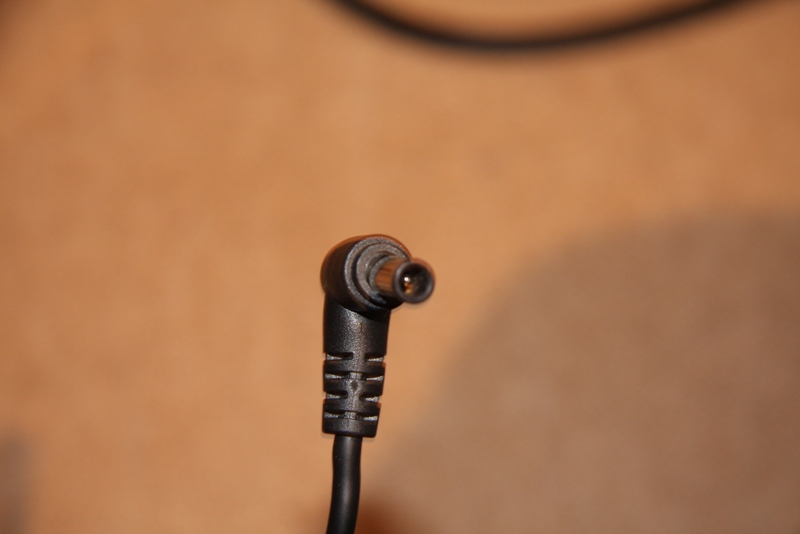
couple of days back the laptop would not charge when plugged in and when I checked the cable it seems a bit loose and very hot! would have burnt my fingertips if I kept it there!
switched off mains supply and put the laptop on standby. When I checked it a couple of hours later, the charger jack had actually deformed due to the heat! Any one seen this issue on the the AW series yet?
Called up vaio support and sent them photos to investigate. Got a voicemail back saying that as it was a physical damage, it won't be covered by warranty and I will have to pay for it.
This laptop remains pretty stationary as it is not really built to be moved around! hence I can't really think how any physical damage would have happened.
Will be calling them back to discuss and give them a piece of my mind as it seems like a manufacturing defect to me.Attached Files:
-
-
2 HDD-s both 320GB but in bios advanced tab is empty
-
so make sure u have installed sata raid driver and then when you restarting vaio try press ctrl and I
-
i have seen too the sata raid driver on the supoport site,But i have now 2 partition with an vista sp2 on the first one.For a single hdd i dont need to install raid driver for what it is absolutly unneccessary.Otherwise at the splash "VAIO" screen when i pressed Ctrl+i nothings happen.do you have raid0 on yours? what is your bios revision?
-
hmm...
just second i need check something ..
mm no no I have one ssd just now ,
but I ordered second sata cable and I want same as you but two ssds -
Once the second drive is added, the system detects it automatically and boots into a RAID manager option, where Ctrl-I will let you go in and configure a RAID arrray if desired (I am not using RAID but I still see this every boot).
the post is from badboy ...
OK - I've installed a second drive. The BIOS sees the second drive and shows both drives on the first setup screen, but there is no option that I can find for enabling RAID. Both drives are identical 320GB drives. Anyone know how to get to the RAID configuration? I have an AW120JH
and badboy answered :
As soon as I installed a second drive, I was given the option to press Ctrl-I to enter the RAID manager.
Originally Posted by bcbarnes
Thanks for the reply. At what point to do you press Ctrl-I? While the bright "VAIO" is on the screen when the system is just starting, or while in Setup? I tried both, and neither seems to work. Do you have the updated BIOS?
Intel Matrix Storage Manager is the very first thing I see, before the VAIO logo. I never saw it until I put the second drive in.
Looks like my BIOS Version is R1051Y2
damak :
lookslike it needs to install intel matrix storage manager ? hmm ...
__ -
You mean the Hardware or The software? On bootup i have not Raid screen with Ctrl+i but i have the same bios.I dont know maybe i have not raid controller on the board.
-
NO i had checked right now R1052Y2 bios have i
-
just one question which bios do you have Phoenix or Ami/Aptio , when ami/aptio can you backup it for me?
-
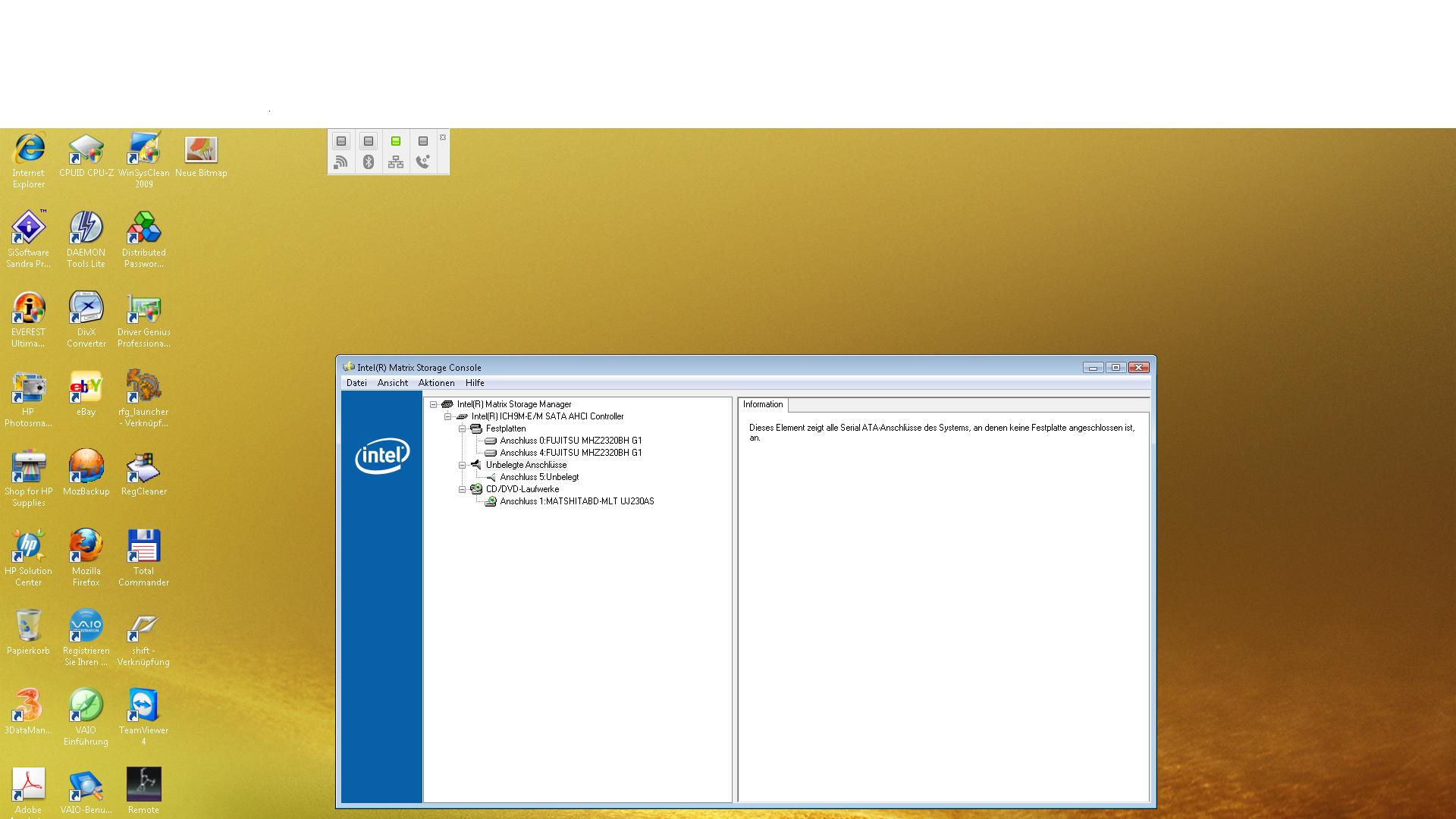
Apropo intel matrix storage manager have i soon in the programs but there are no option for raid or raid0 i see there just the 2 Hdd-s,1 free slot, 1 BluerayIt is Intel ICH9M-E/M Sata Ahci controller
-
Here is it.:
Attached Files:
-
Official Sony VAIO AW Series 18.4" Owners thread
Discussion in 'VAIO / Sony Owners' Lounge Forum' started by Phil, Sep 9, 2008.