Problems? See this thread at archive.org.
Twilight Zone has always been a really well done and well written show especially considering the production values of the era. Curious, though, how it applies to my bizarre situation and don't really want to wade through 847 comments.
So far over the past 48 hours no problems with the fresh install if I see a page loading really slowly or some other anolomy, I just close it immediately. Did do an instant shut down (power off) once and again while starting up immediately after to be extra safe. So far everything seems to be working.
I thought Spy Sweeper was supposed to be the best program going against this type of crap...
-
Windows 7 drivers for AW series now available @ eSupport.sony.com

-
On the European site there are virtualization updates for the bios as well.
-
Okay so what are the advantages of going from Vista to Windows 7 on the AW290 premium? First of all does it support that platform or can it screw a whole bunch of stuff up? Second of all, what does it cost? I'm not even sure if this computer I got in February is capable of that system as I know very little about computers for the most part when it comes to operating systems, code and the like. And is there any real reason for me to want it including the bizarre security issues?
-
For me Windows 7 is freaking faster than Vista! Also I have managed to get rid over of all the bloated software that came with Sony's default Vista installation. Anyway for the price check @ http://store.microsoft.com/microsoft/Windows-Windows-7/category/102 and for the requirements check @ http://www.microsoft.com/windows/windows-7/get/system-requirements.aspx
-
Don't know if I need faster. My main uses are writing, word processing, video, audio, web, BluRay playback-I would use it for BluRay recording but it is such a hassle its insane-that's pretty much it. I don't play video games or anything like that. Why would I need it? I'm writing a movie and another project meant to be a television series but for the moment I don't see any need for video editing, etc. and believe other people and other equipment will be handling that anyway.
And does anybody know if there is a fix for playing the Terminator 2 Skynet Edition BluRay? I have all the updates from Sony esupport so I nothing there-the studio is Lionsgate-the only other BluRay I have of theirs is Crash-which was one of the first-it plays with no problem however the bigger problem with that one is once I watched it I have no desire to ever watch it again as it really sucks. -
Am I the only one to only see a "Picture Motion Browser" driver?? I'm dying for some updated nvidia video drivers!
Anyone succeded in using video drivers NOT coming from sony?? It's kind of a pain to be stuck with older drivers since I'm not using any of the bloatware junk from sony. I was reminded that by farcry 2 who "told me" during the installation to upgrade my "old" drivers... -
dude, you could always use video drivers not supplied by Sony.
go to laptopvideo2go.com and get your drivers. -
Forgive me for not searching myself but does sony have a Win7 ready blu-ray player software?
-
Bah! There is next to nothing of Win7 for my model. Right now anyway.
-
I don't see anything either. And this stuff about Vista being crap certain people keep shoving down people's throats-I don't see it. But then again my AW has a 2.66 GHZ processor and 640 GB of memory and other features so it's not like it isn't already powerful and fast-although the 640 GB memory is really 585 GB of memory after everything else-still it's a ton-enough for thousands upon thousands of files of anything I could want. I'm very happy with the AW290 (except for the paint chipping on the top lid panel portion and the armrest bubbling up which are really just a minor annoyance-also I see the AW390 is not available with an LED screen so I truly feel I have the best Sony there will be until maybe 2011 at least.)
-
InterVideo WinDVD BD® for VAIO® Software: This utility installs the originally shipped version of the InterVideo WinDVD BD for VAIO software.
VAIO® BD Menu Data: This utility installs the VAIO BD Menu Data for compatibility with the Microsoft® Windows® 7 operating system.
I'm not sure if this is what you are asking! -
updated all of my drivers and all is well...except that the default color settings in the Control Panel crush blacks in certain (maybe all) BD movies.
those of you who have the RGB screen, load up The Dark Knight and leave the color mode on "automatically select". big-time black crush. when x.v.Color is selected by hand (because it doesn't default to it for whatever reason), it looks perfect. but having to manually switch to it is kinda lame. -
If the sony flavor of WinDVD BD works in Win7 then thats what I am asking. Do the old AW video drivers work in Win7?
Thanks. -
the sony flavor of WinDVD BD works in Win7.
the old video drivers work as well. alternately, you can download a more recent video driver from laptopvideo2go. Either way, YES, you'll be able to watch video's with WinDVD. -
hey guys, has the Vaio Launcher been replaced by that Media Plus app that goes into a full screen cross media bar? or is it just my imagination?
-
That's a different app. It's Vaio Media Plus or something.
-
My AW drivers thread updated with the latest drivers and utils for Win7.
ajreynol, install the new notebook utilities and see if that fixes the colour setting issue for you.
There is also a new AW BIOS. Was posted under the AW4* model on the EU site. Flashed my AW1* fine and now have SLIC 2.1 in BIOS.
-
but will the new bios break virturalization? edit: nice.
also, I'll try out the new notebook utilities and report back.
Mujja: if I might make a recommendation - rehost your stuff on megaupload. Rapidshare is trash. People have to wait 15 minutes between each download, and for half the time, you get a "Rapidshare is too busy. But if you were a Premium member, this wouldn't be a problem." type of error message.
also, my VAIO Control Center is newer than the version in your AW Drivers thread. Mine is 4.0.0.0 7130. Could that be my problem? Or is your driver just older?
edit: I just looked on the AW site. you need to update your drivers in your thread. check out what's new here:
http://esupport.sony.com/US/perl/swu-download.pl?mdl=VGNAW290J&upd_id=5078&os_id=47 -
VT is included in the new BIOS
VAIO Launcher is in my drivers thread. -
what do you mean and now have SLIC 2.1 in BIOS
-
SLIC table is used to activate OEM installs. Have a read over at the MyDigitalLife forum.
-
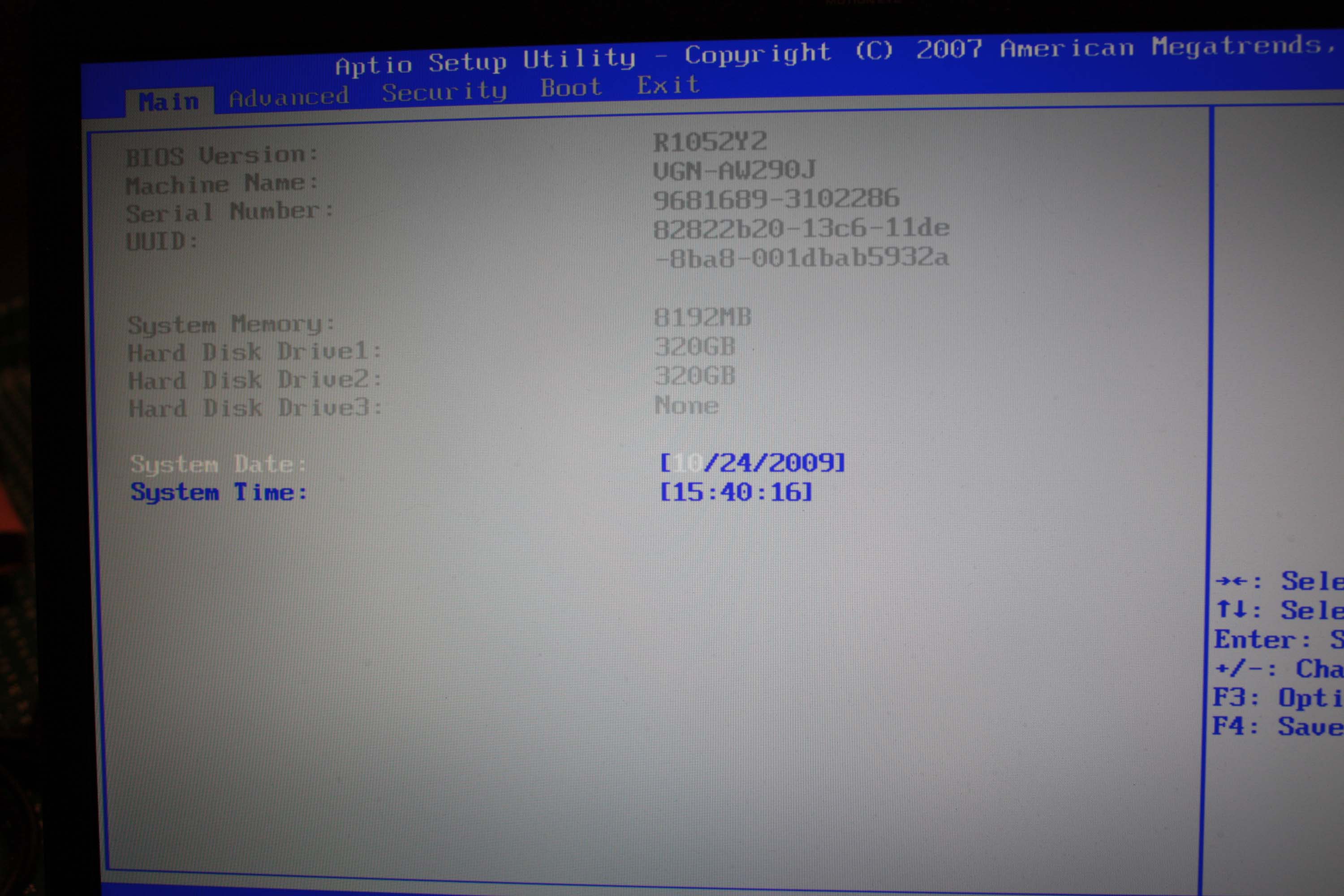
Can you post pic of your BIOS ?
-
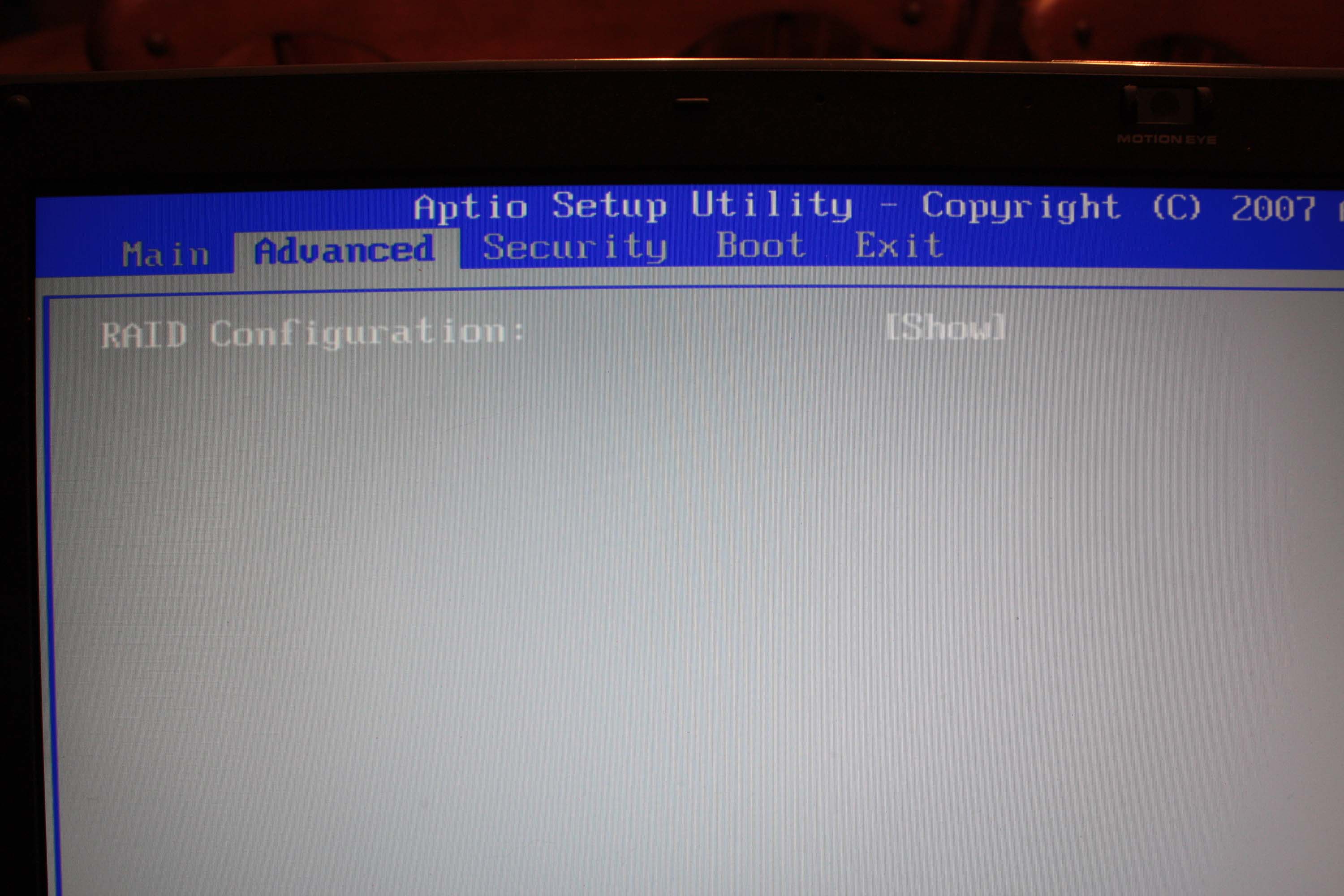
Options under the Advanced tab are still missing for us, if that's what you're asking.
-
Did you give up with RAID ? Do you think we will have it or we will never be able enable RAID ?
-
Are there claims to that effect? Besides I thought the AW bios had virturalization disabled so what would there be to break?
-
laptodd5
The two latest releases have an option to enable/disable VT. -
I think you are talking about the EU versions, the NA versions are still disabled from what I have read.
-
Mujja
One guy here sent email to AMI company and ask about Aptio ..
He sent me back that he could buy Aptio Utilities ...
And they said to him he will need annual licence and it might cost 800 $
I have a little bit crazy idea if we everybody who has AW series and FW series gather money together it may come reasonable ?
-
the version in your drivers thread is old. in fact, there are several updates for your drivers that you should have. grab the update from sony's website. host on megaupload. rapidshare sucks.
just an update: I reinstalled/updated all of my notebook utilities. blacks are still being crushed by the DVD/BD color setting mode. mauled, really.
x.v.Color = fairly good.
TV = dark, moderate crushing of blacks.
DVD/BD = dark, heavy crushing or blacks.
anyone who has The Dark Knight, Pan's Labyrinth of some other predominantly dark BD movies, give it a try. -
My aw150y cannot be made into RAID. It came with two hard drives but drive C and drive F. The Advanced tab in the bios is EMPTY! I tried. If it can please let me in on the secret.
-
I have the Targus CityGear Notebook Backpack - Backpack
http://www.buy.com/retail/product.asp?sku=208287873
I love it!! It says for 17 inch but works great for the AW. Talk about room. It will carry everything you throw at it. I use it everyday including camera stuff, CD player, flat TV antenna and much more. It also has not broke a stitch in the 8 months i have owned it. -
I own both laptops as you see below. Side by side there is a world of difference!! The AW290 display is gorgeous! Much brighter and the contrast is SHARP. I take pictures all the time and it is worth every penny for the display. -
Hi can u post me some pics how your bios advanced menu looks in that AW290 please ? just one pic
thnx -
This is what the Matrix storage Consule says on my aw290 RAID.
"INTEL(R) ICH8M-E/ICH9M SATA RAID CONTROLLER" -
There is only one line in the Advance tab on my AW290
RAID Configuration: [hide]
That is it! In the AW150 there is zip zero notta.
I have the 290 set were you do briefly see the RAID option come up in the boot up. Enter Hit (ctrl i)Attached Files:
-
-
So in BIOS you can only set hide or show in advanced menu + VT enable and disable ?
Update bios and you will have VT as well -
I owe that laptop. Glad you posted this useful info.
-
I update the bios to the latest. R1052Y2. What is the VT option?
-
that is old pick 4Y2 not 2Y2
-
I added the pics you requested. Reply #3236
-
Thank you very much for pictures
I wish I could have RAID
now download and update this bios :
http://support.vaio.sony.eu/computi...208467.exe&m=VGN-AW11XU_Q&ip=EP0000208467.htm
disconnect all devices from laptop then click on update -
Why is this not on the USA site? Wait I see this is not for the AW290?? But for the VGN-AW11XU/Q
-
anyone? hoping someone might be able to try this out.
-
hi all
i have aw11z and i want to install clean windows 7
i have the orginal disc , what do i need to do ?
i dont care about the recovery center and all the digital Buttons
i want clean win 7 who works fine
can i delete the os from the computer and start to install win 7 and after all the drivers that i need to work with the computer ( audio . wireless . vga. and other importent drivers )
thanks for the help
i made the recovery disc if on day i want to change back the orginal os with the recovery center can i do this ? -
put the disc in the computer and restart. as the computer is booting (after the vaio logo disappears) you should see text on the screen that tells you to press any button to boot from the disc/DVD. press a button and it will begin booting into the Windows 7 installer. follow the on-screen instructions and Windows 7 will be installed in less than 15 minutes.
-
Hi everybody!
I have Sony VAIO VGN-AW360J.
About two weeks ago I noticed something weird with the brightness regulation of the display. When I tried to change the brightness (always set up to the maximum) to a lower degree using the keys (Fn – F5) a high pitch noise can be heart coming from the screen (to be more exact - from the lid of the laptop, below the VAIO logo), and it is very noticeable in a quieter environment. Continuing lowering the degrees of brightness would cause higher or less noise. The nosier setting is at 90% of brightness.
Do you have the same problem?? Please, listen to your AW's! I'm really concerned about this!!
Thanks,
Dimitry. -
Hi all,
I have my AW11Z/B for almost a year now, and had no issues till yesterday.
I found out the new firmware was out, downloaded and installed it.
During the installation, the fan went suddenly crazy, and the system was not responding anymore. Then, I got a blue screen (of death).
After that, my AW didn't ever start up again: the powerled is on, I can see some short HD activity, but that's it.
It doesn't respond to bootable CD's or USB keys, or keyboard key combinations. (removed the battery, power and so on to try to reset the system, no luck).
Is this the end, meaning I have to sent it in for repair?
Or is there a way to enter the system and reflash the bios?
I passed hours and hours to figure out what to do... -
that doesn't matter download and install
-
That's normal behaviour. Did you try to do anything while the BIOS was being updated to make the laptop crash/BSOD?
When you reboot do you see the VAIO logo?
Official Sony VAIO AW Series 18.4" Owners thread
Discussion in 'VAIO / Sony Owners' Lounge Forum' started by Phil, Sep 9, 2008.