Problems? See this thread at archive.org.
By the way...
A few weeks ago, I reinstalled my nvidia drivers from the Sony esupport site and i'm no longer getting the 'display driver has stopped and has recovered succesfully' warning message. ALSO fan whine has been occuring much less frequently to none at times.
I can now call Sony tech to get this fan issue looked at but from what it seems in this thread, that doesn't do it. Oh well...
Edit: the Display driver issue was already happening before I installed the Nvidia tools for overclocking..
Edit 2: Fan activity with reinstalled drivers is less active and does not kick-in from time to time now at idle state.
-
Just for fun, check the work done & time when compairing your 17-820QM to my i7-720QM:
![[IMG]](images/storyImages/BatteryEater_Report_To_No_End._Joe_Bleau.jpg)
-
Hello,
As I’ve already mentioned above my vaio F is not working properly – the screen freezes permanently. Nothing works normally except power off. I decided to send the vaio back though do not know how to do it. Does anyone know how to manage that? Who is paying for transportation? Has anyone practiced the problem similar to mine before? I got my vaio F on 16th of March with limited warranty.
Thank you in advance.
David -
Yep, looks like the guilty party. An update may have fix your problem.

-
-Gray or black is something I would suggest you walk into a store and look at for yourself. The black still has Silver inside just black on the outside. personally I got Black
-SSD I think through Sony is better deal as MelodyMaster said
-No nothing these days ships with a DVD copy. However from what I have read, You will be able to create a Restore Disk with the Rescue Partition -
@dati80
Call up Sony' tech support and request for repair. If it's off-site repair then they will send a laptop shipping box to you. I don't believe you will have to pay for shipping. -
Quiz: 4 HDD's are connected to my Vaio_F via fast SATA connections @ the present.
No hubs, no network & no other computer connected to the F. Can you guess how is that possible?
-
Ghost image that's lingering ?
Did you have any of these drives other than your F's plugged in at some point before? -
There is no software gimmicks, no reporting error by the SIW utility.
It's 4 physical HDD's connected simultaneously to the F, none via the slow USB.
-
Why not create your own thread with direct links to each individual driver, util and app on Sony's sites. I have already given my reasons for doing so in the F drivers thread. Continue the conversation there if you want, don't follow me around like a troll.
-
Thanks for the link to the PMB app but the instructions seemed to suggest the original PMB CD was needed for installation.
The PMB update on VAIO supporty is actually the full app which installs and works fine but doesn't map itself to the VAIO button on the F. Which is why I'm looking for the version from the recovery disc as I'm hoping this will map itself to the key during installation.
I haven't tried VAIO support as I don't have much failth in them.
P.S. About the drivers, experienced users will know what they need to download from VAIO support. The thread is for people who want them all in one place without too much trouble or extracted so only the drivers minus the utils are installed, e.g. Realtek, Intel, Broadcom who install their own software when installing their drivers. -
An express port card with 3 eSATA ports?
-
My guess is some kind of enclosure. Like a 4-Bay Drobo.
http://www.drobo.com/products/drobo.php
(I do not work for Drobo, but my BF has one and it's wonderful.)
To make this an "F" related post. I did hook it up to my F1190 when I had it. Works great! -
I see your point, Joe, but I normally don't like to run those .exe files b/c they install god knows what along the needed drivers, but for now I'll go the easy official route.
I do not see VAIO Update 5 utility, how does it work?
To create Recovery Disks should I use VAIO Care or Win 7 Control Panel->Backup and Restore->Create System Image?
Thank you -
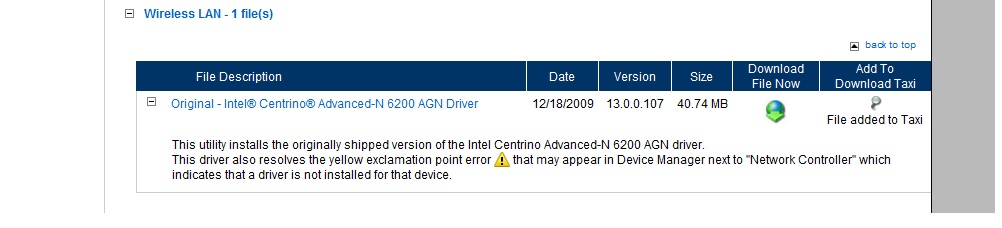
SONY eSupport lists Original - Intel® Centrino® Advanced-N 6200 AGN Driver however windows Device Manager says it's Atheros 9287.
Where can I get the correct wireless driver?
Thank you. -
Both the Intel and Marvell (Atheros) are available on the esupport download section - Use the AR 9285 drivers. From the US esupport site:
-
I have only Intel listed
Attached Files:
-
-
Which F model do you have and where are you located? Better yet, what esupport site are you viewing?
-
Thanks
After customize:
i7-820QM
256GB SSD (¿¿¿Does it come with TRIM???)
4GBx1
GT 330M GPU
Free BD
With educational discount and taxes the price is $2,073.49:
Now my question is if it is possible to get a discount to end with a price of $2,003 because my credit card limit is 1500 -
I am in US, it's VPCF1190X.
Here is the link to the Sony eSupport that I am using:
http://esupport.sony.com/US/perl/swu-list.pl?mdl=VPCF1190X&SelectOS=45 -
Try changing the model to VPCF11JFX. This was a US preconfigured model.
-
I don't know where u r but in US I called the sales number and chatted with the lady and had her build it and she gave me 10% off!
-
you can't combine the student discount with another discount. It's one or the other.
-
"I do not see VAIO_Update 5 utility, how does it work?" - > Start > search & type: update 5 > run VAIO_Update 5. It will search automatically Sony_support for updates specific to your F model. In "Settings" you can disable auto update (I didn't) and run manually Update 5 every once in a while, just like Windows Update.
If you don't have Update 5, then you did not install something, check: "...the proper order (Step 3)...". You can also go to your countrie's Sony_support page, go to your specific model page & manually download the updates or drivers you want.
Update 5 is just easy & convenient for the casual user & keeps your F up to date. Set to auto update & forgetaboutit.
"...don't like to run those .exe files b/c they install god knows what" - I didn't see that so far on Sony_support. You can always create a restore point (> Start > search & type: restore point) or use utilities like Total Uninstall to easily go back to your current system state or monitor what the update install does to your F.
"...To create Recovery Disks should I use..." - well, I provided a link to the Sony_support how-to doc in the post you quoted :
-
- you are right, I did not read the fine print, sorry.
"The PMB update on VAIO_support is actually the full app which installs and works fine but doesn't map itself to the VAIO_button on the F..." - Actually in the OEM OS in factory state, the silvery VAIO_button opens the Vaio_Media_Gallery and it's not possible to remap the button w/o uninstalling it.
![[IMG]](images/storyImages/Keyboard_S1.jpg)
Currently because of your "clean install", your VAIO_button should default to Mute & you should be able to remap it with the free KeyTweak utility.
Check: VAIO_F Backlit Keyboard, Spacebar, Mute Key Remap & Power Light and also Vaio_Special Keys Remapping. -
Yeah..Its rarely happen though, maybe I dont hear that much of music/video with high frequency sound,Im not quite sure. Same thing! its coming from the top left of the laptop. When you like holding it down (applying small pressure), its gone. But I'm keeping this laptop, since trying to get refund would be somewhat a hassle (ship back,I have to cover the cost,etc2..not including I might get the same kind of issue)
-
Its on unification post..same profile for US screen 1080P
-
Another reason to love the F11, the GT330M supports exactly the type of H264 indexing and decoding I need to do, using the only (non-Perl scripted) tool that will do what's needed. Most cards including ALL ATIs will not work.
http://www.anandtech.com/video/showdoc.aspx?i=3657&p=3
http://en.wikipedia.org/wiki/PureVideo#Table_of_PureVideo_.28HD.29_GPUs
http://www.neuron2.net/dgdecnv/dgdecnv.html
This laptop gets better every time I turn it on. -
Sweet
I just did some goofing off and found that thankfully, my machine's fan is not the cause of the vibration, but the seagate HD is.
It's a 500gb 5400rpm model, that alone is reason enough to go get something else, but I'll see what sony says tomorrow/friday. -
Any idea if the wireless card can be swapped out? The one it comes with does not see my 5ghz wireless signal.
-
I used Acronis to copy the 5400rpm drive to a 7200rpm drive I had. Makes a difference for sure.
-
Run this search: hdd acoustic management maybe the function is enabled for your model.
@ MelodyMaster: I thought you would have solved the enigma:
Quiz: 4 HDD's are connected to my Vaio_F via fast SATA connections @ the present.
No hubs, no network & no other computer connected to the F. Can you guess how is that possible?
-
I did the same & while the boot time is shorter, the Windows Experience stayed the same.
If one wants to install the factory state on the new HDD, the recovery discs work fine as I did here. You can also shrink the recovery partition & create a D: partition while you are at it: C: Drive Partitions & Recovery Trick.
If your old or your new HDD is a Seagate, you can get the free Seagate DiscWizard which is made by Acronis (read the pdf doc).
I'm using Windows Backup @ the present because it's free, fast, simple, already included in the F & seamless. Last time I did a full backup to an external drive connected vie eSATA, it took about 1h20 min. to make a full system image with all my installed software and documents (about 110gb).
And you can use it to clone your current HDD to the new one, just like Acronis.
-
I watched two short movie clips from megavideo and veoh on two separate occassions and during the clip I got a black screen (crash) and a loud buzzing that would only stop if I powered the laptop down. This only happened watching online streams and never with games.. Is this an issue with the streaming app or hardware??
I am now free to schedule the service with Sony and I will add this to the list. I would like to know if you guys have experience with this issue.
thanks -
Internal ports? I know the boot drive and optical port are primaries, so internal slaves? (Yes there IS a Master-slave relationship for SATA....)
-
I'm connecting my HDMI out to my Samsung TV but I cant seem to changed the resolution to 1080
![[IMG]](images/storyImages/HDMI.jpg)
Anyone know how to changed from 720 to 1080?
My clean install scored 4.7, before that I was getting 4.8 (no big deal), this is for G310M not 330M, I was wondering why G310M have low score on aero, my gf mini 311 (Nvidia ION) score about 4.4 at aero.
![[IMG]](images/storyImages/Index.jpg)
No CUDA??
![[IMG]](images/storyImages/Cuda.jpg)
Anybody can post original VAIO desktop wallpaper?Mine is gone because clean instal..
Just updated Nvidia Driver to 8867 from Sony, this driver supposed to be more stable. -
If you bought it on sonystyle.com, just call (1-877-865-7669) and ask for the return procedure.
They will send you via email a fedex bill that you need to print.
Pack all back into the box it came go to a kinkos with your printed bill and they will deliver it for you.
The same email is good for tracking too.
Cost of all this procedure: $0.00!! At least something good from all this nightmare. -
Had the same problem: solution here: http://forum.notebookreview.com/showthread.php?t=464372&page=169 (check Joe Bleau's post).
You can also just ignore it... at the moment of connection you're already at 1920x1080, your tv would have indicated that much. If not, you can set the display resolution to this a few tabs higher. -
Right, I have it now - thanks, jacksjw!!
My VPCF1190X drivers page is also missing Vaio Care and a couple of other files. I guess they do not update the drivers for CTO very diligently. -
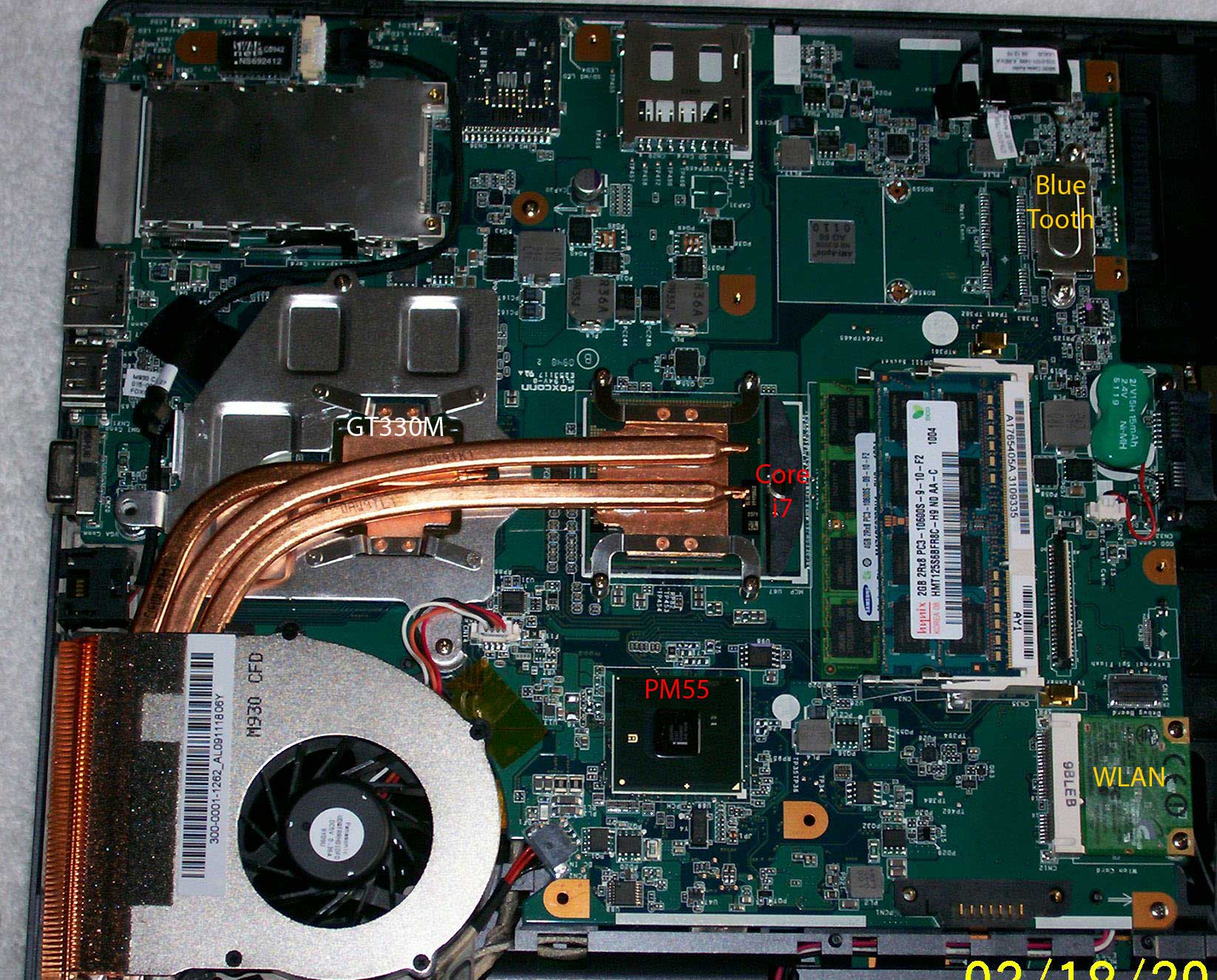
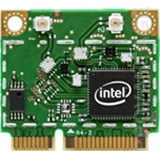
Physically, yes. Both WLAN cards are PCIe mini half cards. (see attachment photos). Both cards only have 2 antenna connections.
We know that Sony uses the Intel card in the EU and it supports both 2.4GHz and 5.0GHz bands.
What we do not know is whether the antennas in the top of the LCD lid next to the web cam are different for the Atheros 9287. That is, are they tuned for the 2.4GHz band only or are the dual band? What you do not want is to have reflected RF energy directed back at the amplifier in the WLAN card due to an incorrect antenna - even if it less than a watt of RF power.Attached Files:
-
-
I found it - it was right in front of me - thank you.
-
I have the impression the Atheros card as configured in the F11 is very efficient. My IBM laptop with dlink card (forgot the chipset) gets my router and just one neighbour. The Asus N10E with Atheros can see about 5 routers. The desktop with Intel chip and a separate wired antenna receives 7, yet the F11 with Atheros sees more than 20 IDs, (possibly a large condo a couple of hundred feet behind the house has come into range) and I can cross the street using the F11 while still solidly connected to my router buried in the basement, whereas the Asus loses the ID completely.
-
I see a ton of Routers and WAPs also - we live in a townhouse community. Usually picking up multiple SSIDs is a combination of a properly tuned antenna and a receiver front-end that has a high sensitivety rating.
I have been searching for the specs of the Atheros 9287 but have only found a press release which does imply dual band. I question the drivers as they list the device as a 9285. The 9287 is a new board.
The Intel 6200 does support the 802.11 A/B/G/N standards including the dual banding of 802.11N. I do have a bunch of 5.0GHz WAPs that I use in my corporate show work for backbone communications across the conference area. My old Dell was able to connect into the backbone directly - all of the other users were on 2.4GHz. Now I will have to fight for bandwidth.
Maybe it is time to spend $30 and get the Intel 6200. -
"Is this an issue with the streaming app or hardware??" - Your Event Viewer can reply to that question.
Check: VAIO_F_Series Lockup on Youtube?
Update your browser & it's FlashPlayer pluggin & try the same movie with an other browser.
If you download the movie to your F & play it, do you get the same error?

-
LOL So I was in math class today, and the girl next to me thought my laptop cost $5000....
I guess Sony beat Apple in the looks department XD -
I haven't tried to connect to my HDTV yet however after updating the SONY VAIO EVENT SERVICE Update, the FN for volume doesnt work..it does work for the brightness, so I revert back using system restore. The Nvidia however installed with no issue.
Must be some compatibility issue with some of your programs, it happen to me also but after I did clean install, that problem gone.
I think GT330 might be causing some issue with the fan as it probably run at higher clock. I got the 310M with 1600X900, I dont do gaming or anything like that so the 310 is enough for me. -
Dear All,
I am new to the forum and trying to read it, buit have 2 questions and one information for you.
Info: I was just travelling from the Terminal 5 of Heathrow airport, where I stopped by the official Sony Store. They have a GREAT offer for VPCF11M1E/H.CEK It is now sold for GBP 807 (while the original price is around GBP 950). Of course I bought one ... it is an excellent notebook
Product link: https://www.sonystyle.co.uk/SonyStyle/VAIO-Laptop-PCs/F-Series-16-4/VPCF11M1E/H.CEK
My questions now:
1. Do you recommend to reinstall Win7 and the necessary drivers? I heard that you machine will be much much faster that way. Or is this good enough just to uninstall the unnecessary Sony softwares ?
2. I wonder if you can recommend a method that I can overclock the M330 GPU. Do you recommend to do so, can it make any harm? Does this make sense at all, will it help in gaming performance?
Many thanks,
V. -
#*%(&@#%(*&@#%
I just realized I have a cluster of dead pixels on my LCD
FML lol -
Sorry, can't edit for some reason.. Thought I'd add in something funny before I go to bed lol ^^
If you want a fresh install, you can just install a fresh install of Windows over the OEM install, install drivers from the old Windows/system32 folder, and then trash the old folder
lol I just did that. Laziness ftw
Besides, I'm going to see about getting my HD replaced, too. Seems hit or miss, but out of 5 VPFC1s I've used, only 2 have HD vibration. (They all have the same Seagate, too).
That and the screen are gonna have to get looked at, awesome machine otherwise I guess
-
Darn, it's no easy swap like some laptops where you remove a couple of bottom screws, remove a plate, and there it is. Looks like I would have to remove the entire top.
Official Sony VAIO F Series Owners lounge *PART 2*
Discussion in 'VAIO / Sony Owners' Lounge Forum' started by eagle17, Jan 7, 2010.




![[IMG]](http://s82.photobucket.com/albums/j268/hendyp/?action=view¤t=HDMI.jpg)
![[IMG]](http://s82.photobucket.com/albums/j268/hendyp/?action=view¤t=Index.jpg)
![[IMG]](http://s82.photobucket.com/albums/j268/hendyp/?action=view¤t=Cuda.jpg)