Problems? See this thread at archive.org.
There is, follow the links in the post: Tweaks: Clean Install... http://forum.notebookreview.com/showthread.php?p=5924807&highlight=clean+install#post5924807
The minimum Vaio_and other stuff you need for a clean install is the maximum cleaning point you can reach without cutting in the bone.
Everybody has a different definition of what is "bloatware".
-
I'm thinking of selling my XPS M1730 and getting one of these F series. Can anyone tell me how long the battery life is with the extended battery? thanks.
-
Well I do not have an intention of doing a semi-clean recovery. But if someone, who has done one, could tell me what VAIO programs still are in the Programs and Features box and which ones have been removed, that could solve the problems for many F11 users who do not want to do the recovery but only intend to remove those VAIO software manually.
-
I bought the VPCF115FM/B today at Best Buy, but I am concerned about the fan issue. Should I go ahead and open it up and assume the fan will not be an issue? Or is this a legitimate issue? Thanks!
-
Ha I also bought one at Best Buy today, have yet to open it.
Mitch -
lol.. I don't have the self-restraint to do that kinda stuff.
The fan isn't really that noisy, all laptops have fans that make noise too. The thing is, this one runs the fan almost all the time. Not just when you're crunching stuff, but when you're sitting around doing nothing.
The tradeoff, is that the Vaio F doesn't get hot. It does get a little warm, but nowhere near as hot as an i7 quad laptop would generally get.
Remember, it's a big, powerful laptop. -
Hey I just got a Sony VPCF111FD and have the stuck fan problem. Could you just walk me through the FIX and I would be ever so grateful because I'm ready to jump out the Window....Thanks Mick
-
By properly configuring SpeedFan, you can let it change fan speeds based on system temperatures. SpeedFan can access digital temperature sensors and can change fan speeds accordingly, thus reducing noise.
http://www.almico.com/speedfan.php
Never used this app, but sounds like some of you might want to try it. -
Mine came with "Fresh Start," no trialware or antivirus..in my experience NONE of the VAIO programs need or should be removed, they are all tied to drivers needed for the F11, button pushes, system software updates, recovery etc. So far every one of the Vaio utilities has been useful to me at some point.
Some say WiFi Helper can be stopped.....
As for Roxio authoring and Corel WinDVD, sure you can remove those, but why? - Unless you have preferrred DVD-Bluray authoring and player software. (Corel doesn't play Mpg FILES unless it's upgraded, a reason to use my licensed copy of PowerDVD instead.)
To put it in perspective, just ONE desktop gadget, such as moon phases, takes more memory and CPU resources than all the VAIO software combined. -
Guaranteed 3 hours with light use on 80% charge, maybe 4 hours at 100%, down to 90 minutes when playing a DVD,
-
Unfortunately it doesn't detect the F's fan...
-
RivaTuner 2.0 fan speed & Overclock Guide
Again, have not tried this app but for what it's worth...
http://www.guru3d.com/article/rivatuner-20-fan-speed--overclock-guide/1 -
NVIDIA nTune
My understanding is that you can manually set fan speed with this as well.
http://www.nvidia.com/object/ntune_2.00.23.html -
Open Power Options/Settings and select Power saver as the plan.
Click on Change plan settings for the Power saver.
In the next window select Change advanced power settings
In the Power Options Advance settings scroll down and expand Processor power management. For both Minimum processor state and Maximum processor state set both to 100%. Click ok Save changes. Note: It may take a minute or 2 for the graphics card fan to go off after performing these steps.
Again, have not done this- only research. -
I've searched this thread with no luck. If my question has been answered I apologize.
I just orderd my F11 and it should be here this week. But right away I want to do a fresh Win 7 install. I am reading on here that this laptop does not come with any windows disk?
My question is, where do I download or get this software? If its part of my purchase with the laptop I find it odd they do not include a disk...
My reason for fresh install is bloatware removal.
Thanks -
New laptops don't usually come with a disk of the OS, just a recovery CD of some sort. It sucks, but you have to buy Windows 7 if you want to re-install a fresh copy of the OS.
If you don't want to buy Windows 7, you could get revo uninstaller and uninstall most of the applications that come with the vaio. I find that a lot of the included software (besides norton and microsoft works) is actually pretty useful.
I would recommend revo uninstaller - its basically a program that removes all traces of a program and leftover fragments in the registry, etc. I would say that you could safely remove any of the "VAIO Content..." stuff as well as the "PMB VAIO..." stuff. "VAIO Messenger" should be safe to remove as well. "VAIO Media Plus" (including the Sony Home Network Library) stuff should be able to be safely removed as well.
If you don't want to remove these programs or are uncomfortable removing them, you can keep them from running at startup. This allows your computer to boot and run faster while still keeping the programs installed. To do this, simply open the start menu and type msconfig in the search box. Hit enter. Once the dialog is open, click on the "Startup" tab. Go through and check all the services or programs that you don't wish to run at startup. You will want to keep things like drivers and antivirus programs checked. Here is a screenshot of what programs I run/don't run at startup (note I have some programs that I installed that I choose not to run at startup - this is here for example only).
Finally, you can keep Sony services from running by going to the "Services" tab in msconfig and unchecking those programs that you wish to keep from running. Again, below is an image of what VAIO programs I choose not to run.
Once you're done, hit apply and restart. The next time you start up your computer there should be a popup that says that you've made changes to confirm that the changes have been made. As MelodyMaster said though, the vaio programs are pretty useful (Especially the Vaio care stuff, so don't delete any of that) -
so i'm thinking about getting (or rather quite set that i will be getting) a vaio F series. i'm probably going to get a CTO but what I want to know is, has there been any news on a refresh? if fancy new options are coming out soon, i can wait a bit. =]
and does anyone know of any of the big plus/minuses of getting a CTO? once i've ordered it, i will have no intention of returning so that part is fine. but say i end up with a dead pixel, would i come across problems getting that fixed?
thanks -
Or you can download the Windows 7 iso from somewhere like here, burn it to DVD and activate it using your Windows product id (on the bottom of the lappy).
-
Oh cool! Thx for the link
-
Refresh is late June or July with Fermi, and i9 as an additional CPU option. There's no guarantee that prices on current options, such as SSD and HD screen, won't in fact increase in June. We're getting very good pricing right now.
-
well, if Fermi will be in the refresh, i would expect an overall increase in the price. i've been reading fermi has massive powerdraw and heating which is very bad news for laptops. i guess i'll pass on the refresh and grab one while the price is good. =]
and another little bit. i've been heavily debating SSD or 7200rpm. i've heard wonderful reviews about SSD's. is the SSD that i get from the CTO option up to par? or do you think i could find a better for cheaper?
thanks -
Black Viper's Windows 7 Service Configurations
http://www.blackviper.com/Windows_7/servicecfg.htm
One of the best guides in helping you decide which Win7 services are essential or not. Do not be fooled by the looks of this website. Scroll down to see the list. My opinion is to be somewhat careful with Revo uninstaller. Once in a great while it can be too aggressive with an uninstall. CCleaner is tamer, but I do have Revo on my system as well. I disable services though 'Services' and some say not to use msconfig. Sysinternals Process Explorer from Microsoft will tell you what's eating your resources. And I do use autoruns for startup application changes. -
You don't say what country you're in, but for Canadian CTO buyers SSD bundling prices are just a fraction of what they would be on the open market. I love the performance of the Toshiba 256 Gig SSD in my my F11.
The i9 option will be worthwhile, but indeed I'm not sure that for video, other than in having Dx 11, the GT440 etc. will be worth the wait. The availability of the 1 Gig faster cards again will be a relief though. The GT330 1Gig is in short supply, Canadian CTOs rarely even offer it. -
I´m interested in the ssd too. I am in USA and I would like to know if they have TRIM?
-
I'm in the U.S. I just looked it up and looks like we pay about the normal market price for SSD. Can't really complain about that.
The i9 really is quite tempting but i probably wouldn't need it. Planning on getting the i7 820M which should run all my CAD programs w/o a hitch. Will definitely need the GT330 too. They're all in backorder right now but I've still got some time. -
Sad to say but the faulty read-out of the battery-gauge stayed after decharging and recharging to 100%. When I close down at 95 % the next morning I get a reading of 80 %. Anybody an idea?
-
I thought this was a problem with that battery drain while laptop is off I've been hearing about. What makes you think it's a faulty read-out?
-
Because I read about it in Unification post #2. People solved this so called drain by completly discharging from 100% and then recharging at 100%, this is called calibrating the battery. And after the procedure they didn't have the problem any more.
-
thx - I think I can live with that. Better than the 40 mins you get with the M1730 anyway - doing anything without mains power on it is like pulling teeth.
-
One thing I would try is running the battery to the ground again and see what happens when you get low. If it were a mis-calibration, funny things should start happening when you get low. Make sure to turn off the hibernate and sleep options when the battery gets low so as to make sure you fully discharge your battery. I have also heard it recommended that when charging the battery back up, it is better to have the device off.
Just talked with sony support and they said that TRIM is available. -
Hi, very good summary indeed. Do you know if the
"vaiocareservice.exe" and "VCsystray.exe" can be dropped?
If yes, where can I kill them, as I dont find them under services .... I just can see these 2 in Processes all the time.
And what about VAIO power managment and VAIO Event service? Are them a must or ... ?
MAny thanks,
V. -
The device was off while it was recharging and I waited untill the battery-led at the front went out + 1/2 hour before I switch it back on.
I will try a new calibration when i've the time. -
I don't think you need any of that stuff really, I did a 'reinstall' with XP Pro
-
@ Fishon: until you can test on a F11_laptop the utilities you are suggesting to monitor or modify the fan speed, I suggest you stop suggesting them.

People will waste their time on this wild goose chase & in the case of Rivatuner, mess up their system.
Other F11_owners & I have tried several utilities & you can't see nor control the fan speed on the F.
Why? Because we reported that the fan speed on the F varies according to the amount of heat produced by the activity of the powerful quad core + GPU in a small factor. I'm sure Sony_prevented us for messing up the fan & toasting our CPU and/or GPU.
Any F owner can tell you that the air coming out of the vent grid is hot so it would not make sense to slowdown the fan unless you want to microwave an egg or something.
The only reason I downloaded & installed RivaTuner v2.24c (the most recent) to report here: I use Total Uninstall Pro to protect the OS from my messin' around.
I made a snapshot of my system & monitored the Rivatuner install.
Right off the bat Win 7 skipped a driver saying the driver was not signed & could be incompatible with the F. I aborted the the install then ran it again as Administrator.
The first thing Rivatuner did when I ran it is to pop that pleasant warning:
![[IMG]](images/storyImages/Fan_Rivatuner-01.jpg)
![[IMG]](images/storyImages/Fan_Rivatuner-02.jpg)
You will notice that these are photos taken with a P&S as Rivatuner broke my faithful screen capture function via Print Screen ("Prt SC" key on the F) or Alt + Prt SC! I tried to paste in Paint & Photoshop: not.
![[IMG]](images/storyImages/Fan_Rivatuner-03.jpg)
Nope, not on Vaio_F11 as there is no fan speed info:
![[IMG]](images/storyImages/Fan_SpeedFan_4-40.jpg)
![[IMG]](images/storyImages/Fan_SpeedFan_4-37-Desktop.jpg)
I don't need to waste my time on the next one because in a desktop, you can mess around with your GPU's fan and it will not affect the CPU's fan and the space around the components can mitigate your under-cooling tweaks. It's NOT the case on the_F11 with it's single fan:
Other utilities (screen capture working again!) that can't read nor modify the Vaio_F_Series fan speed (for good reasons:
![[IMG]](images/storyImages/Fan_GPU-Z_No.jpg)
![[IMG]](images/storyImages/Fan_SIW.jpg)
![[IMG]](images/storyImages/Fan_PC_Wizard_2010.jpg)
BTW, EVEREST also does not show the fan speed.
From this post by jacksjw:
![[IMG]](images/storyImages/F11-MoBo-Bottom-3_by_jacksjw.jpg)
-
Joe You're awesome lol.
Man sitting here on power saver mode, Windows 7 just guessed I have 3 hours of battery life, at 80%! Not bad aye!
This laptop is nothing short of impressive lol. Oh and BTW, that fan has 3 pins, obviously speed control and reporting is going on. Not to mention, our machines run EFI, awesome.. stuff.
Sony hid lots and lots of things as far as how the machine works though. Some of it's good, because you can run any OS and not worry about it, and then some of it is just annoying because you can't see what's going on.
Two things I'd love:
* Matte screen option
* Slot loading drives option. OMG SONY WHY! rofl.
RGBLED display would be sweet too
-
Yes, there is a problem in the cockpit.
A quote from a world famous guy: "I would suggest to try the free & already included in the F: Windows 7 PowerCfg to Evaluate Energy Efficiency. It's fast &..."
![[IMG]](images/storyImages/powercfg-06_Balanced_Default_Realtek_Sony.jpg)
Read the rest here.
See link above.
Nope: See link above.
-
well noted. i remember seeing that a while back but i had completely forgotten about it. -
I've run the powercfg and I have the same report as the reference report in default.
Could it be that it has something to do with the wireless usb connector from logitech that I leave in the usb-port. It's one of those small unifying receivers.
Because my energy-report says that, with that receiver plugged in, the usb-device can't be put in stand-by mode. Is this the cause of my battery drain?
Thx -
Hi,
Am looking how to get the laptop working in the office. They have Cisco LEAP encryption. The wireless card in the laptop is Atheros AR9287 Wireless Network
Thanks a lot -
Duh!
We will know in 24 hours when you will report back I guess.
-
Why Duh? Is it logical that when you power off your system the usb devices till uses power? Then that's something new to me.
It can't be that that small receiver uses 15% of my battery when the lappy is switched off. -
Were you able to replace the card. It would be great if you could let me know how it can be done
Thanks -
I use process explorer as my task manager. Kill them there and see. I'm showing Vaio Care using approx 50 MB
-
There's something completly wrong. I powered it off at 45% and removed the usb-receiver. Now, an hour later, I switched it back on and npw I get a reading of 18%. Any ideas?
Thx -
I haven't tried.
-
Hi all, I'm a new owner of the BB VPCF115 and have just begun to dig into it. I've removed the bloatware with revo and am making a to-do list from this thread. I was going to post last night and ask the question that Mangosango has already answered, premonition?
What I'm wondering now is what kind of memory usage are you seeing with these items disabled? My current laptop has only 2gb's ram, and at idle on startup, it is using less than 800mb's. My new F on the otherhand is sitting around 1400-1500mb's, but I have only disabled adobe, quicktime and maybe one or two more items through msconfig.
BTW, enjoying the laptop so far. After reading about the screen issues others have mentioned, I watched a few minutes of Star Trek on BR to see if video had a blue tint, no problems found and no dead pixels yet.
- the fan is not any louder than my current laptop, HPdv9500(AMD Turion with integrated gpu)
- the battery icon reports 1hr. 40min. of use on a full charge, I hope I'm going to get better than that with just wireless web browsing while traveling.
- audible beeps when changing volume and such, will rename the exe later
- will need to turn off autobrightness, it is set a little too low -
I have disable the high pitch fix...And this error went away...
I have been observing the sleep/hibernate/battery drain issue since I went back to the factory setting...everything seems to work great so far.
When I had this high pitch fix applied...my battery will drain quite a bit (like 30% to 40%...sometimes...no battery left in the morning...).
After disabling this fix...and no errors on powercfg -energy...and battery doesn't drain...may be 5% or so after whole night of sleeping/hibernating, which is pretty normal I think.
Not only that...now I seem to get higher "remaining" time...I have large cap battery. When I had the high pitch fix applied...I would get something like "3 hours and 15 minute remaining" when I point my mouse on the battery icon in taskbar...now without the hight pitch fix...I am getting statements like "4 hours and 32 minutes remaining." This is at 100% battery. But his number does still fluctuate...
There is some kind of registry patch released by Sony for this model...may be we are seeing difference in between who has applied this patch and people who has not... Just an idea.
Just an FYI...Yesterday, my Vaio Care program downloaded and installed new power management update....I will monitor if anything changes. -
Has any of the people who said they were going to run tests on their whistling fans been able to do so yet? It's driving me crazy! Also, any UK people who sent their whistling fans in for "repair" got theirs back yet?
-
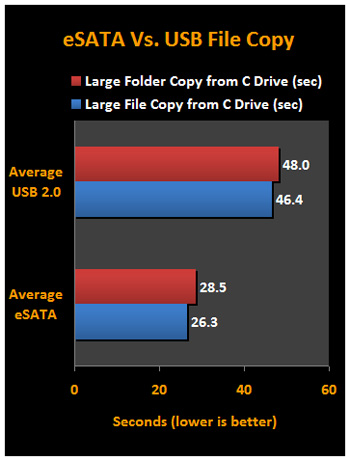
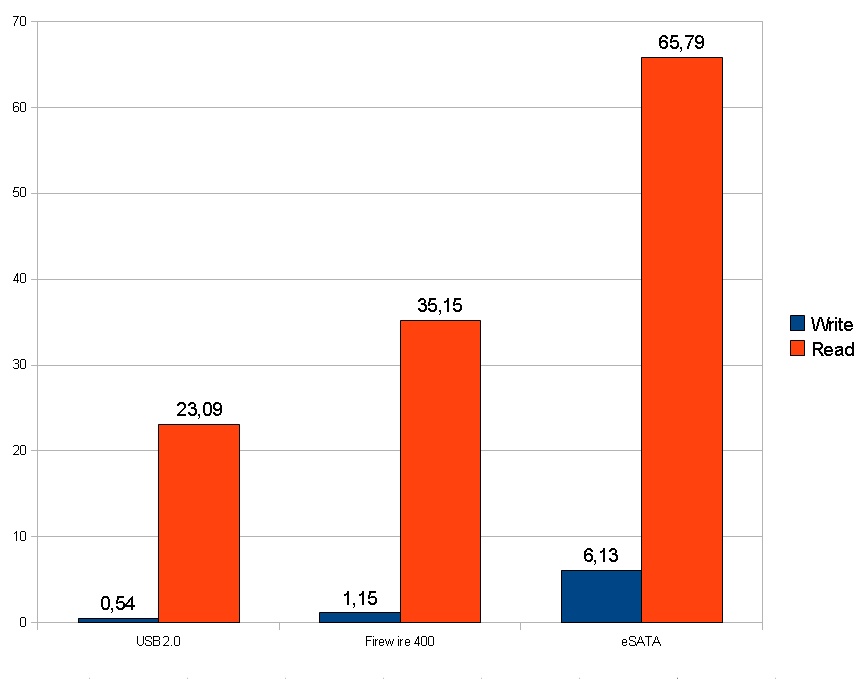
What is better then ?
I really dont know now .. hmm
usb
esat
or
firewireAttached Files:
-
Official Sony VAIO F Series Owners lounge *PART 2*
Discussion in 'VAIO / Sony Owners' Lounge Forum' started by eagle17, Jan 7, 2010.