 Problems? See this thread at archive.org.
No, that's wrong Joe. The rear flap must go DOWN, against the motherboard. The screw goes in quite deep but then secures the flap directly against the chassis. They way you have it there is no support for the flap so it bends down as you tighten the screw, and it only engages a couple of thread-turns. As shipped that caddy was correct, the flap must be flush with the bottom.
-
-
Ralf, I'm 100% sure about it.
 Look at this photo taken immediately after taking out the ODD & before touching the bracket:
![[IMG]](images/storyImages/ODD_Removal.jpg)
Don't wait to fix it, seriously it may cause some major electrical problems!
To insert photos, click![[IMG]](images/storyImages/insertimage.gif) when posting & paste the image's URL.
when posting & paste the image's URL.
-
![[IMG]](images/storyImages/cr.gif)
MelodyMaster, can we bet something before you remove your ODD to see that I'm right? :wink: How about a can of Canadian maple syrup against a bottle of "Premium" Costa Rican rum, including international shipping?
![[IMG]](images/storyImages/HDD_ODD_Bay_WD_400GB_Caddy_Teaser_ODD.jpg)
![[IMG]](images/storyImages/HDD_ODD_Bay_WD_400GB_Caddy_Teaser.jpg)
![[IMG]](images/storyImages/ODD_HDD_Caddy_by_niebyl2002_Bracket.jpg)
-
-
Thanks for the photos. Looking forward to more of those internals pics.
One does not need to worry about up/down if the bracket is positioned in the same way as on the OEM ODD. It's not possible to insert the entire HDD caddy upside-down in the F anyway because of it's overall shape.
Do you agree that niebyl2002 should fix his bracket orientation ASAP to be on the safe side?
Too bad, I was looking forward to that maple syrup, it's been a few years since the last time I enjoyed some.
-
Hey Guys... Thanks for the responses in regards to the Vaio themes.
I deleted the recovery partition when I F-Disked the whole drive. I run a debug script here when I format:
How to use debug to clear a hard disk of partition info.
Great themes and thanks for the zip. However, the themes displayed as black. I guess there are external files too that go beyond the .theme file itself.
Anyways. Thanks again.
-
Yea I'm telling you, that optical bay hard drive module looks awfully tempting. But then, I'd need an SSD to put in place of my hard drive.
Tell me what's heavier to you, the optical or the hard drive? CUrious.
-
Thanks for the update Gary, I may get the 2GB one in the next months.
-
Ahhh whoops. I should've known that there would've been external wallpapers. Found them: http://dl.dropbox.com/u/126056/Sony.zip
Unzip to windows\web\wallpaper\Sony
or just unzip to any folder and use the set background tool in the control panel. -
If someone is ordering a new CTO in the US, these are a no brainer. As I recall, sonystyle charges $150 to upgrade from 4 Gb to 6 Gb, and another $150 to go to 8 Gb. Ordering these, the cost is under $60 to go to 6 Gb, and now it's down to about $143 to get a total of 8 Gb.
Gary -
Niebyl's tag won't work, he'll have to use the one on the native optical drive - swap that over.
-
The resolution is a necessary but insufficient condition for a "premium" screen. Sony even stopped using the word "premium" to describe the 1920x1080 screen in the F at least a month ago (as some screens were unavailable, apparently) and then resumed it recently (all documented in my posts).
Go read my posts with the links and cites from the official Sony ads: Full HD is the resolution, and "Vaio display" is what was used for the F series' "Full HD" (words apart) for a while in the States, prompting a special "shame on you, Sony" posting from me (which was sent to Sony, BTW -- and now the site is different).
Originally, SonyStyle called the 1920x1080 screen that was dual-lamp CCFL a "FullHD" screen (words run-together) for the FW series. Then for the original appearance of the F series, Sony used "premium" in the selection area (and all over the world announced that the "premium" was an RGB LED screen), then later changed the selections at SonyStyle and called it a Full HD "Vaio display" with the word "premium" in the description (as opposed to the selection) area. Yes, SonyStyle has used the words "Vaio Display" with resolution indications for BOTH of the screen resolutions available on the F.
And now SonyStyle is using the word "premium" again to describe the screen in the selection area. Sony also, in the "More info" section, states that the Vaio Premium Display is better than the Vaio Display, not just of a higher resolution:
VAIO Displays provide brilliant colors, sharp contrast and crisp graphics. Also featured is a special, anti-reflective coating that lessens glare and light reflection so you can enjoy a better picture. Additionally, the F notebook has a 1600x900 resolution to help minimize those annoying black bars when you watch a movie.
VAIO Premium Display is a Full High Definition display. Premium displays allow you to enjoy the clarity and brilliance of a 1080p High Definition viewing experience wherever you take your F Series notebook. Whether you're viewing a Blu-ray Disc™ movie, gaming, viewing photos, or just plowing through your workload, Premium displays deliver an industry-leading viewing experience marked by super-crisp hi-def detail, richer colors and a brighter display. VPCF1190X | VAIO® F1190X Configure-to-Order | Sony | Sony Style USA
We will have to see what those who now order from SonyStyle say about their 1920x1080 screens to know whether, for example, a dual-lamp CCFL is back. In any event, Sony has had three sets of advertisements for the F's "Full HD" screen at SonyStyle and they appear to correspond to, at the very least, two different models of Sharp 1920x1080 displays.
Providing links to support screen "spec"-ulations is the only honest, non-provocative way to proceed here. Bitte, por favor, etc. -
Does Sony have their version of LableFlash or LightScribe? I've not been able to find it for the F series...?
-
Thank you very much. That did the trick.
-
My new F11 is up and running, but the lesser screen F11s are now in service. I wish I could have kept them longer, but mine was delayed by over 2 weeks with the screen shortage.
My 1920x1080 screen is very sharp and colorful. It looks to be a single lamp design as it seems lighter on the bottom (light bleed) when I have a black background, but in normal use it is very nice. It will take some getting used to...this is very small detail for my aging eyes. I enlarged everything, but then it looked like the lesser work screens did. I bought this for the detail, so I figure I'll get used to it. I love being able to "snap" two pages into half screen mode. This is very handy!
Bill -
I think, even if SONY want to replace the screen, it must be at least at the refresh. They couldn't do it for current version of F because its probably just impractical as the tech support need to figured out which screen you have and vice verse, the model# need to be changed for any change in hardware.
I thought at first I can get used to the lightbleed, but I was wrong...sometimes I watch hulu and doing anything that have back background just really annoys me. Just try to see if you can live with it before 30 days I supposed. -
Don't they offer this with the Roxio software?
-
Not sure because as soon as I got the laptop, I did a fresh install of Ultimate and I didn't load the Roxio software. Even if the Roxio software supports some type of LightScribe or LableFlash, the hardware (ce writer) also has to support it and it's not mentioned as being supported.
-
One of the links Joe Bleau, I believe, provided on the origin and development of the Sony dual-lamp screen indicated that Sony puts both lamps at the bottom, if I recall correctly. Only way we know if your screen is different from the other high res screen is to have the two side by side, unfortunately, since the location of the lamps is identical for Sony's single and dual-lamp CCFLs.
As for enlarging the text, I hope you didn't change the resolution but just use Ctrl + or - to enlarge the screen.
Good luck! -
Looking to buy and install nod32 or kaspersky as this laptop's antivirus software. I am about to uninstall that McAfee trial that came pre-installed with this, but I noticed this is a 'sony vaio mcafee edition' or something like that...when I go to 'tools' I see that it seems linked with this system's other functions, namely 'disk defragmenter' and 'task scheduler'.
Does this mean that if I uninstall this trial software, these WINDOWS functions will go with it?
-
Yes, you're both right. I fixed it today. See pic below
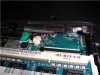
It looks like that rear bracket is for the ground purposes. See the red left box. In a caddy setup it doesn't matter since the drive is separated by thin plastic anyway and the hdd drive got negative from the sata socket. On the pic I marked the second box, the one to the right, to show you how my incorrect setup looked like before. There was no danger of damaging anything since nothing is there. The bracket wasn't touching anything.
BTW thanks for spotting it, I really appreciate it. Finally my drive is secured by two screws.
Here's some more pictures of my caddy:
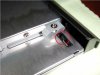
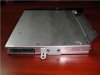
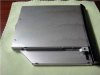
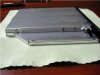
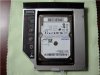
-
More pics.
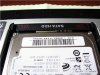
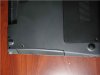
I tried to take of the front bezel however it was sitting pretty tight so I decided to leave it that way.
Let me know if you want to see the caddy from a different angle. -
I've plugged my iPod earphones into the black jack(headphone jack). I'm only getting sound out of the left ear; the right ear is dead, but I know that the problem isn't the earphones. These earphones work perfectly with my Droid.
I've noticed that the Device stays as Speaker/HP after I've plugged in the earphones. The Digital Output(Optical) doesn't produce sound, even when I've set it as default. I'm guessing that the Device should switch from Speaker/HP to Digital Output(Optical) after I've plugged in my earphones, etc. Help would be appreciated! -
Oh that's cool, so the bracket can take the bezel from the optical drive and look completely stealth? SWEET!
-
Make sure you've pushed the jack all the way in. It can be a bit stiff when new.
-
LMFAO! When I first read this, I thought, "Does he think I'm retarded?" I tried it anyway and it worked... There's a last little "click" after you think its plugged in... THANK YOU!
-
Only with the caddy that Niebyl found. It won't fit on the common caddy to which Joe Bleau linked - the one I have.
-
I'm glad to have made you laugh! and pleased you fixed your problem.
-
How to get the OEM ODD bezel off? I got the newmodus caddy, I'd really like to get swap the bezel.
-
Look at the pic below
Start from that side. With a tiny flat screwdriver push that lockable piece of plastic down (gently), with your other hand try to pull the bezel (gently) off the drive. There are three of them total. Once you get the first loose the rest will let go easily. Remember to do it very, very gently. Do not brake anything.
Read Joe Bleau manual before. -
Anyone know the new sony CTO coupon codes? The previous 20% off one expired on the 28th......
-
@ niebyl2002 : Thank you very much for your report & nice photos.
I updated the How to install a secondary hard drive in the optical drive bay of a VAIO_F Series article with some of them & added notes about your fenvi HDD caddy. Will add more stuff in a couple of days.
If I would do it again, that's the brand I would get.
![[IMG]](images/storyImages/ODD_HDD_Caddy_by_niebyl2002_Side_View.jpg)
![[IMG]](images/storyImages/ODD_HDD_Caddy_by_niebyl2002_Top_View.jpg)
![[IMG]](images/storyImages/ODD_HDD_Caddy_by_niebyl2002.jpg)
*****
@ njsss: Could you report about how the F's OEM bezel fits on the newmodeus caddy & include a photo if possible to be added to the article?
-
The newmodeus caddy is the one I have and the OEM bezel does not fit - not without drilling and hacking. That is the reason I'm not using the caddy. I'd love to find a definite source for the Fenvi, but it appears to be out of production, and if one IS being offered on Ebay the seller generally doesn't identify the brand, so it's not searchable.
(Edit) This appears to be it, I think I'll take a chance... I'd appreciate it if Niebyl could confirm... New Laptop 12.7mm SATA TO SATA 2ND HDD HARD DRIVE caddy - eBay (item 250619909385 end time May-22-10 18:18:19 PDT) -
Hi Joe,
I get some troubles when connecting eSata drive to a VAIO serie F
I connect a VAIO VPCF11CEE ( Windows 7) to an external Verbatim drive
USB connexion : OK
eSata/combo connexion :
The drive is not recognized in Windows Explorer.
In control pannel--> hardware and audio
it is seen as a SAMSUNG HMJI drive.
Double clicking on it result in waiting a long time and nothing happens.
No files are seen.
The BIOS don't have any option about hardware settings and so I can not activate the AHCI mode
Intel Matrix Storage Control Storage program detects the external drive on port 5 as SAMSUNG .. and I get this message
"a storage device is connected. If this peripheral is an port replicator only port 0 will be active"
Thanks for your help
Charles -
Did you format the drive? Control Panel -> System and Security -> (Administrative Tools) -> "Create and Format Hard Disk Partitions."
OR open Program search and type "Format." The above will be listed. -
It's easy to find a fenvi 12.7mm thick caddy on ebay. I posted this search suggestion in the how-to article when I first posted it online: 12.7mm SATA TO SATA caddy. From the results, just make sure it's a fenvi 12.7mm.
Before ordering one, let's see if you can fit the bezel on your $50 newmodus. Could you post a photo with the caddy perfectly aligned over the OEM ODD to compare the dimensions with both bezel's removed? I mean like a sandwich?
-
What is the exact model of external Verbatim drive? When via USB, it gets it's power via USB but when via eSATA, it needs a source of power or is it eSATA/USB two-in-one (or Power Over eSATA) compatible?
Did you check the Verbatim support site?
sparkz42 had the exact same problem as you (USB OK, eSATA no way) & it turned out that his LaCie rugged drive was defective. See here. Did you try the Verbatim via eSATA on an other computer?
-
If I configure 1*4GB RAM from Sony
What is the exact manufacturer or RAM spec?
I want to buy separately another 4GB as it is cheaper way to get 8GB total. -
Just wait to have the F in front of you if you want 2 identical sticks (which I prefer) as_Sony uses 2 brands for the F, both very good. In my 6GB VPC115FM I got:
DIMM1: Samsung M471B5273BH1-CH9 4GB
DIMM2: Hynix HMT125S6BFR8C-H9 2GB
But some F owners also reported 4GB Hynix and 2GB Samsung sticks. -
Take the cover off and look at what you have once you get the system. So far The F-series has used Samsung, Fujitsu, Hyundai, Kingston, and Renesas ram. While it is best to match brands, laptop DDR3- 1333 seems to be pretty interchangeable across brands.
-
It shows in BIOS, therefore it's getting power. This exactly matches what 95% of the time turns out to be the user not knowing that the drive has to be formatted before it will show in Windows Explorer.
"a storage device is connected. If this peripheral is an port replicator only port 0 will be active"
That's the standard message you get with this chipset in Win7. It shows the drive is ok, but not necessarily formatted.
(Edit) sometimes a drive formatted via a USB caddy under one chipset does not show as formatted as a native drive under a different chipset. Always try to format a drive via a native connection, Esata or connected directly to the motherboard. And yes, a drive formatted under AHCI may not be recognized as formatted at all under ATA/IDE. Or it may show as "Corrupt" when it is not, in fact. -
I cannot wait. My cousin is going to USA to buy the stuff for much cheaper than in my country. So I'll have to get the laptop and RAM without seeing it.
Thanks for the RAM specs. -
Then get Samsung or Hynix/Hyundai, you'll be safe. Even Kingston maybe. I don't know about mixing with Hitachi (Renesas) though.
-
Yes I did that.
Connecting on an USB port it works very fine. -
This saga continues....
I received my F11 back from Sony in mid-April after engaging Sony Listens. (Side note: a good way to get in touch with this group is via Twitter --- Sonylistens (Sonylistens) on Twitter). The service slip indicated that the motherboard was replaced. The unit worked properly for less than two weeks, and then yet again exhibited the same problem -- unable to boot, power button just goes green for a second or two and then dark. The only common denominator for each time that the unit has failed has been if the unit is left on and unplugged for an extended time. I've had laptops for a dozen years and every one of them were able to survive a full battery power drain, until this one.
I've now re-engaged Sarah at Sony Listens to advocate on my behalf for either a full refund or a brand-new unit (possibly a different model). My wife is irate - she went ahead and called Sony directly to complain. I'm becoming numb to this whole situation - nothing surprises me now. -
Yes, so as I asked, did you FORMAT it via the USB connection? More often than not the drive then will not be recognized on Sata. Also there's the AHCI versus IDE thing. Never format a drive on an external box via USB, that has caused SO many service calls! Start fresh and format it via the Esata port. If it THEN will not be recognized in Windows Explorer then it's a hardware problem.
Formatted while directly connected to the motherboard or via Esata it will then ALWAYS work through USB. Also formatting via firewire doesn't seem to casue problems. -
Yes, this is it. Once you buy it, be patient. Package coming from Hong Kong, it will take aprox. 2 weeks.
-
So the drive works thru USB but it doesn't thru eSata. Does the drive powers up at all while connected to eSata port?? Is the drive 2.5'' or 3.5''? Do you use power eSata cable or just regular sata cable?
-
He said it was recognized in BIOS and device manager via Esata, thus it appears to be only software (AKA format.) As I say, a drive formatted in an external box via USB to Sata or ATA is frequently not recognized when that USB interface is bypassed. A formatting error is being introduced during the USB to Sata translation. Thus I want to hear that the drive is being FORMATTED via Esata, which doesn't seem to be the case here.
And there are stupid problems like a drive being formated via USB under XP is not being recognized in Win7, also a drive formatted as NTFS via USB can't be "imported" when connected directly, and vice-versa...and so on.. -
You've probably already tried this, but have you tried unplugging and draining the CMOS battery to reset the BIOS state? The reason your computer is failing to boot is probably because the BIOS becomes corrupted when the battery is drained and the computer shuts off unexpectedly.
There are directions to try this in this post if you haven't already. It's worth a shot.
Best of luck to ya mate.
Official Sony VAIO F Series Owners lounge *PART 2*
Discussion in 'VAIO / Sony Owners' Lounge Forum' started by eagle17, Jan 7, 2010.


