Problems? See this thread at archive.org.
Hi, this is my first post here. I don't know if it's in the right place, but I want to know when the vaio F11S1E will be available in London. I'm from Brazil and i'll spend my vacation there but in all stores it's out of stock. Any help?
Furthermore, what about F11M1E/H. It's just capable, or a big deal for core i5?
-
I had an F111FD/B from Future Shop that I took back. It had a defective Atheros wifi card. It was determined that it could receive, but not transmit.
One other issue with that machine was that the Toshiba HD and the SATA controller were both SATA 300, but both the HD and optical drives were only running at SATA 150. I don't know if this is applicable to only the basic F111 version, or to other F versions. -
The reduced Sata speeds is a fault, but it's possible that both the defective WiFi function and reduced drive functionality are related to a resource conflict, corrupted driver, etc. In other words it MIGHT have been just a Bios bug or software problem for both issues. Or a bad Atheros card can take down other I/O functions such as the drives.
-
Email sent to Sony Style Customer Care USA:
Reply: -
I ordered the VPCF11JFX/B on Thursday night, but now this model dissappear from the website. Online 2 pre-built models left. What's gonna happen?
-
Well, I already called them up a few days back but seems like even their 2nd level support had no idea on the RGB gamut coverage of the 1080P full-HD screen.
Strange for a product that is being promoted as their solution for photo and video editing.
-
If you received an order confirmation from Sony, I am assuming that you will get your product delivered on the date promised.
-
yeah to no ends were good I wanted to see amateur photos to see what i looks like when you don't set up a multithousand dollar shoot.
-
MelodyMaster's photo was not "amateur" enough? :smile:
From this post: "btw - the "wrong color" was gray, when we ordered black. Turns out: I'm a big fan of the gray, after all." -
Is anyone else getting really quiet sound when playing a Blu Ray movie on this laptop? I had all the volume settings on high (though the Blu Ray Player setting only goes to 50), but I could barely hear the dialogue sound in the Star Trek movie I was playing. I eventually had to use ear phones to watch the movie. Am I doing something wrong or are the speakers for this laptop unusually quiet?
-
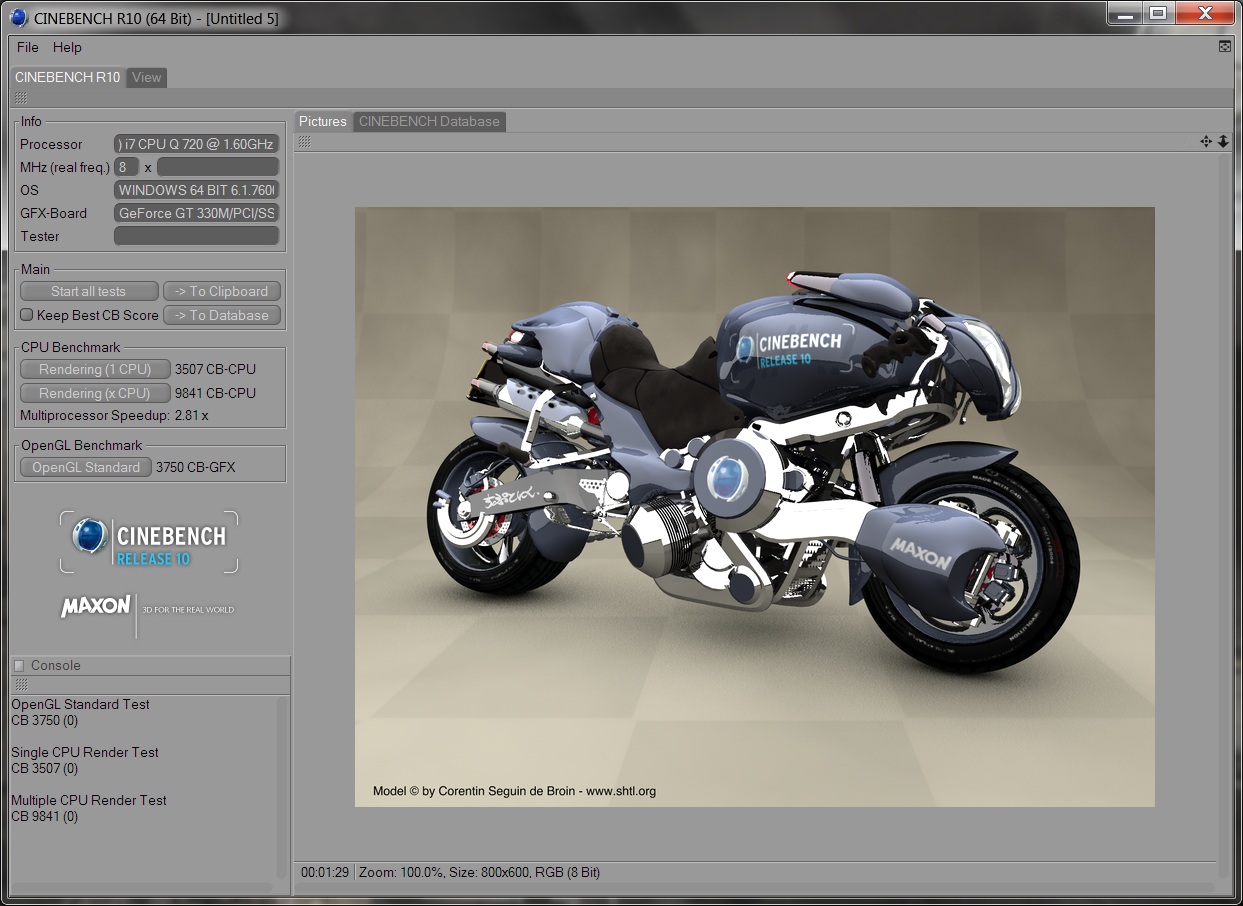
I can't remember if Phsyx was enabled or not when I ran that benchmark so I just ran another one.
First my system specs:
i720
6 gb DDR3
500 gb 5,400 rpm drive
Geforce GT 330m
Plugged in with Performance profile enabled and Nvidia Physx enabled at Cinebench 10 I scored:
Rending 1 CPU: 3507
Rendering X CPU: 9841
OpenGL Standard: 3750 -
Here is the screen shot of my Cinebench 10 plugged in, performance profile, and physyx enabled.
Attached Files:
-
-
I thought my photos were EXTREMELY amateur...
![[IMG]](images/storyImages/F11outtake2.jpg)
![[IMG]](images/storyImages/F11-outtake1.jpg)
-
The similarly-rated ATI card (4650?) has three times the Open GL speed. Open GL is useful for rendering CAD and similar applications that would normally work best with a professional card such as Nvidia Quadro and ATI FireGL. Also Google Earth seems smoothest under OpenGL. This plus the superiority of ATI cards for multimedia and its support of Mirroring is why it's such a shame this otherwise excellent laptop uses the Nvidia GT3X0. The E/EB series has ATI cards, but it doesn't have a couple of other things I would like in my laptop, at least in North America.
-
I like the cat picture...but where are the laptop pics?
-
Post 1080. Remember that I only had the system in my possession for two hours, until I packed it and got it back to Sony via courier the same day I got it.
http://forum.notebookreview.com/showpost.php?p=5766539&postcount=1080 -
sarcasm
Sorry.
I've got the black and love it. -
The black is actually two tone, with a gunmetal plinth, a style which I prefer. I ordered the grey because I thought black was all one colour, with a solid black plinth. I would have kept the grey however - if it worked.
-
You like cats? Here are mine as shot by my 8 year old, laptop pics to follow in 2 weeks. Zazou & Zaza:
![[IMG]](images/storyImages/Cats.jpg)
Spooky!
-
I agree with the other forum member who was concerned about a connection. I would also wonder whether the on-site service for the known noise issues might not also be related to this as a related symptom.
I have repeatedly reported that the FW owners' threads have members complaining that there is a whine related to the brightness of the screen. In short (pardon the pun there), there appear to be power issues involved. In the case of screens, I always suspect the weakest link: the power adapter. That turned out to be the case for a friend's Vaio where a defective adapter was creating bands on the screen and affecting the brightness of the screen as well. New adapter and the problem never returned.
Call Sony and let a tech come out to check everything out -- and suggest that they bring an additional adapter for testing purposes and possible trade out. Of course, adapters are often not warrantied but this close to the release of the model, I can't see Sony refusing.
Good luck! -
The progression of GPU's in the FW series refreshes over a period of a little over a year is not quite accurate. The first FW had the HD3470, the second and the third had the HD3650 and the fourth and fifth had the HD4650 (you can verify this, as I did, by checking spec sheets listed at http://esupport.sony.com).
So, a year's wait for a better GPU is NOT the norm for Sony.
I agree that, because of the halt of the production line and the delays incurred, Sony will likely not issue the refresh that it otherwise would have by next month or so. But before summer, I would expect another refresh with a different video card and processor mixes and yet another refresh or two before the end of 2010. That is the history of Vaio changes and NOT a year's wait.
Therefore, sitting tight for just a couple of more months is likely to provide a better F for the same price -- that, too, is the usual history of Vaio refreshes. -
Since we are all sharing pics of our F Series
My pics suck...taken on iPhone.
No idea why the came out like that after i clicked the image selector thingy....lol
Also, my issues are a squeaky space bar and the mic high pitch noise that is not existant when I mute it...skype still works just fine though...so I have no idea what muting even does....but whatever. The space bar is a huge annoyance but only squeaks when i use my right thumb (which is 99.9% of the time....my left thumb doesnt' make the space bar squeak. Gonna have to teach my self how to type all over again....haha.
I'd send it in for repair, but i leave for South Korea in a couple weeks.
-
Yes, indeed, BUT there have been repeated reports that the F series has the FW screens in the U.S. at least. Ergo, issues with that screen may be germane to the F series.
As for "known issue fixes", I'm waiting for that onsite Sony tech support visit report in a week or so from another forum member. Only then will we know what SONY thinks constitutes a "known issue fix" and not what are "work-arounds" kindly provided by skilled forum members.
Until then, we're ALL speculating....
In the meantime, I suggest it might be more pleasant for us all to simply try to adopt the Rodney King maxim: "Can't we all just get along?" -
Instead of muting mic, try this: post#2462 See this Video about the fix.
-
At the risk of being attacked for daring to mention the predecessor model to the F (the FW), the similar keyboard on some FWs also had a few reported squeaks which, over time, simply disappeared. Keyboards do "settle down" (literally) with use over time, so contact Sony and ask about it in a couple of weeks if it is still there.
Good luck! -
What was the answer to number 3? I watch a few region 3 movies and need to know this info bad.
edit where is the light sensor specifically? -
I would assume that the laptop would let you change the region up to 5 times, similar to the dvd drives...
-
Does the vaio f track pad have multitouch? If so, what are the capabilities (scrolling, pinch zooming etc)?
Otherwise does it have the scrolling bar on the side of the track pad? -
THat's correct, you can change the Blu-Ray region up to 5 times before it locks.
Good thing - as always - there's a workaround. Try http://www.slysoft.com/en/anydvdhd.html
and you won't have to worry about regions again .... -
VLC media player cross-platform open-source multimedia, freeware & region free.
![[IMG]](images/storyImages/vlc_101_w7.jpg)
Image from VLC screenshots. -
thank youuuuuu
Is the weight of it and battery life really that annoying that you can't bear to put it in your lap or on a folding table and watch a tv show on hulu or whatever? -
They're due in stock on the 15th I believe. The Sony stores had them last week, but the website seems to indicate many of them are already out as well.l.
-
Actually for Bluray the region code is only verified by the player software, not the player's firmware. There are many workarounds. Anyway some 70% of Blurays have NO region coding. Slysoft is for ripping BD to the hard drive for dubbing or reauthoring.
-
I actually did that. I did the first fix that was muting it, then ran across the second one and did it and never had an issue again...why my skype is unaffected now.
I forgot I did that. Thanks for reminding me! -
Thank you I figured it'd probably work itself out as the space bar is probably one of the most used keys
Just sucks i'm moving out of country soon and probably won't have the means to get it fixed if it persists as I will not go without a computer for a couple weeks
-
I noticed the same thing myself. Initially I thought the speakers were just weak, but then I noticed that when playing music, or even a DVD as opposed to a BluRay disc, they sound louder. Which makes me think it's something to do with the sound processing within Corel WinDVD. When I go into the menu in WinDVD I can bring up a menu having to do with sound, but it won't let me make any changes. I suspect there's a way to overcome this problem somehow, either in Vaio's sound menu, or in WinDVD, or perhaps by using a different software for playing BluRay. The sound quality when watching BluRay movies is pretty good, and there is a cool simulated surround effect going on. But I agree that during certain parts of certain movies, it's just too soft. Anyone else encountered this and figured out a work-around (besides the obvious use of headphones (which sound amazing on the Vaio F))?
-
anyone notice the difference in the gray color in the sonystyle pics and the other ones scattered around here? I like the SS gray color better (the inside of the laptop).
EDIT: I know a lot of you use HULU...whats the battery life on that, you don't have to be specific, just how many 30 minute tv shows can you watch on full charge with standard battery at avg. light settings? at 480p if that matters.
EDIT AGAIN: Does the bluray player on here upconvert dvds to look better? Is it really noticeable on screen? -
It' a gamble. Right?
-
You are going to South Korea, right? Do you think that it is impossible to find a tech there that can fix 1 squeaky key if your keyboard does not settle after a while?
A fun search: squeaky spacebar. Video: Squeaky Spacebar on MacBook Pro and How to fix the VAIO SZ spacebar. -
However there isn't an obvious progression from the GT330M at this market level. It would have to be to a yet-to-be-announced Nvida card if there is an "upgrade." And I don't believe a switch from Nvidia to to ATI is possible without a significant change in the motherboard.
-
I would't ever return a laptop because the keys "squeaked" on a new unit, that's just tightness between the guide and the sliding scissors mount for the key. Wear will remove the tightness, and just plain old household dust will act as a lubricant.
-
Yeah I have the squeaky space bar (exactly as described) aswell, and I'm not going to send it for repair. But I do hope that it stops to squeak after some time of use. I also have the whining fan noise, but it's not that bad.
-
Are you sure it's the fan and not mic related? Try this: post#2462 and video about this fix.
-
When I drag a window to the edge of the screen & windows 7 is trying to expand it to full screen before I release the left mouse button this is what I see:
![[IMG]](images/storyImages/linesscreen.jpg)
I also see these lines behind the transparent header of any open window. This doesn't look good, however under normal viewing circumstances there are no visable lines. -
Wait, so that's a screen cap, not a photo? That completely eliminates the screen or any mechanical connection as the issue. It also mostly eliminates the video card. So it's the driver.
-
Yes, it's a screen cap & I just reinstalled the Nvidia drivers with no change. I thought that someone else had this happen.
-
Does anybody who now owns an F11 have an update for me if the F11 is able to run virtualization software (Win 7 XP mode or VirtualBox)? Is it enabled in the BIOS?
-
I have been running Virtualbox (for Ubuntu) now successfully, Its not enabled by default in BIOS. You gotta enable it, after that installing virtualbox is a breeze.
-
Thanks for that good news and for your quick response. I can't wait to receive my F11 (same specs as you have allthough I hope to get a screen resolution of 1920 x 10
80).
Official Sony VAIO F Series Owners lounge
Discussion in 'VAIO / Sony Owners' Lounge Forum' started by eagle17, Jan 7, 2010.